
Editor’s note: This Decube review is based on my hands-on test of Decube release 1.63 in its sandbox workspace, in November 2026. I weighed pricing, setup, monitoring, lineage, governance, AI, and security against Monte Carlo, Sifflet, Metaplane, and Atlan.
Quick verdict: I recommend Decube for data platform and governance teams of 10 or more people, especially in regulated industries, who want monitors, column-level lineage, a catalog, and approval workflows under one contract with published prices. Entry costs $21,000 a year, V2 monitoring covers seven source types, and the AI features are beta; monitoring-only teams pay less with Metaplane Free.
Decube’s combined observability and governance is the standout in this Decube review: monitors, incidents, column-level lineage, the catalog, the business glossary, PII classification, and change approvals share the same asset pages. Lineage runs from warehouse SQL through dbt, Fivetran, and Airflow to Tableau, Looker, and Power BI.
In this review, I’ll take a closer look at Decube’s pricing, features, and lineage, so you can see exactly whether it fits your data team or whether a dedicated observability tool like Monte Carlo is the better buy.
Key Takeaways
- One product: Monitors, lineage, catalog, glossary, and approvals, with SOC 2 Type II and ISO 27001.
- Steep entry price: $175 per user a month with a 10-user minimum ($21,000 a year), billed annually, no free plan.
- V2 has hand-set thresholds: V2 runs on seven source types; ML thresholds stay in Classic.
- Schema drift can lag: Detection follows metadata collection, every 24 hours by default.
- AI still in preview: Trusty AI, MCP, and the Public API are beta or preview; data contracts are roadmap.
Pros and Cons
Pros
- Monitoring, lineage, catalog, glossary, and approvals share one product.
- Published prices from $175 per user a month, with 1,000 monitors and three sources on Starter.
- Lineage connects dbt, Fivetran, and Airflow to Tableau, Looker, and Power BI.
- Metadata-only collection, plus single-tenant SaaS (+$1,000 a month) and bring-your-own-cloud options.
- SOC 2 Type II and ISO 27001, plus SSO and RBAC on every plan.
Cons
- The 10-user minimum puts entry at $21,000 a year, billed annually.
- No free plan or published trial length; sandbox access requires a request form.
- V2 supports seven source types; BigQuery stays on Classic.
- Schema drift detection follows the 24-hour default collection schedule.
- Trusty AI, the MCP server, and the Public API remain beta or limited preview.
Decube Pricing: How Much Does It Cost?
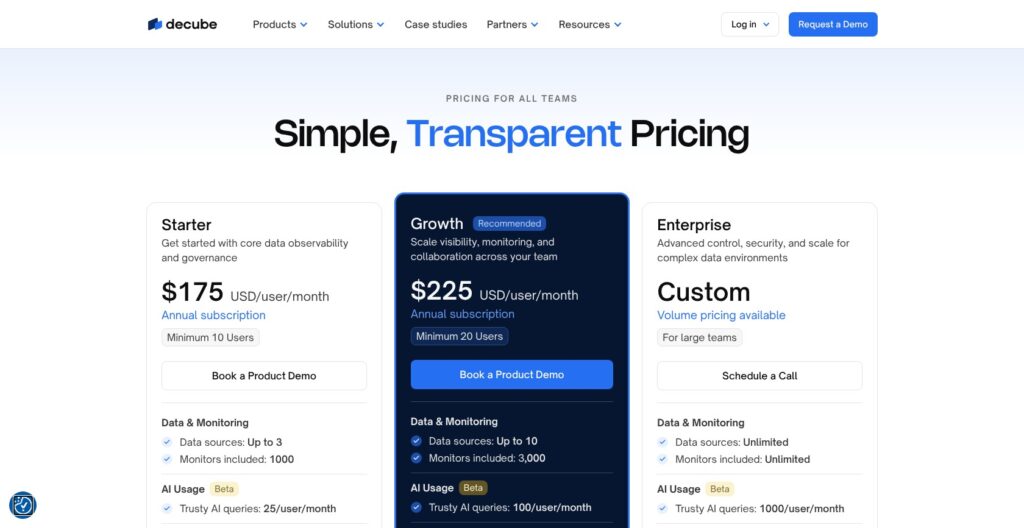
Decube bills per user on annual contracts in USD, starting at $175 per user a month with a 10-user minimum: $21,000 a year. Monte Carlo, Sifflet, Atlan, and Bigeye publish no prices.
- Starter ($175 per user a month): For teams starting with core observability and governance; minimum 10 users.
- Growth ($225 per user a month): For teams needing onboarding, training, and priority support; minimum 20 users. Marked Recommended.
- Enterprise (custom): For volume pricing, private cloud deployment, SLA and audit logs, and custom contracts (MSA).
| Plan | Price | Annual minimum | Data sources | Monitors | Trusty AI queries per user/month | Support |
|---|---|---|---|---|---|---|
| Starter | $175 per user a month | $21,000 | Up to 3 | 1,000 | 25 | |
| Growth | $225 per user a month | $54,000 | Up to 10 | 3,000 | 100 | Priority; Slack or Microsoft Teams channel |
| Enterprise | Custom | Custom | Unlimited | Unlimited | 1,000 | Dedicated customer success manager; priority and integration support |
Every plan includes:
- Catalog and lineage: Metadata management, automated lineage, and a business glossary.
- Monitoring: Data observability and quality, plus schema drift detection.
- Access: API access, SSO, and RBAC.
Add-ons apply separately:
- Additional monitor ($0.59 each): Beyond the cap, no minimum commitment, all plans. A monitor is a single data quality or observability check run against a table or column.
- Additional source ($100 per source a month): Billed annually, on all plans.
- Single-tenant SaaS (+$1,000 a month): Billed annually, Growth and Enterprise only.
Additional users cost the same per-user rate. Trusty AI is free during beta; GA pricing is unannounced. There is no free plan or published trial length.
Is Decube Good Value for Money?
- Monitoring only: Metaplane Free costs $0 forever for 10 monitored tables and three custom SQL monitors; Pro is usage-based per monitored table.
- Contracts: Soda offers Free at $0 and Team at $750 a month with collaborative data contracts.
- Smaller catalogs: Collate, managed OpenMetadata, has a free tier with five users and 500 assets.
- Broad readership: Secoda includes unlimited viewers and teams on every plan; every Decube user is a paid seat.
- Extra sources: A 10-user Starter team adding two sources pays $21,000 + $2,400 = $23,400 a year, below Growth’s $54,000 floor.
Decube is good value only if your team would otherwise buy an observability tool and a catalog, not for a three-person team that needs freshness and volume alerts.
Reviewer’s Notes: I recommend Starter for a stack of one warehouse, dbt, and one BI tool, which fits its three-source cap. Add sources at $100 a month before upgrading, and move to Growth for 20-plus users, the Slack or Teams support channel, or single-tenant hosting.
My Experience With Decube
Getting Access and Choosing a Region
I requested the sandbox through Decube’s product tour form (name, email, and organization name), and the credentials arrived by email. There is no self-serve signup or free plan, unlike Metaplane’s free tier.
I logged in through the regional login URL, which covers the United States, Europe, or Asia Pacific. On a new account, connecting a first data source is compulsory before anything else. Private sources connect through four network options:
- VPC access.
- IP whitelisting.
- SSH tunneling.
- AWS identities.
Connecting Snowflake With Key-Pair Authentication
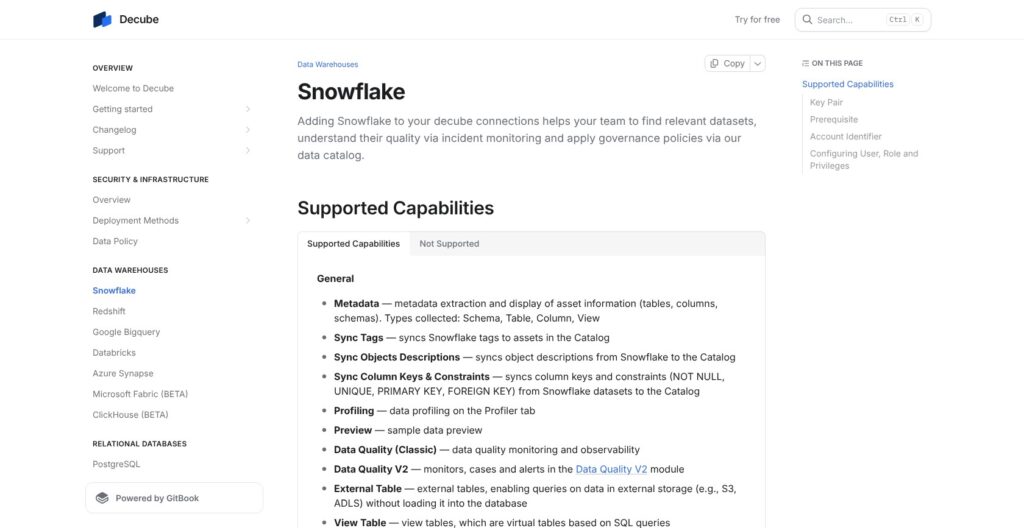
Snowflake connects with key-pair authentication only, so I set up a dedicated user and role with read-only grants:
- I created DECUBEUSER and DECUBEROLE in a Snowflake worksheet, assigned the role, and set the user’s RSA public key.
- I granted imported privileges on the SNOWFLAKE database and USAGE on a warehouse.
- I granted USAGE on each target database and its current and future schemas, plus SELECT on current and future tables and views.
- In Decube, I opened My Account > Integrations > Data Sources.
- I entered the username, key file, account identifier in org-account format, warehouse, and role, then tested and saved.
If no warehouse is named, the setup script creates an XSMALL DECUBE_WH warehouse.
Checking the Catalog and the Collection Schedule
Tables and schemas appeared in the Catalog after the first metadata collection. New sources collect metadata every 24 hours by default, with 1, 12, or 24 hours available on the source’s Credentials tab.
Only the source’s data owner can change that schedule, and the Trigger metadata collection button runs a collection on demand.
Schema Drift switches on automatically when a source connects; Job Failure does so for ETL-type sources. Both follow the metadata collection schedule, not the V2 monitor schedules.
Reviewer’s Notes: On the 24-hour default, a schema drift alert can arrive up to a day late. Set business-critical sources to the 1-hour schedule on day one.
Building My First Data Quality V2 Monitor
I opened Data Quality V2 from the navbar and ran the step-by-step wizard on the Monitors tab:
- I picked the asset and a monitor type, such as Freshness SLA or Staleness.
- I chose a schedule, from every 30 minutes to monthly, or Manual.
- I set the detection method (source metadata, a timestamp column, or a full table count for Volume) and the threshold or tolerance.
- I added custom attributes (severity, domain, team) and a data quality dimension, which feeds the Data Quality Scorecard.
Schedules run in fixed 30-minute slots, and Freshness SLA and Volume cannot be Manual. Custom SQL’s Test Value button runs the query and shows its row count before saving, and one Custom SQL monitor covers up to 10 tables or columns.
Routing Alerts to Slack and Jira
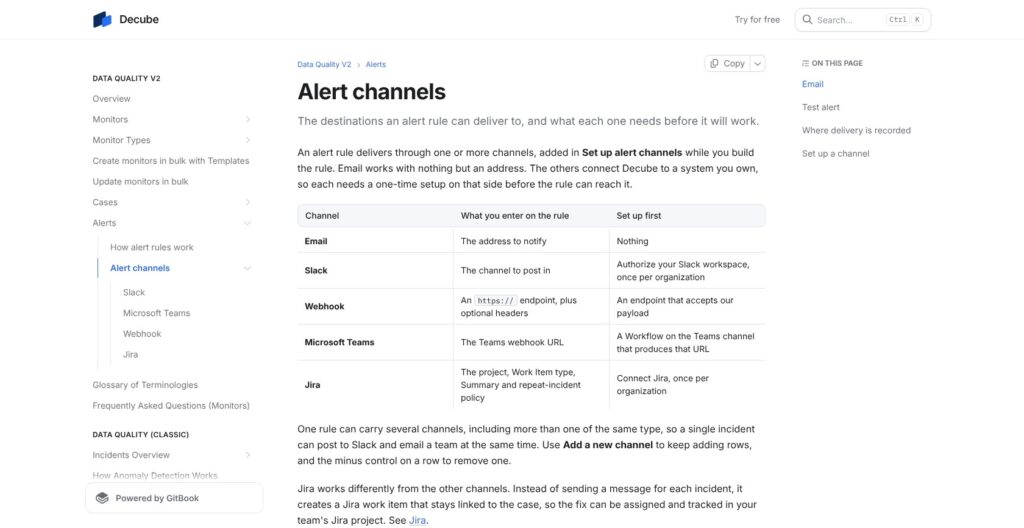
On the Alerts tab, I built a rule triggered by a generated incident, scoped it to selected monitors, and filtered by monitor type, custom attributes, or name. Rules route to five channels:
- Email.
- Slack.
- Webhook.
- Microsoft Teams.
- Jira.
Each channel has a Test alert button. Failed runs become incidents grouped into cases, which I could assign, mute for one day, one week, or one month, or close.
I created a Jira work item from a case through the Jira integration (release 1.63.0, November 2026), which links up to 10 work items per case and can sync Jira status back to close the case.
There is no native PagerDuty or Opsgenie channel. The generic HTTPS webhook is the catch-all.
Data Quality Monitoring: V2 Monitors, ML Thresholds and Cases
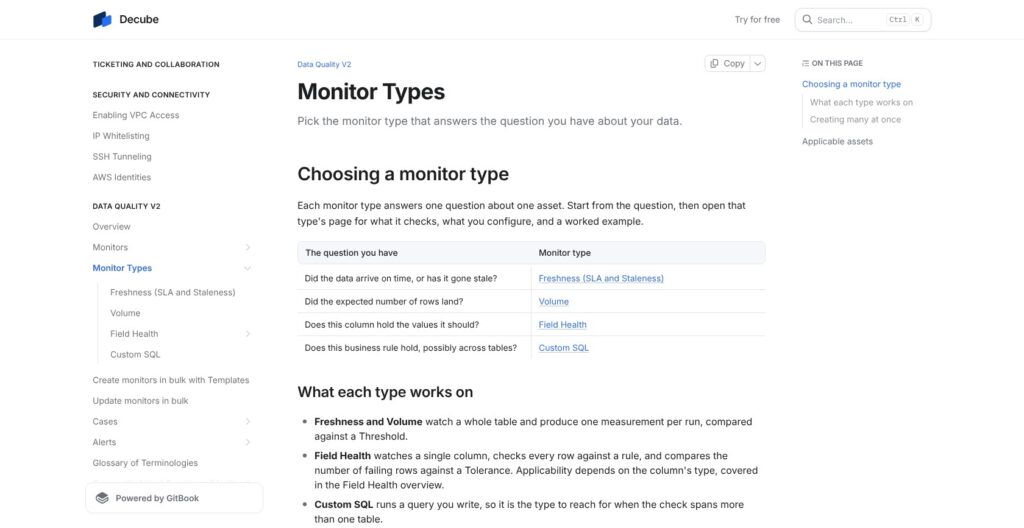
Data Quality V2 arrived in release 1.62.0, the week of October 12, 2026, and runs on seven source types:
- Snowflake.
- Databricks.
- AWS Glue with Athena.
- Redshift.
- PostgreSQL.
- MySQL.
- Microsoft Fabric.
BigQuery is not yet supported on V2 and stays on Classic monitors.
V2 Monitors and Field Health Checks
V2 provides Freshness, Volume, Field Health, and Custom SQL monitors. Field Health covers numeric and string checks plus:
- Value-set checks.
- Null, unique, and zero checks.
- Temporal checks.
Scans cover the full table or run incrementally on a timestamp column or custom filter, and a Manual schedule requires a full scan. Metadata-based detection is unavailable for views and some sources.
V2 thresholds are hand-set: a duration, numeric range, count delta, or percentage delta. Bulk templates exist for Freshness only, applying one saved configuration to many tables.
Classic Monitors and ML Thresholds
Classic has six monitor types, adding Schema Drift and Job Failure to the four above. Its Auto (ML) threshold sets a confidence interval per scan, with sensitivity from -5 to +5 (default 0) tuned through incident feedback.
Hourly monitors use a seven-day lookback; daily monitors use 192 days. Classic Freshness raises an incident when arrival probability falls below 50%.
Baseline learning takes about three days. ML tests skip when fewer than five valid points exist in the last 30 observations, so a sparse table can look healthy while its scans are skipped. Custom SQL has no Smart Training.
The Data Quality Scorecard reports per-monitor scores by dimension and date range, with a 25-row preview and full CSV export. Pick V2 for explicit rules and Classic for learned thresholds.
| Capability | Data Quality V2 | Data Quality Classic |
|---|---|---|
| Monitor types | Freshness, Volume, Field Health, Custom SQL | Those four plus Schema Drift and Job Failure |
| Thresholds | Hand-set | Hand-set or Auto (ML) |
| BigQuery | Not yet supported | Supported |
| Grouped-By sub-monitors | No | Yes, except Volume and Freshness |
Column-Level Lineage From Warehouse to Dashboard
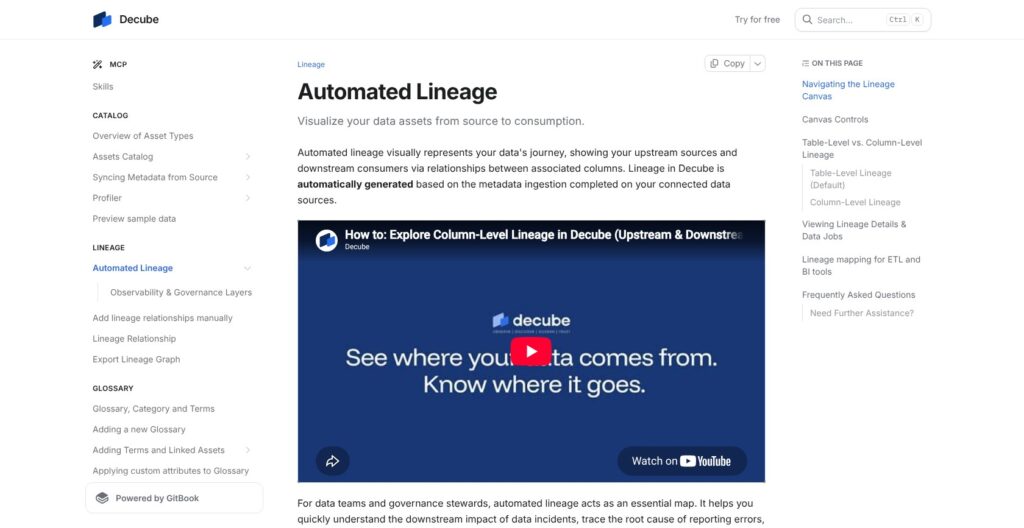
Decube builds lineage automatically from SQL parsing of query history and view definitions, ETL and BI connector metadata, foreign keys, and OpenLineage events. Query-derived lineage is kept for six months, and the OpenLineage connector is in beta.
- dbt Cloud and Core: Core reads its manifest from S3.
- Fivetran: Maps lineage across Snowflake, Redshift, BigQuery, Databricks, PostgreSQL, MySQL, SQL Server, and Salesforce.
- Airflow: Requires version 2.3.0 or later with its API enabled.
- Tableau: Uses the Metadata API, exposing column detail down to charts.
- Looker and Power BI: Connect BI objects to supported upstream warehouses.
The graph opened at table level. I selected columns on a node to see column-level lineage, one node at a time, and clicking a connection showed how Decube derived it.
The canvas was redesigned in March 2026, and April’s Observability and Governance layers added toggles that put open incidents and classifications such as PII on the graph. Stewards add manual lineage in the UI or API on the entry-point asset, and the graph exports.
Snowflake stored procedure and foreign key lineage are not supported, and complex SQL the parser cannot read leaves column gaps that manual lineage has to fill.
Monte Carlo lists no catalog or governance module in its plans, while Decube overlays incidents and PII classifications on lineage and links glossary terms to the same assets. Lineage is Decube’s clearest edge over monitoring-only rivals, provided you budget steward time for manual fixes.
Catalog, Glossary and Governance Workflows
Decube’s catalog combines relevance-ranked search with asset-level context:
- Ownership: Owners, descriptions, and custom attributes.
- Schema context: A schema change feed, column keys, and Snowflake tag sync.
- Governance: Field classifications on asset pages.
Atlan is catalog-and-governance first; Decube’s case is that the catalog and the monitors share one asset page and one bill.
Glossary, Classification and Masking
The business glossary links categorized terms to assets and supports CSV import and export for bulk edits.
Classification rules match keywords or regex patterns in asset names, not data content, and can automatically add new matching assets. I previewed the matching assets before submitting the rule through the approval workflow.
Preview masking supports:
- SHA-256 or hash.
- First-four or last-four masking.
- Email masking.
- Nullification.
The opt-in Profiler produces table and column statistics with Quick Run or a configured run and keeps historical profiles. Profiling moves some data out of the source, unlike the metadata-only collection model.
Approvals, Access Requests and Data Products
Change requests put catalog and glossary edits through an approval workflow, and the Governance module shows a before-and-after diff. Access Requests let users ask for assets they cannot see, once the account manager enables the feature.
The Data Products module (June 2026) packages owned, documented assets into a marketplace with search and peer ratings. It is still in iterative development: data contracts and SLAs sit on its H2 2026 roadmap, after the older Data Mesh module was removed in November 2025.
Buy Decube for the shared catalog and monitoring workflow today; for data contracts now, Soda Team ships them at $750 a month.
Trusty AI, the MCP Server and AI Governance
Trusty AI, a natural-language assistant over Decube’s metadata, launched in beta in release 1.52.0 on March 12, 2026, and opens from the AI Hub. Allowances are 25, 100, or 1,000 queries per user a month by plan, free during the beta; GA pricing is unannounced.
Its capabilities include:
- Discovery and lineage: Natural-language questions over metadata.
- Quality assistance: V2 health, profiling data, and monitor recommendations.
- Skills (July and August 2026): Incident Remediation, Monitor Recommendation, Steward Morning Brief, and Quality SLA Tracker.
- Description Autocomplete: Opt-in table and column descriptions.
Trusty runs on Claude models through Amazon Bedrock, respects RBAC, keeps content in the customer’s AWS region, and does not use data for training.
The MCP server is in limited preview (July 2026) and exposes catalog search, owner assignment, lineage, monitors, cases, and scorecards to clients such as Claude or Cursor through US, EU, and APAC endpoints.
The AI Agent Registry (early access, August 2026) inventories AI agents with owner, environment, status, reachable data, and PII. The Public API is also beta: REST with an API key header and no hard rate limit yet.
I don’t recommend buying Decube for its AI features until they leave beta and GA pricing is published.
Security, Deployment and Data Residency
Decube collects metadata (table and column names, types, job status), metrics (row counts, last updated), and opt-in aggregated statistics through read-only credentials. Previews are masked by classification and never stored; the opt-in Profiler is the one exception that moves data.
- Certifications: SOC 2 Type II and ISO 27001; supports GDPR and HIPAA compliance.
- Encryption: TLS in transit and AES-256 at rest.
- Testing: Annual penetration testing of application layers.
- Hosting: AWS across multiple availability zones, with United States, Europe, and Asia Pacific regions.
Multi-tenant SaaS comes with every plan; single-tenant SaaS adds $1,000 a month, billed annually, on Growth and Enterprise.
With bring-your-own-cloud, the data plane (metadata API, storage, scheduler, collector, and quality monitoring) runs in your cloud, and only configuration and license information syncs to Decube’s hosted control plane.
SSO (with Microsoft Entra and JumpCloud guides) and RBAC are included on every plan, with group policies by data source, administration, and module.
Anomalo can run fully in a customer VPC, and Sifflet reserves hybrid or self-hosted deployment for Enterprise. Decube publishes no numeric uptime SLA, so put availability terms in the Enterprise contract. Pick bring-your-own-cloud if metadata must stay inside your own cloud.
How Does Decube Compare to Competitors?
Decube’s $21,000 annual minimum rules it out for many small monitoring projects.
- Monte Carlo: Credit-based, pay-per-monitor pricing without published dollar amounts. Start allows up to 10 users and 1,000 monitors, and Business Critical adds a dedicated instance with disaster recovery and regional failover. It wins for large teams that need failover tiers more than a catalog, which its plans do not list.
- Sifflet: Plans scale by asset count (Entry up to 500, Growth up to 1,000, Enterprise 1,000-plus) with no published prices, and hybrid or self-hosted deployment requires Enterprise. It wins for teams that prefer asset-based plans over Decube’s seat minimums.
- Metaplane: Free costs $0 forever for 10 monitored tables and three custom SQL monitors; Pro is usage-based per monitored table. It wins for small teams that want monitoring at no cost on day one.
- Soda: Free costs $0; Team costs $750 a month and includes collaborative data contracts. It wins when contracts are needed now rather than on Decube’s roadmap.
- Atlan and DataHub: Atlan is catalog-and-governance first; DataHub Core is open source. Neither publishes cloud prices. They win when the catalog is the main purchase.
- OpenMetadata: Open source, with managed Collate offering a free tier of five users, 500 assets, 10 test cases, and five alerts. It wins for teams that fit that free tier or run open source themselves.
- Acceldata, Bigeye, and Anomalo: Prices are unpublished. Acceldata offers a 30-day free trial and Cost Optimization plans; Bigeye offers a demo and product tour; Anomalo runs in a customer VPC or as SaaS. They suit enterprise buyers who need cost optimization (Acceldata) or an in-VPC deployment (Anomalo).
Decube wins where one team must run monitors, column-level lineage, a glossary, and change approvals in one product, at a price it can see before the first sales call.
How I Reviewed Decube
For this Decube review, I worked through the sandbox on release 1.63 in November 2026: connecting Snowflake, checking metadata collection, building a V2 monitor, routing alerts to Slack and Jira, tracing lineage, and setting up glossary terms, classification policies, Trusty AI, and the MCP server. I priced it against Monte Carlo, Sifflet, Metaplane, Soda, Atlan, DataHub, OpenMetadata, Acceldata, Bigeye, and Anomalo.
I prioritized:
- Pricing and value: Minimums, allowances, and add-ons.
- Setup: Snowflake permissions and collection schedules.
- Monitoring: V2 versus Classic, cases, and Jira.
- Lineage: Column coverage and parser limits.
- Governance: Glossary, classification, and approvals.
- AI: Availability status and query caps.
- Security: Data movement and deployment.
Current connector support and governance workflows weigh more in my verdict than beta AI features.
Prices current as of November 2026.
Decube Review: Should You Use Decube for Observability and Governance?
I recommend Decube for teams of 10 or more that need observability and governance together on Snowflake, Databricks, Redshift, or another V2-supported source. Shared asset pages connect monitors to column-level lineage, the glossary, PII classification, and change approvals, and SOC 2 Type II, ISO 27001, and bring-your-own-cloud fit regulated teams.
The published $175 per user a month Starter price makes budgeting possible before a sales call, but the $21,000 annual floor is too much for a small team that only needs freshness and volume alerts. Those teams should start with Metaplane Free or Soda Team at $750 a month.
Skip Decube if BigQuery is your main warehouse and you want V2 monitors, or if you need data contracts today.
Before signing, settle:
- Viewer seats: Whether every catalog reader needs a paid seat.
- Source and monitor counts: Your stack against Starter’s three sources and 1,000 monitors, plus add-ons.
- Trusty AI pricing: What the AI features will cost after the beta.
My pick is Starter plus source add-ons, unless you need Growth’s support channel or single-tenant hosting. Request a sandbox or demo at Decube.
FAQ
How much does Decube cost?
Decube Starter costs $175 per user a month, minimum 10 users, from $21,000 a year. Growth costs $225, minimum 20 users, from $54,000 a year; Enterprise is custom. Plans bill annually in USD. Add-ons cost $0.59 per extra monitor and $100 per extra source a month, and single-tenant SaaS adds $1,000 a month on Growth and Enterprise.
Does Decube have a free trial or free plan?
Decube has no free plan or community edition, and no published trial length. A sandbox is available through a form asking for your name, email, and organization name, with credentials sent by email. For free monitoring, Metaplane’s free plan covers 10 monitored tables, and Soda Free costs $0.
Is Decube SOC 2 compliant?
Yes. Decube is SOC 2 Type II and ISO 27001 certified and supports GDPR and HIPAA compliance. Connections use read-only credentials, with TLS in transit and AES-256 at rest. Regions cover the United States, Europe, and Asia Pacific. Standard collection covers metadata and metrics; the opt-in Profiler moves some data.
What data sources does Decube connect to?
Decube connects to warehouses, databases, transformation tools, and BI platforms, including:
- Warehouses: Snowflake, Redshift, BigQuery, Databricks, Azure Synapse; ClickHouse and Microsoft Fabric in beta.
- Databases: PostgreSQL, MySQL, SingleStore, SQL Server, Oracle; SAP HANA in beta.
- Pipelines: dbt Cloud/Core, Fivetran, Airflow, AWS Glue, Azure Data Factory, Spark.
- BI: Tableau, Looker, Power BI.
- Storage/SaaS: S3, ADLS, GCS, Salesforce.
Capabilities vary by connector (metadata, profiling, preview, Classic or V2 monitors, lineage), and Kafka is coming soon.
Can Decube run in my own cloud?
Yes. Bring-your-own-cloud places the data plane in your cloud, while Decube hosts the control plane and receives only configuration and license information. Enterprise lists private cloud deployment. Separately, single-tenant SaaS costs an additional $1,000 a month, billed annually, on Growth and Enterprise.