
Editor’s note: We combine independent analysis, data collection, and hands-on testing to review data and AI tools. This review weighs pricing, setup effort, monitor accuracy, lineage and CI coverage, and fit against direct rivals.
Quick verdict: We recommend Metaplane for small and mid-size analytics teams on Snowflake, BigQuery, Databricks, Redshift or ClickHouse who want anomaly monitors on production tables before any sales call. The trade-off: Pro is billed per monitored table at a rate you only get from sales, and the dbt pull-request previews are paid add-ons.
Key Takeaways 🔍
- The Free plan costs $0 forever: 10 monitored tables, 3 custom SQL monitors, Slack, email and Teams alerts, no credit card
- ML monitors train in under 3 days, and false alarms are marked as normal from Slack
- Column-level lineage is parsed from warehouse query logs and reaches your BI dashboards, but it starts on Pro
- Pro has no published per-table rate, so budgeting past 10 tables needs a quote
- Datadog bought Metaplane in April 2025 but still sells it standalone, with no date for the platform merge
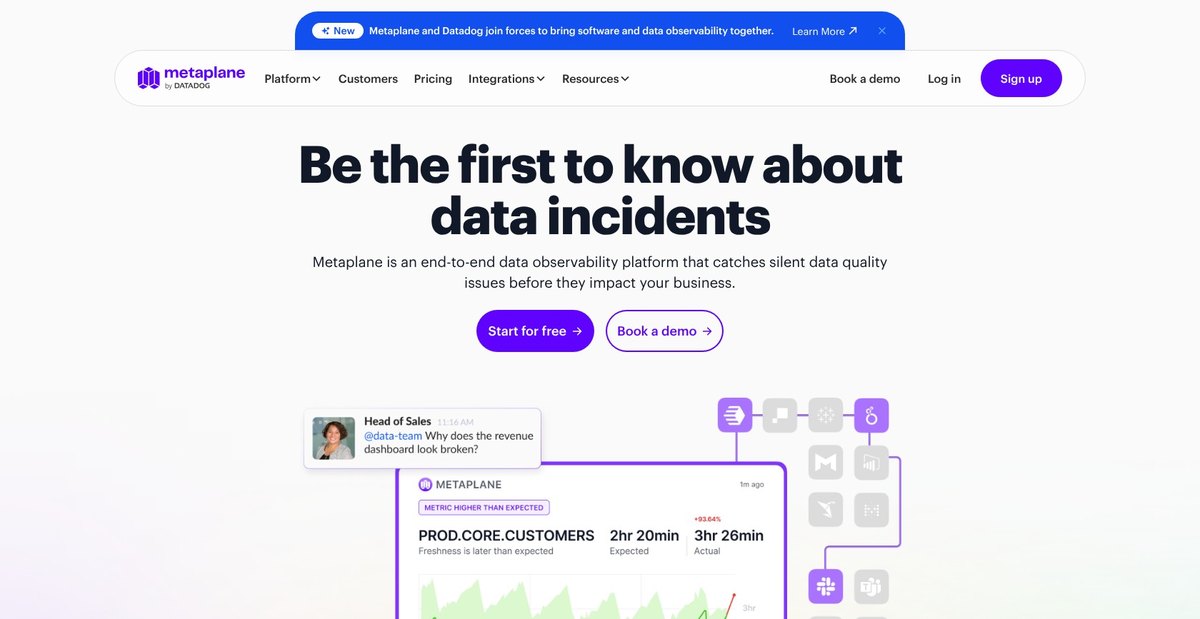
Among data observability tools, Metaplane is the one we point lean warehouse teams to first. In this Metaplane review, I’ll take a closer look at its pricing, monitors, lineage and CI features, and how it stacks up against Monte Carlo and Soda, so you can see exactly whether it fits your team.
Pros and Cons
Pros
- Free forever plan with 10 monitored tables and 3 custom SQL monitors, no card required
- 14 monitor types, from row count and freshness to percent negative and custom SQL
- Column-level lineage parsed from warehouse query logs, out to Looker, Tableau and Power BI
- Monitors as code in dbt model meta, plus Impact and Test Previews on GitHub and GitLab PRs
- Snowflake Native App keeps processing inside your own account, payable with Snowflake credits
Cons
- Pro is billed per monitored table with no published rate
- Impact Previews, Test Previews and spend monitoring cost extra on top of Pro
- Schema change alerts cover every object in a connected warehouse, monitored or not
- PagerDuty needs Pro, and API or webhook alerts need Enterprise
- Datadog platform merge announced in April 2025 with no dates
How Much Does Metaplane Cost?
Metaplane sells three plans and publishes a price for only one of them:
- Free ($0 forever): for a team putting its first 10 tables under monitoring, with 3 custom SQL monitors and alerts to Slack, email and Microsoft Teams
- Pro (usage-based, per monitored table): for teams that need column-level lineage, PagerDuty, Data CI/CD or more than 10 tables, up to 100 monitored tables and 5 custom SQL monitors
- Enterprise (custom): for unlimited tables, 10 custom SQL monitors, API and webhook alerts, SSO, PrivateLink and a customer success manager
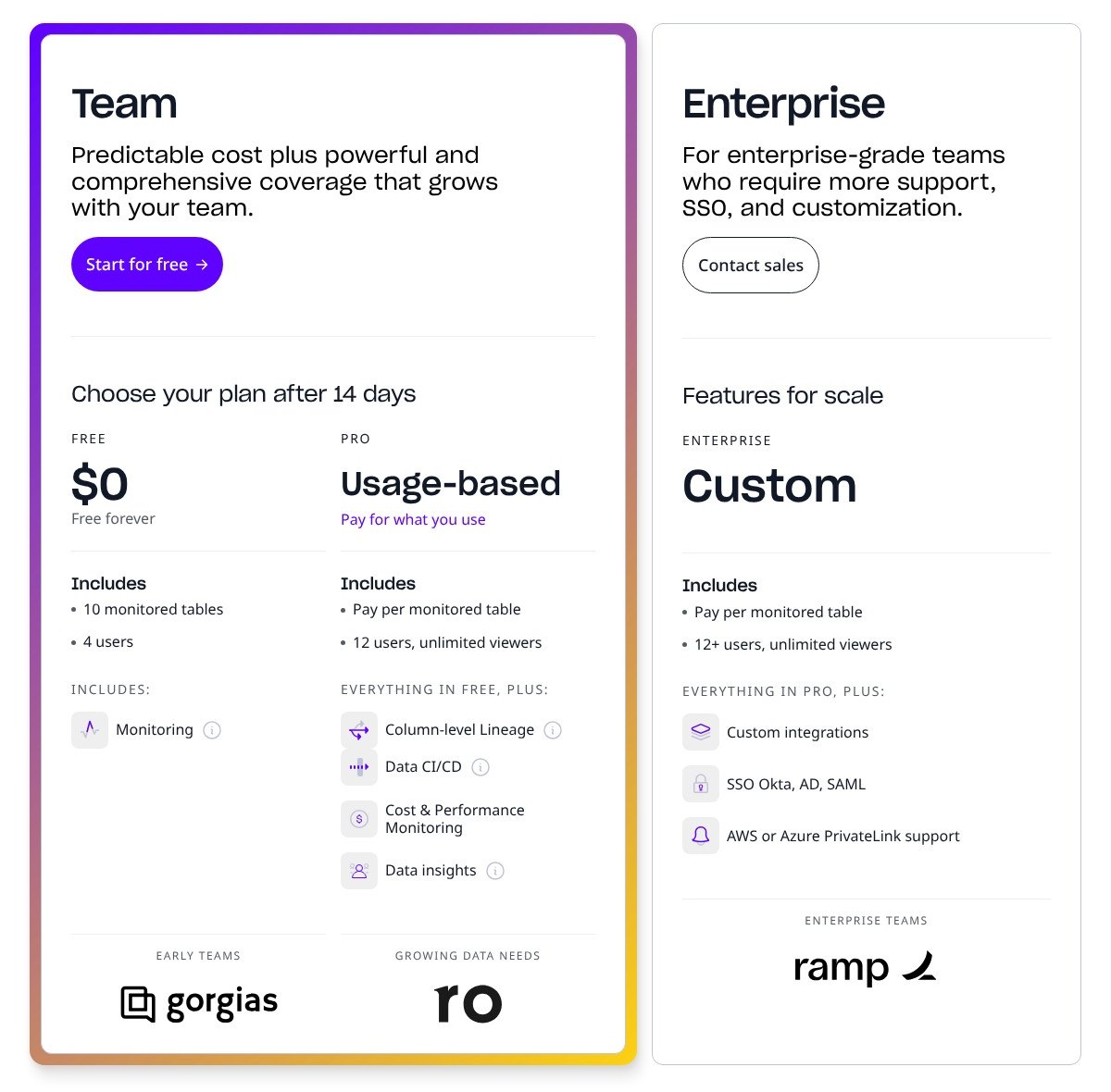
A monitored table is one with monitors running for more than 30 days, so a table you watch for a week during an incident never reaches the bill. Alert notifications and CI tests carry no user limit, so people who only read alerts in Slack don’t count against your plan.
| Plan | Price | Monitored tables | Custom SQL monitors | Alert channels | Notable extras |
|---|---|---|---|---|---|
| Free | $0 | 10 | 3 | Slack, email, Teams | dbt job monitoring, manual thresholds, email support |
| Pro | Per monitored table, quote only | 100 | 5 | Adds PagerDuty | Column-level lineage, Data CI/CD, partition and rolling-window monitors; Impact Previews, Test Previews and Credit and Spend Monitoring sold as add-ons |
| Enterprise | Custom | Unlimited | 10 | Adds API and webhooks | SSO (Okta, AD, SAML), AWS and Azure PrivateLink, CSM, shared Slack channel |
Snowflake customers can pay with existing Snowflake credits through sales, which keeps Metaplane off the new-vendor list at procurement.
Is Metaplane Good Value for Money?
- The free plan is the real differentiator: Monte Carlo and Anomalo have no free tier and Bigeye sells by quote only, so Metaplane is the only one of the four with a published free plan you can run on production tables
- Per-table billing rewards discipline: a team that monitors its 20 to 50 critical tables pays for 20 to 50, while a team that monitors everything pays for everything
- The add-ons are where the bill grows: Impact Previews, Test Previews and Credit and Spend Monitoring each carry their own unpublished price on top of the Pro rate
- Soda is your benchmark: it gives you 3 production datasets free, then charges $8 per dataset per month billed annually, so hold your Metaplane per-table quote against that figure before you sign
Author’s Testing Notes 📝
Start on Free with your 10 most-queried tables and stay there until you hit a specific wall: you need lineage to trace a broken dashboard, you need PagerDuty to wake someone up, or table 11 matters. Ask for the Pro quote at that point, when you know your real monitored-table count. Enterprise only earns its custom price when security asks for SSO or PrivateLink.
— Panoply reviewer
My Experience With Metaplane
Connecting a Warehouse and Slack
Signing up needed no credit card. Metaplane then asks for two connections: one warehouse or lake (BigQuery, ClickHouse, Databricks, Redshift or Snowflake) and one alert destination, Slack or Microsoft Teams. I connected the warehouse with a read-only role and pointed alerts at a dedicated channel for the training period.
Choosing Tables and Monitors
I started where Metaplane’s setup flow points you: five or more heavily queried tables with downstream dependencies, each carrying freshness, row count and one more metric. On Free that leaves five more slots, and I’d spend them on the models behind your most-viewed dashboard. Row count and freshness are read from information_schema on Snowflake, BigQuery and MySQL (freshness on Databricks too), so they run on metadata instead of scanning tables. Distribution monitors such as mean or nullness and the 3 custom SQL monitors run real queries in your warehouse.
Waiting for the Models, Then the First Alerts
The anomaly models need under 3 days of observations before they fire, so the first alerts you see are schema changes, which start after the first metadata sync and cover every object in the connected warehouse, monitored or not. Once a model is trained, you can mark an anomaly as normal from Slack, the incident page or the monitor page. One marked point is usually enough; mark the last point of a trend or the peak of a spike, not the first.
Tuning the Noise
“Include observations since” makes the model forget history before a date, which is the fix after a backfill creates a new normal. WHERE clauses narrow what a monitor sees, and rolling windows do the same on Pro. A metric with a monthly cycle needs a different model type than the default, and any change can take up to a week of retraining before alerts settle.
Author’s Testing Notes 📝
Ten tables with three monitors each is 30 models to train and tune, so put them on tables with downstream dashboards and route alerts by tag or schema to the team that owns them. Soda’s free tier gives you 3 datasets to learn on; Metaplane gives you 10, and the rest can wait for Pro once the first set runs quiet.
— Panoply reviewer
Monitors and Anomaly Detection
Metaplane ships 14 monitor types, and Free includes the volume, schema, freshness, uniqueness, nullness, distribution and custom SQL groups up to its 10-table cap:
- Volume and freshness: row count, table freshness and column freshness (from MAX of a timestamp column)
- Schema: column count, plus the automatic schema change alerts
- Distribution: cardinality, uniqueness, nullness, min, max, mean, standard deviation, sum, percent zero, percent negative
- Custom: custom SQL, 3 on Free, 5 on Pro, 10 on Enterprise
Pro adds partition monitors and rolling-window monitors, which an append-only events table needs, since a whole-table mean moves too slowly to catch one bad daily load.
The default Stationary model assumes a metric hovers around a fixed level, and it performs poorly on anything that trends, flatlines, sawtooths or repeats on a cycle longer than 30 days. Switching model type fixes most of that; setting sensitivity to its minimum roughly doubles the alert range, which is the blunt fix. Rules add monitors to new tables automatically, so a table that appears in a watched schema gets coverage with no manual step. February 2025 brought source-to-target monitors, one-click monitors for critical tables and a coverage percentage.
Anomalo’s ML checks reach into the data values themselves, including unstructured data, but Anomalo has no free tier and no public price. Metaplane’s built-in types are table and column aggregates: they tell you a column’s null rate jumped, not which rows are wrong.
Best for: teams whose failures are freshness, volume and null-rate problems on up to 100 tables, Pro’s cap. Skip if: you need row-level validation of values or coverage of unstructured data, where Anomalo earns its quote.
Lineage and Data CI/CD
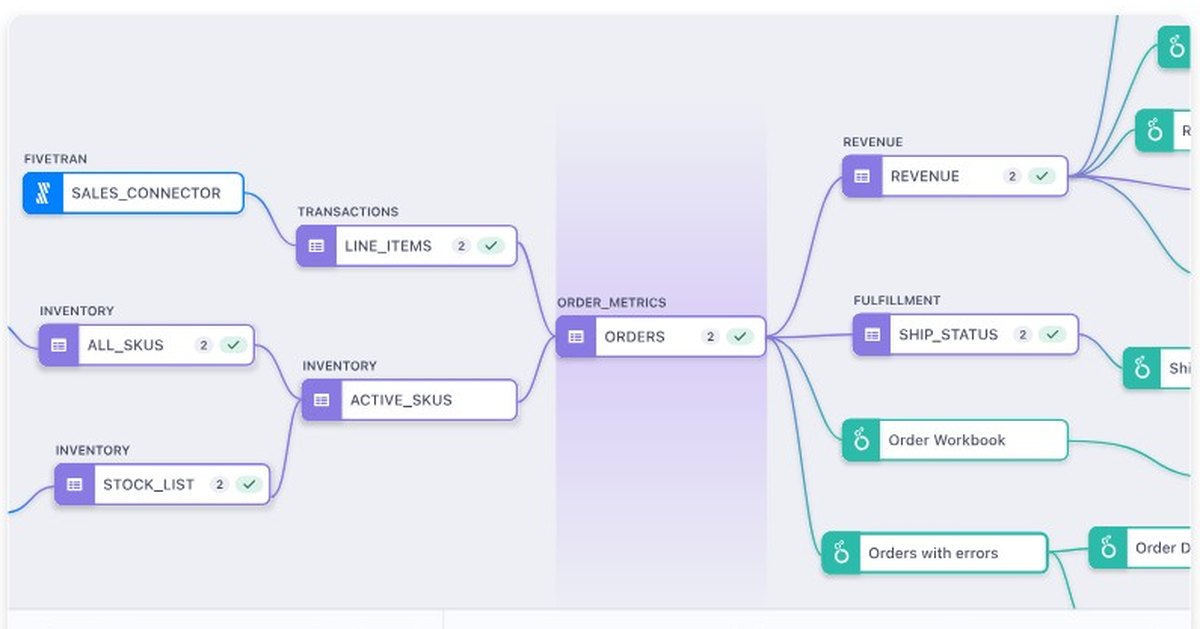
Metaplane builds column-level lineage by parsing the SQL in your warehouse query logs, and table-level lineage from dbt Core or dbt Cloud, with edges labeled as DIRECT or FILTER lineage. Upstream, the graph shows Fivetran connectors; downstream, it reaches Looker, Tableau, Power BI, Sigma, Mode, Metabase and Hex dashboards, so a row-count alert on a staging table points at the dashboard that breaks. Depth controls, collections and CSV export handle large graphs. The read-only role needs query-log access, and column lineage is removed after 21 days without an update, so a monthly pipeline loses its column edges. Column-level lineage starts on Pro.
🔀 Data CI/CD on GitHub and GitLab
Impact Previews post the downstream lineage of every changed model as a comment on the pull request. Test Previews run your tests against the dbt changes in the PR schema before merge, which needs the Metaplane user granted access to PR schemas through a grant on future schemas or a dbt macro. Both work on GitHub and GitLab and need a separate dbt CI job, with configurable change threshold, timeout and query time. Both are paid add-ons on Pro, not part of the Pro rate.
Monitors as code live in dbt model meta under meta.metaplane, synced hourly by default; a custom monitor needs sql, name and identifier. Elementary’s open-source dbt package is free, but you host it yourself.
Top Tip 💡
Define monitors in dbt meta rather than in the UI, so every new model ships with its row count and freshness monitors in the same PR that creates it. The hourly sync picks it up without anyone opening the app.
Integrations, Security and the Snowflake Native App
Metaplane’s integrations, by layer:
- Warehouses and lakes: Snowflake, BigQuery, Databricks, Redshift, ClickHouse, S3
- Databases: MySQL, PostgreSQL, SQL Server
- Ingestion: Airbyte, Fivetran
- Transformation and orchestration: dbt Cloud, dbt Core, Airflow
- Reverse ETL: Census, Hightouch
- BI: Looker, Metabase, Mode, Power BI, Sigma, Tableau, Hex
- Alerts: Slack, Microsoft Teams and email on every plan, PagerDuty from Pro, API and webhooks on Enterprise, plus Jira
Event alerts cover dbt job failures and Fivetran syncs, so a broken sync reaches the same Slack channel as a row-count anomaly.
Metaplane lists SOC 2 Type II, GDPR, CCPA and HIPAA compliance, and the warehouse role is read-only. The cost caveat: custom SQL and distribution monitors run queries inside your warehouse, so 5 custom monitors on a tight schedule show up on your Snowflake or BigQuery bill.
The Snowflake Native App runs Metaplane inside your own Snowflake account via Snowpark Container Services and sends out only aggregated observations, which is the version to put in front of a security team that refuses a third-party metadata connection. Everything else is cloud-only with no self-hosted option; Elementary’s dbt package and Soda’s open-source core are the routes if your policy requires running the tool yourself.
What the Datadog Acquisition Means for Metaplane Buyers
Datadog announced its acquisition of Metaplane on April 23, 2025, with terms undisclosed. In October 2026 the product is still sold standalone as “Metaplane by Datadog”, with its own site, pricing page and the three plans above. Metaplane’s announcement told customers “Your experience stays the same for now”, with all features, support and services continuing.
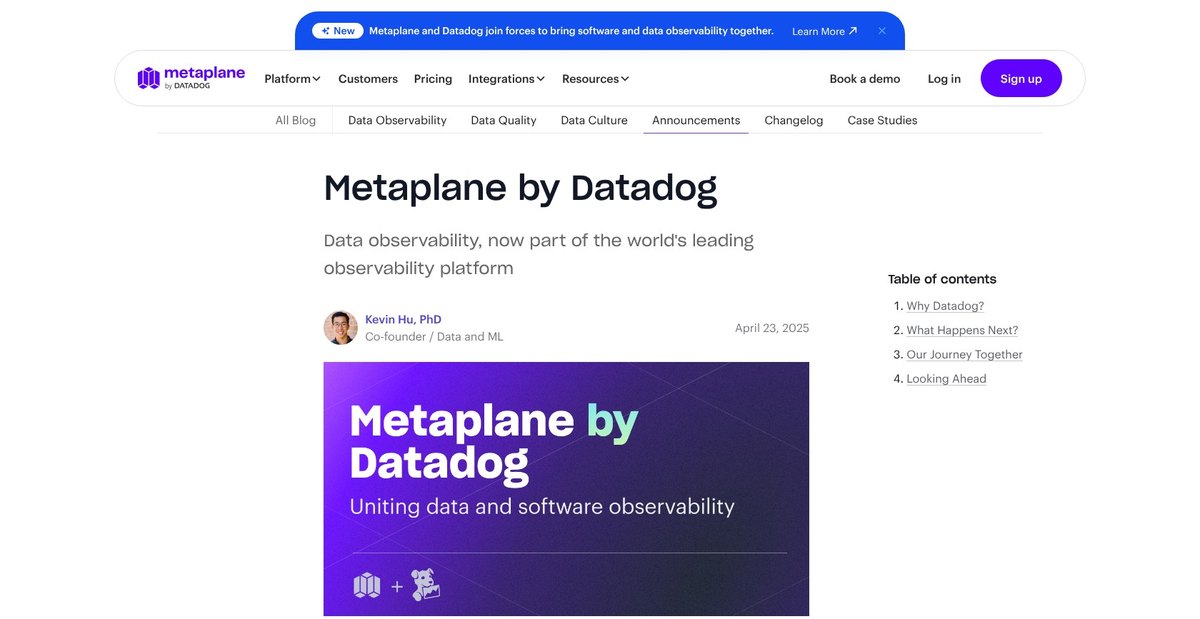
Datadog has said it will bring the Metaplane capabilities it values into the Datadog platform over time, with no timeline, and Metaplane’s roadmap ties data quality to Data Streams Monitoring, Data Jobs Monitoring and APM. Datadog VP of Product Michael Whetten said existing tools see data only after it lands in a warehouse, and that Datadog wants coverage across the full data lifecycle.
For a buyer, that means favoring monthly or short annual terms and asking sales two questions before signing: what the migration path into Datadog looks like, and whether your per-table rate is protected through it. Teams already paying for Datadog APM gain the most from the merge; teams on another observability stack are buying a standalone tool whose next version lives somewhere else.
How Does Metaplane Compare to Competitors?
Metaplane and Soda are the only hosted tools here with a published free plan, and Metaplane’s covers 10 tables to Soda’s 3 production datasets.
- Monte Carlo: four credit-based tiers (Start, Scale, Enterprise, Business Critical), all quote-only with no free tier; wins for large enterprises that need enterprise security from Scale up and agent, ML and data observability in every tier. Our Monte Carlo review covers the tiers in detail.
- Bigeye: quote-only; wins on customizable thresholds, SLAs, lineage and enterprise governance modules.
- Anomalo: quote-only, no free tier; wins on ML anomaly detection across the data values themselves, including unstructured data, with in-VPC deployment.
- Sifflet: priced by asset count (Entry up to 500 assets, Growth up to 1,000, Enterprise above 1,000); wins on field-level lineage with trust scores.
- Elementary: free open-source dbt package, with quote-only cloud tiers; wins for code-first dbt teams willing to self-run.
- Soda: free for 3 production datasets, then $8 per dataset per month billed annually; wins on data contracts and a no-code UI.
| Tool | Free option | Pricing model | Best for |
|---|---|---|---|
| Metaplane | Yes, 10 tables forever | Per monitored table, quote | Lean warehouse and dbt teams |
| Monte Carlo | No | Credit-based tiers, quote | Large enterprises, AI and agent observability |
| Bigeye | None published | Quote | SLA-driven governance |
| Anomalo | No | Quote | Value-level checks, in-VPC |
| Sifflet | None published | Asset-count tiers, quote | Field-level lineage, trust scores |
| Elementary | Open-source package | Cloud tiers, quote | Code-first dbt teams |
| Soda | 3 production datasets | $8 per dataset per month, annual | Data contracts, no-code checks |
If your table count is under 100 and your stack is dbt plus one of the five supported warehouses, Metaplane’s 10 free tables are the widest free footprint among the hosted tools on this list, and per-table billing keeps the step up to Pro proportional. At enterprise scale, or where the question is “are the values right” rather than “did the load land”, Monte Carlo and Anomalo justify their quotes.
How We Test Data Tools at Panoply
We score every data tool on the same five areas: pricing transparency and value, setup effort, depth of the core capability (for an observability tool, monitor accuracy controls, lineage and CI coverage), integrations and security posture, and fit against its direct rivals. Each review is our own test of the product, set up by us, with a real workflow run end to end and the result weighed against the tools it competes with.
With Metaplane I focused on the Free plan, the warehouse-to-Slack setup flow, how much tuning the anomaly models ask for, and which features sit behind the Pro and Enterprise gates, since the gates decide the bill long before the per-table rate does.
Prices current as of October 2026.
Metaplane Review: Should You Trust Your Data Quality Alerts to It?
Metaplane gives a small warehouse team 14 monitor types, column-level lineage and dbt PR previews, with a free plan that covers 10 production tables for as long as you want. The costs are an unpublished Pro rate, add-on pricing for the previews, and a roadmap that now runs through Datadog.
For a lean dbt team on Snowflake, BigQuery, Databricks, Redshift or ClickHouse, the answer is yes: start on Free and let the first 10 tables earn the Pro conversation. A large enterprise, or one that needs row-level checks of values, should get quotes from Monte Carlo or Anomalo instead. A team that must run the tool itself belongs with Elementary or Soda.
On the Datadog question, buy on short terms and ask about the migration path and price protection, because the standalone product you sign up for today is on its way into another platform.
Connect your warehouse on Free, put freshness and row-count monitors on your 10 most-queried tables, give the models their 3 days, and only then ask sales for a Pro quote, with your real monitored-table count in hand. Our score: 4.1/5.
FAQ
Is Metaplane free?
Yes. The Free plan costs $0 forever and covers 10 monitored tables, 3 custom SQL monitors, and Slack, email and Teams alerts, with no credit card at signup. Column-level lineage, PagerDuty and Data CI/CD need Pro.
How much does Metaplane Pro cost?
Metaplane Pro is billed per monitored table at a rate you only get by quote. A monitored table is one with monitors running for more than 30 days, and Pro covers up to 100. The PR previews and spend monitoring are paid add-ons on top of the rate.
Is Metaplane part of Datadog now?
Yes. Datadog acquired Metaplane on April 23, 2025, and the product is still sold standalone as “Metaplane by Datadog”. Datadog plans to fold Metaplane into its platform on no published timeline, so buy on short terms and ask about migration.
Does Metaplane access my data?
Metaplane connects with a read-only role and works from metadata such as row counts and freshness. Custom SQL and distribution monitors do run queries inside your warehouse, at your compute cost. The Snowflake Native App keeps processing inside your own account.
Is Metaplane better than Monte Carlo?
For teams under 100 tables, Metaplane wins on price: a free tier and per-table billing against Monte Carlo’s quote-only credit tiers. Monte Carlo wins for large enterprises that need SSO and agent and AI observability. See the comparison section above for the full split.