
Editor’s note: This Anomalo review evaluates the pricing model, setup requirements, and documented capabilities. It is not a hands-on performance test.
Quick verdict: I recommend Anomalo for data teams on Snowflake, Databricks, or BigQuery who need to catch wrong values inside hundreds of tables nobody has written rules for. The trade-off: no public price, annual enterprise contracts, and checks that run as queries in your own warehouse, so compute lands on that bill too.
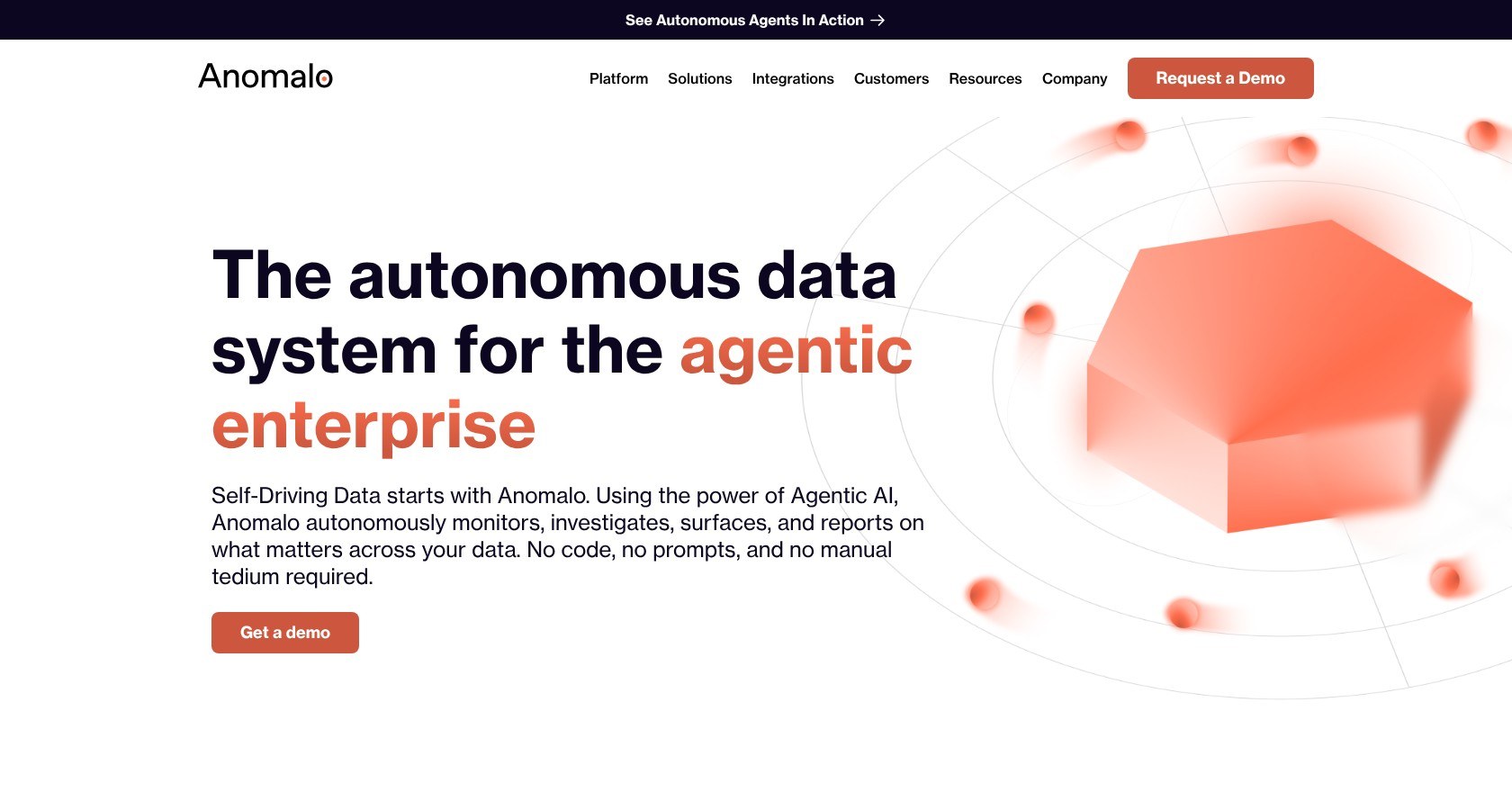
Anomalo samples 10,000 recent rows per table, compares them with earlier days using unsupervised machine learning, and flags the day values drift, with 40+ no-code checks and root cause analysis on top.
Key Takeaways
- Anomalo runs unsupervised anomaly detection on the data itself, with freshness, volume, and missing-data checks on by default
- Root cause analysis isolates the segment behind a failure, down to the one column value that holds the bad rows
- There is no published pricing: annual contracts are sold direct, on AWS Marketplace (12, 24, or 36 months), or on Azure Marketplace against MACC
- The model needs about two weeks to become useful and 30 to 60 days to settle
- Checks run in your warehouse, so warehouse compute goes up, and seasonal shifts keep alerting until the model adapts
For this review, my priority is whether Anomalo’s value-level detection saves enough rule-writing to justify an enterprise contract. If you only have a few dozen tables and a team happy to write checks, I would start with a free tool.
In this Anomalo review, I’ll take a closer look at Anomalo’s pricing, monitoring workflow, root cause analysis, and new AI agents, so you can see exactly whether it earns a place in your stack.
Anomalo Pros and Cons
Pros
- Unsupervised ML on data values, not just freshness and row counts
- 40+ no-code validation checks, plus custom SQL and key metrics
- Root cause analysis with downloadable good and bad row samples
- Connectors for Snowflake, Databricks, BigQuery, Redshift and 12+ more databases, plus Alation, Atlan, Collibra, and Purview catalogs
- Runs fully inside your own VPC on AWS, GCP, or Azure, with your own LLM
Cons
- No public pricing, and no number until after a demo
- About two weeks before anomaly detection is useful on a new table
- Profiling queries land on your warehouse bill
- Seasonal shifts trigger alerts until the model adapts
- Four of the nine 2026 agents are still marked coming soon
How Much Does Anomalo Cost?
Anomalo does not publish prices. The only route to a number is a demo, followed by an annual contract sized to the tables you want monitored.
Once you have a quote, there are four ways to buy:
- Direct contract: annual, sized after the demo, for teams buying outside a cloud marketplace
- AWS Marketplace: a SaaS contract on 12, 24, or 36-month terms, for teams that buy software through AWS
- Azure Marketplace: available since December 2024 and payable from a MACC commitment
- In-VPC deployment: the same platform inside your own AWS, GCP, or Azure account, for teams whose data cannot leave their cloud
| Option | Contract | Who it suits | Notes |
|---|---|---|---|
| Direct | Annual, sized after a demo | Teams without a cloud marketplace preference | Scope is set in the sales conversation |
| AWS Marketplace | SaaS contract, 12, 24, or 36 months | AWS-centric teams | Billing runs through AWS |
| Azure Marketplace | Contract, payable with MACC | Microsoft-centric enterprises | Available since December 2024 |
| In-VPC | Annual, plus your own infrastructure | Regulated teams on AWS, GCP, or Azure | Bring your own LLM for the AI features |
Expect the quote to move with five levers:
- Monitored tables: the main unit, so a 500-table rollout and a 50-table pilot are very different conversations
- Check frequency: hourly checks on every table cost more than daily ones
- Deployment: SaaS or in-VPC, where you also carry the infrastructure
- Agent modules: which of the 2026 agents you switch on
- Support tier: the level of vendor support in the contract
One cost never appears on the Anomalo invoice. Profiling and checks run as queries in your warehouse, so deep profiling shows up as Snowflake credits or BigQuery bytes, and the default checks also scan columns nobody downstream reads. Anomalo does not break that warehouse cost down per check, which is why I would limit the first rollout to the tables that matter.
Is Anomalo Good Value for Money?
- This is enterprise software at enterprise prices: a small team with a dozen tables will not get a quote that makes sense next to the open-source route
- Soda has a Free plan and a Team plan at $750 per month, and GX Core from Great Expectations is free, Apache-2.0 open source, so rule-based coverage costs only engineering time
- Elementary is free for dbt shops, which makes it the default if every transformation you own already lives in dbt
- Monte Carlo and Bigeye are quote-only too, so among the ML-first platforms Anomalo is not the odd one out on pricing
- Anomalo earns its price when the table count is high, because the alternative is a team writing and maintaining hundreds of rules by hand
Reviewer’s Notes: My recommendation is to walk into the demo with a list of your 20 to 50 most business-critical tables and ask for a scoped pilot on exactly those. Get two answers before anyone talks about a full rollout: how the price scales per table, and what the profiling queries will add to your warehouse bill.
Getting Started With Anomalo
You need read access to the right schemas before you need a rule builder. Anomalo connects to Snowflake, Databricks, BigQuery, Redshift, Athena, PostgreSQL, SQL Server, Oracle, Teradata, SAP HANA, and a handful of other databases, and all it asks for is a credential with read access to the schemas you want monitored.
- Connect the warehouse: add a read-only credential for the schemas in scope
- Enable monitoring per table: from the table page in the UI or through the API
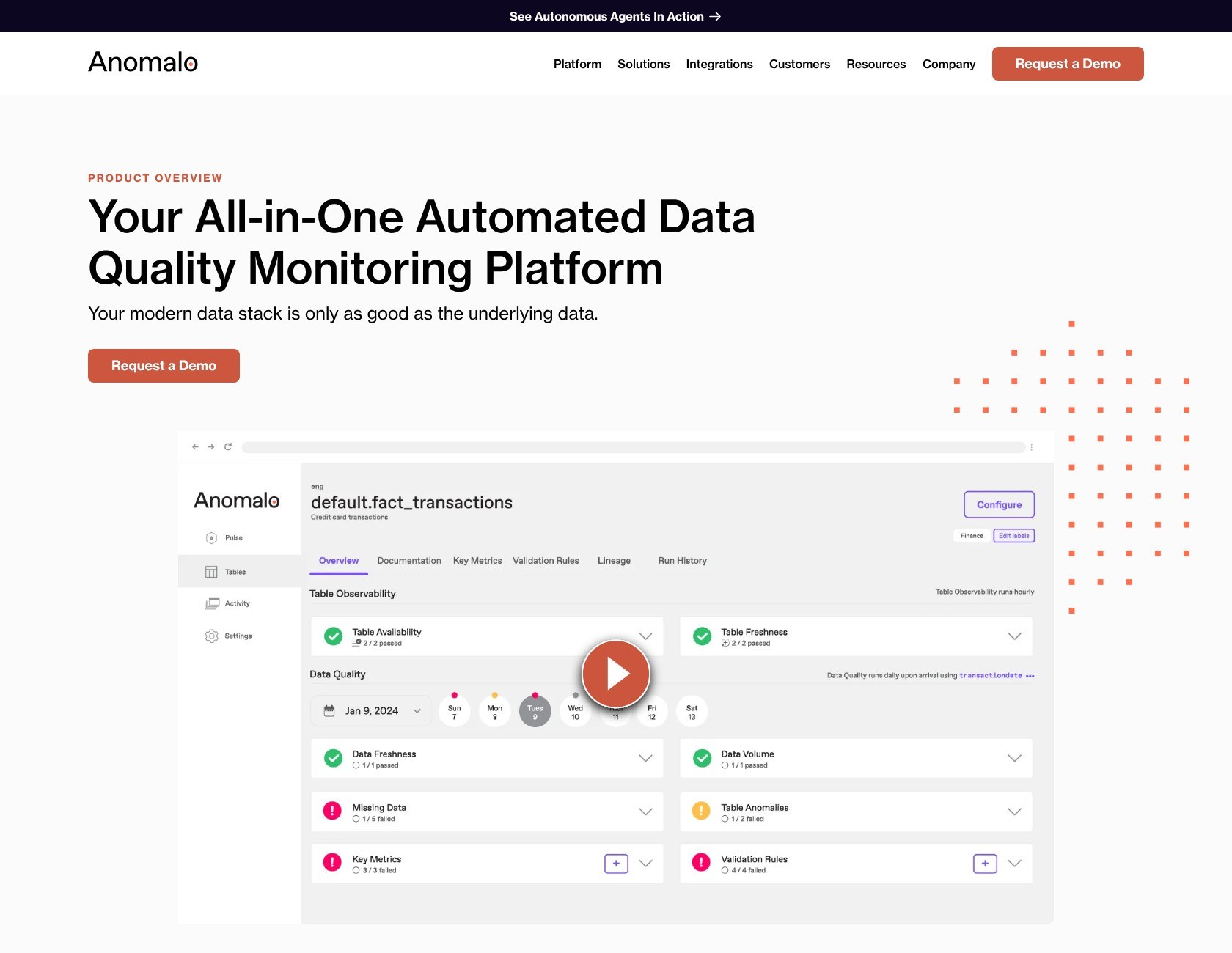
- Review the default schedule: Anomalo attaches freshness, volume, and anomaly checks the moment monitoring is on
- Route alerts: point failures at Slack, Teams, PagerDuty, email, Opsgenie, or a webhook, and tickets at Jira or ServiceNow
Databricks has one catch. Partner Connect only works for SQL warehouses, so if your data sits behind a cluster you connect manually with the Server Hostname, Port, HTTP Path, and an access token, and Databricks recommends OAuth or a service principal token over a personal one.
The default schedule runs in a sensible order:
- Freshness runs daily from midnight and checks whether the table was updated on time
- Volume runs hourly once freshness passes and watches row counts
- Every other check, including ML anomaly detection, runs after volume passes, so a late or empty load never gets scored as a data anomaly
I like that ordering: it keeps a late load from turning into a pile of false anomaly alerts. Each schedule is editable per table, which matters for tables that load weekly or land after midnight in your time zone. Soda and Great Expectations give you none of this on day one: you write the first check yourself.
For an initial rollout, I would start with your 20 to 50 most critical tables, not the whole schema. Every monitored table adds profiling queries to your warehouse bill and early alerts while the model learns, and both are far easier to manage across 50 tables than 500.
The Warm-Up Period
A newly monitored table starts with its anomaly threshold at the maximum, so only extreme changes fire an alert in the first days. Anomalo tightens that threshold as daily samples accumulate, and the model needs about two weeks before its alerts are worth acting on.
It keeps improving over the following 30 to 60 days, which is when you decide whether the thresholds fit your data. Expected row-count jumps, such as a monthly batch load, keep alerting for two to three days until the model has seen them, so a seasonal business feels this more than a steady one.
A Soda or GX rule is correct on day one and never gets smarter; Anomalo trades a two-week wait for coverage on columns you never thought to write a rule for. I would plan the pilot around that window rather than judging the alerts in week one.
What Happens When a Check Fails
A failed check alerts wherever you routed it. Each incident comes with a severity report that highlights the columns and segments carrying the most anomalous rows, and you can download samples of the good and bad rows, which is the file you hand to whoever owns the upstream pipeline. Root cause analysis runs on the same failure.
Anomaly Detection and Root Cause Analysis
Anomalo’s detection samples 10,000 recent records and compares them, using unsupervised machine learning, against the samples it took on previous days. A check fails when the change exceeds a dynamic threshold tied to how much that table normally fluctuates.
Monte Carlo leans on metadata and lineage to tell you a pipeline is late or a schema changed; Anomalo reads the values, which is how it catches a botched currency conversion or a critical field that went to zero while the pipeline finished on time.
Every monitored table gets four categories of check without configuration:
- Freshness: was the table updated on schedule
- Volume: did the row count land in its usual range
- Missing data: a segment that stopped arriving, or NULL and zero values rising in a column
- Table anomalies: the ML detection itself, including duplicates rising in a column that used to be unique
Root cause analysis starts when a rule fails. Anomalo samples the failing and passing rows, scores every segment of every column independently, clusters the segments that move together, and labels each one unrelated, directional, insufficient, or probable.
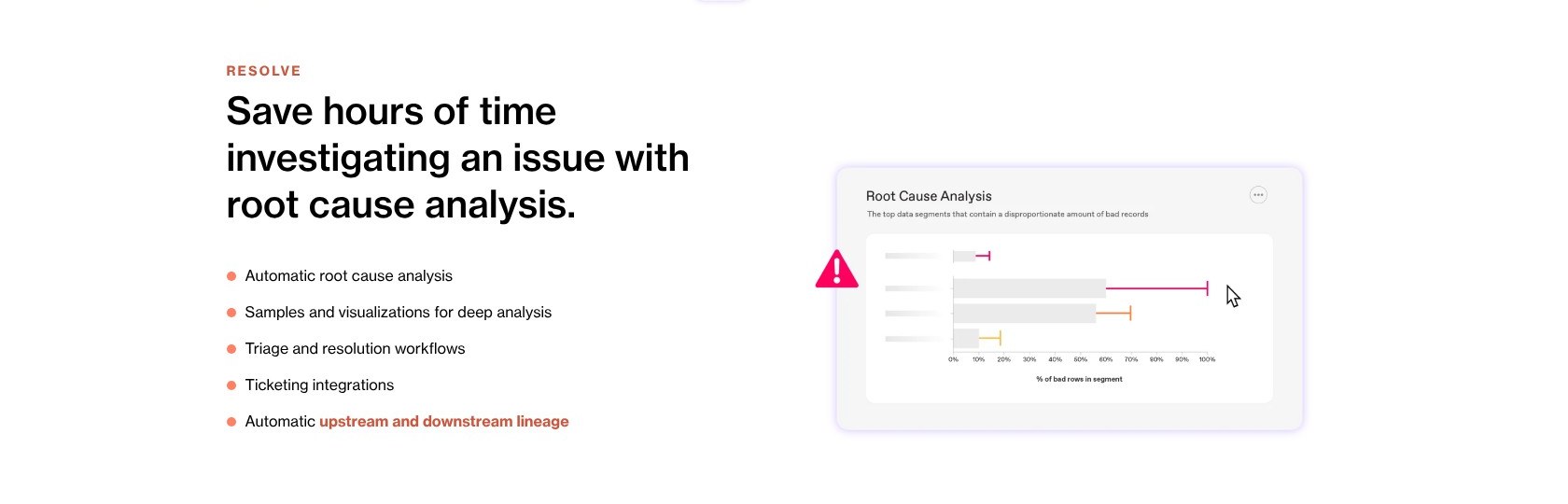
In Anomalo’s own worked example, a ticketing table where 793 rows (about 0.5% of the table) arrived with a NULL price, RCA found that one venue, the Metropolitan Opera, covered every bad row but only about 1.4% of the good ones, and labeled it the probable cause. That replaces the GROUP BY queries you would otherwise run by hand, and I find it the most useful part of the product.
The thresholds still need tuning to fit the business, some proposed outlier bounds fall outside the range a column can physically hold, and the first weeks on a seasonal table produce more alerts than you will want. Bigeye’s answer to that noise is alert tuning that learns from your feedback; Anomalo’s is time and manual threshold edits.
Validation Rules, Key Metrics and Alerts
When you already know what correct looks like, Anomalo gives you 40+ no-code validation check types with adjustable thresholds, plus a custom SQL check for anything the list does not cover. A non-technical analyst can add a “values in this column must be between 0 and 100” rule from the UI without filing a ticket with engineering.
Key metrics sit on top: you register a business metric, such as daily gross bookings or new accounts, through a no-code rule or the API, and Anomalo tracks it against its own history the same way it tracks a column. Since April 2026 the Data Quality agent also writes rules from natural language, so a plain-English request becomes a check without anyone opening the rule builder.
Alerts and tickets route to the tools your on-call already uses:
- Chat and paging: Slack, Microsoft Teams, PagerDuty, Opsgenie, email, and webhooks
- Ticketing: Jira and ServiceNow
- BI: Tableau, Power BI, and Looker
- Orchestration: Airflow, dbt, Databricks Workflows, and Azure Data Factory
Reporting runs from an executive dashboard down to per-column profiles showing expected values and how they changed over time, and Anomalo maps upstream and downstream lineage automatically. Catalog integrations cover Alation, Atlan, DataHub, Microsoft Purview, Unity Catalog, Snowflake Horizon, data.world, and Collibra.
The built-in checks expose thresholds but not much else, and the dashboards cannot be reshaped the way a Looker user would expect, so I would expect teams with unusual validation logic to end up in custom SQL sooner than the 40-check headline suggests.
Are Anomalo’s AI Agents Useful?
On April 2, 2026, Anomalo relaunched the platform as an autonomous system of nine agents, and five are live:
- Table Observability: the monitoring described above, now framed as an agent
- Data Quality: writes validation rules from natural language
- Data Insights: pushes findings to an AI-curated feed, the table page, Slack, or email
- Conversational Analytics (AIDA): answers questions about your data and stores your corrections as organizational memory for future answers
- Data Documentation: documents your data
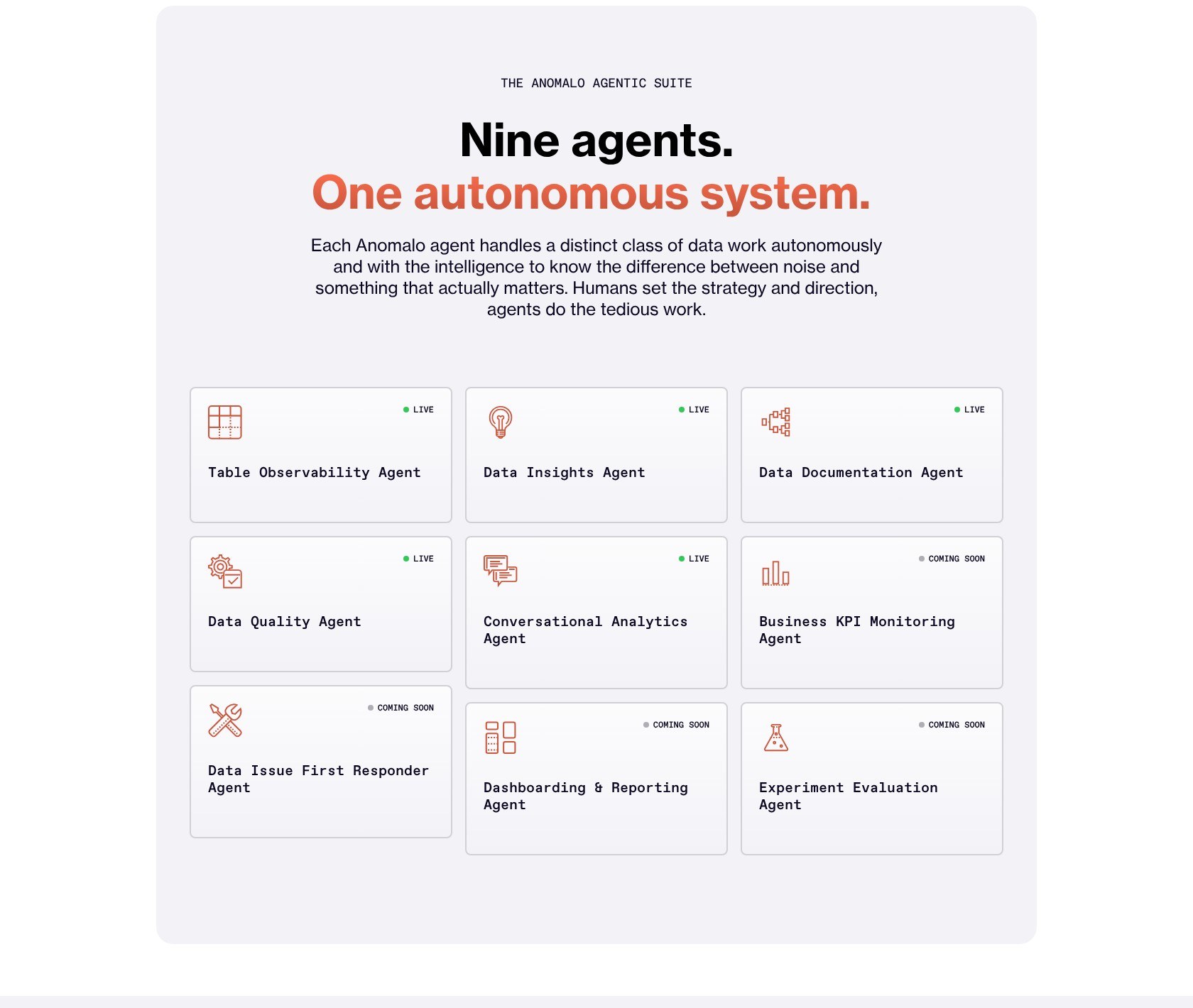
Four more are marked coming soon: a Data Issue First Responder that runs runbooks into ServiceNow and Jira, Dashboarding and Reporting, Business KPI Monitoring, and Experiment Evaluation. I would judge Anomalo on the five that ship. The First Responder is the one that would change how your on-call works, and it is not here yet.
Unstructured monitoring checks a document collection for 15 issue types out of the box, including document length, duplicates, topics, tone, language, abusive language, PII, and sentiment, and you can define custom issues with their own severity. That is the check I would want on a RAG corpus before a chatbot starts quoting it.
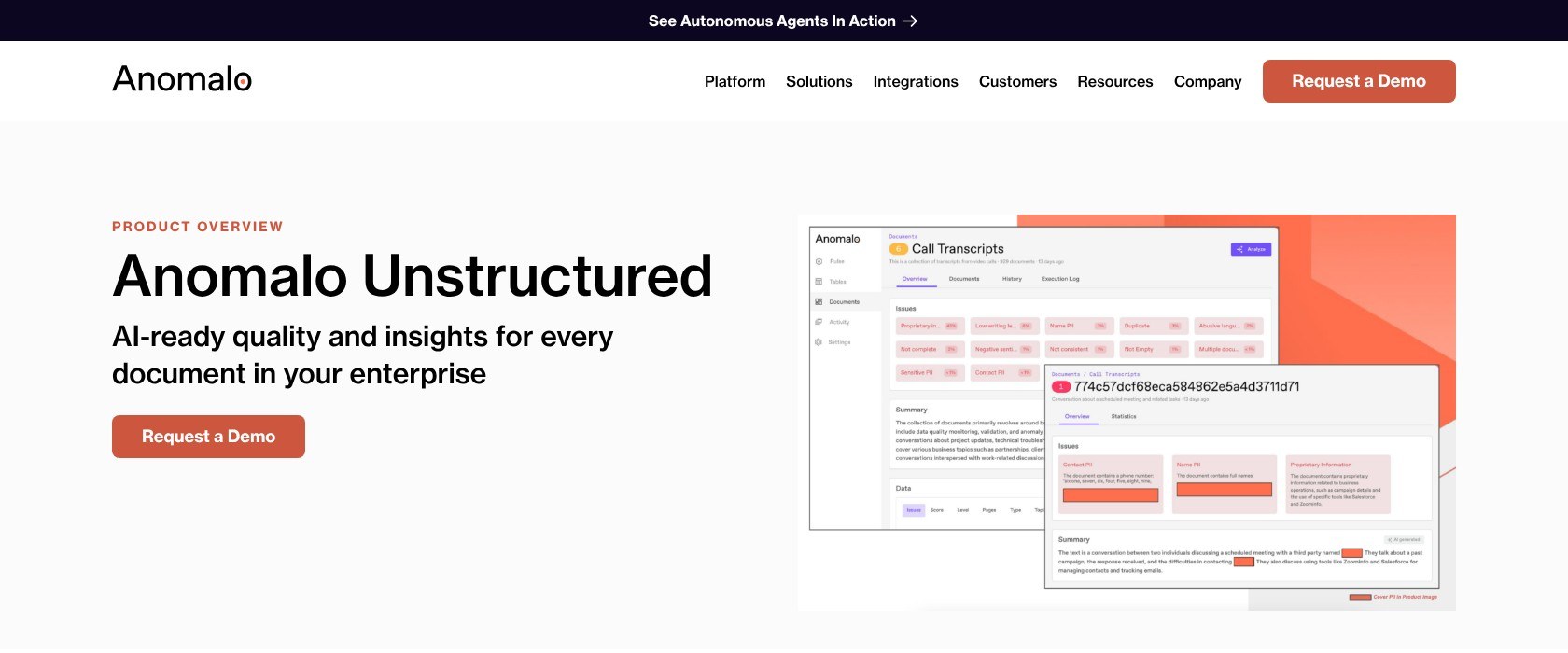
The LLM behind those checks is your choice: Anthropic, Google, Meta, or OpenAI models, or cloud-hosted versions through Vertex AI, Bedrock, or Azure AI.
Deployment and Security
Anomalo runs as SaaS or fully inside your own AWS, GCP, or Azure account with your own LLM, holds SOC 2 Type II, GDPR, and HIPAA, and signs in through SAML SSO with Okta, Google, or Microsoft Entra ID.
Everything here is batch on warehouse tables. Anomalo does not monitor a Kafka topic or a streaming pipeline, so events get checked once they land in a table, not in flight.
How Does Anomalo Compare to Competitors?
I would shortlist alternatives based on whether your problem is wrong values or broken pipelines. Anomalo wins on value-level detection and root cause analysis, and each rival below wins a different niche:
- Monte Carlo: my first comparison when pipeline health matters most. It covers pipeline and lineage observability across the whole stack, incident management, and agent observability, priced per table on Start, Scale, and Enterprise tiers, and it is quote-only
- Bigeye: wins on alert tuning, because its models learn from the feedback you give on each alert, which attacks the noise Anomalo leaves to time and manual edits. Quote-only as well
- Soda: wins on code-first control, with checks as code, data contracts, and open-source Soda Core, plus a Free plan and a Team plan at $750 per month
- Great Expectations (GX): wins the free path. GX Core is Apache-2.0 open source and GX Cloud has a free Developer tier, but you write every expectation by hand and nothing gets detected that you did not define
- Metaplane: wins for Datadog shops. Datadog acquired it in April 2025 and sells it as Metaplane by Datadog, with column-level lineage into BI
- Elementary: wins for dbt-only teams, free and dbt-native
- Sifflet and Lightup: the quote-only alternatives I’d shortlist if Anomalo’s demo falls through, Sifflet for lineage-centered, business-user-friendly observability and Lightup for pushdown checks that run on the warehouse
| Tool | Approach | Public price | Best for |
|---|---|---|---|
| Anomalo | Unsupervised ML on data values, plus rules and RCA | No | Enterprises with hundreds of tables and no rules written |
| Monte Carlo | Metadata, lineage, and incident management | No, per-table tiers | Pipeline health across the whole stack |
| Bigeye | ML monitoring with feedback-trained alerts | No | Teams fighting alert noise |
| Soda | Checks as code and data contracts | Free plan, Team $750/month | Engineering teams who want rules in Git |
| Great Expectations | Open-source expectations, managed cloud | GX Core free, Cloud Developer free | Teams with budget for engineers, not software |
| Elementary | dbt-native open source | Free | dbt shops |
You leave Anomalo for a lower bill or for code-first control, and you give up detection on the columns nobody wrote a rule for. I’d pick Monte Carlo instead when pipeline health and incident workflow matter more than what is inside the rows.
How I Reviewed Anomalo
I evaluated the pricing model, documented setup workflow, anomaly detection and root cause analysis, validation rules, AI agents, and deployment options against the needs of a data team choosing a data quality platform. My recommendations weigh practical buyer fit and operational effort; they do not represent measured detection accuracy or hands-on usability scores.
Pricing model and product details checked in October 2026.
Should You Choose Anomalo?
I recommend Anomalo if you are an enterprise data team on Snowflake, Databricks, or BigQuery with hundreds of tables nobody has written rules for, a real cost attached to wrong values reaching a dashboard, and possibly a requirement to keep everything inside your own VPC. Value-level detection and segment-level root cause analysis are the two things no rule-based tool gives you.
I’d be more cautious if you are a small team or on a tight budget, because Soda’s Free plan, GX Core, and Elementary cover rule-based checks for nothing. The same goes if your data is streaming, since Anomalo only checks what has landed in a table. And if pipeline health and incident management come first, start with Monte Carlo instead.
For the right team, the next step is a demo with homework attached. Bring a list of your 20 to 50 critical tables, ask for a scoped pilot on those, and get two numbers in writing before you sign: how the price scales per table, and what the profiling queries are expected to add to your warehouse compute.
FAQ
Is Anomalo free?
No. Anomalo has no free plan and no self-serve trial; the only entry point is a demo request. Ask in that demo for a scoped pilot on a small set of critical tables. For free alternatives, Soda’s Free plan, GX Core, and Elementary all cover rule-based checks at no cost.
How much does Anomalo cost?
Anomalo is quote-only, priced after a demo and sold on annual contracts. You can buy direct, through AWS Marketplace on 12, 24, or 36-month SaaS contracts, or through Azure Marketplace against a MACC commitment. Expect the number to scale with monitored tables, check frequency, deployment choice, agent modules, and support tier.
What is Anomalo used for?
Anomalo monitors the data inside warehouse tables for quality problems: late loads, volume changes, rising NULLs, duplicates, and value anomalies caught by unsupervised machine learning, plus rule-based checks you define. When a check fails, root cause analysis isolates the column segment behind the bad rows. It also monitors document collections for PII, duplicates, and tone before they feed an AI application.
Anomalo vs Monte Carlo: which is better?
Anomalo is better at catching wrong values inside a table and explaining which segment caused them; Monte Carlo is better at observing pipeline health, lineage, and incidents across the whole stack. Both are quote-only. Pick Anomalo when the data arrives on time but is wrong, and Monte Carlo when the data arrives late or broken.
Does Anomalo work with Databricks and Snowflake?
Yes. Snowflake, Databricks, and BigQuery are its core warehouses, and Snowflake Ventures made a strategic investment in Anomalo in March 2025, with Databricks Ventures a participant in its 2024 Series B. On Databricks, Partner Connect supports SQL warehouses only; clusters connect manually with the Server Hostname, Port, HTTP Path, and an access token.