
Editor’s note: This Acceldata review evaluates pricing, implementation requirements, and data observability capabilities. It is not a hands-on performance test.
Quick verdict: I recommend Acceldata for enterprise data teams that need to connect unreliable data with the pipelines and computing resources behind it. Its appeal is strongest when quality issues and infrastructure costs land on the same team’s desk. Custom pricing and a substantial implementation make it a harder recommendation for a small team that just needs reliable table checks.
Key Takeaways
- Acceldata covers data quality, pipeline monitoring, and compute observability, giving platform teams several ways to investigate an incident.
- Reconciliation is particularly useful when you need to check that data survived a migration or transformation correctly.
- Separate Data Reliability and Cost Optimization offerings let you scope the purchase around a specific problem.
- Budgeting requires a scoped quote, and important capabilities sit in Enterprise tiers.
- A sample-data trial is an accessible starting point, but it doesn’t establish how difficult your production rollout will be.
In this review, I’ll take a closer look at where Acceldata earns its place in a data stack, what I’d prioritize in a trial, and when I’d choose another tool.
Acceldata Pros and Cons
Pros
- Quality policies combine explicit rules with anomaly detection.
- Reconciliation compares data across source and target systems.
- Compute observability extends investigation to jobs and infrastructure.
- Cost monitoring helps connect resource consumption with spending.
- The ADM trial includes sample data without a local installation.
Cons
- Quote-based subscriptions make early budget comparisons difficult.
- Reconciliation and pipeline monitoring require Data Reliability Enterprise.
- Customer-managed data-plane deployment brings infrastructure work.
- Broad platform messaging makes contract scope especially important.
How Much Does Acceldata Cost?
Acceldata uses custom pricing for ADOC, its Data Observability Cloud. Scope Data Reliability and Cost Optimization separately; both have Pro and Enterprise tiers:
- Data Reliability Pro (custom quote): for teams starting with quality monitoring.
- Data Reliability Enterprise (custom quote): for broader pipeline oversight and cross-system validation.
- Cost Optimization Pro (price on request): for visibility into cloud data spending.
- Cost Optimization Enterprise (custom quote): for more developed cost-management workflows.
| Offering | Pro includes | Enterprise adds |
|---|---|---|
| Data Reliability | Profiling, anomaly detection, freshness, schema drift, policies, alerts, and AI Copilot | Reconciliation, pipeline monitoring, SDK, RBAC, and direct metadata API access |
| Cost Optimization | Cost trends, Query Studio, dashboards, and alerts | Automated actions, chargeback, showback, advanced support, and AI Copilot |
AWS Marketplace provides some pricing context: its 12-month contract lists Data Reliability at $5,000 on a monitored-volume dimension based on average terabytes processed monthly, and Spend Intelligence at $100,000 per Snowflake account or Databricks workspace. These are contract dimensions, not universal prices for a complete deployment.
My frustration is the gap between understanding the tiers and knowing whether you can afford them. The plan names won’t tell you your likely annual commitment. Request a quote against a written list of sources, monitored workloads, and required features so that competing proposals cover comparable work.
I would also separate the subscription from the resources needed to run it. A monitoring platform can be worth paying for while still adding infrastructure or query costs. Ask who pays for those resources and what happens to the bill when monitoring expands.
Is Acceldata Good Value for Money?
I see the strongest case when a costly incident crosses team boundaries: a pipeline falls behind, reports become unreliable, and engineers investigate the data and infrastructure separately. Bringing that evidence together could justify a broader platform purchase. Buying the same breadth to check a handful of tables is much harder to defend.
- Good fit: a platform team responsible for both dependable data delivery and the systems running it.
- Less convincing fit: a small analytics team whose main requirement is a short list of known assertions.
- Budget priority: price the coverage you need today, then request the cost of the next realistic expansion.
Reviewer’s Notes: I’d start with Data Reliability Pro for quality monitoring alone. If reconciliation or pipeline monitoring is essential, request Enterprise pricing immediately. Add Cost Optimization when someone on your team owns a measurable spending problem and can act on the findings.
Getting Started With Acceldata
Acceldata offers an ADM sandbox with sample sources, a guided introduction, and the option to connect your own data. No credit card or local installation is required for that sandbox. I like this as a way to explore the product before involving the people responsible for production access.
The more useful evaluation starts with your own problem, though. I’d pick one important data product, such as a daily revenue report, and work backward through the systems that supply it. A polished sample environment won’t tell you whether your particular dependencies are visible.
- Choose a failure that matters. Use a missing load, a reconciliation mismatch, or an unexpectedly expensive job as the scenario.
- Check the required connectors. Confirm the monitoring and lineage capabilities available for each source, along with its permissions.
- Define an actionable rule. Set an expectation tied to the business requirement, rather than collecting every available metric.
- Follow the issue to its owner. Decide who receives the alert and what information they need to investigate it.
- Price the production version. Include deployment, source-query costs, support, and the features demonstrated during the evaluation.
Production Setup Deserves Its Own Evaluation
Customer-managed deployment has a very different workload from the sandbox. The Kubernetes prerequisites for the documented data-plane setup specify four nodes, each with four CPU cores, 32 GB of memory, and 80 GB of disk. That is a meaningful infrastructure commitment before you start expanding coverage.
I would involve a platform engineer early if that is your intended deployment. Confirm sizing for your workload and identify who will maintain the environment. Those prerequisites apply to that deployment route, not to every way of evaluating or buying Acceldata.
For a team already operating Kubernetes, the additional work may be manageable. For an analyst who only wants to know whether yesterday’s sales table is complete, it is a strong reason to compare a more focused approach first.
Catching Bad Data Before It Spreads
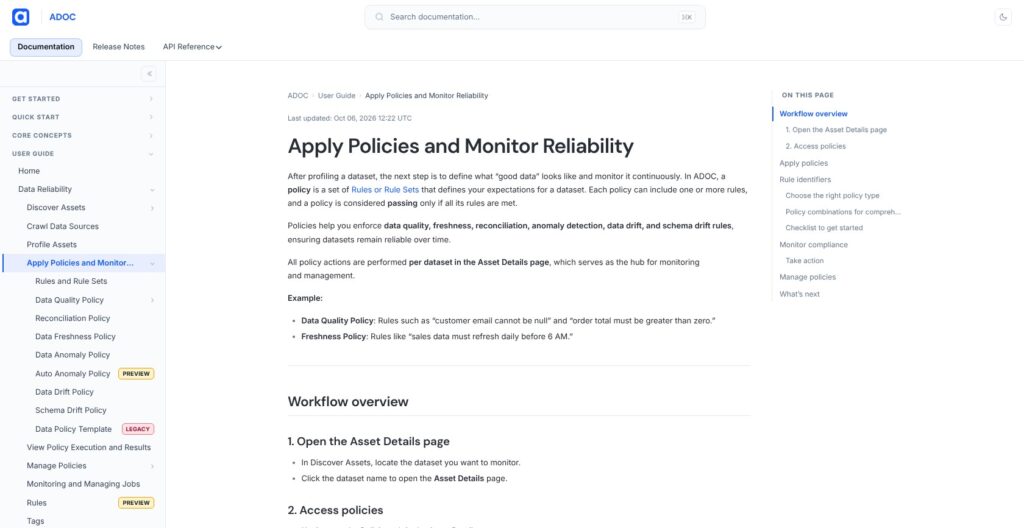
Acceldata’s combination of explicit quality rules and anomaly detection makes sense to me. Some failures are predictable: an identifier shouldn’t be empty, or a business field should match an allowed value. Others only become obvious when a dataset behaves differently from its usual pattern.
I’d use those approaches together. A statistically normal table can still violate a business rule, while a table that passes every rule you’ve written can still contain an unexpected change.
- Profiling: understand the data’s contents and distributions before deciding what to monitor.
- Quality policies: express expectations that the business already understands.
- Anomaly detection: flag unusual behavior that fixed rules may miss.
- Reconciliation: compare source and target data to uncover mismatches between systems.
Reconciliation is the feature I find especially useful for migrations. Suppose an order dataset moves from one system to another. Matching the row count is reassuring, but it doesn’t prove that individual values survived the move. Acceldata supports field comparisons and reconciliation of custom SQL results as well as counts. I’d choose the check around the risk: missing records, changed values, or an incorrect business calculation.
Detection speed also needs attention. Data anomaly and drift checks follow profiling jobs, while schema-drift checks follow crawls. I wouldn’t treat that as instant coverage: your schedules need to match how quickly a problem could affect the business.
I also like the role of lineage in deciding which problems deserve attention first. An issue affecting an executive report should be easier to distinguish from a change in an unused table. But the usefulness of that view depends on the connected sources and the dependencies it can actually capture.
Bigeye also deserves a place on your shortlist if monitoring and dependency-led investigation are the main requirements. I wouldn’t choose Acceldata on quality checks alone; I’d want its wider operational coverage to earn the extra scope.
Connecting Pipeline Problems to Compute Costs
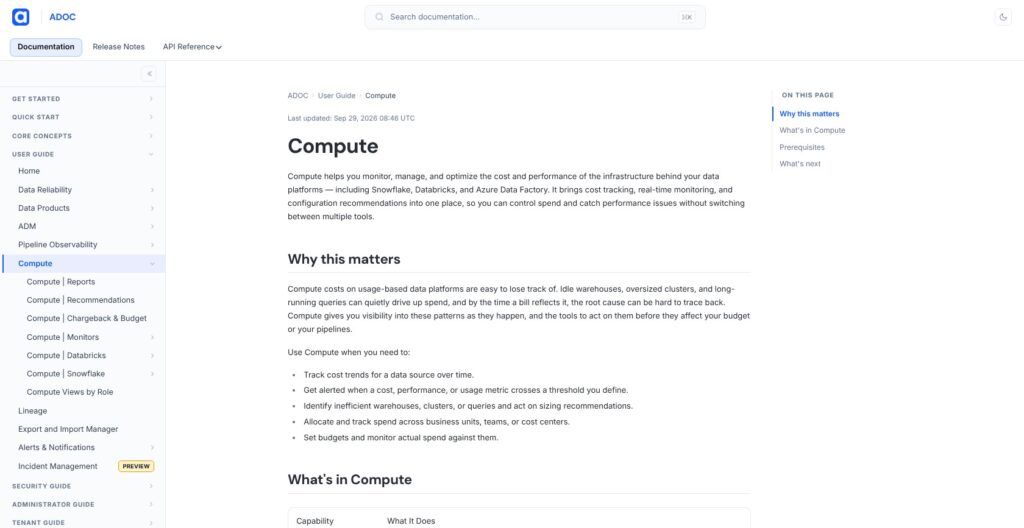
A late table can be the symptom of a job or infrastructure problem. Acceldata’s compute observability is interesting because it gives engineers a way to investigate that side of data reliability too.
Its Hadoop observability capabilities cover services, jobs, and resource behavior. Snowflake and Databricks compute monitoring extend the investigation into cloud environments. For teams maintaining Hadoop alongside cloud systems, I find that operational coverage more compelling than another dashboard of table-health indicators.
- Delivery: did the workload complete within the time the business needed?
- Resources: what happened to the computing resources while it ran?
- Spending: did the resource use make sense for the work delivered?
Consider a job that becomes slower after its input grows. More compute might bring the runtime back down, but it could also hide an inefficient process. I like having cost and performance evidence in the buying discussion because the cheapest job isn’t necessarily the one that serves the business best.
There is a limit to that argument: visibility only produces savings when someone makes a useful change. I wouldn’t attach a savings percentage to Acceldata without measuring it against your own baseline.
I would also keep cloud Cost Optimization and Hadoop observability distinct when agreeing the scope. They address related questions, but the name Acceldata on a proposal doesn’t establish that every connector, module, or action is included.
Monte Carlo is another enterprise option for data and AI observability. My preference for Acceldata would depend on the importance of infrastructure investigation in your actual incidents, rather than a blanket claim that one platform covers more.
How Much Should You Rely on the AI?
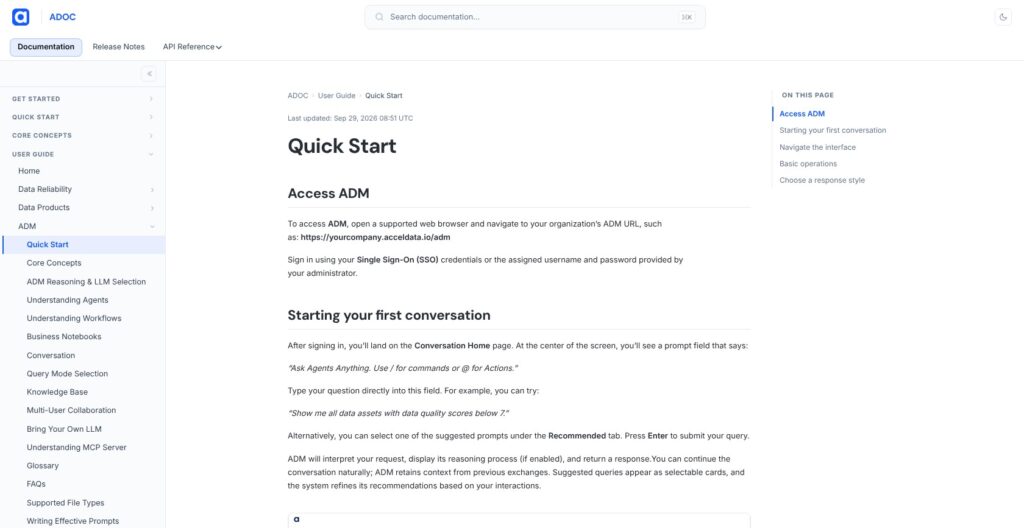
I like AI assistance most when it reduces the work between receiving an alert and deciding what to investigate. Acceldata combines anomaly detection with AI-assisted quality policies. Its Agentic Data Management interface also lets you ask questions about data assets in natural language and follow up in the same conversation.
I see a practical benefit in asking which assets have poor quality scores without first navigating several screens. That convenience still depends on useful answers and appropriate access to the underlying data.
Those capabilities aren’t interchangeable purchasing terms. The wider xLake platform now spans much more than observability. I would ask for the precise AI functions and modules included in the proposed subscription.
For generated quality rules, my priority would be meaning rather than quantity. A rule can be valid SQL and still express the wrong business expectation. Someone who understands the dataset should review it before it becomes an operational requirement.
The same applies to proposed incident fixes. I’d want the supporting evidence, the intended change, and a clear approval boundary. Faster suggestions are useful; granting them permission to change production is a separate decision.
My verdict is cautiously positive. AI assistance strengthens the appeal of an already useful monitoring workflow, but I wouldn’t buy Acceldata primarily for the promise of autonomous operations. The underlying coverage and the ability to investigate a real incident should carry the decision.
How Does Acceldata Compare to Alternatives?
I’d shortlist alternatives by the work your team needs to do, then run the same failure scenario through each product:
- Monte Carlo: worth comparing for a team focused on data and AI reliability across its connected stack. I would compare incident context and the coverage of your actual sources before choosing either platform.
- Bigeye: a strong comparison candidate when quality monitoring and lineage are the center of the purchase. Ask both products to trace the same issue to the assets it affects.
- Soda: my first comparison for engineers who want to express quality expectations as data contracts and run checks in development workflows. That can be a better match for a focused testing requirement than a broader operations platform.
I would lean toward Acceldata when the problem consistently extends beyond the dataset into the jobs and infrastructure running it. If that operational breadth isn’t useful to your team, give a narrower implementation a fair chance.
How I Reviewed Acceldata
I evaluated Acceldata’s pricing structure, deployment requirements, quality controls, and operational coverage, then compared the buying priorities with Monte Carlo, Bigeye, and Soda. My recommendations emphasize what each capability would help a data team decide or do.
I haven’t run Acceldata against a production workload or measured its detection accuracy, alert noise, or cost savings. The screenshots show official website and documentation pages.
Pricing and product information checked October 2026.
Should You Choose Acceldata?
I recommend shortlisting Acceldata if your data platform team is responsible for reliable pipelines and the infrastructure behind them. The combination of quality monitoring, reconciliation, and operational investigation gives it a clear purpose in a complicated data environment.
I’d be more hesitant if you have a small stack and a well-defined set of table checks. Custom pricing and deployment work need a business case, and unused platform breadth won’t improve your data.
Start with one consequential incident and ask Acceldata to show how your team would detect, understand, and respond to it. If that workflow earns its place, request a quote for exactly that coverage. Expand from a useful result, rather than buying the whole platform vision up front.
FAQs
What Is Acceldata Used For?
Acceldata helps teams monitor data quality, investigate pipeline and infrastructure problems, and understand data-platform costs. Its wider product range also covers agentic data management and other data-platform functions.
How Much Does Acceldata Cost?
Request a quote for your intended coverage. The public AWS Marketplace amounts are annual contract dimensions, so they don’t establish the total cost of your particular deployment.
Can You Try Acceldata for Free?
Yes. The advertised ADM sandbox includes sample data and requires no credit card. Its pricing page promotes a 30-day trial; confirm that term and the included modules when arranging your evaluation.
Is Acceldata Suitable for Small Teams?
It can be, but I would start by checking whether its operational breadth solves a real problem. A small team that only needs explicit quality checks may find a focused testing tool easier to justify.
Does Acceldata Automatically Fix Data Problems?
Acceldata offers AI assistance and agentic workflows, but I wouldn’t assume every detected issue can be safely repaired without intervention. Confirm the available actions and approval controls for the modules you purchase.