
Editor’s note: This review evaluates Bigeye’s capabilities, setup requirements, and buying considerations. It is not a hands-on performance test.
Quick verdict: I recommend Bigeye for data teams that need to connect quality problems with the reports, pipelines, and people they affect. Its combination of monitoring, lineage, and incident investigation makes more sense as your data environment grows, but the sales-led purchase and ongoing configuration are harder to justify for a small team with straightforward testing needs.
Key Takeaways
- Bigeye’s strongest feature is the connection between data quality alerts and downstream business impact.
- Suggested monitors and adaptive thresholds give you a useful starting point without defining every check yourself.
- Collections and issue ownership help turn alerts into work for the right team.
- You’ll need a custom quote, and monitoring queries can add warehouse costs beyond the subscription.
- Historical patterns and AI suggestions still need human judgment. Neither guarantees that your data is correct.
In this Bigeye review, I’ll look at where its monitoring earns its place, what you need to set up, and when I’d choose a lighter alternative.
Pros and Cons
Pros
- Lineage connects monitoring coverage to downstream reports and data products.
- Autometrics suggests checks instead of requiring every monitor to be written manually.
- Adaptive thresholds account for historical patterns and seasonality.
- Collections route alerts to shared Slack, email, or webhook destinations.
- Custom SQL virtual tables support checks across joins and calculated fields.
Cons
- Custom pricing makes quick budget comparisons difficult.
- Source permissions, coverage decisions, and incident ownership require setup.
- Monitoring and profiling can add warehouse compute costs.
- Restricting raw-data access reduces some AI investigation capabilities.
Bigeye Pricing
Bigeye requires a sales conversation to establish your price. I wouldn’t budget around an unofficial monthly figure or assume that a demo includes a free subscription.
- Commercial subscription (custom quote): For teams buying a defined scope of data monitoring and related platform capabilities. Get the included sources, monitored assets, and features in writing.
- Evaluation (terms to confirm): Ask what you can connect and evaluate before committing, including any time limit or usage restrictions.
I’d separate the purchase into four cost questions:
| Purchase component | Price basis | What I would confirm |
|---|---|---|
| Bigeye subscription | Custom quote | Included monitoring scope, modules, and growth terms |
| Warehouse queries | Your data platform’s charges | Expected scan frequency and query volume |
| Setup and services | Confirm in proposal | Who configures sources and whether services cost extra |
| Evaluation | Confirm with sales | Duration, data access, and supported scope |
The warehouse line matters. A subscription quote doesn’t tell you what repeated profiling or monitoring will cost on your own infrastructure. I’d ask for an estimate based on representative tables, then compare it with actual query usage during an evaluation.
Is Bigeye Good Value for Money?
Bigeye makes the strongest financial case when investigation consumes more engineering time than writing tests. If several teams routinely reconstruct the same failure, shared context and ownership are worth paying for.
For a small dbt project, I’d be less eager to add another platform. If your main problem is missing uniqueness or null checks, improve those tests first. Bigeye becomes more appealing when the gaps extend across teams and systems.
My recommendation is to request an observability-focused quote around your critical data products. Only add the wider governance or AI capabilities when you have a clear use for them. A smaller, well-owned rollout gives you a better basis for deciding whether broader coverage earns its cost.
Getting Started With Bigeye
Bigeye needs access to your data sources before its recommendations become useful. An administrator connects a source using a service account with the required permissions, then your team chooses the monitoring coverage.
I like that Autometrics offers a starting point. I wouldn’t enable every suggestion without checking what the table does, though. A missing value might be harmless in an optional field and a serious problem in a customer identifier.
For an initial rollout, I’d follow this sequence:
- Connect a representative source. Use a service account with the permissions the integration requires.
- Choose an important dataset. Pick something with an identifiable owner and a report or process that depends on it.
- Review the suggested metrics. Keep checks that reflect meaningful failures, then add business-specific rules where needed.
- Configure recent-data monitoring. Where appropriate, use a row creation timestamp to define which data the check evaluates.
- Set the alert destination and owner. Decide who responds before expanding the coverage.
Collections help here: they group metrics and send notifications to shared destinations. I’d organize them around responsible teams or data products so that a finance-related problem reaches someone who understands its consequences.
Reviewer’s Notes: Start with a dataset whose failures you already understand. You can then judge whether the alerts are useful, whether the investigation has enough context, and whether the workload is manageable before extending monitoring elsewhere.
Monitoring That Goes Beyond Fixed Rules
I like Bigeye’s adaptive thresholds for data with predictable variation, such as a table that is busy on weekdays and quiet on weekends. Fixed boundaries are harder to maintain in that situation.
Autometrics suggests what to measure; Autothresholds flags unusual measurements. You still need business rules.
For example, a hypothetical orders table could have an unusually low number of rows without being empty. An adaptive monitor may help flag that change, while an explicit rule can enforce a requirement such as every order having an identifier.
Allow Time for Useful Historical Patterns
Autothresholds uses 21 days of training history by default, with a default model refresh every 24 hours. Suitable timestamped data can support backfilling, so this doesn’t necessarily mean waiting three weeks after connecting a source.
Without suitable history, the model needs time to learn. Adjust sensitivity to your workload, and keep explicit checks alongside it: a stable pattern can still be wrong.
Custom Checks Give Technical Teams More Control
Virtual tables let you define a SQL query inside Bigeye and monitor its result without creating a physical table or view in the warehouse. That is useful when the quality question spans multiple datasets.
Suppose you want to check whether completed orders have matching payment records. A joined query is closer to that business question than inspecting either table in isolation.
I like this flexibility, particularly when creating new warehouse views requires another team’s approval. The trade-off is familiar: someone must maintain the SQL as the underlying data changes.
The CLI supports repeatable management of metrics and related configuration, which should appeal to engineering teams. Monte Carlo also supports monitoring as code, so I would compare the actual configuration workflow before choosing between them.
Lineage and Incident Investigation
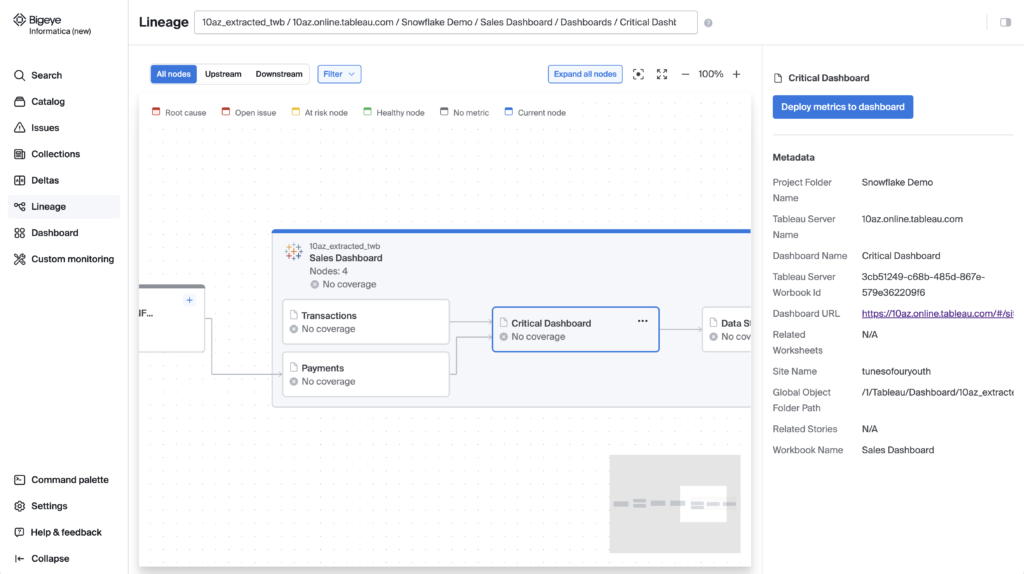
Lineage is the main reason I would shortlist Bigeye. It helps connect an alert with the upstream data that produced it and the downstream assets that depend on it.
You can start from an asset such as a Tableau dashboard, inspect its upstream dependencies, and deploy relevant monitoring. I prefer that approach to treating every table as equally important. It gives the rollout a purpose: protecting something your business actually uses.
The limitation is coverage. A dependency map can only help with the sources and relationships available to it. I’d make the completeness of a real reporting path part of the buying decision, especially when that path crosses several systems.
Alerts Need Enough Context to Act On
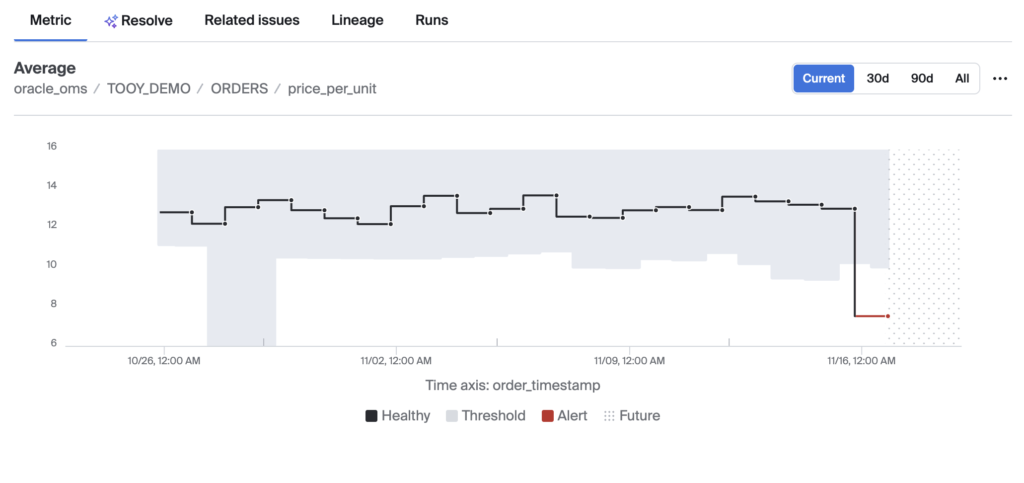
Bigeye’s issue view brings together the metric history, assignment, status, and investigation context. Data diagnosis, ETL analysis, related issues, and lineage give engineers several ways to approach a failure.
Consider a hypothetical rise in missing customer IDs. The useful questions are whether the change started after a pipeline update, whether related tables are affected, and which reports depend on the field. An isolated threshold notification would leave you assembling that context yourself.
Related issues can be grouped into an incident. I’d agree on its owner, communication channel, and resolution criteria before the first serious failure.
Is bigAI Useful?
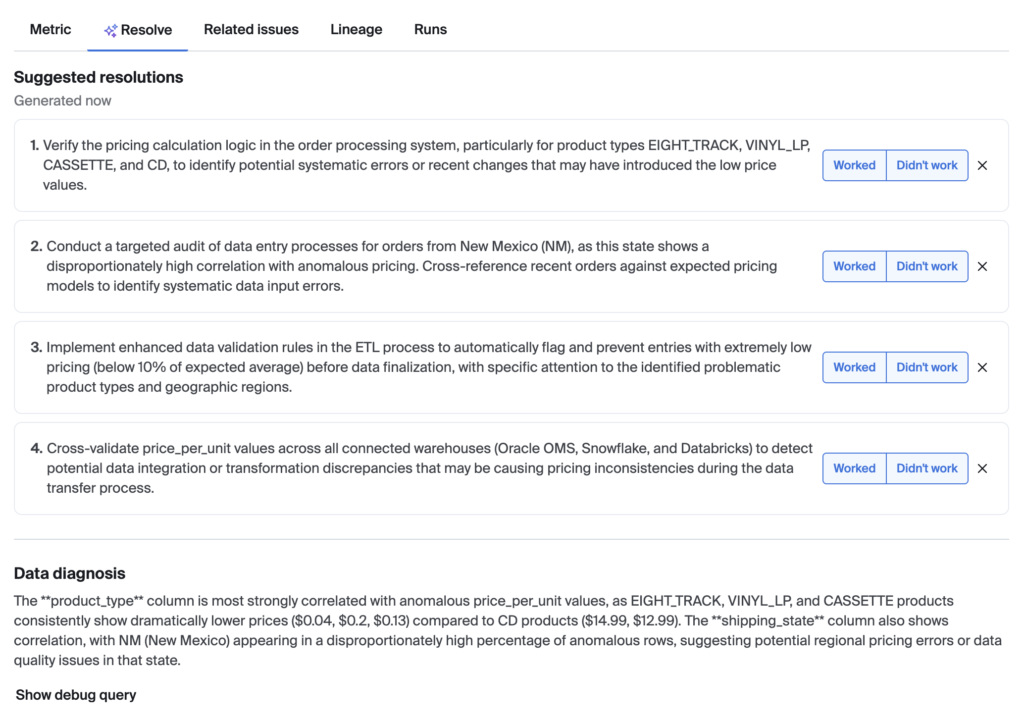
bigAI is most interesting as investigation support. Its suggested resolutions can use issue metadata, upstream ETL code, past related problems, and limited underlying-data analysis when that access is enabled.
I like the use of pipeline context and previous incidents here; those are more useful starting points than a generic explanation of null values.
However, I would treat the output as a starting point for an engineer. A plausible diagnosis isn’t proof, and a proposed change still needs checking before it reaches production. I wouldn’t choose Bigeye on the assumption that AI will take over incident response.
Data Access Changes What AI Can Do
Bigeye’s default stored material is metadata and aggregate metrics, but optional preview and AI debugging functions can access row-level data. Raw-data restrictions and feature controls therefore matter.
The consequence isn’t just administrative. Disabling bigAI row-level access removes LLM-based cross-column correlation suggestions in profiling, while aggregate-based suggestions can continue.
I’d grant access according to the investigation features you need. For restricted datasets, decide whether the narrower diagnosis is an acceptable trade-off.
Profiling also offers sampling and filtering. These can control query work, but a sample is not equivalent to examining every row. If a rare defect is the problem you care about, the profiling scope deserves as much attention as the AI summary.
What About the Broader AI Trust Features?
Bigeye also covers sensitive-data discovery and visibility into AI agents’ data access. Sensitive-data scanning supports different scan modes, while Agent Trust connects agent activity with the data it uses.
I can see the appeal for organizations that want quality and sensitivity information to inform AI operations. For an observability purchase, though, I’d keep the decision focused. Ask which modules the proposal includes and evaluate them against a concrete requirement before expanding the subscription.
How Does Bigeye Compare to Alternatives?
- Monte Carlo: My closest comparison for teams buying broad observability. It combines automated monitoring with deeper quality checks and code-managed configuration. I would compare the coverage of your actual sources and the usefulness of incident investigation, rather than treating automation as unique to Bigeye.
- Soda: My stronger starting point when the priority is agreeing on explicit data expectations and enforcing them through executable contracts. It supports collaboration and AI-assisted contract creation, so it shouldn’t be dismissed as a collection of manual checks.
- dbt data tests: My first recommendation when your immediate gaps are assertions around transformed data. Checks such as uniqueness, accepted values, and relationships may address the problem without buying a separate observability platform. They can also remain useful alongside Bigeye.
| Option | Where I would start with it | Main buying question |
|---|---|---|
| Bigeye | Monitoring linked to dependencies and incident work | Does it connect your important data paths well enough to guide investigation? |
| Monte Carlo | Broad automated observability | Which platform covers your sources and investigation workflow better? |
| Soda | Executable quality contracts | Can your team define and maintain the expectations it needs to enforce? |
| dbt data tests | Assertions within transformation workflows | Are targeted tests enough, or do you need broader operational context? |
I wouldn’t pick a winner from a feature checklist alone. Use the same problematic dataset and downstream report when comparing platforms. That makes differences in context and investigation much easier to assess.
How I Reviewed Bigeye
I evaluated Bigeye’s monitoring configuration, lineage workflow, incident handling, AI assistance, and commercial buying requirements. I compared those capabilities with Monte Carlo, Soda, and dbt data tests, weighting practical fit and operational trade-offs over headline feature counts.
This is a research-based evaluation, not a benchmark of detection accuracy or incident-resolution speed. Pricing information was checked in October 2026; the commercial cost requires a tailored quote.
Should You Choose Bigeye?
I would shortlist Bigeye if your team can detect some data problems but struggles to understand their reach and coordinate the response. Its monitoring, lineage, and issue context address that problem directly.
I would hold off if you mainly need a few well-defined checks on a small data project. Start with those checks and clear ownership, then reconsider observability when you can identify the investigation work a separate platform would remove.
Before committing, validate one important reporting path and measure its query workload. I’d expand the purchase only when that exercise gives the team a clearer response to failures.
FAQ
What Is Bigeye Used For?
Bigeye helps data teams monitor quality, investigate anomalies, and understand the assets affected by a problem. Its wider platform also includes capabilities for sensitive-data discovery and AI trust.
How Much Does Bigeye Cost?
Bigeye uses custom pricing. Request a proposal for your monitoring scope and required capabilities, then account separately for warehouse queries and any agreed implementation services.
Does Bigeye Replace dbt Tests?
I would usually treat them as complementary. dbt tests enforce explicit assertions, while Bigeye adds adaptive monitoring, dependency context, and workflows for investigating issues across connected systems.
Does Bigeye Access Raw Data?
Some optional functions can access rows, including previews and parts of AI debugging. Default stored information is metadata and aggregate metrics. Configure the available restrictions around your team’s requirements and the features it needs.
Can Bigeye Automatically Fix Data Problems?
bigAI can suggest resolutions using issue context, but I wouldn’t treat those suggestions as verified repairs. An engineer should check the diagnosis and validate the proposed fix.