
Editor’s note: This Meltano review is based on my hands-on test of Meltano 4.4.1, from installation to a working pipeline. It weighs pricing transparency, openness and exit costs, setup and operating effort, connector depth, development momentum, and my overall verdict.
Quick verdict: I recommend Meltano for data engineers who want MIT-licensed, Git-versioned ELT pipelines with 600+ Singer connectors and are comfortable on the command line. Connector quality varies tap by tap and the free version has no UI, so production means owning orchestration, monitoring and the occasional tap fork; the Matatika-run Meltano Cloud tiers carry no dollar prices.
Meltano began inside GitLab and spun out in 2021; the company became Arch in late 2023 and shut down, and Matatika took over the open-source project in 2026. Version 4.4.1 shipped on October 7, 2026 (about 2,650 GitHub stars).
In this review, I’ll take a closer look at Meltano’s pricing, what it was like to build a pipeline with it, the Hub connector catalog, and how it stacks up against Airbyte, Fivetran and dlt, so you can see exactly whether it belongs in your stack.
Key Takeaways
- Meltano Open is free under the MIT license and runs on Python 3.10 to 3.14
- 631 extractors and 50 loaders sit on Meltano Hub, but only 32 default extractor variants are maintained by MeltanoLabs
- In my test a CSV-to-DuckDB pipeline ran in about 8 seconds, but a new source column was silently skipped until I refreshed the catalog
- There is no GUI in Meltano Open (removed in v3.0), and scheduling needs Airflow or another orchestrator
- Meltano Cloud sells compute hours, from 200 a month on Starter to 5,000 on Scale, and every tier is quote-only
Pros and Cons
Pros
- MIT-licensed core, free to self-host with no row caps
- 631 extractors and 50 loaders on Meltano Hub
- Whole project lives in one meltano.yml you can diff and review in Git
- Each plugin installs in its own virtualenv, so tap dependencies never collide
- Inline stream maps hash, cast or drop columns with no extra service
Cons
- Tap quality varies, and forking an abandoned tap is a common fix
- No UI in the free version and no built-in scheduler runtime
- Schema changes can be silently skipped until you refresh the catalog
- Meltano Cloud prices are not published; expect a demo first
How Much Does Meltano Cost?
Meltano Open costs nothing under the MIT license, the managed Meltano Cloud bills by compute hour rather than by row, and none of the four Cloud tiers lists a dollar price.
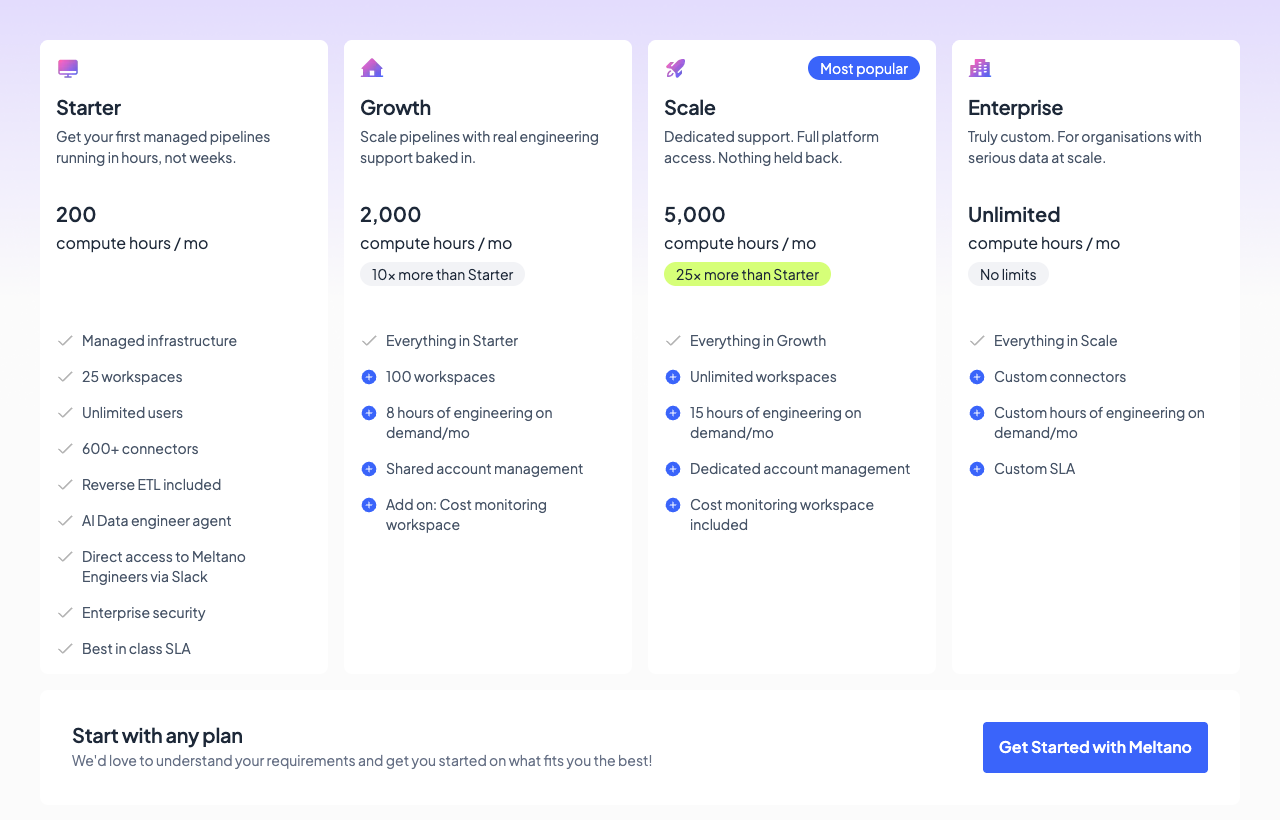
- Meltano Open (free): for proofs of concept and teams with their own DevOps capacity, the self-hosted CLI with every Hub connector on your own infrastructure, with scheduling and monitoring left to you
- Starter (quote): for teams running 5 to 10 daily connectors, with 200 compute hours a month, 25 workspaces, unlimited users, 600+ connectors, reverse ETL, the AI data engineer agent, and Slack access to Meltano engineers
- Growth (quote): for teams that want engineering help on call, with 2,000 compute hours, 100 workspaces, 8 hours a month of Meltano engineering time, shared account management and an optional cost-monitoring workspace
- Scale (quote): for high-volume or multi-client setups, with 5,000 compute hours, unlimited workspaces, 15 engineering hours a month, dedicated account management and cost monitoring included
- Enterprise (quote): for teams that need custom connectors and a custom SLA, with unlimited compute hours and engineering time set by contract
| Plan | Price | Compute hours/mo | Workspaces | Engineering support |
|---|---|---|---|---|
| Meltano Open | Free (MIT) | Unlimited, on your infrastructure | n/a (self-hosted) | Community |
| Starter | Quote | 200 | 25 | Slack access to Meltano engineers |
| Growth | Quote | 2,000 | 100 | 8 hours/mo |
| Scale | Quote | 5,000 | Unlimited | 15 hours/mo |
| Enterprise | Quote | Unlimited | Unlimited | Custom hours, custom SLA, custom connectors |
Is Meltano Good Value for Money?
- A compute hour is time spent actively running pipelines, so a connector that syncs for 30 minutes twice a day uses about 30 hours a month, and Meltano sizes Starter’s 200 hours for teams with 5 to 10 daily connectors
- Meltano claims compute pricing comes out 40 to 80% cheaper than Fivetran’s MAR model for high-frequency database and bulk loads; the only way to check that against your own workload is a quote set beside your current bill
- The managed rivals publish their numbers: Fivetran is free up to 500K MAR, then charges a $5 base per connection with a $12,000 annual minimum on contracts; Airbyte Standard starts at $20 a month in credits; Stitch Standard starts at $100 a month
- The hidden cost of Open is an engineer: Meltano itself calls the self-hosted edition “perfect for testing things out, but not really suited for production teams unless you have a dedicated DevOps crew,” and Open ships no scheduler runtime or alerting, so every schedule, alert and retry is yours to build
I recommend starting on Open for the proof of concept, since it costs nothing and Cloud runs the same meltano.yml from a connected GitHub repo later. Move to Starter only if nobody on the team can run Airflow and monitoring, and get a written quote before you commit; Meltano doesn’t publish Cloud prices, so expect a demo first, then compare the number against your Fivetran MAR bill for the same connectors.
My Experience With Meltano
Installing Meltano and Creating a Project
I installed Meltano 4.4.1 with pip install meltano in a fresh Python 3.14 virtual environment on macOS, which took about three minutes because of the dependency count. meltano init demo --no-usage-stats then finished in under a second and laid out meltano.yml, extract, load, transform and orchestrate folders, a SQLite system database, and three environments named dev, staging and prod.
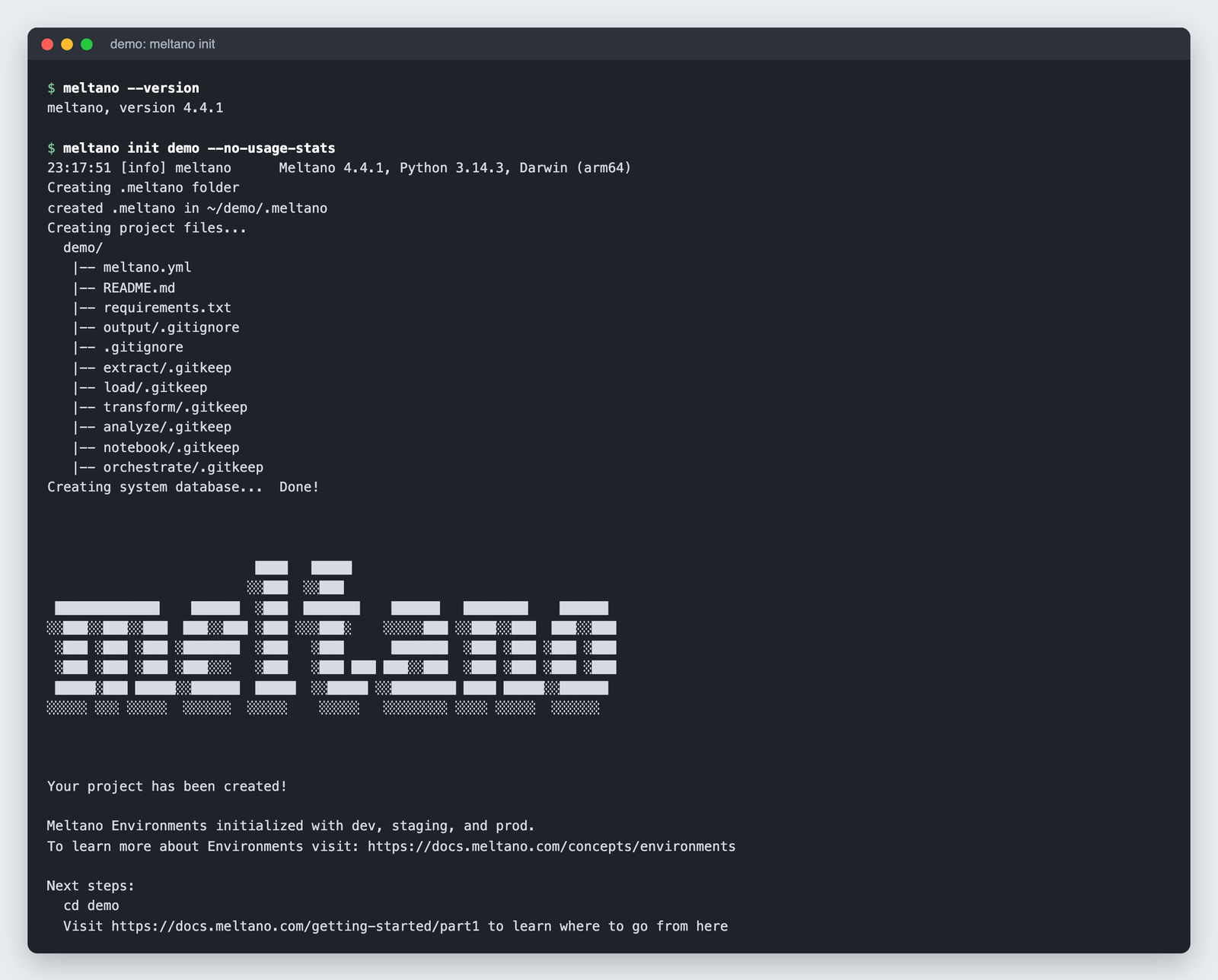
The --no-usage-stats flag wrote send_anonymous_usage_stats: false into meltano.yml. Telemetry is on by default, so pass the flag at init if that matters to you.
Adding a Tap and a Target
My first gotcha came from older tutorials: meltano add extractor tap-csv fails in 4.x with “Utility ‘extractor’ is not known to Meltano”, because the plugin type is now inferred from the name. meltano add tap-csv worked, pulled the MeltanoLabs variant (tap-csv 1.2.0, built on Singer SDK 0.54.7) from Meltano Hub, and installed it into its own virtual environment in under a minute.
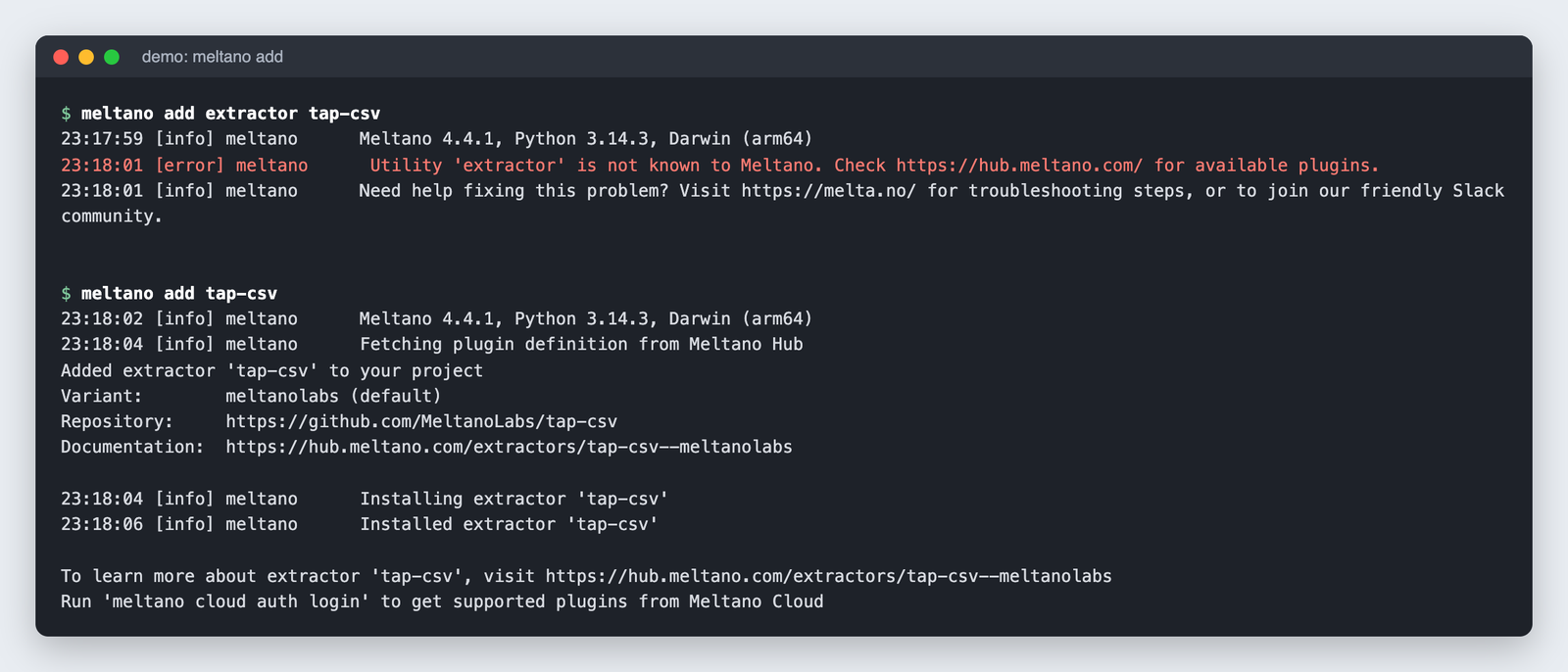
meltano add target-duckdb took about two minutes, and meltano config set target-duckdb filepath output/warehouse.duckdb wrote plain YAML into meltano.yml, which is exactly what you want for code review. After every add, the CLI prints a nudge to run meltano cloud auth login for Cloud-supported plugins, which is the paid tier knocking.
Running the First Pipeline
A 5,000-row orders CSV went into DuckDB with meltano run tap-csv target-duckdb in about 8 seconds on the first run, exit code 0. The log showed record_count 5000 on both the tap and target sides, a sync duration per stream, and a saved state under the ID dev:tap-csv-to-target-duckdb, visible through meltano state list.
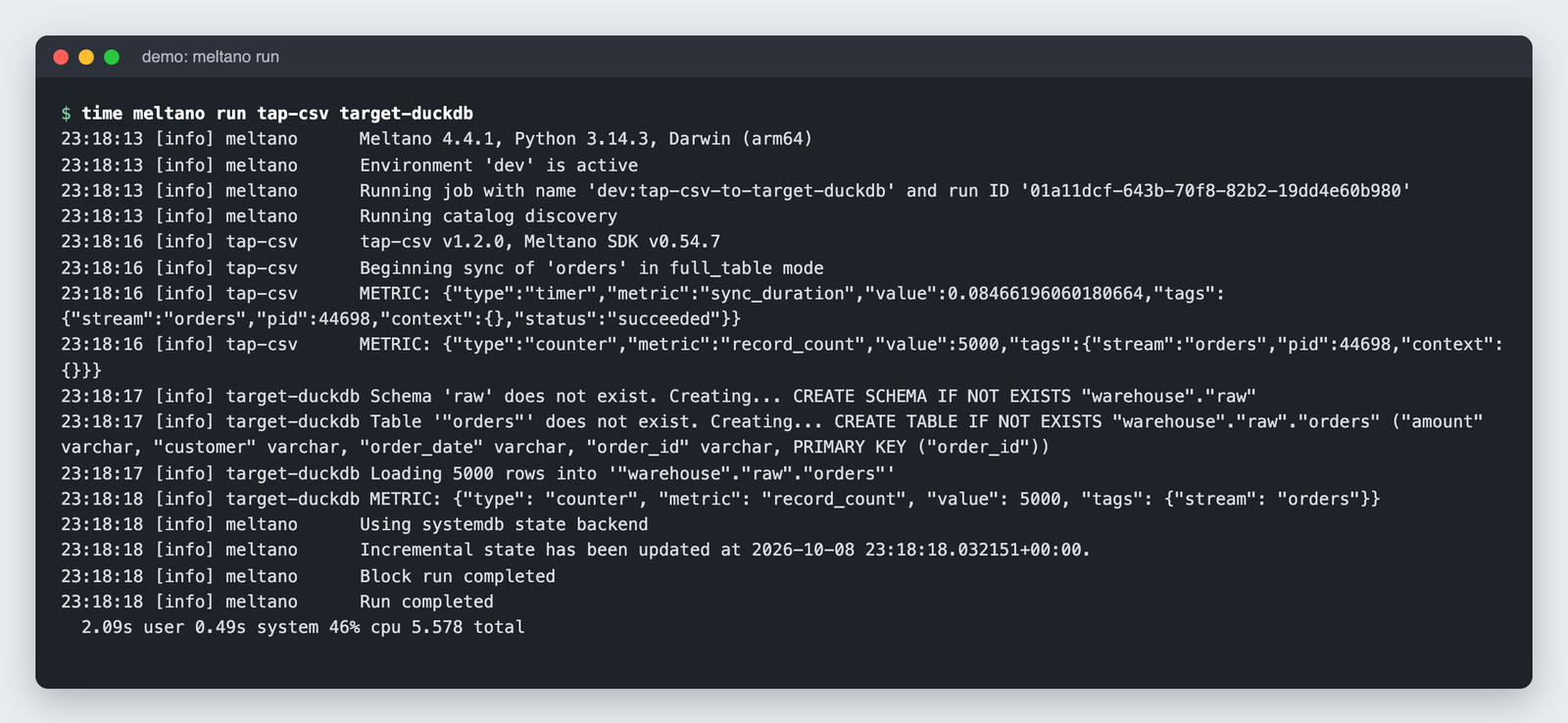
Every column landed as VARCHAR, including amount, so sum(amount) failed in DuckDB. Typing is the tap’s job, and the CSV tap does not infer numeric types.
Changing the Schema
I added a channel column and one new row, then reran. The upsert on order_id worked (5,001 rows, no duplicates), but the new column was dropped, and the only trace was an info-level log line: “Properties (‘channel’,) were present in the ‘orders’ stream but not found in catalog schema. Ignoring.”
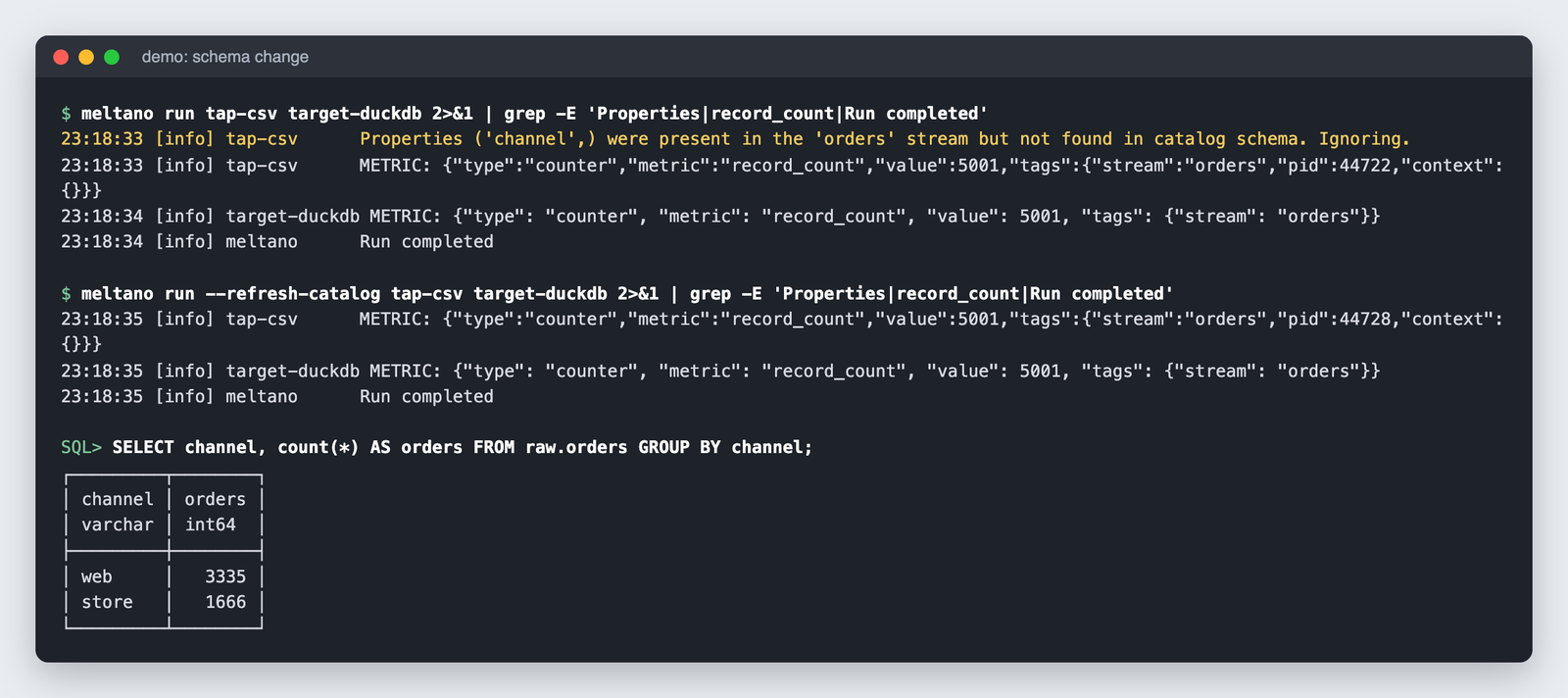
meltano run --refresh-catalog tap-csv target-duckdb fixed it, and the channel column appeared populated on all 5,001 rows. Subsequent runs took about 2 seconds.
Masking a Column With Stream Maps
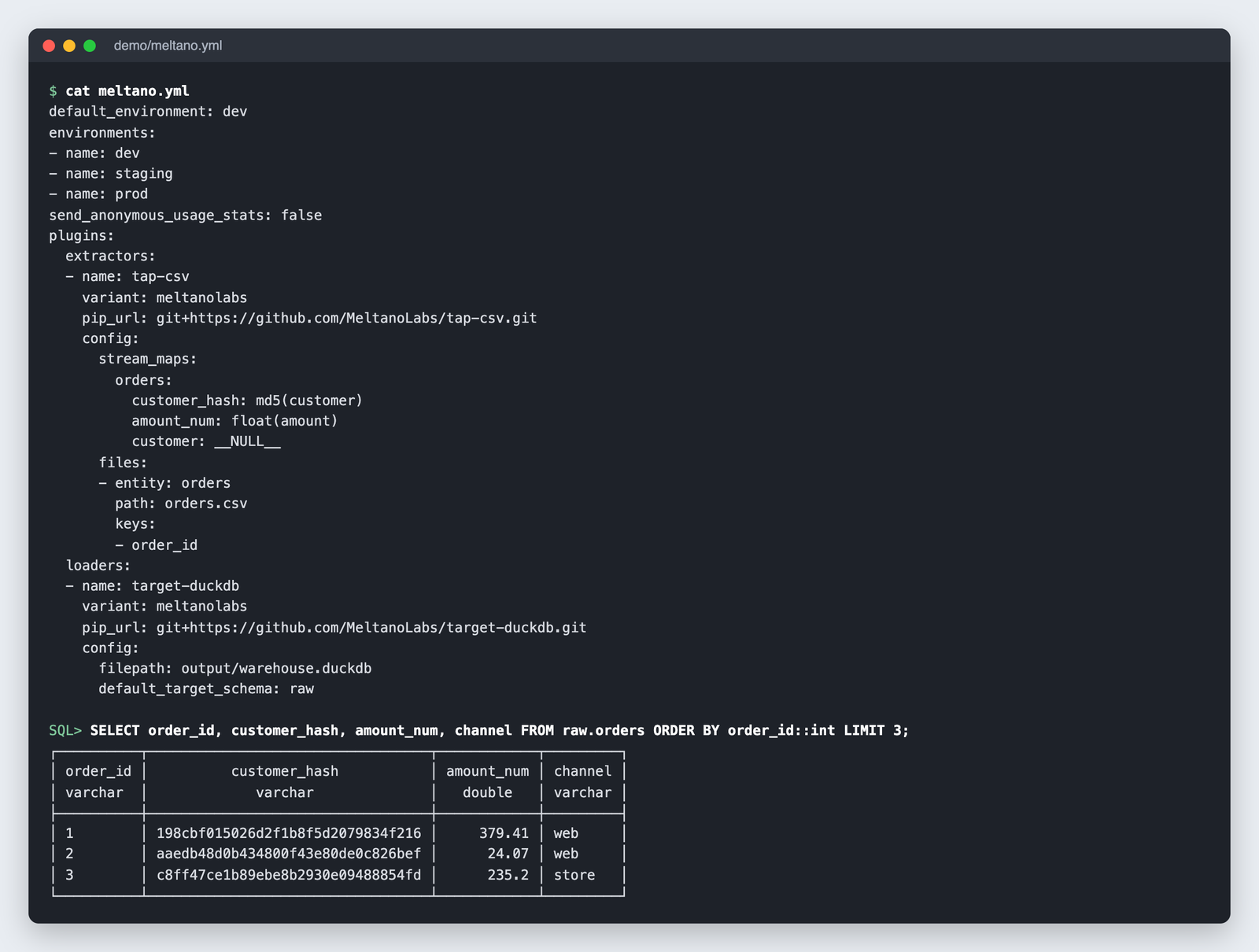
Setting stream_maps on tap-csv with customer_hash: md5(customer) and amount_num: float(amount) produced an md5 column and a DOUBLE column in one run, no mapper plugin required. Dropping a column was less obvious: customer: null was ignored, and only customer: "__NULL__" removed it.
The project’s .meltano folder weighed 74 MB with two plugins installed, since each gets its own virtual environment. A later attempt to add the dbt-duckdb utility failed on a dependency download in my Python 3.14 environment, so I cannot report on transformation; the failure does show that every plugin install inherits the packaging fragility of that plugin.
Reviewer’s Notes: Put
--refresh-catalogin your CI run command from day one, because the silent column drop produces a successful exit code and a quiet log line, which is the worst kind of failure to find three months later. Commit the plugin lock files Meltano 4 writes on every add as well, since lock-file and variant mismatches are a common way for Meltano pipelines to break.
Meltano Hub and the Singer Connector Catalog
Meltano Hub lists 631 extractors, 50 loaders and 26 utilities, which is the count behind Meltano’s “600+ connectors” line.
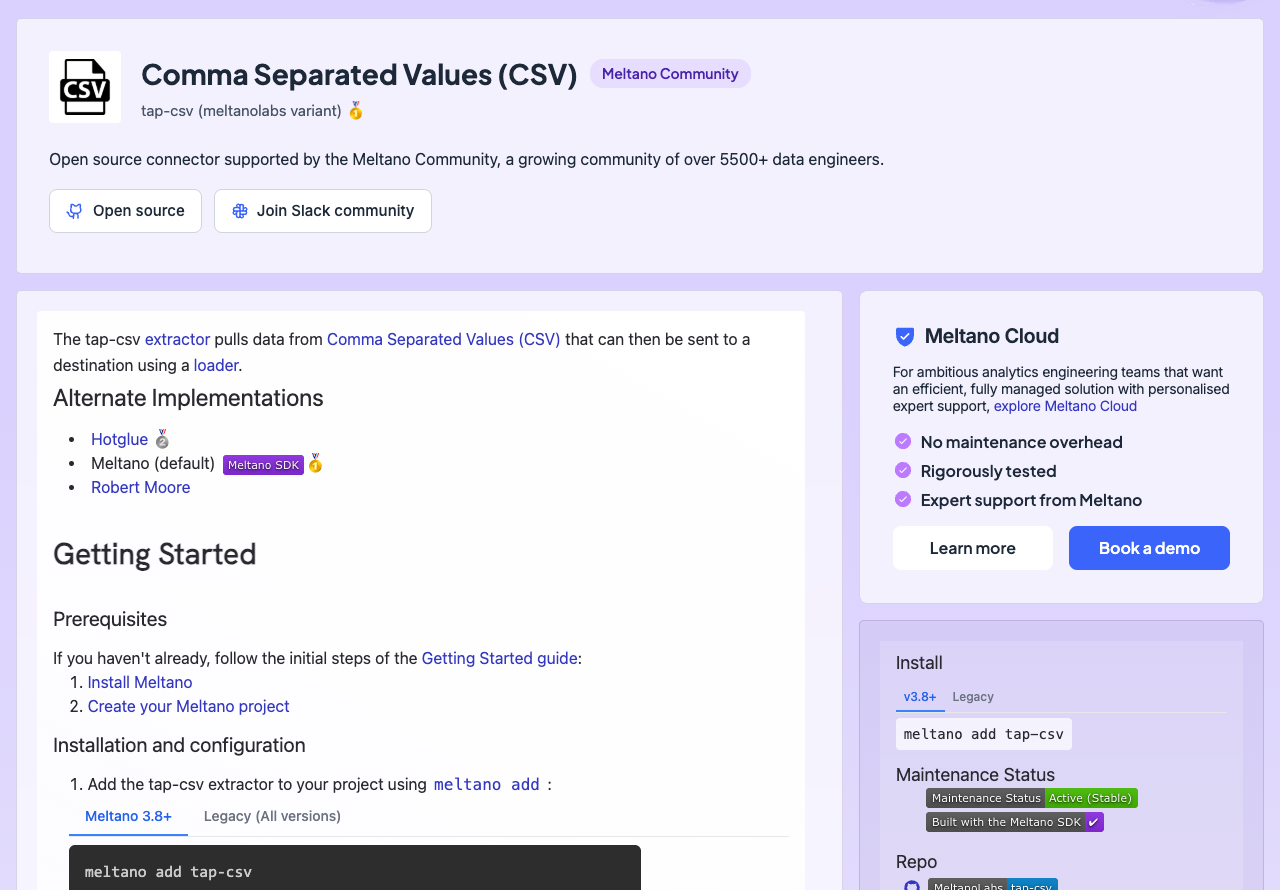
Many of those extractors exist in several variants, meaning separate implementations of the same tap by different authors; the Hub tracks up to 244 Airbyte-wrapped and 113 singer-io variants. The default variant Meltano installs is Airbyte-wrapped for 135 extractors, singer-io for 76, hotglue for 57, MeltanoLabs for 32 and Matatika for 22, so only about 5% of default extractors are MeltanoLabs-maintained.
Loaders are consolidated: 11 of the 50 default to MeltanoLabs variants, including Postgres, Snowflake, BigQuery, DuckDB and ClickHouse, and target-duckdb, the one I ran, gave me no trouble. The extractor side is where users report the pain, with inconsistent tap quality, stale variants that no longer run, and forking as the usual fix when a tap lacks a field or an auth method. Users describe needing a custom fork for most sources they connect, and one found the Zuora tap too dated to run and ported a working tap from outside the Hub instead.
Meltano asks tap authors to contribute upstream rather than publish yet another variant, and recommends its Singer SDK for new taps. The SDK (0.54.7 at the time of writing) scaffolds a custom tap with templates, pagination and retry helpers, and built-in tests, and it is what the tap-csv I ran was built on. Plugin inheritance (meltano add tap-postgres--billing --inherit-from tap-postgres) gives you several differently configured copies of one tap without duplicating the install, which is how you would split one Postgres source into billing and product pipelines with separate state.
Fivetran sells near-zero connector maintenance, and Airbyte’s own connector quality also varies by contributor; Meltano gives you breadth and a build kit, so check a variant’s last release date before you depend on it.
Best for teams whose sources include at least one niche system no managed vendor covers. Skip it if your source list is ten mainstream SaaS apps and nobody wants to read a tap’s source code.
meltano.yml, Environments, State and Stream Maps
One File for the Whole Project
meltano.yml holds every plugin, its variant, its pip_url and its config, so a pull request shows exactly which tap changed and which settings moved. Version 4 auto-locks plugin definitions when you add or update them, so the manual meltano lock step from older guides is gone, and meltano config set now takes the plugin name before the setting name.
Each plugin lives in its own virtual environment under .meltano, managed through uv, which is why two taps with conflicting dependencies can coexist in one project. Windows is not fully supported; use WSL or Docker there.
Environments and State
meltano init creates dev, staging and prod environments, and every run records its bookmark under a state ID of the form {environment}:{tap}-to-{target}, which is what I saw as dev:tap-csv-to-target-duckdb.
State backends:
- System database (SQLite) by default, which is what my run used
- Local filesystem via a file:// URI
- AWS S3 and S3-compatible stores, Azure Blob Storage and Google Cloud Storage, each needing the matching
meltano[s3],meltano[azure]ormeltano[gcs]extra
Version 4.3 added state export and import, so you can carry a pipeline’s bookmarks between machines or into CI, and a remote backend lets ephemeral containers run incremental syncs with no database at all. Singer replication is at-least-once, so incremental runs can emit duplicates; my rerun upserted on order_id with none, but an append-only target would keep them.
Stream Maps
Stream maps live inside the tap’s config and handle aliasing, filtering, hashing, casting, adding and flattening properties before the record reaches the target; I hashed customer IDs and cast amounts to float in one run. Aggregation, joins and external lookups are out of scope and belong in dbt downstream.
dlt does the same work in Python code rather than YAML, which is the cleaner model if your team already thinks in Python functions; Meltano’s version is declarative and reviewable without running anything.
Orchestration, dbt and Meltano Cloud’s Managed Layer
meltano schedule add and meltano job add declare what runs and when, but Meltano Open executes nothing on a timer by itself. Apache Airflow is the standard path, installed as a utility with meltano add airflow, and Dagster sits on the Hub as the alternative.
The same utility mechanism covers the rest of the stack:
- dbt adapters for Postgres, Snowflake, BigQuery, Redshift, DuckDB and Athena
- Quality and lint: Great Expectations, Elementary, SQLFluff
- BI: Superset, Evidence, Metabase
A job can chain tap-x target-y dbt-postgres:run in one line, and meltano schedule add <name> --job <job> --interval '@daily' hands it to Airflow. I did not test dbt, because the utility failed to install in my environment, so this paragraph describes the setup rather than a run.
Meltano Open has had no UI since v3.0. Meltano Cloud is the answer when you will not run Airflow, since it schedules pipelines itself: sign in, connect a GitHub repo that contains your meltano.yml, add credentials, and run pipelines from the UI or meltano cloud run, with logs streamable to Datadog. Cloud also markets an AI layer (the Agent Melty assistant, a melty-mcp MCP server, AI diagnostics) and reverse ETL, and its changelog has been updated weekly, most recently on October 5, 2026.
The ownership history is why some teams hesitate: the company behind Meltano rebranded as Arch in late 2023 and later shut down, and Matatika took the project on in 2026. Three releases in three weeks (4.3.0 on September 21, 4.4.0 on September 29, 4.4.1 on October 7) show Matatika is shipping.
How Does Meltano Compare to Competitors?
Meltano wins Git-native, Singer-compatible, self-hosted ELT, and each rival below wins a niche it does not.
- Airbyte: a UI plus 600+ connectors, self-hosted as Core or managed as Cloud Standard from $20 a month in credits, with Plus at $189 a month for 40 credits. Wins for teams that want to click a source into existence; Meltano wraps 135 Airbyte connectors as default extractor variants, so the two catalogs overlap heavily.
- Fivetran: near-zero maintenance on MAR billing, free up to 500K MAR, then a $5 base per connection and a $12,000 annual minimum on contracts, with row deletes counting toward MAR since January 2026. Wins when engineering time costs more than the bill.
- dlt: an Apache 2.0 Python library where every pipeline is code, free to use, with dltHub’s paid platform listed at $12,000 a month on a 12-month minimum. Wins for Python-first teams building custom sources who would rather write a function than a YAML block.
- Stitch: Singer-based managed replication, Standard from $100 a month, Advanced at $1,500 a month billed annually, and no built-in transformations. Wins for small managed replication with no infrastructure at all.
- Hevo Data: free up to 1M events a month, Starter at $299 list, Professional at $849. Wins for no-code teams that will never open a terminal.
- Estuary: free up to 10 GB a month, then $0.50 per GB plus a per-connector-instance fee. Wins for real-time CDC, which Meltano’s batch model does not do.
| Tool | License / model | Starting price | Best for |
|---|---|---|---|
| Meltano | MIT (Open), managed Cloud | Free; Cloud quote-only | Git-versioned Singer ELT you run yourself |
| Airbyte | Open-source Core, managed Cloud | Free Core; Standard $20/mo in credits | Teams that want a UI |
| Fivetran | Commercial, MAR billing | Free to 500K MAR; $12,000/yr contract minimum | Zero-maintenance managed ELT |
| dlt | Apache 2.0 Python library | Free | Python-native custom sources |
| Stitch | Commercial, Singer-based | $100/mo | Small managed replication |
| Hevo Data | Commercial, event billing | Free to 1M events; Starter $299/mo | No-code pipelines |
| Estuary | Commercial, streaming | Free to 10 GB/mo; $0.50/GB | Real-time CDC |
The license column is the decision: Meltano, dlt and Airbyte Core are the three you can run free with no vendor contract, and Meltano is the only one of those that is Singer-native and managed as a single Git-versioned YAML project. PipelineWise, Wise’s Apache 2.0 Singer runner, is the closest open-source cousin, and 14 of its taps ship on the Hub as transferwise variants.
How I Reviewed Meltano
I start every review with my own setup and testing: I install or sign up, connect real sources, run the core workflow end to end, and compare the tool against the strongest rivals in its category.
Five areas feed my verdict: pricing transparency, openness and exit costs, setup and operating effort, connector depth, and development momentum. Quote-only pricing counts against transparency, and sponsors and affiliates cannot change a verdict.
For Meltano, that meant installing 4.4.1 in a clean Python environment, building a CSV-to-DuckDB pipeline, forcing a schema change, running incremental state and stream maps, and comparing Open against the Meltano Cloud tiers. I also note what I could not test: the dbt utility failed to install in my environment, so I have not run a transformation. Prices current as of October 2026.
Meltano Review: Should You Build Your ELT Pipelines With Meltano?
Yes, if you are a data engineer who wants ELT in Git, needs at least one niche Singer tap no managed vendor offers, and can run Airflow or Dagster alongside it. The MIT license, the single meltano.yml and the per-plugin virtual environments are the reasons to pick it, and my pipeline ran in about 8 seconds once the install was done.
Choose Meltano Cloud if you like the meltano.yml model but will not run the infrastructure. Meltano sizes Starter’s 200 compute hours for 5 to 10 daily connectors, so count your syncs and get the quote in writing before you plan around it.
Say no if you want a UI (Airbyte), zero maintenance (Fivetran), Python-native pipeline code (dlt), or CDC streaming (Estuary). Say no as well if your team works on Windows without WSL, or if nobody will own the Airflow instance and the alerting that Meltano Open leaves to you.
The next action is free: pip install meltano, then meltano add tap-<your hardest source> before anything easy, because the tap for your most awkward system is what decides whether Meltano works for you. Run it with --refresh-catalog before you trust a schema change. The official site is meltano.com.
FAQ
Is Meltano free?
Yes. Meltano Open is free under the MIT license with no row or connector caps; you pay for the machines it runs on and the engineering time to schedule and monitor it. Meltano Cloud, the managed edition, is paid, sold in compute-hour tiers (Starter, Growth, Scale, Enterprise) with no published prices, so expect a demo before a quote.
Is Meltano still maintained?
Yes. Matatika took over the open-source project after Arch, the previous company, shut down, and it shipped 4.3.0, 4.4.0 and 4.4.1 between September 21 and October 7, 2026, with the core repository pushed to as recently as October 8. The v3 line still receives patches as well: 3.9.5 shipped in July 2026.
What is the difference between Meltano and Singer?
Singer is the specification for taps (sources) and targets (destinations) that exchange JSON records. Meltano is the project manager around it: it installs taps and targets into isolated virtual environments, holds their config in meltano.yml, tracks incremental state per environment, applies stream maps, and catalogs 631 extractors and 50 loaders on Meltano Hub. You can run a Singer tap without Meltano; you cannot run Meltano without Singer-style plugins.
Meltano vs Airbyte: which is better?
Airbyte is better if you want a UI and a managed Cloud plan from $20 a month in credits. Meltano is better if you want pipelines as reviewable YAML in Git, free self-hosting with no row caps, and Singer taps you can fork or build yourself. See How Does Meltano Compare to Competitors? above for the full breakdown.
Does Meltano support reverse ETL or CDC?
Reverse ETL, yes: targets such as HubSpot, Salesforce and Pardot are on the Hub, and reverse ETL connections are included in both Open and Cloud. CDC depends on the individual tap; log-based replication exists for some databases, but Meltano runs in scheduled batches, so it is not a real-time streaming tool. For real-time CDC, Estuary is the better fit.