Quick verdict: I recommend AWS Glue for custom data preparation when your engineers already work in AWS. You get managed Spark processing without provisioning a cluster, but your team still has to handle permissions, schema changes, and safe reruns. For routine source-to-warehouse replication, I recommend looking at Fivetran or Airbyte first.
What I like about Glue is the combination of a shared metadata catalog and visual or code-based transformations. You can describe data once, then build jobs that prepare it for analytics. I like having both options, especially when a simple visual job grows into something that needs custom code.
Key Takeaways
- Best for AWS-native engineers: Glue makes sense for custom transformations with S3 at the center.
- Visual and code-based jobs: Glue Studio connects transformation graphs with generated scripts.
- Version-specific pricing: Glue 6.0+ standard Spark ETL costs $0.308 per DPU-hour in US East (N. Virginia).
- Serverless isn’t maintenance-free: Your team still handles permissions, schemas, and output checks.
- Bookmarks aren’t CDC: Tracking processed inputs doesn’t automatically prevent duplicate target writes.
In this AWS Glue review, I’ll take a closer look at pricing, building jobs, and keeping your data reliable, so you can decide whether that flexibility is worth the work.
Pros and Cons
Pros
- Managed Spark processing without a persistent cluster to provision.
- Studio supports visual graphs alongside transformation code.
- Data Catalog keeps shared metadata separate from stored data.
- Glue 6.0+ offers lower DPU-hour rates.
- DQDL supports explicit completeness and uniqueness checks.
Cons
- Service roles and networking require AWS expertise.
- Previews and crawlers add separate compute charges.
- Resetting bookmarks leaves existing target data untouched.
- Runtime upgrades can require code and dependency changes.
AWS Glue Pricing
Glue has no monthly subscription tiers. You’re buying processing capacity and supporting services, so the useful question is which execution option fits your job, not which plan unlocks enough features.
All compute prices below are in USD per DPU-hour, for US East (N. Virginia), us-east-1. DPU means data processing unit: the bill depends on how much processing capacity you use and how long it runs. These aren’t per-job prices, and a worker doesn’t necessarily equal one DPU.
- Standard Spark ETL: $0.308/DPU-hour for Glue 6.0+ Gen2 processing. My starting choice for compatible new production jobs.
- Flex: $0.203/DPU-hour for Glue 6.0+ Gen2 processing. A lower-cost option for eligible, nonurgent batch work.
- Interactive sessions: $0.308/DPU-hour for Glue 6.0+ Gen2 sessions. Budget for development and preview, not just scheduled jobs.
- Memory-optimized processing: $0.364/DPU-hour for Glue 6.0+ Gen2 memory-optimized usage. Choose it for a genuine memory requirement.
- Crawlers: $0.44/DPU-hour. Discovering catalog metadata has its own compute bill.
| Usage option | Glue 6.0+ Gen2 rate | Earlier-runtime rate | Important distinction |
|---|---|---|---|
| Standard Spark ETL | $0.308/DPU-hour | $0.44/DPU-hour | Runtime determines the rate |
| Flex execution | $0.203/DPU-hour | $0.29/DPU-hour | Nonurgent work; supported G.1X/G.2X configurations |
| Interactive sessions | $0.308/DPU-hour | $0.44/DPU-hour | Development compute, separate from production |
| Memory-optimized processing | $0.364/DPU-hour | $0.52/DPU-hour | Different worker class from standard processing |
| Crawlers | $0.44/DPU-hour | $0.44/DPU-hour | Separate crawler rate, not Gen2 ETL pricing |
The Data Catalog has a useful free allowance. Just don’t mistake free metadata usage for free ETL: storing the underlying data and processing it remain separate expenses.
| Catalog usage | Included allowance | Overage price |
|---|---|---|
| Stored metadata objects | First 1 million objects | $1 per 100,000 objects per month |
| Metadata accesses | First 1 million accesses per month | $1 per million requests |
For example, a hypothetical Glue 6.0 Standard job consuming six DPUs for 15 minutes has this compute cost:
6 DPUs x 0.25 hours x $0.308/DPU-hour = $0.462
At the earlier $0.44 rate, the same DPU-time costs $0.66. That’s a compute illustration, not an all-in pipeline bill.
The extra charges are where I recommend paying attention:
- Crawler runs add catalog discovery costs.
- S3 and CloudWatch are billed separately.
- Data quality checks can consume additional compute.
- Development sessions add spending beyond scheduled production runs.
Is AWS Glue Good Value for Money?
I like Glue’s value when custom Spark transformations are the reason you’re buying it. It’s less compelling when you mainly want someone else to maintain source synchronization.
- Good value: AWS engineers preparing data with custom transformation logic.
- Weaker value: Teams needing straightforward replication rather than Spark jobs.
- Budget risk: Estimating the whole pipeline from the ETL rate alone.
Reviewer’s Notes: Start with Glue 6.0 Standard for compatible new AWS data-lake jobs. Flex is worth considering for nonurgent workloads on supported G.1X or G.2X workers, with Glue 3.0+ required. Keep an earlier runtime when the migration effort outweighs the near-term savings.
Getting Started With AWS Glue
I recommend making your first job deliberately small. For example, you could turn incoming order files in S3 into Parquet, a column-based format used for analytics. That gives you a useful first project without several datasets to untangle at once.
1. Separate the source and destination
Choose your AWS region, then use distinct S3 prefixes such as incoming/orders/ and curated/orders/. You want an obvious distinction between raw files and prepared output.
Keep the first version to one source format and one destination, with an explicit schema. If the result is wrong, a narrow job gives you fewer places to investigate before adding incremental processing or more sources.
2. Give the job its own permissions
Glue needs a service role with AWSGlueServiceRole permissions and access to the relevant source and target locations. Encrypted data may also require KMS permissions.
Your console access isn’t the job’s access. You might be allowed to configure a transformation while its execution role cannot read the order files or write the results.
My preference is to scope the role to the S3 locations the job actually needs. Broad bucket access may look convenient during setup, but it shouldn’t become the permanent answer by accident.
3. Choose catalog metadata or a direct S3 source
You can read through a Data Catalog table or point the job directly at S3. A crawler can infer catalog metadata, but you don’t need one for every file conversion.
I favor the catalog when several consumers need the same dataset description. For a tightly controlled conversion, a direct source avoids adding crawler schedules and schema-update decisions without a clear benefit.
4. Build the transformation graph
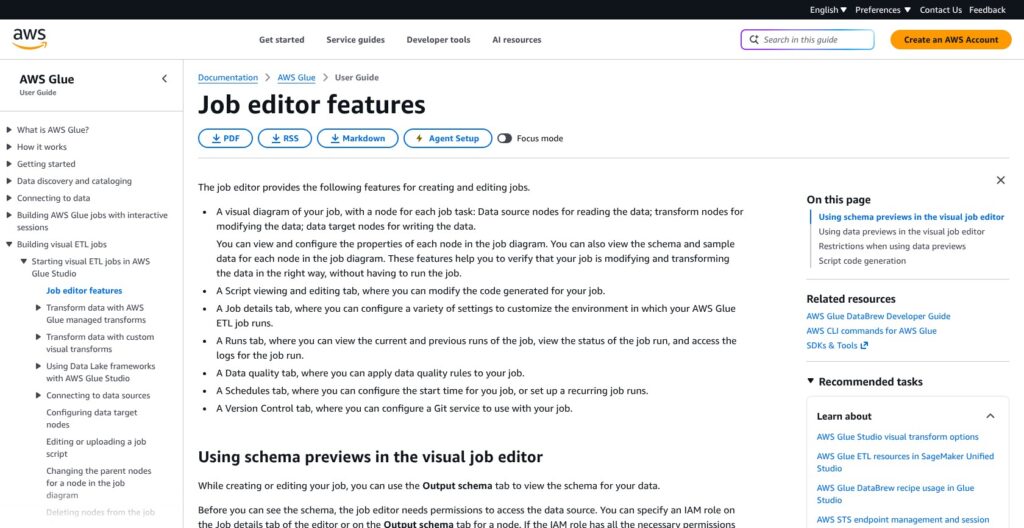
Glue Studio organizes visual jobs into source, transform, and target nodes. For the orders example, the graph could include:
- S3 source: Read files from the incoming prefix.
- Mapping transform: Set field names and intended data types.
- Filter transform: Apply your rule for unacceptable rows.
- S3 target: Write Parquet files to the curated prefix.
Studio generates a script stored in S3. I like that connection between the picture and the code: the visual graph doesn’t have to conceal what the job will execute.
Be careful with filtering. Removing an order with an invalid total might make the output easier to query while hiding a problem someone needs to fix. Decide what happens to rejected rows, rather than treating their disappearance as success.
5. Treat preview as paid development
Data preview uses an IAM role and an interactive session, so preview consumes compute. End the session when you’re finished.
Preview is useful for spotting an obvious mapping mistake. A sample can’t tell you whether every file has the expected schema or every order ID is valid, though. Use it to refine the transformation, then check the actual output.
6. Configure execution and output handling
Before running the job, make deliberate choices about:
- Runtime version: Select the version explicitly.
- Worker type and count: Match capacity to the workload.
- Execution class: Use Standard or eligible Flex execution.
- Retries and timeout: Set limits on failure handling.
- IAM role: Assign the job’s execution permissions.
After a run, inspect the records and file layout, not just the status. CloudWatch metrics help explain what happened during processing.
My recommendation is to settle rerun behavior before scheduling the job. Writing Parquet once is useful; knowing what happens when yesterday’s orders arrive again is what makes the pipeline dependable.
Organizing Your Data With the Glue Data Catalog
The Data Catalog is one of Glue’s most useful pieces because it lets you share dataset descriptions without moving the data. The catalog stores metadata; your order records can stay in S3.
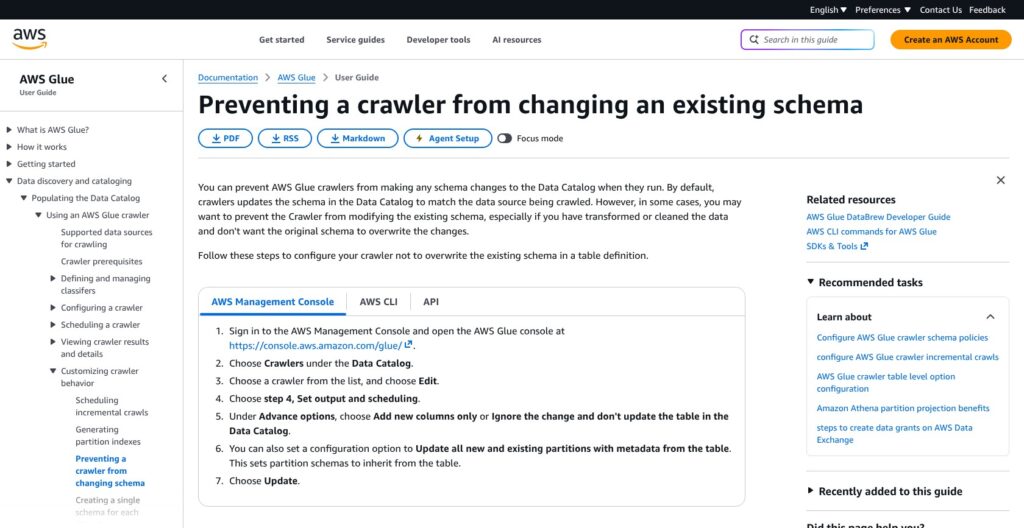
Crawlers save you from defining every schema manually. Their default behavior is less reassuring for stable reporting datasets: they update the catalog schema to match the source. An upstream change can therefore affect everyone reading that shared table.
You can choose a different approach:
- Update the schema: Apply changes discovered in the source.
- Merge new columns: Allow additions through the crawler policy.
- Log changes: Record differences without changing the table schema.
I don’t want automatic discovery deciding what a finance report should accept. If order_total changes from a number to text, detecting the change is helpful; approving it is a separate decision.
For shared production tables, I recommend controlled schema changes and a named person or team responsible for approving them. Exploratory data can reasonably use a more permissive policy.
Connections deserve the same scrutiny. A supported database connection doesn’t guarantee support for every source object or incremental mode you need. For VPC-based sources, access also depends on the right subnets, security groups, and routes.
This is where Fivetran or Airbyte becomes attractive. If maintaining source syncs is the main task, a connector-centered product can be a better starting point than assembling discovery, networking, and custom jobs in Glue.
Building Transformations With AWS Glue
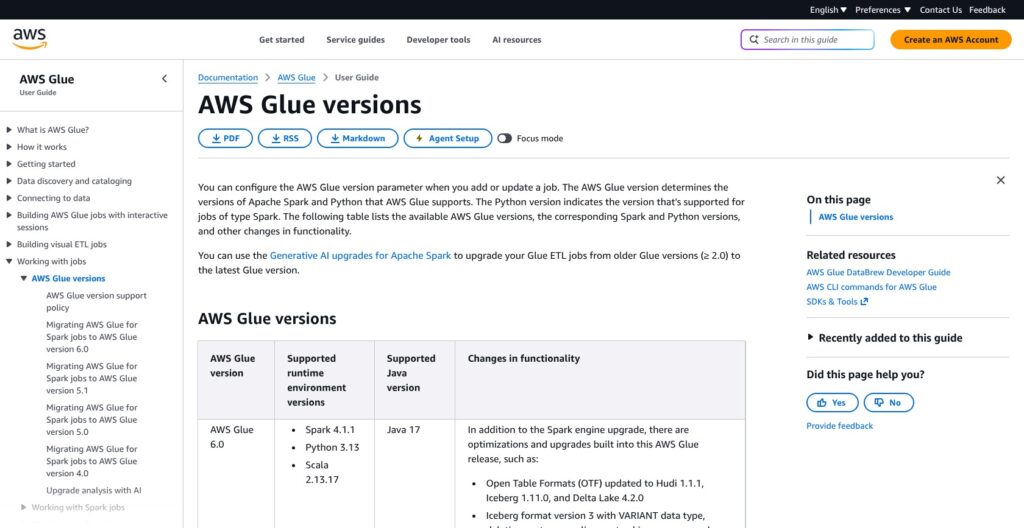
I recommend Glue when the transformation itself is valuable work, not just a small step between copying tables. Studio’s visual graph is useful for readable mappings and filters, while code-based authoring gives engineers more room for unusual logic.
Neither approach removes the need to understand Spark and its dependencies. If your team already knows Spark, I think that’s a fair trade for the flexibility. If it doesn’t, the visual editor alone isn’t a good reason to choose Glue.
Glue 6.0 uses:
- Apache Spark 4.1.1
- Python 3.13
- Scala 2.13.17
- Java 17
Select the version yourself. The documented default remains Glue 5.1 when unspecified, so leaving that setting alone doesn’t reliably get you 6.0 or its lower rates.
The migration changes matter more than the version number. Glue 6.0 enables ANSI SQL mode by default, meaning invalid casts or overflow can raise errors instead of returning null. Custom JARs built for Scala 2.12 also need recompilation for Scala 2.13.
For example, a job that previously tolerated malformed numeric order totals may now fail. I see that as a reason to define rejection handling before migrating, not a reason to avoid the newer runtime altogether.
Glue 6.0 also adds:
- Spark Declarative Pipelines for another way to define processing.
- Spark Connect interactive sessions for interactive development.
- Real-time mode supporting stateless streaming.
Choose the processing mode around whether the job needs to remember earlier events and how it should recover. A real-time feature label isn’t a latency guarantee.
My strongest warning concerns Iceberg v3: it cannot be downgraded to v2, and Athena SQL does not read v3. Keep Iceberg v2 when Athena compatibility matters.
AWS provides Python Glue libraries for local development, provided you match the runtime dependencies. That doesn’t make the managed service self-hostable. If your engineers already work in Databricks, weigh the value of Glue against maintaining another development and scheduling environment.
Keeping Your Data Reliable
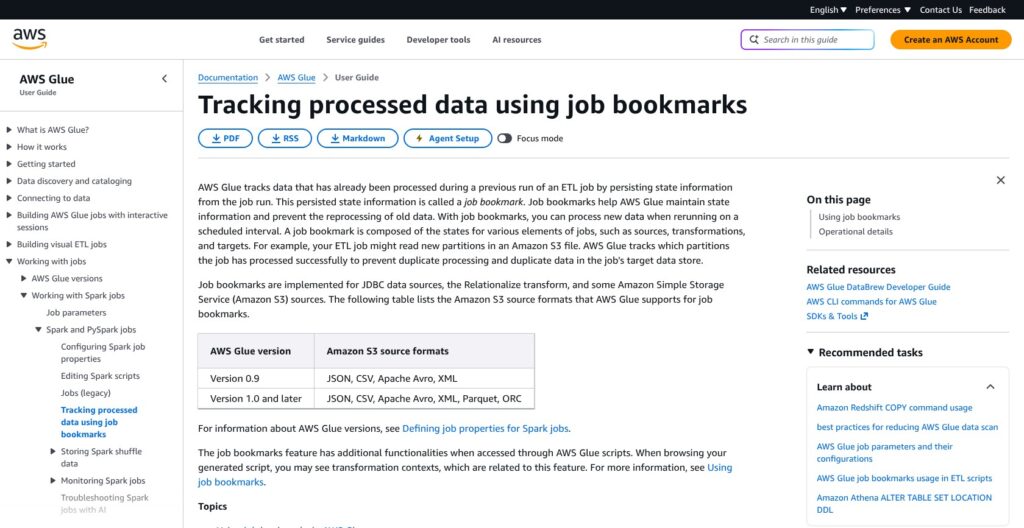
My biggest concern isn’t whether Glue can finish a job. It’s whether a rerun leaves you with the data you intended. A green status doesn’t answer that question.
Bookmarks track input, not safe output
Job bookmarks are disabled by default. For supported JDBC and S3 sources and formats, they track processing state so subsequent runs can identify relevant input.
S3 bookmarks use object last-modified timestamps, not order IDs or another business key. JDBC bookmark keys have their own constraints. Neither should be confused with log-based change data capture.
Most importantly, resetting bookmarks doesn’t clean targets. Reprocessing files into an append-only destination can write the same orders again.
For the orders example, choose a rerun strategy before you need it:
- Separate replay output: Send reprocessed data to another target, then reconcile it.
- Controlled replacement: Handle the affected output explicitly instead of blindly appending.
- Defined deduplication: Use a business key and decide which competing record wins.
Bookmarks don’t supply those decisions. Don’t rely on them to capture every database change or ensure that each record is written only once.
Streaming ETL is different: supported Kafka and Kinesis sources use checkpointing. Plan streaming recovery separately rather than applying batch bookmark assumptions to it.
Quality rules need someone to act on them
Glue Data Quality can recommend and evaluate rules written in DQDL. For an orders pipeline, useful checks might include:
- IsComplete or Completeness: Detect missing order IDs.
- Uniqueness: Find duplicate identifiers.
- RowCount: Flag an unexpected dataset size.
- CustomSql: Check a more specific business condition.
I like explicit checks because you can explain what they protect against. A missing-ID rule is much more useful than an unexplained assurance that the dataset looks healthy.
But recommended rules can’t decide whether an order total makes commercial sense or a late cancellation should replace an earlier record. Your developer chooses both the rules and what happens when they fail.
Catalog quality tasks require compute and output permissions. Checks inside ETL jobs can add runtime and DPU consumption, so include them in the budget rather than treating them as a free extra.
Monitoring helps, but doesn’t fix the job
Glue exports CloudWatch metrics for:
- Runtime
- Task failures
- Records and bytes read
- Shuffle activity
Custom metrics may incur charges. These signals help you investigate, but someone still has to interpret them and change the job.
Auto Scaling adjusts workers within your configured maximum on supported Glue 3.0+ jobs. Legacy Standard worker configurations are unsupported, and scaling doesn’t fix poor partition design, inefficient transformations, or unsuitable data layout.
Bigger workers aren’t automatically better, either. G.12X, G.16X, and R workers have higher startup latency. Match capacity to the workload and schedule instead of paying for the largest option as a precaution.
How AWS Glue Compares With Alternatives
An AWS destination alone isn’t enough reason for me to recommend Glue. The better deciding question is whether you need custom transformation code or a maintained way to move data between systems.
- Fivetran: My first alternative for managed replication. Its connection-and-sync approach suits teams that want less custom pipeline code. Check the exact source, destination, and sync coverage before committing.
- Airbyte: Worth comparing if you want more control over connectors, including configurable sync schedules, modes, and schema propagation. Deployment and connector maintenance responsibilities still deserve attention.
- Databricks: The stronger candidate when your team is already consolidating engineering there. Lakeflow Connect combines managed and custom ingestion options with Unity Catalog governance and Lakeflow Jobs orchestration.
| Product | Buyer fit | Main workflow | Principal trade-off |
|---|---|---|---|
| AWS Glue | AWS-native engineers needing custom ETL | Catalog data and author visual or coded jobs | Team handles runtime, schema, and rerun decisions |
| Fivetran | Teams prioritizing managed replication | Configure connections and syncs | Suitability depends on connector and sync coverage |
| Airbyte | Teams wanting connector flexibility | Configure sources, destinations, and sync modes | Deployment and maintenance responsibilities vary |
| Databricks | Teams consolidating data engineering | Combine ingestion, governance, and jobs | Broader platform than a standalone ETL job |
For straightforward replication, start with connector coverage rather than Spark features. A supported managed connector may solve the whole problem without a custom Glue job.
Conversely, Fivetran and Airbyte aren’t substitutes for Glue’s custom Spark workflow just because all three move data. Databricks deserves serious consideration if you already use its governance and orchestration, but adding that platform solely for one S3 conversion could be unnecessary.
How I Reviewed AWS Glue
I assessed AWS documentation and pricing for Studio authoring, catalog behavior, runtime compatibility, and incremental processing, using an S3-to-Parquet orders scenario to explain the workflow. I also compared the documented approaches of Fivetran, Airbyte, and Databricks. Prices are current as of October 2026; the compute rates shown apply to US East (N. Virginia).
Should You Use AWS Glue?
Choose Glue for custom AWS ETL if your team is comfortable with Spark and AWS permissions. I particularly like it for S3-centered preparation where shaping the data matters more than simply copying it.
My starting recommendation is Glue 6.0 with Standard execution for compatible new jobs. Consider Flex for supported nonurgent work, but don’t rush an existing pipeline onto a new runtime just to lower the unit rate. Dependency changes and SQL behavior can make migration a project of its own.
Keep Iceberg formats compatible with your query tools, especially when Athena needs to read the results. Then settle schema changes and reruns before expanding the schedule.
If your main goal is less source-sync maintenance, start elsewhere: Fivetran for managed replication, Airbyte for connector flexibility, or Databricks when your engineering already lives there.
Glue’s appeal is clear: less cluster administration, substantial transformation control. Buy it for that combination, not for maintenance-free data pipelines.
AWS Glue FAQ
Is AWS Glue free?
Not as a complete ETL service. The Data Catalog includes free allowances for metadata storage and access, while ETL processing and crawlers are separately metered. Budget for supporting services such as S3 and CloudWatch too.
Is AWS Glue no-code?
Glue Studio offers visual authoring and generates scripts, but I consider it a visual tool for technical teams. You still need technical skills to handle permissions, schema decisions, and runtime configuration.
Is AWS Glue a data warehouse?
No. Glue provides data integration, processing, and a metadata catalog. The catalog describes datasets; it doesn’t replace the storage and querying functions of a data warehouse.
Does AWS Glue handle CDC?
Bookmarks are not log-based CDC. They track processing state for supported inputs under specific rules. Glue can also process streaming data from supported sources, but source change capture, deletion handling, and applying changes to the target remain requirements to assess separately.