
Editor’s note: This Hevo Data review assesses pricing, pipeline workflows, and transformation options for teams choosing a managed data integration service.
Quick verdict: I recommend Hevo Data for small and midsize data teams that want to spend less time maintaining connections and more time using their warehouse data. Its managed pipelines make it an appealing choice for recurring reporting, but I’d look closely at event consumption and transformation requirements before committing. The easier replication setup doesn’t remove the need for someone who understands your databases.
Hevo is an ingestion and ELT service for teams that have outgrown manual exports. I like its focus on getting operational data into a warehouse, but I’d want a named person responsible for the feeds before making it part of everyday reporting.
Key Takeaways
- Hevo is a good fit for teams that want managed data movement into a warehouse.
- I like having pipeline monitoring and downstream modeling available within the same platform.
- The Free plan only covers eligible connectors, so it won’t suit every small project.
- Event billing means a source table’s row count alone won’t tell you what you’ll pay.
- New Standard transformations are no longer supported; the current Edge dbt workflow transforms data after loading.
In this review, I’ll look at where the service saves effort, what still needs technical attention, and which buyers should consider an alternative.
Hevo Data Pros and Cons
Pros
- Managed database, SaaS, and file ingestion reduces custom extraction work.
- A permanent Free plan supports eligible small workloads.
- Pipeline visibility includes job status, latency, and event consumption.
- Edge can run dbt jobs after a pipeline sync.
- History mode can preserve successive versions of changing records.
Cons
- Repeated changes can increase billable event consumption.
- New Standard pre-load transformations cannot be created.
- Edge dbt support is limited to GitHub and three warehouse destinations.
- Connector setup and recovery still require technical ownership.
How Much Does Hevo Data Cost?
I’d consider Hevo’s paid plans once you need recurring reporting. Paying a monthly subscription for an occasional export is hard to justify.
Hevo’s Pipeline plans are:
- Free ($0): for small workloads using eligible sources.
- Starter (from $299/month): my starting point for a small production data team.
- Professional (from $849/month): for teams that need more capacity and pipeline automation.
- Business Critical (custom pricing): for organizations with stronger access and networking requirements.
| Plan | Paid monthly | Monthly equivalent, paid annually | Starting monthly events | Users |
|---|---|---|---|---|
| Free | $0 | $0 | 1 million | Up to 5 |
| Starter | $299 | $265 | 5 million | Up to 10 |
| Professional | $849 | $750 | 20 million | Unlimited |
| Business Critical | Custom | Custom | Custom | Unlimited |
These are starting prices in USD; higher event volumes change the cost. The discounted figures require annual billing. Hevo also offers a 14-day trial without a credit card.
What Counts Toward Your Bill?
Events aren’t the same as unique rows in your database. Inserts and updates can count toward usage, while replicated deletes are treated as updates. Depending on the pipeline, nested data can also produce additional destination records.
That makes a busy operational database a different buying decision from a quiet reporting feed. For example, an order that changes status several times before delivery can create more billable activity than one inserted once and left alone.
I would use actual event consumption from a representative workload to choose a plan. Buying far more capacity than you need is wasteful too, because the subscription charge doesn’t fall just because you use less of the allowance.
Is Hevo Good Value for Money?
Hevo’s value depends on how much pipeline work it removes from your team:
- Good value: you have recurring feeds that would otherwise need separate extraction scripts and ongoing maintenance.
- Less convincing value: you only need an occasional export and have no immediate reason to automate it.
- Worth comparing carefully: your records change frequently, since Hevo’s events and Fivetran’s monthly active rows measure different things.
I wouldn’t upgrade to Professional just to get dbt integration: Starter already includes it. Pay more when you need the pipeline APIs or capacity. Business Critical is the tier to discuss if single sign-on or VPC peering is essential.
Reviewer’s Notes: I’d start with Starter for a small team whose connectors and workload fit it, then assess the bill before accepting an annual commitment. Include your warehouse’s own costs in that decision: paying for ingestion doesn’t cover every part of running your analytics stack.
Getting Started With Hevo Data
Hevo makes the connection workflow approachable, but you’ll still need access to both ends of the pipeline. That distinction matters if you’re the analyst requesting the data and someone else controls the production database.
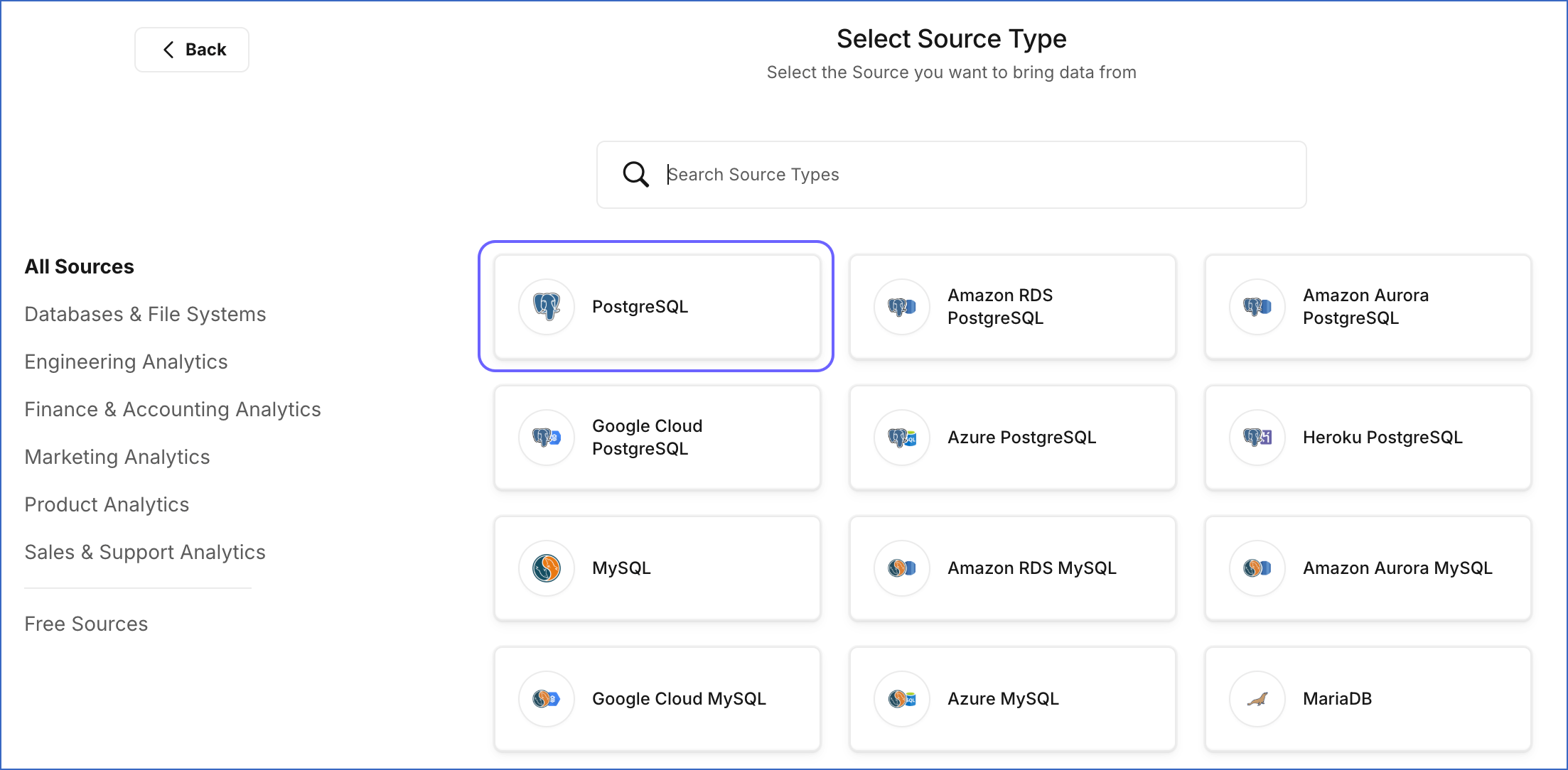
The setup follows a familiar sequence:
- Choose your source and destination. Establish where the data lives and where Hevo should load it.
- Configure access. Supply the connection details and arrange the necessary permissions and network settings.
- Choose the ingestion mode and objects. Decide which supported method to use and which tables or other objects to include.
- Review loading and scheduling. Set the historical-data option and the relevant mapping and sync settings.
- Monitor the initial load and later updates. Confirm that the resulting data is suitable for the reporting you want to build.
I like that you can connect a supported source without writing an extraction program first. For a small team, that leaves more attention for checking whether the resulting data answers the business question.
You’ll still make technical decisions, though. A PostgreSQL connection can still involve IP allowlisting or an SSH tunnel, SSL configuration, and a choice of replication method. I’d involve the person responsible for that database before treating setup as a quick admin task.
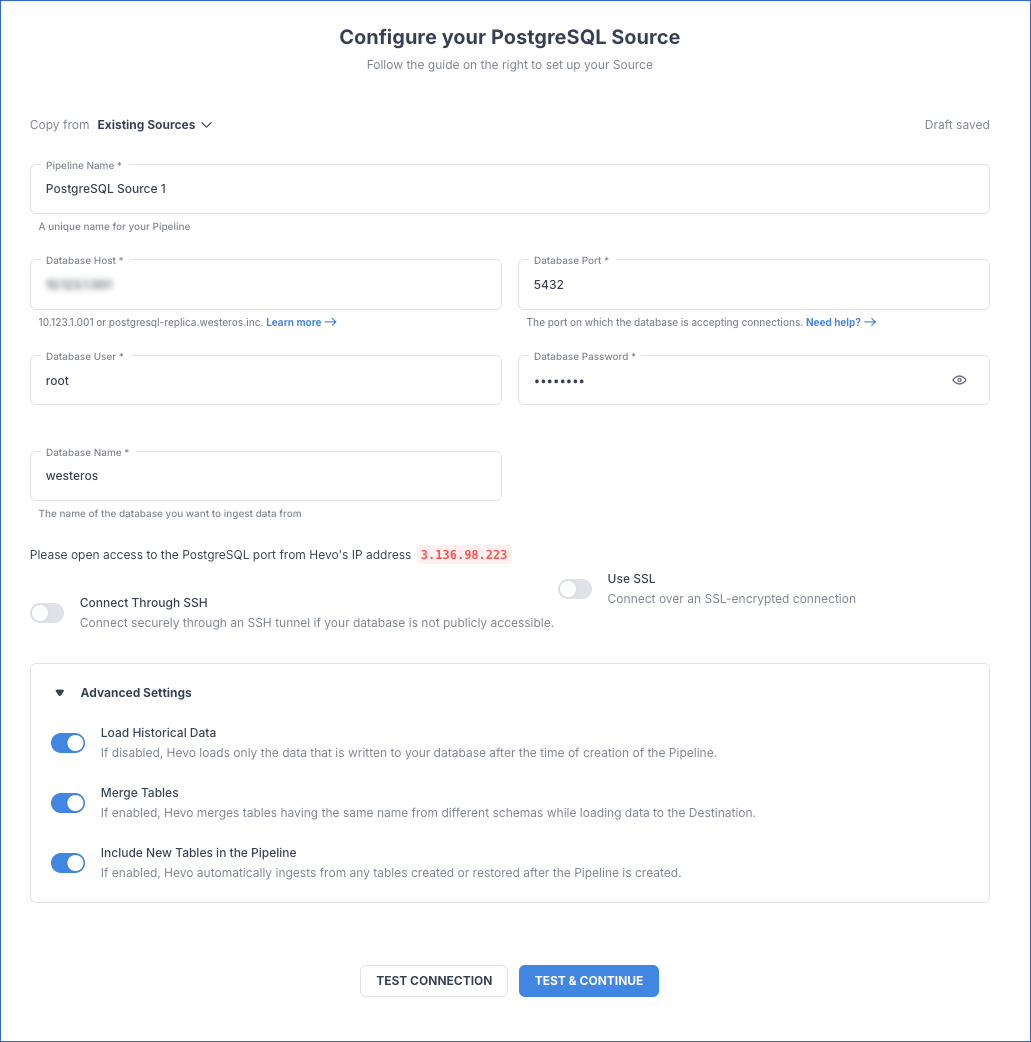
I’d start with a source your team uses every day, including its updates and deletes. A tiny, rarely updated table won’t tell you much about your busiest feed.
For a team that wants to own the runtime instead, Airbyte offers a self-managed route. I’d only prefer that option if you have someone available to operate it; infrastructure ownership is a responsibility as well as a benefit.
Connecting Your Data and Keeping It Fresh
I would choose Hevo by connector behavior, not connector count. A supported database or app is only useful if Hevo carries over the changes your reports depend on.
For PostgreSQL on Edge, Hevo’s XMIN mode avoids the setup required for WAL-based replication, but it scans tables and doesn’t detect deletes by default. Capturing deletes with that approach involves a full-refresh comparison.
I like having a simpler setup option, but I wouldn’t accept it blindly for a dashboard that depends on removed records disappearing correctly. Your reporting requirement should determine the replication method, rather than whichever configuration looks easiest.
Data freshness needs the same attention. Supported log-based sources can use streaming when enabled, while other workflows rely on scheduled ingestion. I wouldn’t choose a plan on the assumption that every connector delivers the same delay. Get the intended source, pipeline type, and sync requirements confirmed together.
How Much Maintenance Does Hevo Remove?
On Edge, SQL Server CDC can require capture settings to be refreshed after schema changes. Hevo offers support-enabled beta stored procedures to automate parts of that work, so I’d check their suitability before assuming new fields will flow through unaided.
For a reporting team, the consequence is straightforward: involve the pipeline owner when developers change the source database. Automation helps, but the database and reporting teams still need to talk.
History mode is another feature I like for the right workload. In Edge, it can retain successive record versions instead of overwriting each change. That helps when you need to understand how a record evolved, although newly added columns don’t gain a retroactive history.
I’d decide early whether you want the latest state of a record or its history. Those are different data models, and choosing deliberately is more useful than switching on every available feature.
Transforming Data With Hevo
The biggest drawback for new buyers is the change to pre-load transformations. Hevo has two pipeline systems, Standard and Edge, with different transformation workflows. New Standard transformations can no longer be created. Existing transformations continue to run and can be modified, but that isn’t the same offer for a new customer.
Edge uses dbt to transform data after loading. I’d recommend that approach to teams already building warehouse models in SQL, especially if separate ingestion and modeling schedules are becoming awkward to manage.
The practical limits are clear:
- Repository: GitHub is supported; GitLab and Bitbucket aren’t supported for this workflow.
- Destination: Edge dbt transformations support Snowflake, BigQuery, and Amazon Redshift.
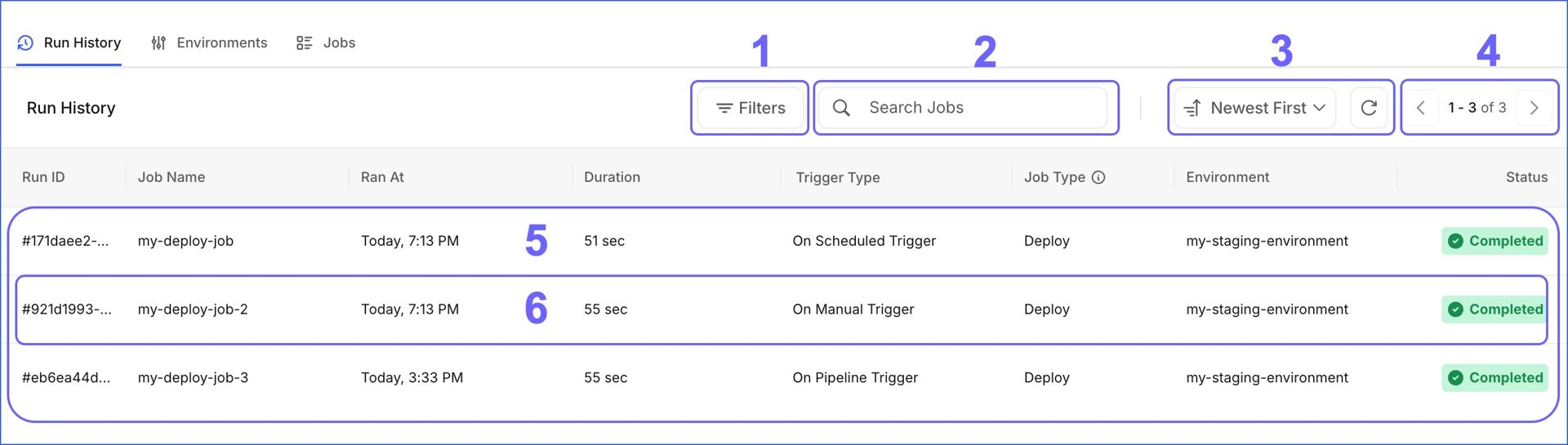
- Execution: jobs can run on a schedule, on demand, or after a pipeline sync; they aren’t real-time pre-load transformations.
I like the option to run models after a sync: the transformation follows the arrival of fresh data, instead of relying on two schedules happening to line up.
Who Will Get the Most From It?
A team already comfortable with dbt is the strongest match. Hevo’s transformation environments connect a destination to a Git branch, with environment variables allowing different schemas or databases for staging and production. You can keep a common project while separating development work from the production output.
That is useful control, but it isn’t a shortcut around learning how to model data. If your team expects to define business logic entirely through simple visual controls, I’d be cautious about choosing Hevo on the strength of its no-code positioning.
The change also matters if sensitive fields must be removed before reaching your warehouse. The Standard-to-Edge approach moves transformation into the destination, so I would require a clear design for that restriction before choosing it. Post-load cleaning doesn’t satisfy a requirement that the original value must never land there.
I’d choose this for a team that wants to bring existing dbt work into its ingestion platform. I wouldn’t choose it expecting a visual replacement for SQL modeling.
Monitoring Pipelines and Handling Problems
Hevo’s monitoring is one of its more useful reasons to pay for managed ingestion. You can inspect job status and logs alongside latency, throughput, and billable events. That puts operational health and usage in the same conversation.
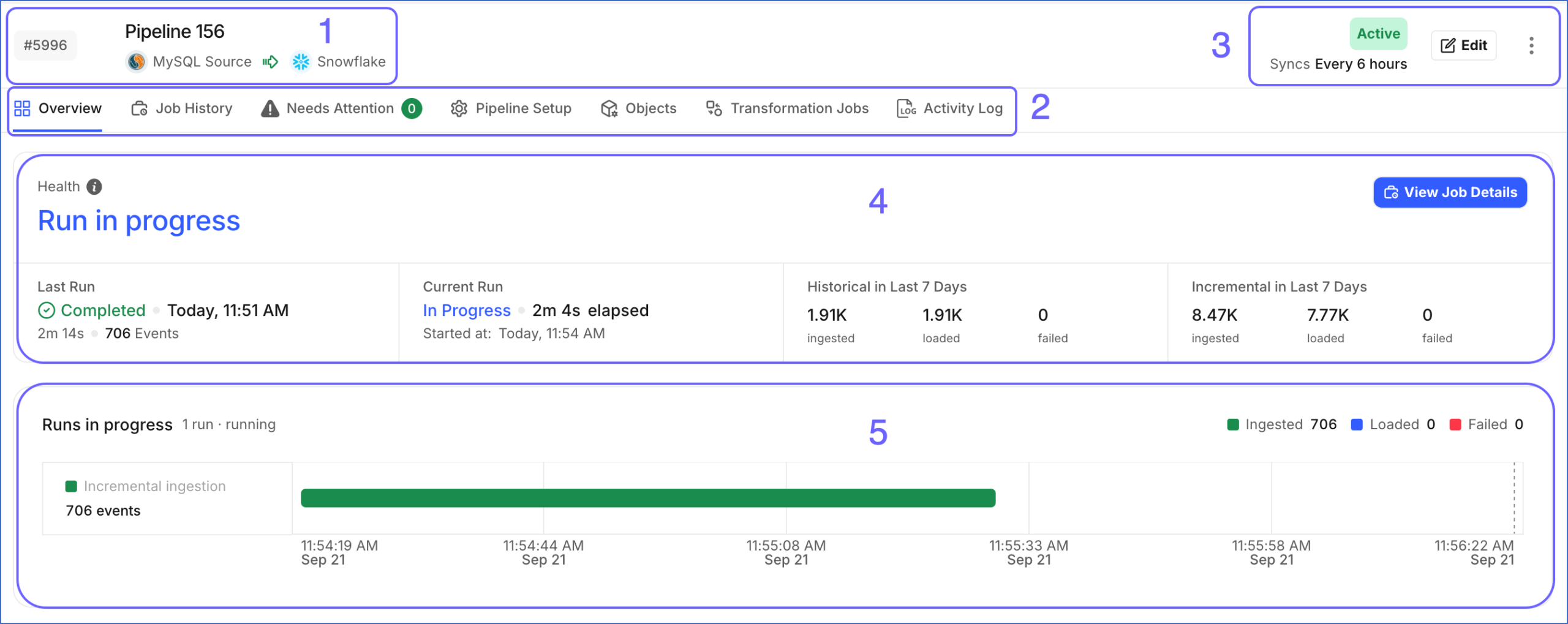
I particularly like that combination for a small team. A feed arriving late and a feed consuming unexpectedly high volume can both become business problems, even when the connection itself hasn’t failed.
Alerts can cover failures, latency spikes, and schema changes. With Edge latency alerts, the setup guidance recommends a threshold at least twice the configured sync frequency. I’d set that against the report’s actual deadline, so someone has time to act before colleagues start relying on stale data.
Standard failed events have a seven-day recovery window. After that, they are permanently purged and won’t be replicated to the destination. I’d treat that as a reason to assign alerts to someone who can act, especially over holidays or staff absences.
Some Standard errors can be replayed automatically after a correction; others need manual resolution. A retry is only useful once you’ve fixed the cause.
My priorities for the pipeline owner would be:
- Know which data is affected: distinguish a failed record or object from a wider interruption.
- Resolve the underlying cause: address the permissions, mapping, or destination problem before repeating the same operation.
- Check the downstream result: a pipeline returning to a healthy state doesn’t, by itself, prove that every business report is correct.
That shared view is a good reason to pay for managed ingestion. It makes it easier to hand an incident to a colleague without asking them to understand someone’s custom scripts first.
How Does Hevo Compare With Alternatives?
- Fivetran: worth comparing for frequently updated data. Under its normal monthly active row model, repeated changes to the same row within a month don’t each create another active row. History mode and multiple connections introduce qualifications, so I wouldn’t declare either service cheaper without comparing the same workload. If repeated updates drive your Hevo consumption, this is the first pricing comparison I’d make.
- Airbyte: my alternative for teams that want more deployment control. Its free, self-managed Core edition gives you infrastructure ownership, while managed plans offer a different operating model. I would choose Core when the ability to run the system yourself matters enough to justify the operational work. For a team trying to reduce that work, Hevo’s managed approach is the stronger attraction.
Hevo remains my pick of these approaches when the goal is to reduce ingestion infrastructure work and its connectors meet your reporting requirements.
How I Reviewed Hevo Data
I assessed Hevo’s plan conditions, connection requirements, billing model, transformation options, and recovery workflows. I also compared its operating model with Fivetran and Airbyte, focusing on the trade-offs a small data team would face.
The recommendations are an independent product assessment, not a measured production-performance benchmark. Pricing checked in October 2026.
Should You Choose Hevo Data?
Yes, if your main problem is maintaining recurring data feeds into a warehouse. I like Hevo for a small data team that wants managed replication and clear operational visibility, with someone available to make the database and modeling decisions.
I’d be more hesitant if you need new pre-load transformations, expect the whole workflow to require no technical skills, or have an update-heavy workload without a clear cost estimate. Those are central buying requirements, not details to sort out after committing.
My recommendation is to start with one representative pipeline during the trial. Judge it on the data your reports need, the event usage it generates, and the work your team still has to do. If those fit, Hevo is a sensible managed ELT choice.
Hevo Data FAQ
Is Hevo Data Free?
Hevo has a permanent Free plan for eligible sources, with a monthly allowance of one million events. I’d check connector eligibility first. A free allowance doesn’t help if the source you need requires a paid subscription.
Is Hevo an ETL or ELT Tool?
Hevo supports data integration workflows, but its current Edge dbt transformation approach is ELT: extract and load the data, then transform it in the destination. Existing Standard pre-load transformations have different behavior.
Does Hevo Work in Real Time?
Supported sources and enabled streaming configurations can provide continuous replication. Other pipelines use scheduled ingestion, so the answer depends on your source and configuration. Confirm the required freshness before choosing a plan.
Does Hevo Replace a Data Warehouse?
No. Hevo moves data into destinations such as a warehouse; it doesn’t remove the need for that destination. You’ll still need somewhere to store and query the data and a way to present the results to your team.