
Editor’s note: This Qlik Sense review weighs analytical flexibility, pricing, setup, and governance. Our recommendations reflect an editorial assessment of its features and buying requirements.
Quick verdict: I recommend Qlik Sense for analytics teams that need to investigate connected business data and have someone who can maintain the models behind it. Its associative analysis gives you a useful way to follow unexpected questions, but the cost and preparation make it a demanding choice for basic reporting.
Key Takeaways
- Qlik’s associative engine helps you explore related and excluded values, making it particularly appealing for investigative analysis.
- Choose your deployment before comparing costs: Qlik Cloud Analytics and client-managed Qlik Sense have different licensing.
- Managed spaces give you controlled publishing, which is why I recommend Standard for a departmental rollout.
- Self-service dashboards still depend on carefully prepared data. Budget for a model owner, not just software.
- AI features have different entitlements and configuration requirements. Buying Qlik does not give you unlimited access to every AI capability.
In this review, I’ll look at Qlik’s pricing, everyday workflow, and AI features to help you decide whether it belongs on your enterprise BI shortlist.
Qlik Sense Pros and Cons
Pros
- Associative selections expose both related and excluded data.
- Visual preparation and load scripts support different levels of data modeling.
- Reusable measures help keep dashboard calculations consistent.
- Standard and higher cloud plans do not charge for additional users.
- Cloud analytics combines dashboards with conversational and predictive AI options.
Cons
- Entry-level cloud pricing requires an annual commitment.
- Starter’s analysis capacity cannot be expanded within that plan.
- Complex models require Qlik-specific scripting and expression skills.
- Cloud AI capabilities should not be assumed available in client-managed Qlik Sense.
How Much Does Qlik Sense Cost?
Budget for your deployment first. Qlik Cloud Analytics is the hosted service; client-managed Qlik Sense needs a separate quote. I would not use the cloud prices below to budget for an on-premises installation.
- Starter (from $300/month): includes 10 users; extra seats cost more.
- Standard (from $825/month): my pick for departmental analytics; no extra user charges.
- Premium (from $2,750/month): for predictive analytics or public access.
- Enterprise (custom quote): for larger deployments.
| Cloud plan | Starting monthly price, billed annually | Included data for analysis | Starting annual cost |
|---|---|---|---|
| Starter | $300 | 10 GB, fixed | $3,600 |
| Standard | $825 | 25 GB | $9,900 |
| Premium | $2,750 | 50 GB | $33,000 |
| Enterprise | Custom quote | Starts at 250 GB | Custom quote |
Annual totals are the monthly starting prices multiplied by 12. Allow for extra capacity, add-ons, and implementation.
The capacity figures also need some explanation. Data for analysis is a subscription measure, not simply the size of one dashboard. Qlik measures qualifying data loaded into and stored in the platform, while individual applications have separate size limits. I would ask for a capacity estimate using your proposed data sources before agreeing to a plan.
Starter’s fixed allowance is the restriction I would watch most closely. You can buy more seats, but you cannot buy more analysis capacity within Starter. A small team with substantial data may need Standard before its headcount suggests an upgrade.
Qlik offers a 30-day cloud trial. I would use it to assess a realistic app with your own data before committing to an annual subscription.
Is Qlik Sense Good Value for Money?
I think Qlik becomes easier to justify when many people need to explore a well-maintained set of business data. Standard’s lack of additional user charges helps that case, although data capacity still limits what the subscription covers.
For a smaller team, Microsoft Power BI deserves a close look. Power BI Pro costs $14 per user per month, paid yearly. Ten Pro licenses come to $140 per month, less than half Qlik Starter’s base price. The feature bundles differ, but that saving deserves attention if you mainly need shared reports.
- Choose Starter for a contained team whose data comfortably fits the fixed allowance.
- Choose Standard when managed publishing or wider internal adoption is part of the plan.
- Choose Premium when you can name a specific requirement that justifies the upgrade, such as predictive deployment or public access.
My recommendation is to price Standard for a production departmental rollout. Use Starter only when its capacity and collaboration limits fit the intended project, rather than treating it as a cheap route into every Qlik capability.
Getting Started With Qlik Sense
The difficult part of getting started is deciding how your data should fit together. Creating charts comes later. I would begin with one business question, such as why orders are being delivered late, and bring in the tables needed to answer it.
- Create an app and connect your data. Start with a limited set of files or supported database connections so you can check results against a known report.
- Build the associations. Use Data Manager to examine relationships between tables and prepare fields. Matching field names are a starting point, not proof that the relationship is right.
- Define the measures. Decide what counts as a late order and which date controls the reporting period before creating reusable calculations.
- Build the sheets. Add visualizations around those measures, then check how selections affect the results.
- Arrange refreshes and access. Decide who maintains the data and who consumes the analysis. When publishing to a managed space, configure reload schedules on the published copy; they do not transfer automatically.
I like that Qlik offers both visual preparation and a Data Load Editor for more controlled transformations. You have room to grow beyond an initial spreadsheet project. The trade-off is that complicated preparation can take you into Qlik’s scripting language, which needs someone willing to own it.
Pay particular attention to tables with several fields in common. Qlik can create synthetic keys in these situations, and unexpected ones deserve investigation. A chart can look completely reasonable while relying on relationships you did not intend.
For an evaluation, I would use an ordinary, imperfect slice of your own data. Include a duplicated identifier or an awkward date field and see whether your team can explain the resulting model. A polished sample dashboard tells you far less about the work ahead.
My view: Qlik is approachable for people consuming a prepared app, but I would not describe a complex deployment as a no-technical-skills project. If nobody owns the data model, buying better visualization software will not fix that gap.
Exploring Data With the Associative Engine
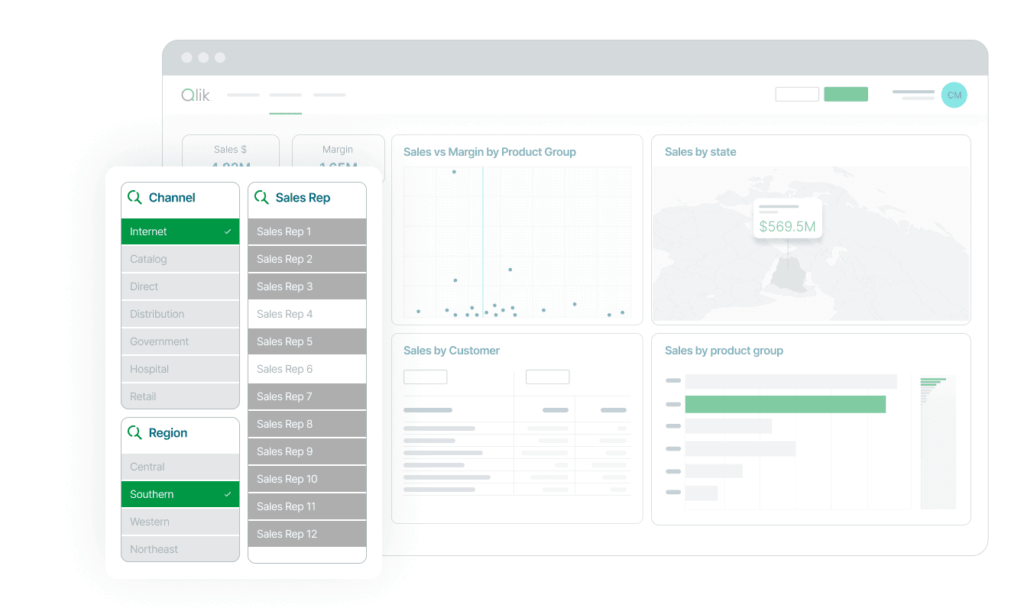
The associative engine is the strongest reason I would choose Qlik. Selecting a value updates the relationships across the app, with visual states distinguishing selections, possible values, and exclusions. That gives excluded data a visible role in the investigation.
Imagine you manage a product launch. You want to inspect sales for one product, then ask which customer accounts have not bought it. With customers and orders modeled appropriately, the excluded values can help you investigate that second question without rebuilding the analysis around a new report.
There is a catch: a sales table alone cannot reveal prospective customers who never appear in your source data. You need the relevant customer records in the model for that comparison to mean anything.
What I like is the invitation to keep asking questions. A manager may start with a regional total, notice an unusual product mix, and then inspect the affected customers. You do not need to know every question before opening the app.
I would still resist calling every exclusion an opportunity. Missing records, inconsistent identifiers, or a badly chosen association can create a misleading absence. The model establishes what the selection means; the interface makes it easier to explore.
Tableau is the alternative I would shortlist when the priority is constructing and presenting a particular visual analysis. Qlik gets my attention when the priority is investigating relationships across a prepared app. Both support interactive exploration, so the useful comparison is how your team approaches questions, not whether one product has filters.
Building Dashboards Your Team Can Trust
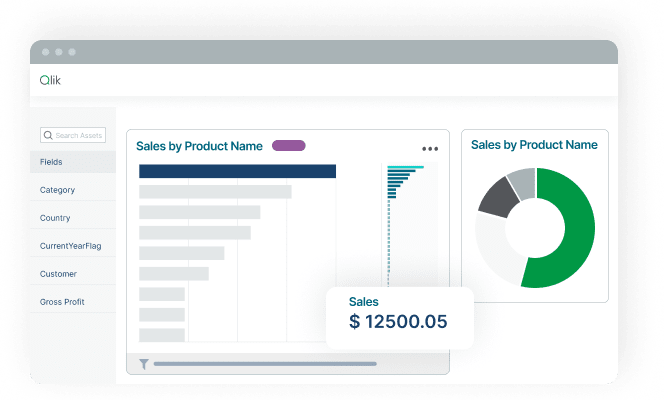
Reusable measures are more valuable than another attractive chart. Qlik’s master items let app authors reuse dimensions, measures, and visualizations. I like this approach for repeated business definitions: a gross-margin calculation should not change because someone builds another sheet.
The responsibility remains with the app owner. Reusing a formula consistently does not establish that it is the correct formula, and independently maintained apps still need agreement on business definitions.
Access needs just as much care as the calculations:
- Who builds the analysis? Shared spaces support collaboration on content.
- Who receives the approved version? Managed spaces support controlled distribution of published apps and are available from Standard upward.
- Which records can each person see? Section Access can restrict data within an app and needs careful configuration.
That distinction is why I prefer Standard for departmental use. A shared workspace is useful while a team develops an app, but I want a clear boundary between work in progress and the version managers rely on.
Qlik also supports scheduled reporting, which matters when some colleagues need a recurring report rather than another dashboard to open. Reporting allowances are a separate buying consideration; I would include expected distribution volume in the quote.
For teams that primarily want straightforward questions and dashboards over an existing database, Metabase is worth evaluating before committing to Qlik’s broader setup. Its free open-source edition can be self-hosted, although hosting and maintenance remain your responsibility.
Reviewer’s Notes: Ask who will approve a changed business definition and update the affected apps. If the answer is unclear, solve that ownership problem before expanding access to the dashboards.
Are Qlik’s AI Features Worth Paying For?
I would buy Qlik for its analytics foundation first, then decide which AI features deserve a budget. Natural-language access can help colleagues ask questions, but it does not settle disagreements about what revenue means or which records belong in a calculation.
Insight Advisor Helps You Find an Analysis
Insight Advisor can suggest analyses and visualizations using the app’s data. Business logic and vocabulary let you shape how it interprets the model, which is useful when your team’s everyday terminology differs from source field names.
I like the potential for someone who knows their question but does not know which chart to build. I would give that person a curated app with understandable fields, rather than expecting AI to make an unfamiliar data model self-explanatory.
Qlik Answers Adds Conversational Access
Qlik Answers now supports questions over structured analytics data as well as unstructured content. That makes it relevant to more than searching a collection of documents: an assistant can work with analytical context and supporting knowledge.
My main concern is the scope of the switch: enabling the agentic experience replaces Insight Advisor and Insight Advisor Chat across the tenant. It also requires enabling cross-region inference. I would involve the analytics owner and security team before making that switch, especially where data-processing location is part of the buying decision.
Answers also has question and document-indexing allowances. Questions reset monthly without carrying over; indexed pages keep using capacity while they remain indexed. I would estimate both usage and document volume before letting a whole department depend on it.
Qlik Predict Needs a Business Case
Qlik Predict adds automated machine learning for tasks such as estimating churn risk. Training a model and deploying it for ongoing predictions are different steps, and the included capacities matter to that distinction.
My recommendation is to begin with one decision your team can act on. If a prediction flags a customer as likely to leave, who contacts them, and how will you judge whether the intervention helped? Without that plan, predictive features can become an expensive addition to a dashboard nobody uses differently.
Premium is the cloud tier I would investigate for production predictive requirements. Check deployed-model entitlements and any extra Predict subscription needs before buying; the ability to experiment does not imply unlimited operational use.
How Does Qlik Sense Compare to Competitors?
- Microsoft Power BI: My first comparison for a budget-conscious Microsoft team. Pro’s per-user pricing makes the starting cost easier to justify for a small group, and it is included with Microsoft 365 E5 and Office 365 E5. Check the licenses your viewers need before extrapolating that saving to a large rollout.
- Tableau: My shortlist choice when visual analysis and presentation are the central requirements. Its drag-and-drop authoring and visualization options suit analysts who want substantial control over how they explain data. I would compare representative workbooks with Qlik apps using the same business questions.
- Metabase: Worth trying when you mainly need database questions and dashboards, especially if a free self-hosted edition matters. You take on operational work with that route, and should compare governance needs against the specific edition.
Qlik would stay on my shortlist when exploratory analysis is valuable enough to support a dedicated model owner. If the requirement is simply to deliver a fixed weekly report, I would need a stronger reason to accept its cost and setup.
How I Reviewed Qlik Sense
I assessed Qlik’s suitability for a business analytics team across pricing, data preparation, associative exploration, governed sharing, and AI entitlements. I also compared the buying case with Power BI, Tableau, and Metabase. This is a research-based evaluation of product fit and trade-offs.
Prices checked October 8, 2026. Cloud plan prices are in US dollars and billed annually.
Should You Choose Qlik Sense?
I recommend Qlik Sense when your analysts need to follow questions across connected data and your organization will invest in maintaining the models. The associative engine gives that investment a clear purpose: helping people investigate relationships and exclusions as their questions develop.
For a new cloud rollout, I would start the buying discussion with Standard and a carefully scoped first app. Move to Premium when predictive or public-facing requirements justify it, rather than paying for capabilities your team has no plan to use.
I would look elsewhere for a small reporting project without a technical owner. Power BI is a compelling cost comparison, while Metabase offers a free self-hosted route. Qlik earns its place through the analytical work it enables, and that work needs to matter to your business.
FAQ
Is Qlik Sense the same as Qlik Cloud Analytics?
Qlik Sense is available as a client-managed analytics product. Qlik Cloud Analytics provides Qlik analytics as a hosted service with its own subscriptions and cloud capabilities. Decide which deployment you need before comparing prices or assuming AI feature parity.
How much does Qlik Sense cost?
Use the cloud plan table above to compare starting subscriptions. Your total also depends on capacity, add-ons, and implementation. Client-managed Qlik Sense requires a separate quote, so decide how you want to deploy it before setting a budget.
Is Qlik Sense suitable for beginners?
A beginner can explore a well-prepared app, but preparing a reliable model is a different task. I recommend having a capable owner for relationships, expressions, refreshes, and access before rolling it out widely.
Is Qlik Sense better than Power BI?
I would favor Qlik when associative exploration is central to the project. Power BI is my first cost comparison for small Microsoft-focused teams. Compare both using your actual data and reporting questions rather than assuming either is universally better.
Does Qlik Sense include AI?
Qlik offers assisted analysis, conversational AI, and predictive capabilities. Availability depends on deployment, subscription, and configuration. In particular, do not assume a client-managed installation includes the same AI services as Qlik Cloud Analytics.