Mode puts a SQL editor, Python and R notebooks, a drag-and-drop chart builder and shareable reports in one workspace, and every query result flows straight into the notebook.
In this Mode Analytics review, I’ll take a closer look at Mode’s pricing, features, and how it compares to Hex, Looker, Sigma and Metabase, so you can see exactly whether to buy it, and from whom.
ThoughtSpot bought Mode for $200 million, closing on July 19, 2023. Mode.com still sells free Studio and demo-led Pro and Enterprise plans, while ThoughtSpot has sold the same SQL, notebook and dataset workflow as Analyst Studio since January 15, 2025.
Editor’s note: This Mode review evaluates the pricing, setup requirements, and documented capabilities of Mode and ThoughtSpot Analyst Studio as of October 2026. It is not a hands-on performance test. I weigh pricing, the SQL and notebook workflow, sharing and governance, integrations, and vendor direction.
Quick verdict: I recommend Mode for SQL-fluent analyst teams who want code-first analysis and shareable reports in one tool, starting on free Studio. Go in knowing that no plan above Studio has a public price, and that ThoughtSpot’s dated 2026 releases ship under the Analyst Studio name.
Key Takeaways:
- SQL, Python 3.11, R 4.2 and dashboards share one report, with no export between steps
- Studio is free for up to 3 users, the only Mode plan with a published price
- Pro (3-user minimum) and Enterprise (50-user minimum) are quote-only after a demo
- Free notebooks cap at 4 GB of RAM, 1 CPU core and 60-minute runs, with no extra library installs
- AI Assist is enabled only on request and runs on GPT-3.5 Turbo and GPT-4 Turbo, per Mode’s docs
Pros and Cons
Pros
- SQL, Python 3.11/R 4.2 notebooks and dashboards share every query result in one report
- Free Studio plan for up to 3 users, with private database connections
- 30+ JDBC connections, including Snowflake, BigQuery, Redshift, dbt Semantic Layer and Looker SQL
- Two-way GitHub sync for reports, datasets and Definitions
- Signed white-label embeds with 10-second URL signatures
- Still shipping under ThoughtSpot: data mashup, spreadsheets and a July 2026 publish flow
Cons
- No published price for Pro, Enterprise or any add-on
- Enterprise requires a 50-seat minimum
- Free notebooks capped at 4 GB RAM, 1 core, 60-minute runs and 10 MB per query
- AI Assist is request-only and runs on GPT-3.5/GPT-4 Turbo per the docs
- No real-time data and no documented row-level security
How Much Does Mode Cost?
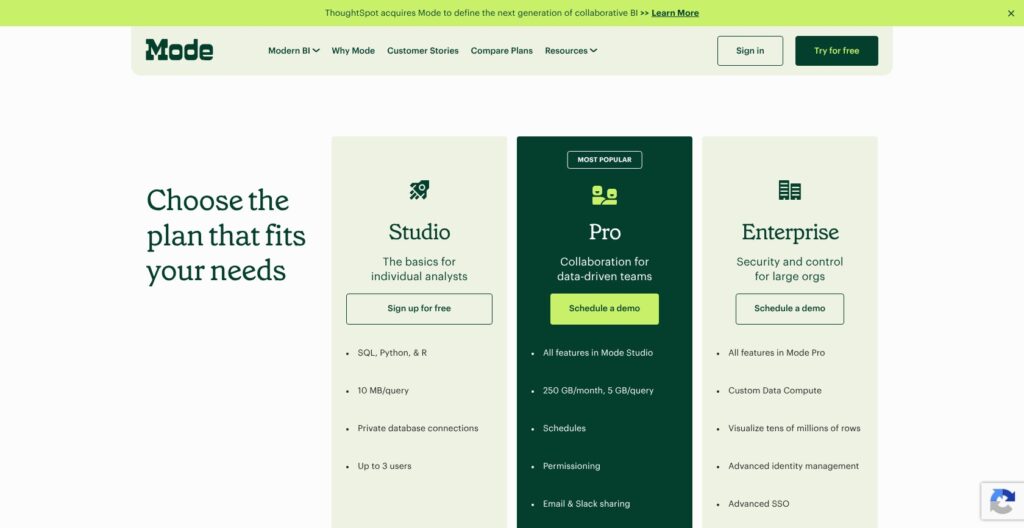
Mode publishes a price for exactly one plan, Studio, which is free. Pro and Enterprise both require a demo, and the demo request on mode.com routes to ThoughtSpot.
- Studio (free): for solo analysts and teams of up to 3, with SQL, Python and R, 10 MB per query, visualization of thousands of rows, and private database connections
- Pro (quote, minimum 3 users): for analyst teams that share work with the business, with 250 GB of data a month, 5 GB per query, schedules, permissioning, email and Slack sharing, API access and millions of rows visualized
- Enterprise (quote, minimum 50 users): for large organizations, adding custom data compute, tens of millions of rows visualized, advanced SSO and identity management, an admin-level API and premium support
White-label embed, external sharing, custom themes, SCIM and the Discovery API are add-ons, and none has a public price. Through ThoughtSpot, the same workflow comes as Analyst Studio on these plans:
- ThoughtSpot Analytics Essentials (from $25/user/month, billed annually): for 5 to 50 users with up to 25M rows, Analyst Studio as an add-on
- ThoughtSpot Analytics Pro (from $50/user/month, billed annually): for up to 1,000 users and 250M rows, with 25 Spotter AI queries per user a month and Analyst Studio as an add-on
- ThoughtSpot Pro usage-based (from $0.10 per credit): for teams that want metered billing, with Analyst Studio included
- ThoughtSpot Enterprise (custom): for large deployments, with Analyst Studio included
ThoughtSpot lists no price for the Analyst Studio add-on and does not name Mode anywhere on its pricing page.
| Plan | Price | Users | Query and data limits | Best for |
|---|---|---|---|---|
| Mode Studio | Free | Up to 3 | 10 MB per query, thousands of rows visualized | Proving the workflow on a real warehouse |
| Mode Pro | Quote after demo | Minimum 3 | 250 GB/month, 5 GB per query, millions of rows | Analyst teams with scheduled reporting |
| Mode Enterprise | Quote after demo | Minimum 50 | Custom compute, tens of millions of rows | Large orgs needing SSO and admin API |
| ThoughtSpot Essentials + Analyst Studio add-on | From $25/user/month plus unpriced add-on | 5 to 50 | Up to 25M rows | Small ThoughtSpot teams adding code-first analysis |
| ThoughtSpot Pro usage-based (Analyst Studio included) | From $0.10 per credit | Not listed | Metered by credits | ThoughtSpot buyers who want Analyst Studio bundled |
Is Mode Good Value for Money?
- Hard to judge without a quote: Hex Professional publishes $36 per editor per month and Team $75, so I can price a Hex rollout before talking to sales, which isn’t possible with Mode Pro
- Studio is generous on features, tight on scale: 3 users and 10 MB per query is enough to prove the SQL-to-notebook workflow, not to run a team’s reporting
- Flat-fee BI costs less on paper: Metabase Starter is $100 a month for 5 users and Power BI Pro is $14 per user per month, though neither has Mode’s Python and R layer
- Notebook-first rivals publish prices too: Deepnote Team costs $39 per editor per month billed yearly
- ThoughtSpot customers may already have it: Analyst Studio is included on ThoughtSpot’s usage-based Pro and Enterprise plans
Reviewer’s Notes: I’d start on Studio with my real warehouse connected and build two or three reports there before asking for anything. I’d request a Pro quote only once I needed schedules, permissioning or Slack delivery, and I’d get the price of every add-on I expect to use in writing. If my company already pays ThoughtSpot, I’d price the Analyst Studio add-on before signing a separate Mode contract.
My Experience With Mode
Mode’s setup path starts with a free Studio account at app.mode.com/signup, no demo call required, followed by a Workspace: the group of users who share database connections and analysis.
Signing Up and Connecting a Warehouse
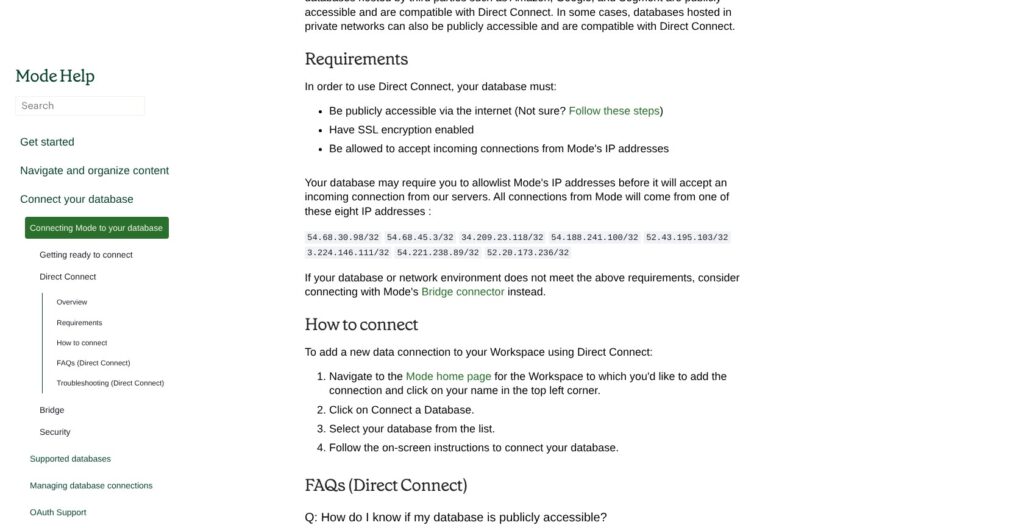
Every Mode connection runs over JDBC, either directly after allowlisting Mode’s IP addresses in the warehouse firewall, or through Mode’s bridge connector for databases inside a private network or VPC. Authentication depends on the warehouse:
- Snowflake: a key pair, or OAuth with PKCE support from a recent release
- BigQuery: a service account JSON key
- Redshift: an IAM role
- Databricks: host, token and HTTP path
The schema browser refreshes daily at 10:05 UTC, so a table created this morning may not show up there until the next refresh.
Writing the First Query
The SQL editor is built on Ace, with autocomplete for tables, columns and Definitions, SQL formatting, run-selected-code, and a run history that stores both the raw and the rendered SQL. “Limit 100” is checked by default, so I’d untick it whenever I need real totals. Liquid templating turns hard-coded values into report parameters, so one query can feed a date picker or a region filter.
From Query to Notebook to Report
Every query result in a report, plus any Dataset without calculated fields, appears in the notebook as a datasets object, so moving from SQL to pandas takes no CSV export. Mode runs all of a report’s queries in parallel, and the notebook waits until every one succeeds. Results load into pandas reliably up to about 4 GB.
Visual Explorer then builds bar, line, table, pivot and combo charts on query results, and Report Builder drags charts and notebook outputs into a layout I can share by email, Slack or link. Quick Charts, Visual Explorer and report filters don’t work on notebook DataFrames, so a chart built in Python has to be driven by report parameters instead of filters. Hex avoids that split by pairing reactive notebooks with published data apps.
Reviewer’s Notes: Studio notebooks get 4 GB of RAM, 1 CPU core, a 60-minute run limit and a 30-minute idle suspend, and pip installs don’t work, so I’m limited to the preinstalled libraries. The requests and urllib3 packages in Python and httr in R are also restricted on the free tier, which rules out pulling data from external APIs inside a notebook. I’d treat Studio as a proof of the workflow, not a place to run production models.
SQL Editor, Definitions, and AI Assist
Definitions are Mode’s version of reusable SQL: a saved single SELECT statement that other queries reference like a view Mode maintains, with unlimited Definitions on paid workspaces.
🧩 Definitions and Query Limits
- Nesting: Definitions can reference other Definitions up to 10 layers deep
- Scope: each Definition is tied to one connection, and none can be renamed after saving, so naming conventions matter from day one
- Creating: I’d open the Definitions section on the Mode home page, pick a connection, and name the Definition with letters, numbers and underscores, plus an optional description
- Saving: the Limit 100 checkbox has to be unticked before a Definition saves
The editor accepts multiple semicolon-separated statements, including DDL and DML, and a report holds up to 160 queries. Each query uses one connection, so a join across Snowflake and Postgres needs Python, R or the newer data mashup feature. Timeouts depend on how the query runs:
| Run type | Timeout |
|---|---|
| Manual run, or daily, weekly or monthly schedule | 12 hours |
| Hourly schedule | 1 hour |
| Every 30 minutes | 30 minutes |
| Every 15 minutes | 15 minutes |
Looker keeps reusable logic in LookML models that developers maintain; Definitions are lighter and analyst-owned, with no metrics governance layer on top.
🤖 AI Assist
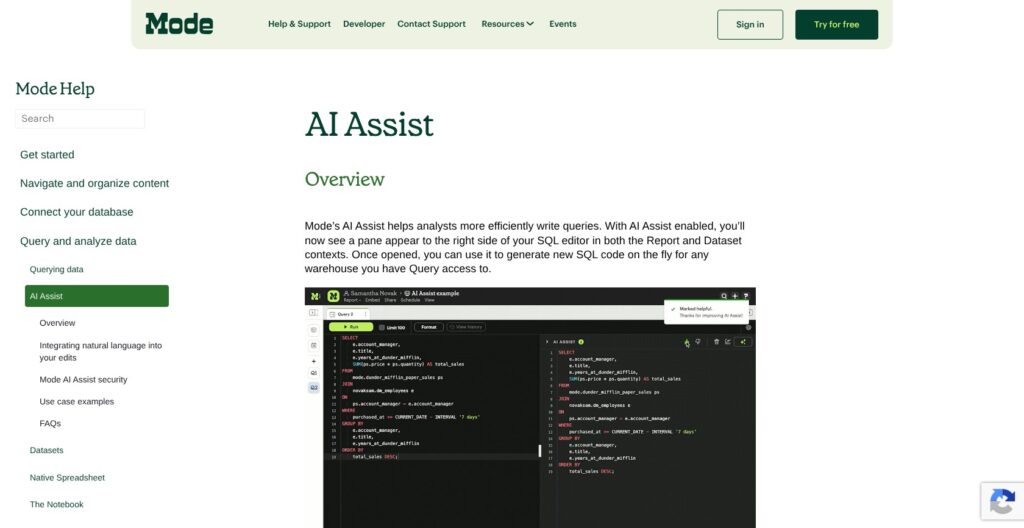
AI Assist opens in a pane beside the editor. I write SQL that names at least one valid table, add a --! placeholder such as SELECT --! total sales by manager, and click Generate (Shift+Opt/Alt+N). The pane shows the output next to my original, and I insert it (Shift+Opt/Alt+I) or revise the prompt and regenerate, then mark the result helpful or unhelpful. The same pane also fixes broken SQL.
AI Assist is enabled per account on request, and Mode’s docs name OpenAI’s GPT-3.5 Turbo and GPT-4 Turbo as its models, both older OpenAI models. ThoughtSpot puts its AI effort into Spotter instead: per-user plans include 25 Spotter queries per user a month, Unlimited Spotter is an add-on, and ThoughtSpot says it doesn’t meter LLM tokens.
Notebooks, Datasets, and the Helix Engine
Notebooks are what separate Mode from SQL-only BI tools like Metabase and Sigma: Python 3.11 runs in three environments, and R 4.2.0 runs alongside it in the same report.
🐍 Python and R Notebooks
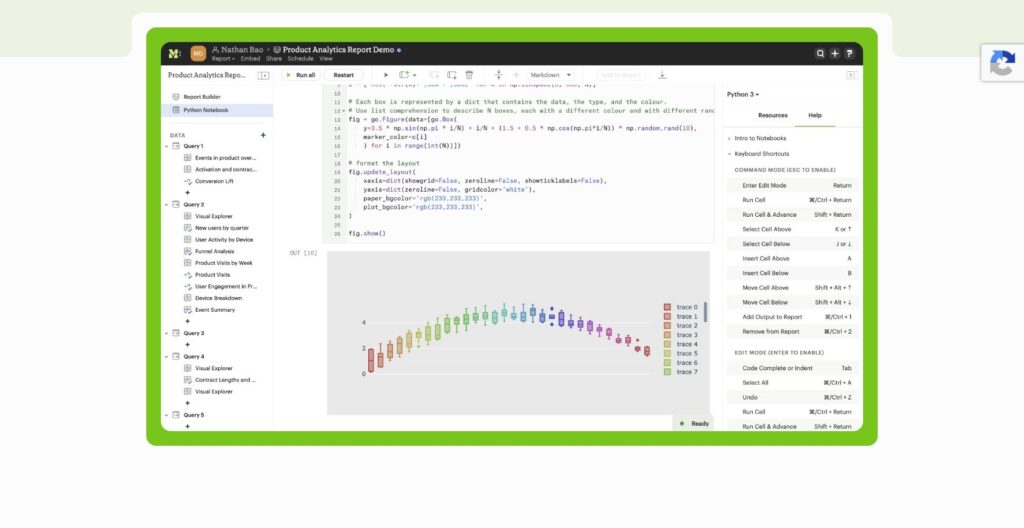
- Python 3 (standard): 60+ preinstalled libraries
- Python 3 Edge: for staging library upgrades before they reach standard
- CleanSlate: no preinstalled packages
- R 4.2.0: for R users working in the same report
Mode’s notebook docs, which still use the older Business and Enterprise plan names, give paid tiers 16 GB of RAM, 16 cores, a 12-hour run limit and a 60-minute idle suspend, plus library installs with up to 2 GB of extra memory for added packages. Notebooks up to 25 MB import as .ipynb files and export as .py or .r. A Python-only secrets store keeps encrypted, write-only values scoped to one report, which is where I’d put API keys so report viewers never see them.
⚡ Datasets and Helix
A Dataset promotes a working SQL query into a reusable result cached in Helix, Mode’s in-memory engine, so reports read the cache instead of hitting the warehouse. Refreshes run on a schedule with a frequency, time and timezone, and if one fails, dependent reports fall back to the last successful run. Datasets follow collection permissions, and the data mashup feature joins SQL Datasets across warehouses and Google Sheets.
- No parameters: Datasets can’t take parameters or be referenced in SQL
- No custom JavaScript: reports that use Datasets can’t run custom JavaScript
- Row ceilings by plan: Visual Explorer handles 100K+ rows on Helix, while plan limits run from thousands of rows on Studio to millions on Pro and tens of millions on Enterprise
- No real-time data: Mode opens a new connection for each report run, so I’d use Sigma’s live-warehouse spreadsheets for operational dashboards
Hex’s reactive notebooks and Deepnote, at $39 per editor per month billed yearly, are the notebook-first alternatives, but Mode keeps the notebook, the chart and the dashboard in the same report.
Sharing, Embedding, and Governance
Mode covers scheduled delivery, Slack, signed embeds and GitHub sync, but row-level security is not documented, so the access controls on record are collection permissions, sign-in and SCIM.
📤 Schedules, Email and Slack
- Plan gate: schedules, permissioning, and email and Slack sharing are Pro features on the compare-plans page
- Slack delivery: an admin installs the app under Workspace Settings > Features > Slack Application, and scheduled reports post to public channels, private channels (after adding the @Mode bot) and Slack Connect channels
- Link previews: report preview images in Slack stay live for 4 days
- Admin Managed Schedules: admins cap how often reports and Datasets can refresh, which protects warehouse spend
- Shareable report views: a recent release added non-expiring URLs for saved report views
🔐 Embeds, GitHub and Sign-In
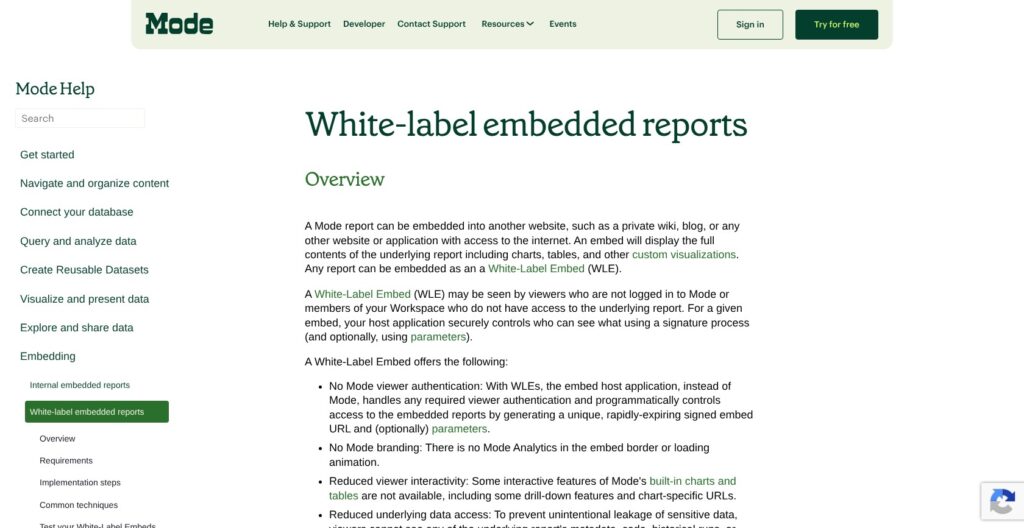
White-label embeds need a paid workspace with the add-on enabled. My app signs each embed URL server-side, signatures are valid for 10 seconds, and viewers can’t see the code or query results behind a chart. The automatic parameter form doesn’t render in embeds, CSV links expire after 24 hours, and a custom theme or CSS can match the host app, but the embed docs don’t mention custom domains.
GitHub sync is two-way for Reports, Datasets, Definitions and custom themes in open and private collections. It needs a paid plan, a workspace admin, and an unprotected main or master branch in a GitHub organization repo, and Mode can see the whole repository, so I’d give it a dedicated repo.
Sign-in supports Google, Office365 and custom SAML providers. SCIM, itself an add-on, works with Okta and Azure AD only when SAML is the sole sign-in method, with one SCIM instance per workspace.
Mode’s security page lists TLS 1.2+ in transit and AES-256 at rest, but no SOC 2 report and no data regions; ThoughtSpot’s Analyst Studio page says its data is hosted in North America and the EU. If governed metrics matter more than notebooks, I’d compare Looker’s central LookML model before committing.
How Does Mode Compare to Competitors?
Mode wins on keeping SQL, Python, R and dashboards in one report; most rivals either drop the notebook layer or publish prices Mode doesn’t.
| Tool | Starting price | Open source | Best for |
|---|---|---|---|
| Mode | Studio free (3 users); Pro and Enterprise by quote | No | SQL and notebook analyst teams |
| Hex | Free Community plan; Professional $36/editor/month | No | Notebook-first teams and data apps |
| Looker | Quote only | No | Governed metrics in LookML |
| Sigma | Quote only | No | Spreadsheet-style self-serve BI |
| Metabase | Free open source; Starter $100/month for 5 users | Yes | Budget self-serve BI |
| Lightdash | Free open source; Cloud Pro $3,000/month | Yes | dbt-native teams |
| Power BI | Pro $14/user/month | No | Microsoft 365 organizations |
| ThoughtSpot Analyst Studio | Add-on to plans from $25/user/month | No | Existing ThoughtSpot customers |
- Hex: best for notebook-first teams that want published pricing and reactive notebooks that double as data apps. The free Community plan caps published apps at 5, Professional costs $36 per editor per month, and Team $75.
- Looker: best for governed metrics in a central LookML model. Google lists Standard, Enterprise and Embed editions, each starting with 10 standard and 2 developer users, priced through sales, and Mode can query Looker through its Open SQL interface, so the two can run side by side.
- Sigma: best for business users who want a spreadsheet interface on live warehouse data. Pricing is quote-only, and there’s no Python or R notebook layer.
- Metabase: best for budget self-serve BI. The open-source edition is free, Starter is $100 a month for 5 users, Pro is $575 a month for 10, and Enterprise starts at $20,000 a year, with no notebook layer.
- Lightdash: best for teams whose metrics already live in dbt. It is open source, Cloud Pro costs $3,000 a month with unlimited users, and embedding is billed separately at $0.05 per load after the first 1,000.
- Power BI: best for Microsoft 365 organizations. Pro costs $14 per user per month and Premium Per User $24, billed yearly, but there’s no SQL-to-notebook workflow like Mode’s.
- Tableau: best for visual analytics at scale when charts matter more than SQL and notebooks.
- ThoughtSpot Analyst Studio: best for existing ThoughtSpot customers who want analyst-built datasets feeding Spotter and ThoughtSpot’s semantic layer.
If I moved off Mode later, plain SQL from queries and Definitions would port with light cleanup, but reports, notebook outputs and permissions would need rebuilding. GitHub sync keeps a versioned copy of every synced report’s code in the meantime.
Pick Mode if your analysts live in SQL and Python and need shareable reports from the same workspace; pick Hex for published per-editor pricing, Metabase or Lightdash for open source, and Looker when governed metrics matter more than notebooks.
How I Reviewed Mode
I judged Mode on five areas: pricing and packaging, the SQL and notebook workflow, sharing and governance, integrations, and vendor direction after the ThoughtSpot acquisition.
For pricing, I compared Mode’s three plans and add-ons with ThoughtSpot’s per-user and usage-based plans and with published rates from Hex, Metabase, Lightdash, Deepnote and Power BI. For the workflow, I mapped the documented path from signup and warehouse connection through the SQL editor, Definitions, AI Assist, notebooks, Datasets and reports, including every plan limit that changes what a team can do. For governance, I went through scheduling, Slack delivery, signed embeds, GitHub sync, SSO and SCIM. For direction, I weighed ThoughtSpot’s Analyst Studio releases through July 2026 against Mode’s own release notes.
This is not a hands-on performance test, so I make no claims about query speed or notebook performance on my own data.
Prices current as of October 2026.
Should You Choose Mode for SQL-First Analytics?
Yes, if your analysts write SQL and Python and want one workspace from query to shared report. The datasets object, Definitions, Helix-cached Datasets and GitHub sync cover that loop, and free Studio lets a 3-person team prove it on a real warehouse before any sales call.
If your company already runs ThoughtSpot Analytics, buy the same workflow as Analyst Studio instead: it is included on usage-based Pro and Enterprise, and its datasets feed Spotter.
Skip Mode if business users need self-serve exploration (Sigma or Power BI fit better), if governed metrics come first (Looker or Lightdash), or if you need a price before talking to sales (Hex at $36 per editor per month or Metabase Starter at $100 a month).
My next step would be to open a Studio workspace, connect the warehouse, rebuild one recurring report with a notebook output, and only then request a Pro quote with every add-on I’d need listed up front.
FAQs
Is Mode still available after the ThoughtSpot acquisition?
Yes. Mode.com still offers free Studio signups and demo-led Pro and Enterprise plans as of October 2026, under a ThoughtSpot acquisition banner. ThoughtSpot, which completed the $200 million deal on July 19, 2023, also sells the same workflow as Analyst Studio, an add-on to its own analytics plans.
How much does Mode cost?
Studio is free for up to 3 users. Pro (minimum 3 users) and Enterprise (minimum 50 users) are quote-only after a demo, and add-ons such as white-label embeds and SCIM have no public price. Through ThoughtSpot, plans start at $25 per user per month, with Analyst Studio as an add-on. See How Much Does Mode Cost? above for the full table.
Is Mode the same as ThoughtSpot Analyst Studio?
They share the same workflow and release-note feature names, including the new SQL editor, data mashup, notebook file import and admin-managed schedules. The difference is packaging: Mode is sold on mode.com with its own plans, while Analyst Studio is an add-on to ThoughtSpot Analytics plans, included on usage-based Pro and Enterprise, and its datasets feed Spotter.
Does Mode have a free plan?
Yes. Studio is free for up to 3 users, with SQL, Python and R, private database connections and 10 MB per query. Studio notebooks get 4 GB of RAM, 1 CPU core and a 60-minute run limit, and they can’t install extra libraries, so heavier modeling needs a paid plan.
Mode vs Hex: which is better?
Hex is better if you want published pricing and reactive notebooks that double as data apps, with Professional at $36 per editor per month. Mode is better for SQL-first teams that want queries, Python and R notebooks and dashboards in the same report, starting free on Studio for up to 3 users.