
Editor’s note: This Valohai review is based on my hands-on test of Valohai’s 14-day trial with the valohai-cli 0.37.0 command-line tool, in November 2026. I weighed pricing, setup, versioning, infrastructure, deployment, security and LLM tooling against ClearML, Domino Data Lab, SageMaker and open-source stacks.
Quick verdict: I recommend Valohai for ML teams running training, pipelines and endpoints on their own cloud, on-prem GPUs or Slurm under one versioned workflow, with SOC 2 Type II and SSO. The trade-offs are no published price, separately billed hybrid compute and a closed-source platform; ClearML Pro lists $15 per user a month plus usage.
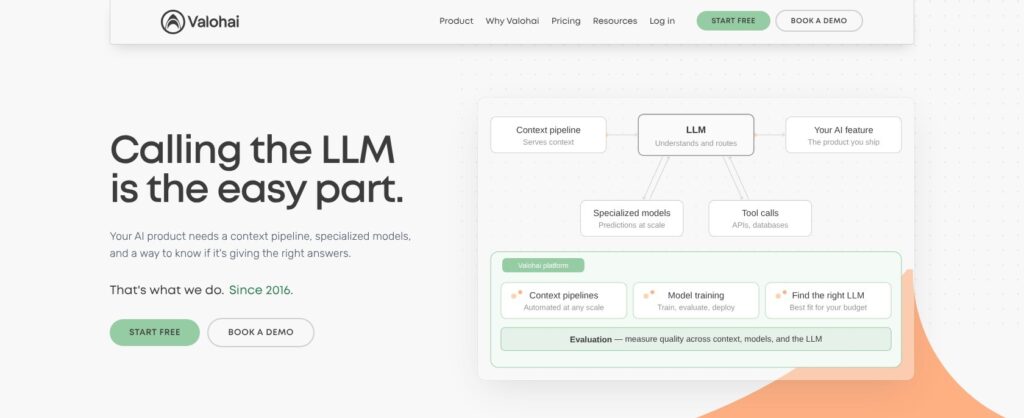
Valohai’s automatic lineage is the standout in this Valohai review: every execution versions its code, parameters, Docker image, inputs and outputs. One valohai.yaml file defines steps, pipelines and endpoints, with the same workflow running on AWS, Azure, Google Cloud, Oracle Cloud, OVHcloud, Scaleway, on-prem machines, Kubernetes or Slurm.
In this review, I’ll take a closer look at Valohai’s pricing, features, and infrastructure options, so you can see exactly whether it fits your ML team or whether a cloud-native platform like SageMaker is the better buy.
Key Takeaways
- Unlimited runs: One per-user license covers unlimited projects, experiments, pipelines and deployments.
- Customer-owned compute: Hybrid workers, queue and data stay in my cloud; Valohai never connects to workers directly.
- No public price: Quote only; hybrid compute is a separate cloud bill.
- Closed-source platform: Only the CLI, utils and YAML parser are open source (MIT).
- 2026 additions: Kubernetes workspace volumes, multi-repository projects, OIDC and free-for-now LLM evaluations, with updates every one to three weeks.
Pros and Cons
Pros
- One valohai.yaml runs jobs on AWS, Azure, GCP, Oracle Cloud, on-prem GPUs, Kubernetes or Slurm.
- Every execution versions code, parameters, Docker image, inputs and outputs automatically.
- One per-user license covers unlimited projects, experiments, pipelines and deployments.
- Pipeline execution reuse skips nodes whose code, parameters and inputs did not change.
- SOC 2 Type II, SSO via Okta SAML, Azure AD or OIDC, and a 180-day uneditable activity log.
Cons
- No published price: quote only, with cloud compute billed separately in hybrid mode.
- Closed-source platform; only the CLI, utils and YAML parser are open source (MIT).
- Real-time endpoints deploy only from Git-committed code, never from ad-hoc uploads.
- Notebook executions keep billing until stopped manually, even when idle.
Valohai Pricing: How Much Does It Cost?
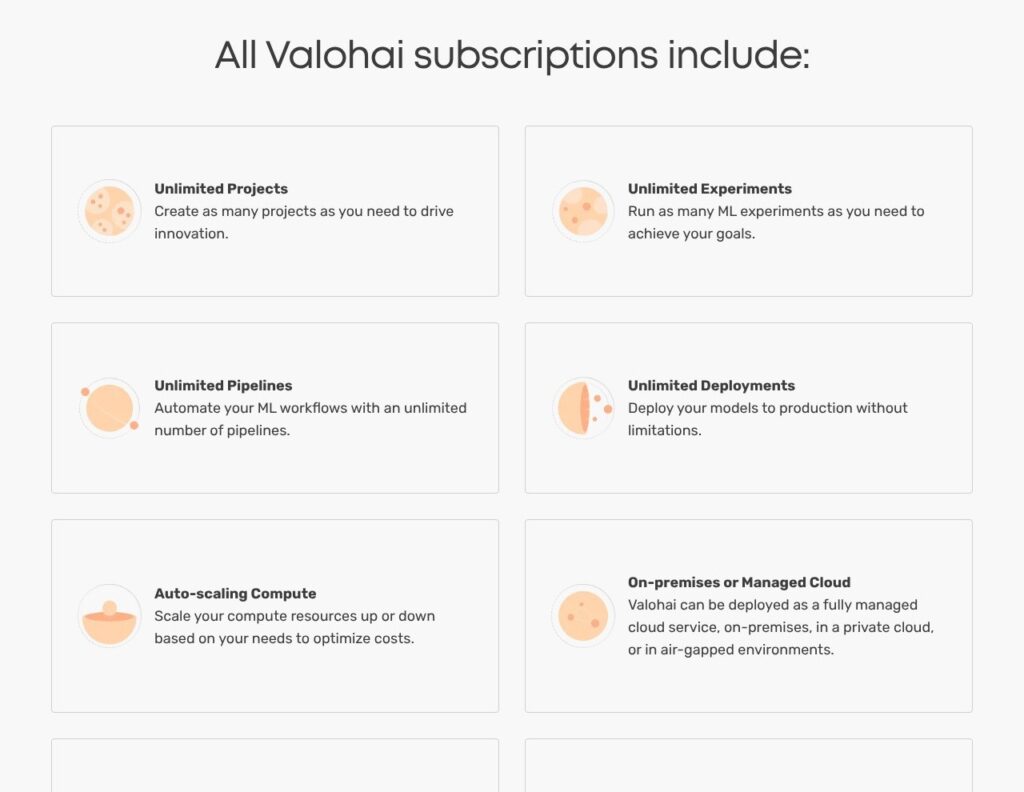
Valohai publishes no price: the license is a fixed fee per user per month, regardless of how many projects, experiments, pipelines or deployments a team runs, and every plan path ends at “Get a custom quote.”
- Subscription (quote): For ML teams on Valohai’s managed application. Includes unlimited projects and runs, auto-scaling compute, Dynamic GPU Allocation for multi-GPU on-prem servers, security and access controls, Customer Engineering support, and training and onboarding.
- Self-hosted or air-gapped (quote): For teams that must run the whole platform in their own network, on-prem, in a private cloud or air-gapped, under the same per-user model.
- 14-day free trial: All features; Customer Engineering handles extensions inside the trial environment, and there is no permanent free tier.
- Valohai LLM (free for now): For the separate LLM evaluation tracker, labeled “free while it lasts,” with no credit card.
| Option | Price | What I pay for | Where it runs |
|---|---|---|---|
| Subscription | Quote only | Per-user license; compute billed separately | Managed application with my own or Valohai-run workers |
| Self-hosted / air-gapped | Quote only | Per-user license plus my infrastructure | My network or private cloud |
| Free trial | Free for 14 days | All features, no license fee | Trial environment |
| Valohai LLM | Free for now | Evaluation tracking dashboard | Results posted from my local evaluation code |
Compute is a second bill: in hybrid mode, my AWS, Azure, GCP or OCI provider bills the workers, queue machine and storage at its own rates. For environments Valohai runs, the Billing tab charges machine hours and Valohai-managed storage monthly, with usage by project.
On AWS Marketplace, Valohai Hybrid AWS still needs a license bought directly from Valohai, plus the AWS infrastructure costs.
Is Valohai Good Value for Money?
- ClearML: Free is $0 and Pro is $15 per user a month plus usage; Scale and Enterprise are quote-only for VPC, on-prem and air-gapped installs.
- TrueFoundry: Developer is free for up to 3 users, and Pro is $25 per user a month.
- Weights & Biases: Pro starts at $60 a month.
- ZenML: Pro Starter is $39 a month with unlimited seats, one ML project and up to 100 pipeline runs a month.
- SageMaker AI and Azure ML: No minimum fees or upfront commitments on SageMaker; “no additional charge” on Azure ML beyond compute and supporting services.
- Domino Data Lab: Also quote-based, with 5 admin licenses and unlimited consumer licenses.
Value rises with how much infrastructure the team already owns, because the flat per-user fee covers unlimited runs on that hardware. For a two-person team on one cloud, ClearML Pro or SageMaker is the better-value start, with prices public before any sales call.
Reviewer’s Notes: I recommend running the 14-day trial with one real training step on the cloud account you plan to keep, then asking for the per-user quote with the self-hosted option priced separately. Budget compute on the cloud provider’s bill, since unlimited executions cover the license, not the machines.
My Experience With Valohai
Signing Up and Installing the CLI
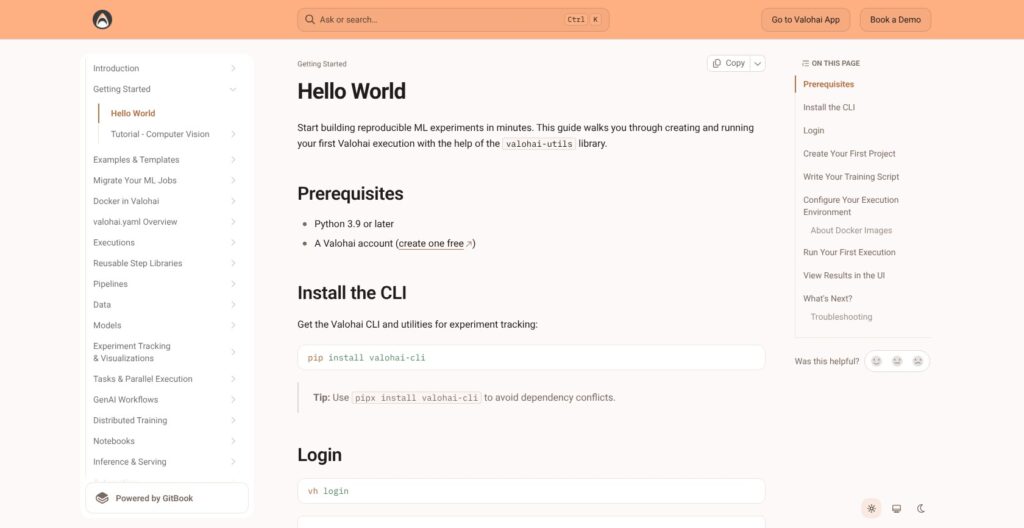
I started Valohai’s 14-day trial from the “Start free” button, which opens the trial signup at app.valohai.com. Then I installed the CLI with pip (pipx is the alternative that isolates its dependencies), logged in, and created a project from my working folder:
pip install valohai-cli
vh login
vh project create --name my-ml-project
vh execution run train --adhoc --watch
vh project create linked my local directory to the new project; vh project link attaches an existing project instead. The last command ran only after I added the step below. Accounts that sign in through SSO need a personal token from My Profile > Authentication > Manage Tokens, passed to vh login --token, and self-hosted installs add --host with the company’s Valohai URL.
The rest of the workflow also runs from the terminal in valohai-cli 0.37.0: vh execution logs, outputs, ssh and stop, plus vh pipeline run, vh task run, vh notebook run, vh model versions and vh deployment create-version. vh environments listed the machine types my organization could target, and --environment picks one per run.
Running My First Execution
A step in valohai.yaml needs a name, a Docker image and a command; parameters, inputs and environment are optional keys. Mine defined one tunable parameter:
- step:
    name: train
    image: python:3.11
    command:
      - pip install valohai-utils
      - python train.py
    parameters:
      - name: learning_rate
        type: float
        default: 0.001
The python:3.11 image supplied only the runtime. Valohai expects code and data outside the image: code arrives from Git or, as in my case, an ad-hoc upload.
Running vh execution run train --adhoc --watch uploaded my working directory without a Git push and streamed the logs to my terminal. vh execution open then showed the run in the browser:
- Logs and metric charts: Runtime output and the metrics the script printed.
- Parameters: The
learning_ratevalue behind that run. - Output files: Everything written to
/valohai/outputs/, uploaded and versioned. - Reproducibility details: The code version, Docker image and inputs.
Inputs download to /valohai/inputs/ before the code starts, from HTTP(S) URLs, cloud storage or datum://, dataset:// and model:// URIs, so moving an existing script means pointing its reads and writes at those two folders. Metrics come from JSON printed to stdout, with valohai-utils‘ log_metric as an optional helper, so train.py needed no tracking SDK. vh lint validates the YAML before a submit.
Chaining Steps Into a Pipeline
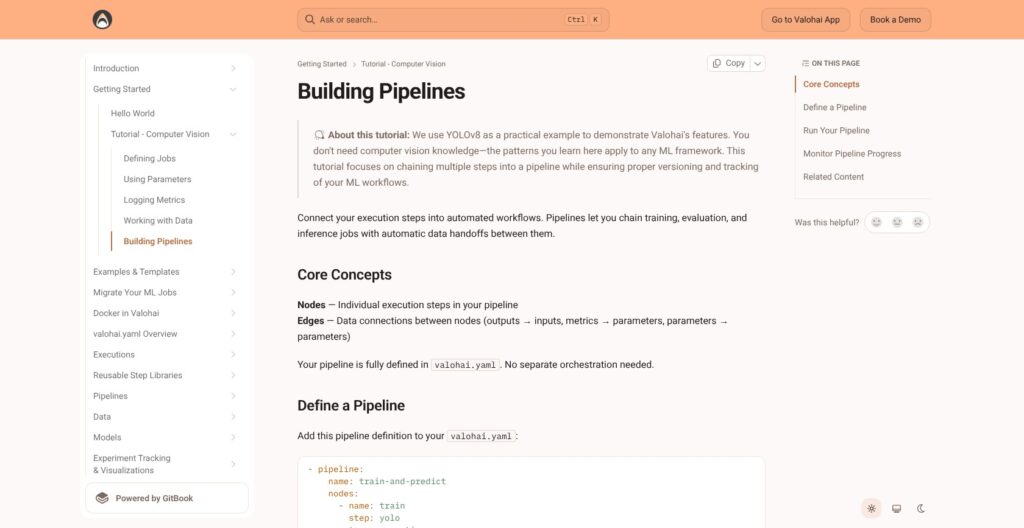
Next, I added a pipeline to the same file: two nodes of type: execution, each pointing at a step (train and evaluate), and an edge connecting train.output.model.onnx to evaluate.input.model. vh pipeline run with --adhoc started it without a Git push.
With reuse-executions: true at pipeline level, Valohai skips any node whose code, parameters, input checksums, Docker image and step name are unchanged, so an edit to the evaluation step alone leaves the training node reused.
The pipeline view holds one execution per node, so a failed node’s logs live in that node’s execution, not in the pipeline overview. The CLI cannot draw the pipeline graph from the YAML before a run (a feature request open on the valohai-cli GitHub repository since 2023), so edge mistakes surface only when a run starts.
Reviewer’s Notes: Start with
--adhocruns to learn the YAML, then connect the Git repository before production. Real-time endpoints and non-ad-hoc runs use committed code, so the ad-hoc path is a learning tool, not a deployment shortcut.
Data Versioning, Model Hub and Experiment Tracking
Every execution records its code version, parameters, Docker image, inputs and outputs, and files are addressed by URI, so I passed versioned artifacts between runs without copying files into new folders.
| URI | What it identifies | My use |
|---|---|---|
datum:// | One versioned file | Reuse an execution artifact |
dataset://name/version | A dataset version | Pin training inputs |
model://name/version | A model version | Select a deployment artifact |
Datasets and Model Hub
Dataset versions are immutable: a new version references existing files plus additions instead of duplicating them, and aliases such as latest can be repointed without editing code. Pinning dataset://name/version keeps an older training run reproducible, while latest follows new data.
The 2026 data additions include:
- Dataset properties: Query-builder filtering for datasets and versions.
- File previews: JSONL, NDJSON, Parquet and video, plus directory-tree browsing of outputs.
- Dataset inputs: Selectable directly on executions since June 2026.
- Search: By tags and URIs, added in November 2026.
In Model Hub, a model’s model:// URI is fixed once created. Versions come from training outputs through a metadata file and can wait in pending approval before pipelines and deployments pull model://name/version; model version comments shipped in November 2026. MLflow covers the registry job under Apache 2.0 but leaves orchestration and compute to me.
Sweeps, Spot Instances and Notebooks
- Tasks: Grid search, random search, Bayesian optimization (Optuna by default, HyperOpt optional) and manual sweeps, with early stopping on a metadata condition. Bayesian runs start with 20 random executions, so plan 30 or more.
- Spot recovery: On interruption the code receives a KeyboardInterrupt and gets 2-3 minutes to save, and
--autorestartrequeues the job with the previous outputs as a_restartinput, so resuming means writing checkpoints to/valohai/outputs/. - Notebooks: Jupyter executions start in 2-5 minutes, version their final state and bill until stopped manually, even when idle.
Versioning is Valohai’s strongest area; idle notebooks are its easiest cost leak.
Where Valohai Runs: Hybrid Cloud, Kubernetes, On-Prem and Slurm
In hybrid mode, Valohai runs the web application at app.valohai.com while workers, a queue machine and the storage bucket live in my AWS, Azure, GCP or Oracle Cloud account. Queue traffic uses Redis over TLS on port 63790; Valohai never connects directly to worker machines, and training data stays in my bucket.
Hybrid Workers in My Cloud
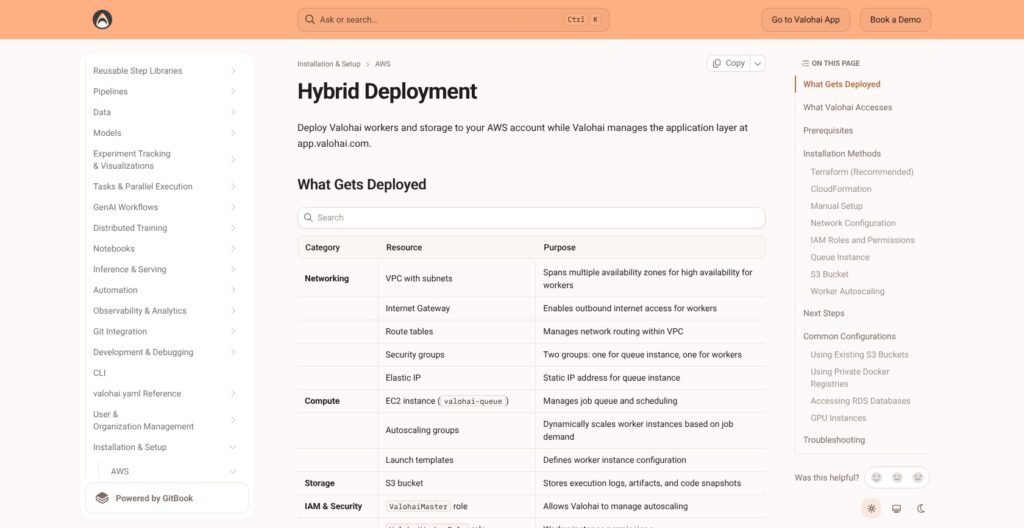
AWS setup supports Terraform, CloudFormation or a manual install, with Terraform recommended. Before provisioning, Valohai support supplies an AssumeRole ARN and a queue address. The deployment creates:
- Networking: A VPC with subnets, security groups and an Elastic IP.
- Compute: Autoscaling worker groups and a
valohai-queueinstance. - Storage and permissions: An S3 bucket, IAM roles and a Secrets Manager secret for the Redis password.
That customer-owned worker model reaches further than AWS-only SageMaker AI, but the resources and their bill stay in my account. Supported storage connections include:
- Object storage: Amazon S3, Azure Blob Storage, Google Cloud Storage, OVH and Oracle buckets.
- Shared filesystems: NFS volumes, including AWS EFS, Google Filestore and Azure Files.
- Data warehouses: Redshift, BigQuery and Snowflake.
Kubernetes, On-Prem GPUs and Slurm
- Kubernetes: Helm installs workers. Each job runs one pod with the workload container and a sidecar; scaling uses Karpenter, Cluster Autoscaler, GKE Autopilot or the AKS autoscaler.
- On-prem Linux: Ubuntu 24.04 is recommended, with NVIDIA Container Toolkit for GPUs. Workers reach a queue VM in my network.
- Dynamic GPU Allocation: Splits multi-GPU servers by requested GPU count in VM Dispatch environments. It is disabled by default and needs an administrator to enable it.
- Slurm: Jobs submit through the Slurm REST API or SSH. The integration is built and tested with Singularity containers.
- Full self-hosting: AWS EC2, EKS and OpenShift installs run the whole platform privately, including air-gapped networks, though Valohai advises trying hybrid first because self-hosting adds operations work.
Team quotas cap concurrent machines per team and environment. My pick is hybrid unless network rules demand full self-hosting. ClearML’s Scale and Enterprise plans also cover VPC, on-prem and air-gapped installs, and its open-source server is self-hostable.
Deployments, Automation and Security
Real-time endpoints run on Kubernetes, and Valohai creates them only from Git-versioned code. The endpoint block in valohai.yaml sets the image, server command, port (8000 by default), files and resources, and new deployment versions come from the UI or vh deployment create-version. Batch inference for CSV and image files is a separate pattern. 2026 added Gateway API support and workspace and shared volumes for endpoints.
Triggers and API
- Scheduled triggers: Launch work on a defined schedule.
- Webhook triggers: Connect external events, with GitHub and Slack examples.
- Notification triggers: Respond to new dataset or model versions.
- REST API: Launch and manage jobs programmatically, for example when new data lands in S3.
Since October 2026, a trigger disables itself after three failures within 12 hours, so check trigger status after changing a webhook. October also added multi-repository projects: several named Git repositories in one project, with commits referenced in the form ml-models:main.
Security and Access Control
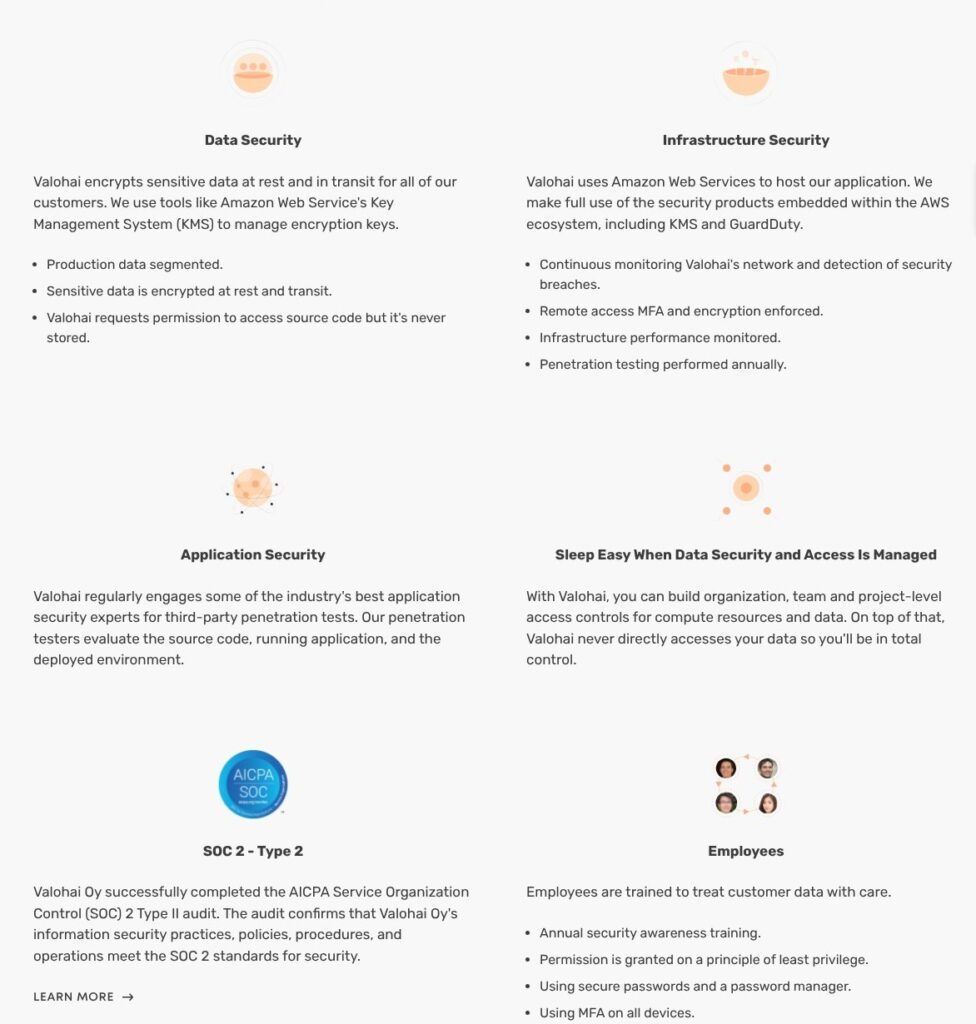
- SOC 2 Type II: Valohai Oy completed the assessment.
- Encryption: Data is encrypted at rest and in transit, with AWS KMS for key management.
- Testing and access: Annual external penetration tests and MFA enforced for remote access.
- Source code: Valohai requests access permission but never stores source code.
- SSO: Okta SAML 2.0, Azure AD and OIDC, with OIDC added in March 2026. IdP-initiated login is not supported.
- Activity log: Organization logs cannot be edited or deleted, keep 180 days of events and export to CSV.
- Sensitive actions: Reauthentication since April 2026.
No ISO 27001 certification is listed for Valohai. ZenML Pro Enterprise lists both ISO 27001 and SOC 2 Type II, which puts it on the shortlist when procurement requires both.
LLM Evaluations and Agent Skills
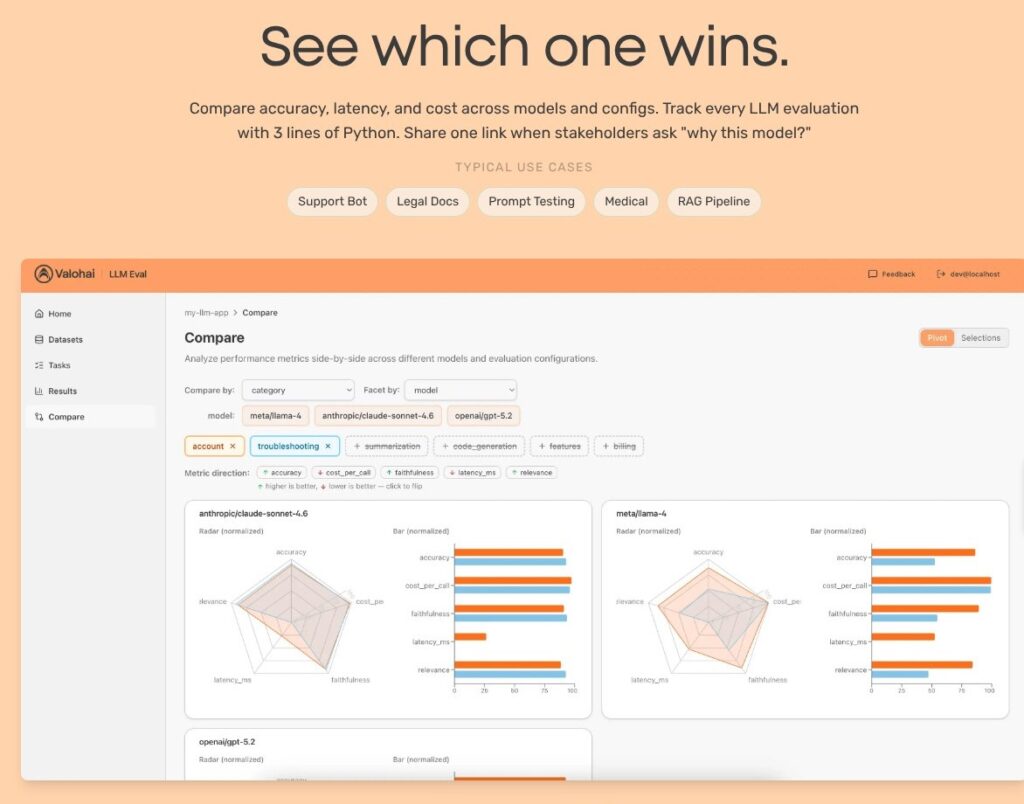
Valohai now pitches itself as the MLOps platform for LLMs and specialized models: provider comparisons run OpenAI, Anthropic and Meta Llama on one versioned dataset, and RAG context preparation, human approval gates and LLM fine-tuning run as ordinary pipelines.
- Valohai LLM: Version 0.1.0 shipped in February 2026. After
pip install valohai-llm,post_result()sends evaluation results to a dashboard that compares up to six configurations with radar charts, bar charts and scorecards; parameter-grid sweeps run every combination. - conduit: An MIT-licensed local proxy records token usage and cost across LLM providers and can forward that data to Valohai LLM.
- Agent Skills: The Apache-2.0
valohai-skillspackage supplies six skills for migrating steps, parameters, metrics, data handling, project runs and pipeline design.
npx skills add valohai/valohai-skills --all installs the skills for Claude Code, GitHub Copilot or Cursor, and the migration flow ends with vh lint and an ad-hoc run to validate the generated YAML.
Valohai LLM is free for now, not a permanent free tier, and Weights & Biases, which also covers evaluations and tracing, starts with a $0 Free plan. These are add-ons to Valohai’s job runner, not an LLM observability product.
How Does Valohai Compare to Competitors?
- ClearML: Free is $0 and Pro is $15 per user a month plus usage ($0.1 per GB of artifact storage, $1 per 100K API calls); Scale and Enterprise are quote-only for VPC, on-prem and air-gapped installs. It wins for teams that want published prices and an open-source server they can self-host.
- Domino Data Lab: Quote-based Domino Cloud (fully managed) or self-managed Premium and Enterprise, with 5 admin licenses, unlimited consumer licenses and premium support. It wins for large enterprises that want broader governance and FinOps controls.
- Amazon SageMaker AI: Pay for what I use, with no minimum fees or upfront commitments and Savings Plans available. It wins for AWS-only teams that want managed training and hosting without a separate license.
- Google Vertex AI and Azure Machine Learning: Vertex bills training and prediction per node-hour plus management fees; Azure ML adds no charge beyond compute, Blob Storage, Key Vault, Container Registry and Application Insights. Each wins inside its own cloud.
- TrueFoundry: Developer is free for up to 3 users, Pro is $25 per user a month, and Enterprise is custom with VPC or on-prem. It wins for teams whose main job is serving models and LLM apps.
- Weights & Biases: Free is $0, Pro starts at $60 a month, and Enterprise is custom. It wins for experiment tracking and visualization but does not orchestrate jobs on my hardware.
- MLflow, Kubeflow, ZenML and Metaflow: MLflow is Apache 2.0 with a managed version on Databricks, Kubeflow is a CNCF-graduated Kubernetes stack, ZenML Pro Starter is $39 a month, and Metaflow’s commercial company, Outerbounds, is now part of Anaconda. They win for teams with platform engineers willing to run the stack themselves.
Valohai wins where one team must run versioned ML jobs across several clouds, on-prem GPUs and Slurm without building that control plane in-house.
How I Reviewed Valohai
I signed up for Valohai’s 14-day trial, installed valohai-cli 0.37.0, created a project and ran an ad-hoc training execution from a valohai.yaml step. I built a two-node pipeline with execution reuse, worked through datasets, Model Hub versions and a Bayesian sweep, and walked through the hybrid AWS, Kubernetes, on-prem and Slurm installation guides plus the endpoint, trigger, SSO and security settings. I priced Valohai against ClearML, Domino Data Lab, SageMaker, Vertex AI, Azure ML, TrueFoundry, Weights & Biases and open-source stacks.
I weighted these areas:
- Pricing and value: License versus compute bills.
- CLI workflow: Project linking, ad-hoc runs, Git.
- Versioning: Datasets, Model Hub, lineage.
- Infrastructure: Hybrid, Kubernetes, on-prem, Slurm.
- Deployment and security: Endpoints, triggers, SSO.
- LLM tooling: Evaluations and agent skills.
- Alternatives: Managed, cloud-native and open-source rivals.
Prices current as of November 2026.
Valohai Review: Should You Use Valohai for MLOps?
I recommend Valohai for ML teams that train on their own cloud accounts, on-prem GPU servers or a Slurm cluster and want one versioned workflow: valohai.yaml definitions, automatic lineage, pipelines with execution reuse and Kubernetes endpoints, backed by SOC 2 Type II, SSO and a 180-day activity log. The flat per-user license pays off as run volume grows, because extra experiments add no license charge, while compute stays on the cloud bill.
Skip Valohai if you are a small team on one cloud that wants a published price (ClearML Pro at $15 per user a month plus usage, or SageMaker’s pay-as-you-go), if you need an open-source platform you can fork, or if experiment tracking alone is the job, where Weights & Biases Pro starts at $60 a month.
Before signing, get these in writing:
- License quote: The per-user monthly amount and the Customer Engineering support it includes.
- Hosting proposal: Whether self-hosted or air-gapped installation changes the price under the same per-user model.
- Compute estimate: Workers, queue machine and storage on your provider’s bill.
Start the 14-day trial at Valohai with one real training step on the infrastructure you plan to keep.
FAQ
How much does Valohai cost?
Valohai publishes no price: the license is a fixed fee per user per month, quote only, and it covers unlimited projects, experiments, pipelines and deployments. Self-hosted and air-gapped installs use the same per-user model. In hybrid mode, your cloud provider bills the workers, queue machine and storage separately. A 14-day free trial includes all features.
Does Valohai have a free trial?
Yes, Valohai offers a 14-day free trial with all features, started from the “Start free” button. Extensions are requested from Customer Engineering inside the trial environment. The main platform has no permanent free tier; the separate Valohai LLM evaluation tracker is free while it lasts and needs no credit card.
Can Valohai run on-premises or air-gapped?
Yes. Valohai runs on-prem Linux workers, Kubernetes workers and Slurm clusters, and the full platform can be self-hosted on AWS EC2, EKS or OpenShift, including air-gapped networks. In hybrid mode, Valohai still manages the web application while your machines run the jobs; full self-hosting moves the application inside your network too, which adds operations work.
Is Valohai open source?
No, the Valohai platform is closed source. Its valohai-cli, valohai-utils and valohai-yaml packages are MIT-licensed, valohai-skills is Apache-2.0 and conduit is MIT. For an open-source platform, the alternatives are ClearML (self-hostable server), MLflow (Apache 2.0), Kubeflow (CNCF graduated), ZenML (Apache 2.0) and Metaflow.
Is Valohai SOC 2 compliant?
Yes. Valohai Oy completed a SOC 2 Type II assessment. Data is encrypted at rest and in transit with AWS KMS, external penetration tests run annually, source code is never stored, and MFA is enforced for remote access. SSO supports Okta SAML 2.0, Azure AD and OIDC. No ISO 27001 certification is listed, so teams that need it should look at ZenML Pro Enterprise, which lists both ISO 27001 and SOC 2 Type II.