
Editor’s note: This Kubeflow review is based on my hands-on test of the Kubeflow Pipelines SDK 2.17.0, run locally in October 2026: a four-step pipeline with a condition, a loop, a pip dependency and a deliberate failure. I didn’t deploy the full platform, so the cluster-side sections describe how those components work, not how they performed for me. I weigh cost, the developer loop, operations and security.
Quick verdict: I recommend Kubeflow for platform teams that already run Kubernetes well and want portable open-source ML pipelines, training and serving in one place. The trade-off: a 12 GiB platform that ships twice a year with hand-run upgrade steps and has no vendor SLA.
Among MLOps pipeline frameworks, Kubeflow’s strongest piece is the Pipelines SDK, which compiles Python into IR YAML that runs on your own cluster or on Vertex AI Pipelines.
In this review, I’ll take a closer look at Kubeflow’s cost, pipelines, training stack and operations, so you can see whether it beats MLflow, Flyte or a managed service.
Key Takeaways
- Free under Apache-2.0; you pay for the cluster and the engineers
- kfp ran my four-step pipeline locally in about 5 seconds, no cluster
- CNCF Graduated on July 24, 2026, with 6,600+ contributors
- The full stack needs about 12 GiB, 4.4 cores and 65 GB; upgrades include manual deletes
- Stock 26.03.1 ships KFP 2.16.1, below the 2.17.0 fix for a CVSS 10.0 SSRF
Kubeflow Pros and Cons
Pros
- Apache-2.0 license with no fee and no usage cap
- IR YAML pipelines run on the open-source backend or Vertex AI Pipelines ($0.03 per run)
- The local kfp runner tests whole pipelines with no cluster
- Trainer, Katib, KServe and the Hub registry ship in one 26.03.1 bundle
- CNCF Graduated (July 2026) with 6,600+ contributors
Cons
- The full platform needs about 12 GiB RAM, 4.4 cores and 65 GB before your first job
- Upgrades mean deleting resources by hand, twice a year
- No vendor SLA or support unless you buy a distribution
- Stock 26.03.1 ships KFP 2.16.1, below the 2.17.0 fix for a CVSS 10.0 SSRF
How Much Does Kubeflow Cost?
Kubeflow is free under the Apache-2.0 license, with no usage cap, no paid tier and no price card from the project itself. You pay for the Kubernetes cluster it runs on and for the engineers who install, patch and upgrade it, so the nearest things to plans are these distributions and managed backends.
- Self-managed Community Distribution ($0): for teams with Kubernetes skills; the full stack reserves about 4.4 cores, 12 GiB of memory and a 65 GB volume, while Pipelines alone needs about 1 core, 3.5 GiB and 35 GB
- Vertex AI Pipelines ($0.03 per run plus compute): for Google Cloud teams that want the same SDK and IR YAML on a managed KFP backend
- Charmed Kubeflow (per-node, per-year subscription, quote only): for buyers who want Canonical’s 10 years of security maintenance; Canonical’s open-source distribution is also free
- Red Hat OpenShift AI (subscription, quote only): for companies already on OpenShift; the 60-day trial requires an existing OpenShift cluster
| Cost line | What you pay | Notes |
|---|---|---|
| Kubeflow license | $0 | Apache-2.0, no usage limits |
| Amazon EKS control plane | $0.10/hour (about $73/month) | $0.60/hour on extended Kubernetes version support |
| GKE cluster fee | $0.10/hour | $74.40 monthly credit covers one zonal or Autopilot cluster |
| AKS control plane | Free tier $0; Standard $0.10/hour; Premium $0.60/hour | Free tier has no uptime SLA |
| Vertex AI Pipelines | $0.03 per run | Plus the compute and services each run uses |
| Minimum platform hardware | 16 GB RAM and 8 cores recommended | Excluding components trims it to 4-8 GB and 2-4 cores |
| Commercial support | Quote only | Canonical, Red Hat, Aranui Solutions, RAICS.AI and a freelance consultant publish no prices |
Worker nodes sit on top of every control-plane fee in that table, and the platform’s 12 GiB reservation is paid for before any training pod or GPU schedules.
Is Kubeflow Good Value for Money?
- Good fit: if you already pay platform engineers to run Kubernetes, Kubeflow adds pipelines, training, tuning and serving for the cost of the nodes plus a control plane (about $73/month on EKS), with no execution meter like ZenML Scale’s 2,000 runs for $999/month
- Less convincing fit: if nobody on your team runs Kubernetes today, a managed plan such as Union.ai Team ($950/month minimum, credited against usage) takes over the twice-yearly upgrades you would otherwise have to staff
- Budget priority: at $0.03 per run, 1,000 Vertex AI Pipelines runs a month cost $30 in pipeline fees, less than half of EKS’s $73/month control-plane fee before a single worker node, and SageMaker Pipelines adds no pipeline fee at all on AWS
- Watch the support window: each release gets about six months of community support, so the free license assumes you upgrade on schedule or pay one of the five listed support providers
- Storage counts too: the platform’s 65 GB of persistent volumes bills as cloud block storage on top of the nodes, before you store a single dataset or model
Reviewer’s Notes: I recommend starting with standalone Kubeflow Pipelines, or Vertex AI Pipelines if you already run on Google Cloud, and adding Trainer, Katib or KServe only when a workload demands them. If you want the full platform, budget a node pool of at least 8 cores and 16 GB of memory before any GPUs, because that’s the recommended floor for the single-command install.
My Experience With Kubeflow
Installing the SDK and Writing My First Pipeline
pip install kfp==2.17.0 took about 10 seconds and produced a 55 MB virtual environment on Python 3.9, the oldest version the SDK still supports. Every run printed a google-auth warning that Python 3.9 is past end of life, so I’d start on a newer interpreter.
I wrote four lightweight components with @dsl.component (make_data, train, evaluate and promote) and wired them together with typed artifacts: Output[Dataset], Output[Model] and Output[Metrics]. A dsl.If gate runs the promote step only when the RMSE beats a threshold.
Compiling took 0.01 seconds and produced a 300-line IR YAML file at schema version 2.1.0, with the condition compiled into its own sub-DAG. Components with no base image default to python:3.11.
A component defined in a python -c one-liner fails with “OSError: could not get source code”, because @dsl.component reads the function’s source. Components have to live in a file or a notebook cell.
Running It Locally With kfp.local
With SubprocessRunner, a single component ran outside any pipeline in 1.3 seconds. The full four-step pipeline finished with SUCCESS in 5.0 seconds, about 1.2 seconds per task, and logged an RMSE of 1.021. The dsl.If branch fired, so promote returned “promoted (rmse=1.021)”.
A dsl.ParallelFor over three items also succeeded, in 3.7 seconds, though the iterations ran one after another rather than in parallel. Adding numpy through packages_to_install with use_venv=True made the runner build a throwaway venv, and that task took 9.5 seconds instead of about 1.2.
A component that raised a ValueError printed the full Python traceback, and the pipeline call raised a RuntimeError naming the failed task after 2.4 seconds, with the upstream task’s output kept. Every task also logs its executor input and output JSON, which is verbose but made debugging easy.
SubprocessRunner ignored base_image and ran every task in my local Python 3.9, not python:3.11. Local runs have no caching or retries, and integer metadata came back as a float (100 became 100.0). Treat kfp.local as a unit-test loop, not a preview of cluster performance; DockerRunner is the runner for testing real container images.
Where My Test Stopped: The Cluster Install
The dashboard, backend caching and every component past the SDK need a Kubernetes install, which I did not run. The Community Distribution (formerly kubeflow/manifests) installs with kustomize onto kind or a real cluster, and the recommended machine has 16 GB of memory and 8 cores. You get Istio, Dex, oauth2-proxy, cert-manager and Knative alongside the ML components, and because kubectl apply can fail on the first pass while CRDs register, the install command is a retry loop.
The default login is user@example.com with password 12341234, which you must change before the cluster serves anyone else. ARM64 images are not fully supported yet. The lighter route is standalone KFP via kubectl apply -k, but its dev flavor is labeled non-production.
Reviewer’s Notes: Write and unit-test your pipelines locally first, and stand up the cluster only when you need the UI, backend caching and multi-user Profiles. The same compiled YAML also submits to Vertex AI Pipelines at $0.03 per run, so on Google Cloud you can skip running a cluster of your own.
Kubeflow Pipelines: Authoring, Caching and Portability
Kubeflow Pipelines compiles Python into IR YAML that runs on the open-source KFP backend or on Vertex AI Pipelines, and Kubeflow’s own 2026 SDK survey ranks it as the most-used Kubeflow service, ahead of Notebooks and Trainer. If your team adopts only one Kubeflow component, it should be this one.
- Two component types: lightweight Python components with
@dsl.component, and container components with@dsl.container_componentfor any image - Typed artifacts: Dataset, Model and Metrics inputs and outputs that the backend tracks per run
- Caching on by default: disable it per task with
set_caching_options(False), per run withenable_caching=False, at compile time with a flag, or with an environment variable - Argo execution: the backend runs on Argo Workflows v3.7 or v4.1 with the Emissary executor and MySQL v8
- kfp-kubernetes extension: mounts volumes and secrets, replacing the old VolumeOp
- One container per step: each component execution maps to one container execution, so resource requests stay per task
KFP 3.0 will require Argo Workflows 4.x, so plan to upgrade your Argo controller before the next major KFP version. Moving from v1 to v2 is a manual rewrite: create_component_from_func and ContainerOp are gone, VolumeOp is unsupported, and keyword arguments are now mandatory when you instantiate components. Stricter type casting means the string ‘0.1’ now fails for a float parameter, and v1 pipelines only run on a v2 backend if you compile them with the v1 SDK, which stops at kfp 1.8.22. A feature request for a v1-to-v2 migration tool is still open on GitHub, so no automated path ships today.
Flyte builds workflows from typed, versioned tasks, and Union.ai runs it managed from $950/month. Argo Workflows (17,034 stars) on its own gives you KFP’s execution engine without the ML-specific Python SDK, typed artifacts or caching.
Kubeflow Pipelines is best for teams that want one Python pipeline definition that runs on their own Kubernetes or on Vertex AI. Skip it if you still have a large KFP v1 codebase and no time budgeted for the rewrite.
Training, Tuning and Serving: Trainer, Katib, KServe and Hub
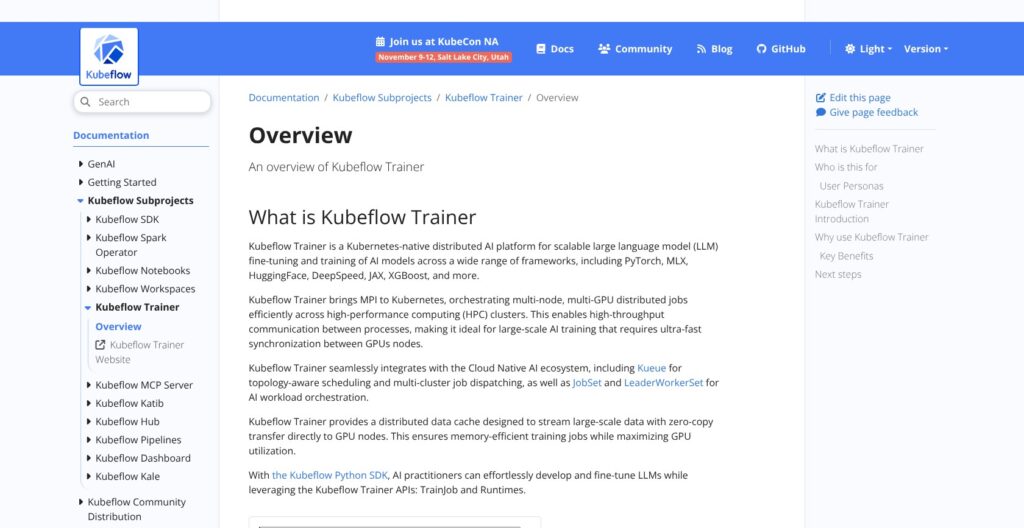
Beyond Pipelines, the 26.03.1 bundle ships five separately versioned ML services, and Katib, KServe and Hub are all still on 0.x version numbers. None of them ran in my local test, so this is how each component works rather than how it performed.
Trainer v2.2.0
Trainer runs distributed jobs through its TrainJob and Runtimes APIs for PyTorch, MLX, HuggingFace, DeepSpeed, JAX and XGBoost, with scheduling through Kueue, JobSet, LeaderWorkerSet, Volcano or YuniKorn. It adds LLM fine-tuning blueprints and a distributed data cache. The older Training Operator v1.9.2 still ships but is legacy, and it’s already gone from the next release’s component list.
Katib v0.19.0
Katib handles hyperparameter tuning and neural architecture search as Kubernetes jobs.
KServe v0.18.0
KServe serves models, with a Knative-based serverless mode; the next release jumps to 0.21.0.
Kubeflow Hub v0.3.9
Hub, formerly Model Registry, now combines a model registry with a model catalog; 44% of respondents in Kubeflow’s 2023 user survey had named a missing registry as a top gap.
Notebooks v1.11.0 and the Kubeflow SDK
Notebooks ships with workspaces v2 in beta, and the Central Dashboard 2.0.0 has moved to its own repository. The separate Kubeflow SDK (pip install kubeflow) has passed 1 million downloads and exposes TrainerClient and OptimizerClient, which switch between a local process, Docker or Podman, and Kubernetes with a one-line backend change. Its 2026 roadmap adds an MCP server, OpenTelemetry integration and a dynamic LLM trainer framework. Spark Operator 2.5.0 also ships in the bundle for Spark jobs on the same cluster.
The bundle has no feature store, so you run a separate one, and no built-in model monitoring, which 45% of respondents in that same survey named a top lifecycle gap. MLflow has the stronger experiment tracking and registry experience, and Weights & Biases or ClearML cover tracking if you’d rather not run MLflow alongside Kubeflow.
For distributed training on Kubernetes, Trainer is the strongest part of this kit. For tracking and registry, I’d still pair Kubeflow with MLflow rather than rely on Hub.
Running Kubeflow in Production: Upgrades, Multi-Tenancy and Security
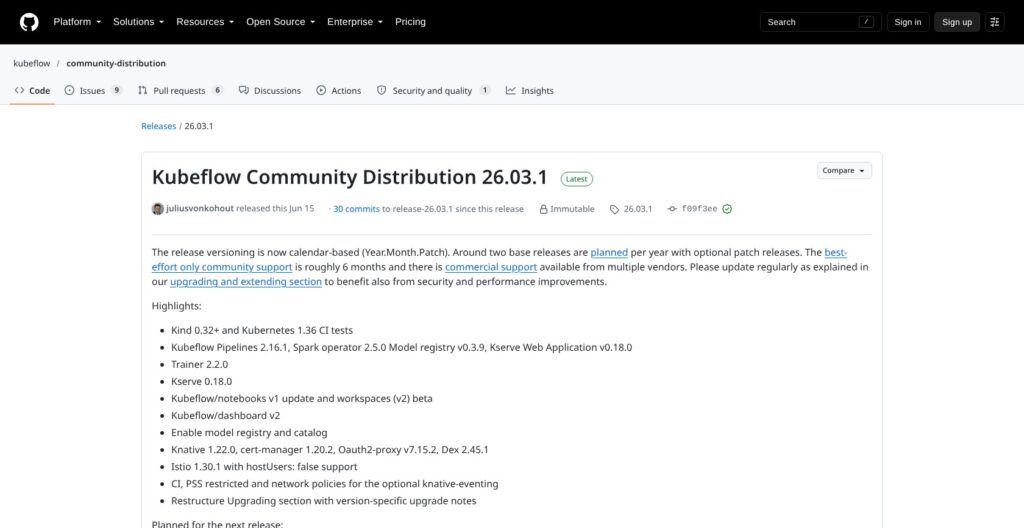
Kubeflow ships two calendar releases a year (26.03 now, 26.10 planned), and each gets about six months of best-effort community support, so a cluster that isn’t upgraded twice a year drifts out of support.
Upgrades
- 26.03 storage switch: object storage moved from MinIO to SeaweedFS, so you delete MinIO and copy your data across with S3 commands
- 26.03.1 manual deletes: the release flags breaking dashboard changes and requires deleting the JobSet controller deployment and an old KServe cluster role binding by hand before re-applying
- Kustomize only: installs and upgrades run through Kustomize, with no official Helm chart
- In-place path: keep your changes as Kustomize overlays on the example kustomization, point at the new release, re-apply, and run
kubectl apply --prune --dry-runto list leftover resources
In Kubeflow’s own 2023 user survey, 39% of respondents named installation and 39% named upgrades as top challenges, and users asked for Helm. Closed GitHub issues titled “Upgrade guide” and “Upgrade procedure” drew 14 and 13 reactions from users asking for a documented path.
Multi-Tenancy
Each user gets a Profile that creates a dedicated namespace, and sharing works through Kubernetes RBAC plus Istio AuthorizationPolicies. The default install uses Istio CNI for Pod Security Standards compatibility, and 26.03 added restricted-profile support for Pipelines v1 and v2.
Security
- CVE-2026-47237 (CVSS 8.0): a user with Contributor rights in a namespace could steal other users’ authorization tokens from the Dashboard, Pipelines API or Notebooks; fixed in 26.03-rc.1
- CVE-2026-54745 (CVSS 10.0): an unauthenticated server-side request forgery through the KFP frontend’s
/_proxy/route; fixed in KFP 2.17.0
Stock 26.03.1 bundles KFP 2.16.1, so a default install stays exposed to that SSRF until you upgrade Pipelines to 2.17.x (the master branch already carries 2.17.2). Graduation in July 2026 required an external security assessment, but the project offers no SLA; paid support comes from the five listed providers.
Reviewer’s Notes: Pin to a release, subscribe to Kubeflow’s GitHub security advisories, and patch Pipelines to 2.17.x on day one of any 26.03.1 install. Budget a platform engineer’s time for every six-month upgrade cycle; if you can’t, Union.ai or Vertex AI Pipelines take that Day 2 work off your plate for a fee.
How Does Kubeflow Compare to Competitors?
Kubeflow is the only option here that bundles pipelines, distributed training, tuning and serving in one open-source Kubernetes release; every rival below wins by doing less, or by running the platform for you.
| Tool | Model | Starting price | Runs on | Best for |
|---|---|---|---|---|
| Kubeflow | Open source | $0 plus cluster | Kubernetes | Kubernetes platform teams |
| MLflow | Open source, also managed | $0 self-hosted | Anywhere | Tracking and registry |
| Flyte / Union.ai | Open source / managed | $0 / Team from $950/month minimum | Kubernetes | Typed data and ML workflows |
| Metaflow | Open source | $0 (managed pricing not published) | Local, AWS, Kubernetes | Data-scientist-first Python |
| ZenML | Open source / managed | $0 / Scale $999/month | On top of orchestrators, KFP included | One layer across several backends |
| Vertex AI Pipelines | Managed | $0.03 per run plus compute | Google Cloud | Managed KFP |
| SageMaker Pipelines | Managed | No pipeline fee, compute only | AWS | AWS-native teams |
- Kubeflow vs MLflow: MLflow (28,350 GitHub stars) wins on experiment tracking, model registry and tracing, and runs managed on Databricks, SageMaker and Azure Machine Learning; it doesn’t orchestrate Kubernetes pipelines, so Charmed Kubeflow and Red Hat OpenShift AI both ship the two together
- Kubeflow vs Flyte: Flyte (7,682 stars) wins for workflows built from typed, versioned tasks on Kubernetes, and Union.ai sells it managed from a $950/month minimum with a 30-day trial
- Kubeflow vs Metaflow: Metaflow (10,300 stars) wins for data scientists who want plain Python that runs locally, on AWS or on Kubernetes; Anaconda bought its vendor, Outerbounds, in April 2026, and managed pricing isn’t published
- Kubeflow vs ZenML: ZenML (5,612 stars) sits on top of orchestrators, Kubeflow included, and wins if you want one abstraction across several backends; its Scale plan costs $999/month
- Kubeflow vs Vertex AI Pipelines: Vertex runs the same KFP IR YAML at $0.03 per run plus compute, and wins for Google Cloud teams that don’t want to operate a cluster
- Kubeflow vs SageMaker Pipelines: SageMaker charges no separate pipeline fee and wins for AWS teams already training inside SageMaker
- Kubeflow vs Apache Airflow: Apache Airflow (47,149 stars) wins for general data orchestration across non-ML jobs, where Kubeflow’s ML artifacts and Trainer add nothing
deployKF, a community packaging of Kubeflow, has had no release since May 2024, so I wouldn’t build on it. If you only need pipelines and already run on Google Cloud, Vertex AI Pipelines is the cheapest way to use Kubeflow’s SDK without its operations. If you need training and serving on your own Kubernetes as well, no rival in this table covers as much in one open-source release.
How I Reviewed Kubeflow
I installed the kfp SDK 2.17.0 in a fresh Python virtual environment on macOS and ran real pipelines locally with kfp.local: a compile, a four-step pipeline with a condition, a three-item loop, a task with a pip dependency and a deliberate failure. I did not deploy Kubeflow to a cluster. I compared it with MLflow, Flyte, Metaflow, ZenML, Vertex AI Pipelines and SageMaker Pipelines on price, hosting model and fit.
For everything beyond the SDK, I evaluated the 26.03.1 Community Distribution release: its component versions, resource requirements, install and upgrade steps, and 2026 security advisories, plus the cost of the cluster and the managed alternatives. I weighed four areas: cost of ownership, the pipeline developer loop, day-to-day operations and security.
Prices current as of October 2026.
Should You Build Your ML Pipelines on Kubeflow?
Among pipeline frameworks in the MLOps category, Kubeflow gives you free, vendor-neutral ML pipelines that run on your own Kubernetes or on Vertex AI, plus Trainer, Katib, KServe and Hub in one release. The price is operational: a 12 GiB platform, twice-yearly upgrades with manual steps, and security patches you apply yourself, like the KFP 2.17.0 fix for a CVSS 10.0 SSRF.
I recommend Kubeflow if you have a Kubernetes platform team and want pipelines plus training and serving without a vendor. Start with standalone Kubeflow Pipelines, or Vertex AI Pipelines on Google Cloud, and add the rest when a workload needs it.
Skip it if you’re a small data science team without Kubernetes skills: Metaflow, or MLflow plus a managed orchestrator, gets you running faster. If you need vendor support, buy Charmed Kubeflow or Red Hat OpenShift AI, or move to Union.ai’s managed Flyte from $950/month.
Your next step: run pip install kfp, port one of your pipelines to @dsl.component, and run it locally with kfp.local this week before you provision a cluster. Kubeflow is free to download from kubeflow.org.
FAQ
Is Kubeflow free?
Yes. Kubeflow is open source under Apache-2.0, with no license fee or usage cap. You pay for the Kubernetes cluster it runs on (about $73/month for an EKS control plane, before worker nodes) and the engineers who operate it. Commercial support from Canonical or Red Hat is sold by quote. See How Much Does Kubeflow Cost? above for the full breakdown.
What is the latest version of Kubeflow?
The latest stable platform release is Kubeflow 26.03.1, published June 15, 2026. Kubeflow now uses calendar versioning (Year.Month.Patch), with 26.10 planned next. The kfp SDK is versioned separately: its latest release is 2.17.0, and the KFP backend reached 2.17.2 in September 2026.
Is Kubeflow better than MLflow?
Neither replaces the other: Kubeflow orchestrates ML pipelines, training and serving on Kubernetes, while MLflow is stronger at experiment tracking, model registry and tracing, and runs anywhere. Pick Kubeflow if you need Kubernetes-native orchestration and MLflow if tracking is your gap; the two also run side by side.
Can I run Kubeflow Pipelines without Kubernetes?
For development, yes. kfp.local runs pipelines on your machine with SubprocessRunner or DockerRunner, and my four-step test pipeline finished in 5 seconds with no cluster. Production runs still need a Kubernetes cluster with the KFP backend, or Vertex AI Pipelines, which runs the same compiled YAML as a managed service.
How much hardware does Kubeflow need?
Plan for 16 GB of RAM and 8 CPU cores for the full platform. The complete stack reserves about 12 GiB of memory, 4.4 cores and 65 GB of storage, and you can exclude components to fit 4-8 GB and 2-4 cores. Kubeflow Pipelines on its own needs about 1 core, 3.5 GiB and 35 GB.