
Editor’s note: This review evaluates Turbopuffer’s pricing, retrieval features, deployment choices, and operational trade-offs through independent analysis.
Quick verdict: I recommend Turbopuffer for developers building search over large document collections, especially when much of that data is accessed only occasionally. Its combination of vector and keyword search is appealing, but cold queries, usage-based billing, and the work of building a complete search application deserve as much attention as storage costs.
In this Turbopuffer review, I’ll look at what you get for your money, how the search workflow fits together, and when I’d choose another vector database.
Key Takeaways
- Object storage makes Turbopuffer particularly interesting for large collections with uneven search traffic.
- Vector search, BM25 keyword search, native embeddings, and server-side rank fusion can work together in one retrieval service.
- Launch starts at a $16 monthly usage minimum, rather than a fixed price for unlimited searches.
- Cold queries can be slower, and reserving resources through pinning changes the cost calculation.
- This is a developer product. Your team still owns document preparation, relevance evaluation, and the application around search.
Pros and Cons
Pros
- Vector and BM25 search with server-side reciprocal rank fusion
- Native embeddings reduce the need for a separate embedding integration
- Object storage with SSD and memory caching suits uneven access patterns
- Strongly consistent reads are the default
- Namespace pinning offers reserved resources for sustained traffic
Cons
- Cold queries can add latency to the first search after inactivity
- Monthly commitments apply even when usage is low
- Pinning has a 128 GB billing floor
- Commercial BYOC does not provide an open-source database you can run independently
How Much Does Turbopuffer Cost?
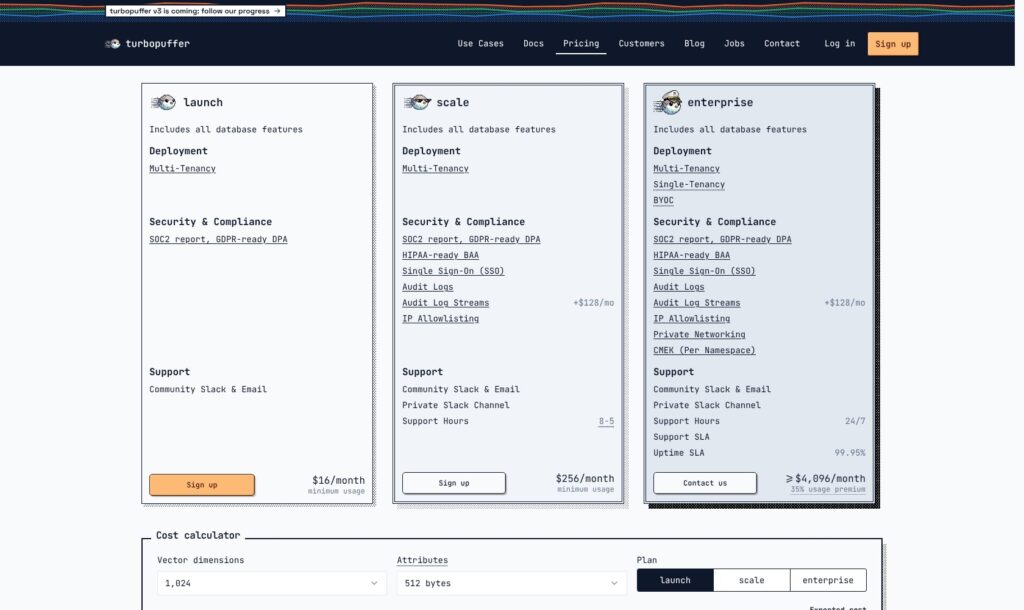
I’d start with Launch unless your security or support requirements rule it out. All three plans include the database features, so a higher commitment isn’t required just to combine vector and keyword search.
- Launch ($16/month minimum): For small teams using shared infrastructure and community support.
- Scale ($256/month minimum): Adds SSO, audit logs, a HIPAA-ready BAA, and private Slack.
- Enterprise (from $4,096/month): Adds BYOC, private networking, and 24/7 support, with a 35% usage premium.
| Plan | Monthly commitment | Main reason to choose it |
|---|---|---|
| Launch | $16 minimum | Access to the database without a large commitment |
| Scale | $256 minimum | Additional access controls, compliance options, and support |
| Enterprise | At least $4,096, plus usage premium | Deployment control and contractual service commitments |
Unused commitment does not roll over, and usage above it costs extra. Audit log streams add $128 per month on Scale or Enterprise.
What Drives the Bill?
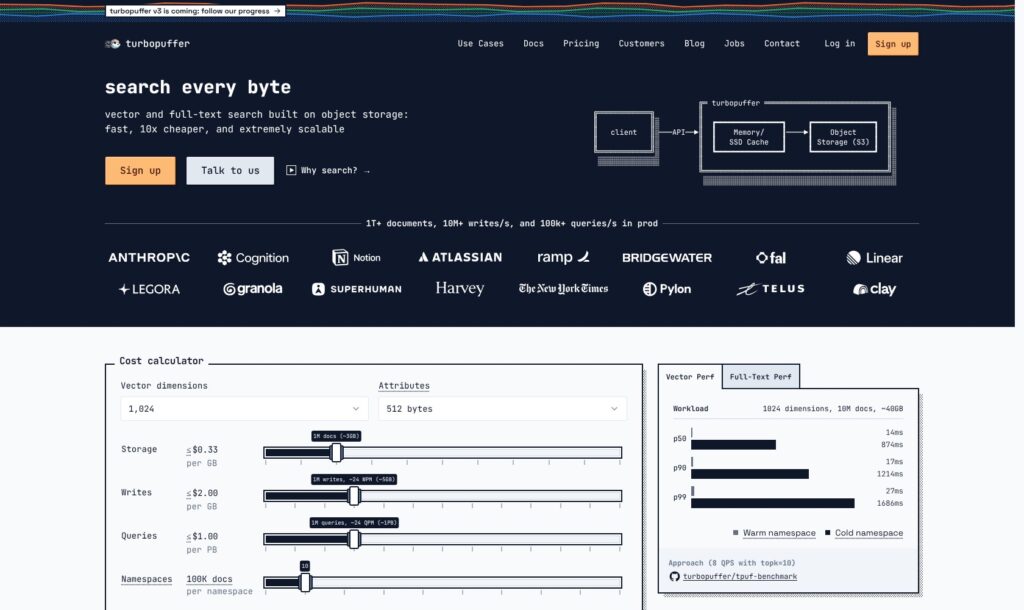
The standard Launch and Scale calculator uses $0.33 per GB-month for storage and a $2-per-GB write rate before batch discounts. Query charges depend on the size of the namespace searched, with returned data billed separately. A namespace is a separate collection of documents and indexes. Native embeddings add model-specific token charges for documents and queries, so include them in your estimate.
That makes the number of stored vectors a poor budget on its own. I’d model your document attributes, update frequency, collection sizes, and expected searches together. A low-traffic archive and a busy search box can have very different costs even with the same amount of data.
Is Turbopuffer Good Value for Money?
- For a growing document collection: I like the separation between storing information and keeping it constantly active in expensive compute resources.
- For a tiny experiment: A paid minimum is less attractive than a free development tier from an alternative such as Pinecone.
- For consistently busy search: Compare shared query billing with pinning. The cheapest storage option doesn’t automatically produce the cheapest complete service.
Reviewer’s Notes: Choose Launch for an initial application evaluation. Move to Scale when you need its access controls or support, and discuss Enterprise before committing to an architecture that requires private deployment.
Getting Started With Turbopuffer
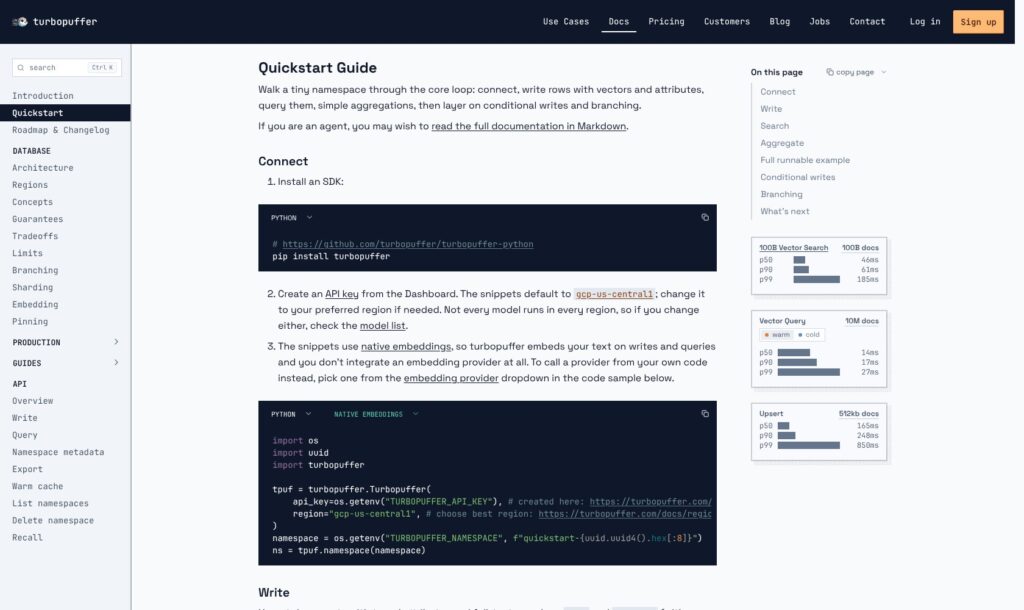
You’ll need a developer to connect Turbopuffer to your application. The setup centers on an API key, a region, and a namespace, followed by writing documents and querying them through an SDK or HTTP API.
I like that native embeddings remove one integration from this process. You can configure a supported embedding model on a text attribute and send text, rather than generating every vector in a separate service first. Model availability varies by region, so choose the model and deployment location together.
A sensible first implementation has four steps:
- Prepare representative documents. Include the metadata your search needs, such as customer, document type, and access permissions.
- Configure the searchable fields. Decide which text needs keyword search and which attributes need embeddings or filtering.
- Try realistic queries. Include exact identifiers, natural-language questions, and requests constrained by permissions.
- Connect the results to your application. Add result presentation or pass selected passages into your AI answer workflow.
The appeal is a fairly direct route from documents to retrieval. The harder part is deciding what counts as a good answer. Breaking a long document into poor chunks can still produce poor results, regardless of how capable the database is.
I would also include awkward queries in the first evaluation: an abbreviated product name, an outdated policy, or two documents that say almost the same thing. Those cases tell you more about the work ahead than a demo question with an obvious match.
Vector and Keyword Search in One Place
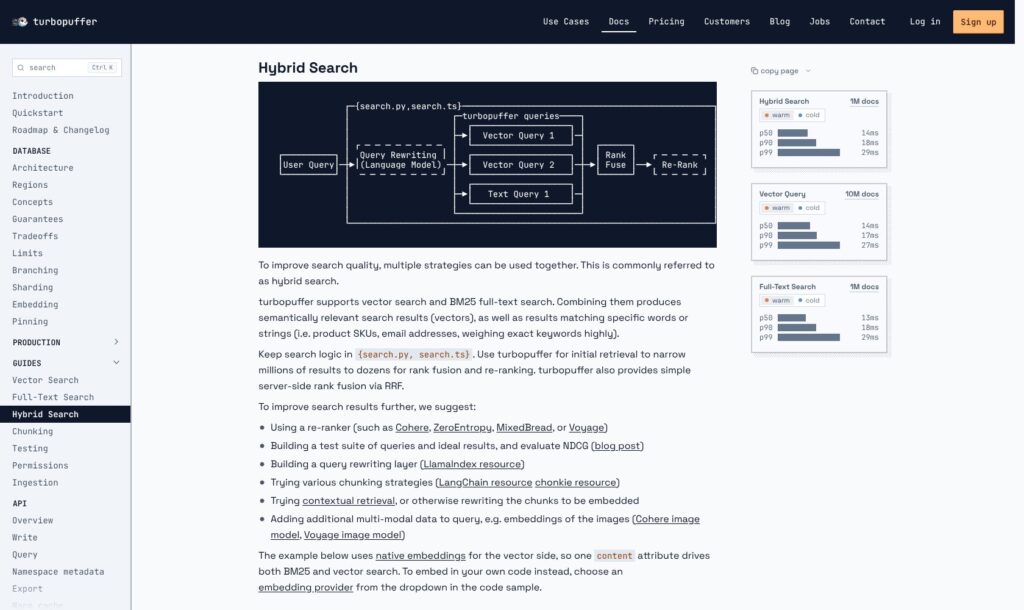
I’d use Turbopuffer’s hybrid search for a knowledge base containing both conversational questions and precise terminology. Vector search helps connect related meanings; BM25 keyword search gives exact terms a useful role. Neither deserves to win every query by default.
For example, someone searching for a refund policy may describe their problem without using the word “refund.” Someone looking for a specific error code needs that code to carry weight. Combining retrieval methods gives you a better starting point for both situations.
Turbopuffer supports server-side reciprocal rank fusion, which merges ranked result lists. You can also keep custom fusion and additional reranking in your application. I like having that choice: a straightforward hybrid setup shouldn’t require unnecessary glue code, while a more specialized search product needs room for its own ranking decisions.
Native embeddings add convenience, but I wouldn’t choose a model solely because it is integrated. Evaluate whether it handles your language, domain vocabulary, and document length well. You can supply your own vectors when a different embedding workflow suits the application better.
Weaviate is also worth comparing for hybrid retrieval and integrated model workflows. Its hybrid query lets you adjust the balance between vector and keyword results with an alpha parameter. That is worth comparing with Turbopuffer’s rank-fusion approach if tuning that balance is central to your product.
Where Object Storage Helps, and Where It Hurts
Turbopuffer stores durable data in object storage and uses SSD and memory caches to accelerate access. I find that design most convincing when your application holds much more information than people actively search at any one time.
Think of a product with many customer workspaces. A handful may be busy throughout the day while others sit idle. Keeping every workspace equally ready for constant traffic can be an expensive assumption. Turbopuffer’s architecture gives that uneven activity a meaningful role in the economics.
The compromise is cold-query latency. A request that needs uncached data can take longer than one served from a warm cache. I wouldn’t judge the fit from a single headline latency number: the first search after inactivity matters if that’s the request your customer remembers.
Strongly consistent reads also have an approximately 10 ms baseline from checking for recent writes. Eventual consistency is available, but trading freshness for latency needs to be a deliberate application decision.
Does Pinning Solve the Problem?
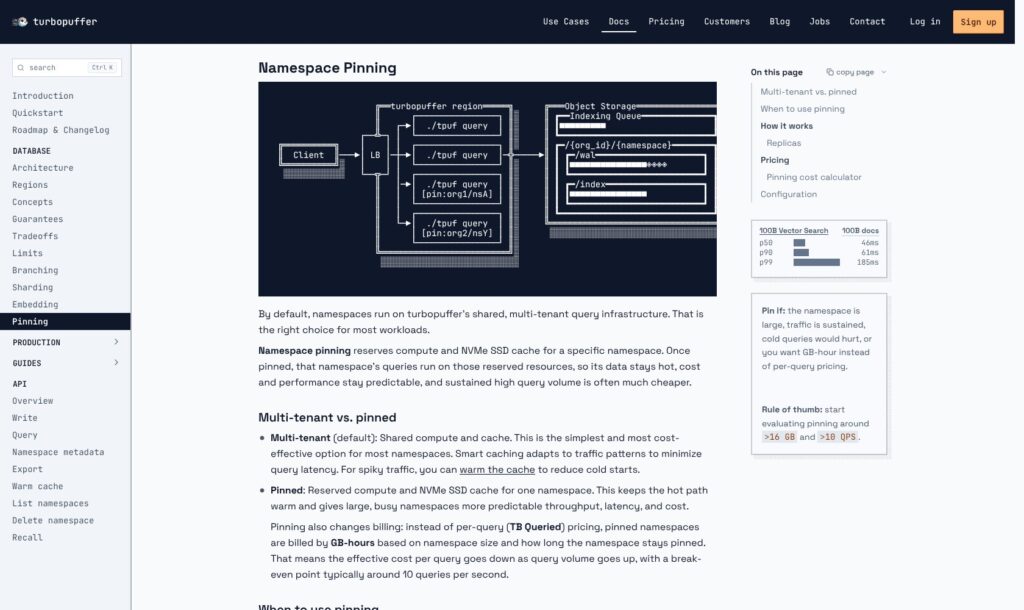
Pinning reserves compute and SSD cache for a namespace, helping keep its search path warm. It replaces the normal queried-volume charge with GB-hour billing based on namespace size, replica count, and time pinned. Returned data still incurs charges.
The catch is a minimum billable size of 128 GB and duration of 10 minutes. Pinning a small collection doesn’t mean paying only for its actual size. Replicas also require management rather than automatically scaling with demand. Multiple replicas can reduce the chance of a hardware failure exposing users to cold queries while a replacement warms up.
I’d evaluate pinning for a busy production collection. For many small, intermittently active customers, I’d start with shared resources and measure whether cold requests are actually hurting the experience.
Running Turbopuffer in Production
Strong consistency is one of my favorite aspects of the design. After a completed write, a subsequent strongly consistent query can see the new data. That is useful when an uploaded document needs to become searchable without leaving users guessing whether ingestion worked.
It doesn’t mean writes are instantaneous. I’d account for write latency in the ingestion design and separate durable ingestion from the response time of the user interface. Make the distinction between receiving an upload and durably writing its searchable content clear in your application.
Access Control Needs Application Design
Namespaces and metadata filters help organize customer data and restrict search results. Turbopuffer does not provide built-in row-level or document-level RBAC, so your application needs to apply the authorization rules. A filterable permission field is only useful when the application populates it correctly and includes the required restriction in every relevant query.
I would make permission behavior part of the release checklist, particularly for an internal assistant searching across teams. Returning a relevant document to the wrong person is a failed search result.
Deployment and Exit Options
Enterprise offers BYOC, but I wouldn’t confuse that with owning an open-source engine. Qdrant is a stronger candidate if running the database independently is a requirement.
Turbopuffer does provide document export, which makes a planned migration more practical. Moving still involves adapting queries and rebuilding the destination’s indexes. Keep source documents and ingestion logic portable from the beginning, and budget for the API-based export as part of that move.
How Does Turbopuffer Compare to Competitors?
I’d shortlist these alternatives based on the work your team wants to own:
- Pinecone: A sensible comparison for managed vector search and an accessible free development starting point. I’d compare total workload cost before choosing either platform for production.
- Qdrant: My stronger starting point when an open-source engine and self-managed deployment are priorities. That freedom also means taking responsibility for operations if you host it yourself.
- Weaviate: Worth considering when hybrid search, model integrations, and a choice between managed and self-hosted deployment are central to the decision.
| Product | I’d shortlist it for | Main question to resolve |
|---|---|---|
| Turbopuffer | Large collections with uneven access | Do cold latency and the full usage bill fit? |
| Pinecone | Managed retrieval with a free development entry point | What will the production workload cost? |
| Qdrant | Open-source deployment control | Who will operate the self-hosted service? |
| Weaviate | Hybrid search with integrated model workflows | Does its data and integration model suit the app? |
I wouldn’t declare one universally cheaper or faster. Run the same documents, filters, and query mix through your shortlist. Include idle periods as well as peak traffic.
How I Reviewed Turbopuffer
I evaluated pricing structure, retrieval capabilities, data freshness, deployment flexibility, and migration requirements. My recommendations weigh those trade-offs against the needs of developers building search applications, with Pinecone, Qdrant, and Weaviate as alternatives. This is an editorial assessment, not a benchmark of production performance.
Prices current as of October 2026.
Should You Choose Turbopuffer?
I’d choose Turbopuffer for a developer-led search application with a large document collection and uneven activity. Hybrid retrieval, native embeddings, and the option to reserve resources give it more flexibility than the storage-first pitch alone suggests.
I’d be more cautious if every request must have tightly predictable latency, or if independently hosting an open-source database is a requirement. Pinning can help with the former; it doesn’t address the latter.
Start with Launch and a representative workload. The deciding evidence should be useful results, acceptable first-query latency, and a bill you can explain. Cheap storage is a good reason to investigate Turbopuffer, but it isn’t enough on its own to choose it.
FAQ
What Is Turbopuffer Used For?
Turbopuffer provides vector and full-text retrieval for applications such as document search and AI assistants. It returns relevant information for your application to use; you still build the surrounding user experience.
Is Turbopuffer Free?
Its public plans start with Launch’s $16 monthly usage minimum. That commitment isn’t an unlimited-use subscription. Storage, ingestion, searches, and other applicable usage determine the eventual bill.
Does Turbopuffer Generate Embeddings?
Yes. Native embeddings can generate vectors from configured text attributes and embed search queries. Available models vary by region, and you can also provide vectors from your own embedding workflow.
Does Turbopuffer Support Hybrid Search?
Yes. You can combine vector and BM25 keyword retrieval, including server-side reciprocal rank fusion. Additional application-side ranking remains an option when you need more control over the final results.
Can You Self-Host Turbopuffer?
Enterprise offers commercial BYOC deployment. That differs from downloading and independently operating an open-source database. I’d compare Qdrant or Weaviate if open-source self-hosting is essential.