Editor’s note: This Vespa review evaluates pricing, setup, retrieval, ranking, and deployment options. The assessment covers documented capabilities and their practical trade-offs.
Quick verdict: I recommend Vespa for engineering teams building search or recommendations where the order of results really matters. Its flexible ranking is the attraction, but you need the time and skills to design the application around it. For straightforward document search, I would compare Weaviate and Pinecone first.
Key Takeaways
- Ranking is the main draw: you can combine relevance signals and apply more expensive models to a smaller selection of results.
- Hybrid search brings text and vectors together: useful when exact names matter as much as the meaning of a query.
- Self-hosting is an option: the engine is open source under Apache 2.0, with infrastructure and maintenance left to you.
- Setup takes engineering work: schemas, queries, and ranking rules are part of building the application.
- Cloud pricing needs a workload estimate: allocated resources and the support level determine your bill.
Vespa belongs in the vector databases category, but I would evaluate it as a search engine with vector capabilities. Storing embeddings is only part of the buying decision.
In this review, I’ll take a closer look at where that extra control pays off, what it costs, and when I’d choose another tool.
Vespa Pros and Cons
Pros
- Keyword and vector retrieval can work within the same query.
- Three ranking phases let you control where expensive scoring runs.
- Apache 2.0 engine supports self-hosting.
- Vespa Cloud automates infrastructure operations and deployments.
Cons
- Application schemas and rank profiles add a learning curve.
- Startup lacks autoscaling and an SLA.
- Search quality still depends on your retrieval and ranking choices.
- Changing content-node resources can trigger data redistribution.
How Much Does Vespa Cost?
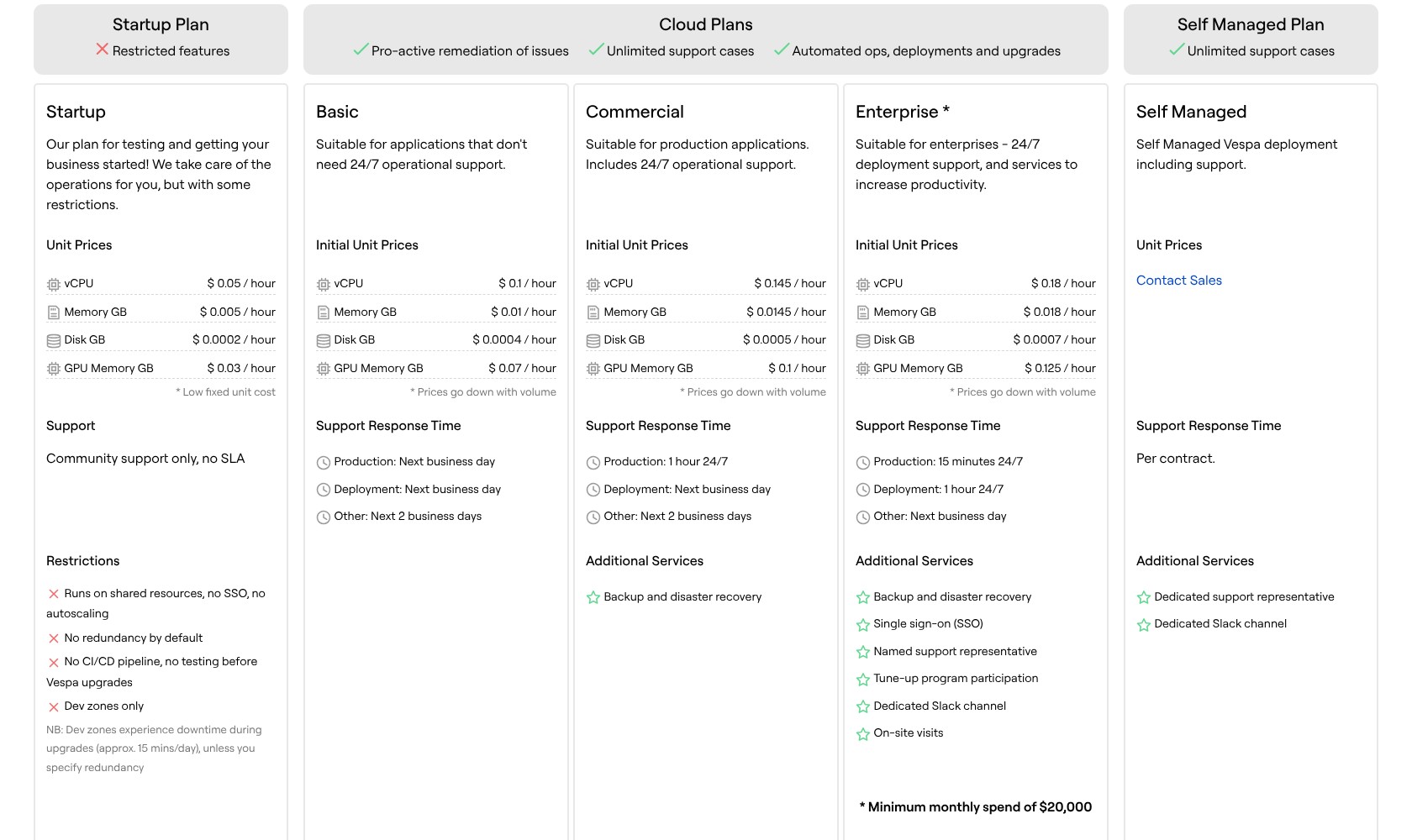
Vespa Cloud bills for allocated resources by the hour. I like the transparent rates, but a CPU price alone cannot tell you what your application will cost.
- Open-source engine ($0 license fee): for teams handling their own hosting and operations.
- Startup (usage-based): development only; community support.
- Basic (usage-based): next-business-day production support.
- Commercial (usage-based): one-hour production response, 24/7.
- Enterprise ($20,000 monthly minimum): higher support levels and enterprise services.
- Self Managed (custom quote): support for your own deployment.
Initial Cloud rates, in USD:
| Plan | vCPU/hour | Memory GB/hour | Disk GB/hour |
|---|---|---|---|
| Startup | $0.05 | $0.005 | $0.0002 |
| Basic | $0.10 | $0.01 | $0.0004 |
| Commercial | $0.145 | $0.0145 | $0.0005 |
| Enterprise | $0.18 | $0.018 | $0.0007 |
GPU resources have separate rates; volume and commitment discounts are available.
Is Vespa Good Value for Money?
I would judge value by the search system you need to build, including the time your team spends maintaining it. A lower hosting bill is a poor saving if it leaves your engineers nursing infrastructure instead of improving results.
- Good value for a search-led product: the ranking flexibility has a clear job to do.
- Harder to justify for a small prototype: setup and evaluation can outweigh the immediate benefit.
- Worth paying for managed operations: if your team can build search well but cannot staff its infrastructure reliably.
My recommendation is to evaluate the application first, then size a production configuration. Choose Commercial when a customer-facing service needs round-the-clock operational support. I would not build a production budget around Startup.
Getting Started With Vespa
Vespa asks you to define how your application works. Your team chooses how to organize the data, find matching documents, and score them. That gives you control, but also makes setup a development project.
The Cloud workflow starts with a tenant and the Vespa command-line tool. From there, you authenticate, clone a sample application, configure its access certificate, deploy it, feed documents, and run queries. Python developers can also take the pyvespa route.
I like having a sample application as a starting point. It gives your team something concrete to inspect before you try to model your own catalog or document collection.
The bigger job comes when you replace that sample with your actual data:
- Define the schema. Decide which document fields need to be stored, searched, or used as ranking signals.
- Choose the retrieval approach. Work out when to use keyword matching, vector similarity, or both.
- Set up ranking. Decide what a better result means for your users and express that in a rank profile.
- Evaluate real queries. Check whether the right documents are retrieved and whether they appear in a useful order.
My advice is to start with a deliberately simple search experience. Add one ranking change at a time, using a fixed set of queries and expected results. Changing the schema, embedding model, and ranking expression together makes it harder to identify what helped.
For a team already comfortable building backend services, this is a reasonable workflow. If your expectation is to upload files and immediately get a finished chatbot, I would choose a more packaged application.
Hybrid Search: More Control Over What Gets Found
I like Vespa most when a query needs both precise matching and an understanding of meaning. A product code should not get lost because a semantically similar item looks promising. Equally, a natural-language question should not fail simply because the document uses different wording.
Vespa lets you combine keyword and vector retrieval through its query language. You can retrieve candidates from either method or constrain how those candidate sets interact. Ranking then determines the order of the results you keep.
That separation lets you investigate two different problems: whether the right document was found, and whether it scored highly enough to appear near the top.
For example, in a support search application, I’d want an exact error identifier to count strongly while still finding explanations written in everyday language. Vespa gives a developer room to build that behavior. It does not automatically know which balance your users prefer.
I would resist choosing Vespa just because it supports hybrid search. Weaviate also combines keyword and vector search and exposes controls for their relative weight. The reason to stretch to Vespa is the wider application and ranking design you want to build around retrieval.
Does Vespa Work for RAG?
Yes. Vespa can retrieve the material used to ground a language model’s response. Its RAGSearcher can also assemble a prompt from retrieved results and send it to a configured model, with sample applications covering local and external LLMs.
I like that you can work on retrieval quality without treating the language model as the answer to every problem. If your application keeps supplying irrelevant documents, rewriting its prompt will only take you so far.
Still, connecting an LLM does not settle document quality, access rules, or answer evaluation. Those remain application responsibilities. I would choose Vespa for the control it gives you over the evidence supplied to the model, rather than expecting an instantly reliable assistant.
Ranking: Vespa’s Strongest Reason to Buy
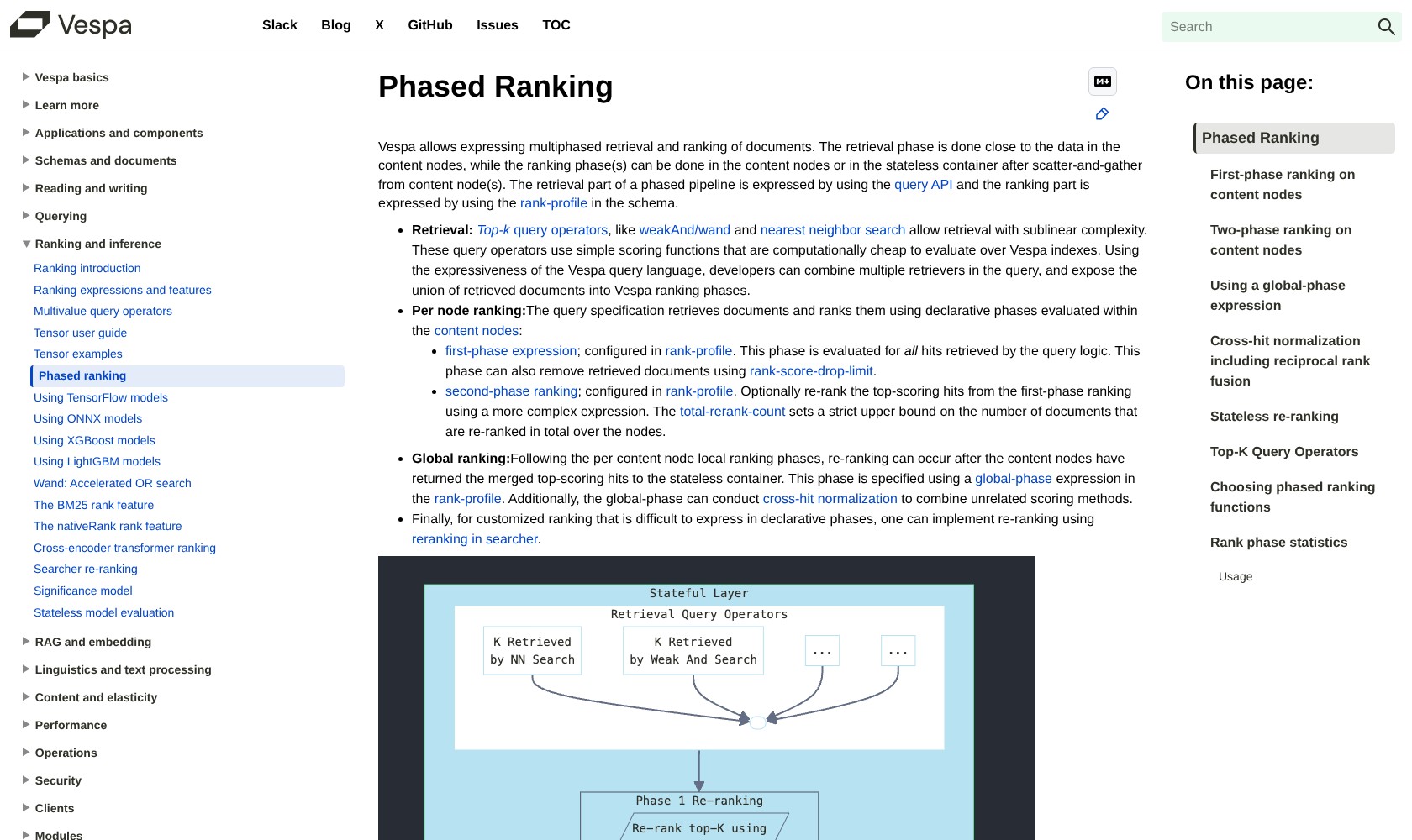
Ranking is where Vespa makes the best case for its complexity. You can start with relatively cheap scoring and reserve more expensive calculations for the candidates most likely to matter.
Its phased ranking supports three stages:
- First phase: score the retrieved candidates on the content nodes.
- Second phase: optionally apply more expensive scoring to a smaller set on those nodes.
- Global phase: rerank the merged leading results in the application container.
That gives you a practical way to ration model work. You do not have to apply your most expensive scoring method to every candidate just because you want it involved in the final decision.
I particularly like this for a product catalog where text relevance alone is not enough. Availability might determine whether an item is eligible, while freshness or user preferences influence its position. You can express those preferences in your scoring logic and check their effect on real queries.
A sophisticated final ranking stage cannot rescue a useful document that earlier retrieval excluded. I’d spend as much care choosing candidates as polishing the final scoring formula.
Qdrant deserves a place in this comparison too. It supports multistage queries, reranking, and formula-based scoring. I would compare the actual ranking pipeline you need in each product, rather than assume Vespa is the only option once simple vector similarity stops being enough.
Reviewer’s Notes: Write down the relevance problem before choosing the engine. If you cannot explain what your current search gets wrong, extra ranking controls may give you more settings without a clearer route to better results.
Vespa Cloud: Less Operations Work, Still Engineering Work
Vespa Cloud is the deployment route I would favor for a team whose priority is building the search product. It takes on infrastructure tasks such as provisioning, upgrades, and replacing failed nodes. You still own the schema and application logic.
Autoscaling also deserves a closer look than the label suggests. You set resource boundaries, and the system responds to observed load. That is useful, but you still need to allow for expected demand and decide what spending limit makes sense.
Content clusters carry another trade-off: their nodes hold data. Changing node resources can mean replacing nodes and redistributing documents. The documentation recommends keeping those resource sizes fixed and scaling node counts where appropriate. I would treat capacity planning as part of the application design, even with the managed service.
Self-hosting remains attractive if you need direct operational control and already have the people to exercise it. The Apache 2.0 engine gives you that option without a software license fee.
I would not call self-hosting the cheap option by default. Someone still needs to own monitoring, capacity, and upgrades. Open source gives you a choice about who does that work; it does not make the work disappear.
How Does Vespa Compare to Competitors?
I would shortlist by the application your team wants to own. All three alternatives below deserve consideration before you commit to Vespa’s development model.
- Qdrant: my first comparison for a team building around vector retrieval that also needs filtering and multistage scoring. Its advanced query options mean you should test the specific requirement before deciding you need a broader search engine.
- Weaviate: worth considering if you want hybrid retrieval with controls such as keyword/vector weighting and an explicit choice of fusion method. I’d start here when those controls cover the relevance problem you need to solve.
- Pinecone: worth comparing when you want managed search infrastructure and prefer to keep more orchestration in your application. Its full-text BM25 search also makes it relevant when exact terms matter.
My reason to choose Vespa would be a well-defined need to combine retrieval and sophisticated ranking within its application model. If your requirements are simpler, the broader platform is not automatically the better purchase.
How I Reviewed Vespa
I assessed Vespa’s pricing structure, deployment workflow, retrieval controls, and ranking architecture against the decisions a buying team needs to make. I compared those capabilities with Qdrant, Weaviate, and Pinecone, focusing on buyer fit and the work each approach asks of your team.
Prices current as of October 2026.
Should You Choose Vespa?
Choose Vespa if search quality is important enough to deserve sustained engineering attention. I particularly like its fit for teams that need to combine several relevance signals and control where expensive ranking happens.
I would skip it for a quick document chatbot unless your requirements already point beyond a simpler setup. There is little value in adopting a more configurable engine without the time to evaluate the configuration.
Start with one representative search problem and a small set of judged queries. If Vespa gives your team useful control over that problem, you have a much stronger reason to invest than a feature list alone can provide.
FAQ
Is Vespa free?
The open-source engine has no license fee. You pay for the infrastructure and work needed to run it. Vespa Cloud is a separately billed managed service.
Is Vespa a vector database or a search engine?
It is a search engine with vector retrieval and configurable ranking. I would compare it in the vector database category when building AI retrieval, while also evaluating its broader application model.
Do you need coding skills to use Vespa?
You should expect development work. Schemas, deployment configuration, queries, and rank profiles are central to building a useful application.
Is Vespa better than Qdrant?
Neither is my automatic choice. I would compare them using your own retrieval and ranking requirements. Both support more advanced workflows than a simple nearest-vector lookup.