Editor’s note: This DVC review combines small local DVC and DataChain tests with an assessment of pricing and implementation requirements. I tested data restoration, pipeline behavior, and a basic dataset query, without benchmarking cloud performance.
Quick verdict: I recommend DVC for technical teams that already use Git and need to recover the exact datasets behind their work. I like its free, open-source core, but you have to manage another set of commands and storage responsibilities. DataChain deserves a separate look if your bigger problem is preparing and querying unstructured data.
The combined DVC / DataChain (Iterative) name needs explaining. DVC originated at Iterative, but lakeFS acquired the open-source project in November 2025. DataChain is a separate product from the team behind DVC, not a paid DVC plan.
Key Takeaways
- DVC keeps data-version references alongside your code without putting the datasets themselves into Git.
- I restored a small CSV from a local remote and recovered its earlier version during testing.
- DVC and the DataChain library are free under Apache 2.0; storage and compute remain your responsibility.
- Git and DVC synchronization are separate, so pushing code alone can leave colleagues without the data.
- DataChain Studio adds collaboration, but its documented free team allowance is only two collaborators.
In this review, I’ll explain where DVC earns its place in an ML workflow, what I found awkward about the extra moving parts, and when I’d choose DataChain or an alternative instead.
DVC Pros and Cons
Pros
- Apache 2.0 core has no per-user license fee.
- Small metadata files connect data versions to Git history.
- Local, S3, Azure, GCS, and SSH remotes offer storage flexibility.
- Unchanged pipeline stages can be skipped or restored from cache.
- Experiment metrics and parameters can be compared alongside code.
Cons
- Git and DVC need separate synchronization.
- Command-line and storage setup demand technical ownership.
- Large collections of small files add hashing and transfer overhead.
- Versioned inputs alone do not guarantee identical training results.
How Much Do DVC and DataChain Cost?
I’d start with the free software. DVC doesn’t require a subscription for its core versioning and pipeline features, and the DataChain Python library is also open source. Paying for Studio is a separate decision about collaboration and managed capabilities.
- DVC ($0 software license): For Git-based data versioning, pipelines, and experiments using storage you configure.
- DataChain library ($0 software license): For developers building data preparation and curation workflows in Python.
- DataChain Studio Free ($0 subscription): For evaluating the web application with a team allowance of two collaborators.
- DataChain Studio Enterprise (custom pricing): For teams that outgrow the Free allowance and need a sales quote.
| Option | Published software price | What I’d choose it for | Cost or limit to watch |
|---|---|---|---|
| DVC | Free, Apache 2.0 | Connecting dataset versions to Git commits | Storage, transfer, compute, and maintenance |
| DataChain library | Free, Apache 2.0 | Processing and organizing data with Python | Your runtime and any model API usage |
| DataChain Studio Free | Free | A small team evaluation | Two collaborators in the documented team plan |
| DataChain Studio Enterprise | Custom quote | Broader team access and enterprise requirements | Confirm included services and usage charges |
I wouldn’t equate free licensing with a free production system. Keeping historical datasets takes storage. Moving those datasets can incur transfer charges, and rerunning training still consumes compute. Someone also needs to own credentials and recovery procedures.
Optional AI enrichment creates another budget line. Studio’s knowledge-base enrichment uses your own model-provider API account. I’d give that spending its own limit rather than assume a Studio subscription covers every model call.
Is DVC Good Value for Money?
DVC looks particularly good value when your team already has Git, suitable storage, and someone comfortable maintaining both. You’re adding a missing capability without taking on a per-seat software bill.
- Good fit: Engineers who need reliable dataset references and can maintain their own workflow.
- Less convincing fit: Analysts expecting a shared dashboard with little configuration.
- Budget priority: Storage retention and operational time before optional interface upgrades.
Reviewer’s Notes: I’d begin with DVC and a small shared dataset. Make sure a colleague can recover an earlier version before expanding the rollout. If Studio is part of the plan, confirm the team allowance and commercial terms directly before budgeting for it.
My Experience With DVC
I could see the benefit most clearly when I restored data, rather than when I first added it. My test used a small CSV, a Git repository, and a local folder as the DVC remote. No hosted account was needed for that setup.
Tracking the First Dataset
After initializing Git and DVC, I ran dvc add against the CSV. DVC created a small metadata file and an ignore rule. I committed those files to Git and checked the tracked file list: the CSV itself wasn’t there.
That separation is what I like about DVC. The repository can record which dataset belongs with the code without carrying the dataset’s contents in Git history. It also makes the extra responsibility obvious: a healthy Git repository doesn’t prove your data is safely shared.
My basic workflow was:
- Initialize the Git repository and DVC project.
- Track the CSV with DVC and commit its metadata with Git.
- Configure a local remote and push the data to it.
- Move the working CSV and local cache aside, then pull the file back.
- Record a changed dataset and restore the earlier metadata to recover the original data.
Recovering an Earlier Version
The pull restored the original CSV exactly after I moved both the working file and cache out of the way. I then recorded a second dataset version, restored the first version’s Git metadata, and used dvc checkout to recover the original CSV again.
That was the most convincing part of the test. I didn’t have to work out which copy of a file called “final” matched the code. The saved reference determined which contents DVC restored.
My reservation is the split workflow. Switching Git metadata and restoring the corresponding data are distinct steps. That is manageable for a developer, but I wouldn’t introduce DVC to a less technical team without a short, repeatable handover procedure.
Checking Whether the Pipeline Re-ran
I also created a simple stage that read the CSV and wrote a total. The first run produced 5. Running it again without changes skipped the stage; changing the input caused it to execute again and produce 12.
It’s a small example, but it demonstrates a useful behavior: DVC can distinguish an unchanged calculation from one that needs rebuilding. It doesn’t establish how much time a larger training pipeline would save. I’d measure that on your own workload.
Versioning Data Without Filling Up Git
I like DVC most when the question is specific: “Which files produced this result?” Keeping small references in Git gives that question a concrete answer without forcing large datasets into a code repository.
The distinction matters during handovers. Sending a colleague the Git link covers only part of the handover. They also need access to the corresponding files in your DVC remote.
Storage flexibility is another strength. You can use a local directory or connect services such as S3, Google Cloud Storage, Azure, and SSH storage. I’d keep sensitive credentials in local configuration rather than commit them alongside the shared remote settings.
Where the Extra Work Shows Up
A missed data push can break an otherwise tidy handover. Git can contain the new metadata while the remote lacks the files it points to. I’d make data synchronization part of the team’s checklist, then verify recovery from a separate workspace.
I’d also test file counts, not just total gigabytes. Hashing and managing many small files introduces overhead, so a successful CSV test tells you very little about a collection of millions of images.
For data shared across a wider platform, I’d assess lakeFS before standardizing on a local repository workflow. Its focus is versioning at the storage infrastructure level. DVC’s appeal is the closer fit with an individual project and its Git history.
Pipelines and Experiments: Useful, With Limits
DVC’s pipeline behavior is a good reason to consider it even when storing datasets isn’t your only concern. You define stages, dependencies, outputs, and commands, then let DVC work out which recorded inputs have changed.
I like that the pipeline definition stays close to the code. It can be reviewed and versioned with the project, and the lock file records the state associated with a run. That is more useful than a script whose expected inputs live in someone’s memory.
However, a versioned pipeline isn’t a guarantee of identical model results. Your environment, external inputs, and random behavior still matter. I’d preserve the dependency environment and random seeds alongside the pipeline rather than treat dvc repro as a complete reproducibility policy.
Comparing Experiments
DVC can record experiments and compare their parameters and metrics. DVCLive supplies logging, while dvc exp show and the VS Code integration offer ways to inspect results. DataChain Studio also continues to document support for DVC experiment tracking.
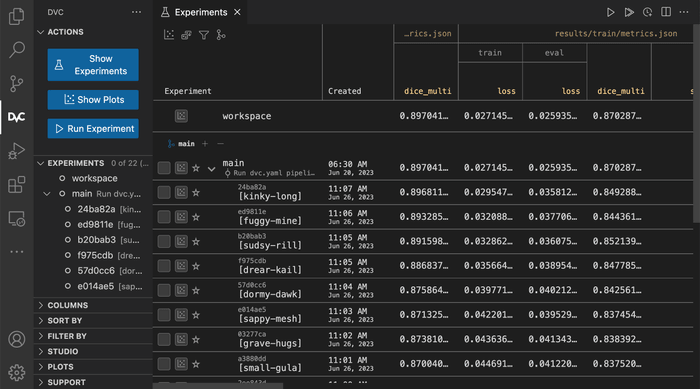
For someone who already works in Git and an editor, that combination makes sense. I like being able to relate a promising result to the project’s data and code instead of leaving it as an isolated chart.
I’d still shortlist MLflow if experiment analysis and model management are the main requirements. Its tracking interface and registry address a different emphasis, and you can pair it with DVC rather than force one tool to handle everything.
If the real problem is coordinating operational jobs, I’d assess Dagster separately. A convenient local pipeline doesn’t remove the need to decide how production work will be scheduled, monitored, and recovered.
Where DataChain Fits
DataChain interests me more when you need to turn a pile of files into a useful dataset. DVC helps preserve which data you used; DataChain provides Python-based processing and a typed, versioned dataset layer for working with the data itself.
That distinction is easy to miss under the combined directory name. I wouldn’t install DataChain simply because I wanted DVC’s versioning. I’d consider it when the work includes extracting information, enriching records, filtering results, and saving a reusable dataset.
For example, a video team might want to extract attributes from clips, identify a difficult subset, and save it for evaluation. DataChain’s current focus on unstructured and physical AI data fits that kind of task. The appeal is a repeatable selection process instead of a manually maintained folder.
What I Like About the Design
DataChain separates expensive Python processing from queries over saved results. Its dataset database holds typed, versioned outputs that can be filtered, joined, or grouped, while a separate knowledge layer exposes context to agents.
I like being able to query saved attributes before paying to extract them again. Whether that saves much depends on your pipeline and what you retain.
My Small DataChain Test
I loaded a three-row CSV with explicit text and integer types, then filtered for values greater than 3. DataChain returned the expected single row, containing a value of 7. I saved that result as a named dataset, which created version 1.0.0, and reloaded it successfully.
That made the distinction from DVC clearer: I was selecting records and keeping a reusable result, rather than restoring a file revision. This was only a CSV test, so it doesn’t demonstrate video processing or AI enrichment.
I also hit a small setup snag. A file URI containing encoded spaces wasn’t resolved in this test; passing the ordinary absolute path worked. I’d start with a similarly small example before connecting a larger collection.
When I’d Add Studio
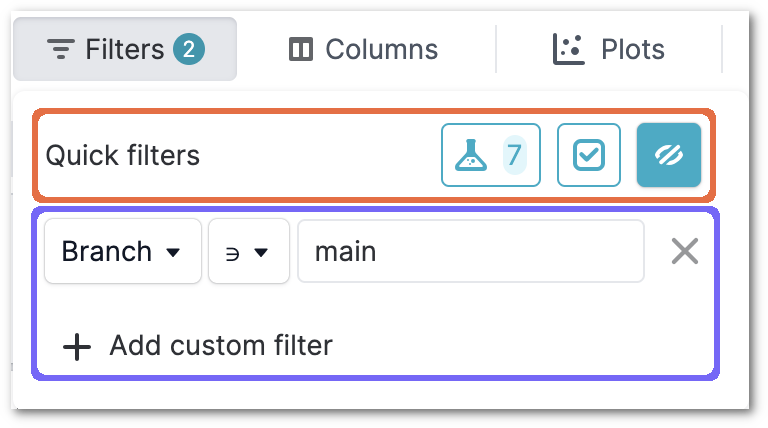
Studio adds a web application with dataset, job, and experiment management capabilities. I would consider it when the team needs more shared visibility, then check which capabilities and deployment options the proposed plan includes.
I wouldn’t buy it merely to avoid learning the underlying workflow, though. You still need to understand the data and transformations, and optional AI processing brings its own usage costs. Model training itself also remains a separate responsibility from DataChain’s dataset preparation role.
How Does DVC Compare With Alternatives?
I’d choose based on the job that’s causing trouble, rather than look for one universal MLOps winner:
- MLflow: My stronger starting point when comparing runs and managing model versions are the priority. DVC can still handle the input datasets alongside it.
- Weights & Biases: Worth considering when you want a dashboard-centered experiment workflow with artifact versioning and lineage. I’d evaluate the collaboration experience before building equivalent conventions around Git.
- lakeFS: My shortlist choice for versioning shared object storage as infrastructure. DVC and lakeFS now share a steward, but their operating models still serve different needs.
- DataChain: The more relevant option when you need to process and curate unstructured files into reusable datasets. It isn’t simply DVC with a different interface.
DVC remains my preference when Git is already central to the project and the missing piece is dependable data-version references. Adding a larger platform would need to solve an additional problem to justify the move.
How I Reviewed DVC and DataChain
I tested DVC 3.67.1 locally with a small CSV and a local remote. I checked Git-tracked metadata, exact file recovery, restoration of an earlier data version, and pipeline behavior with unchanged and changed inputs.
I also tested the DataChain Python library by loading a typed CSV, filtering records, saving a dataset version, and reloading the result. My wider assessment covered licensing, ownership, storage requirements, and Studio capabilities. These local tests don’t measure cloud transfer speed, large-scale processing, or enterprise collaboration. Prices and plan details are current as of October 2026.
Should You Choose DVC or DataChain?
I’d choose DVC if you want dataset recovery to become a routine part of a Git-based project. The local test gave me a concrete reason to trust that workflow: I could retrieve the data and restore an earlier version using the saved metadata.
The trade-off is discipline. Your team has to maintain both Git history and accessible data storage. If that sounds like an unwelcome extra responsibility, start your evaluation with a more managed workflow instead.
I’d choose DataChain for a different problem: building useful, reusable datasets from files that need processing and curation. Begin with the open-source component that solves your immediate need, then assess Studio when collaboration justifies it.
FAQs
Is DVC Free?
Yes. DVC is Apache 2.0 open-source software with no core license fee. Your storage, transfer, compute, and maintenance costs are separate.
Does DVC Replace Git?
No. In the typical versioning workflow, Git tracks code and DVC metadata, while DVC manages the corresponding data files.
Are DVC and DataChain the Same Product?
No. DVC focuses on data versioning and reproducible project workflows. DataChain focuses on processing and organizing datasets. DVC moved from Iterative to lakeFS in November 2025.
Do I Need DataChain Studio to Use DVC?
No. I completed the local versioning and pipeline test without it. Studio is an optional web application that still supports DVC experiment workflows.