Quick verdict: In this Teradata VantageCloud review, I recommend it for enterprise SQL teams that need workload-specific compute and analytics close to warehouse data, particularly when Teradata already anchors their operations. Its main trade-off is the planning required: this is an infrastructure and procurement decision, not a lightweight analytics signup.
Key Takeaways
- Strongest fit: Existing Teradata teams and enterprises with several distinct analytical workloads.
- Workload-specific resources: VantageCloud Lake supports compute groups with separate schedules and access assignments.
- Analytics beyond SQL: Lake offers model scoring and container-based custom analytics.
- Pricing caveat: Current Teradata Cloud packages use Fixed + Flex pricing, with storage billed separately.
- Deployment caveat: Lake documentation does not establish identical capabilities or commercial terms for Enterprise or every current package.
I focus on whether its architecture justifies the commitment compared with another cloud data warehouse. I’ll cover costs first, then documented setup, three core capabilities, and alternatives.
One naming distinction matters throughout. The current public offering is called Teradata Cloud, while VantageCloud historically covered Lake and Enterprise. Lake introduced an architecture using object storage and independent clusters; Enterprise was the established cloud offering. Current branding does not make their documentation or contracts interchangeable, so I identify Lake-specific controls rather than treating them as universal.
Teradata VantageCloud Pros and Cons
I see the strongest case in workload management and analytical flexibility. The corresponding responsibility is having people who can manage those controls deliberately.
Pros
- Lake compute groups support workload-specific schedules.
- Group administrators and users can be assigned separately.
- BYOM scoring is pre-installed on Lake.
- Open Analytics supports custom container-based analytics.
- Lake provides compute and storage consumption views.
Cons
- Setup requires database and networking expertise.
- Storage is separate from current compute pricing.
- Legacy packages do not establish current entitlements.
- Lake consumption views exclude some storage categories.
For an established platform team, those responsibilities may be reasonable. For a small analytics department without dedicated administration, I consider them a meaningful part of the purchase price.
How Much Does Teradata VantageCloud Cost?
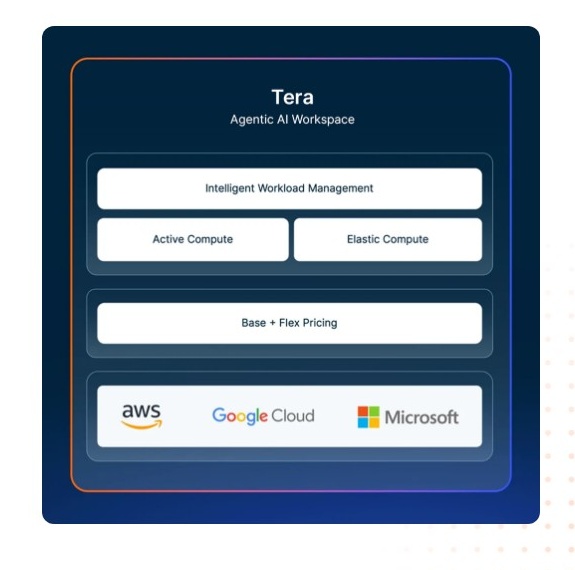
Teradata pricing needs a workload-level budget, not an hourly headline. Current Teradata Cloud pricing uses Fixed + Flex: a committed baseline plus consumed elastic capacity, with storage billed separately.
The current package choices are:
- Select – scoped quote: Include it in an initial comparison for a defined deployment; the name alone does not establish its suitability.
- Assured – scoped quote: Evaluate it against the same requirements rather than assuming a particular support or resilience entitlement.
- Sovereign – scoped quote: Consider it where sovereignty requirements influence procurement, without treating the label as proof of compliance.
| Current package | Budgeting basis | Scope of the price | Buying interpretation |
|---|---|---|---|
| Select | Scoped quote | Deployment-specific | Start with workload requirements |
| Assured | Scoped quote | Deployment-specific | Compare written service commitments |
| Sovereign | Scoped quote | Deployment-specific | Assess sovereignty requirements |
Provider and region affect pricing, and optional services are outside the displayed starting figures. Published terms allow package upgrades at any time, while downgrades take effect at renewal; an existing agreement remains its own commercial reference.
Older VantageCloud Lake material uses Standard, Lake, and Lake+. Its examples involved a particular AWS configuration and a multiyear commitment, with storage exclusions. I do not recommend using those historical rates to estimate a new Select, Assured, or Sovereign purchase, or assuming a one-to-one package mapping.
The useful budgeting exercise starts with the work that must run even during a quiet week. A dependable daily reporting cycle and an occasional modeling project have different capacity needs. Bundling both into one peak-sized estimate can hide the very distinction that elastic resources are intended to address.
I recommend structuring the cost model around:
- Baseline operations: The workloads and availability windows that justify committed capacity.
- Variable demand: Reporting peaks and analytical projects, modeled separately from routine activity.
- Data footprint: Production data and the additional copies the operating plan needs.
- Delivery effort: Migration and ongoing administration, whether supplied internally or purchased.
That last item deserves attention. A warehouse proposal can look attractive while leaving substantial engineering work outside the spreadsheet. I prefer a comparison that includes staff responsibilities rather than assuming every platform requires the same operating effort.
Also model an ordinary month and a peak month separately. An average can conceal whether the commitment suits normal demand or whether the business is effectively buying around a short reporting window.
Is Teradata VantageCloud Good Value for Money?
My value judgment depends on how much of the platform you need, not how impressive its feature list looks.
- Existing Teradata estate: There is a credible case for preserving relevant expertise, although compatibility and migration work still need their own budget.
- Mixed enterprise workloads: Separate compute policies become valuable when departments genuinely need different operating schedules.
- Small SQL-only team: I favor comparing simpler operating models before accepting an enterprise commitment.
For an existing Teradata team moving a defined BI workload, my starting recommendation is a Select-scoped proposal alongside the existing operating requirements. This is a comparison baseline, not a claim that Select is cheapest or sufficient. Choose another package only when its written scope resolves a specific business requirement.
Getting Started With Teradata VantageCloud
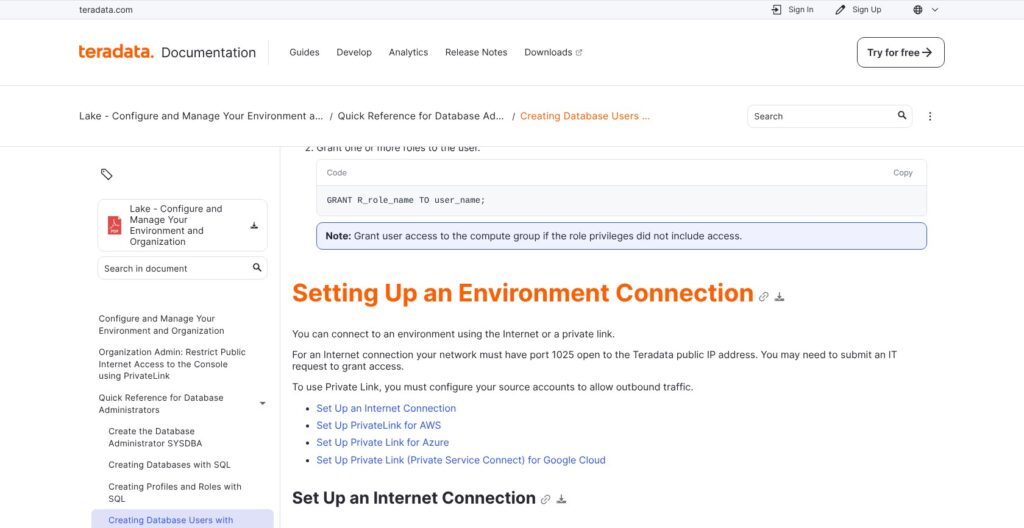
The first meaningful setup decision is which deployment you are buying, not which dashboard you want to build. Current Teradata Cloud lists AWS, Microsoft Azure, and Google Cloud, but cloud availability alone does not establish that every architecture and option is identical.
The workflow below follows VantageCloud Lake documentation. Enterprise has separate instance-option tables, so I would not carry Lake instructions into an Enterprise project unchanged.
- Define the initial workload. My recommendation is to select one reporting process with an identifiable business owner and a clear completion requirement. Starting with a bounded workload makes architectural decisions easier to judge.
- Create the Lake environment. The documented organization-administrator workflow includes deployment location, package, encryption, and primary-cluster resources, followed by a consumption estimate before provisioning.
- Establish connectivity. Lake supports Internet or private connections. Internet access requires port 1025 open to the Teradata public IP; private connectivity requires source-account configuration for outbound traffic.
- Assign database access. Keep the organization-administration role distinct from the privileges needed to operate the database and authorize workload users. My preference is to establish those responsibilities before connecting production reporting.
- Introduce data and representative SQL. Begin with a limited data slice and the queries that determine business usefulness, rather than treating a successful connection as a completed migration.
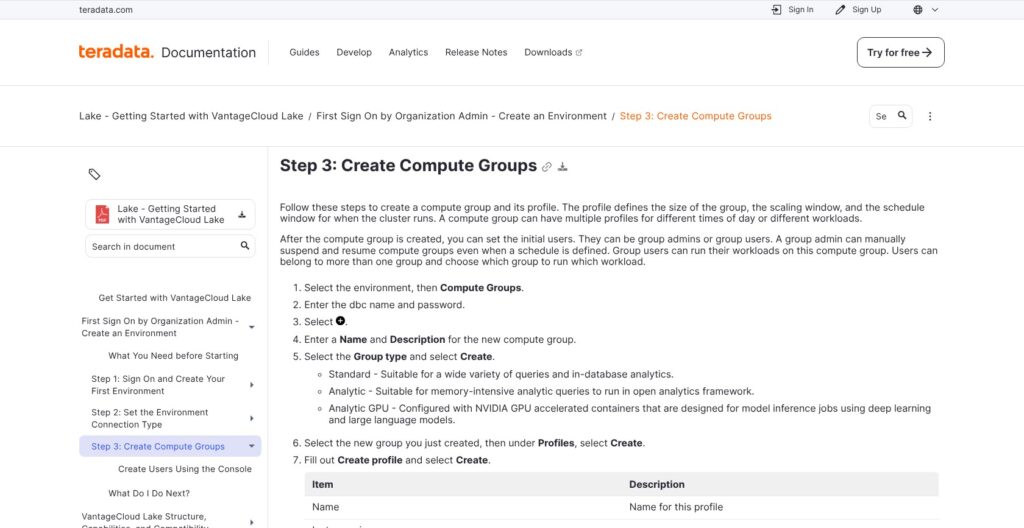
- Configure workload compute. Lake’s compute-group workflow uses database-administrator credentials, a workload type, resource profiles, and group access assignments.
The encryption choice deserves early attention: the documented storage encryption type cannot be changed after provisioning. I see that as an architectural decision to settle with security stakeholders, not an incidental setting to accept during setup.
Networking also makes this a cross-team project. A database administrator can understand the SQL environment without owning the organization’s network policies. My recommendation is to assign responsibility for the connection boundary before scheduling the first business demonstration.
Consider a hypothetical finance migration. A useful first scope would be a daily revenue dataset and the reporting queries used to reconcile it. The acceptance criteria should cover correct results and completion before the reporting deadline, including what happens when a load arrives late.
I recommend adding exploratory analysis once that baseline is understood. Otherwise, an ambitious demonstration can obscure whether the ordinary reporting process is dependable.
The setup is therefore approachable for a prepared enterprise team, but I do not consider it analyst self-service from a blank account. The documented controls assume administrative involvement. That is appropriate when responsibilities are established and burdensome when nobody owns them.
Reviewer’s Notes: I recommend treating the first environment as a narrow production-design exercise. A successful sample query proves connectivity; it does not settle workload ownership or operating cost.
Separating Workloads With Compute Groups
Compute groups are Lake’s standout feature for the buyer I have in mind. They provide a way to organize workload resources rather than making every analytical activity compete through one undifferentiated capacity plan.
Lake combines a primary cluster with additional compute resources. Its documented compute-group types include:
- Standard: General SQL and in-database analytics.
- Analytic: Memory-intensive Open Analytics Framework workloads.
- Analytic GPU: Accelerated model inference, subject to deployment availability and entitlement.
Groups can have multiple profiles, and users can belong to several groups. Profiles specify instance size, availability schedules, and scaling settings; administrators can suspend and resume resources.
Separate SQL profile documentation describes minimum and maximum compute counts, scheduling, and cooldown controls, with an administrative privilege required to create profiles. Those controls matter because a scaling policy is also a spending policy.
My practical interpretation is that workload separation needs an owner. A finance group and a data science group might deserve different schedules, but neither should become an anonymous pool that stays available because nobody is responsible for it.
The same applies to routing. Membership in multiple groups does not itself prove that a particular application is using the intended resources. I recommend making the resource destination part of the application design, alongside its access permissions.
In a hypothetical deployment, recurring executive reporting could have a predictable availability window while exploratory analytics uses another profile. The objective is to make each workload’s resource policy explicit. This is not a guarantee that shared dependencies disappear or that every service-level target will be met.
Snowflake provides a useful comparison through virtual warehouses with auto-suspend and auto-resume. Its multi-cluster warehouses address concurrency but require Enterprise Edition or higher. I recommend comparing concurrency needs and idle policies, rather than simply counting available scaling features.
My verdict: Lake’s controls are worth serious attention when several teams have different workload patterns. If every query belongs to one small reporting pipeline, the administrative structure may offer less practical value.
Using ClearScape Analytics and Your Own Models
Teradata’s analytics story is broader than storing data for a separate modeling system. What I like is the opportunity to place selected analytical steps near governed warehouse data, provided the team can operate the associated runtime.
The documented capabilities cover several distinct jobs:
- ClearScape analytics workflows: Exploration, transformation, modeling, and scoring through teradataml, plus in-database time-series functions and cloud ML API integration.
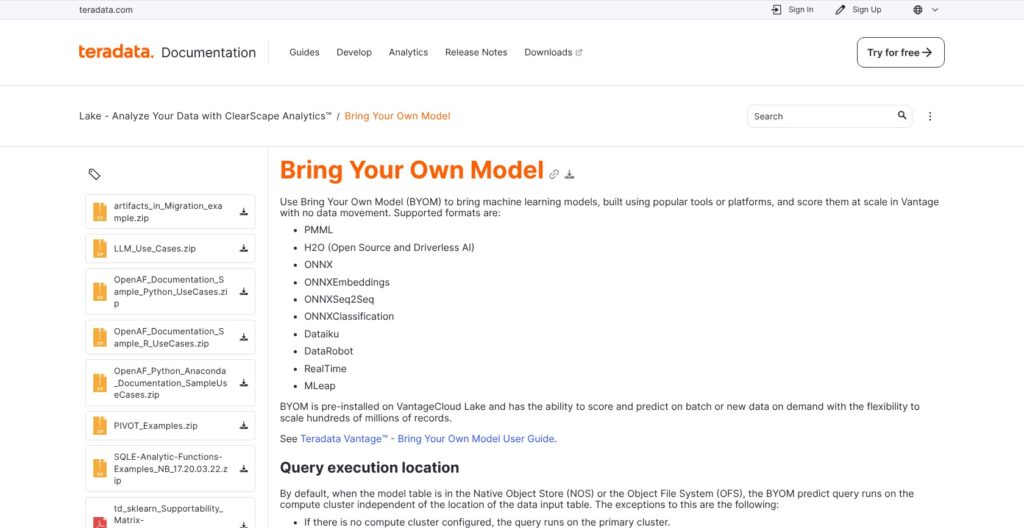
- Bring Your Own Model: BYOM is pre-installed on Lake and supports scoring or prediction against batch or new data.
- Open Analytics Framework: Third-party and custom analytics run in containers on analytic compute groups, using the APPLY table operator.
- Python environments: Custom user environments support library installation, with Miniforge and conda-forge available for dependency management.
The distinction between scoring and training matters. Bringing a model into the warehouse for predictions is not the same task as building or retraining it. I recommend choosing the execution path around the actual stage of the model lifecycle, not around a broad AI label.
A hypothetical churn workflow illustrates the appeal. A data science team might develop a model externally, then score warehouse customer records and expose the resulting predictions to a retention report. The buying question is whether that arrangement makes access control and operational responsibility clearer than maintaining a separate scoring pipeline.
Custom analytics can support a broader workflow, but it also brings dependency management. Lake uses APPLY for installed scripts, with Python access through teradataml’s Apply class; Enterprise uses a different SCRIPT/ExecR approach. Existing code therefore needs a portability assessment rather than a promise of unchanged execution.
The Python connection workflow also requires a database context, Open Analytics authentication, and a prepared user environment. This is not no-code ML, and package management does not mean every library will work unmodified.
I consider these capabilities persuasive for teams that already know which analytical jobs belong near their warehouse data. They are a weaker reason to buy when the business has not yet identified a model owner or a useful prediction-driven process.
Managing Data Access and Consumption
Accessing external data and understanding the bill are related problems: both require knowing what sits inside the warehouse boundary.
The Vantage family’s Native Object Store functionality offers an external-data access path. Database Engine documentation describes READ_NOS for schema discovery and reading CSV, JSON, and Parquet, plus WRITE_NOS for exporting database data as Parquet. Those family-level capabilities should not be read as proof of identical format behavior across every Lake and Enterprise deployment.
I like object-storage access as an architectural option because it gives buyers another way to decide where data should live. It does not remove the need to design permissions or establish responsibility for changes to external files.
For example, a hypothetical operational report might combine managed warehouse tables with periodically delivered object-store data. The business still needs a policy for an incomplete delivery. A queryable file is not necessarily a trustworthy input.
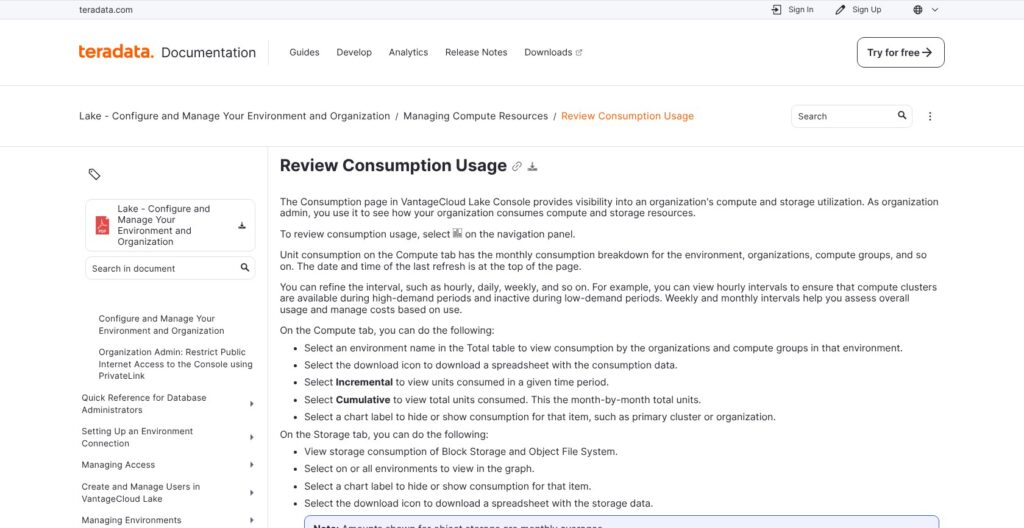
Consumption visibility is more concrete. Lake’s Consumption page separates compute from storage and offers hourly, daily, weekly, and monthly views. Compute consumption occurs while resources are active and available, so availability time matters, not just the number of queries submitted.
The storage view also has a defined boundary. Block storage serves primary-cluster data, while object storage serves compute-cluster workloads; the documented figures exclude backup storage and Native Object Store. I treat that page as an operational view, not an all-inclusive invoice.
My preferred operating routine connects consumption to responsibility:
- Assign a workload owner: Give each recurring resource allocation a named business or technical sponsor.
- Review inactive windows: Look for schedules that no longer match actual business needs.
- Reconcile the full budget: Keep excluded storage and other contracted charges alongside the console figures.
- Plan data exit: Consider how datasets and their business definitions could move elsewhere.
That final point is easy to overlook. Parquet export can help with data portability, but it does not transfer every SQL transformation or analytical runtime.
Redshift Serverless offers a useful governance comparison through maximum RPU-hour usage settings and capacity limits. Teradata’s visibility is useful, but visibility is not a substitute for policy.
How Does Teradata VantageCloud Compare to Alternatives?
I shortlist alternatives by their operating model, not by declaring a universal speed or cost winner. The right comparison depends on which responsibilities your team wants to retain.
- Snowflake: Snowflake is my closest comparison for buyers focused on separable SQL compute. Its virtual-warehouse controls provide a clear basis for discussing idle capacity and concurrency. I favor a direct comparison when Teradata continuity is less important than the organization of new SQL workloads.
- BigQuery: BigQuery is my first alternative for a team that wants no individual VMs or instances to provision. It offers on-demand bytes-scanned pricing or capacity slots. I put it ahead in the initial shortlist for intermittent Google Cloud exploration, while keeping scan volume and separate storage charges in the budget.
- Amazon Redshift: Amazon Redshift deserves attention for AWS-centered teams, particularly its Serverless option. Compute is billed per second with a 60-second minimum, and S3 data-lake queries are included in Serverless compute charges. Storage remains separate, and scaled capacity can stay elevated briefly after demand falls.
| Option | Documented compute model | Cost consideration | My strongest-fit buyer |
|---|---|---|---|
| VantageCloud Lake | Compute-group controls | Match the current quote to the deployment | Enterprise team with Teradata expertise or distinct analytical workloads |
| Snowflake | Virtual warehouses; multi-cluster concurrency scaling | Idle policy and edition requirements | Team prioritizing separately managed SQL compute |
| BigQuery | Serverless queries using on-demand scans or capacity slots | Scan volume or purchased capacity; separate storage | Google Cloud team favoring less instance administration |
| Redshift Serverless | Usage-based serverless compute | Compute duration and capacity; separate storage | AWS-centered team combining warehouse and S3 analysis |
For an existing Teradata customer, I include the effort of translating established business logic in that comparison. Familiarity is not a reason to ignore alternatives, but migration effort is a legitimate cost.
For a new deployment, Teradata has to earn its place through workload requirements. I do not recommend selecting it simply because the organization is large; enterprise size does not automatically create a need for every enterprise control.
How I Reviewed Teradata VantageCloud
I assessed documented architecture, pricing, and workflows, focusing on the decisions an enterprise buyer must make before adoption. The review distinguishes current Teradata Cloud packaging from VantageCloud Lake and Enterprise documentation, then evaluates how the documented controls fit reporting and analytical workloads.
My recommendations are buying judgments based on those specifications, not results from hands-on benchmarking. The examples are hypothetical and illustrate design choices rather than measured outcomes.
Pricing and package information is current as of October 2026; historical pricing material is identified separately.
Should You Choose Teradata VantageCloud?
Choose Teradata VantageCloud if your organization has a defined reason to combine established SQL operations with separately managed analytical workloads. Existing Teradata expertise strengthens that case, especially when the move to cloud is an operating-model change rather than an attempt to replace every data process at once.
I move it down the shortlist if a small team mainly needs occasional SQL reporting and wants minimal infrastructure administration. BigQuery is a more natural initial comparison for that operating preference; Snowflake deserves attention when separate SQL warehouses are the central requirement.
My buying threshold is straightforward: the architecture must solve a real workload-management problem, and the scoped commercial offer must make sense for ordinary demand as well as peaks.
For the right enterprise, Teradata belongs on the shortlist. I recommend starting with one business-critical reporting workload and one distinct analytical workload, with explicit acceptance criteria, before making a broader commitment.
Teradata VantageCloud FAQ
Is Teradata Cloud the same as VantageCloud?
Teradata Cloud is the current public branding. VantageCloud historically covered Lake and Enterprise. Do not assume that today’s package names establish identical features or terms for an older deployment.
How much does Teradata VantageCloud cost?
Budget from a deployment-specific quote, including storage and optional services. Historical hourly examples do not provide a complete current project budget.
Does VantageCloud support machine learning?
Yes. Lake includes BYOM scoring, while ClearScape and Open Analytics documentation cover broader analytical workflows. The relevant distinction is whether the job involves model development, custom execution, or predictions from an existing model.
Is Teradata VantageCloud suitable for a small team?
It can be, but I do not recommend it as the default for a small SQL-only team. Its controls are more compelling when the team has dedicated platform expertise and genuinely different workload requirements.