Editor’s note: This Microsoft Fabric review covers Fabric as sold in October 2026: East US capacity pricing, the trial-to-first-query path, the Warehouse and lakehouse SQL surface, OneLake mirroring and the rivals. I weigh cost predictability, openness and exit costs, operating effort, SQL depth and Power BI fit; it is not a timed performance benchmark.
Quick verdict: I recommend Microsoft Fabric for Power BI-heavy, Azure-committed teams, especially ones large enough for an F64, where free-license viewers can read reports. The trade-off is a fixed capacity pool: past 10 minutes of borrowed compute, interactive operations wait 20 seconds, past 60 minutes they are rejected, and the overage meter that prevents this bills $0.54 per CU-hour, 3x the base rate.
Microsoft reported over 40,000 paid Fabric customers in July 2026, up more than 60% year over year, and runs every Fabric workload in 42 Azure regions.
In this review, I’ll take a closer look at Fabric’s capacity pricing, warehouse and lakehouse, OneLake mirroring, Power BI integration and how it stacks up against Snowflake, Databricks, BigQuery and Amazon Redshift, so you can see exactly whether one shared capacity beats paying per query or per warehouse.
Key Takeaways
- $0.18 per CU-hour pay-as-you-go in East US: F2 $262.80 a month, F64 $8,409.60, both 40.5% less on a 1-year reservation
- Free-license Power BI viewers only from F64 up; below that, Pro ($14) or PPU ($24) per viewer
- Outrunning the smoothing window throttles every workload on the capacity, and overage bills at 3x
- The Warehouse has no triggers or recursive queries, and keys are NOT ENFORCED only
- Mirroring storage is free up to 1 TB per CU, with free replication compute
Pros and Cons
Pros
- One F SKU covers Warehouse, Spark, pipelines and Power BI from $262.80 a month
- 1-year reservation: 40.5% off, $938 per CU-year
- Free-license viewers read Power BI content on F64 and up
- Mirroring storage free up to 1 TB per CU, replication compute free
- Open Delta tables in OneLake, with shortcuts to S3, GCS and ADLS
Cons
- Interactive queries delayed 20 seconds after 10 minutes of borrowed capacity, rejected after 60
- Overage bills $0.54 per CU-hour, 3x base, and is not a hard cap
- No triggers or recursive queries in the Warehouse; keys NOT ENFORCED only
- Every Power BI viewer needs Pro ($14) or PPU ($24) below F64
- F2 to F8 cap Direct Lake at 300 million rows per table, 10 GB model
How Much Does Microsoft Fabric Cost?
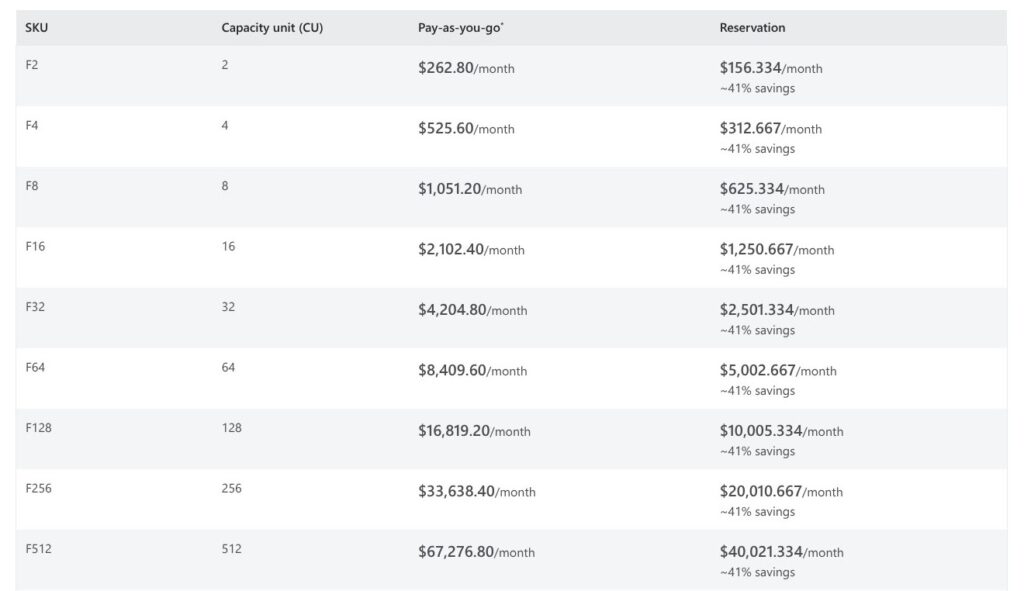
Fabric capacity bills per second, with a one-minute minimum, at $0.18 per CU-hour in East US, and each F SKU is named for its capacity units (CUs): an F2 has 2 CUs, an F64 has 64. The entry points:
- Trial (free for 60 days): an F4 or F64 capacity with a 1 TB OneLake cap and no Copilot
- F2 ($262.80/month): for dev, test and small teams whose report viewers already hold Power BI Pro
- F8 ($1,051.20/month): for teams that outgrow F2 and F4 but have too few viewers to justify F64
- F64 ($8,409.60/month): for organizations where viewers on free licenses need to read reports
- 1-year reservation ($938 per CU-year): for steady workloads, 40.5% under pay-as-you-go
| SKU | CUs | Pay-as-you-go per month | 1-year reserved per month | Power BI viewers |
|---|---|---|---|---|
| F2 | 2 | $262.80 | $156.33 | Pro/PPU each |
| F4 | 4 | $525.60 | $312.67 | Pro/PPU each |
| F8 | 8 | $1,051.20 | $625.33 | Pro/PPU each |
| F16 | 16 | $2,102.40 | $1,250.67 | Pro/PPU each |
| F32 | 32 | $4,204.80 | $2,501.33 | Pro/PPU each |
| F64 | 64 | $8,409.60 | $5,002.67 | Free license |
| F128 | 128 | $16,819.20 | $10,005.33 | Free license |
East US rates at 730 hours a month.
Storage, overage and seats bill separately from capacity:
- OneLake storage: Hot $0.026, Cool $0.019 and Cold $0.004 per GB-month, billed even while the capacity is paused
- Capacity overage: $0.54 per CU-hour for usage past the capacity’s limit, on by default for new capacities
- Power BI seats: Pro at $14 or Premium Per User at $24 per user per month, for creators on every SKU and for viewers below F64
Region changes the rate: the same CU-hour costs $0.22 in West Europe, with overage at $0.66. The 3-year reservation is $2,814 per CU, exactly three times the 1-year price, so it locks the rate for longer without lowering it.
Snowflake bills credits only while a warehouse runs, and BigQuery on-demand charges $6.25 per TiB scanned with the first 1 TiB each month free. A Fabric capacity bills every second it is running, whether queries arrive or not, so an idle F64 still costs $11.52 an hour until you pause it.
Is Microsoft Fabric Good Value for Money?
- Good value with many report viewers: F64 pay-as-you-go costs the same as about 600 Pro seats at $14, and about 357 seats on a 1-year reservation; past that count, the capacity costs less than the viewer licenses it replaces
- Poor value for spiky, mostly idle workloads, unless you automate pause and resume with Azure runbooks or the REST API
- Reserve only steady usage: a reservation is a commitment, so buy it once utilization holds flat; it also counts toward a Microsoft Azure Consumption Commitment (MACC)
Reviewer’s Notes: I’d start on the free 60-day trial, then move dev work to an F2 or F4 on pay-as-you-go with a scheduled pause outside working hours. I’d only buy F64 on a 1-year reservation ($5,002.67 a month) once the viewer count passes about 357 or the Capacity Metrics app shows steady load for several weeks. Below that, Pro licenses at $14 a seat stay cheaper than buying capacity just to free up viewers.
My Experience With Microsoft Fabric
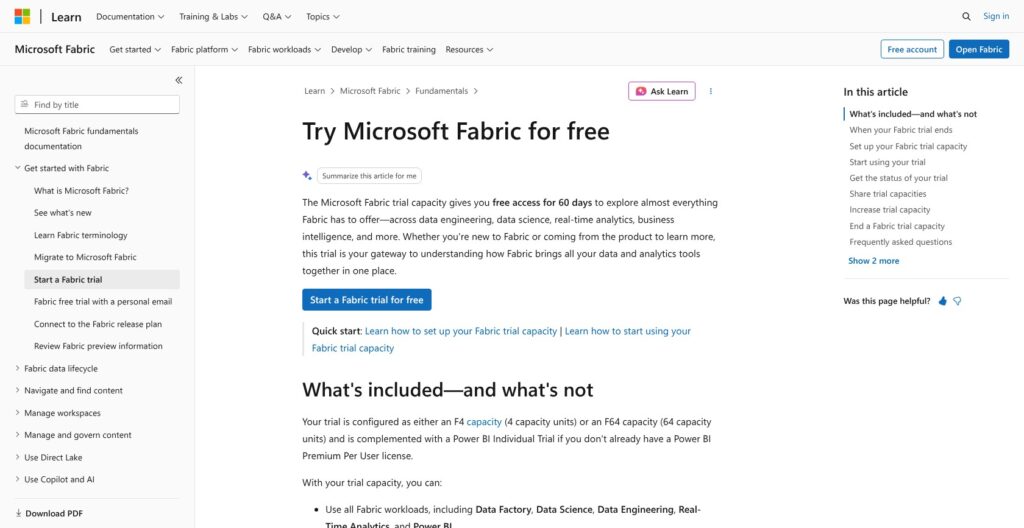
Fabric needs no Azure subscription to start: signing in at app.fabric.microsoft.com assigns a free Fabric license automatically. That license can create Fabric items only in a workspace on a Trial or F capacity, so the trial is the real first step.
Starting the Fabric Trial
- Open the Account manager (profile photo, top right) and choose Start trial
- Accept the terms, pick the region for the trial capacity, and select Activate
- Create a workspace and set its workspace type to Fabric Trial
The trial lasts 60 days, runs as an F4 or an F64, caps OneLake at 1 TB and allows up to 3 SQL databases. When it expires, non-Power BI items go inactive, and content stays in OneLake for 7 days unless you move the workspace to paid capacity.
Reviewer’s Notes: The trial is not always an F64, so an F4 trial shows the smallest-SKU throttling and Direct Lake limits, not what an F64 delivers. Copilot, AI functions and Data agent are also unsupported on trial, so I’d budget at least an F2 before judging Fabric’s AI features.
Creating a Warehouse and Loading Sample Data
In the workspace, + New item opens the item picker, and Sample warehouse under Store data creates a Warehouse preloaded with sample data. A blank Warehouse takes your own data through COPY INTO, CTAS or a Data Factory pipeline with 200+ connectors. Creating a lakehouse instead adds a read-only SQL analytics endpoint automatically.
Querying and Building a Report
The SQL query editor opens on the Warehouse, and the sample scripts count trips per medallion, passengers per trip and trips by hour on working days. The Wide World Importers lakehouse tutorial runs the full chain: pipeline ingestion, notebook transforms, a query through the SQL analytics endpoint, then a semantic model and a Power BI report in the same workspace.
Buying Paid Capacity
Paid capacity lives in Azure, not in the Fabric portal. The subscription needs the Microsoft.Fabric resource provider registered and CU quota in the target region; then Create Fabric Capacity in the Azure portal asks for a resource group, name, region, F SKU size and capacity administrator. Assign workspaces to the capacity, set the overage threshold and surge protection, and pause or resume it from the portal or the API.
Capacity Units, Smoothing and Throttling
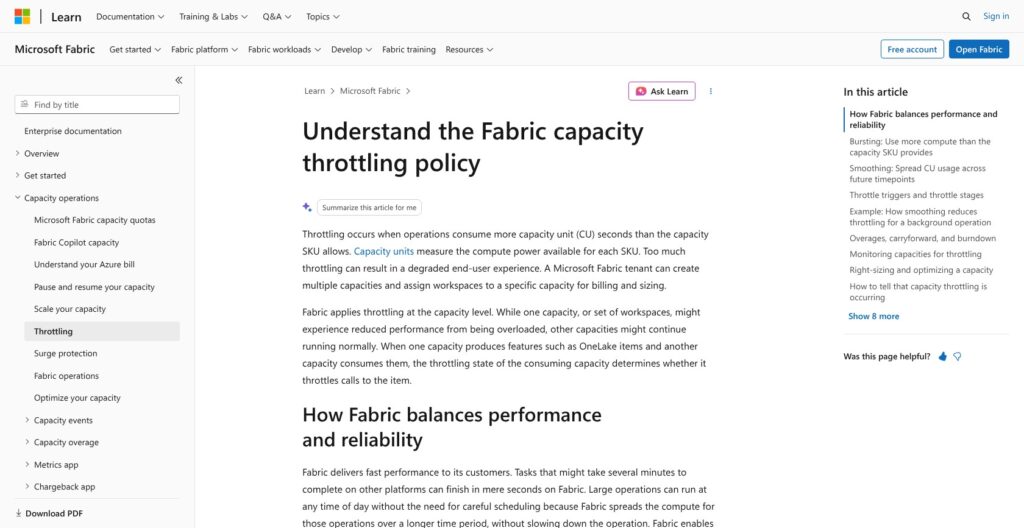
Every Fabric workload draws from one CU pool, measured in 30-second timepoints. Interactive operations are smoothed over 5 to 64 minutes; background operations, which include almost every Warehouse query, are smoothed over 24 hours. Once smoothed usage exceeds the SKU, the capacity borrows from its future, and Fabric throttles on this ladder:
| Future capacity used | What happens |
|---|---|
| Up to 10 minutes | Overage protection, no throttling |
| 10 to 60 minutes | Interactive operations delayed 20 seconds |
| 60 minutes to 24 hours | Interactive operations rejected |
| Over 24 hours | All requests rejected with CapacityLimitExceeded |
In-flight jobs finish, and Real-Time Intelligence skips the delay stage. Bursting lets a job briefly exceed the SKU: Spark gets a 3x multiplier, so an F64’s 128 Spark vCores can burst to 384, at two Spark vCores per CU. Every burst still lands in the smoothing window, which is how one heavy job throttles everyone else on the capacity.
Keep a CU buffer, isolate critical workloads in separate capacities, and treat these three controls as safety nets:
- Capacity overage (GA, F SKUs, on by default for new capacities): pays excess usage at $0.54 per CU-hour up to a rolling 24-hour threshold that defaults to 25%. It is a spending threshold, not a hard cap; keep it below one-third of daily CU-hours, past which scaling up costs about the same.
- Surge protection: rejects new background jobs at an admin-set capacity threshold; a workspace-level version is in preview.
- Pause and resume: bills the accumulated debt at once and clears throttling.
Fabric Community users report what happens on small SKUs: one poster on an F4 said the capacity went into background throttling after 10 questions to the Fabric IQ Data Agent, and an F8 thread showed a notebook averaging about 23 CUs over roughly 17 hours, more than 24-hour smoothing can absorb. BigQuery on-demand and Snowflake’s per-warehouse compute don’t let one team’s job slow another team’s queries this way, so in Fabric, critical workloads belong on their own capacity.
Warehouse vs Lakehouse: How Fabric’s SQL Engine Works
Fabric’s Warehouse and lakehouse store the same thing, Delta tables in OneLake, and differ in write access. The Warehouse gives full T-SQL DDL and DML with multi-table ACID transactions, while every lakehouse gets a SQL analytics endpoint that can query and create views, functions and procedures but cannot insert, update or delete. Queries on both count as background operations, so they get 24-hour smoothing, and Git integration covers both item types.
The Warehouse T-SQL surface supports:
- COPY INTO, CTAS and MERGE (GA)
- Identity columns, session #temp tables and TRUNCATE
- Time travel and cross-database queries
- QUALIFY and GROUP BY ALL
Missing compared with SQL Server and Azure Synapse:
- Triggers, recursive queries, synonyms and CREATE USER
- BULK LOAD (bcp is in preview), PREDICT and SET ROWCOUNT
- SET TRANSACTION ISOLATION LEVEL, FOR XML and the vector data type
- Enforced keys: primary, unique and foreign keys exist only as NOT ENFORCED
- Cross-region connections to a Warehouse or SQL analytics endpoint
- Full ALTER TABLE support, with ALTER COLUMN still in preview
- Slashes (/ or ) in schema and table names
Hierarchy queries built on recursive CTEs and change-log tables fed by triggers need rewriting before they run here. Fabric Migration Assistant for Data Warehouse supports migrations from Azure Synapse Analytics, SQL Server and Teradata. Budget compute per core: one Warehouse core costs 0.538 CU, and 3.446 CU with query acceleration on.
The Warehouse fits star schemas, corporate data marts and governed semantic models, while Spark and file-heavy engineering belong in the lakehouse.
Best for: T-SQL teams building dimensional marts on top of Spark-curated lakehouse tables. Skip if: your codebase depends on triggers, recursive queries or enforced foreign keys.
OneLake, Shortcuts and Mirroring
OneLake is one logical lake per tenant, built on ADLS Gen2, and every Fabric workload writes Delta Parquet into it. That open format keeps Fabric’s exit cost lower than its capacity pricing suggests, because the tables are not locked in a proprietary store.
Shortcuts surface external data in place, without copying, from:
- Amazon S3 and S3-compatible storage
- ADLS Gen2 and Azure Blob Storage
- Google Cloud Storage
- Dataverse, Iceberg tables, OneDrive and SharePoint
Each item supports up to 100,000 shortcuts. Reads through a shortcut bill CUs to the capacity that hosts it, and the source provider charges its own fees for reads from its side.
Mirroring replicates databases into OneLake as Delta, publishing changes as often as every 15 seconds. Sources include Azure SQL Database, Azure SQL Managed Instance, SQL Server, Cosmos DB, Azure Database for PostgreSQL, Oracle, SAP, Snowflake and BigQuery (GA), with MySQL in preview and open mirroring for other systems. Each CU includes 1 TB of free mirroring storage, so an F64 holds 64 TB, and replication compute consumes no CUs. Beyond the allowance, mirrored data bills at $0.026 per GB-month, paused or not, and querying it through SQL, Power BI or Spark costs CUs as usual.
Fabric can therefore sit beside a Snowflake estate rather than replace it: mirror a Snowflake database for Power BI, and mirror Azure Databricks Unity Catalog metadata so Databricks tables appear without a copy.
OneLake transactions draw CUs too: 104 CU-seconds per 10,000 reads and 1,626 per 10,000 writes on the hot tier. From October 15, 2026, Fabric counts some Spark-driven OneLake operations it previously missed, so Spark-heavy capacities may see reported usage rise.
Power BI, Direct Lake and Copilot
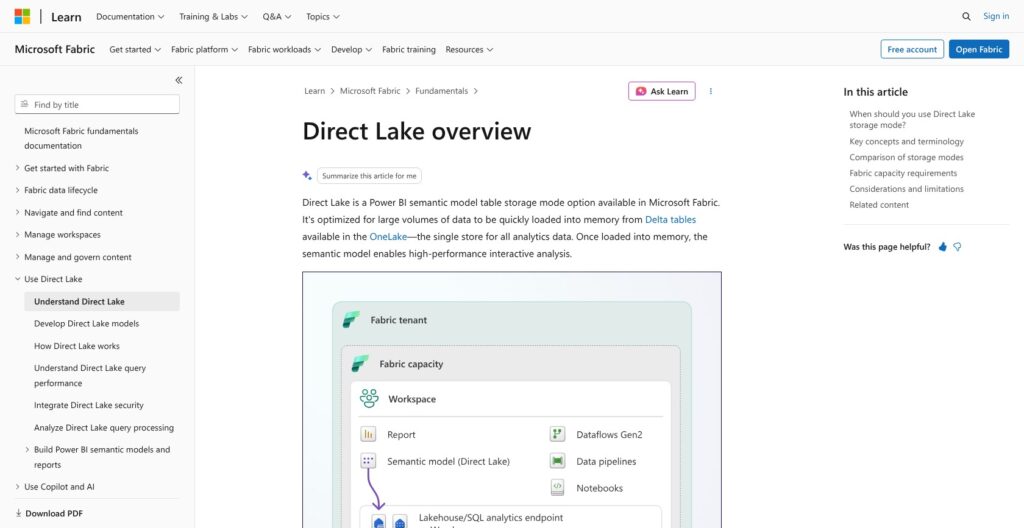
Direct Lake loads Delta tables from OneLake straight into the Power BI engine, so semantic models skip scheduled import refreshes. It only runs on Fabric capacity, and for a Microsoft Power BI shop it is the strongest reason I see to pick Fabric over Snowflake or Databricks. Its guardrails scale with the SKU:
- F2 to F8: 300 million rows per table, 10 GB model, 3 GB memory
- F16: 20 GB model, 5 GB memory
- F32: 40 GB model, 10 GB memory
- F64: 1.5 billion rows per table, no model size cap, 25 GB memory
- F128: 3 billion rows per table, 50 GB memory
Past these limits, Direct Lake on SQL falls back to DirectQuery, while Direct Lake on OneLake fails. Viewer licensing follows the F64 line covered in the pricing section above.
Copilot is on by default for paid F2+ tenants, draws CUs from the same capacity, and is unavailable on trial. It runs Azure OpenAI in US and EU data boundary regions; tenants elsewhere must enable cross-geo processing. Fabric IQ (preview) adds ontology, graph and data agents, and the F4 throttling report in the capacity section came from this workload, so I’d trial it on a separate capacity first.
How Does Microsoft Fabric Compare to Competitors?
Fabric bills one capacity shared by warehouse, Spark, pipelines and BI, while each rival bills per credit, DBU, TiB scanned or RPU-hour:
- Snowflake: runs on AWS, Azure and Google Cloud, with list prices starting around $2 per credit (Standard), $3 (Enterprise) and $4 (Business Critical) in AWS US East, billed per second while a warehouse runs. Snowflake wins multi-cloud estates and teams that want each workload on its own isolated warehouse.
- Databricks: serverless SQL on Azure costs $0.70 per DBU (Premium, East US), against $0.55 for SQL Pro and $0.22 for SQL classic, which add cloud VM costs on top, and Databricks offers a 14-day free trial. Databricks wins Spark- and ML-heavy engineering, and since Fabric mirrors Unity Catalog metadata, the two can coexist.
- Google BigQuery: on-demand queries cost $6.25 per TiB scanned, with the first 1 TiB each month free and no capacity to size, so cost tracks how much data each query scans. BigQuery wins serverless, pay-per-query analytics on Google Cloud.
- Amazon Redshift: Serverless costs $0.375 per RPU-hour on a base adjustable from 4 to 1,024 RPUs, plus $0.024 per GB-month for managed storage, just under OneLake’s $0.026 hot tier. Redshift wins AWS-native shops.
| Platform | Pricing unit | Entry price point | Cloud | Best for |
|---|---|---|---|---|
| Microsoft Fabric | CU-hour (capacity) | $0.18 per CU-hour; F2 $262.80/month | Azure | Power BI-centric teams |
| Snowflake | Credit | Around $2 per credit (Standard) | AWS, Azure, Google Cloud | Multi-cloud, isolated workloads |
| Databricks | DBU | $0.70 per DBU, serverless SQL (Azure East US) | Azure (priced here) | Spark and ML engineering |
| Google BigQuery | TiB scanned | $6.25 per TiB, 1 TiB free monthly | Google Cloud | Serverless pay-per-query |
| Amazon Redshift | RPU-hour | $0.375 per RPU-hour, 4 RPU base | AWS | AWS-native shops |
Against Snowflake, Fabric’s weak point is idle cost: an F64 left running through a quiet month still bills $8,409.60, while a suspended Snowflake warehouse bills no compute. Against Databricks, Fabric’s edge is Power BI on the same capacity, and Unity Catalog metadata mirroring lets a team keep Databricks for engineering while reporting in Fabric.
Fabric wins where Power BI already sits: one bill for the warehouse and the reports, free viewers from F64, and Direct Lake with no import refresh.
How I Reviewed Microsoft Fabric
I priced every F SKU at East US rates, pay-as-you-go and 1-year reservation, with West Europe for contrast. I mapped the documented setup path from trial activation to a first Warehouse query and a Power BI report, then worked through the throttling, overage and surge protection rules, the Warehouse T-SQL surface and its limitations, OneLake shortcuts and mirroring, and the Direct Lake guardrails per SKU. I set Fabric’s pricing unit against Snowflake, Databricks, BigQuery and Redshift, and weighed sustained Fabric Community reports on throttling. The verdict weighs pricing transparency and cost predictability, openness and exit costs, operating effort, SQL depth, and Power BI fit.
Prices current as of October 2026.
Should You Choose Microsoft Fabric?
Yes, if your organization already runs on Power BI, Microsoft 365 and Azure, and either has enough report readers to fill an F64 (about 357 Pro seats against a reserved F64) or mostly needs a warehouse and BI on one bill. Direct Lake, free viewers from F64 and 1 TB of free mirroring storage per CU give Fabric an edge no rival here matches for a Power BI shop. Teams leaving Azure Synapse, SQL Server or Teradata also get Fabric Migration Assistant for the move.
No, if your data spans AWS and Google Cloud, if spiky jobs can’t tolerate 20-second delays and rejections, or if you want to pay per query (BigQuery) or keep each team on isolated compute (Snowflake). Teams that rely on triggers, recursive queries or enforced keys in T-SQL should budget for rewrites.
Start the 60-day trial on Microsoft Fabric with your own data rather than the sample warehouse, watch the Capacity Metrics app, and size the F SKU from what it shows. Buy the 1-year reservation only after utilization holds steady for several weeks.
FAQ
How much does Microsoft Fabric cost per month?
Microsoft Fabric costs $0.18 per CU-hour pay-as-you-go in East US, so an F2 runs $262.80 a month and an F64 $8,409.60 at 730 hours. A 1-year reservation lowers both by 40.5%. OneLake storage bills separately from $0.026 per GB-month on the hot tier, and Power BI Pro seats can add $14 per user.
Is Microsoft Fabric free to try?
Yes. The Fabric trial is free for 60 days and runs as an F4 or F64 capacity with up to 1 TB of OneLake storage. It needs no Azure subscription, but Copilot, AI functions and Data agent are unavailable. Content stays in OneLake for 7 days after expiry unless you move it to paid capacity.
Do Power BI viewers need a license with Fabric?
Below F64, yes: every viewer needs Power BI Pro ($14 per month) or Premium Per User ($24). On F64 and larger, viewers with a free Fabric license and the Viewer role can read Power BI content. Anyone who creates or shares reports needs Pro or PPU on every SKU.
Is Microsoft Fabric a data warehouse or a lakehouse?
Both. Fabric offers a Warehouse with full T-SQL reads and writes and a lakehouse for Spark and files, and both store Delta tables in OneLake behind the same SQL engine. The lakehouse’s SQL analytics endpoint is read-only, so use the Warehouse when T-SQL must insert, update or delete. See Warehouse vs Lakehouse above.
What happens when a Fabric capacity runs out?
Fabric first smooths usage and lets the capacity borrow 10 minutes of future compute. Past 10 minutes, interactive operations wait 20 seconds; past 60 minutes they are rejected; past 24 hours every request fails with CapacityLimitExceeded. Capacity overage can absorb the excess at $0.54 per CU-hour, or pausing and resuming bills the debt and resets the capacity.