
Editor’s note: This Datameer review is based on my hands-on test of Datameer Cloud, connected to a Snowflake account, in November 2026. I weighed pricing, setup and Snowflake permissions, the Workbench (recipes, SQL Editor, Notebook AI), deployment and scheduling, the Jobs and Cost & Usage modules, and rivals dbt, Coalesce, Matillion and Alteryx.
Quick verdict: I recommend Datameer for Snowflake teams where analysts and engineers share one transformation project: analysts click through recipes while engineers drop into the SQL Editor, and every step runs as SQL inside Snowflake. The trade-offs are no public price, Snowflake-only execution and no Git branches or pull requests, so code-first teams are better served by dbt (Starter at $100 per user a month) or Coalesce (free Developer plan).
Among data prep tools, Datameer Cloud is built only for Snowflake: it pushes visual and SQL transformation into your own warehouse, with 270+ built-in functions, view or table deployment and Snowflake Task scheduling. The homepage now leads with Callisto by Datameer, a waitlist-only lineage product, but Datameer Cloud is what you can buy.
In this review, I’ll take a closer look at Datameer’s pricing, features, and Snowflake workflow, so you can see exactly whether it fits your data team or whether a code-first tool is the better buy.
Key Takeaways
- Snowflake credits are part of the cost: transformations, previews and materializations all run on your own warehouse.
- No-code and SQL share one flow: Notebook AI adds question-to-SQL once an admin adds an OpenAI key.
- No public price: per seat, quote only; Jobs, Cost & Usage and Migration are licensed separately.
- Snowflake only: Datameer Cloud does not run on Databricks or BigQuery.
- Versioning is internal: Project History and Model version tags, not Git branches and pull requests.
Pros and Cons
Pros
- Everything runs inside your Snowflake account, with no separate compute or data copy.
- No-code recipes (Filter, Join, Union, Aggregate, Pivot) and nearly all Snowflake SQL in one flow.
- 270+ built-in functions across nine function categories, including windowing and conversion.
- Deploy as a view or table on daily, weekly, custom or data-driven Snowflake Task schedules.
- Models pin production jobs to version tags (e.g. 2026.1) and deploy to several Snowflake locations.
Cons
- No public price: per seat, quote only, with Jobs and Cost & Usage licensed separately.
- Datameer Cloud is Snowflake only, with no Databricks or BigQuery support.
- Previews use a 100,000-row sample by default, so joins and filters can preview empty until cached.
- CSV uploads cap at 100 MB and 512 columns; Filter combines conditions with AND only, no regex or wildcards.
Datameer Pricing: How Much Does It Cost?
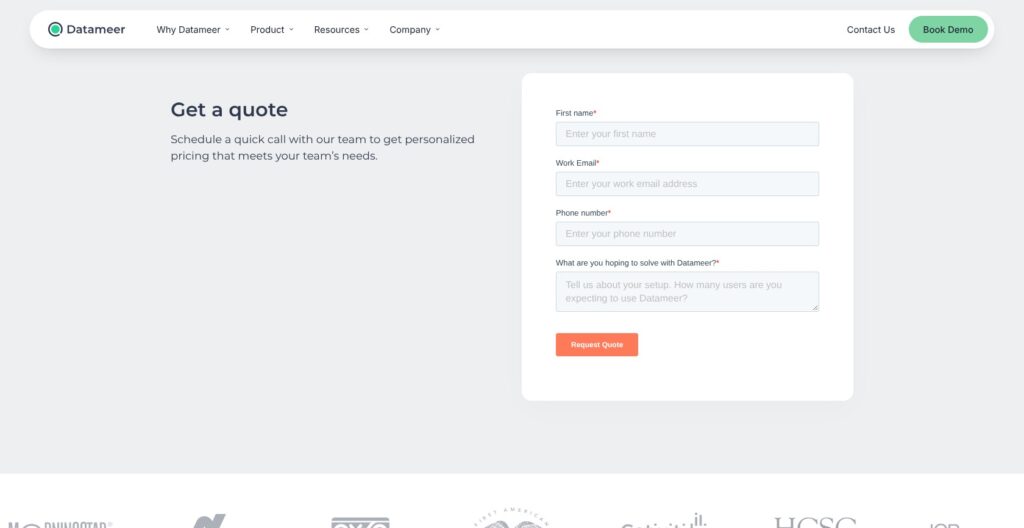
Datameer publishes no price for Datameer Cloud, Callisto or Datameer X. Datameer Cloud is priced per seat, and the only route to a number is a “Get a quote” call booking.
- Datameer Cloud (quote, per seat): for Snowflake teams that need the core Workbench, deployments and Notebook AI.
- Premium modules (quote): for Jobs (orchestration, Models, version tags), Cost & Usage (warehouse spend and table ROI dashboards) and Migration (Datameer Classic to Cloud), each licensed and activated separately through an account rep.
- Callisto by Datameer (waitlist): for lineage and pull-request change-impact analysis; the waitlist form offers a 30-minute session on one of your own open pull requests.
- Datameer X (demo): for data-lake ETL through a spreadsheet interface with 70+ connectors.
Datameer Cloud’s free trial runs 14 days, one per email address, with a Snowflake Sandbox and a sample marketing project. The website now arranges a personalized trial through a demo booking instead of an instant signup.
| Product | Price | Trial / access | What it covers |
|---|---|---|---|
| Datameer Cloud | Per seat, quote only | 14-day free trial; personalized trial through demo booking | Snowflake transformation and deployment |
| Premium modules | Separately quoted and licensed | Activated by an account rep | Jobs, Cost & Usage, Migration |
| Callisto | Not published | Waitlist, 30-minute session on one open PR | Lineage and PR change-impact analysis |
| Datameer X | Not published | Demo booking | Data-lake ETL, 70+ connectors |
Snowflake compute is on your bill. Previews, cached nodes, materializations and scheduled tasks all run on your warehouse, and the default warehouse must auto-resume because Datameer never starts or stops it. Budget Snowflake credits for interactive development as well as production refreshes, because the seat quote covers only the Datameer side.
Is Datameer Good Value for Money?
- dbt Starter costs $100 per user a month: 5 developer seats and 15,000 successful model builds a month, with Git-native SQL models.
- Coalesce Developer is free: 1 user and 2,000 actions a month; Starter is $150 per user a month, billed annually.
- Alteryx One Starter costs $250 per user a month: billed annually, for cloud-only data prep, with a 30-day trial.
- KNIME’s Team plan starts at EUR 99 a month: that covers 3 seats, the cheapest published entry point for visual workflows here.
- Matillion sells consumption credits: there is no public dollar rate, so it also ends in a workload-based quote, like Datameer.
Datameer’s value depends on whether your analysts will actually build in the no-code Workbench. If only engineers will touch the transformations, dbt or Coalesce give you a published price and Git without a sales negotiation.
Reviewer’s Notes: Ask for the base Datameer Cloud seat quote first. Add the Jobs module only if you need Models, event-driven triggers or deploys to several Snowflake locations, and skip Cost & Usage if you already watch warehouse spend in Snowflake.
My Experience With Datameer
Starting a Trial and Connecting Snowflake
The trial form asked for my first name, last name and email, a data-warehouse selection, acceptance of the terms and a captcha. My instance URL arrived by email, I set a password of at least 8 characters, and the instance opened already connected to a Snowflake Sandbox with a sample marketing project.
I then connected my own account through the “Snowflake Account Name or URL”, user name and password fields, clicked Connect and picked a warehouse. Like Coalesce, Datameer connects straight to Snowflake with no separate engine in between, which means no separate compute or data copy.
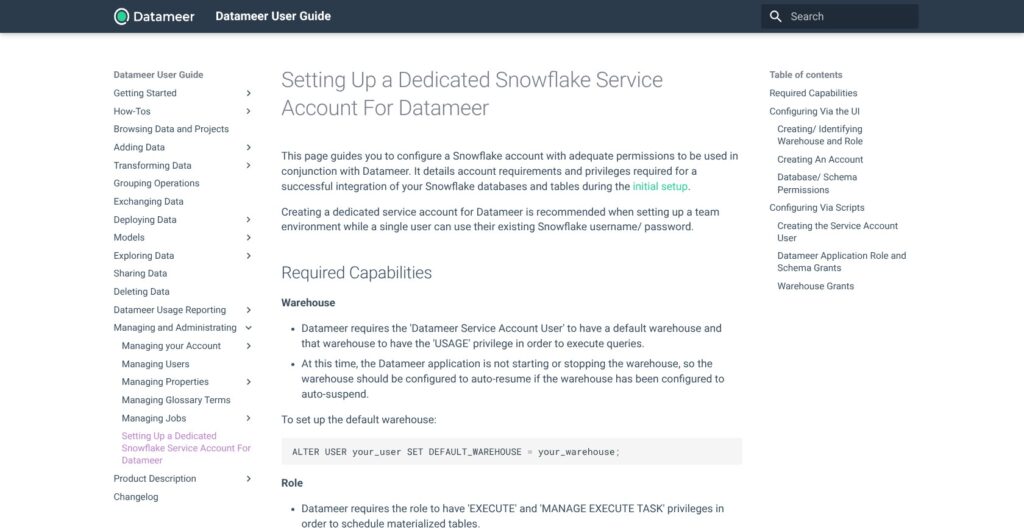
For the connection I created a dedicated service account rather than using my personal login. Its default warehouse needed USAGE and auto-resume enabled, because Datameer does not start or stop the warehouse itself. The role got three sets of grants:
- Scheduling: EXECUTE TASK and EXECUTE MANAGED TASK on the account, for scheduled materialization.
- Reading: USAGE and MONITOR on source databases and schemas, plus SELECT and FUTURE SELECT on tables and views.
- Publishing: CREATE TABLE and CREATE VIEW on the schemas Datameer writes to.
These are the grants I ran for a raw source schema and a marts schema:
GRANT USAGE ON WAREHOUSE TRANSFORM_WH TO ROLE DATAMEER_ROLE;
GRANT EXECUTE TASK ON ACCOUNT TO ROLE DATAMEER_ROLE;
GRANT EXECUTE MANAGED TASK ON ACCOUNT TO ROLE DATAMEER_ROLE;
GRANT USAGE, MONITOR ON DATABASE ANALYTICS TO ROLE DATAMEER_ROLE;
GRANT USAGE, MONITOR ON SCHEMA ANALYTICS.RAW TO ROLE DATAMEER_ROLE;
GRANT SELECT ON ALL TABLES IN SCHEMA ANALYTICS.RAW TO ROLE DATAMEER_ROLE;
GRANT SELECT ON FUTURE TABLES IN SCHEMA ANALYTICS.RAW TO ROLE DATAMEER_ROLE;
GRANT SELECT ON ALL VIEWS IN SCHEMA ANALYTICS.RAW TO ROLE DATAMEER_ROLE;
GRANT USAGE ON SCHEMA ANALYTICS.MARTS TO ROLE DATAMEER_ROLE;
GRANT CREATE TABLE, CREATE VIEW ON SCHEMA ANALYTICS.MARTS TO ROLE DATAMEER_ROLE;
After each permission change, “Refresh” under Snowflake Settings > Service Account picked up the new access. If your Snowflake account restricts IPs, allow-list Datameer’s IP addresses before you connect.
Building a Flow in the Workbench
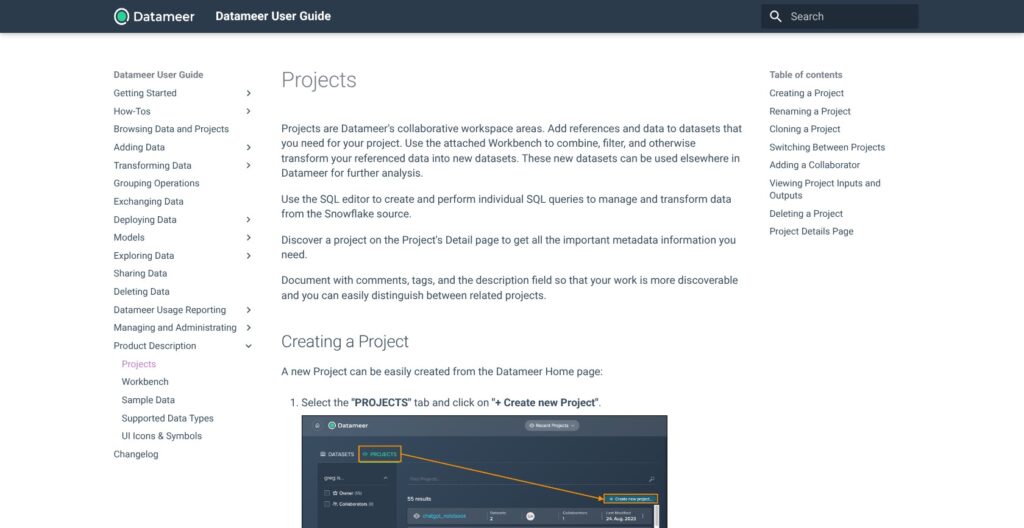
I created a project from the PROJECTS tab with “+ Create new Project” (names run up to 100 characters, descriptions up to 1,000). A project is the shared workspace: cloning one copies data sources and transformation nodes but not deployed nodes, schedules, collaborators or tags. The Workbench splits into four parts:
- Flow Area: the node graph of sources and transformations.
- Data Grid: a preview of the selected node.
- Inspector: settings for the selected node.
- Operation Toolbox: recipe operations stacked with “+ Add to Recipe”.
I joined two tables, filtered the result and aggregated it. Join defaulted to “Outer Left” and suggested column pairs; Filter combined case-sensitive conditions with AND only, so OR logic belongs in a SQL node. Only the latest operation in a recipe stack can be deleted, so fixing a step three operations back means unwinding the stack.
Previews run on a 100,000-record sample by default, and an “!” icon marks sampled nodes. A join or filter on a sample can preview empty even when the full tables match, and the fix is Node Caching: I right-clicked the join node and chose “Cache Dataset”. That creates temporary Snowflake tables tied to my session, and the cache keeps serving previews and Explore queries even after upstream edits, until it is removed and recreated.
The Explore tab adds Filter, Aggregate and Sort through a Query Builder, and an exploration converts into a transformation node when it is worth keeping.
Deploying to Snowflake and Scheduling
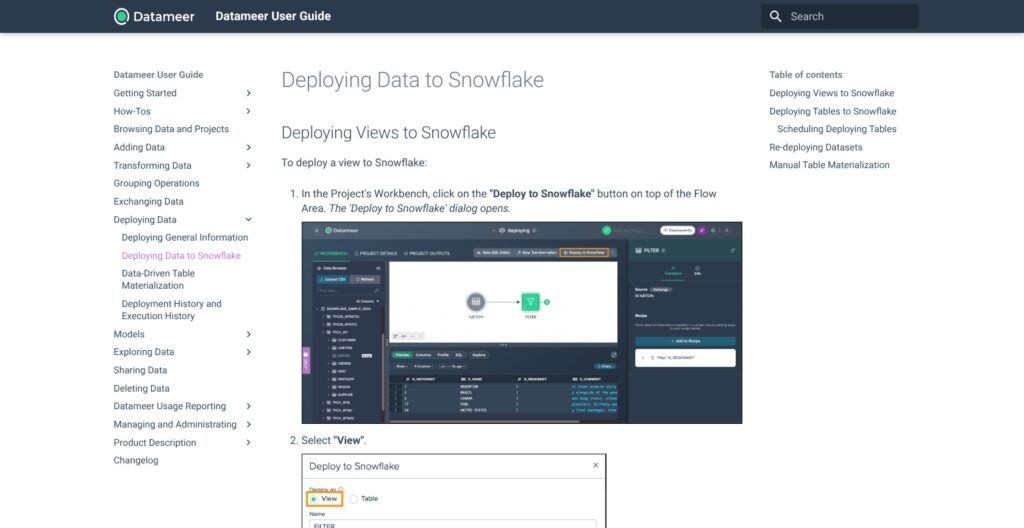
“Deploy to Snowflake” offered View or Table. The deployed node kept a visual link to its source; out-of-sync deployments turn red and take “Re-deploy to Snowflake”. For the table, “Materialize Table Now” ran it ad hoc with a role and warehouse I chose.
I scheduled the table under Inspector > Deployment > Execution Trigger, which offers daily, weekly, custom or DATA-DRIVEN triggers; the last one materializes the table whenever a chosen upstream Datameer-created table materializes. All of it runs as Snowflake Tasks, whereas dbt needs dbt platform jobs or an external scheduler for the same refresh.
Reviewer’s Notes: Learn sampling and caching on day one. A cached node does not reflect upstream edits until you remove and rebuild the cache, so never sign off a changed transformation from an old cached grid.
No-Code Recipes, SQL Editor and Notebook AI
Datameer’s Operation Toolbox ships 10 light-preparation operations and 270+ functions, enough for analysts to cover routine prep without SQL while engineers keep the SQL logic:
- Reshaping: Join, Union, Aggregate and Pivot.
- Text and nested data: Extract JSON, Replace, Split and Extract.
- Cleanup: Filter and Manage Columns.
The functions sit in nine categories:
- Aggregation
- Conditional Expression
- Context
- Conversion
- Date & Time
- Numeric
- String
- String & Binary
- Windowing
Functions fill calculation gaps inside a recipe, from windowed ranks to date conversions, but they do not lift the AND-only Filter limit or add regex and wildcard matching to it. An analyst who needs OR logic, regex or wildcard matching writes a SQL node.
SQL Editor
Clicking “+” next to a view, then “SQL”, opened an editor with Snowflake syntax, highlighting and a Formatter; “Run Query” executed the statement and “Done” saved it into the flow. Nearly all Snowflake SQL runs, but BINARY and VARBINARY columns are unsupported and invisible in Datameer, and UDFs need USAGE grants plus fully qualified names.
My SQL node chained with the no-code nodes in the same graph, so an engineer’s query and an analyst’s recipe feed each other directly. Alteryx One Starter, by contrast, sells cloud-only data prep at $250 per user a month; Datameer runs every node, clicked or written, as SQL in your Snowflake account.
Notebook AI
Notebook AI opened from a transformation node’s context menu. I typed a question in plain English, Datameer translated it to SQL, and “Run Query” executed it. The panel also keeps:
- Conversation history: earlier questions and answers stay in the thread.
- Suggested questions: starting points for the next query.
Before any of that, an admin has to configure the OpenAI integration (model, API key and organization key), so your company’s OpenAI account and data policy govern Notebook AI, not your Snowflake contract. The same OpenAI connection lets Datameer catalog, label and document projects automatically, and the Business Glossary takes terms up to 100 characters with descriptions up to 400.
I recommend this Workbench for mixed analyst-engineer teams. Engineers who already maintain SQL models get more from dbt’s code-first workflow.
Jobs, Models, Cost and Data Quality
Jobs, Cost & Usage and Migration are premium modules, purchased separately and activated independently, so price the Jobs module as its own line before comparing quotes with dbt or Coalesce.
Jobs and Models
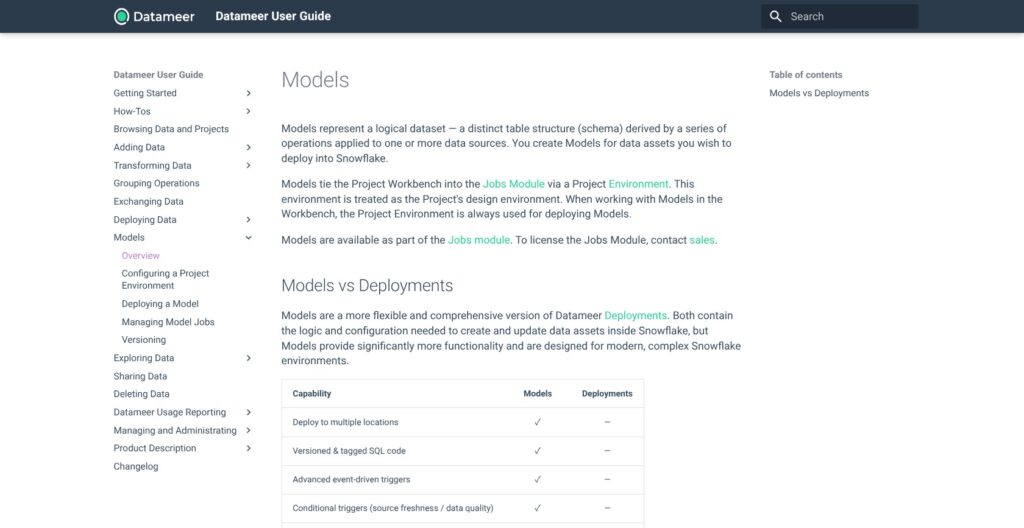
Jobs is built from five concepts:
- Service Account: the Snowflake identity that runs the work.
- Environment: a Snowflake role and warehouse, with an optional Slack notification channel.
- Job Type: Load/Unload, Stored Procedure or Model Job.
- Job Definition: a schedule or an event-driven trigger.
- Job Run: one execution.
The Jobs Dashboard filters runs by period, environment, job, project, role and warehouse, which keeps production runs apart from development activity. A Model is a versioned logical dataset that a Model Job materializes into several Snowflake locations, and Datameer recommends Models over Deployments for most teams.
| Capability | Deployments | Models through Jobs |
|---|---|---|
| Output management | Deployed view or table | Logical dataset with multiple destinations |
| Release selection | Redeploy changed output | Pin jobs to version tags |
| Triggering | Scheduled or data-driven table refresh | Advanced events plus source freshness or data quality conditions |
| Additional controls | Deployment settings | Per-job source override and incremental materialization |
Every Workbench change creates a version in Project History, and Model Jobs pin to tags such as 2026.1 or sprint-42, so production and development can run different versions. This is not Git: there are no branches or pull requests, which is where dbt’s repository workflow and Matillion’s built-in Git on its Developer edition win.
Cost & Usage and Data Quality
Cost & Usage runs admin jobs for Snowflake query-history indexing, Table ROI and warehouse usage, which feed the Warehouse Spend Overview, Warehouse Usage, ROI Report Overview and Asset ROI dashboards. The Monitoring Dashboard collects freshness, inserts, deletes and updates per table every hour, with thresholds set in the data quality inspector; that is basic monitoring, not a full observability product.
File integration loads and unloads between Snowflake and S3, Azure ADL or GCS in CSV, JSON, XML, ORC, Parquet and Avro. Manual CSV uploads are tighter:
- 100 MB maximum file size.
- 512 columns maximum.
- 3 million rows processed; rows beyond that upload but are not processed.
- Organization-wide access: every user in the organization can read uploaded files, so keep restricted data out of uploads.
Sharing covers four channels:
- CSV download: 1 GB default cap, raisable to 5 GB.
- Email CSV: ad hoc or scheduled, 25 MB default cap.
- Google Sheets: through a Google service account.
- Slack: schedule notifications.
Callisto and Datameer X: The Rest of the Lineup
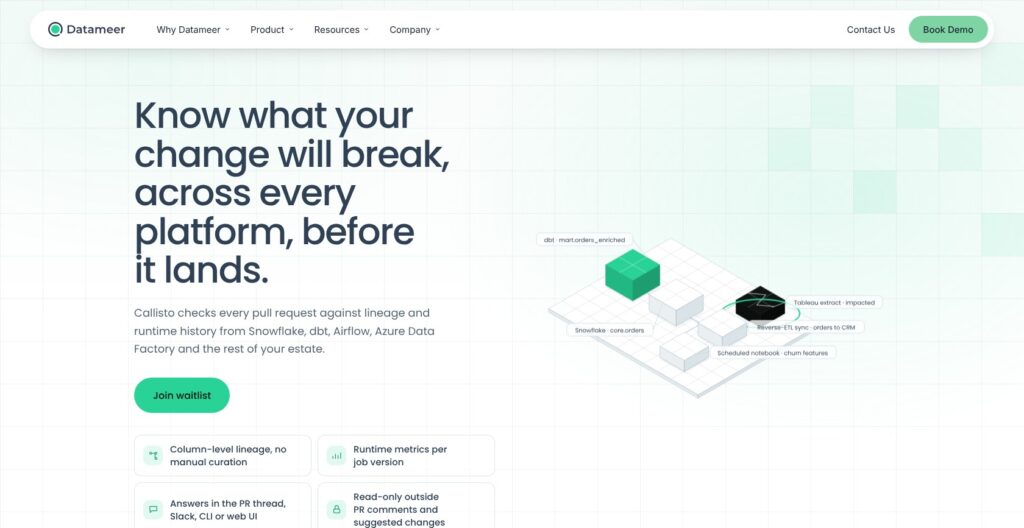
Callisto by Datameer is a lineage and change-impact product, not a transformation tool. It is waitlist only, with no published launch date or price, and I did not use it.
Callisto checks every pull request against lineage and runtime history from:
- Snowflake and dbt
- Airflow and Azure Data Factory
- S3 (Avro) and Tableau
- OpenLineage events and Datadog logs
Column-level lineage is parsed from SQL or inferred from metadata, and each edge is marked Parsed, Inferred or Not mapped. Runtime metrics per job version (bytes scanned, duration, rows returned) sit next to the lineage, and answers land in the PR thread, Slack, a CLI or a web UI, with single-tenant deployment and point-in-time reads. A PR that renames a column in a dbt model, for example, shows the downstream readers across Snowflake, Airflow and Tableau plus the bytes-scanned change for the new job version. Callisto’s GitHub comments do not give Datameer Cloud Git workflows; the two products are separate.
Datameer positions Callisto away from:
- Single-platform shops and small teams where one person holds the whole picture.
- Organizations that prohibit AI tooling.
- Buyers shopping for a data catalog, business glossary or data quality monitoring.
Datameer X is the data-lake ETL line: a spreadsheet interface and 70+ connectors, sold through a demo. The Migration module converts Datameer Classic Import Jobs, Workbooks and Export Jobs into Datameer Cloud projects on a best-effort basis. Datameer X is the legacy path; new Snowflake buyers land on Cloud.
How Does Datameer Compare to Competitors?
I pick Datameer over these rivals only when analyst-owned Snowflake transformations justify a quote-only license and internal versioning.
-
dbt: wins for code-first analytics engineering. Starter costs $100 per user a month with 5 developer seats and 15,000 successful model builds a month, and SQL models live in Git. Datameer’s edge is letting non-SQL analysts build in the same project as the engineers.
-
Coalesce: wins for engineers who want a SQL-generating GUI with a published price. Developer is free for 1 user and 2,000 actions a month; Starter is $150 per user a month, billed annually, for up to 4 Transform users. Its platform list adds Databricks, Fabric, BigQuery and Redshift (private preview) to Snowflake.
-
Matillion: wins when ingestion and transformation belong on one low-code canvas. Developer, Teams and Scale run on consumption credits with no public dollar rate, and Developer includes built-in Git, 1 developer user and unlimited projects, where Datameer offers only internal version tags.
-
Alteryx: wins for analysts who want a published price for cloud data prep. Alteryx One Starter costs $250 per user a month, billed annually, with a 30-day free trial; Professional and Enterprise are contact-sales editions.
-
KNIME: wins on cost for visual workflows. The desktop client is open source, and the Team plan starts at EUR 99 a month for 3 seats with 120 execution credits a month.
-
SQLMesh: wins for change-aware SQL deployments at zero license cost. Fivetran announced its acquisition of Tobiko in September 2025 and contributed SQLMesh to the Linux Foundation in March 2026, while Tobiko Cloud has no published price.
Against every rival above, Datameer’s two weak spots stay the same: no published price and no Git. Datameer wins only where analysts must build inside Snowflake without writing SQL and the team accepts quote pricing for that.
How I Reviewed Datameer
I connected Datameer Cloud to a Snowflake account through a dedicated service account, built a flow from no-code recipe steps, a SQL Editor node and Notebook AI, deployed outputs as a view and a table, and scheduled a Snowflake Task. I then walked through the Jobs and Models, Cost & Usage and data quality screens, reviewed the Callisto and Datameer X material, and priced Datameer against dbt, Coalesce, Matillion, Alteryx and KNIME.
I weighted six areas:
- Pricing and value: seat quotes, module licensing and the Snowflake compute on top.
- Setup and permissions: service-account grants, warehouse auto-resume and IP allow-listing.
- Transformation workflow: recipe limits, SQL coverage and Notebook AI prerequisites.
- Deployment and orchestration: views, tables, Snowflake Tasks and Model Jobs.
- Governance and cost control: Project History, version tags, monitoring and upload visibility.
- Alternatives: dbt, Coalesce, Matillion, Alteryx, KNIME and SQLMesh.
Prices current as of November 2026.
Should You Use Datameer for Snowflake Transformation?
Yes, if your warehouse is Snowflake and analysts who do not write SQL must build and maintain transformations next to engineers. Datameer’s shared recipe-and-SQL Workbench handles exactly that, and every step runs as SQL inside your own Snowflake account.
Skip it if your team is code-first, needs Git branches and pull requests, runs Databricks or BigQuery, or wants a published price. dbt Starter at $100 per user a month, Coalesce’s free Developer plan or open-source SQLMesh fit those teams better.
Settle four things before signing:
- The seat count: list every analyst and engineer who needs a seat.
- Module coverage: get Jobs and Cost & Usage priced as separate lines.
- Snowflake credits: track what previews, caches and scheduled refreshes add to the warehouse bill during the 14-day trial.
- Release process: decide whether Model version tags are enough or repository review is mandatory.
Use the trial to build one real join and filter, edit an upstream node and rebuild its cache, and schedule one table refresh, because those three steps cover the sampling, caching and Snowflake Task behavior you will live with daily. Book a demo or personalized trial at Datameer, and bring one representative Snowflake workflow plus a request for an itemized seat-and-module quote.
FAQ
How much does Datameer cost?
Datameer does not publish a price: Datameer Cloud is priced per seat, quote only. The Jobs, Cost & Usage and Migration modules are licensed separately, so ask for each as its own line on the quote. Snowflake bills warehouse compute on top, including previews, cached nodes and scheduled materializations, which makes the seat quote only part of the real cost.
Does Datameer work with Databricks or BigQuery?
No. Datameer Cloud is built for Snowflake only, with no Databricks or BigQuery support. Datameer X covers data-lake ETL with 70+ connectors, and Callisto reads lineage from many platforms, but neither extends Cloud’s transformation engine. For a mixed-warehouse stack, Coalesce’s platform list covers Databricks, Fabric, BigQuery and Redshift (private preview) alongside Snowflake.
Is Datameer a dbt alternative?
Partly. Both turn SQL into Snowflake views and tables. Datameer adds no-code recipes and Notebook AI on the same graph, so analysts who do not write SQL can contribute; dbt adds a Git workflow and a published Starter price of $100 per user a month for 5 developer seats. I recommend Datameer only when non-SQL analysts must maintain transformations themselves.
What is Callisto by Datameer?
Callisto is a lineage and pull-request change-impact product covering Snowflake, dbt, Airflow, Azure Data Factory, S3 and Tableau. It joins column-level lineage to runtime metrics such as bytes scanned and posts its findings in the PR thread. Access is waitlist only, with no published price or launch date, and it is not a catalog, glossary or data quality tool.
Does Datameer have a free trial?
Yes. Datameer Cloud’s free trial runs 14 days, one per email address, and starts on a Snowflake Sandbox with a sample marketing project. The website now books new trials through a demo request for a personalized trial, so a demo call comes before you connect your own Snowflake account with the service-account grants covered above.