Editor’s note: This review evaluates documented capabilities and pricing; it does not report hands-on testing.
Quick verdict: VeloDB belongs on the shortlist for data engineering teams that want managed Apache Doris, SQL analytics, and separate compute resources for workloads sharing the same data. My strongest reason to consider it is operational: VeloDB manages deployment and upgrades without requiring a move away from the Doris engine.
The catch is that deployment choices affect much more than infrastructure ownership. SaaS and bring your own cloud, or BYOC, have different integration boundaries and different bills. I would settle those differences before comparing headline vCPU prices.
In this VeloDB review, I’ll explain the costs, documented setup process, and architectural trade-offs, then identify when I would choose VeloDB over running Doris or another analytics engine.
Key Takeaways
- Managed Doris is the main attraction: VeloDB Cloud handles infrastructure operations while retaining Doris SQL and analytical capabilities.
- Independent clusters can query shared warehouse data with separate compute and cache.
- SaaS, BYOC, and self-managed Enterprise offer distinct operating models.
- Caveat: SaaS does not support the Spark connector or Java/Python UDFs.
- Caveat: BYOC’s advertised compute rate is a service charge, not the total infrastructure bill.
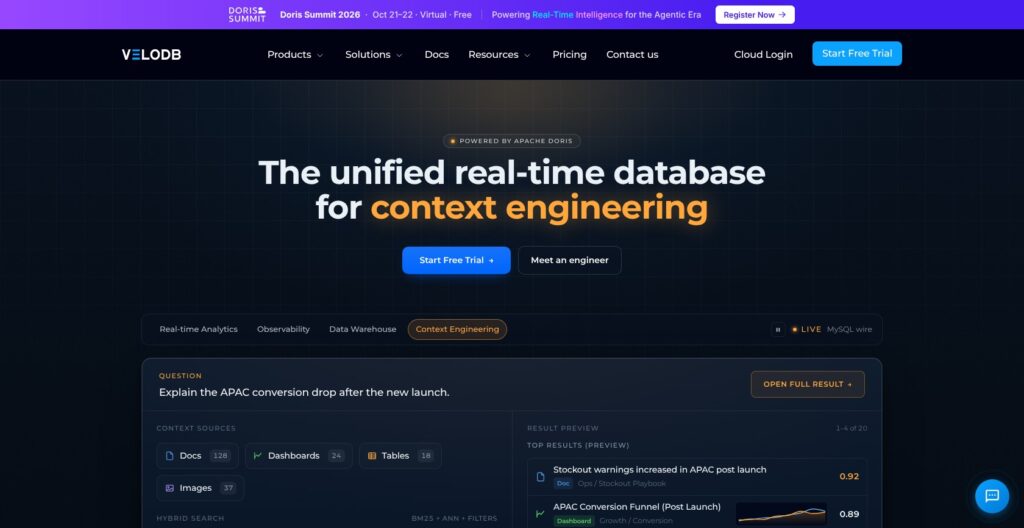
VeloDB Pros and Cons
I see VeloDB’s strengths primarily in its operating model. The limitations matter most when an existing pipeline depends on particular connectors, custom code, or infrastructure control.
Pros
- Managed deployment and upgrades reduce the infrastructure work attached to running Doris.
- Independent compute clusters share warehouse data without requiring separate analytical copies.
- Published compute rates distinguish SaaS pricing from BYOC service charges.
- Doris SQL, table models, indexes, and materialized views carry into Cloud.
- Deployment options cover vendor-hosted, customer-cloud, and self-managed environments.
Cons
- SaaS excludes the Spark connector and Java/Python UDFs.
- BYOC adds customer cloud infrastructure costs to VeloDB service fees.
- Managed infrastructure still requires database design and query-tuning expertise.
- Pausing compute retains cache and stored data, so it does not eliminate all charges.
How Much Does VeloDB Cost?
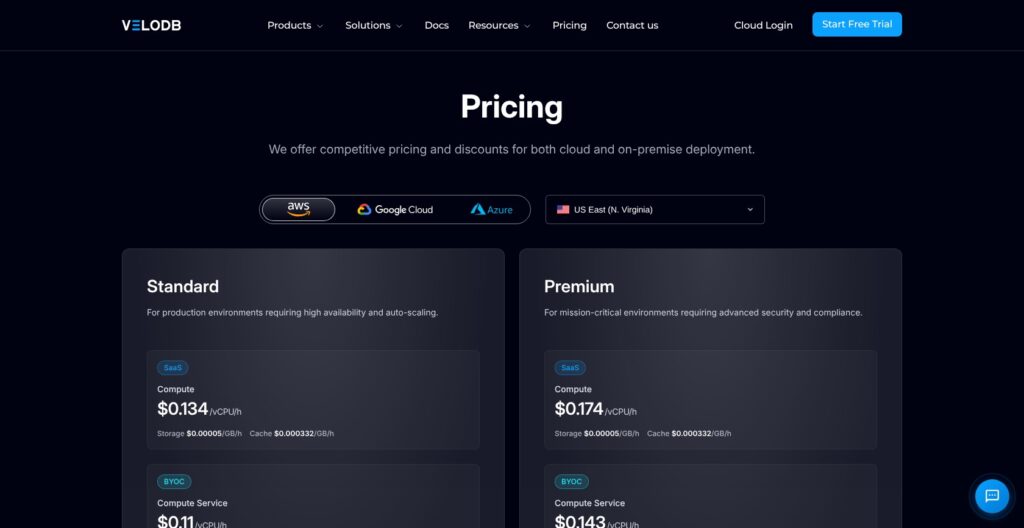
VeloDB pricing separates the service plan from the deployment model. The rates below apply to AWS US East, N. Virginia, as reviewed in October 2026. They are not universal prices across every cloud and region.
- Standard SaaS: $0.134 per vCPU-hour for compute, with storage, cache, and eligible transfer billed separately.
- Premium SaaS: $0.174 per vCPU-hour, with additional security and support entitlements.
- Standard BYOC: $0.11 per vCPU-hour for VeloDB’s compute service, plus your own cloud infrastructure bill.
- Premium BYOC: $0.143 per vCPU-hour for the service, again excluding customer cloud infrastructure.
- Enterprise: Self-managed software with pricing available by quote.
- Cloud trial: Advertised for 30 days, with $300 in credits and no credit card required.
| Offering | Published compute rate | Infrastructure billing | Main buying distinction |
|---|---|---|---|
| Standard SaaS | $0.134/vCPU-hour | VeloDB bills compute and additional usage categories | Vendor-hosted managed analytics |
| Premium SaaS | $0.174/vCPU-hour | VeloDB bills compute and additional usage categories | Additional security and support entitlements |
| Standard BYOC | $0.11/vCPU-hour service fee | Cloud provider bills infrastructure separately | Managed service in your cloud account |
| Premium BYOC | $0.143/vCPU-hour service fee | Cloud provider bills infrastructure separately | BYOC with Premium entitlements |
| Enterprise | Custom quote | Self-managed infrastructure costs are separate | Customer-operated software |
Is VeloDB Good Value for Money?
My answer depends on which operational work the service replaces. A team spending substantial engineering effort maintaining Doris has a different value calculation from a team already operating it comfortably. The published rates establish a charging model, not evidence that VeloDB is cheaper than its rivals.
For a purely illustrative compute calculation, assume eight vCPUs run for 730 hours. At the Standard SaaS rate, that equals $782.56 for compute alone. Premium would be $1,016.16. This hypothetical example is not a minimum or quoted configuration; it excludes storage, cache, and transfer.
SaaS cache is listed at $0.000332 per GB-hour. The baseline Frontend allocation of four vCPUs and 16 GB RAM is included, while larger Frontend capacity costs extra. That included allocation does not mean analytical query compute is free.
Storage also attracts a separate charge. For retention-heavy deployments, I would budget for the data kept between queries as well as the compute used to process it. A low compute rate alone tells you little about that total.
Transfer deserves attention too. Effective September 1, 2026, eligible SaaS ingress and egress costs $0.03 per GB. Supported object-storage integrations within the same cloud and region are exempt, but that is not a blanket exemption for all object-storage traffic. External providers may impose their own network charges.
Usage is collected each minute and billed hourly. I would model a normal operating month, including idle periods, rather than treating the vCPU rate as the price of the database.
Standard SaaS is my default evaluation choice when its capabilities fit. Premium makes sense when specific security or support requirements justify it. BYOC makes sense for account placement or deployment-specific functionality, not merely because its service-rate number is lower.
For BYOC, my comparison would include the service fee, cloud infrastructure, networking, and the internal effort needed to manage that environment. Comparing its service charge directly with SaaS compute would understate the cost.
Getting Started With VeloDB
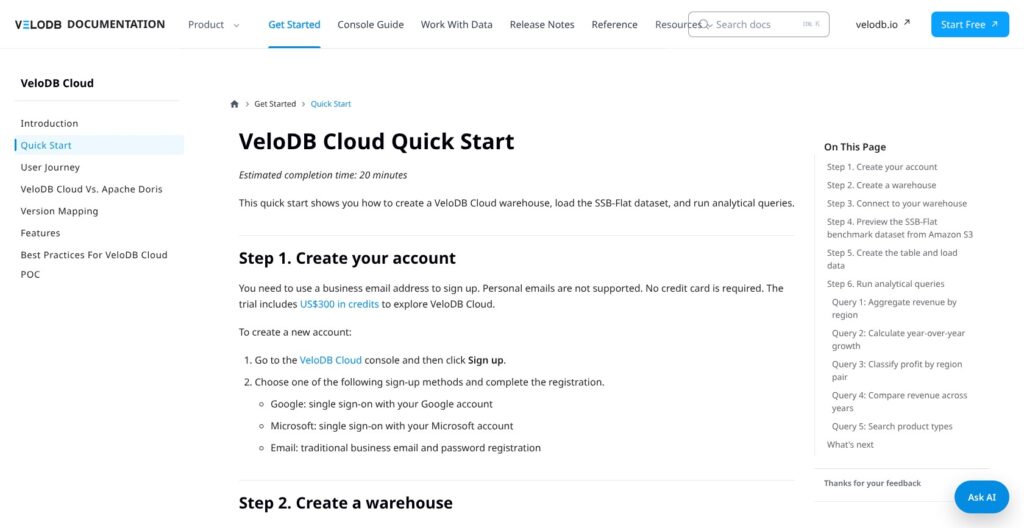
The documented starting point is a business account. VeloDB requires a business email and supports Google, Microsoft, or email-and-password registration. Personal email addresses are not supported.
The SaaS quick start then creates a warehouse, selects a cloud and region, sets an administrator password, and reviews compute and cache settings. Once the warehouse is running, the tutorial connects through SQL Editor and begins with SHOW DATABASES.
Its sample workflow previews public S3 Parquet data, creates the ssb database and ssb_flat table, and loads records using INSERT INTO SELECT. The supplied dataset contains six million rows, with aggregation, window-function, and join examples following the load.
The more important planning decision comes before production data enters the system: what should be a warehouse, and what should be a cluster? An organization contains isolated warehouses. Within a warehouse, clusters share stored data but have independent compute and cache.
I would use that distinction to separate two questions. Does a workload need its own data environment, or does it simply need its own processing resources? Creating a second warehouse for every dashboard could fragment an architecture that would be better served by shared data and separate clusters.
VeloDB’s broader project guidance moves from deployment selection to ingestion or external catalogs, client connections, and resource monitoring. That sequence is sensible, but I would give the deployment decision more weight than the sample load. A successful tutorial cannot establish whether an existing production pipeline fits SaaS.
For AWS BYOC, the documented deployment uses EC2 and CloudFormation rather than an EKS cluster. It also introduces components inside the customer VPC. I would assign that setup to someone comfortable with cloud permissions and networking, not treat it as an analyst-only onboarding task.
Client choice is another practical consideration. The integration catalog names DBeaver, DataGrip, Tableau, Power BI, QuickSight, and Superset, alongside dbt and Flink integrations. It mixes VeloDB and Doris ecosystem entries, so I read it as a starting map rather than a promise that every integration behaves identically across deployments.
The transition to real data also introduces decisions the tutorial cannot make for you. Append-only events, mutable business entities, and summarized metrics have different modeling needs. I would decide which of those dominates the workload before investing heavily in dashboard development.
For me, a useful initial project would have a clear business purpose, such as an operational reporting dataset with known freshness requirements. That gives schema and ingestion decisions a reason to exist. Loading a large sample merely to demonstrate that SQL runs is much less informative about purchase fit.
Finally, a stopped trial is not archival storage. A SaaS trial warehouse stopped for more than seven days is automatically cleaned up. I would keep durable source data and transformation definitions outside a disposable evaluation environment.
SQL, Ingestion, and Integration Limits
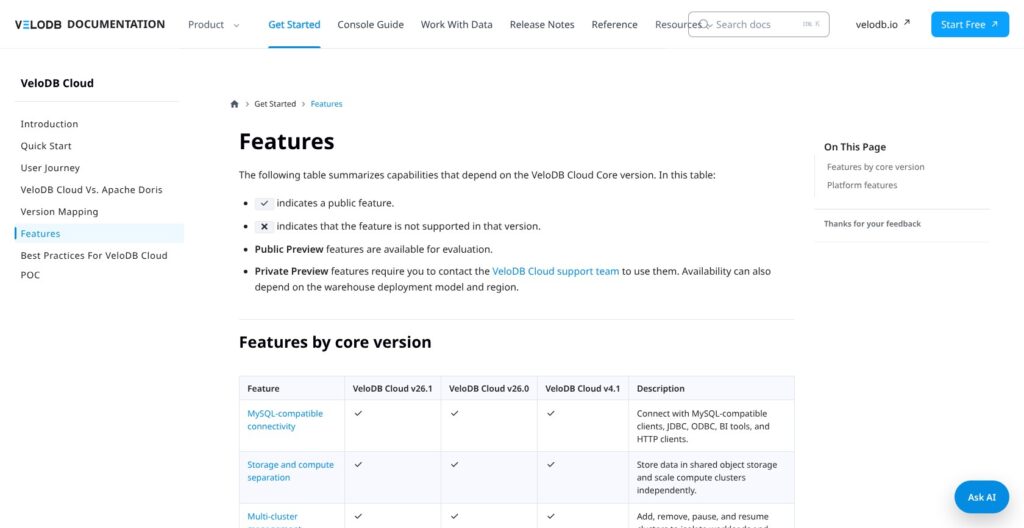
VeloDB Cloud reuses Doris SQL, table models, indexes, and materialized views. That continuity is useful for teams already familiar with Doris, but it does not mean every upstream setting or feature is exposed unchanged.
Server-side configuration files are managed by VeloDB. Changes such as enabling LDAP settings require support. My reading is that the service exchanges some low-level control for managed operations, which is reasonable only if that trade matches how your team works.
Table models remain an engineering choice. Duplicate Key fits append-only events, Unique Key supports primary-key updates, and Aggregate Key serves pre-aggregated metrics. Sort keys, partitions, and bucket distribution still need to reflect the query pattern. Managed does not mean design-free.
For bulk ingestion, the preparation guidance points to Stream Load or Broker Load rather than repeated INSERT VALUES statements. It also recommends batching tiny writes or considering Group Commit. I see this as a useful warning against treating SQL familiarity as permission to reuse transactional loading habits unchanged.
The version matrix matters for managed ingestion. MySQL/PostgreSQL CDC and Kafka imports are listed for cores v26.1 and v26.0, but not v4.1. A generic “supports Kafka” statement therefore leaves out a purchasing constraint.
Ingestion is also distinct from querying data in place. VeloDB documents lakehouse catalogs for Iceberg, Hudi, Paimon, and Hive. Those offer an alternative to loading every dataset into native tables, but I would choose between the approaches based on ownership, freshness, and query requirements rather than assuming one is always preferable.
Deployment-specific gaps can be decisive. SaaS excludes Java/Python UDFs and the Spark connector; BYOC supports them. Arrow Flight SQL is available on request for SaaS and supported in BYOC. I would not assume a Premium SaaS upgrade removes those deployment boundaries.
For reporting, the Cloud 26.x reference documents window functions for rankings, running totals, moving averages, and period comparisons. That gives SQL teams familiar analytical tools without implying that VeloDB should replace the transactional database supplying the data.
Search capabilities broaden the potential workload. Documentation covers structured filtering, full-text search, and vectors. Vector quantization includes flat, sq8, sq4, and pq settings, with compression potentially sacrificing recall to reduce memory requirements. Feature availability alone says nothing about retrieval quality for a particular dataset.
My overall judgment is that VeloDB warrants comparison with ClickHouse and StarRocks for SQL analytics, especially when Doris familiarity already exists. I would not rank those engines by joins, updates, or speed without workload evidence. The immediate question is whether the required SQL, ingestion path, core version, and deployment line up.
Scaling and Isolating Analytics Workloads
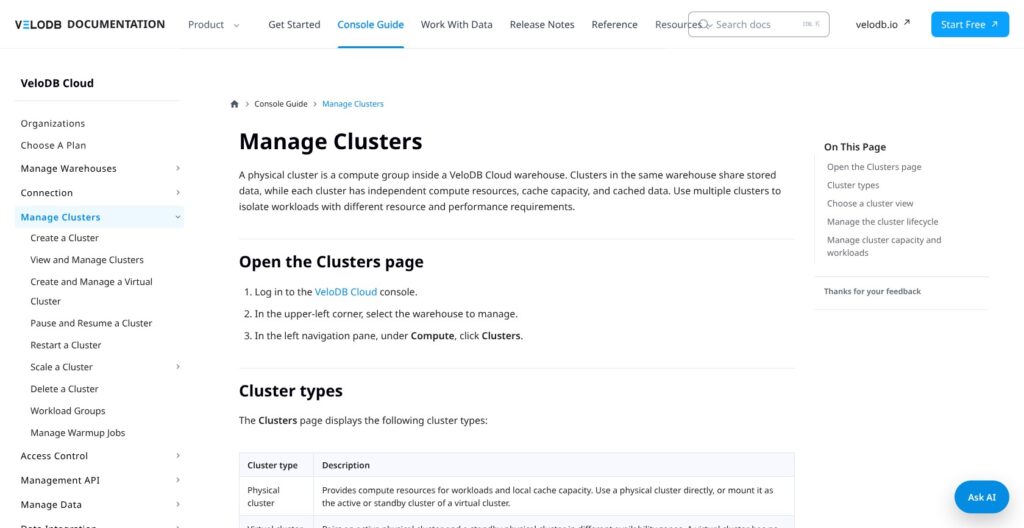
VeloDB separates shared object storage from compute. Its cluster model lets different workloads access the same warehouse data through independent processing resources. I consider this one of its more decision-relevant architectural features.
In a hypothetical deployment, a team could dedicate one cluster to ingestion-related work and another to dashboards. That avoids creating a separate data copy simply to obtain separate compute. It does not prove the dashboards will meet a particular latency target, but it gives the team a concrete isolation mechanism.
The boundary matters. Separate clusters provide independent compute and cache within a shared-data environment; separate warehouses provide isolated environments. I would choose between them based on the required isolation rather than automatically creating more clusters.
Scaling has explicit operating modes. Autoscaling adjusts on-demand compute within a configured vCPU range, while scheduled scaling assigns target capacity by time. Autoscaling, manual scaling, and scheduled scaling cannot all operate together.
My preference would depend on demand shape. Predictable reporting windows make scheduled capacity worth considering. Irregular demand makes autoscaling more relevant, provided the permitted range fits the budget. Neither option eliminates the need to understand what drives resource consumption.
Cache is a separate constraint. It can scale out independently, but separate cache scale-in is not supported. I would account for that asymmetry when estimating the consequences of expanding a cluster for a temporary workload.
Pausing is not a zero-bill switch. A paused cluster releases compute but retains cache space and cached data. Stored data remains too. I would therefore distinguish reduced compute spending from stopping every charge associated with the environment.
The terminology around availability also deserves care. Physical clusters supply compute and cache. Virtual clusters pair active and standby physical clusters across availability zones; they are not another independent pool of resources.
Taken together, these controls offer useful ways to separate and schedule work. I would buy them for that flexibility, not interpret the architecture as a guarantee of uninterrupted service or consistently low latency.
Deployment, Security, and Support
SaaS runs in VeloDB infrastructure. BYOC places warehouse compute and storage in the customer’s cloud account, with documented workflows for AWS, Google Cloud, and Azure. Enterprise is the separate self-managed option.
BYOC does not mean everything stays in your VPC. Warehouse data placement is distinct from control-plane metadata, telemetry, logs, diagnostics, and support records. Shared responsibility still applies. I would make those boundaries part of a security assessment rather than accept account ownership as a complete answer to residency requirements.
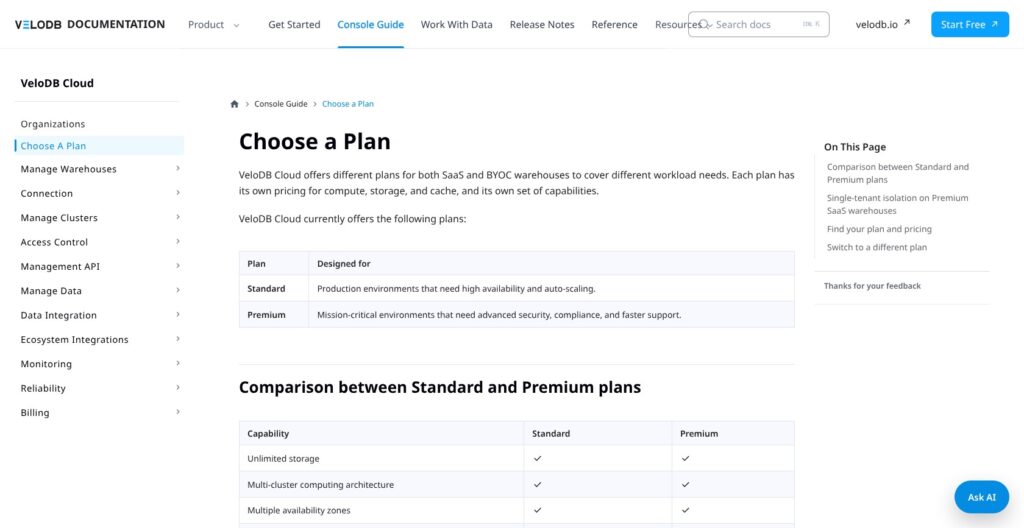
Standard includes multiple availability zones, PrivateLink, configurable backups, and scaling. Premium adds SAML, TDE/CMEK, and request-based single-tenant Meta Service. Those differences make plan selection a governance decision as well as a cost decision.
Premium SaaS metadata isolation requires advance planning. Support must enable single-tenant Meta Service before new warehouse creation, and existing warehouses cannot migrate their Meta Service in place. Plan switching also applies across the organization.
For Level 0 support, the documented response targets are one hour during business hours on Standard and ten minutes around the clock on Premium. The agreement governs commitments. I would not treat those targets as evidence of actual support quality or as uptime guarantees.
Backup terminology needs similar discipline. Configurable backups should not be confused with lightweight snapshots, which are marked private preview in v26.1. Frontend Groups and Metrics API also carry private-preview labels.
My recommendation is to translate security requirements into named controls before selecting a plan. “Enterprise security” is too vague to distinguish networking, identity, encryption, tenancy, and recovery needs. Those requirements can lead to different deployment choices, and moving later may involve more than changing a subscription setting.
How Does VeloDB Compare to Alternatives?
I would narrow the comparison according to the operating model first. Choosing an engine and choosing who operates it are related decisions, but they are not the same one.
-
Apache Doris: Choose it for direct operational control. Doris is the open-source engine underlying VeloDB. Self-management gives the team control over infrastructure and lifecycle, while leaving deployment, monitoring, upgrades, and maintenance with that team. This is my first comparison when the central question is whether managed-service fees justify transferring operational work. Upstream capabilities should not automatically be assumed available in Cloud.
-
ClickHouse: Compare it when the ecosystem already fits. ClickHouse Cloud documents compute/storage separation and automatic idle scaling. Its Scale plan includes compute-compute separation, while Basic is limited to one availability zone and 1 TB of storage. I would compare production-appropriate configurations and include ingestion, transfer, and backup charges where applicable. An existing ClickHouse pipeline is a practical reason to consider it, not evidence that either database is universally faster.
-
StarRocks: Consider it for an engine-focused evaluation. StarRocks documents an MPP query engine, storage-compute separation, and object-storage and Kubernetes deployment options. I would include it for join-heavy or lakehouse SQL when the team is willing to operate an engine. Self-managed StarRocks is not a like-for-like managed-service comparison; managed offerings require their own evaluation.
None of these routes removes workload-specific engineering. My preference would turn on existing expertise, required integrations, and responsibility for operations before any unproven performance ranking.
How I Reviewed VeloDB
I evaluated VeloDB’s official pricing, billing, architecture, deployment, SQL, integration, and setup documentation, alongside primary specifications for the alternatives. Pricing evidence was reviewed on October 14, 2026.
I did not create an account, run the tutorial, ingest data, benchmark queries, or contact support. My judgments concern documented capabilities and buying trade-offs, not observed usability, performance, reliability, or support quality.
Should You Choose VeloDB?
Choose VeloDB if you want Doris analytics with managed infrastructure. I see the strongest fit in engineering teams that understand their data models and need managed deployment, shared-data compute isolation, and SQL access.
I would start with a Standard SaaS evaluation unless customer-account placement, Spark, UDFs, or specific governance requirements already point elsewhere. Premium should answer a named security or support requirement, not serve as a vague upgrade.
I would choose self-managed Apache Doris for greater infrastructure control, compare ClickHouse Cloud where its ecosystem already fits, and consider StarRocks for an engine-led comparison. VeloDB’s appeal is credible, but deployment compatibility and the complete bill should decide the purchase.
FAQ
Is VeloDB free?
VeloDB advertises a 30-day Cloud trial with $300 in credits and no credit card required. That is a limited trial, not an ongoing free production plan.
Is VeloDB the same as Apache Doris?
No. VeloDB Cloud builds on Doris but adds managed operations, deployment options, and service-specific restrictions. Upstream documentation alone does not establish Cloud availability.
Can VeloDB replace transactional MySQL?
I would not choose it for that purpose. SQL compatibility and support for analytical updates do not make an OLAP engine an OLTP replacement. MySQL CDC instead supports a separate analytical copy.
Is BYOC self-managed?
No. BYOC remains a managed Cloud service using warehouse infrastructure in your account. Enterprise is the separate self-managed offering.