
Editor’s note: This MotherDuck review is based on my hands-on test of MotherDuck on DuckDB 1.5.6, in October 2026. It weighs pricing, the day-one workflow, scaling, security, AI features and value against BigQuery, Snowflake, ClickHouse Cloud and self-run DuckDB.
Quick verdict: I recommend MotherDuck for analytics teams of up to 10 people whose data fits single-node DuckDB, from gigabytes to low terabytes, and who want the laptop and the cloud on one engine. The trade-off: moving from free Lite (3 users, Pulse only) to Business costs $250 a month before any compute or storage, on AWS only, with one region per organization.
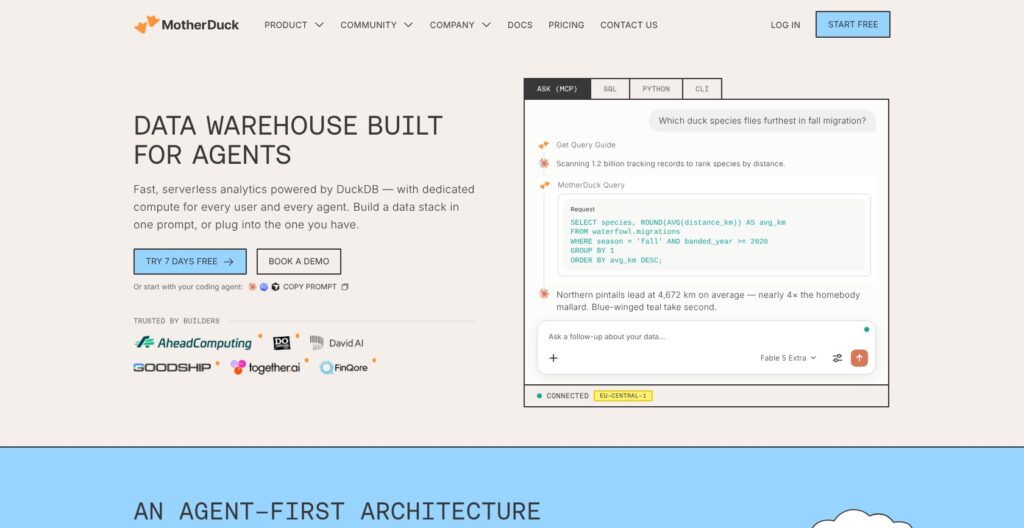
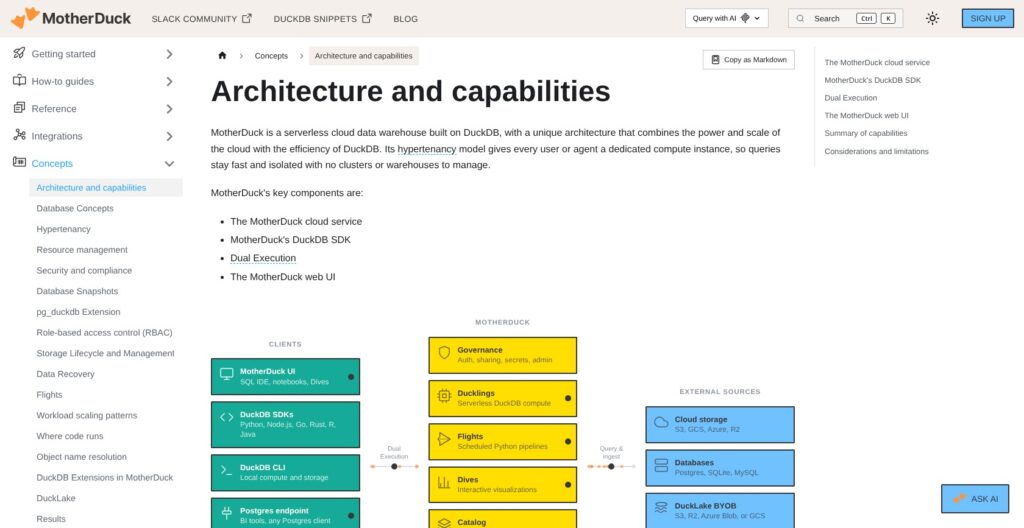
MotherDuck is managed cloud DuckDB, and its standout among serverless warehouses is Dual Execution: after ATTACH 'md:', one query plan spans my laptop files and cloud tables, while every user or agent gets its own Duckling.
In this MotherDuck review, I’ll take a closer look at MotherDuck’s pricing, its Duckling compute model, and its AI features, so you can see exactly whether it can replace a bigger warehouse.
Key Takeaways:
- Free Lite includes 10 GB of storage and 10 Pulse hours a month
- Business costs $250 per organization a month plus usage, with nothing included
- Ducklings bill per second (Pulse per query), but larger sizes bill a cooldown, 10 minutes by default on Giga
- AWS only, 6 regions, and the region is fixed at creation
- 2026 added an MCP server, Dives, Flights and a Postgres endpoint
MotherDuck Pros and Cons
Pros
- Free Lite plan with 10 GB storage and 10 Pulse compute hours a month, no card
- Every user, service account or agent gets its own Duckling, with about 100 ms startup
- Dual Execution joins a laptop file and a cloud table in one DuckDB query
- Per-second billing, and Pulse meters per query with a 1 CU-second minimum
- New DuckDB 1.5.x releases supported 1 to 14 days after launch in 2026
Cons
- Business costs $250 a month per organization before a single query or gigabyte
- Standard to Giga bill a cooldown after the last query, 10 minutes by default on Giga
- AWS only, and an organization’s region is fixed when it is created
- One writer per database, read replicas can lag a few minutes, and no Python UDFs or community extensions
How Much Does MotherDuck Cost?
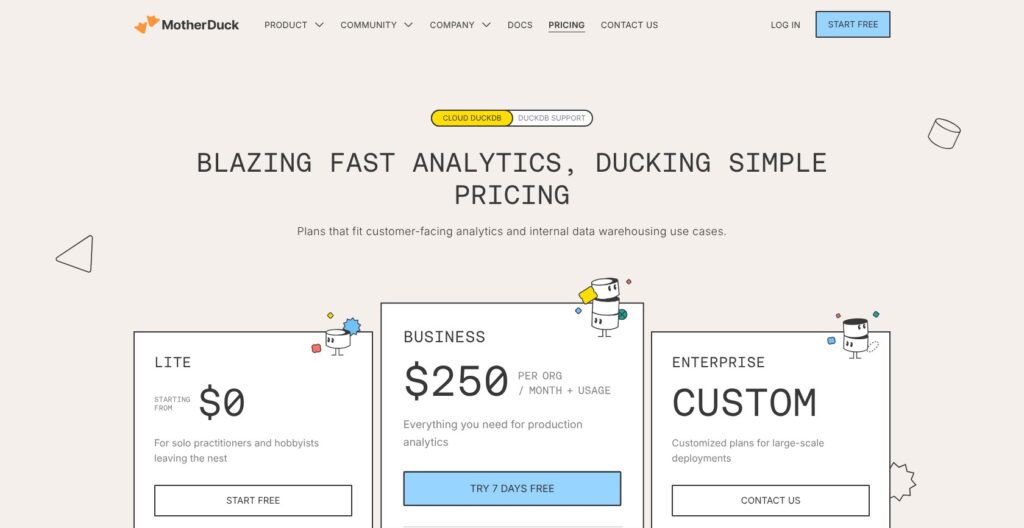
MotherDuck has three plans: Lite at $0, Business at $250 per organization per month plus usage, and Enterprise at a custom price.
- Lite ($0): for up to 3 users and 2 service accounts, with 10 GB of storage, 10 Pulse compute hours a month, Pulse Ducklings only, 1-day snapshot retention and community support
- Business ($250 a month + usage): for up to 10 users, with unlimited service accounts, all five Duckling sizes, read scaling, Flights up to F32, SSO and SCIM, table-level security, 90-day retention, a 99.9% SLA and a 7-day trial without a card
- Enterprise (custom): for unlimited users, with fixed-cost capacity pricing, AWS PrivateLink, IP allowlisting, a HIPAA BAA on request and purchase through an AWS Marketplace private offer
| Plan | Price | Users | Compute | Storage included | Retention |
|---|---|---|---|---|---|
| Lite | $0 | 3 users + 2 service accounts | Pulse only, 10 hours a month | 10 GB | 1 day (0 days without a card) |
| Business | $250/month + usage | 10 users + unlimited service accounts | All five Duckling sizes, billed on usage | None | 0 to 90 days (default 7) |
| Enterprise | Custom | Unlimited | Fixed-cost capacity pricing | Custom | Not listed |
What a Duckling Costs
The $250 Business fee buys access only, and every query and gigabyte bills on top at these rates:
| Duckling | US rate (us-east-1, us-west-2) | Billing | Default cooldown | Best for |
|---|---|---|---|---|
| Pulse | $0.60 per CU-hour | Per query, 1 CU-second minimum | 1 second, not configurable | Ad hoc queries and dashboards |
| Standard | $2.40/hour | Per second | 1 minute | dbt runs and data loading |
| Jumbo | $4.80/hour | Per second | 1 minute | Heavier joins and aggregations |
| Mega | $12.00/hour | Per second | 5 minutes | Large rebuilds |
| Giga | $24.00/hour | Per second | 10 minutes | Full rebuilds and restatements |
Storage costs $0.04 per GB per month in US regions, measured on compressed size, and the 7-day failsafe keeps deleted or overwritten data on the bill for a week. Europe runs about 22% higher (Pulse $0.73, Standard $2.93) and Asia Pacific about 28% higher (Pulse $0.77, Standard $3.10), with storage at $0.043 and $0.044 per GB.
Five 30-second queries on a Standard Duckling bill 210 seconds (150 seconds of queries, 100 ms of startup and a 60-second cooldown), about $0.14 at the US rate. A 5-minute Giga job bills 15 minutes, $6 instead of $2, unless I shorten the cooldown (minimum 1 minute) or end it with SHUTDOWN, which still bills the 1-minute minimum.
AI functions bill separately: FixIt is free, the SQL Assistant costs 1 AI Unit ($1) per 160 calls, and prompt() and embedding() bill on tokens.
Is MotherDuck Good Value for Money?
- BigQuery has no platform fee and gives 1 TiB of scanned data free each month, so a light Business-tier team pays $250 more on MotherDuck before usage
- Per-second Ducklings can undercut scan pricing for repeat dashboards, because BigQuery charges $6.25 per TiB every time a dashboard rescans the same table, while Pulse meters only the compute each query uses
- ClickHouse Cloud Basic bills usage only, at $0.2181 per compute-unit hour and $25.30 per TB of storage in AWS us-east-1, and scales compute to zero when idle
- The base fee has climbed: Business previously cost $100 a month and Lite $25, so the paid step is now bigger while the entry plan is free
Reviewer’s Notes: I’d stay on Lite for as long as 3 people and 10 GB cover the work, since overage bills at the normal Pulse and storage rates once a card is on file. Move to Business when you need a fourth user, SSO, or a Standard Duckling for dbt, and budget $250 plus the hours your Standard jobs run at $2.40 an hour, cooldowns included.
My Experience With MotherDuck
Signing Up and Picking a Region
Start Free on motherduck.com takes an email address, a Google account or a GitHub account, and the first real decision is the cloud region, which cannot be changed later. I could choose from six AWS regions: us-east-1, us-west-2, eu-central-1, eu-west-1, ap-northeast-1 and ap-southeast-2.
The new organization starts on a 7-day Business trial without a credit card and drops to Lite when the trial ends. A default my_db database and a sample_data database, including the nyc.taxi table, are attached from the first login.
If your team already has an organization, ask for an invite before signing up. A direct signup creates a separate organization, and shares scoped to your team’s organization stay invisible from it.
Querying in the Web UI
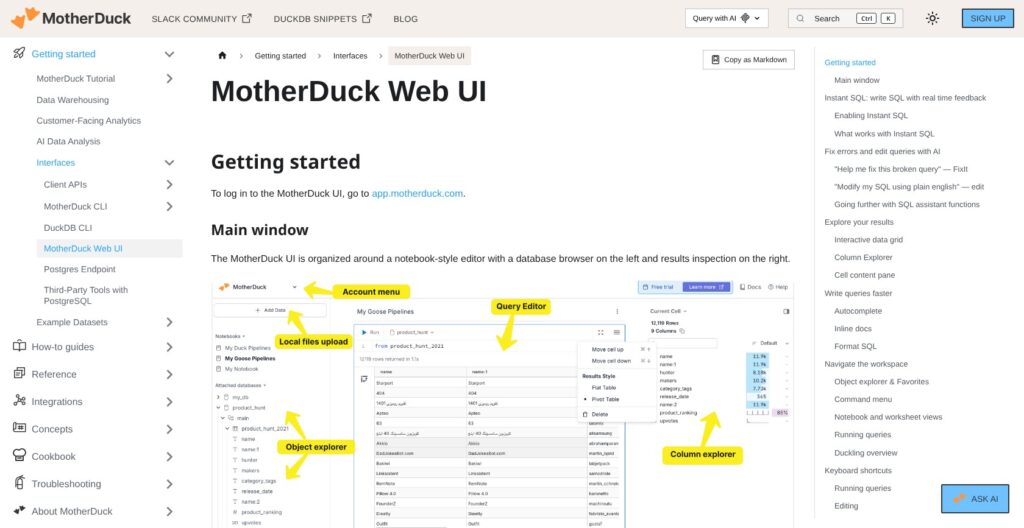
The web UI at app.motherduck.com opens a notebook-style editor with an object explorer, a Cmd+K command menu and an optional worksheet view. Instant SQL previews results as I type by running a local pass through Dual Execution while the cloud result loads, and Column Explorer (Cmd+I) shows NULL percentages, histograms and value frequencies for each column.
When a query fails, FixIt suggests an inline fix at no cost on every plan. One web UI gap: COPY FROM DATABASE with schema and data together is not supported, so I’d split it into separate SCHEMA and DATA steps or run it from the CLI.
Connecting My Local DuckDB
From the DuckDB CLI, duckdb "md:" with a token in motherduck_token connects to the cloud, and duckdb "md:" -ui opens the same web UI from the terminal. In Python, duckdb.connect('md:my_db') does the same. Clients from DuckDB 1.4.x to 1.5.6 connect, so an older pinned DuckDB has to be upgraded first.
Dual Execution handles a join between a local file and a cloud table without any extra setup:
sql
ATTACH 'md:';
SELECT c.region, sum(o.amount) AS revenue
FROM 'orders.parquet' o JOIN my_db.main.customers c ON o.customer_id = c.id
GROUP BY c.region;
Prefixing that query with EXPLAIN tags each operator (L) for local or (R) for remote, so the Parquet scan stays on the laptop and only what the plan needs travels.
Connecting also extends the local DuckDB instance cache to 15 minutes, which can leave a “File is already open” error on a local database file. Running CHECKPOINT or DETACH in code, or setting motherduck_dbinstance_inactivity_ttl to 0s, clears it.
Reviewer’s Notes: The region is the one setup decision I couldn’t undo. It sets my rates (Frankfurt pays about 22% more than Virginia for compute), and shares only work between organizations in the same region, so pick the region where your data and your data partners already live.
Ducklings, Hypertenancy and Read Scaling
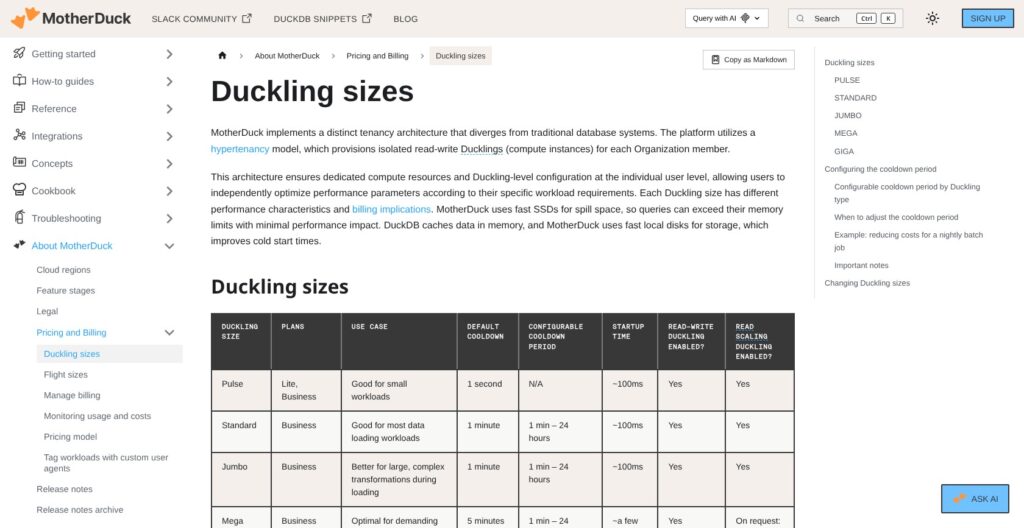
Every user, service account or AI agent in MotherDuck gets its own Duckling, a dedicated DuckDB instance kept on warm standby, so Pulse, Standard and Jumbo start in about 100 ms and Mega and Giga in a few seconds. MotherDuck calls this hypertenancy: with no shared cluster, one analyst’s heavy join doesn’t queue behind a colleague’s dashboard.
DuckDB already parallelizes one query across the whole instance, so I’d scale by picking a size per job:
- Pulse: ad hoc queries and dashboards, metered per query
- Standard: dbt models and data loading
- Jumbo: heavier joins and aggregations
- Mega and Giga: full rebuilds and restatements, where the 5- and 10-minute cooldowns are worth paying
Switching a size takes up to 2 minutes for Pulse to Jumbo, 5 for Mega and 10 for Giga. MotherDuck does not publish vCPU or memory for any Duckling, so I’d size from query history, where bytes_spilled_to_disk and wait_time show when a job needs the next size up.
Read Scaling for BI
Business and Enterprise add read-scaling replicas for BI tools: a default pool of 4, configurable up to 16 as a soft limit. Replicas are eventually consistent and can lag a few minutes behind the writer. CREATE SNAPSHOT followed by REFRESH DATABASES forces fresh data, but creating the snapshot interrupts in-flight queries on that database. For customer-facing analytics, a session_name parameter pins each end user to the same replica so its cache stays warm.
Where the Model Runs Out
MotherDuck allows one writer per database: all read-write connections from one account share a single Duckling, so concurrent writers have to be split across service accounts. Each query runs on one Duckling, while BigQuery spreads a scan across the slots you pay for. A connection_timeout parameter, added October 8, 2026 (for example md:my_db?connection_timeout=30s), caps how long a web server waits for a Duckling to start.
Best for: BI teams with many readers and a few scheduled writers. Skip if: you run many concurrent writers or routine multi-terabyte scans.
Sharing, Security and Data Recovery
MotherDuck shares are read-only zero-copy clones that add no storage cost, update automatically or manually, and only work between organizations in the same region. Table-level security, launched August 21, 2026 on Business and Enterprise, limits a share to named tables, views or schemas through INCLUDE_PATTERN. It selects whole tables only, with no row filtering, no column masking, no per-table GRANT and no support on DuckLake or Iceberg shares, so serving two audiences means maintaining two shares. An unrestricted share can be attached by anyone in the same region who has the link.
- Encryption: AES-256 at rest and TLS 1.2+ in transit
- Compliance: SOC 2 Type II, with full reports on request for Business customers, plus GDPR support
- Identity: SSO through SAML or OIDC (Okta, Entra ID) since February 2026 and SCIM since May 2026, both on Business and Enterprise
- Roles: preset Admin, Builder and Explorer roles, with custom roles on Business
- Enterprise only: HIPAA BAA on request, AWS PrivateLink and IP allowlisting
- Hosting: six AWS regions, with no GCP, Azure or on-premises option
Snapshots and Restore
Point-in-time restore arrived in February 2026: Business keeps automatic or named snapshots for 0 to 90 days (default 7), billed as historical bytes, and UNDROP DATABASE recovers a dropped database. Lite is fixed at 1 day. A database created while the organization was on free Lite keeps 0-day retention after a card is added, and zero-copy clones inherit it, so I’d recreate critical databases after moving to a paid plan.
AI and Agent Features: MCP Server, Dives and Flights
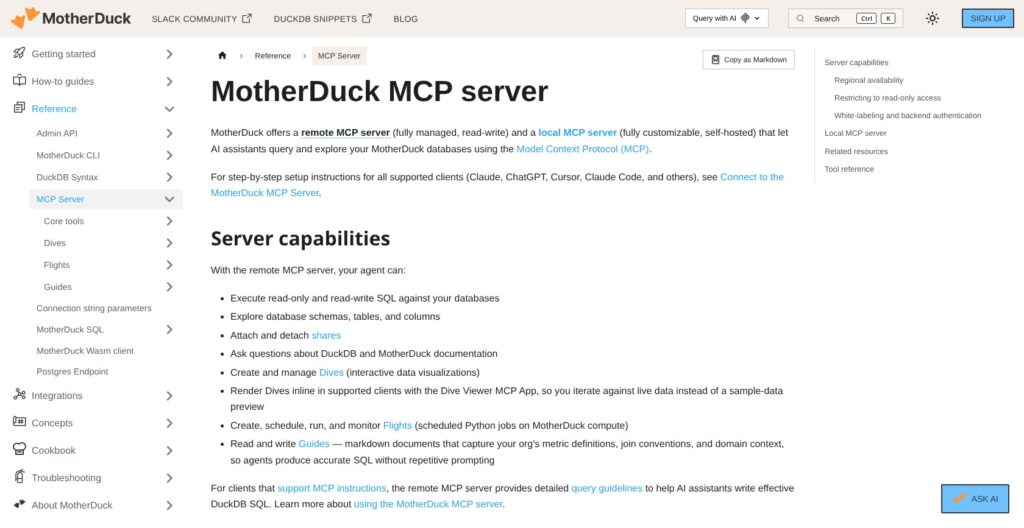
MotherDuck’s remote MCP server at api.motherduck.com/mcp lets Claude, ChatGPT or Cursor run SQL, explore schemas and attach shares, with OAuth for desktop clients and a bearer token for backends. Since February 27, 2026, the query_rw tool lets an agent write data, so I’d enforce read-only mode for any agent analysts use. Query results pass through the MCP server, so teams under strict data-residency rules should run their clients in the organization’s region.
🦆 Dives
Dives are interactive data apps built from a natural-language prompt, generally available since June 10, 2026 on all plans, Lite included. They render inside Claude, ChatGPT and the MotherDuck UI, carry statuses and version history, and gained Chat with Dives on October 8, 2026. Embedding a Dive in your own app needs Business and is still in Preview.
✈️ Flights
Flights run scheduled Python pipelines next to the data and reached general availability on September 3, 2026. Three sizes bill hourly at US rates: F4 (0.5 vCPU, 4 GB) at $0.15, F16 (2 vCPU, 16 GB) at $0.60 and F32 (4 vCPU, 32 GB) at $1.20, plus the Duckling rate for any SQL the Flight runs. Lite without a card gets 30 minutes a day, with a 1-hour cap per run. Flights are built on Tower, whose acquisition MotherDuck announced on August 25, 2026, and they cover light ingestion that would otherwise need dlt plus a scheduler.
SQL AI Functions
prompt(), embedding() and prompt_jev() call language models from SQL and bill on tokens in AI Units, with a default soft cap of 10 AI Units per Duckling session a day on Lite and Business. prompt() and embedding() on OpenAI models became 50 to 60% cheaper on October 1, 2026.
The MCP server is the piece I’d put in front of analysts today. Flights handle a nightly Python load but do not replace a full orchestrator like Dagster.
Integrations, the Postgres Endpoint and Lakehouse Formats
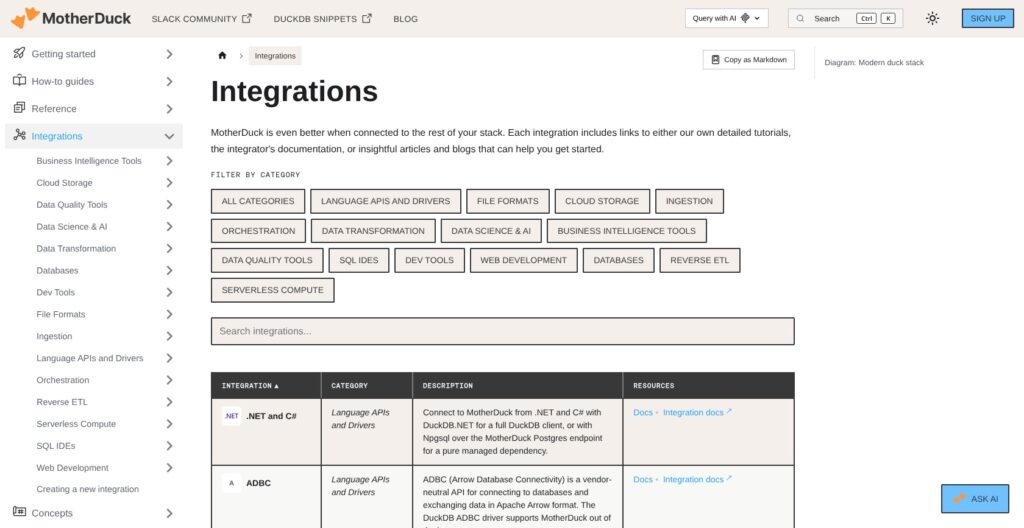
MotherDuck lists 40+ integration partners across the modern data stack:
- Ingestion: dlt, Fivetran, Airbyte (a certified destination since April 2026) and Artie for CDC
- Transformation: dbt and SQLMesh
- BI: Tableau, Power BI, Hex, Omni, Looker and Superset
- Orchestration: Airflow, Dagster and Prefect, plus an official Terraform provider since September 2026
- Clients: DuckDB for Python, Node.js, Go, Rust, R and JDBC
The Postgres endpoint, launched March 6, 2026, lets psql or any Postgres client connect at pg.<region>-aws.motherduck.com on port 5432, with user postgres, the MotherDuck token as the password and md: as the database. It speaks DuckDB SQL, not Postgres SQL: SET, temp tables, local-file COPY and extension management fail, and pooled long-lived connections work best. That covers Tableau Cloud, Power BI and Looker, which all gained support through the endpoint in 2026, but not an app that expects real Postgres.
For lake storage, MotherDuck runs managed DuckLake 1.0, with the catalog and storage hosted by MotherDuck or in your own bucket on S3, R2, Azure Blob or GCS. It also reads and writes Iceberg tables through REST catalogs, with server-side attach in Preview. Custom Python UDFs and community extensions remain unsupported, so a pipeline built on a niche DuckDB extension has to stay local.
How Does MotherDuck Compare to Competitors?
MotherDuck is the only warehouse here that runs the same engine on my laptop and in the cloud, and its $250 Business fee is the one flat charge in this table that buys no usage.
| Tool | Entry price | Billing unit | Wins for |
|---|---|---|---|
| MotherDuck | Lite $0; Business $250/month + usage (US rates) | Per second; Pulse per query | Small teams on single-node data, laptop plus cloud |
| DuckDB (self-run) | Free, MIT license | Your own hardware | One engineer, local analytics |
| BigQuery | $6.25 per TiB scanned, 1 TiB free a month; or $0.04 per slot-hour (Standard edition) | Bytes scanned or slot-hours | Spiky, scan-light workloads |
| Snowflake | Credits priced by edition, cloud and region | Per second after a 60-second minimum | Multi-terabyte data, many writers |
| ClickHouse Cloud | Basic $0.2181 per compute-unit hour + $25.30/TB storage (AWS us-east-1); $300 30-day trial | Per minute | Real-time event analytics |
| Databricks SQL | Serverless, 14-day trial | DBUs | Teams already on Spark |
- DuckDB (self-run): free under the MIT license, with no enterprise edition, and one engineer can run it on a laptop or a VM. You give up shared cloud storage, per-user compute, the hosted UI, sharing and managed backups, which is what MotherDuck’s $250 Business fee pays for. If one person queries Parquet files on one machine, plain DuckDB is the better buy.
- BigQuery: wins for spiky, scan-light workloads, since there is no base fee and the first 1 TiB scanned each month is free. On-demand cost scales with every byte scanned, though, and it runs on GCP only, which rules it out for teams standardized on AWS. MotherDuck is the cheaper pick once dashboards hit the same tables all day.
- Snowflake: wins for multi-terabyte data and many concurrent writers, with warehouses billed per second after a 60-second minimum on each resume. Its price per credit changes with edition, cloud and region, so there is no single public rate to compare against MotherDuck’s $2.40 Standard hour.
- ClickHouse Cloud: wins for real-time, high-ingest event analytics. Basic scales compute to zero when idle but caps at 1 TB of storage and 8 to 12 GiB of memory in a single availability zone, and the Scale tier rises to $0.2985 per unit-hour.
- Databricks: wins for teams already on Spark and a lakehouse, with serverless SQL warehouses billed in DBUs and a 14-day trial; for a small team without Spark, MotherDuck is far less to run.
MotherDuck’s own benchmark claims a Mega Duckling ran 43 queries in 5.9 seconds against 26.8 seconds for BigQuery serverless, a 4.5x gap; treat that as a vendor number until you run your own workload.
How I Reviewed MotherDuck
I worked through MotherDuck’s signup and region choice, the web UI with Instant SQL and Column Explorer, the DuckDB CLI and Python connections, Dual Execution across local and cloud data, database sharing and the MCP connection from Claude. I priced all three plans and the US Duckling rates, and worked the 210-second Standard billing example to see how cooldowns land on an invoice. I then set those rates against the billing models of BigQuery, ClickHouse Cloud, Snowflake and Databricks.
I weighed five areas: pricing and value, setup, the performance and concurrency model, governance and security, and the AI features, judging each against what a team of up to 10 analysts actually needs.
Prices current as of October 2026, US regions (us-east-1 and us-west-2).
Should You Run Your Analytics on MotherDuck?
MotherDuck turns DuckDB into a team warehouse with per-user Ducklings, per-second billing and an MCP server agents can use today. Its limits are structural: one writer per database, one Duckling per query, AWS only, whole-table sharing with no row filtering or column masking, and a $250 step from free to Business.
Recommended if: you already use DuckDB locally, have up to 10 analysts, keep data between gigabytes and low terabytes, and want isolated compute per user plus agent access. Start on Lite, then move to Business at $250 plus usage when you need SSO or Standard Ducklings for dbt.
Not recommended if: you need many concurrent writers, row filtering or column masking on shared data, GCP or Azure hosting, or petabyte scans. BigQuery or Snowflake fit those workloads better, and ClickHouse Cloud fits real-time event streams.
My next step for any team: create an organization in the region you will keep, then run your heaviest dbt model on a Standard Duckling during the 7-day Business trial to size the real monthly bill before it drops to Lite.
FAQ
Is MotherDuck free?
Yes. The Lite plan costs $0 with no credit card and includes up to 3 users, 2 service accounts, 10 GB of storage and 10 hours of Pulse compute a month. It runs Pulse Ducklings only, keeps 1 day of snapshots and comes with community support. Overage bills at the Pulse and storage rates once a card is on file.
How much does MotherDuck cost per month?
Business costs $250 per organization per month plus usage, with no compute or storage included. At US rates, Pulse costs $0.60 per CU-hour, Standard $2.40 an hour, Jumbo $4.80, Mega $12 and Giga $24, and storage costs $0.04 per GB a month. Europe and Asia Pacific regions charge about 22% and 28% more. Enterprise pricing is custom.
What is the difference between DuckDB and MotherDuck?
DuckDB is a free, MIT-licensed analytical database that runs inside your own process. MotherDuck runs DuckDB as a managed cloud service and adds cloud storage, per-user compute, sharing, a web UI, an MCP server and AI functions. It does not support custom Python UDFs or community extensions, and clients must run DuckDB 1.4.x to 1.5.6.
What is a Duckling in MotherDuck?
A Duckling is MotherDuck’s name for a dedicated DuckDB compute instance assigned to each user, service account or agent. There are five sizes: Pulse, billed per query, plus Standard, Jumbo, Mega and Giga, billed per second with a default cooldown of 1 to 10 minutes. Pulse to Jumbo start in about 100 ms. See Ducklings, Hypertenancy and Read Scaling above for sizing.
Which clouds and regions does MotherDuck support?
MotherDuck runs on AWS only, in six regions: us-east-1, us-west-2, eu-central-1, eu-west-1, ap-northeast-1 and ap-southeast-2. An organization picks one region at creation and cannot move it, and shares only work between organizations in the same region. There is no GCP, Azure or on-premises option.