
Editor’s note: This Dataddo review is based on my hands-on test of Dataddo’s 14-day trial, in October 2026. I weighed pricing, CRM activation, replication, transformations, data quality, AI access, and security.
Quick verdict: I recommend Dataddo for small and mid-size data and RevOps teams wanting ingestion and CRM activation without row-based billing. Data Anywhere starts at $99/month billed yearly for 3 flows; each flow has one destination, and SSO requires Enterprise.
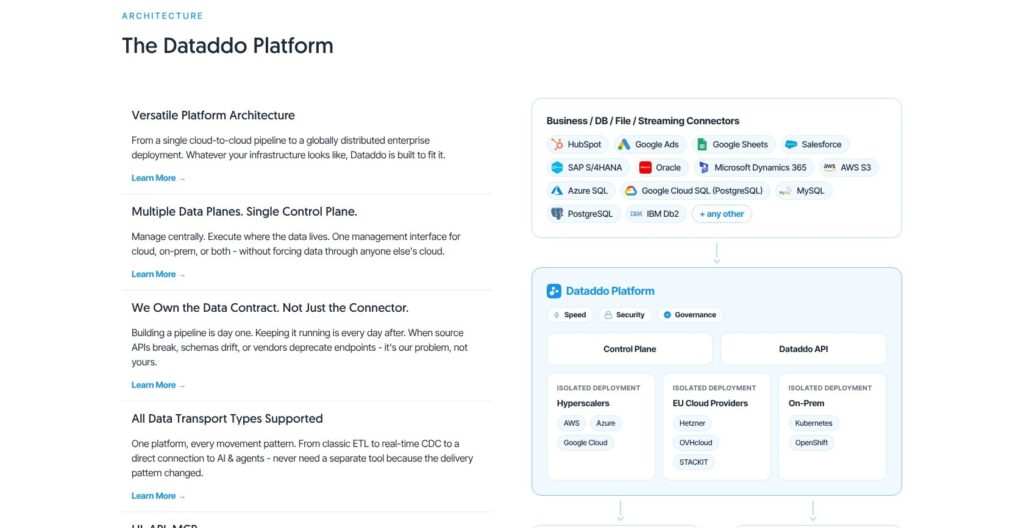
Dataddo combines 400+ managed connectors with ETL/ELT, log-based CDC, streaming, and reverse ETL. In this Dataddo review, I’ll take a closer look at its pricing, features, and HubSpot setup, so you can see exactly whether its flow-based billing fits your pipelines.
Key Takeaways
- Data Anywhere: 3, 15, or 30 flows cost $99, $299, or $449/month billed yearly; monthly billing costs $129, $389, or $599. The 14-day trial requires no card.
- Flow-based billing: Row volume and extraction frequency do not increase the subscription price; published tiers stop at 30 flows.
- Uneven CRM writes: HubSpot supports six write modes; Zoho CRM and NetSuite accept inserts only.
- Enterprise gates: SSO, REST API, on-premises deployment, and the connector-build SLA require a custom contract.
- Strict terms: No refunds under any circumstance; subscriptions automatically renew for the same term.
Pros and Cons
Pros
- Data Anywhere starts at $99/month billed yearly for 3 flows
- Price follows flow count, with no row caps on published tiers
- Reverse ETL, CDC and streaming included from the 3-flow tier
- Log-based CDC for MySQL, PostgreSQL, SQL Server, Oracle and MongoDB
- 400+ managed connectors, with new builds in about four weeks
Cons
- Each flow has one destination, so two CRMs cost two flows
- Published tiers stop at 30 flows; extra flows have no listed price
- SSO, REST API and on-prem need a custom Enterprise contract
- Zoho CRM and NetSuite destinations accept inserts only
- Terms allow no refunds and auto-renew for the same term
How Much Does Dataddo Cost?
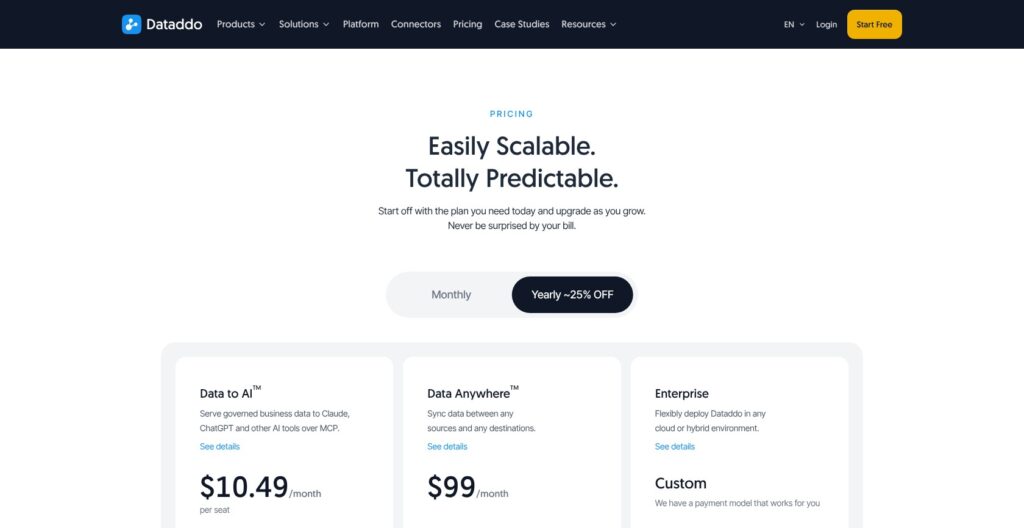
Dataddo sells Data Anywhere by flow, Data to AI by seat, and Enterprise through custom contracts. Self-serve plans start with a 14-day full-feature trial, unlimited flows, and no credit card; yearly billing saves about 23 to 25 percent.
- Data Anywhere, 3 flows: $99/month billed yearly or $129 monthly. My pick for a couple of ingestion pipelines and one CRM sync.
- Data Anywhere, 15 flows: $299/month billed yearly or $389 monthly. My recommendation for a small team combining warehouse ingestion and activation.
- Data Anywhere, 30 flows: $449/month billed yearly or $599 monthly. Flows beyond 30 are bought only through the account manager and have no published price.
- Data to AI: $10.49/seat/month billed annually or $13.99 monthly, with a 3-seat minimum. It provides read-only MCP access for Claude, ChatGPT, and other AI tools and launched in September 2026.
- Enterprise: Custom pricing adds on-premises Data Planes, BYOK, SSO, REST API, Headless/OEM, and an SLA on new connector builds.
A flow connects one or more sources to exactly one destination. Sending one warehouse table to Salesforce and HubSpot consumes 2 flows, even though the data is identical; row volume, extraction frequency, and source count do not increase the price.
| Data Anywhere feature | 3 flows | 15 flows | 30 flows | Enterprise |
|---|---|---|---|---|
| Price billed yearly, per month | $99 | $299 | $449 | Custom |
| Price billed monthly | $129 | $389 | $599 | Custom |
| Flows | 3 | 15 | 30 | Custom |
| Reverse ETL | Included | Included | Included | Included |
| CDC and streaming | Included | Included | Included | Included |
| MCP server | Included | Included | Included | Included |
| SSO | Not included | Not included | Not included | Included |
| REST API and Headless | Not included | Not included | Not included | Included |
| On-prem deployment | Not included | Not included | Not included | Included |
| SLA on new connector builds | Not included | Not included | Not included | Included |
Is Dataddo Good Value for Money?
- Predictable volume costs: I prefer Dataddo’s flow meter to Fivetran’s monthly active row billing for growing datasets with stable destinations. Fivetran’s free allowance covers 500,000 MAR for connections and 3,500 MAR for activations.
- Lower paid entry: Integrate.io Core costs $1,999/month and Polytomic starts at $500/month. Hightouch’s paid plans are quote-only.
- Fan-out costs: Each additional destination consumes another flow. Extra single flows require an account manager, and their price is not published.
- Trial, not a free-plan budget: Dataddo publishes no free-plan limits; I treat the trial as the free way in.
- Upgrades: Features apply immediately; the new price starts next billing cycle.
- Downgrades: Features disappear immediately; the lower price starts next cycle.
- Cancellation: Cancel in the app; access continues until the billing cycle ends.
- Refunds: The terms allow “no refunds, setoffs, or credits” under any circumstance.
- Renewal: The subscription renews for the same term unless notice is given within the last 30 days of the term.
Reviewer’s Notes: I recommend 15 flows billed monthly at $389 when pipeline count is uncertain, then yearly billing once the count stabilizes. The 3-flow tier fills quickly because each destination needs a separate flow.
My Experience With Dataddo
Starting the Trial
I started the trial without entering a credit card, and the 14-day period began automatically with full features and unlimited flows and sources. I organized the setup around Dataddo’s three building blocks:
- Source: The warehouse data prepared for extraction.
- Destination: The application receiving the records.
- Flow: The connection controlling the transfer between them.
I also checked Dataddo’s available roles before connecting HubSpot:
- Owner: Billing, account administration, and integration management.
- User: Integration objects and authorized services.
- Authorizer: Authorized services only.
Building a Warehouse Source
I created a source from a BigQuery table of modeled data, with one row per target record. In Advanced Settings, I added the Dataddo Hash to provide a ready-made unique identifier for upserts.
I checked the extraction settings separately from the destination write mode. Batch extraction can run as often as every 1 minute where the source API allows.
Dataddo retries failed extractions up to three times before marking the source broken. I set the snapshot policy to replace so each run sent the current state of the source table to the upsert flow.
Pushing Rows Into HubSpot
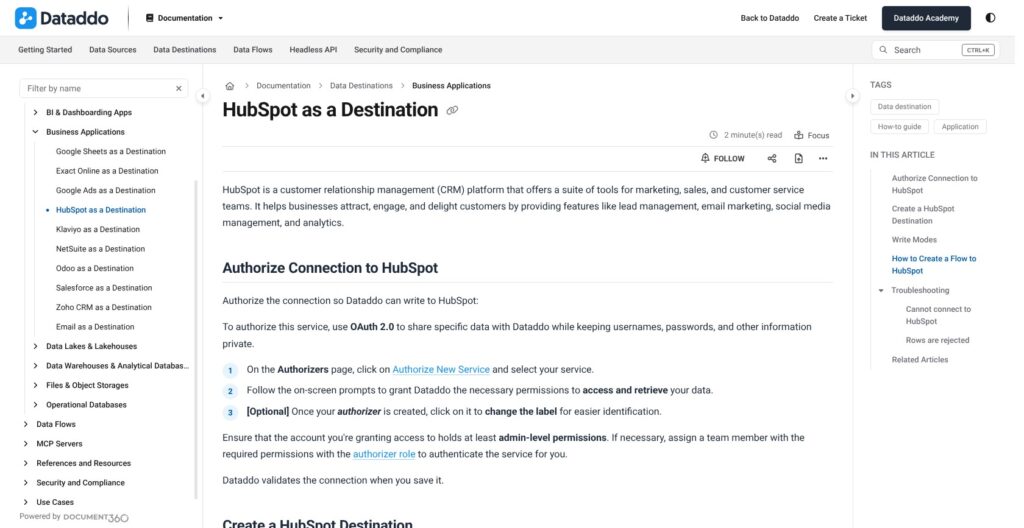
I authorized HubSpot through OAuth using an admin-level account, created the destination, and selected the object. HubSpot supports Contacts and Deals, with Companies added in August 2026.
- Added the BigQuery source and selected the HubSpot destination.
- Selected upsert and used the Dataddo Hash as the unique identifier.
- Checked column names against HubSpot property names.
- Set the schedule, checked the data preview, named the flow, and created it.
HubSpot offered six write modes, but I focused on upsert because the task involved creating or updating target records. Mapping is by name, and unmatched columns are ignored rather than automatically assigned to another property.
I also checked manual execution behavior: since September 2026, a manual run extracts fresh data before writing. It no longer simply resends the previous extraction.
Reviewer’s Notes: I recommend renaming warehouse columns to match HubSpot property names before building the flow. I also recommend null checks on the warehouse load, because the Data Quality Firewall does not protect HubSpot or other application destinations.
Reverse ETL and Data Activation
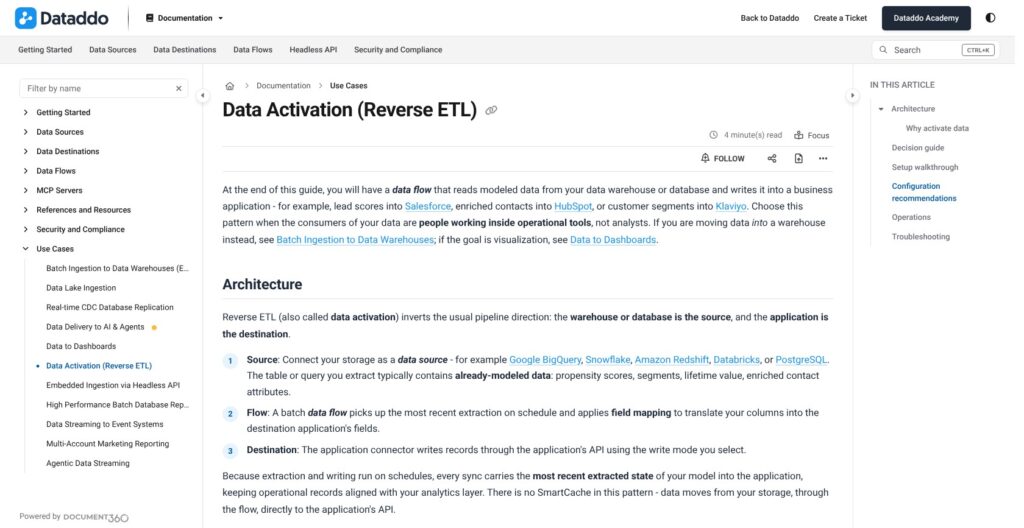
Dataddo reverse ETL uses a warehouse or database as the source and an application as the destination. A scheduled batch flow takes the latest extraction, applies field mapping, and writes through the application’s API using the selected mode.
I prioritize write modes over connector count: Zoho CRM and NetSuite appear in the catalog but cannot update existing customer records through these destinations.
| Destination | Write modes | Practical restriction |
|---|---|---|
| HubSpot | insert, insert_ignore, upsert, update, update_ignore, delete | Supports Contacts, Deals, and Companies |
| Salesforce | insert, upsert, update | No delete mode |
| Klaviyo | insert, upsert, update, update_ignore | No delete mode |
| Odoo | insert, update | No upsert mode |
| Google Ads | insert_ignore | Duplicate offline conversions are skipped, not updated |
| Zoho CRM | insert | Cannot update existing records through this destination |
| NetSuite | insert | Cannot update existing records through this destination |
Dataddo’s warehouse and database options include:
- Cloud warehouses: BigQuery, Snowflake, Amazon Redshift, and Databricks.
- Relational databases: PostgreSQL, MySQL, SQL Server, and Oracle.
- Additional destinations: Exact Online, Email, and Google Sheets.
For warehouse scores or segments going into HubSpot, Salesforce, or Klaviyo, I recommend upsert with a unique identifier. The Dataddo Hash used in my walkthrough provides a ready-made key, while field names still need to match the destination.
Hourly or daily is enough for most activation. Source APIs such as GA4 and Facebook Ads cannot be pulled every minute.
The Data Quality Firewall excludes application destinations. I recommend upstream validation for CRM writes and the Data Quality Watcher for alerts, rather than treating alerts as a transfer-blocking safeguard.
Hightouch is my alternative for up to 2 free active syncs, while Fivetran Activations, formerly Census, offers 200+ activation destinations on Standard. I favor Dataddo when the purchase combines ingestion with a few CRM syncs, rather than choosing it for activation catalog breadth alone.
Reviewer’s Notes: I recommend choosing flows around the exact object and write mode. Zoho CRM and NetSuite are insert-only, so neither fits a workflow whose central requirement is updating existing customer records.
Best for: I recommend Dataddo for warehouse-to-CRM activation alongside ingestion. Skip if: I recommend a different activation tool when the required destination lacks upsert or updates.
Connectors, Database Replication and CDC
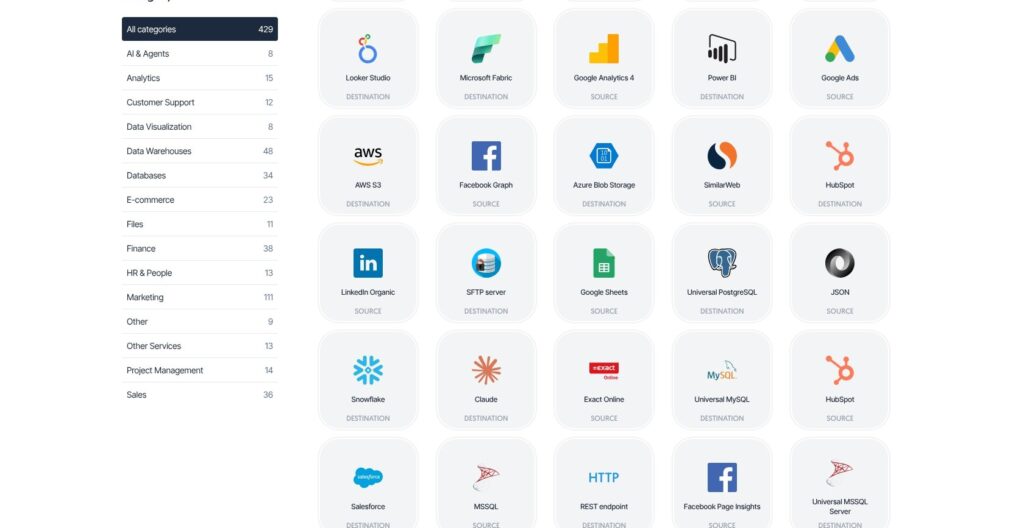
Dataddo has 400+ managed connectors, compared with Fivetran’s 700+. I treat that as catalog breadth, not 400+ reverse ETL destinations: connectors can support extraction, loading, or both.
Dataddo’s connector category counts include:
- Marketing: 111.
- Data warehouses: 48.
- Finance: 38.
- Sales: 36.
- Databases: 34.
- Ecommerce: 23.
Dataddo offers three connector types:
- Fixed-schema connectors.
- Custom-schema connectors.
- Universal connectors: JSON, XML, CSV, and HTTP webhooks, requiring a short transformation-pipeline script.
Missing connectors take about four weeks to build; a contractual build SLA requires Enterprise. I exclude unbuilt connectors from a launch plan without that commitment.
Schema drift handling is included in Data Anywhere, but destination schemas are not automatically altered. When the source schema changes, the source needs rebuilding and reconnecting to its flow; connectors moved to fixed schemas in February 2026.
Database Replication and CDC
I recommend log-based replication when deleted records must propagate. Dataddo offers four extraction methods:
- Table Replication by Timestamp: New and updated rows.
- Table Replication by Row Sequence: Inserts only.
- Log-based Replication: Inserts, updates, and deletes.
- Custom SQL Query: Query-defined extraction.
| Database | Log-based CDC mechanism |
|---|---|
| MySQL | binlog |
| PostgreSQL | WAL logical replication |
| SQL Server | CDC tables |
| Oracle | MLOG |
| MongoDB | oplog |
Each replicated table needs a primary key or unique column. The CDC Supervisor restarts stalled replication from its tracked log position, while CDC write mode materializes a mirror table on supported destinations, including BigQuery and SQL Server.
For multi-account reporting, Multi-Account Extraction supports up to 30 accounts in one source, enabled by Dataddo’s solutions team. Supported services include:
- Snapchat
- TikTok
- Xero
I recommend this option for consolidating account extraction, while still counting each separate destination as its own flow.
Transformations and Data Quality
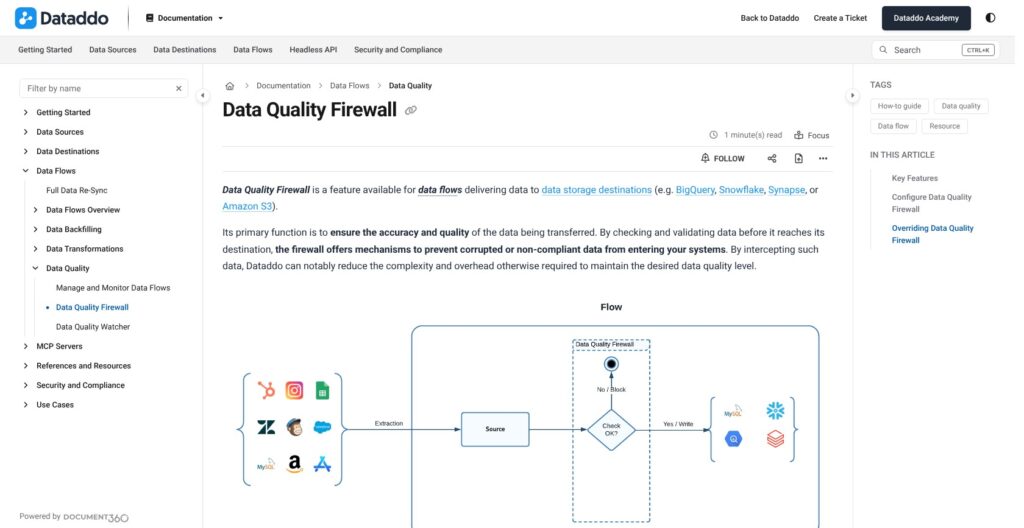
Dataddo handles transformations at three levels, but I recommend keeping substantial modeling in the warehouse rather than treating its SQL editor as the entire modeling layer.
- Extraction: Automatic flattening and harmonization, PII exclusion or hashing, and metadata inclusion.
- Flow: A SQL editor and data union; union requires identical schemas.
- Destination: Further transformation stays with the warehouse or BI tool.
The SQL Source Union editor arrived in April 2026 alongside sensitive-field hashing. Extraction snapshot policies support append as an alternative to replace.
The Data Quality Firewall protects storage destinations only, including warehouses, lakes, and databases:
- Column checks: Rules can check nulls, zeros, and anomalies.
- Blocking mode: A rule failure halts the transfer.
- Non-blocking mode: A rule failure is logged and triggers a notification.
- Manual inserts: Rules still apply unless “Skip flow rules validation” is selected.
I value blocking checks before warehouse loading, but they do not extend to the HubSpot flow described earlier. The Data Quality Watcher sends alerts without blocking CRM transfers.
Data to AI, MCP Servers and the Headless API
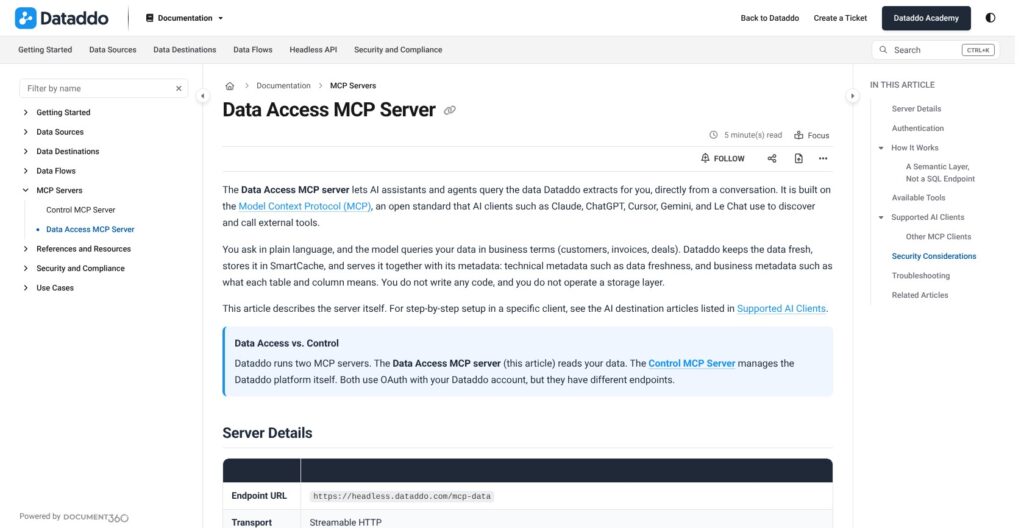
Dataddo’s two MCP servers are read-only, so I do not treat its AI layer as an agent that can change CRM records. Both use OAuth 2.1:
- Data Access: Queries a semantic layer over data attached to an AI destination; the model never sends SQL.
- Control: Searches connectors through
find_connectorsandget_connector.
Dataddo supports these MCP clients:
- Claude
- ChatGPT
- Cursor
- Gemini CLI
- Le Chat
- Copilot
- Grok
- Generic MCP clients
The first MCP server arrived in July 2026, followed by the Data Access endpoint in September. Data to AI costs $10.49 per seat/month billed annually, with a 3-seat minimum; MCP access is also included in Data Anywhere.
AI tools cannot edit campaigns, budgets, or CRM records through this access. I recommend excluding or hashing PII before exposure and keeping reverse ETL separate from AI queries.
The Headless API requires Enterprise, despite MCP being available in Data Anywhere. It exposes the platform over REST with a default quota of 10,000 calls per day across endpoints, plus an OpenAPI reference and Postman collection.
Headless/OEM pricing is individualized through integration units, rather than the self-serve flow tiers. I recommend requesting that quote separately for embedded integrations.
Dataddo also has an AI Assistant for execution logs, introduced in November 2025; that operational helper is distinct from Data Access queries.
Security and Deployment
Dataddo is SOC 2 Type II certified, with its report available under NDA. Encryption uses AES-256 at rest with keys in a cloud KMS, plus TLS in transit; MFA is available.
- Compliance: Dataddo states ISO 27001 and HIPAA compliance, alongside commitments covering GDPR, CCPA, LGPD, and POPIA.
- Data Anywhere controls: Role-based access control, SSH tunneling, immutable activity logs, and lineage are included.
- Roles: Owner controls administration and billing; User manages integrations; Authorizer manages authorized services.
- Sign-in and Enterprise SSO: Google and Microsoft are standard sign-in options. SSO through SAML 2.0 and OIDC requires Enterprise; Okta via SAML was added in September 2026.
- Enterprise deployment: Data Planes can run on-premises or in sovereign clouds, with BYOK.
- Residency: EU data residency and an EU-hosted control plane are available.
Enterprise deployment options include Kubernetes, OpenShift, and VMware Tanzu. I recommend budgeting for Enterprise when SSO is mandatory, even when only 3 flows are needed.
How Does Dataddo Compare to Competitors?
I recommend Dataddo’s flat per-flow pricing for small teams needing ELT, CDC, and a few CRM syncs in one plan.
- Hightouch: My first comparison for a small activation-only workload. Reverse ETL is free for up to 2 active syncs with unlimited destinations and seats; paid plans are quote-only. I favor that allowance when ingestion is outside the purchase.
- Fivetran: My pick for catalog breadth, with 700+ connectors. Its free plan includes 500,000 MAR for connections and 3,500 MAR for activations; Standard has 15-minute syncs and 200+ activation destinations. Census is now Fivetran Activations, billed by monthly active rows.
- Polytomic: My Enterprise price comparison when on-premises deployment and SSO are mandatory. Pricing starts at $500/month, and Enterprise adds both features. I favor Polytomic when its Enterprise quote beats Dataddo’s for the required on-premises deployment and SSO.
- Integrate.io: My shortlist choice for heavy-volume pipelines on a flat bill. Core costs $1,999/month with unlimited data volume and 60-second pipeline frequency. I favor Integrate.io when 60-second pipeline frequency is the deciding requirement and the $1,999/month price fits.
- Airbyte: My low-entry-price comparison. The self-hosted core is free, Cloud Standard starts at $20/month, and Plus starts at $189/month. I favor Airbyte over Dataddo when free self-hosted software is the priority.
- Hevo Data: My event-allowance comparison. Its free plan includes 1M events/month, while Starter begins at $299/month. I favor Hevo Data when the workload fits its 1M-event free allowance and avoiding a paid subscription takes priority.
- Supermetrics: My lower-entry-price shortlist option: Starter costs EUR 49/month or EUR 39/month billed yearly. I favor Supermetrics when the budget calls for its EUR 39/month yearly Starter price rather than Dataddo’s $99/month entry.
| Comparison | Dataddo | Hightouch | Fivetran | Polytomic | Integrate.io |
|---|---|---|---|---|---|
| Entry offer | $99/month billed yearly, 3 flows | Free for up to 2 active syncs | Free: 500,000 connection MAR and 3,500 activation MAR | From $500/month | Core $1,999/month |
| Key allowance or feature | One destination per flow; no row-volume price increase | Unlimited destinations and seats | 700+ connectors | Enterprise adds on-premises deployment | Unlimited data volume |
| Paid-plan distinction | SSO and REST API require Enterprise | Paid plans quote-only | Standard: 15-minute syncs and 200+ activation destinations | Enterprise adds SSO | Core: 60-second pipeline frequency |
How I Reviewed Dataddo
I used the 14-day trial to build a BigQuery warehouse source and run a reverse ETL flow into HubSpot. I also walked through the replication and Data Quality Firewall settings, keeping storage checks separate from application writes.
- Pricing: I weighed flow counting, extra capacity, and billing commitments.
- Activation: I checked destination objects, write modes, and unique identifiers.
- Ingestion: I considered connector coverage and CDC behavior.
- Quality: I assessed transformations and transfer-blocking checks.
- Access: I weighed AI, MCP, and Enterprise API restrictions.
- Security: I considered roles, deployment options, and contract terms.
I compared the published plans against Hightouch, Fivetran, Polytomic, Integrate.io, Airbyte, Hevo Data, and Supermetrics.
Prices current as of October 2026.
Should You Use Dataddo for Reverse ETL?
I recommend Data Anywhere with 15 flows for a small data or RevOps team combining warehouse pipelines and CRM activation on one predictable bill. Its $299/month yearly rate includes reverse ETL, CDC, and streaming without tying the price to row volume.
I prefer starting at $389 billed monthly when the destination count is unsettled. Count separate CRM destinations before choosing the tier, and match each connector to the required operation: insert-only NetSuite is not a substitute for an update workflow.
I recommend Hightouch for up to 2 free active syncs, or Fivetran Activations when its 200+ Standard destinations better match the workload. Skip Dataddo’s self-serve plans if the requirements include SSO, REST API access, more than 30 flows without a sales conversation, or refund flexibility.
Count flows, one per destination, then start Dataddo’s 14-day trial. Use the trial to test the exact CRM object, field names, and write mode; reserve yearly billing for a stable flow count and a compatible destination.
FAQs
How much does Dataddo cost?
Dataddo Data Anywhere costs $99, $299, or $449/month billed yearly for 3, 15, or 30 flows; monthly billing costs $129, $389, or $599. Data to AI costs $10.49 per seat/month annually or $13.99 monthly, with a 3-seat minimum. Enterprise is custom. I recommend counting destinations before selecting a tier.
Does Dataddo have a free plan?
Dataddo publishes no free-plan limits; the free entry is a 14-day trial with full features and unlimited flows, requiring no credit card. I recommend using that trial to test connector compatibility rather than budgeting around an ongoing free allowance. See How Much Does Dataddo Cost? for the paid options.
Does Dataddo support reverse ETL?
Yes, Dataddo includes reverse ETL in Data Anywhere, including the 3-flow tier. It moves warehouse or database data into applications such as HubSpot and Salesforce. I recommend choosing by destination-specific write modes: HubSpot supports six, while Zoho CRM and NetSuite support inserts only, not updates to existing records.
What counts as a flow in Dataddo?
A Dataddo flow connects one or more sources to exactly one destination. Sending the same warehouse table to Salesforce and HubSpot therefore uses 2 flows. I recommend budgeting by destination connections rather than table volume, because Data Anywhere pricing does not increase with row volume or extraction frequency.
Can I cancel Dataddo and get a refund?
Dataddo allows cancellation in the app, with access continuing until the billing cycle ends, but its terms provide no refunds, setoffs, or credits under any circumstance. Subscriptions automatically renew for the same term unless notice is given within the last 30 days of the term. I recommend setting a renewal reminder.