
Editor’s note: This Datacoves review is based on my hands-on test of the Datacoves SaaS plan’s 14-day trial, connected to a Snowflake account and a GitHub repository, in November 2026. I weighed pricing, setup, the workspace, Airflow and CI/CD, security, AI tooling and rivals.
Quick verdict: I recommend Datacoves for enterprise data teams that want dbt Core, Airflow and a governed VS Code workspace run for them, as SaaS or in their own cloud. The trade-offs are no published price, a setup call and no rollback on platform upgrades; dbt Cloud Starter has a published price of $100 per user a month.
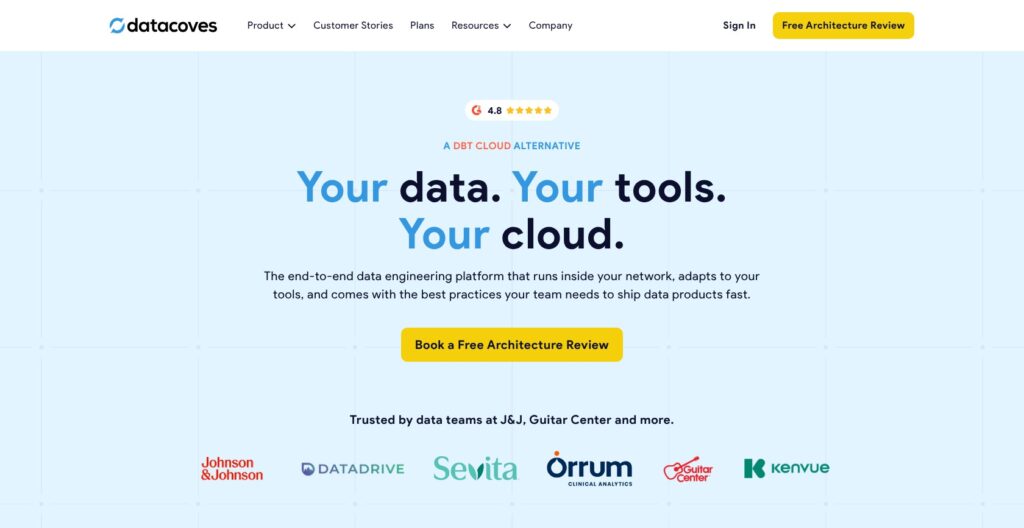
Among dbt ecosystem tools, Datacoves bundles Managed dbt, Managed Airflow with a My Airflow sandbox per developer, VS Code in the browser and CI/CD, plus optional Airbyte, DataHub, Grafana and Superset. My Datacoves review verdict: the bundle beats an IDE-only subscription when the team also runs Airflow.
In this review, I’ll take a closer look at Datacoves’ pricing, features, and Airflow workflow, so you can see exactly whether it fits your data team or whether a hosted dbt platform is the better buy.
Key Takeaways
- No caps: no cap on users (still billed per user), plus unlimited projects and environments. The bundle includes Managed dbt, Managed Airflow, VS Code in the browser and CI/CD templates.
- Private Deployment runs in my AWS, Azure or GCP account with no VPC peering, upgraded by Datacoves.
- No public price: SaaS bills users, instances and worker minutes, Private Deployment users and instances; the trial starts through Datacoves.
- No SOC 2 report is claimed for Datacoves itself, and platform and Airflow upgrades have no rollback.
- dbt v2 (Fusion) runs on request, not by default; projects can stay on dbt Core v1.12.
Pros and Cons
Pros
- Managed dbt, Managed Airflow and browser VS Code in one plan, with no user cap and unlimited projects.
- Private Deployment runs in my AWS, Azure or GCP account with no VPC peering, operated by Datacoves.
- A personal My Airflow instance per developer runs next to the shared Team Airflow.
- CI/CD blueprint with Slim CI (state:modified+) and Snowflake blue/green deploys via dbt-coves.
- Bring-your-own-key Copilot across 8 LLM provider types, plus GitHub, Airflow, Grafana and Snowflake MCP servers.
Cons
- No published price: SaaS bills users, tool instances and Airflow worker minutes, quote only.
- Account setup runs on a call with the Datacoves team, not self-serve.
- Infrastructure, Airflow and Python upgrades cannot be rolled back.
- No SOC 2 report or certification is claimed for Datacoves itself.
- My Airflow runs no parallel tasks and shuts down after 4 idle hours.
Datacoves Pricing: How Much Does It Cost?
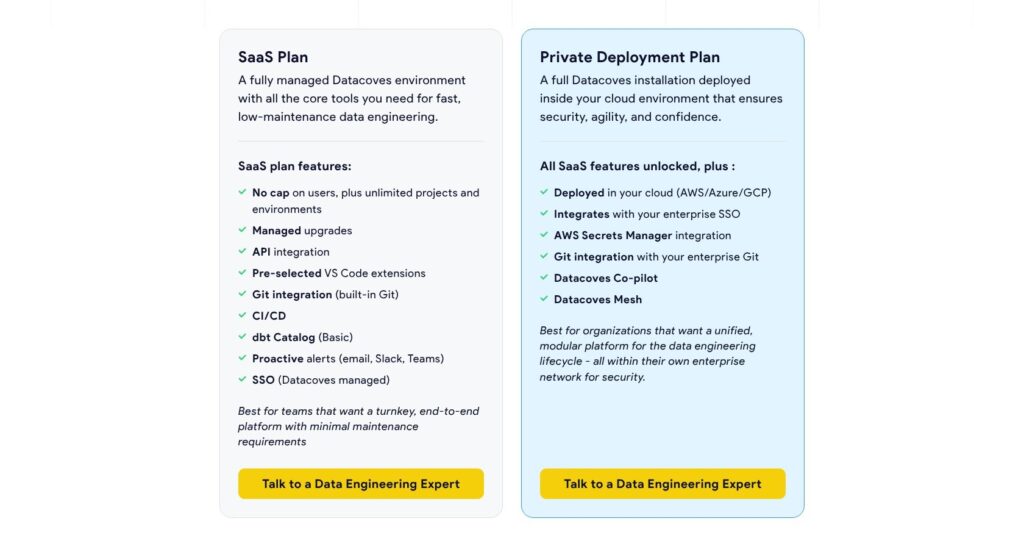
Datacoves publishes no price for either plan, and buying starts with “Book a Free Architecture Review”, a 15-minute call.
- SaaS Plan (quote): for teams that want a turnkey platform. It bills users, tool instances and Airflow worker minutes, and includes managed upgrades, built-in Git, CI/CD, dbt Catalog (Basic), email, Slack or Teams alerts and Datacoves-managed SSO.
- Private Deployment Plan (quote): for teams whose security rules keep the platform in their own network. It bills users and instances (the compute is mine, so no worker minutes) and adds deployment in my AWS, Azure or GCP account, enterprise SSO, AWS Secrets Manager, private Git server access and Datacoves Mesh; a setup charge may apply.
- Add-on services (quote): for implementation help: Change Management for onboarding, a Dedicated Resident Solution Architect, Datacoves Foundation (an MVP, typically about six weeks of build time) and White Glove Support.
My 14-day SaaS trial ran with only the components I picked; extensions come by request, and there is no permanent free tier. Mid-cycle user changes are prorated by active days, with invoices in Stripe.
| Plan | Price | What I pay for | Where it runs | Extras |
|---|---|---|---|---|
| SaaS Plan | Quote only | Users, tool instances, Airflow worker minutes | Datacoves-hosted clusters on AWS or Azure | Managed upgrades, Datacoves-managed SSO |
| Private Deployment Plan | Quote only | Users and instances; my cloud bills the compute | My AWS, Azure or GCP account | Enterprise SSO, Mesh, private Git, AWS Secrets Manager; setup charge possible |
| Add-on services | Quote only | Agreed implementation, training or support scope | Alongside either plan | Change Management, Resident Solution Architect, Foundation, White Glove Support |
| Free trial | Free for 14 days | Only the SaaS components I enable | Datacoves SaaS | Extensions by request |
Worker minutes follow pod running time: billing starts when the worker container reaches Running and covers the git-sync init container and bootstrap, so billed minutes land between Airflow’s task duration and queue-plus-run time. A Billing API reports daily minutes per service for up to 180 days per query; warehouse compute stays on my warehouse vendor’s bill.
Is Datacoves Good Value for Money?
- dbt Cloud Starter costs $100 per user a month: 5 developer seats, 15,000 models built a month and 1 project, plus a free Developer plan.
- Paradime Code IDE starts at $20 per user a month: Bolt scheduling adds from $180 per user a month.
- Astronomer Astro Developer deployments start at $0.35 an hour: for managed Airflow alone, with no dbt workspace.
- Prefect Cloud Team costs $100 per user a month: for Python orchestration, with no managed dbt.
Datacoves’ value depends on how much of the bundle (Airflow, CI/CD, secrets, private deployment) my team otherwise has to run. For a five-person team needing only a dbt IDE and a scheduler, dbt Cloud Starter is the better buy.
Reviewer’s Notes: Start the SaaS trial with one development environment and ask for the quote split into users, instances and estimated worker minutes for your DAG schedule. Choose Private Deployment only if security rules require it and you can provide managed Kubernetes and two PostgreSQL servers.
My Experience With Datacoves
Datacoves has no self-serve signup: my trial account was configured on a call with the Datacoves team.
Setting Up My Account on the Onboarding Call
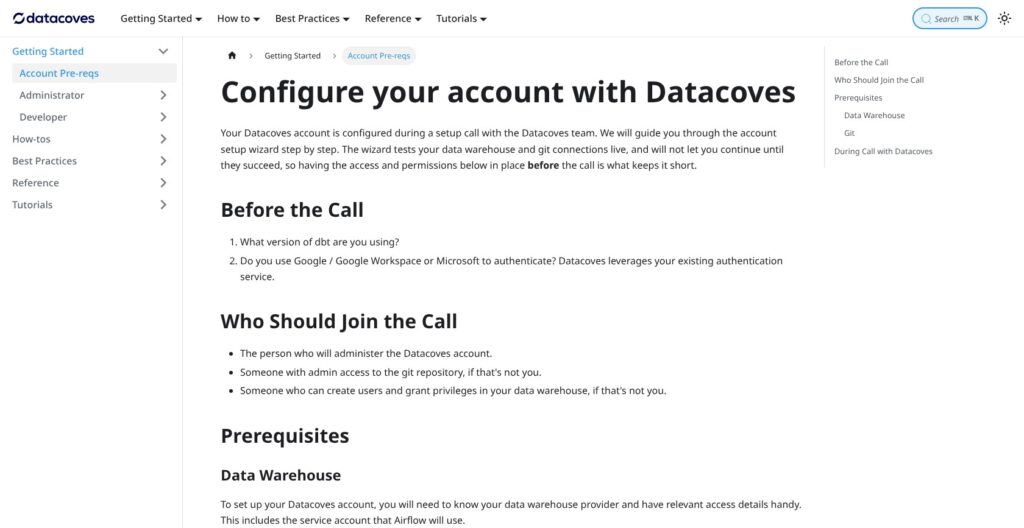
Before the call, I emailed my dbt version and whether I sign in with Google or Microsoft. A setup wizard live-tested the warehouse and Git connections and blocked the next step until both passed. For the Snowflake and GitHub setup, I brought:
- A repository admin: someone who can add a deploy key to the GitHub repository.
- A warehouse admin: someone who can create users and grant privileges in Snowflake.
- Snowflake details: Account, Warehouse, Database, Role, Schema, User and Password; the wizard takes only username and password for Snowflake.
- MFA and network access: MFA on my personal Snowflake user and the Datacoves IP address on the allow-list.
I entered the account in orgname-accountname format, not the snowflakecomputing.com URL. The wizard generated a Deploy Key, which I added under GitHub Repository Settings > Deploy keys, and a Developer Key for my own GitHub user. I also created a dbt-docs branch for hosted dbt docs.
The wizard’s other warehouses are Redshift, Databricks and BigQuery, and Datacoves markets any warehouse with a dbt adapter, DuckDB and MotherDuck included. Snowflake gets the most tooling: blue/green deploys, the Snowflake extension and a Snowflake MCP server.
Opening VS Code and Running My First Model
VS Code stayed disabled until I connected Git and Snowflake from my user settings:
- Under my user icon > Settings > Git SSH keys, I chose Add and auto-generated a key.
- I pasted the public key into GitHub, tested it, and “Tested” appeared next to the repository URL.
- Under Database Connection > Add, I named the connection
dev(my dbt target) and picked the admin’s connection template. - I filled in my Snowflake details, Datacoves tested the connection, and I saved it.
- On the Launchpad, I clicked Open next to my development environment, and Datacoves applied my settings and cloned the repository.
In the Transform tab terminal, I ran:
dbt debug
dbt-coves generate sources
dbt-coves generate sources writes source definitions and staging models, and I then ran a staging model with the run icon and previewed its CTEs with Cmd+Enter.
The workspace came with:
- Terminal and Python virtual environment: with Git aliases such as
git br,git coandgit st. - SQLFluff and Datacoves Power User: SQL linting, plus runs of individual or all dbt tests.
- Lineage View: single-click opens the SQL, double-click the YML, right-click runs dbt actions.
- Query previews: capped at 500 lines by default.
Datacoves allows any VS Code extension, so I ran dbt Core in VS Code with a full terminal rather than a hosted IDE like dbt Cloud’s. Extra Python libraries for Airflow DAGs, such as Pandas, must be pre-configured with Datacoves beforehand; the onboarding call asks which Python libraries are needed in Airflow or VS Code.
Building a DAG in My Airflow
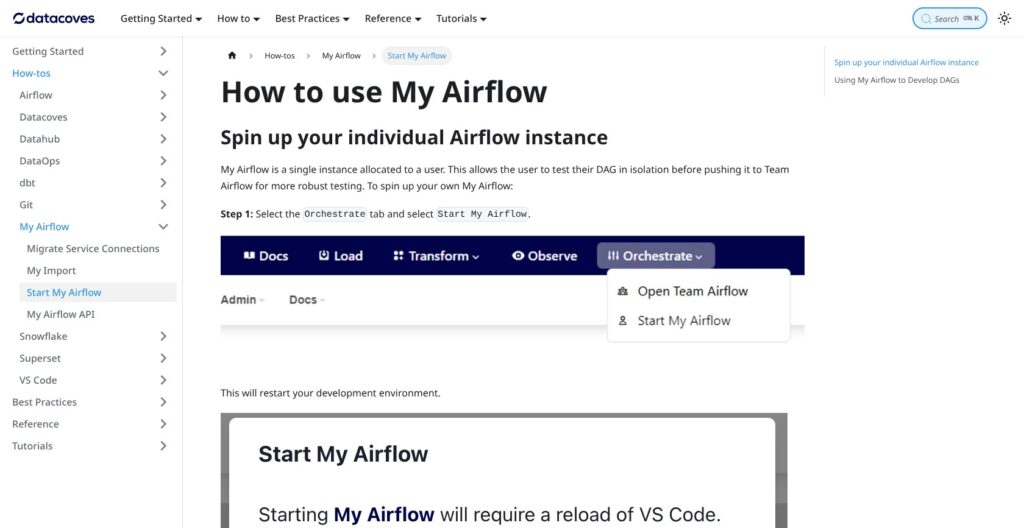
My Airflow needs both the Developer and Sys Admin groups for the environment, so I added my user to both first. From the Orchestrate tab I selected “Start My Airflow”, then “Open My Airflow”, which carries a light-blue Airflow banner.
Connections and variables do not carry over from Team Airflow, so I ran datacoves my import, which copies variables and dbt-adapter connections, and typed the secret values at the prompt.
I wrote the DAG on a feature branch, which My Airflow tracked. Because My Airflow runs no parallel tasks and shuts down after 4 hours of inactivity, I merged into airflow_development for a full run in Team Airflow, which syncs that branch every minute. New DAGs arrive paused, so I triggered mine manually.
Reviewer’s Notes: Before the first developer opens My Airflow, add them to both the Developer and Sys Admin groups and walk them through the manual secret import.
Managed Airflow, DAG Generation and CI/CD
New Datacoves environments run Airflow 3 (older ones may still be on Airflow 2), and Airflow pulls DAGs from the configured Git branch every minute. Git Sync is the default, and S3 Sync is the alternative when CI copies the project into a bucket.
Running dbt From Airflow
The @task.datacoves_dbt(connection_id="main") decorator copies the repository to a temp folder, activates the dbt virtualenv, runs dbt deps when packages are missing and builds a temporary dbt profile from the service connection, so my task carried no connection or virtualenv code:
@task.datacoves_dbt(connection_id="main")
def run_orders():
    return "dbt run --select stg_orders"
Astronomer offers the open-source Cosmos package for running dbt in Airflow, but no dbt workspace to write the models in.
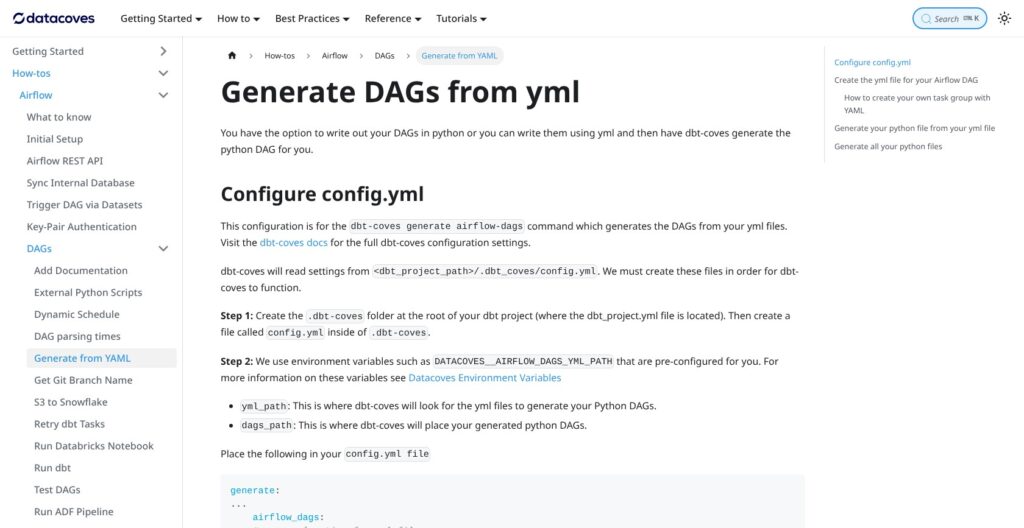
For YAML, I added a definition file to orchestrate/dags_yml_definitions and chose Generate Airflow Dag for YML from the More menu in the status bar. dbt-coves generate airflow-dags does the same from the terminal, and both write Python DAGs to orchestrate/dags.
Retrying only failed dbt models needs Datacoves 3.4 or later plus the dbt API feature, which Datacoves support switches on.
Loads, Secrets and the CI/CD Blueprint
Managed Airbyte is part of the bundle, and Datacoves recommends setting each Airbyte connection to manual frequency so Airflow, not Airbyte’s scheduler, triggers syncs. dbt-coves generates Airbyte and Fivetran sync tasks, though Fivetran connections need manual configuration. Airflow tasks also trigger Azure Data Factory pipelines, Databricks notebooks and S3-to-Snowflake loads.
The Datacoves Secrets Manager reads only keys prefixed datacoves-, and “Share with stack services” must be on for Airflow to read them. AWS Secrets Manager and Azure Key Vault also work as backends, with lookups running AWS, then Datacoves, then Airflow environment variables.
The public balboa sample repository runs the CI/CD blueprint on GitHub Actions:
- Per-PR isolation: a new database for each pull request, plus the production manifest.
- Slim CI:
dbt build --defer --statewithstate:modified+, so only changed models and their dependents build. - Validation gates: SQLFluff, dbt-checkpoint and Airflow checks.
- Production deploy:
dbt-coves blue-greenfor Snowflake on merge, then docs generation and artifact upload.
dbt-coves is Apache-2.0 licensed, with v1.12.2 released in September 2026. This layer saves an Airflow-on-Kubernetes build and is the strongest reason to buy Datacoves over hosted dbt.
Environments, Security and Private Deployment
Private Deployment installs into my existing AWS, Azure or GCP account with no VPC peering, and Datacoves’ team installs, upgrades and troubleshoots it inside my firewall.
Projects, Environments and Roles
Each project maps to one Git repository, and each environment is typed development, test or prod. Every environment enables at least one stack service:
| Stack service | Component |
|---|---|
| LOAD | Airbyte |
| TRANSFORM | dbt and VS Code |
| OBSERVE | Hosted dbt docs |
| ORCHESTRATE | Airflow |
| ANALYZE | Superset |
Each new project and environment creates Admin, Developer, Sys Admin and Viewer groups, which can map to Active Directory groups. SaaS uses Datacoves-managed SSO with Google or Microsoft accounts; Private Deployment integrates with enterprise SSO.
What Private Deployment Needs
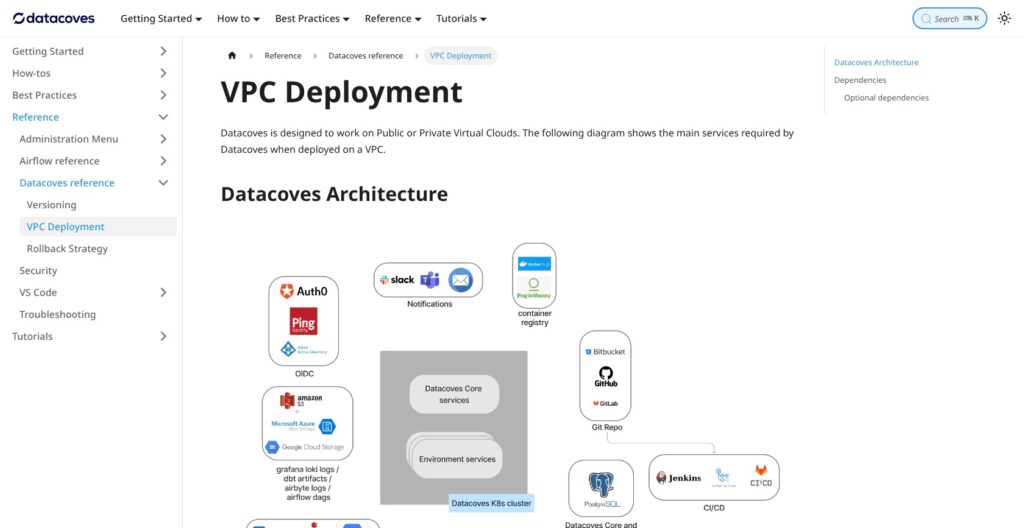
- PostgreSQL above version 14: two servers (core services from 2 vCPU and 16 GB, stack services from 4 vCPU and 32 GB), or one for smaller installs.
- Managed Kubernetes above v1.34: clusters of at least 4 servers.
- Storage buckets: for dbt artifacts, Grafana logs and each Airflow and Airbyte instance.
- Git and CI: a Git server above v2.33 or GitHub/GitLab, plus a CI/CD server.
- HTTPS and DNS: two certificates and their DNS entries.
Astronomer’s Astro Private Cloud runs only Airflow in my environment, and dbt Cloud runs dbt there only through Enterprise+ Hybrid Projects.
Upgrades, SLA and Compliance
Datacoves runs upgrades while I coordinate timing and roll dbt versions out per environment, and a custom image lets me run ahead of the shipped dbt version. Infrastructure, Airflow and Python upgrades cannot be rolled back, and dbt package reverts are possible but discouraged, so testing each upgrade before production is the only safety net.
Datacoves commits to 99.9% monthly availability for the services it runs, with credits of 1% to 5% of monthly fees:
- Severity 1: initial response within 24 hours at most.
- Severity 3: within 3 business days.
- Channels: a customer Slack channel or email.
- Monitoring: 24/7, with a public status page.
SaaS clusters run in AWS and Azure, with AES-128 encryption at rest. Browser query results pass through Datacoves without being stored or cached, though code that logs data writes it into job logs.
No SOC 2 report or certification is claimed for Datacoves itself; a private deployment runs under my own controls, which helps only if my security team accepts that in place of a vendor report.
AI Tools, dbt Docs and the dbt v2 Question
Datacoves Copilot (Datacoves v4 and later) runs on my own LLM account, so the model bill comes from my provider, not Datacoves.
Copilot and MCP Servers
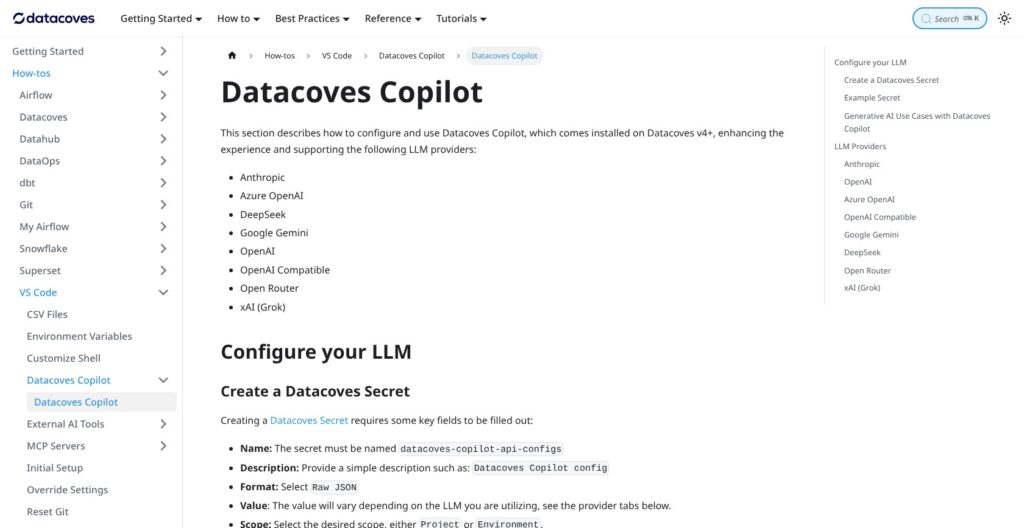
Copilot supports eight provider types:
- Anthropic
- Azure OpenAI
- DeepSeek
- Google Gemini
- OpenAI
- OpenAI-compatible endpoints
- OpenRouter
- xAI
I stored the provider settings in a Datacoves secret named datacoves-copilot-api-configs, then switched on AI extensions, AI CLI tools and MCP servers for my environment under Admin > Environments > AI Tools. GitHub Copilot and OpenAI Codex also run in the workspace, Snowflake Cortex CLI is always on in Snowflake environments, and Datacoves support enables Claude Code on request.
| MCP server | Access and prerequisites |
|---|---|
| GitHub | Repos, PRs, issues and CI checks; personal access token |
| Airflow | DAGs, runs and task logs; read-only |
| Grafana | Metrics and logs; observability stack enabled |
| Snowflake | Read-only SQL; RSA key-pair auth and a DATACOVES MCP server object in Snowflake |
For the Snowflake MCP server, I switched my dev connection to an RSA key pair, because the default auto-generated elliptic-curve key does not work with it.
dbt Docs, Catalog and dbt v2
I pointed OBSERVE at the dbt-docs branch from setup, and it serves production dbt docs to Viewers and Developers of the production environment. Both plans include dbt Catalog (Basic), which is not dbt Cloud’s Catalog, and no semantic layer, whereas dbt Cloud offers both the Semantic Layer and Catalog. Tributary Docs, Datacoves’ standalone column-level lineage explorer, is a separate product.
dbt v2 (the Fusion engine), released September 14, 2026, and the official dbt VS Code extension run on request, not by default, and projects can stay on dbt Core v1.12. dbt Labs completed its merger with Fivetran on June 1, 2026, and its premium features still bill through dbt Labs, such as dbt State at $0.094 per daily active target table.
Atlas, a separate Datacoves product announced September 14, 2026, serves versioned business definitions to AI tools over MCP; it is in a design-partner stage with no published price, and I did not test Atlas.
How Does Datacoves Compare to Competitors?
Each Datacoves alternative below wins a narrower job than the dbt-plus-Airflow bundle, and every one publishes a price or is free.
- dbt Cloud: Developer is free (1 seat, 3,000 models built a month), and Starter costs $100 per user a month with 5 developer seats and 15,000 models built a month in 1 project. It adds the Semantic Layer and Catalog, and wins for teams that want hosted dbt with a published price.
- Paradime: Code IDE starts at $20 per user a month with DinoAI credits, and Bolt scheduling starts at $180 per user a month. It wins for an AI-assisted dbt IDE priced per product.
- Astronomer: Astro Developer deployments start at $0.35 an hour and Team at $0.42 an hour, and Astro Private Cloud runs in my environment. It wins for Airflow-first teams that do not need a dbt workspace.
- Dagster: Dagster+ Solo costs $10 a month for 1 user, and Starter $100 a month for up to 3 users and 5 code locations. It wins for asset-based orchestration, and Prefect announced in July 2026 that it is acquiring Dagster.
- Prefect: Hobby is free, Starter costs $100 a month and Team $100 per user a month. It wins for general Python workflows with no dbt workspace attached.
- Coalesce: Developer is free for 1 user and 2,000 actions a month, and Starter costs $150 per user a month billed annually. It wins where engineers prefer a visual builder to code-first dbt.
- Self-hosted dbt Core plus Apache Airflow: no license fee, but I run Kubernetes, environments, secrets, CI and upgrades myself on the same open-source tools Datacoves manages.
- SQLMesh: open source under the Linux Foundation since Fivetran donated it in March 2026, and Datacoves says SQLMesh can run on its platform.
Datacoves wins where dbt, Airflow and the developer workspace must run as one governed stack inside my own cloud.
How I Reviewed Datacoves
I set up a Datacoves SaaS trial account with a Snowflake connection and a GitHub repository, opened the VS Code workspace, ran dbt models and generated sources with dbt-coves. I built a DAG in My Airflow and promoted it to Team Airflow, walked through environments, groups, secrets and the CI/CD blueprint, reviewed the Private Deployment requirements and the SLA, and priced Datacoves against six rivals.
I weighted seven areas:
- Pricing and value: billing units, trial terms and rival prices.
- Onboarding and setup: the setup call, Git keys and Snowflake access.
- Developer workspace: dbt commands, extensions, Lineage View and previews.
- Orchestration and CI/CD: My Airflow, Team Airflow and the blueprint.
- Security and deployment: private-deployment requirements, roles, rollback limits and the SLA.
- AI tooling: bring-your-own-key Copilot, MCP servers and dbt v2 access.
- Alternatives: dbt Cloud, Paradime, Astronomer, Dagster, Prefect and Coalesce.
Prices current as of November 2026.
Should You Use Datacoves for dbt and Airflow?
Yes, if your team runs dbt Core and needs Airflow, wants a governed VS Code workspace per developer, and either wants the platform hosted or must keep it inside its own AWS, Azure or GCP account. That is where one Datacoves subscription replaces a self-built Airflow-on-Kubernetes stack plus a dbt IDE.
Skip it if you only need a dbt IDE and a scheduler: dbt Cloud Starter costs $100 per user a month, and Paradime pairs a Code IDE from $20 with Bolt scheduling from $180 per user a month, both at published prices. Skip it too if you need a hosted semantic layer or a SOC 2 report from the platform vendor.
Settle these before signing:
- The quote: users, tool instances and estimated SaaS worker minutes as separate lines, with warehouse costs kept apart.
- Copilot: which plan includes Datacoves Copilot for your deployment.
- Upgrades: the pre-production test schedule, since there is no rollback.
- Infrastructure: for Private Deployment, who on your side provides the Kubernetes, PostgreSQL, buckets and certificates Datacoves installs into.
Start the 14-day SaaS trial or book the architecture call at Datacoves, and bring a representative DAG schedule so the worker-minute estimate reflects real usage.
FAQ
How much does Datacoves cost?
Datacoves publishes no price; both plans are quote only. The SaaS Plan bills users, tool instances and Airflow worker minutes, while the Private Deployment Plan bills users and instances because the compute runs in your cloud. Both plans have no user cap. The 14-day SaaS free trial can be extended by request, and there is no permanent free tier.
Is Datacoves a dbt Cloud alternative?
Yes, for dbt Core teams. Datacoves runs the same dbt engine plus Managed Airflow, VS Code in the browser and an optional private deployment in your own cloud. dbt Cloud adds the Semantic Layer and Catalog and publishes a Starter price of $100 per user a month, so it fits teams that need hosted dbt without managed Airflow.
Can Datacoves run in my own cloud?
Yes. Private Deployment installs into your AWS, Azure or GCP account with no VPC peering, and Datacoves operates it inside your firewall. Your account provides managed Kubernetes above v1.34, two PostgreSQL servers (one for smaller installs), storage buckets, a Git server or GitHub/GitLab with CI, two HTTPS certificates and DNS entries. See Environments, Security and Private Deployment above for sizing.
Is Datacoves SOC 2 certified?
No SOC 2 report or certification is claimed for Datacoves itself. A private deployment keeps the platform under your own security controls, which is different from the vendor holding its own report. Datacoves does commit to a 99.9% monthly availability SLA for the services it runs, with credits of 1% to 5% of monthly fees.
Does Datacoves support dbt Fusion?
Yes, on request. dbt v2 (the Fusion engine) and the official dbt VS Code extension run in a Datacoves workspace when you ask for them, not by default, and projects can stay on dbt Core v1.12. Premium dbt features such as dbt State, at $0.094 per daily active target table, still bill through dbt Labs.