Editor’s note: This Azure Event Hubs review evaluates the pricing model, the tier quotas, the Kafka compatibility surface and the setup path as Microsoft sells it in October 2026. It is not a hands-on performance test.
Quick verdict: I recommend Azure Event Hubs for Azure teams that need managed, Kafka-compatible ingestion at Standard-tier prices: about $21.90 per throughput unit per month in US East, plus $0.028 per million events. The catch: Standard fixes 32 partitions at creation, retention at 7 days and consumer groups at 20, and Premium costs about $750 per processing unit per month with no automated migration.
Among streaming platforms, Azure Event Hubs is the cheapest managed Kafka-protocol stream I’d put on Azure: a Kafka producer connects by switching bootstrap.servers to the namespace on port 9093, with no brokers to run.
In this review, I’ll take a closer look at Azure Event Hubs’ pricing, tier quotas, Kafka compatibility and Capture, so you can see whether it beats Confluent, Redpanda or self-managed Kafka.
Key Takeaways
- Standard throughput unit: $0.03 per hour (about $21.90 per month) for 1 MB/s in and 2 MB/s out
- Kafka endpoint on Standard and above, Kafka 1.0 and later, config change only
- Capture on Standard costs $0.10 per hour, over three times the TU itself, and scales with TU count
- Partition count is permanent on Basic and Standard, Auto-inflate never scales down, and tier migration is manual
- Premium at about $749.71 per PU per month includes Capture, ingress, 90-day retention and geo-replication, plus still-preview Kafka Streams and transactions
Azure Event Hubs Pros and Cons
Pros
- Standard TU at $0.03 per hour (about $21.90 per month), billed hourly and easy to forecast
- Kafka clients connect with a config change on port 9093, no brokers to run
- Capture writes Avro to Blob Storage or Data Lake Storage without using egress quota
- Premium includes Capture and ingress, 90-day retention and 100 partitions per hub
- Geo-replication with a synchronous RPO 0 mode on Premium and Dedicated
Cons
- Standard Capture costs $0.10 per hour per TU, more than the TU itself
- Partition count is fixed at creation on Basic and Standard
- Auto-inflate scales TUs up and never back down
- Kafka Streams and transactions are still public preview, Premium and Dedicated only
- No automated migration from Standard to Premium, and Dedicated starts near $5,000 per CU per month
How Much Does Azure Event Hubs Cost?
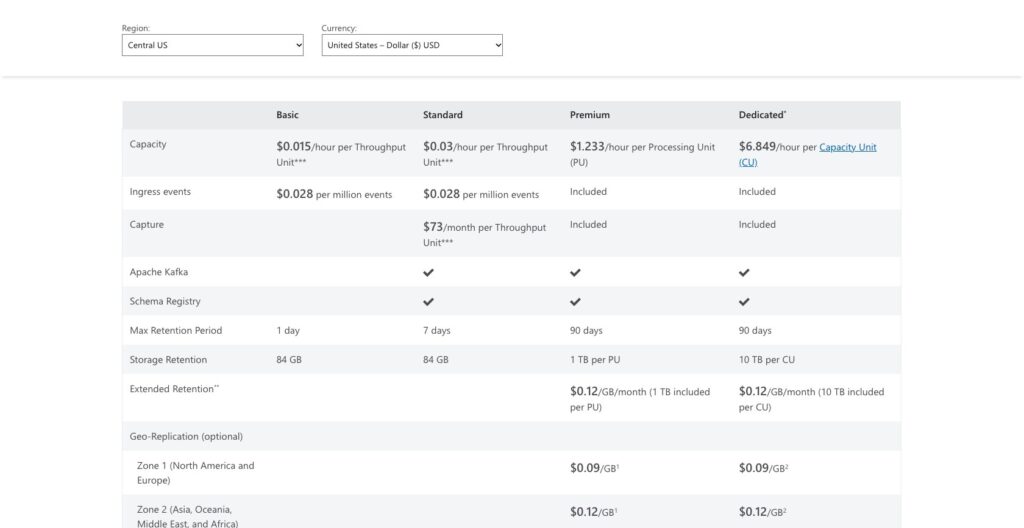
Event Hubs bills capacity by the hour, and in US East a Standard throughput unit is $0.03 per hour, about $21.90 a month, plus $0.028 per million ingress events.
These are US East list rates; other regions differ, and Premium in Central US is $1.233 per PU-hour.
- Basic ($0.015 per TU-hour, about $10.95 per month): dev and test; no Kafka, no Capture, 1 consumer group, 1-day retention, 256 KB events
- Standard ($0.03 per TU-hour, about $21.90 per month): most production workloads under about 40 MB/s; Kafka endpoint, Capture add-on, Schema Registry, Private Link, geo-DR, 7-day retention
- Premium ($1.027 per PU-hour, about $749.71 per month): isolated capacity, Capture and ingress included, 90-day retention, 100 partitions per hub, BYOK and geo-replication
- Dedicated ($6.849 per CU-hour, about $4,999.77 per month): single-tenant cluster, 20 MB events, 1,024 partitions per hub, 10 TB per CU, four-hour billing minimum
Azure Event Hubs pricing (US East list)
| Tier | Capacity price | Ingress events | Capture | Max retention | Partitions per hub | Consumer groups |
|---|---|---|---|---|---|---|
| Basic | $0.015/TU-hour | $0.028 per million | Not available | 1 day | 32 | 1 |
| Standard | $0.03/TU-hour | $0.028 per million | $0.10 per hour per TU | 7 days | 32 | 20 |
| Premium | $1.027/PU-hour | Included | Included | 90 days | 100 | 100 |
| Dedicated | $6.849/CU-hour | Included | Included | 90 days | 1,024 | 1,000 |
A Standard namespace at 2 TUs with Capture on and 100 million events a month comes to about $192.60: $43.80 for TUs, about $146 for Capture and $2.80 for ingress, before the Blob Storage that Capture writes to.
Capture at $0.10 per hour against a $0.03 TU roughly quadruples the capacity line, and at 4 or more TUs the gap to one Premium PU (about $750, Capture included) narrows fast.
Extended retention is $0.10 per GB-month on Premium and Dedicated, and geo-replication adds $0.09 per GB replicated in Zone 1 (North America and Europe).
Is Azure Event Hubs Good Value for Money?
- Good fit: Azure teams under about 40 MB/s on Standard, where a $21.90 TU-month is less than a quarter of a Confluent Cloud Basic eCKU at $0.14 per hour (about $102 per month), before Confluent’s $0.05 per GB in and out
- Less convincing fit: anyone needing Capture on Standard with more than 3 TUs, or more than 32 partitions on one hub, where Premium’s $750 per PU is the honest floor
- Budget priority: Google Pub/Sub at $40 per TiB delivered with nothing to size wins for low, bursty volumes, and Kinesis on-demand at about $0.08 per GB ingested wins on AWS
Reviewer’s Notes: Start on Standard with 1 or 2 TUs, cap Auto-inflate at 4 with a cost alert, and keep Capture off until the cold path is designed. Price Premium once you need over 32 partitions, over 7 days of retention, or Capture on 4 or more TUs.
Getting Started With Azure Event Hubs
A namespace is the billing and endpoint boundary, an event hub inside it is the Kafka topic equivalent, and tier and partition count, both picked at creation, cannot change later on Basic and Standard.
TU count and Capture can change after the fact, though Capture switched on for an existing hub picks up only new events.
Creating the Namespace and Event Hub
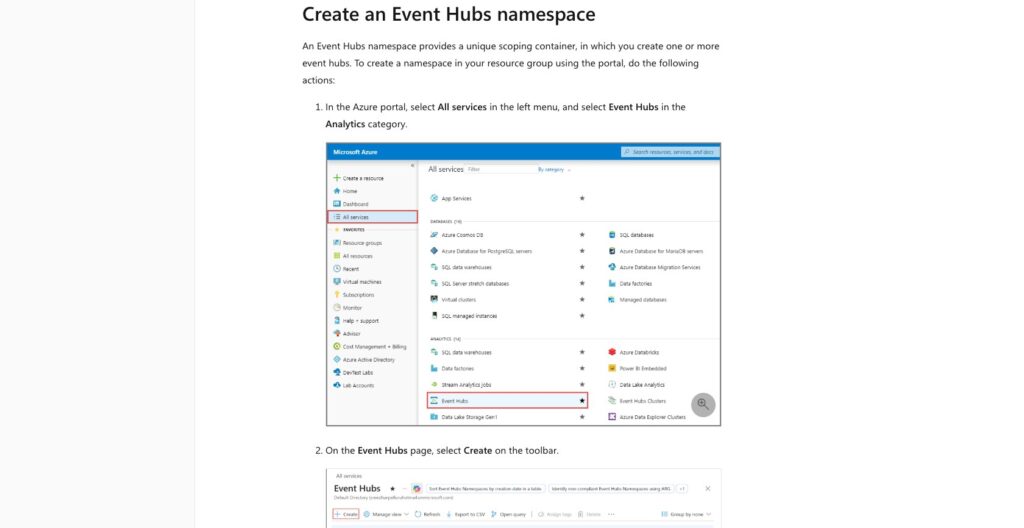
In the portal, create a resource group, then an Event Hubs namespace: name, region, tier, a starting TU count and the Auto-inflate toggle with its ceiling. Pick Standard if you want the Kafka endpoint, because Basic does not have one.
Then select + Event hub and set the partition count (up to 32 on Standard) and retention (default 1 hour, up to 7 days).
I’d size partitions for peak reader parallelism, not today’s volume: partition count caps parallel consumers per consumer group, 1 MB/s per partition is the planning figure, and on Standard a wrong guess means a new hub.
For auth, assign your identity Azure Event Hubs Data Owner for passwordless Entra ID sign-in, or copy the RootManageSharedAccessKey connection string. A namespace holds at most 12 authorization rules, so plan one per application rather than one per developer.
Sending and Reading Events
Install azure-eventhub and azure-identity with pip, and a producer is EventHubProducerClient, create_batch, EventData and send_batch. Reading uses EventHubConsumerClient with a Blob checkpoint store from the azure-eventhub-checkpointstoreblob-aio package, where the on_event handler calls update_checkpoint.
The checkpoint store wants one container per consumer group in a separate storage account, same region as the app, with hierarchical namespace, soft delete and versioning switched off.
Each consumer group allows 5 non-epoch receivers. When senders are throttled, readers see delay rather than errors, so a quiet consumer is not proof the pipeline is healthy.
Pointing an Existing Kafka Client at It
Set bootstrap.servers to NAMESPACE.servicebus.windows.net:9093 and security.protocol to SASL_SSL. For sasl.mechanism, use PLAIN with the username $ConnectionString and the namespace connection string as the password, or OAUTHBEARER with Entra ID.
Each event hub is a topic, and group.instance.id for static membership keeps a restarted consumer from triggering a rebalance. Confluent Cloud and Redpanda accept the same client config, so quotas, not protocol, decide between the three.
Best for: Azure teams that want an existing Kafka producer or the Python SDK streaming into a managed endpoint the same day, with no broker to patch.
Skip if: you need to change partition counts after launch or run Kafka Connect and Streams as managed services, where Confluent Cloud is the shorter path.
Throughput Units, Partitions and Retention
One throughput unit buys 1 MB/s or 1,000 events per second in and 2 MB/s or 4,096 events per second out, whichever limit you hit first.
Standard tops out at 20 TUs in the portal and 40 by support request; past that, you change tier, not the slider.
Microsoft pitches Premium as the low-cost option under about 120 MB/s and often cheaper than Dedicated up to 160 MB/s per namespace, while one Dedicated CU handles roughly 100 to 200 MB/s of ingress.
Premium PUs come in 1, 2, 4, 6, 8, 10, 12 and 16, and Dedicated scales to 10 CUs self-serve and further with a support request.
What each tier allows
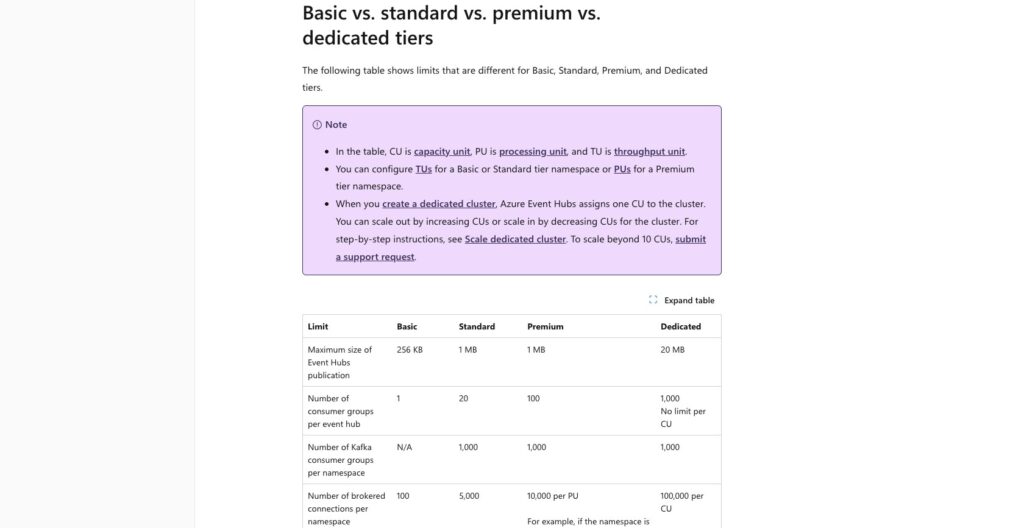
| Limit | Basic | Standard | Premium | Dedicated |
|---|---|---|---|---|
| Max event size | 256 KB | 1 MB | 1 MB | 20 MB |
| Partitions per hub | 32 | 32 | 100 | 1,024 |
| Consumer groups per hub | 1 | 20 | 100 | 1,000 |
| Event hubs per namespace | 10 | 10 | 100 per PU | 1,000 |
| Retention storage | 84 GB per TU | 84 GB per TU | 1 TB per PU | 10 TB per CU |
| Brokered connections | 100 | 5,000 | 10,000 per PU | 100,000 per CU |
| Max retention | 1 day | 7 days | 90 days | 90 days |
At the ceiling, producers get ServerBusy and must buffer and retry. Kafka producers see throttle_time_ms delays instead of errors, which is why the ThrottledRequests metric often stays flat during a Kafka throttle.
Auto-inflate, Standard only, raises TUs to your cap and never lowers them, so pair it with a cost alert. On Standard, consumer lag is a number you compute yourself: the checkpoint sequence number against the last enqueued one.
Entra ID (OAuth 2.0) and SAS work on every tier, Private Link and an IP firewall start at Standard, and customer-managed keys and dynamic partition scale-out start at Premium.
Availability zones cover all four tiers: Premium is zone-resilient from the first PU, while zone-redundant Dedicated clusters need at least 3 CUs and a support request.
Premium and Dedicated can raise partition count later but never lower it, so Standard’s fixed count is the real tier difference.
I’d call Standard’s quotas generous for an ingestion layer and tight for a shared platform, since 10 event hubs and 20 consumer groups go fast across three teams.
Is Azure Event Hubs Really Kafka-Compatible?
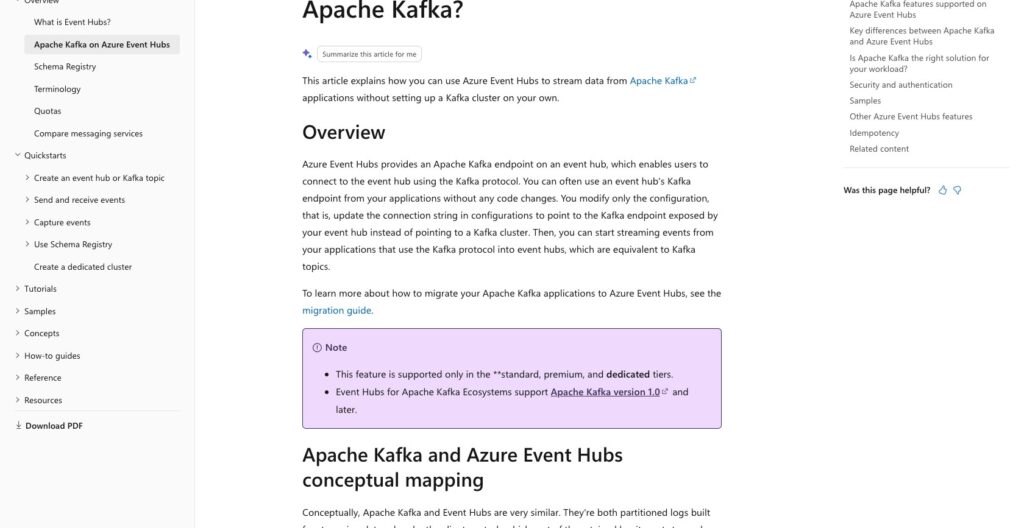
The Kafka endpoint speaks Kafka 1.0 and later on port 9093 over SASL_SSL on Standard, Premium and Dedicated, and existing producers and consumers connect with a config change.
The concept map fits on one line: cluster to namespace, topic to event hub, partition to partition, consumer group to consumer group, offset to offset.
- Works: producers, consumers, consumer groups, idempotent producers, and Schema Registry for Avro, JSON Schema and Protobuf
- Preview: Kafka Streams and transactions, Premium and Dedicated only
- Tier-gated: gzip compression on Premium and Dedicated only; log compaction holds 1 GB per partition on Standard and 250 GB on Premium and Dedicated
- Missing: broker admin (broker config is not exposed), hosted Kafka Connect (you run Connect workers yourself against the endpoint) and ksqlDB; manually generated SAS tokens do not work on the endpoint
Microsoft’s answer to the Streams gap is Stream Analytics, Databricks, Spark and Flink, which covers the job on a different toolchain and a different bill.
Confluent Cloud ships Connect, Streams and ksqlDB as managed services, Redpanda gives a full Kafka API surface with broker control, and Amazon MSK is real Kafka. Event Hubs offers migration-grade compatibility for clients, not for platform teams who live in Connect and Streams.
Quick comparison: Event Hubs puts a Kafka producer on Azure for about $21.90 per TU-month with no cluster to run; Confluent Cloud’s Basic eCKU is about $102 per month plus per-GB traffic, with the ecosystem managed. Pick Event Hubs for ingestion, Confluent for the platform.
Capture, Schema Registry and Geo-Replication
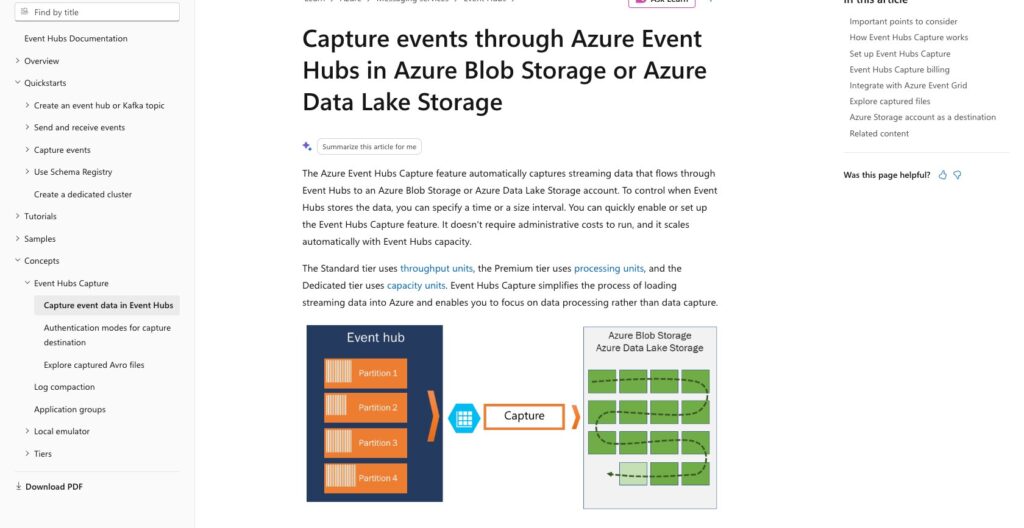
Capture writes Avro files to Blob Storage or Data Lake Storage Gen2 on a size-or-time window, whichever fills first, and because it reads from internal storage it costs no egress quota.
Files land at {Namespace}/{EventHub}/{PartitionId}/{Year}/{Month}/{Day}/{Hour}/{Minute}/{Second}, and Parquet output goes through the portal’s no-code editor (Stream Analytics) to Data Lake Storage rather than through Capture itself.
On Standard, Capture costs $0.10 per hour per TU; Premium and Dedicated include it. Past the 7-day Standard and 90-day Premium retention caps, Capture is the only replay path.
Schema Registry handles Avro, JSON Schema and Protobuf with a 1 MB cap per schema, and Standard’s single schema group is tight for more than one team:
- Standard: 25 MB, 1 schema group, 25 versions
- Premium: 100 MB, 100 groups, 1,000 versions
- Dedicated: 1,024 MB, 1,000 groups, 10,000 versions
Geo-replication went GA in July 2025 on Premium and Dedicated, in synchronous (RPO 0) or asynchronous mode, with customer-initiated promotion that typically completes in under two minutes.
It cannot span tiers, the secondary can be neither read nor written, and Kafka clients need 2.1.0 or later for replicated offsets. The bill is $0.09 per GB replicated in Zone 1 plus the secondary region’s PUs or CUs.
Geo-disaster recovery on Standard pairs metadata only, so no events move. Retention storage past Premium’s included 1 TB per PU costs $0.10 per GB-month, against $0.08 per GB-month of storage on Confluent Cloud.
Direct recommendation: stay on Standard with Capture off if a 7-day replay window and metadata-only failover are acceptable; move to Premium the day either stops being true, since Capture is then included and geo-replication becomes possible.
How Does Azure Event Hubs Compare to Competitors?
On Azure, Event Hubs Standard is the cheapest managed Kafka-protocol stream I’d put in front of a data platform; off Azure it does not compete, and for Kafka-ecosystem depth Confluent and Redpanda win.
- Confluent Cloud: the full Kafka ecosystem managed, with Connect, Streams and ksqlDB; a Basic eCKU runs $0.14 per hour (about $102 per month) plus $0.05 per GB in and out and $0.08 per GB-month of storage
- Apache Kafka (self-managed): the full API and broker control with no per-unit fee, in exchange for running brokers, disks, upgrades and rebalancing yourself on Azure VMs or AKS
- Redpanda Cloud: the Kafka API with broker control and no JVM; Serverless on AWS runs about $0.10 per cluster-hour plus about $0.045 per GB written and $0.04 per GB read, and BYOC puts the cluster in your own VPC
- Amazon Kinesis Data Streams and MSK: AWS-native; Kinesis on-demand is about $0.08 per GB ingested, MSK Serverless about $0.75 per cluster-hour, and neither speaks natively to Azure services
- Google Pub/Sub: $40 per TiB delivered with nothing to size, which wins for bursty low-volume topics; not Kafka protocol, though it can import from Event Hubs at $80 per TiB
- Debezium: not a rival but the usual CDC source feeding Event Hubs, through Kafka Connect workers you host yourself
Pick Event Hubs when your producers and consumers live on Azure and a Standard namespace’s 32 partitions, 20 consumer groups and 7-day retention fit the stream. Self-managed Kafka only makes sense with a platform team that already runs it.
Pick Confluent Cloud when Connect, Streams or ksqlDB are the product, Redpanda when you want broker control without a JVM, and Kinesis or MSK when the rest of the stack is on AWS.
How I Reviewed Azure Event Hubs
I evaluated the four tiers’ pricing and quotas in US East, the setup path from namespace to first consumed event, and the Kafka compatibility surface, including what is still in preview, plus Capture, Schema Registry and geo-replication.
I compared them against Confluent Cloud, Redpanda, self-managed Kafka, Kinesis and Pub/Sub for a data team choosing a streaming platform on Azure.
My recommendations weigh buyer fit and operational effort, which is why Standard’s fixed partition count and Capture’s $0.10 per hour outweigh any feature list. They do not represent measured throughput, latency or a timed benchmark.
Prices are US East list rates, current as of October 2026, and the worked bills assume 730 hours a month.
Should You Choose Azure Event Hubs?
Azure Event Hubs is the cheapest managed Kafka-protocol ingestion on Azure, at about $21.90 per TU-month with no brokers to run. The catches: 32 partitions fixed at creation, 20 consumer groups, 7-day retention, and Capture costing more than the TU it rides on.
I recommend Azure Event Hubs for Azure-committed data teams with fewer than 32 partitions per stream and under 7 days of replay.
Teams that live in Kafka Connect and Streams should price Confluent Cloud or Redpanda first. Anyone off Azure should skip it, because nothing here reaches AWS or GCP services natively, and Kinesis or Pub/Sub will fit that stack better.
The next step costs about $44 a month: create a Standard namespace with 2 TUs, point one existing Kafka producer at port 9093, and watch the ServerBusy and TU metrics for a week before you size partitions or price Premium.
Leave Capture off for that week, since on 2 TUs it would add about $146 a month to the same bill.
FAQ
How much does Azure Event Hubs cost per month?
In US East, Basic is about $10.95 per throughput unit per month, and Standard is about $21.90 per TU plus $0.028 per million ingress events and about $73 per TU for Capture.
Premium is about $749.71 per processing unit with Capture and ingress included, and Dedicated about $4,999.77 per capacity unit with a four-hour billing minimum. Rates vary by region.
Is Azure Event Hubs the same as Kafka?
No. Event Hubs exposes a Kafka protocol endpoint on Standard and above that accepts Kafka 1.0 and later clients after a config change to port 9093 over SASL_SSL.
You get producers, consumers, consumer groups and idempotent producers, but no broker admin, no hosted Kafka Connect and no ksqlDB, and Kafka Streams and transactions are still preview on Premium and Dedicated. Treat it as a Kafka endpoint, not a Kafka cluster.
What is the difference between Event Hubs Standard and Premium?
Standard bills throughput units at $0.03 per hour on shared capacity with 32 fixed partitions, 20 consumer groups, 7-day retention and Capture as a $0.10 per hour add-on.
Premium bills processing units at $1.027 per hour on isolated capacity with Capture and ingress included, 90-day retention, 100 partitions per hub, dynamic partition scale-out, customer-managed keys and geo-replication. There is no automated migration between them.
Does Azure Event Hubs have a free tier?
No. The entry point is Basic at $0.015 per TU-hour, about $10.95 per month, which drops Kafka and Capture.
For a short evaluation with the Kafka endpoint, one Standard TU costs about $0.72 a day, so a week of testing stays near $5 before ingress events.