
Quick answer: Can PostgreSQL work as a data warehouse?
Yes, PostgreSQL can work as a data warehouse. It is a practical option when your analytical queries, data volumes, and reporting concurrency fit the resources you can provide. It is not automatically a substitute for a distributed, columnar cloud warehouse.
Data warehouses are becoming increasingly popular as many businesses, nonprofits, and municipal organizations realize the value of storing their current and historic data in a dynamic and useful way.
The data warehouse is the central place where all of the different technical systems across the organization meet to store their data, from retail processing to customer management software to marketing campaigns and more. Creating the right data warehouse for every business is a hard ask, which is why there are so many different ways to do it.
If you’ve heard of PostgreSQL, there’s a reason. It’s a useful general-purpose relational database maintained by an active community, and it can also serve as a data warehouse. It can handle more than just one kind of data processing, which makes it a pretty compelling option.
The 2 types of data processing
There are two types of critical data processing systems primarily used today: Online Transaction Processing (OLTP) and Online Analytical Processing (OLAP). They each serve different purposes. Keeping heavy analytical queries separate from production transactions can prevent them from competing for the same resources.
OLTP is almost exactly what it sounds like: a database responsible for operational transaction processing. It must be fast, dynamic, and responsive to database failure with a backup plan.
This kind of processing is used for e-commerce purchases, bank account transactions, retail purchases, and the like. The priority is fast, reliable transactions, not keeping the database artificially small. Historic and current data can be copied into an analytical system while the operational database continues serving applications.
OLAP is different: its purpose is to analyze historical and combined data. ETL means Extract, Transform, Load; ELT means Extract, Load, Transform. These pipelines prepare data for analysis rather than being the definition of OLAP itself. The OLAP system is at the heart of critical business decisions, offering up data related to day-to-day performance and long-term organizational stability.
Analytical queries often scan and aggregate many rows, whereas operational queries commonly read or change a small number. That does not make OLAP inherently slow: a warehouse is designed to make this analytical work efficient.
PostgreSQL as a data warehouse: The benefits
As I said before, an excellent feature of PostgreSQL is its ability to be used for both OLTP and OLAP. That lets teams reuse familiar SQL, drivers, and administration tools across operational and analytical databases. But sharing a database engine does not automatically move or transform data between them; you still need to build or configure those pipelines.
It’s extremely compatible
PostgreSQL works with many of the programming languages used in modern data extraction, from Python to .NET to Java and more.
Postgres is free
Yes, I said it. It’s free and easy to install and try right away, and if you’re anything like me you love to do that. Never underestimate the power of immediate experimentation.
The software has no license fee, but hosting, storage, backups, monitoring, and engineering time still cost money.
It’s basically SQL
Someone out there is going to read that subheading and be upset with me, but here’s the thing: I’ve never encountered a situation where I had to question whether or not the query I wrote using my SQL background would run in a PostgreSQL database. It just works, and most everybody in the data world knows a bit of SQL.
That familiarity is useful, but it is not a guarantee that SQL from every database runs unchanged. PostgreSQL has its own functions, data types, and syntax differences, so test queries when moving between systems.
Useful analytical features are already built in
PostgreSQL supports indexes, table partitioning, parallel queries, and materialized views. Those give you ways to reduce repeated work and improve reporting. They still need suitable query and schema design; a materialized view also needs refreshing when its stored results should change.
Postgres as a DW: Limitations and challenges
Although PostgreSQL is a popular and useful data warehouse solution for many reasons, there are also challenges that come with using it, especially at an enterprise level scale. Here are just a few.
Version bugs and dependencies
Whatever version of PostgreSQL a data team may choose will have to be compatible with all of the other programming and hardware dependencies they work with. Most of the time this isn’t a problem, but depending on the data transformation framework you layer on top of your data warehouse, it could cause errors for engineers and compatibility confusion.
Each major PostgreSQL release receives five years of community support. Use a supported release with current minor fixes, and test your drivers, extensions, and transformation jobs before a major upgrade.
Security vulnerabilities
Open-source solutions are fantastic, and frankly they have changed the programming and engineering worlds when it comes to technological innovation and the opportunity for community development.
Public source code does not, by itself, make PostgreSQL less secure than a proprietary database. The practical responsibility is keeping the server and its extensions patched, restricting network access and permissions, and protecting backups. PostgreSQL publishes security advisories and fixes, but someone still has to apply them to a self-managed installation.
Load-balancing at scale is tricky
No matter the level of the business, organizations large and small find themselves in need of fast, reliable transactional processing and data analytics processing. Read replicas can offload some reporting, but replication, write capacity, and failover are different problems.
With PostgreSQL, that can become a complicated and multifaceted issue as workloads grow. The official PostgreSQL documentation describes several approaches to high availability, replication, and load balancing. A conventional primary-and-standby setup does not automatically distribute writes across several servers, and replica lag can affect how fresh a report is. It can be done, but it needs planning, especially as the data and number of users grow.
Support for urgent technical issues needs planning
What happens if you have a PostgreSQL production issue that needs immediate technical resolution, but your engineers aren’t sure how to solve the problem? You can ask the community for help, but community support does not come with a guaranteed response time. Commercial PostgreSQL support and managed hosting are available. Choose the response times and support scope your business needs before an incident occurs.
Large analytical scans need a different kind of tuning
Ordinary PostgreSQL tables use row-oriented storage. Dedicated columnar warehouses organize data differently, which can help queries that scan a few columns across many rows. PostgreSQL’s partitioning and parallel query features help with analytical workloads, but they do not turn a standard installation into an automatically distributed warehouse. Benchmark your actual queries and peak reporting concurrency before deciding to move.
When PostgreSQL is a good fit
PostgreSQL is worth shortlisting when your team already knows it, your reports meet their response-time targets, and you can manage backups, upgrades, and data pipelines. A separate reporting database or replica may let you reuse those skills while reducing pressure on your operational system.
Compare dedicated warehouses when broad scans, concurrent dashboards, or infrastructure maintenance are becoming the bottleneck. There is no universal row count or database size at which PostgreSQL stops working: query design, hardware, freshness requirements, and the number of simultaneous users matter too.
Other data warehouse options
So what else do enterprises use for a data warehouse? A host of other options are available, but it can often be hard to find the right one. Two well-known solutions are Google BigQuery and Snowflake.
BigQuery
Google’s BigQuery product is a highly configurable and flexible data processing tool suite that uses SQL as its backbone. What does BigQuery handle differently from a self-managed PostgreSQL warehouse?
First, it is a serverless cloud data warehouse that does not require local installation or server provisioning. Google manages the underlying infrastructure, so less manual configuration is required. BigQuery charges for storage and compute beyond its free allowances, with pricing depending on the options and services you use.
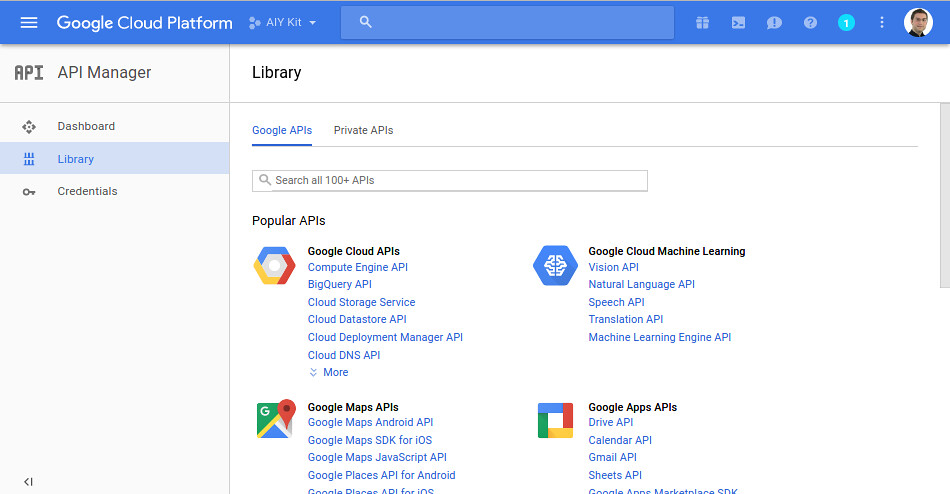
BigQuery might be fine for an organization with varied data workloads and engineers with time to explore the BigQuery user interface, but Google Cloud Platform—and Google Cloud Console in particular—are pretty complicated. BigQuery also supports external tables and federated queries for supported sources. Check the source-specific permissions, location restrictions, and query costs rather than assuming every external database connects in the same way.
Snowflake
Snowflake is another data warehouse tool that has become increasingly popular. It’s well-known for having a dynamic architecture that can handle a lot of data processing at scale. Its architecture separates storage and compute, and virtual warehouses provide the compute resources for queries.
Snowflake also connects to a wide range of data interfaces and integration tools. For concurrent workloads, multi-cluster warehouses can add clusters, but require Enterprise Edition or higher. Adding clusters addresses concurrency; increasing a warehouse’s size addresses the compute available to its queries.
Sounds amazing, right? It can be, if you are a skilled and seasoned SQL warrior. Snowflake manages infrastructure and software maintenance, but your team still needs to configure access, model the data, and control compute spending.
If you’re like me and you’ve learned SQL along with another half a dozen languages, you know that it takes some time to work in a primary language. If someone has the engineers on hand to configure Snowflake, it can be well worth the complex technical effort. Managed infrastructure reduces some of that work; it doesn’t remove every design decision.
A simpler alternative
You can see why so many organizations turn to a free community tool like PostgreSQL, which can be used as data warehouse software. But when working with Postgres as a data warehouse, you still need to plan for security updates, version compatibility, scaling, and operational support. That’s overhead to account for before your business analytics can be processed efficiently.
There are data warehouse tools out there that combine lots of data integrations for that sweet OLAP we all need with an easier interface. Managed PostgreSQL hosting can reduce database administration; a dedicated cloud warehouse can take more analytical infrastructure off your hands. You still need to check which ingestion, transformation, backup, and support tasks are included.
Wrap up
There are a lot of reasons why someone might choose to program their own data warehouse from scratch or pick a paid tool that also requires specialized configuration.
It’s easy to overlook the human costs of overhead: exhausted data engineers who are tired of panicking when something goes wrong in production and working overtime. This costs everyone time, stress, and likely money.
PostgreSQL can work as a data warehouse when its performance and operating requirements fit your workload. Start with the skills and infrastructure you already have, then compare the full cost of running it with a managed alternative. The goal is to get the real data analytics work done without creating an operating burden your team cannot sustain.
Comments 0 Responses