Editor’s note: This mParticle review evaluates the pricing model, implementation requirements, and documented capabilities. It is not a hands-on performance test.
Quick verdict: I recommend mParticle for established consumer businesses that need customer data from their apps, website, and warehouse to work together in marketing. Its combination of identity management and audience activation is appealing, but you need engineering support and a carefully scoped quote to make the investment worthwhile.
Key Takeaways
- mParticle suits teams that need to connect customer behavior across several channels and act on it.
- Hybrid audiences combine warehouse-defined groups with live behavioral conditions.
- Predictive targeting gives you more flexibility than rules based only on past actions.
- Custom pricing and prepaid credits make budgeting more involved than choosing a monthly subscription.
- Implementation requires decisions about tracking, identities, and destinations before marketers can work independently.
For this review, my priority is whether the platform solves a problem large enough to justify its setup. If you’re simply sending a customer list to one advertising platform, I would start with a narrower tool.
In this review, I’ll take a closer look at the costs, setup work, audience tools, and alternatives that should shape your decision.
mParticle Pros and Cons
Pros
- Collects customer events through application SDKs and server-side APIs.
- IDSync offers configurable strategies for connecting customer identities.
- Data Plans can stop unplanned events from reaching downstream tools.
- Hybrid audiences combine warehouse membership with live behavior.
- Future Behavior predictions support purchase and churn targeting.
Cons
- Custom contracts make direct price comparisons difficult.
- Tracking and identity setup require technical ownership.
- Warehouse audience membership refreshes on a schedule.
- Prediction calculations can take up to 24 hours.
How Much Does mParticle Cost?
mParticle uses custom pricing, so you’ll need a sales quote for your implementation. I wouldn’t build a budget around an unofficial starting price: the useful number is what your actual combination of collection, storage, and audience activity will cost.
- Value-based pricing (custom quote): You commit to prepaid mParticle Credits, which are consumed by metered platform activity. The contract sets the unit rates, and larger commitments can qualify for higher discounts.
| Pricing option | Published starting price | Billing approach | My recommendation |
|---|---|---|---|
| Custom mParticle agreement | Contact sales | For value-based contracts, prepaid credits cover metered products and services | Request a workload-based estimate before agreeing to a commitment |
The credit model has a useful advantage: your spending can cover different parts of the platform. The drawback is that an event count alone doesn’t explain the bill. Your audience activity and other metered services also matter.
I would ask for a quote based on your current workload and a second estimate for a busy trading period. Compare both with the proposed commitment. A discount is less attractive if you have to buy capacity your team won’t use.
Is mParticle Good Value for Money?
I see the strongest case for mParticle when multiple teams need consistent profiles and several campaigns depend on fresh customer behavior. Its value is harder to justify when the remaining job is a straightforward sync from your warehouse.
- Good fit: You need to collect events, manage customer identities, and activate audiences together.
- Less convincing fit: You only need to move an existing warehouse segment into a business tool.
- Budget priority: Price the implementation work alongside the subscription, including who will maintain tracking and identity rules.
Event tiers give you another cost lever. Connect forwards events without storing them; Preserve adds storage without real-time evaluation; Personalize supports that evaluation. I like having this distinction because a diagnostic event shouldn’t automatically receive the same treatment as a purchase signal.
Be careful about optimizing too aggressively, though. Choosing a lower tier changes what you can do with the data later. I would classify events with the campaign owner before making cost-driven changes.
Reviewer’s Notes: My recommendation is a custom agreement scoped around your first valuable campaign, with the relevant credit rates and expected consumption spelled out. Expand after you understand the workload, rather than buying for every possible future use case.
Getting Started With mParticle
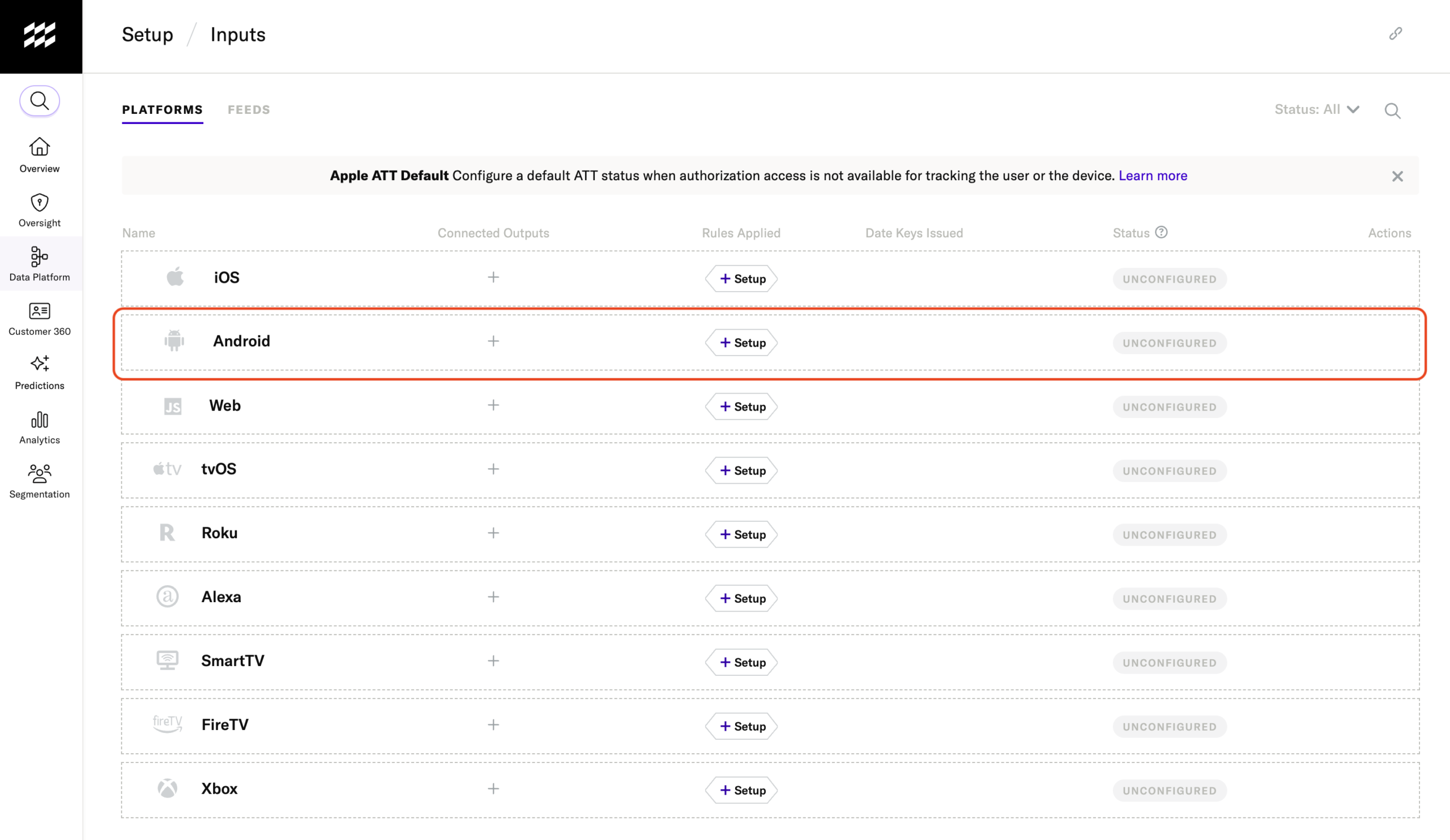
You need an implementation owner before you need an audience builder. mParticle can give marketers useful independence once the foundations are in place, but I wouldn’t approach it as a tool a marketing team can configure entirely on its own.
- Create an input: Define the application or other source that will supply customer data.
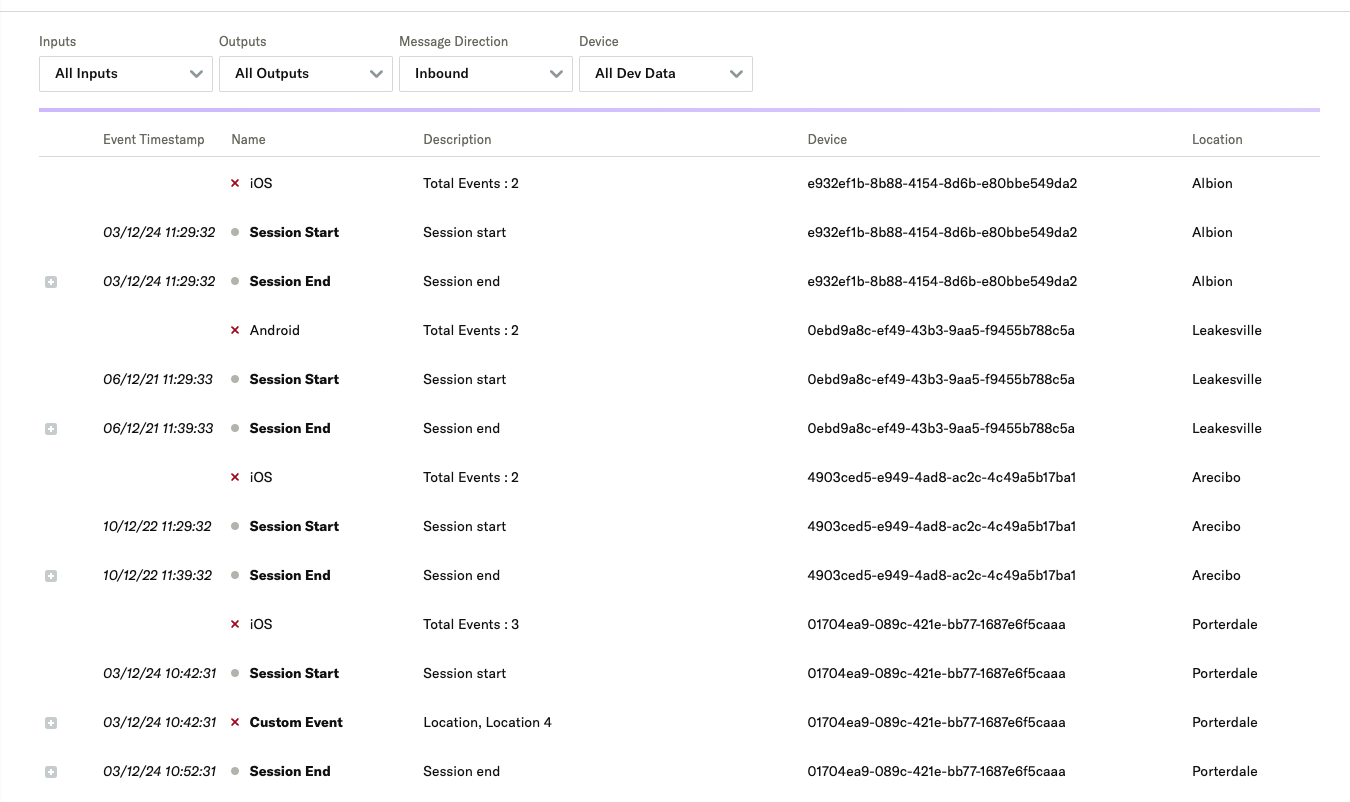
- Start sending events: Instrument the source with the appropriate SDK or API and check that the expected data arrives.
- Connect an output: Configure the destination that needs those events and validate the connection.
- Build an audience: Define which customers should qualify, then connect the audience to an appropriate output.
I like being able to check incoming and outgoing events in Live Stream. You can establish whether a purchase event arrived before investigating why someone didn’t qualify for a campaign.
For an initial rollout, I would keep the scope small: one customer journey with a clear commercial purpose. An abandoned-cart audience, for example, forces you to answer useful questions about product views, cart activity, completed purchases, and customer identifiers without redesigning your entire marketing stack.
Decide How You’ll Recognize Customers
IDSync determines how incoming identities relate to customer profiles. Its strategies govern what happens when someone is identifiable and when they’re anonymous, so the choice affects the customer history available to your campaigns.
That flexibility is a strength, but it deserves more attention than a routine setup checkbox. Think about a customer browsing anonymously before signing in, or several people using the same device. Your desired behavior should guide the configuration.
I would bring engineering and marketing into that decision together. Engineering can implement the identifiers, but marketing needs to explain which customer journey the profile should represent. Buying a CDP doesn’t settle those questions for you.
Keeping Customer Data Consistent
Data Plans are one of mParticle’s most practical features. They define the events and attributes you expect and can block unplanned names from being stored or forwarded. That helps prevent inconsistent purchase tracking from undermining a campaign.
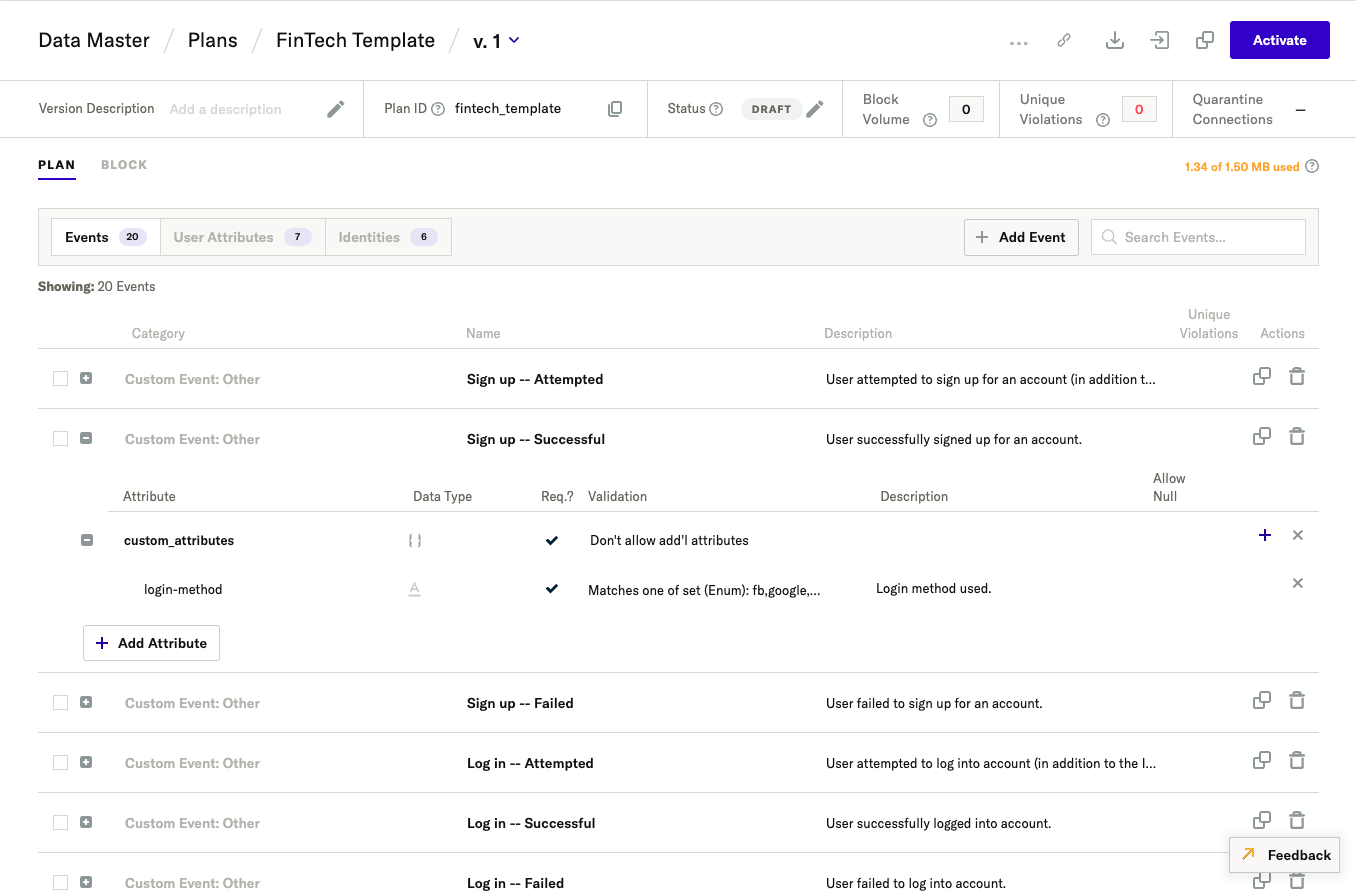
I would introduce blocking carefully. A legitimate event from a newly released feature can be rejected if nobody updates the plan. Quarantine connections can send blocked batches to Amazon S3, but recovering them requires a backfill workflow; there is no replay button in the interface.
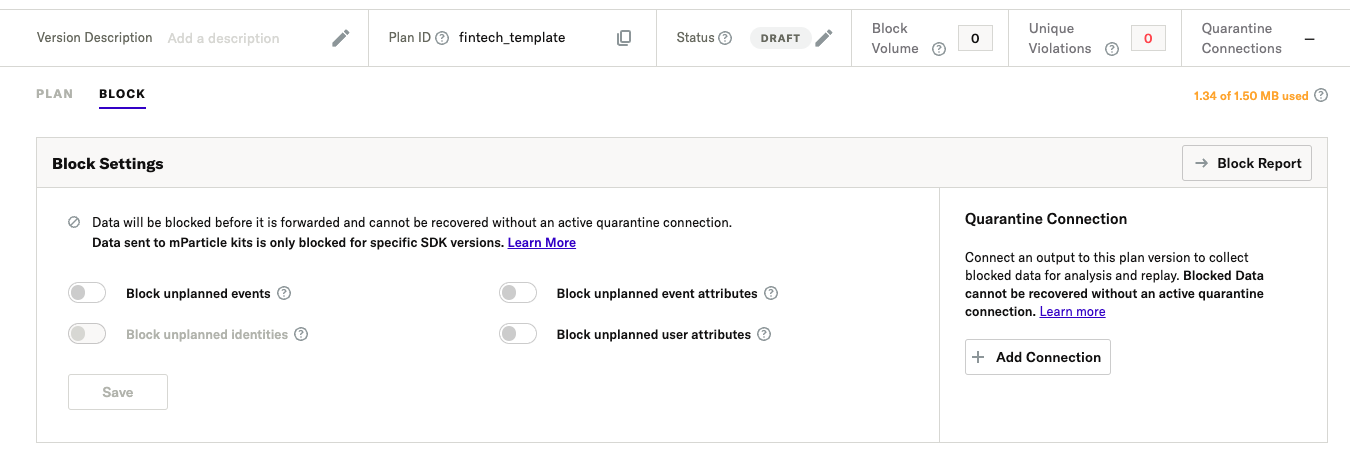
Plans support up to 1,000 data points. Above 400, I would favor the API or external builder over managing everything in the interface. Client-side kit blocking also has narrower support than server-side blocking, so check the path your destination uses.
These controls need an owner who coordinates tracking changes with application releases. I like the ability to enforce a shared definition of customer activity, but buying the platform won’t keep those definitions accurate.
RudderStack is worth comparing if your developers prefer warehouse-based profile modeling. Its version-controlled YAML approach may fit an engineering team’s existing practices better. I’d choose on the basis of who will maintain the system and how marketers will use its output.
Building Audiences From Live and Warehouse Data
Hybrid audiences are the feature that makes mParticle especially interesting to me. They let a warehouse-defined customer group participate in targeting that also responds to live behavior.
Imagine your warehouse identifies loyal customers using their purchase history. You then want to reach members of that group who show fresh interest in a product. Combining those conditions is more useful than choosing between a historical customer list and a purely behavioral segment.
- Real-time audiences: Use supported profile and behavioral conditions to respond to incoming customer activity.
- Composable audiences: Build segments from warehouse data and refresh their membership on a schedule.
- Hybrid audiences: Combine eligible warehouse audience membership with conditions evaluated in mParticle.
The distinction matters. A hybrid audience doesn’t make the warehouse refresh continuously. If the warehouse-defined group changes, that membership still depends on its refresh cycle. I’d ask the team to demonstrate how this timing affects your intended campaign.
Hybrid processing records audience membership on matching mParticle profiles. It doesn’t write warehouse attributes, events, or identity changes back into those profiles. Customers without a matching profile won’t yet appear in the real-time membership criteria.
A campaign that needs a warehouse attribute directly may therefore need a different setup from one that only checks segment membership. Budget for warehouse compute too: those audience queries run in your warehouse.
Does It Replace a Warehouse Activation Tool?
I would compare mParticle with Hightouch if your customer data already lives in a well-maintained warehouse. Hightouch’s warehouse-centered approach is a natural starting point when the main problem is getting that data into operational tools.
For mParticle, I’d want the combined event collection, identity controls, and hybrid targeting to justify the broader implementation. Hightouch also supports marketing audiences and journeys, so this isn’t a choice between a CDP and a basic list exporter.
My recommendation is to compare the same campaign in both products. Check the required data preparation, refresh behavior, and destination support, rather than deciding from the label “composable CDP.”
Are mParticle’s AI Features Useful?
I find predictive targeting more relevant here than a generic AI writing assistant. Future Behavior predictions estimate the likelihood of a customer taking a chosen action, such as purchasing or becoming inactive. Those estimates become attributes you can use for targeting.
This gives you a different question to ask of your data. Instead of selecting everyone who previously performed an action, you can focus on customers likely to do something next.
I would still judge it against a straightforward rules-based audience. A more sophisticated segment only earns its place if it improves the campaign outcome you care about. Keep a comparison group and measure the result before expanding its role.
Predictions need suitable historical data. The Agent’s prediction workflow requires at least 45 days, with 90 or more recommended. Even a readiness check doesn’t guarantee a successful calculation. I wouldn’t make a launch depend on a new model before checking its output.
What Can the mParticle Agent Do?
The mParticle Agent can prepare individual real-time audiences and create Future Behavior predictions through a conversational workflow. Proposed changes require your confirmation, which I like: the person responsible for the campaign retains a decision point.
Its boundaries are worth understanding:
- It can use eligible existing Composable Audience membership, but cannot create the Composable Audience itself.
- It cannot edit an existing saved audience or activate one for you.
- Future Behavior calculations can take up to 24 hours; targeting needs current, usable results.
- You choose the prediction target range. The Agent does not make that decision for you.
I see this as assistance with building and understanding segments, not a replacement for managing campaigns. The most valuable demonstration would use your own event names and a realistic targeting request, then show the resulting conditions clearly enough for you to approve them.
How Does mParticle Compare to Alternatives?
I would shortlist alternatives based on where your team wants to manage customer data.
- Hightouch: My first comparison when warehouse activation is the main requirement. Look at it closely if your customer models are already reliable and you want marketers to use them in downstream tools.
- RudderStack: Worth considering for engineering-led teams that want event collection alongside warehouse-based profiles and activation. I’d favor evaluating this route when your data team wants the warehouse to remain central to the design.
- Twilio Segment: The closest broad comparison here. Its full CDP combines Connections, Unify, and Engage for collection, profiles, audiences, and journeys. Compare that package with mParticle; the Connections pipeline alone isn’t an equivalent purchase.
I wouldn’t choose between these products on integration counts alone. A smaller set of connections that supports your exact event types, identifiers, and campaign workflow is more useful than a long catalog with gaps in the destinations you rely on.
How I Reviewed mParticle
I evaluated the pricing model, documented implementation workflow, identity controls, audience options, and AI limitations against the needs of a team choosing a CDP. My recommendations weigh practical buyer fit and operational effort; they do not represent measured campaign results or hands-on usability scores.
Pricing model and product details checked in October 2026.
Should You Choose mParticle?
I recommend mParticle when connecting customer identities and activating fresh behavior are substantial business requirements. Its combination of collection, profiles, and hybrid audiences gives an established consumer business plenty to work with.
I’d be more cautious if you lack an implementation owner or only need a simple warehouse-to-marketing sync. In that situation, start with a narrower Hightouch evaluation.
For the right team, the next step is a scoped demonstration and quote built around one real campaign. Have mParticle show how the audience updates, reaches its destination, and consumes credits. That will tell you more than a broad feature tour.
FAQs
What is mParticle used for?
mParticle collects customer data, connects identities, and helps teams build audiences for marketing and other connected tools. It is particularly relevant when customer activity spans multiple applications and channels.
How much does mParticle cost?
Pricing requires a custom quote. Value-based agreements use prepaid credits, with consumption determined by the services and workload covered by your contract.
Can mParticle use warehouse data?
Yes. Composable audiences use warehouse data, while hybrid audiences combine eligible warehouse membership with mParticle conditions. Warehouse membership refreshes on a schedule.
Is mParticle suitable for a small team?
Only if the need justifies the implementation work. I wouldn’t recommend it simply to connect a small customer list to one marketing tool; start by evaluating a narrower solution.