
Editor’s note: This Twilio Segment review evaluates pricing, setup requirements, and customer data features for teams choosing a CDP.
Quick verdict: I recommend Twilio Segment for growing businesses that need their analytics and marketing tools to work from consistent customer data. Its appeal is strongest when you need both event collection and audience activation, but you should budget for engineering support and a custom CDP quote. A small business with straightforward tracking needs can easily buy more platform than it needs.
Key Takeaways
- Segment makes the most sense when several tools need the same customer events.
- Connections lets you start small before committing to a full CDP.
- The full CDP package adds unified profiles and audience tools, but requires a sales quote.
- Tracking design and identity rules still need an owner on your team.
- AI predictions need enough historical activity, and data won’t arrive instantly through every connection.
In this review, I’ll take a closer look at the costs, the setup work, and where Segment earns its place among customer data platforms.
Twilio Segment Pros and Cons
Pros
- Shared event collection feeds multiple analytics and marketing destinations.
- A free Connections plan supports a small implementation.
- Unify combines customer identifiers into profiles for activation.
- Protocols checks incoming events against agreed tracking rules.
- Engage supports audience building and visual customer journeys.
Cons
- Full CDP pricing requires a custom quote.
- Tracking setup and identity decisions require technical ownership.
- Warehouse loads and some audience updates run on schedules.
- Predictions need historical data and qualifying customer activity.
How Much Does Twilio Segment Cost?
Segment’s starting price doesn’t buy the full CDP. Connections handles collection and routing; the Customer Data Platform package combines Connections, Unify, and Engage. I would settle which of those you need before comparing prices.
- Connections Free ($0): For a small project with up to 1,000 monthly tracked users and two sources.
- Connections Team (from $120/month): For growing data pipelines, with 10,000 monthly tracked users included and unlimited sources.
- Connections Business (custom quote): For larger implementations with negotiated volume and more demanding operational requirements.
- Customer Data Platform (custom quote): For businesses that also need unified profiles, audience building, and journey orchestration.
| Plan | Starting price | Included monthly tracked users | Best fit |
|---|---|---|---|
| Connections Free | $0 | 1,000 | Small tracking project |
| Connections Team | $120/month | 10,000 | Growing event pipeline |
| Connections Business | Custom | Agreed volume | More complex data operations |
| Customer Data Platform | Custom | Agreed volume | Profiles and customer activation |
Team offers a 14-day trial. Monthly billing starts after the trial; annual Team subscriptions charge for the year upfront, with usage overages billed monthly. I prefer a monthly commitment while you’re establishing normal traffic and tracking coverage.
The Usage Costs I’d Watch
Monthly tracked users, or MTUs, include identified users and anonymous visitors who haven’t been connected to a known user. They aren’t just paying customers. That matters if your website attracts substantial browsing traffic but relatively few purchases.
On the monthly Team plan, additional usage costs $12 per 1,000 MTUs between 10,000 and 25,000, then $11 per 1,000 between 25,000 and 100,000. Above that, the rate is $10 per 1,000.
At 20,000 MTUs, the base subscription plus those usage charges comes to $240/month ($120 + 10 x $12). That’s a calculated example before tax or any other applicable charges. I’d budget against your likely tracked audience, rather than treating $120 as a fixed monthly bill.
For a larger contract, ask about throughput allowances and the features included in your quote. Protocols is an add-on, so don’t assume the full governance package comes with every paid plan.
Is Twilio Segment Good Value for Money?
I think Segment offers better value when it replaces recurring integration work across several teams. It’s harder to justify when one website already sends the few events you need to one analytics tool.
- Choose Free to prove a small collection-and-routing use case within its limits.
- Choose Team when that pipeline needs more capacity or sources.
- Request a CDP quote when the outcome depends on joined customer profiles and coordinated audiences.
Reviewer’s Notes: I’d ask sales to price one specific customer journey, including the required data sources and destinations. A quote for a defined outcome is much more useful than a demo of everything Segment can do.
Getting Started With Twilio Segment
I’d start with one business question, such as which trial users reach an activation milestone. Segment can collect a lot of activity, but collecting more doesn’t automatically make the resulting data useful.
For a basic implementation, the setup follows this sequence:
- Create your workspace and a source for your website, app, or server. Keep development data separate from production.
- Install the relevant library and connect it using the source’s write key.
- Identify known users and define the important actions you want to track.
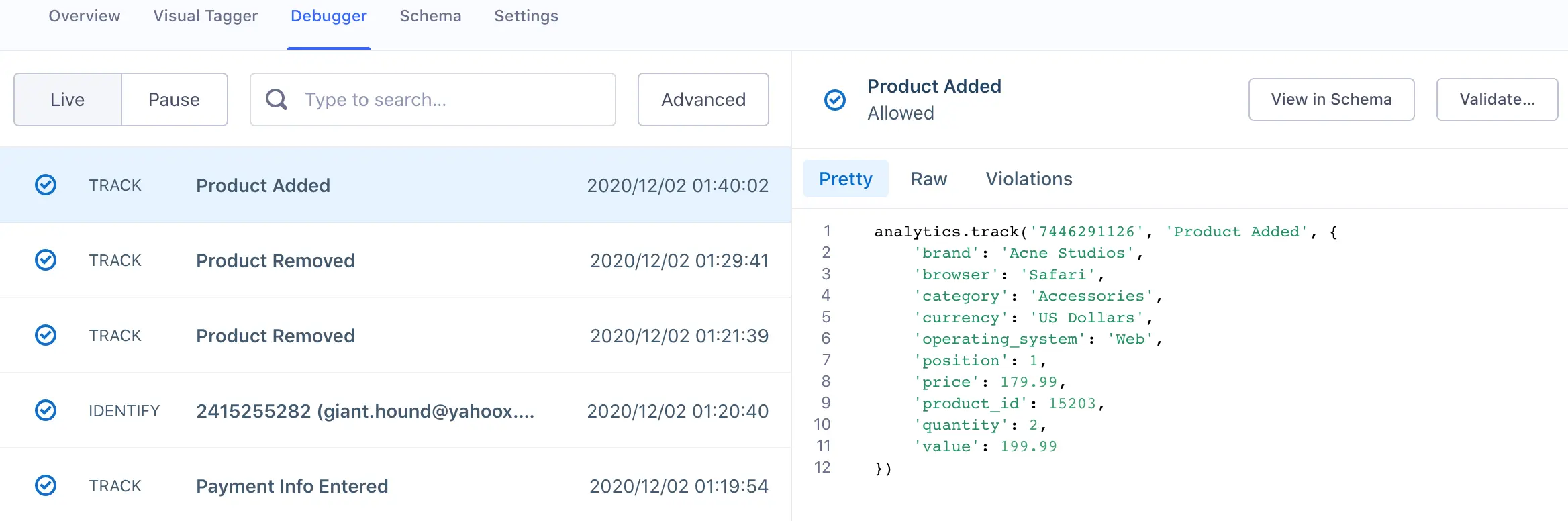
- Check incoming events in the Source Debugger.
- Connect a destination and verify that it receives the information it needs.
Agree on what an event means before building campaigns around it. A trial user who creates an account may need a different follow-up from one who finishes a first project. I’d get product and marketing to settle that definition together.
Checking That Your Data Is Usable
I like the Source Debugger’s practical focus: you can inspect an incoming event, check its properties, and look at the raw payload when something is missing. It gives an engineer a concrete place to investigate a tracking problem.
However, the debugger displays a sample of events. Seeing an event there confirms arrival at the source; it doesn’t prove that every event reached every downstream tool. I’d check the receiving application as well before calling an integration complete.
Does Segment Remove the Need for Developers?
Not entirely. Auto-Instrumentation can capture activity and let you define events through an Event Builder after SDK setup. I like that direction because changing an event definition shouldn’t always require another release.
There are limits: Auto-Instrumentation is in public beta and isn’t supported in EU workspaces. More fundamentally, someone still needs to decide what an event means and which user it belongs to.
I’d put Segment on the shortlist when you have technical help available. For a marketer working alone, the breadth of the platform could become another dependency rather than a shortcut.
Connecting Your Customer Data
Connections is the part of Segment I’d consider first if maintaining separate integrations has become a recurring chore. A shared event can feed the tools that analyze customer behavior or act on it, without each team defining a completely separate tracking implementation.
Imagine your product team and lifecycle marketer both need to know when a customer finishes onboarding. Agreeing on one event gives them a common starting point. That’s the benefit I care about more than the size of an integration catalog.
Still, you need to check what each destination supports. Supported methods and connection modes differ, so an integration’s presence in the catalog doesn’t guarantee that it accepts every event or field you want to send.
I’d also check for duplicate tracking during a migration. Leaving the original integration running alongside its Segment replacement can send the same activity twice and distort your reporting.
Warehouse Data Has a Different Schedule
Segment’s standard warehouse destination loads data in batches. Free syncs once daily, Team twice daily, and Business supports up to 24 syncs per day.
That’s reasonable for reporting that can wait. It’s a poor fit if your requirement is for every warehouse record to update immediately after a customer action. I would keep the event-routing requirement and the reporting-refresh requirement separate when evaluating it.
If your customer data is already organized in a warehouse and the main job is sending it into business tools, I’d compare Hightouch early. Segment also supports Reverse ETL, but you may not need its broader collection setup to solve that narrower problem.
Building Profiles and Keeping Data Consistent
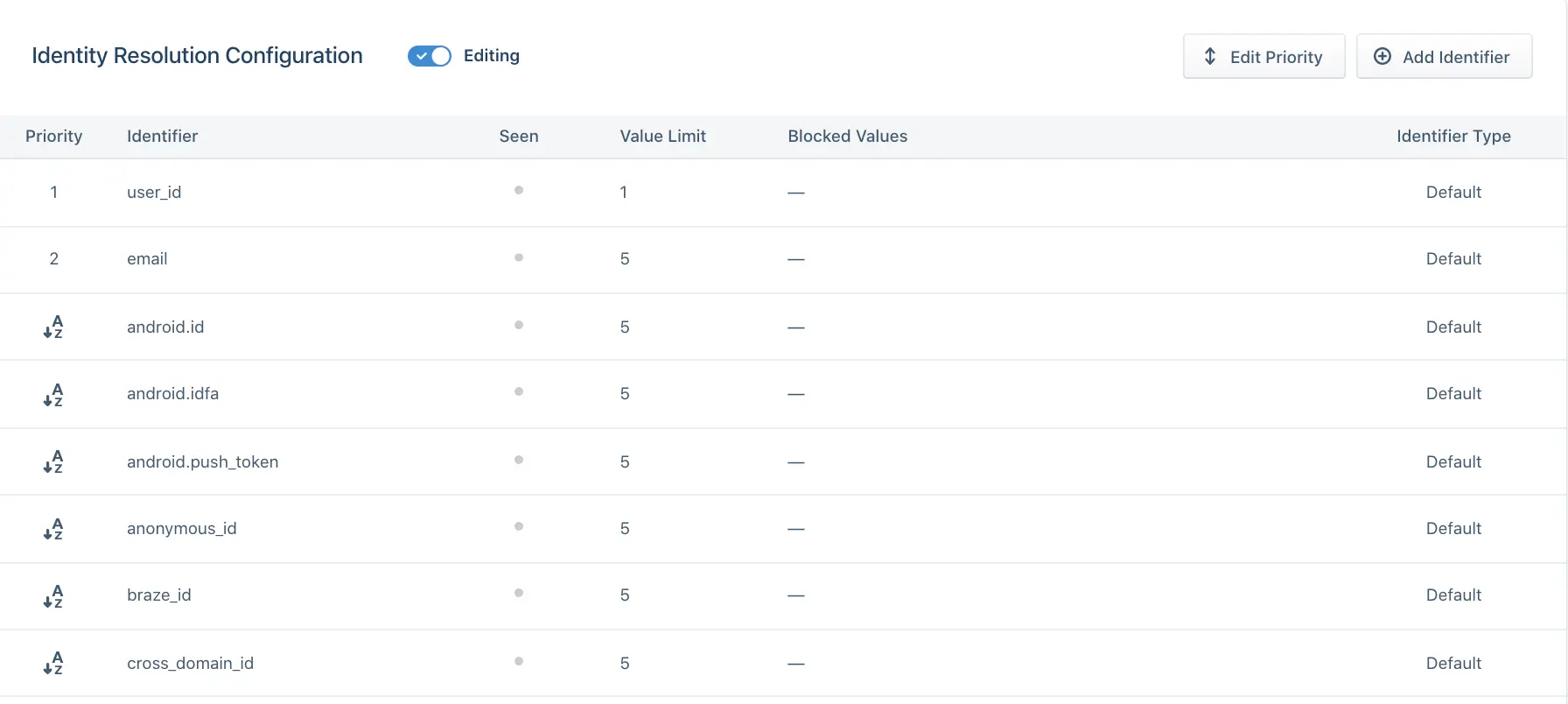
Unify makes Segment more useful when the same customer appears across several systems. Its identity resolution associates incoming identifiers with profiles, with rules determining when profiles should merge.
I like having those rules under your control. A business with shared devices or multiple account types needs more care than a simple assumption that every matching identifier represents the same person.
You can configure identifier priorities, value limits, and blocked values. I’d pay particular attention to placeholder identifiers, such as a generic value sent for every logged-out visitor. If your identity inputs are wrong, more automation can spread the mistake further.
For a team that wants to build identity models directly in its warehouse, RudderStack is worth comparing. Its Profiles approach uses configuration files to define an identity graph and customer features. I’d favor that model when your data engineers want those definitions in version control.
Protocols Gives Tracking Rules Some Teeth
Protocols checks incoming events against a tracking plan, then lets you block or quarantine invalid data and correct naming inconsistencies. That’s a useful safeguard when several teams depend on the same events.
Consider a purchase event whose revenue field unexpectedly becomes text. I’d rather catch that change near collection than discover it after it has affected a report or an audience.
Protocols requires a paid add-on, and somebody still needs to maintain the plan and resolve violations.
I’d assign an owner to each important event before turning strict controls on. Blocking a malformed purchase event can protect your reports, but it also leaves a gap until someone fixes the tracking bug.
Creating Audiences With Segment AI
Engage is where the collected data becomes useful to a marketer. Its visual Journeys builder can branch on customer events, traits, and audience membership, then send users or events to compatible destinations.
For example, you could design a journey around customers who start onboarding but don’t reach a key milestone. I like the ability to connect audience logic with the next action. The value depends on whether the relevant activity is captured accurately and whether your destination can carry out that action.
Generative Audiences: A Helpful Starting Point
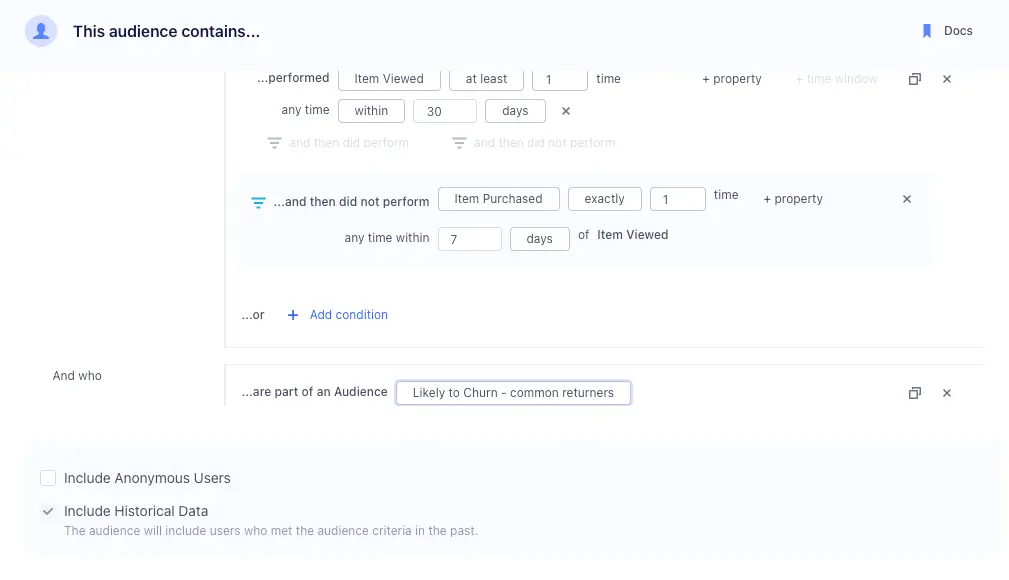
Generative Audiences turns a written description into audience rules using the events and traits available in your workspace. I can see the appeal for marketers who know the group they want but don’t want to build every condition manually.
I’d still inspect the resulting rules. The feature supports English prompts, and its schema context favors recently used data. An inactive event or trait may not be recognized, so a plausible-looking result can still miss part of your intended audience.
To me, this is useful assistance with audience construction. It doesn’t remove the need to understand your data.
Predictions Need a Track Record
Segment’s Predictions can estimate purchase and churn likelihood. Its Predicted Lifetime Value model forecasts spending over the next 120 days for customers with at least two qualifying purchases. I’d consider these tools once a business has reliable tracking and repeat customer activity.
Predictions need at least five event types and history covering three times the target window. A 30-day prediction therefore needs at least 90 days of history, with at least 100 users who performed the target action and 100 who did not. Clearing those thresholds doesn’t guarantee that the model will train successfully.
Scores update weekly by default. I would use them to prioritize an audience, then measure whether the resulting campaign improves outcomes. A prediction score alone isn’t evidence that a campaign will work.
How Real-Time Are Segment Audiences?
Some audience definitions use scheduled computation. Time-window and funnel audiences, for example, default to an eight-hour update cycle; real-time audiences sent to batch destinations sync every two to three hours.
For an urgent follow-up, I’d confirm the timing of the exact audience and destination. Fast event collection doesn’t guarantee immediate campaign delivery, and your contract may set different computation limits.
How Does Segment Compare With Alternatives?
- Hightouch: My first comparison for a business with usable warehouse data that mainly needs to sync it into operational tools. Its source-and-model approach suits teams that want activation to start from existing data models.
- RudderStack: Worth a close look when engineers want warehouse-based identity resolution and customer features defined in configuration files. I prefer that approach for a team that already manages data logic through code review.
- Twilio Segment: My preference when the requirement spans collecting events, maintaining shared customer profiles, and giving marketers tools to act on them. The broader scope needs to justify the implementation effort.
How I Reviewed Twilio Segment
I evaluated pricing, documented setup workflows, feature requirements, and operational limits, then compared the architecture with Hightouch and RudderStack. My recommendations focus on buyer fit and implementation demands; they aren’t performance benchmarks or campaign results.
Prices and plan details checked October 2026.
Should You Choose Twilio Segment?
I’d choose Segment when inconsistent customer data is holding back several teams and you have the technical support to fix the foundations. Shared collection, controlled profiles, and audience activation make a persuasive package in that situation.
I’d hold off if you only need basic website analytics, haven’t agreed on your key events, or can’t name the campaigns that joined customer data would improve. Those gaps make it much harder to justify the investment.
Start with one source, one meaningful event, and one destination. Prove that flow, then price the profiles and activation capabilities your next use case actually needs.
Twilio Segment FAQ
Is Twilio Segment Free?
Connections has a free plan for a small implementation. The full Customer Data Platform package requires a custom quote.
Does Segment Replace My Analytics Tool?
I would usually use it alongside one. Segment collects and routes customer data; a connected analytics tool provides the reports your team uses to investigate behavior.
Do I Need a Data Warehouse?
No. You can send events from your website or application to connected destinations without making a warehouse part of the initial setup.
Is Segment Suitable for a Small Business?
It can be, if you have a clear integration problem and technical support. I’d skip a full CDP purchase when basic tracking already answers your business questions.