Editor’s note: We combine independent analysis, data collection, and hands-on testing to review data and AI tools. This TrueFoundry review weighs pricing transparency, real-world adoption signals, development momentum, openness and exit costs, practitioner sentiment, and our editorial verdict.
Quick verdict: We recommend TrueFoundry for platform teams that already run Kubernetes on AWS, GCP or Azure and want one control plane for model serving, training jobs, LLM hosting and an LLM/MCP gateway, with compute and data staying in their own cloud account. The trade-off: only the AI Gateway has public pricing (Developer free, Pro $25 per user per month, $20 per 100k extra requests); the deployment platform is a Contact Sales deal, the cluster prerequisites are yours to meet, and the platform is closed source.
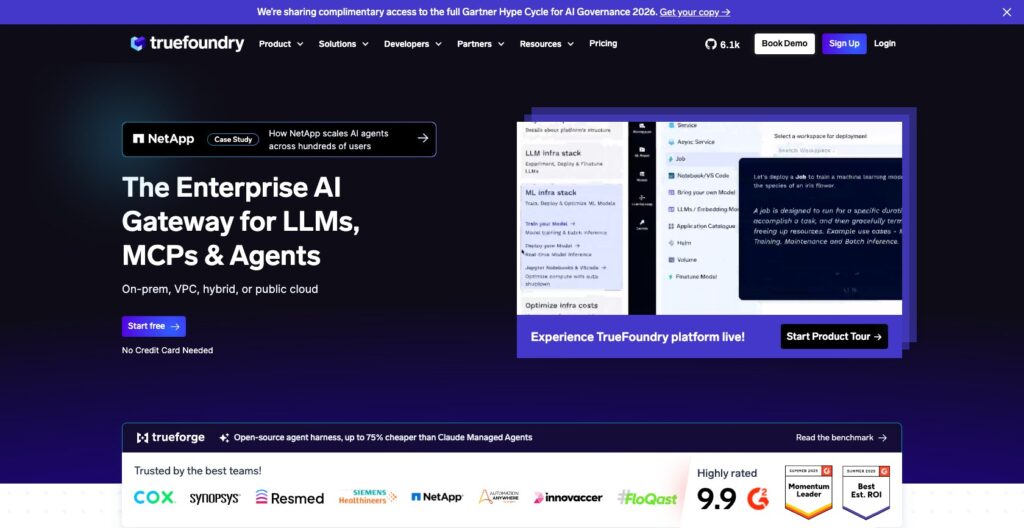
TrueFoundry deploys a FastAPI service, an async queue worker, a scheduled job or an open LLM on vLLM, SGLang or TensorRT-LLM onto your own EKS, GKE, AKS, OpenShift or on-prem cluster from one UI or the tfy CLI, and its AI Gateway fronts hosted LLM providers and your self-hosted models behind one OpenAI-compatible endpoint. SageMaker covers the same build-to-endpoint path, but only on AWS.
Founded in 2021 by three former Meta engineers, TrueFoundry raised a $19 million Series A led by Intel Capital in February 2025 and bought Seldon, the company behind Seldon Core and MLServer, in June 2026.
In this review, I’ll take a closer look at TrueFoundry’s pricing, deployment workflow, AI Gateway and LLM tooling, so you can see exactly whether a Kubernetes-native platform beats a managed cloud service or a DIY stack for your team.
Key Takeaways
- Split-plane architecture: TrueFoundry hosts the control plane, and every workload runs on your own Kubernetes cluster in your own cloud account
- One platform covers real-time services, async services, jobs, workflows, notebooks, LLM serving and QLoRA fine-tuning from the same control plane
- The AI Gateway adds rate limits, budgets, fallbacks, guardrails and an MCP gateway, priced per request rather than per token
- Published pricing covers the gateway only: the deployment platform is quote-only, and your cloud and model-provider bills sit on top
- The platform is closed source, and connecting a cluster needs real Kubernetes prerequisites, with TrueFoundry’s own estimate for the provisioning run at 40-50 minutes
Pros and Cons
Pros
- Workloads and data stay in your own AWS, GCP, Azure or on-prem Kubernetes; only the control plane is hosted
- One control plane for services, jobs, notebooks, LLM serving on vLLM, SGLang or TensorRT-LLM, and fine-tuning
- Gateway Pro costs $25 per user per month with 20k requests per user pooled across the team
- Rate limits, budget rules, automatic fallback and guardrail policies per user, team or service
- SOC 2 and HIPAA, with VPC, on-prem and air-gapped deployment on Enterprise
Cons
- The deployment platform has no public price; serving, jobs and notebooks are Contact Sales only
- On AWS, needs EKS 1.30+, Karpenter, EBS and EFS CSI drivers and a wildcard certificate before the first deploy
- Closed source; only the TrueForge agent harness is MIT licensed
- Request metering counts every LLM call and every MCP tool call, and model-provider bills come on top
How Much Does TrueFoundry Cost?
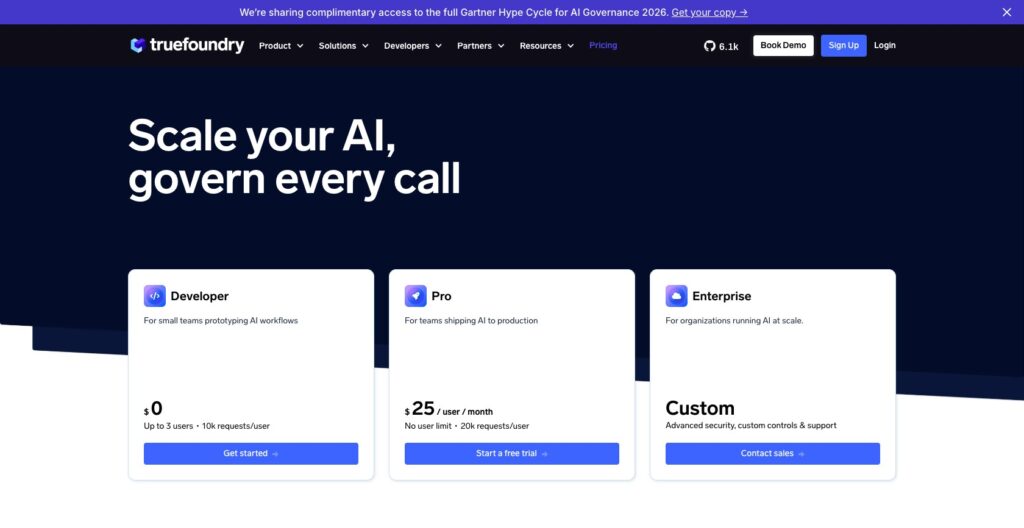
TrueFoundry publishes three AI Gateway plans, and that is the whole public price list: the deployment platform (model serving, jobs, notebooks, fine-tuning) has no listed price and goes through Contact Sales, and every GPU or CPU you run bills to your own cloud account.
- Developer (Free): up to 3 users, 10k requests per user per month, 2 teams, 3 service accounts, 5 model accounts, 1 budget rule, 7-day log retention
- Pro ($25 per user per month): unlimited users, 20k requests per user per month pooled across the team, up to 10 teams, 50 service accounts, 10 budget rules, 10 guardrail policies, 30-day log retention and a support portal
- Enterprise (Custom): SSO, SCIM, activity logs, VPC, on-prem or air-gapped deployment, data residency controls, an SLA, a dedicated Slack channel and the option of a self-hosted control plane
| Plan | Price | Included requests | Teams / service accounts | Log retention | Deployment |
|---|---|---|---|---|---|
| Developer | Free | 10k per user per month, up to 3 users | 2 teams / 3 service accounts | 7 days | Hosted control plane |
| Pro | $25 per user per month | 20k per user per month, pooled across the team | Up to 10 teams / 50 service accounts | 30 days | Hosted control plane |
| Enterprise | Custom | Custom | Custom | Custom | VPC, on-prem or air-gapped; deployment platform quoted through sales |
Overage is $20 per 100k requests beyond the pooled allowance, with no minimum commitment, and Pro can start with a single user. Every LLM request and every MCP tool call counts as one request, so a 1-token ping and a 200k-token prompt cost the same, while OpenAI, Anthropic, Google, Azure or AWS bill you for the tokens separately.
A 10-person Pro team gets 200k pooled requests for $250 per month. At 500k requests a month the extra 300k costs $60, so $310 before provider bills, where LiteLLM’s self-hosted proxy routes for free.
Experiment tracking is not in the bundle, so budget ClearML Pro at $15 per user per month or Comet Pro at $19 per user per month on top.
Is TrueFoundry Good Value for Money?
- Strong value as a gateway for small teams: $25 seats plus $20 per 100k requests are predictable, and Developer covers a 3-person pilot free
- Platform value depends on the quote and on who runs your cluster: a team with a Kubernetes owner skips hand-wiring ArgoCD, Prometheus and autoscaling; a team without one buys an ops job along with the quote
- The savings claims are TrueFoundry’s own: over 40% against SageMaker by avoiding a 25-40% instance markup and using spot and fractional GPUs, which we have not measured
- No free path to the deployment platform: a 2-person team cannot deploy a model on TrueFoundry without a sales conversation, where Modal starts at $0 with $30 of credits
Author’s Testing Notes
I recommend starting on the free Developer plan, wiring the gateway into one application and watching the request counter for a month, because the per-request meter decides whether $25 seats stay cheap for your traffic shape. Move to Pro when you pass 3 users or need guardrail policies, and request a platform quote only once someone owns the EKS, Karpenter and certificate prerequisites.
— Panoply team
My Experience With TrueFoundry
TrueFoundry starts as a hosted control plane: the gateway works from signup, but deploying anything of my own first meant handing the platform a Kubernetes cluster.
Connecting a Cluster
Deployment features stay hidden until you enable them under Settings > Platform Feature Visibility; from there, Clusters offers Create New Cluster or Attach Existing Cluster. The form asked me for a name, a region, a VPC, a load balancer choice and the platform features to turn on.
The AWS prerequisites come first: an EKS 1.30+ cluster with IRSA, EBS and EFS CSI drivers, AWS Load Balancer Controller 2.12.0 or newer, Karpenter, a wildcard domain with an ACM certificate, CPU and GPU quotas, and egress to container registries including public.ecr.aws, quay.io, ghcr.io and nvcr.io.
Submitting the form generates OpenTofu/Terraform for your AWS account and a single curl command to run it. TrueFoundry’s own estimate for that run is 40-50 minutes, after which the cluster connects back through IAM roles and a TFY Agent holds a WebSocket to the control plane.
Once the platform shows the cluster as connected, the last step is a Route 53 CNAME pointing the wildcard domain at the new load balancer. Modal and SageMaker skip this chapter because they own the compute; keeping your data and GPUs in your own account is what it buys.
Deploying My First Service
I installed the CLI with pip install -U truefoundry and ran tfy login --host <control plane URL>. In the UI, Deployments > New > Service asked me to pick a workspace, then a source: a GitHub repo or Code from Laptop.
The getting-started example is a FastAPI model server: repo truefoundry/getting-started-examples, build context ./deploy-model-with-fastapi/, command uvicorn server:app --host 0.0.0.0 --port 8000, port 8000. The form also exports the configuration as a deploy.py to run with python deploy.py, which is how I moved from clicking to code.
Once the deployment goes Active, the service answers at its /predict endpoint; ArgoCD handles the rollout and Prometheus feeds the autoscaler. The server must bind to 0.0.0.0 rather than localhost, and a .tfyignore file controls what gets uploaded from your laptop.
Deploying an Open LLM
For an LLM, Deployments > New offers a model catalog, or you paste a Hugging Face URL. TrueFoundry picks the GPU configuration and inference server (vLLM, SGLang or TensorRT-LLM), and gated models need your Hugging Face token stored as a Secret first.
Submitting gives you OpenAI-compatible Completions and Chat Completions endpoints. Autoscaling runs on requests per second by default, and scale-to-zero is available for dev deployments so a test model does not hold a GPU overnight.
What I rate highest is the code export: a team can start by clicking and end up in GitOps without re-describing the service. What I rate lowest is everything before the first form, an AWS prerequisite list that SageMaker never asks of you.
AI Gateway and MCP Gateway: Routing, Budgets and Guardrails
The TrueFoundry AI Gateway puts one OpenAI-compatible endpoint in front of hosted providers and your self-hosted vLLM or SGLang deployments, and it is the half of the product you can buy without talking to sales. TrueFoundry quotes anywhere from 250+ to 1,600+ supported models depending on the page, so test the providers you actually call.
- Rate limits per user, service or endpoint
- Cost and token budgets with budget rules (1 on Developer, 10 on Pro)
- Routing: latency-based routing, weighted balancing, automatic fallback to a second provider, and geo-aware routing
- Guardrails: PII and toxicity checks with OpenAI Moderation, AWS Guardrails and Azure Content Safety integrations, up to 10 policies on Pro
- Virtual models and virtual model groups so applications call a stable name while you swap the provider behind it
- Logs with P50/P90/P99 latency and time-to-first-token, kept 7 days on Developer, 30 on Pro, custom on Enterprise
The MCP Gateway applies the same idea to tools: a central registry of MCP servers (Slack, GitHub, Confluence and Datadog among the connectors) with RBAC and OAuth 2.0 in front, so an agent gets only the tools its team is allowed. An Agent Gateway sits alongside it, and every MCP tool call counts as one request on the meter.
Teams that cannot send prompts through a hosted gateway can run the gateway plane and its data storage in their own infrastructure, with only the control plane hosted. TrueFoundry’s own figures put internal gateway latency under 3ms and uptime at 99.99%, and it credits one customer, Staffbase, with 141 million-plus requests across 141 model deployments in 9 regions.
Portkey and LiteLLM win on simplicity if you never serve your own models; Helicone, Langfuse and LangSmith are observability-first and go deeper on tracing. TrueFoundry’s edge is that one budget rule can cover a GPT call and a request to an open model on your own cluster.
Model Deployment, Jobs and Notebooks on Your Own Kubernetes
Five workload types and a registry deploy from the same control plane: real-time services (REST or gRPC, including FastAPI, Streamlit and Gradio apps), async queue-backed services, jobs run manually or on a schedule, multi-step workflows, Jupyter and VS Code or SSH remote servers, and a model and artifact registry.
- Clusters: EKS, GKE, AKS, OpenShift, Oracle Kubernetes Engine or on-prem Kubernetes
- Delivery and metrics: ArgoCD for deployments, Prometheus for metrics and autoscaling
- Optional add-ons: Istio, Argo Rollouts, Argo Workflows, KEDA, Victoria Logs with Vector, the NVIDIA GPU Operator and Grafana
- Cost levers: spot instances, fractional CPU down to 0.1 of a core, and fractional GPUs, which TrueFoundry cites alongside the SageMaker instance markup for its 40%-plus savings claim
You are buying open-source Kubernetes tooling bundled under a UI and CLI, not new serving technology. A platform team that has already wired ArgoCD, Prometheus and Karpenter by hand gets less from it than a 5-person ML team that has none of that.
SageMaker and Vertex AI tie the same workload types to one cloud each, and Databricks bundles data processing with managed MLflow but is built around the lakehouse rather than standalone serving.
Our verdict on the platform half: right for teams with a cluster owner who want services, jobs and notebooks governed in one place, and wrong for a team whose first question is who will upgrade the cluster.
LLM Serving, Fine-Tuning and Agents
The catalog deploy from My Experience runs on vLLM, SGLang or TensorRT-LLM with the GPU configuration chosen for you, caches models so a restart does not re-download weights, uses sticky routing to keep a session’s KV cache on one replica, and exposes GPU utilization, temperature and memory as metrics.
Fine-tuning from the same catalog uses QLoRA, which TrueFoundry says fits a fine-tune onto smaller hardware, down to a single GPU. Self-hosted models sit behind the same gateway, so one budget rule covers your hosted GPT traffic and your own fine-tuned model.
TrueForge, launched on August 19, 2026, is an MIT-licensed agent harness and the only open-source piece of TrueFoundry. TrueFoundry’s own benchmark puts it at $8.50 per run against $11.80 for Claude Managed Agents across 14 tasks, roughly 30% less, a vendor figure on its own task set that we have not validated.
The Seldon acquisition, announced June 24, 2026, brings Seldon Core and MLServer under TrueFoundry, and the announcement says nothing about their licensing. Seldon Core users should watch for that answer.
Modal, billing serverless GPUs per second (an H100 at about $3.95 per hour), gets an open model online faster when nobody has provisioned a cluster.
How Does TrueFoundry Compare to Competitors?
TrueFoundry is the only product here that combines a Kubernetes deployment platform with an LLM and MCP gateway, so most TrueFoundry alternatives replace one half of it:
- Amazon SageMaker wins for AWS-only shops that want fully managed endpoints with no cluster to run
- Google Vertex AI wins for BigQuery-centric teams on GCP that want AutoML and custom training under one roof
- Databricks wins when training data already lives in the lakehouse and managed MLflow is the registry you want
- Portkey wins as a hosted gateway with no Kubernetes to run, starting on a free developer tier
- LiteLLM wins for teams happy to self-host a free open-source proxy and skip the budget and guardrail extras
- Modal wins for serverless GPUs billed per second, Starter at $0 with $30 of credits and no cluster
- BentoML wins for teams that want an open-source serving framework, with bring-your-own-cloud on BentoCloud Enterprise
- MLflow, Weights & Biases and ClearML win on experiment tracking and the registry; pair them with TrueFoundry rather than swap one for the other
| Tool | Best for | Runs where | Entry price |
|---|---|---|---|
| TrueFoundry | Kubernetes serving plus an LLM/MCP gateway | Your cloud or on-prem Kubernetes; hosted control plane | Gateway Developer $0, Pro $25 per user per month; platform custom |
| Amazon SageMaker | AWS-native managed ML | AWS | Pay-as-you-go |
| Google Vertex AI | GCP-native managed ML | Google Cloud | Pay-as-you-go |
| Databricks | Lakehouse data plus ML | Multi-cloud | Custom |
| Portkey | Hosted LLM gateway | Hosted | Free developer tier |
| LiteLLM | Self-hosted open-source proxy | Anywhere you run Docker | Free, open source |
| Modal | Serverless GPUs | Modal’s cloud | Starter $0 with $30 credits |
| ClearML | Open-source orchestration and tracking | Self-hosted or hosted | Pro $15 per user per month |
| Comet | Experiment management | Hosted or self-hosted | Pro $19 per user per month |
For TrueFoundry vs SageMaker, the decision is whether you would rather pay a negotiated platform fee to keep every workload on Kubernetes in your own account across clouds, or stay on AWS and let SageMaker own the compute.
How We Test
We install, configure and run each tool ourselves on a realistic workload, then weigh six areas: pricing transparency, real-world adoption signals, development momentum, openness and exit costs, practitioner sentiment, and our editorial verdict.
For TrueFoundry, we walked through connecting an AWS cluster, deploying the FastAPI example service from the UI and from deploy.py, deploying an open LLM from the catalog, and configuring gateway routing and budget rules. On exit costs, your services are plain containers on your own Kubernetes and the gateway speaks the OpenAI API, so leaving means re-pointing a base URL and keeping the cluster.
Sponsors and affiliate partners cannot change a verdict, areas that do not apply to a tool are left out rather than scored zero, adoption signals refresh monthly, and the editorial review is repeated quarterly.
Prices current as of October 2026.
TrueFoundry Review: Should You Run Your Models and LLM Traffic Through TrueFoundry?
Buy TrueFoundry if a platform team already runs Kubernetes on AWS, GCP or Azure and you need serving, jobs, notebooks and LLM hosting inside your own VPC, on-prem or air-gapped, with SOC 2 and HIPAA covered and one gateway governing both hosted and self-hosted models. Regulated teams get the strongest case: the compute plane never leaves your account, and the gateway plane can stay there too.
If you only want the gateway, Developer at $0 for 3 users and Pro at $25 per user per month is a cheap, low-risk start, and the $20 per 100k overage is simple to forecast.
Skip it if nobody on your team owns a cluster, where Modal or SageMaker remove that job entirely; if procurement needs open source end to end, where LiteLLM and MLflow qualify and TrueFoundry’s closed control plane does not; or if experiment tracking is the actual need, where Comet at $19 per user per month or Weights & Biases does the job without a deployment platform attached.
Start on the Developer gateway plan this week, then request a platform quote with a named workload and a named cluster owner. Visit truefoundry.com to create the free account.
FAQ
Is TrueFoundry open source?
No. The TrueFoundry platform and its AI Gateway are closed source; the one open-source piece is TrueForge, the MIT-licensed agent harness released in August 2026. LiteLLM (gateway) and MLflow (tracking and registry) are the open-source alternatives for each half.
How much does TrueFoundry cost?
TrueFoundry pricing covers the AI Gateway: Developer is free for up to 3 users, Pro is $25 per user per month with 20k pooled requests per user, Enterprise is custom, and overage is $20 per 100k requests. The deployment platform for serving, jobs and notebooks has no public price and is quoted through sales.
Does TrueFoundry host my GPUs?
No. TrueFoundry hosts only the control plane; the compute plane runs on your own Kubernetes cluster in AWS, GCP, Azure, OpenShift, Oracle or on-prem, and your cloud provider bills you for the GPUs directly.
Can TrueFoundry run on-prem or air-gapped?
Yes. The compute plane runs on on-prem Kubernetes as standard, and the Enterprise tier adds VPC, on-prem and air-gapped deployment with a self-hosted control plane option, data residency controls, SSO, SCIM and activity logs.
TrueFoundry vs SageMaker: which is cheaper?
It depends on your instance bill. TrueFoundry claims over 40% savings by avoiding what it describes as a 25-40% SageMaker instance markup and by using spot instances and fractional GPUs; compare its custom platform quote plus your raw cloud bill against your current SageMaker invoice.
Which LLM inference servers does TrueFoundry support?
vLLM, SGLang and TensorRT-LLM. Each deployment exposes OpenAI-compatible Completions and Chat Completions endpoints, with model caching and GPU metrics included.
Is there a free trial?
The Developer gateway plan is free for up to 3 users and 10k requests per user per month, and TrueFoundry also offers a 7-day trial at signup. The deployment platform has no free path; it needs a sales conversation and your own Kubernetes cluster.