
Editor’s note: My assessment of LlamaParse weighs pricing transparency, real-world adoption signals, development momentum, openness and exit costs, and practitioner sentiment. The recommendations below draw on documented capabilities, published benchmarks, and user reports.
Quick verdict: I recommend LlamaParse for teams parsing complex documents (dense tables, scans, mixed layouts) inside a LlamaIndex-native pipeline, using the mode menu deliberately. The trade-off: user-filed reliability issues, including empty output on paid plans, and raw LLM calls that win on cost at volume. In this LlamaParse review, I examine the credit math, quality record, and alternatives for document parsing and RAG pipelines.
Key Takeaways 🔍
- v2 pricing (September 2026): Fast 1, Cost-effective 3, Agentic 10, Agentic Plus 45 credits per page; 1,000 credits cost $1.25; the free tier’s 10K monthly credits hard-stop with a 402 error
- The real per-page range is $0.00125 to about $0.056, a 45x spread by mode
- Platform breadth: 130+ file formats, EU region, SOC 2 Type II, 48-hour cache with opt-out
- Con: 2026 GitHub issues report failed jobs, empty markdown, and figure errors, including on a paid plan
- Con: the Agentic-tier models are unnamed, and the llama-parse package is deprecated for the llama-cloud SDK
Pros and Cons
Pros
- Mode menu trades cost for fidelity across a 45x range, from $0.00125 to about $0.056 per page
- 130+ file formats, including spreadsheets, images, and audio
- Production users vouch for table accuracy; one called it among the rare tools that always got the right information
- EU region, SOC 2 Type II, and a 48-hour cache with a do_not_cache opt-out
- Composes with Extract, Classify, Split, and Index on one platform
Cons
- 2026 GitHub issues report failed jobs and empty output, including on a paid plan
- Per-page cost loses to raw multimodal LLM calls at high volume, per independent cost analysis
- The models behind the Agentic tiers are not publicly named
- The llama-parse package was maintained only until May 1, 2026, forcing an SDK migration
- A transcription error sat on the vendor’s own landing-page demo, spotted independently by two developers
The Credit Menu: Modes, Math, and the Repricing History
I would start a LlamaParse budget with the parse mode: that one decision can swing your bill 45x. The v2 API prices four tiers per page, verified September 2026 at $1.25 per 1,000 credits:
- Fast (1 credit = $0.00125 per page): text extraction for simple digital documents, no LLM processing
- Cost-effective (3 credits = $0.00375 per page): ordinary mixed documents
- Agentic (10 credits = $0.0125 per page): agentic OCR for harder layouts
- Agentic Plus (45 credits = about $0.056 per page): the hardest scans and layouts
| Mode | Credits per page | Price per page | Fits |
|---|---|---|---|
| Fast | 1 | $0.00125 | Clean digital text, no tables that matter |
| Cost-effective | 3 | $0.00375 | Everyday PDFs with moderate structure |
| Agentic | 10 | $0.0125 | Dense tables, scans, mixed layouts |
| Agentic Plus | 45 | $0.05625 | The pages that break everything else |
The platform auto-selects the model within each tier, and layout extraction is always on and free in v2. Plans stack on top of the credit rate:
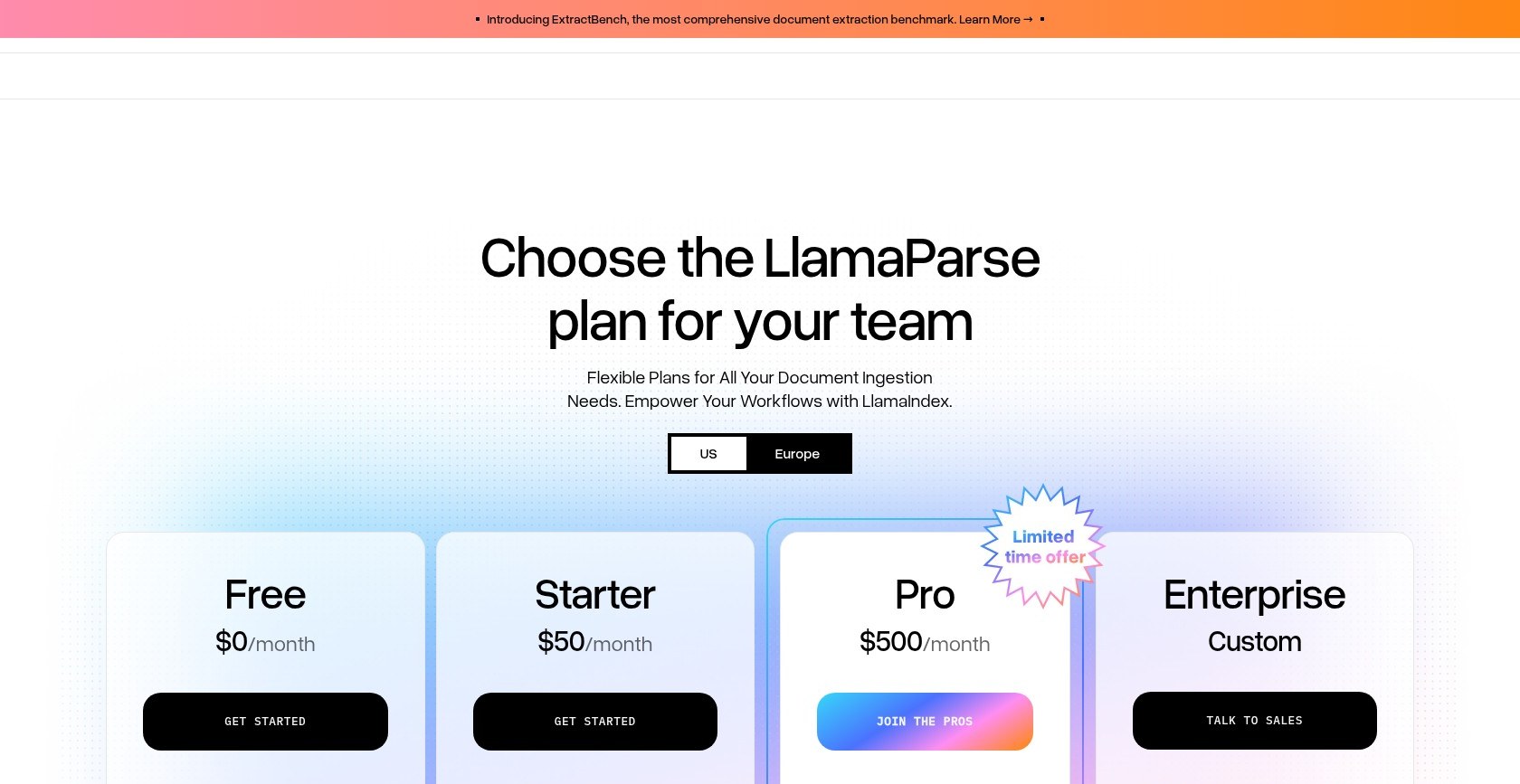
- Free ($0): 10K credits a month, then a hard 402 stop until the next billing cycle
- Starter ($50 a month): 40K credits, then pay-as-you-go up to $5,000 a month
- Pro ($500 a month): 400K credits, plus a promotional one-time 800K-credit bonus for business-email signups; unused bonus credits expire immediately on downgrade
- Enterprise (custom): the only plan with BAAs
This menu is the second pricing system LlamaParse has run. The v1 scheme priced by named model: LVM modes ran 6 to 60 credits per page, agent modes 10 to 90, and preset templates like Invoice cost a flat 90. v2 replaces all of that with four tiers, and v1 is still documented while it is phased out. I would re-check the rate card before committing, because this vendor reprices.
Parse 10,000 mixed pages on Cost-effective: 30K credits, $37.50. Run the same pages through Agentic Plus: 450K credits, $562.50. The cheapest lever is Classify at 1 to 2 credits per page, which routes each document type to the right tier before Agentic credits land on pages Fast would have handled.
Is LlamaParse Good Value for Money?
- Raw multimodal LLM calls undercut it per page. An independent cost analysis of Gemini-class parsing set off a 1,303-point Hacker News debate, and one commenter’s math put the crossover where fixed hardware beats per-page vendor pricing at about 500,000 pages a day
- The counterargument comes from a parsing-vendor essay: frontier models handle basic extraction, but precision table and reading-order work is territory where being a little wrong is the same as being wrong, and that precision is what the premium buys when it delivers
- The free 10K monthly credits are a real evaluation budget: 10,000 Fast pages or 222 Agentic Plus pages, at $0
Reviewer’s Notes 📝
I recommend benchmarking Fast and Cost-effective on your own corpus first, then reserving the Agentic tiers for the specific pages that fail. Wire your 402 handling before you trust the free tier inside anything automated: when the 10K credits run out, the API stops with an error, not a warning.
— Panoply reviewer
Getting Started With LlamaParse
The workflow is a managed job queue: submit a document, poll, collect structured output. My first recommendation is to choose the current SDK before planning the integration.
Parsing a Document
The current path is the llama-cloud SDK (PyPI: llama-cloud, npm: @llamaindex/llama-cloud). The standalone llama-parse package that most old tutorials reference is deprecated and was maintained only until May 1, 2026, and the interim llama-cloud-services package is deprecated too. If you are integrating today, get that consolidation right first.
To parse a document, instantiate the client with LlamaCloud(), upload with client.files.create(file='document.pdf', purpose='parse'), then run client.parsing.parse() with the file ID, a tier such as 'agentic', and expand=['markdown']. The job returns markdown and JSON with layout data, page by page, readable at result.markdown.pages[0].markdown.
I see two useful ways to control costs on large documents: target_pages restricts parsing to the pages you actually need, and the Split API can pre-segment concatenated files before you spend higher-tier credits on them.
For documents that need several structured views, parse once and run Extract against the cached result with different schemas at extract-only cost. When a job fails, its status and error code show in both the API and the web UI, backed by a Troubleshooting & Error Codes guide.
The Operational Envelope
The vendor’s own Limitations page defines the working range (all figures are the vendor’s):
- Max upload size: 512MB per file
- Per-page extraction caps: 35 images and 64KB of text
- Job timeout: a base of up to 2 hours, plus up to 5 minutes per page
- Average parse time: about 45 seconds for a block of pages, with image-dense documents noticeably slower
That reported 45-second average would make me cautious about using LlamaParse in an interactive application. I would treat it as batch infrastructure, not a real-time endpoint.
Privacy and Regions
Uploaded documents are cached for 48 hours to avoid re-billing repeat jobs, then permanently deleted, and the vendor states your data is never used for model training. For sensitive files, do_not_cache=True skips the cache entirely. An EU region is available by pointing the client at api.cloud.eu.llamaindex.ai, the service is SOC 2 Type II certified, and enterprise customers can self-host via BYOC. The catch for healthcare teams: BAAs are Enterprise-plan only.
Reviewer’s Notes 📝
My main budgeting concern is that the parser is one part of a metered platform. Extract caps schemas at 5,000 properties and 7 nesting levels, Classify runs 1 to 2 credits per page, Split is still in beta, and Index charges 1 credit per page plus 100 credits per chat turn. I would price the whole workflow before building around any one piece of it.
— Panoply reviewer
Parse Quality: What Users and Tests Actually Say
I would not assume that paying 45 credits a page guarantees accurate output. The record is mixed: strong table fidelity in production, systematic errors in independent tests, and a reliability backlog on GitHub.
One user who ran LlamaParse in production called it one of the rare tools that always got the right information out of tables. The same user’s caveats deserve equal print: tables-only benchmarks undersell problems with irregular text structures, and using a non-deterministic LLM-based tool for deterministic work means writing, modifying, and maintaining a prompt.
The independent benchmarks discussed in the Unstructured review give me a mixed picture. LlamaParse was the fastest of the three tools tested, at roughly 6 seconds regardless of document length, and produced the best row and column structure in one table test.
The weaknesses, from the same benchmarks:
- Complex tables: systematic misplacement; in one case LlamaParse extracted 100% of the values and placed 0% of them correctly
- Multi-column layouts: trouble keeping columns apart, with merged words
- Currency symbols and footnotes: accuracy dropped
- Table accuracy overall: Docling led, at 97.9% cell accuracy on a hierarchical table
Reliability is the area I would test hardest before committing. GitHub issues filed in 2026 report instability and slow responses in March, jobs that could not parse any files, markdown coming back empty in parse_page mode since mid-February, and incomplete record extraction on a paid plan. Figures are a second cluster: errors processing figures, images that could not be analyzed, and index creation failing with image enrichment enabled. Before production, test exactly those paths: job failure handling, empty-output detection, and figure-heavy pages.
A cautionary anecdote from February 2025: a transcription error sat in the parsed-document demo on LlamaParse’s own landing page, 234.4 where the source said 234.1, spotted independently by two developers in the same public discussion. If the showcase page needs proofreading, your pipeline needs verification.
One open question: a prospective buyer publicly asked LlamaIndex’s CEO how well LlamaParse handles foreign-language documents, for an Arabic pipeline, and the question sits unanswered, with no non-English accuracy figures publicly documented. For a multilingual pipeline, I would treat non-English accuracy as unproven until tests on your own documents say otherwise.
LiteParse and the When-to-Pay Question
For me, the strongest reason to question whether you need paid LlamaParse comes from LlamaIndex itself. The company maintains LiteParse, a free, Apache-2.0, fully local parser that its README puts at roughly 2 to 5 milliseconds per page, with no cloud dependency and no per-page cost.
LiteParse is positioned explicitly as the lightweight option for when full LlamaParse accuracy is not needed, and its own README draws the boundary: LlamaParse gives significantly better results on complex documents, meaning dense tables, multi-column layouts, charts, handwritten text, and scanned PDFs. That is the vendor telling you, in its own repository, which documents do not need its paid product. The same vendor benchmark framing shows chart extraction scoring near zero for every tool tested, 0.013 for LiteParse itself.
Here is how I would choose:
- Digital-native, simple documents: LiteParse or Fast mode, at zero or $0.00125 per page
- Dense tables, scans, handwriting, mixed layouts: the Agentic tiers, which exist for the documents that break everything else
- Charts: hard for the entire category, per the vendor’s own numbers; plan on manual verification or a separate extraction step regardless of what you pay
The scale claims around the paid product (1B+ documents processed, 300k+ LlamaParse users, testimonials from 11x, Pursuit, Stack AI, and Delphi) are vendor marketing, not independent verification; treat them as directional.
How Does LlamaParse Compare to Competitors?
I would shortlist alternatives based on what you need to improve: parsing speed, table structure, or cost.
- Unstructured: the ETL and connector play, priced at a flat $0.015 per page after 10,000 free pages, which budgets predictably where LlamaParse’s bill swings 45x by mode. In the same independent tests that flattered LlamaParse’s speed, it was slower and weaker on complex tables. Panoply carries a full review
- Docling: the table-accuracy leader in those independent benchmarks (97.9% cell accuracy on a hierarchical table), free and local. It is a library, not a managed service, so you inherit hosting, scaling, and retention policy yourself
- Raw multimodal LLMs (Gemini-class): the cost disruptor the 1,303-point Hacker News thread was about. Cheaper per page at volume, but you build the prompting, chunking, and error handling yourself, with no parsing-specific guarantees; at scale that build cost amortizes, below it the build is pure overhead. The precision counterargument, from a parsing-vendor essay: a little wrong is the same as wrong on high-stakes tables
- Cloud OCR (AWS Textract, Azure): the incumbent for forms and compliance-grade structure. Hacker News practitioners argue cloud platforms beat both LlamaParse and Unstructured on forms and tables, and one reports testing Textract head-to-head against LlamaParse for a real extraction pipeline, so treat it as a standing candidate, not a legacy option
- LiteParse: the in-family free parser for simple documents, covered above, at roughly 2 to 5 milliseconds per page
I would choose LlamaParse for LlamaIndex-native pipelines with difficult documents and a deliberate mode budget. For simple documents, I would start with free tools; for forms and compliance requirements, I would evaluate cloud OCR. At extreme volume, I would compare raw-model costs before committing.
How I Reviewed LlamaParse
My assessment focuses on LlamaParse’s documented pricing, SDK requirements, parsing modes, operational limits, and privacy options. I weigh those capabilities against published benchmark results and practitioner reports, with particular attention to table accuracy and reliability.
I distinguish vendor claims from independent findings and treat reported failures as reasons to test your own workload. The performance figures cited here come from published benchmarks and vendor documentation, rather than a personal performance test. Prices current as of September 2026.
LlamaParse Review: Should You Parse Your Documents With LlamaParse?
I recommend LlamaParse for complex-document workloads, scans, dense tables, and mixed layouts feeding LlamaIndex or LlamaCloud pipelines, for compliance-conscious teams that want the EU region and the cache opt-out, and for teams that will actually use the mode menu instead of defaulting to the priciest tier. Used that way, the 45x price spread is a tool, not a trap.
I would skip it for clean digital corpora, where LiteParse or Fast mode covers the job at zero to $0.00125 per page. I would also look elsewhere for form-extraction compliance work, where cloud OCR remains the incumbent. At volumes where the raw-model math wins, I would compare the cost of building a custom pipeline; one commenter’s estimate in the public cost debate put that crossover around 500,000 pages a day.
My recommendation is to start with a free evaluation: point the free tier’s 10K monthly credits at your worst 50 pages and run them through Fast, Cost-effective, and Agentic, which spends 700 credits. Then check every table by hand against the source. Wire your 402 and failed-job handling before any of it touches production, because both failure modes are documented in the issue tracker.
FAQ
How much does LlamaParse cost per page?
Between $0.00125 and about $0.056 per page, depending on mode. The v2 tiers cost 1 credit (Fast), 3 (Cost-effective), 10 (Agentic), or 45 (Agentic Plus) per page, at $1.25 per 1,000 credits. The free plan includes 10K credits a month and returns a 402 error when they run out; Starter is $50 and Pro is $500 a month, with pay-as-you-go at the same credit rate once included credits are spent. See The Credit Menu above for the full math.
Is LlamaParse accurate?
Mixed. Production users vouch for its table accuracy, and independent benchmarks found it fast (about 6 seconds per document) with strong row and column structure. The same benchmarks found systematic value misplacement in complex tables, and 2026 GitHub issues report failed jobs and empty output. Chart extraction is weak across the whole category, and non-English accuracy is not publicly documented.
Is my data safe with cloud parsing?
LlamaParse caches documents for 48 hours, then permanently deletes them, and states data is never used for model training. Set do_not_cache=True to skip caching for sensitive files. An EU region and SOC 2 Type II certification are available; BAAs for HIPAA workloads require the Enterprise plan, as does self-hosting through BYOC.
LlamaParse vs Unstructured: which should I pick?
I would shortlist LlamaParse for speed and table structure inside LlamaIndex pipelines, and Unstructured for ETL breadth and connectors at a flat $0.015 per page. Independent tests found LlamaParse faster and stronger on tables, though with placement errors on complex ones. The Unstructured review covers the other side in full.
Which SDK should I use for LlamaParse?
Use llama-cloud (PyPI) or @llamaindex/llama-cloud (npm). The standalone llama-parse package is deprecated and was maintained only until May 1, 2026, and the older llama-cloud-services package is deprecated too. Both fold into the unified llama-cloud SDK, so new integrations should start there.