Editor’s note: We combine independent analysis, data collection, and hands-on testing to review data and AI tools. This JFrog ML review weighs pricing transparency, real-world adoption signals, development momentum, openness and exit costs, practitioner sentiment, and our editorial verdict.
Quick verdict: We recommend JFrog ML for teams already running JFrog Artifactory who want model builds, endpoints and monitoring under the same registry and scanner as their packages. The catch: MLOps bundles need Enterprise X (from $950 per month) or Enterprise+, ML credits have no published dollar rate, and the feature store is Ultimate-only, which means Enterprise+.
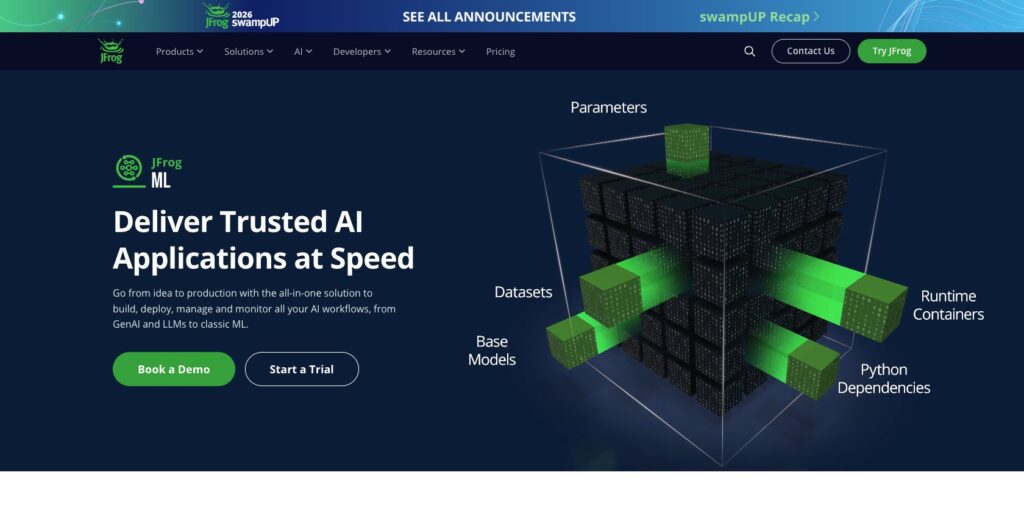
JFrog bought Qwak for $230 million, announced June 2024, and launched JFrog ML in March 2025. The Qwak MLOps platform workflow survived: wrap a model in a Python class, run frogml models build for a Docker image, and deploy it as a REST endpoint, batch job or Kafka stream. SageMaker covers the same path pay-as-you-go from $0.23 per hour.
In this review, I’ll take a closer look at JFrog ML’s pricing, builds, serving, feature store and governance, so you can see exactly whether it belongs on your Artifactory contract.
Key Takeaways
- One Python class plus one build command deploys as a REST endpoint, batch job or Kafka stream
- Models live in Artifactory with Xray scanning and the AI Catalog
- MLOps ships as the Unified bundle (Enterprise X or Enterprise+) or Ultimate bundle (Enterprise+ only), with no public price
- The feature store, A/B and shadow deployments are Ultimate-only; the SaaS feature store runs batch feature sets only
- There is a 14-day free trial, but Qwak’s $1.20-per-QPU pay-as-you-go pricing is gone
Pros and Cons
Pros
- A Python class plus frogml models build produces a deployable Docker image
- Real-time, batch and Kafka streaming deployments from the same build, with autoscaling to zero
- Models stored in Artifactory and scanned by Xray, next to your software packages
- Deploys on JFrog-managed cloud or your own AWS, Google Cloud or Azure account
- 14-day free trial on a company email, before any Enterprise contract
Cons
- MLOps bundles need Enterprise X (from $950 per month) or Enterprise+; there is no standalone JFrog ML plan
- ML credits have no published dollar rate, so compute cost needs a sales quote
- Feature store, A/B testing and shadow deployments need the Ultimate bundle on Enterprise+
- SDK and CLI renamed from qwak to frogml, so Qwak-era tutorials no longer match the commands
How Much Does JFrog ML Cost?
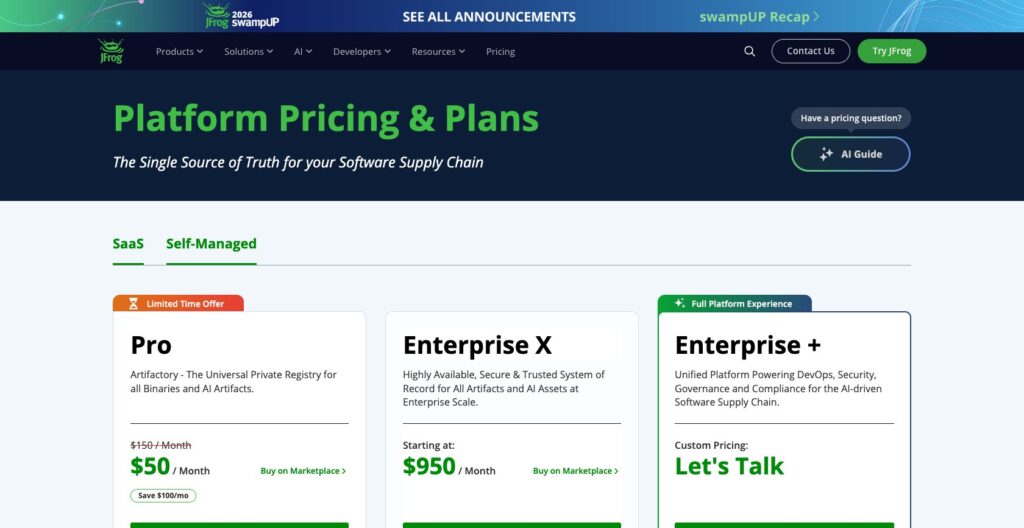
JFrog ML pricing is an MLOps bundle on top of a JFrog Platform subscription: there is no standalone JFrog ML plan, and Qwak’s old price list now forwards to JFrog’s.
- Pro ($150 per month, $50 per month on a limited-time offer): Artifactory and Xray, 25 GB base, no MLOps bundle
- Enterprise X (from $950 per month on SaaS, from $51,000 per year self-managed on 3 servers): the entry point for the Unified MLOps bundle, sized for up to 300 users and 20 TB
- Enterprise+ (custom quote): the only tier with the Ultimate MLOps bundle
- Unified MLOps bundle (quote, 200-developer base): registry, experiment tracking, model data analytics, monitoring, and real-time, batch and streaming serving
- Ultimate MLOps bundle (quote, 500-developer base): adds multi-environment setup, A/B and shadow deployments, the feature store, and multi-cloud and multi-region deployment
| Plan | Starting price | MLOps bundle available | ML features included |
|---|---|---|---|
| Pro | $150 per month SaaS ($50 per month limited-time offer) | None | None; Artifactory and Xray only |
| Enterprise X | From $950 per month SaaS, or $51,000 per year self-managed | Unified (200-developer base, quote) | Model registry, experiment tracking, model data analytics, monitoring, real-time, batch and streaming serving, base ML credits |
| Enterprise+ | Custom | Unified or Ultimate (500-developer base, quote) | Everything in Unified plus multi-environment setup, A/B and shadow deployments, feature store, multi-cloud and multi-region deployment |
Enterprise X and Enterprise+ include a base amount of ML credits; overage is billed automatically on the monthly invoice rather than blocking the account. CPU instances meter from 0.125 credits per hour (Prompt, 0.5 CPU, 1 GB) to 16 (4XLarge, 64 CPU, 128 GB), GPUs from 2.19 (T4 XL) to 163.2 (A100 8XL), and feature store clusters add 4 to 120 per hour.
JFrog publishes no dollar rate per credit; the rate comes from sales. SageMaker bills an ml.g5.xlarge at $0.74 per hour pay-as-you-go, ClearML Pro costs $15 per user per month, and Qwak’s retired $1.20-per-QPU rate with its 100-QPU monthly free tier is gone.
Is JFrog ML Good Value for Money?
- Good value if you already pay for Enterprise X or Enterprise+: the bundle rides on an existing contract, with one vendor and one scanner for packages and models
- Poor value for a 5-person data science team without Artifactory: a $950 per month platform floor before any compute, against free MLflow or Comet at $19 per user per month
- Budget risk from the undisclosed credit rate and the 200-developer bundle base: your first invoice is an estimate until sales quotes both
- Feature store buyers must budget for Enterprise+: it ships only in the Ultimate bundle, and SaaS feature sets are batch only
Author’s Testing Notes
I recommend running the 14-day trial on one real model to size credit burn, then pricing the Unified bundle on Enterprise X, because it covers the registry, monitoring and all three serving modes. Move to Enterprise+ for Ultimate only if you need the feature store or shadow and A/B rollouts, and negotiate the base credit allowance and per-credit rate against the burn you measured.
— Panoply team
My Experience With JFrog ML
The way in is a 14-day free trial on a company email; SageMaker’s closest equivalent is its 2-month free tier.
Starting the Trial
I started the trial with a company email, and JFrog ML sits inside the JFrog Platform alongside Artifactory and Xray. The trial lists scikit-learn and XGBoost among its frameworks, Snowflake, MySQL and Kafka among its data sources, and NVIDIA NIM and Hugging Face as integrations.
Creating a Model and Writing the Class
I installed the frogml SDK, which supports Python 3.12 and 3.13, and ran frogml models create "<Name>" --project-key <key> to register the model under a project. The model itself is a class that subclasses FrogMlModel with two methods.
build() runs once during the remote build: it trains or loads weights and logs metrics with frogml.log_metric(). predict(), decorated with @frogml.api(), takes and returns Pandas DataFrames by default, with input and output adapters for other formats, and training data can come from the Feature Store, a CSV, S3 or Parquet.
Building on Managed Compute
frogml models build --model-id <id> . runs build() remotely on JFrog’s managed compute, runs the integration tests, and stores the result as a Docker image. Adding --instance gpu.t4.xl --gpu-compatible moves the build to a T4 with CUDA 12.1 provisioned.
GPU builds run on EC2 Spot instances to keep cost down, so a GPU build can wait for Spot capacity before it starts.
Deploying a Real-Time Endpoint
Each real-time deployment is a REST endpoint on Kubernetes with min and max replicas, a polling interval that defaults to 30 seconds, and a cool-down that defaults to 300 seconds before the endpoint scales to zero. Prometheus triggers scale on CPU, GPU, memory, latency, error rate or throughput.
I could choose spot or on-demand instances, name variations of the model, and keep the default of 2 Gunicorn workers per replica. Clients call the endpoint through the Python inference SDK or a plain REST request.
Where I Hit Friction
The qwak-to-frogml rename is the main one. Qwak-era tutorials that use QwakModel and qwak models deploy, and the old docs.qwak.com address, still surface in search and no longer match the CLI, so a new team member copying an older example hits a command that does not exist.
The SaaS feature store accepts batch feature sets only, so the first time you want a streaming feature from Kafka, you are into the hybrid deployment in your own cloud account.
The developer loop itself is one class, one build command and one deploy. On SageMaker the same loop means wiring IAM roles, VPC settings and CloudWatch alerts yourself; MLflow gives you the registry and tracking but leaves the serving infrastructure to you.
Model Registry and AI Governance: Artifactory, Xray and the AI Catalog
JFrog ML uses Artifactory as its model registry, storing model files, data and components together for versioning and traceability, and Xray scans model artifacts the way it scans a Maven or npm package. That one design choice is the strongest reason to pick JFrog ML, and it means nothing to an organization that does not run Artifactory.
Models can arrive from Hugging Face or as NVIDIA NIM containers, which JFrog says deploy with one click, and JFrog names MLflow and SageMaker as integrations for teams that keep tracking or training elsewhere. A model pulled from Hugging Face lands in the same registry and under the same Xray scanning as your Maven and npm packages.
The AI Catalog, launched in September 2025 for JFrog Curation customers first, adds discovery of approved models through tags, projects and metadata, with continuous Xray scanning while a model sits in the catalog and one-click deployment to internal or external providers. A November 2025 expansion added shadow AI detection, which finds unmanaged calls to the OpenAI, Gemini and Anthropic APIs, and Secure Serving, an AI gateway that fronts models hosted by outside providers.
The catalog has since grown an MCP Registry, an Agent Skills Registry and Agent Guard, so the governance layer now covers agents and tool servers as well as model weights. JFrog says the platform serves over 7,000 customers and 80% of the Fortune 100; that is a platform-wide figure, not a count of JFrog ML users.
Weights & Biases and Comet are built for experiment tracking first; neither puts model binaries in the registry and scanner your software packages already use. If your security team already trusts Xray for packages, JFrog ML puts models under the same scanner; if it does not, governance alone is not a reason to buy.
Model Serving and Monitoring: Real-Time, Batch and Streaming
One build serves three deployment modes: a real-time REST endpoint, a batch inference job, and a streaming deployment that consumes from Kafka. The scale-to-zero autoscaling from My Experience applies to the real-time mode.
The instance catalog runs from the Prompt size (0.5 CPU, 1 GB) to a 4XLarge (64 CPU, 128 GB), plus 28 GPU options across A10, A10G, A100, T4, V100, L4 and M60 cards, up to an A100 8XL with 8 GPUs and 1,072 GB of RAM. Real-time deployments let you pick spot or on-demand capacity, so a test endpoint can run on spot while the customer-facing one stays on-demand.
Monitoring covers model data analytics, drift monitoring, runtime metrics, and request and prediction logging, with dashboards in Grafana over Prometheus and ElasticSearch. Those signals ship in the Unified bundle, so an Enterprise X customer gets drift monitoring and per-request logs without the top tier.
A/B testing, shadow deployments, multi-environment setup (dev, staging and prod), multi-cloud and multi-region deployment all sit in the Ultimate bundle on Enterprise+, so a Unified team cannot run a shadow copy of a new build against live traffic before switching to it.
JFrog ML deploys natively on AWS, Google Cloud and Azure, either on JFrog’s infrastructure or inside your own cloud account. BentoML covers serving only, and against SageMaker the comparison on serving comes down to three lines:
- Deployment modes: JFrog ML deploys the same build as a REST endpoint, batch job or Kafka consumer; SageMaker offers a broader GPU instance range but expects EC2, IAM and VPC work to wire it up
- Monitoring: JFrog ML ships Grafana dashboards and drift monitoring in the Unified bundle; SageMaker alerts need manual CloudWatch setup
- Rollouts and price: SageMaker includes shadow testing pay-as-you-go from $0.23 per hour on an ml.m5.xlarge; JFrog ML’s shadow deployments need Enterprise+ Ultimate on top of ML credits
Feature Store and LLM Tooling
Can JFrog ML replace a dedicated feature platform? Its feature store is built from entity keys, data sources and feature sets: batch feature sets read from Snowflake or BigQuery, streaming feature sets consume from Kafka, and real-time features compute at inference, with one extraction populating both the offline and online stores.
SaaS deployments support batch feature sets only, so streaming and real-time features need the hybrid deployment, which runs the compute in your own AWS or Google Cloud account. The feature store itself ships only in the Ultimate bundle, which means an Enterprise+ subscription, and its data clusters bill 4 to 120 ML credits per hour, from Nano to 2X-Large, on top of the serving instances.
Chalk is a dedicated feature platform you can buy without an Enterprise+ contract in front of it, and Tecton, now sold through Databricks, serves lakehouse shops. In our testing, JFrog ML’s store is the right answer only when the Ultimate bundle is already on the contract for other reasons.
The LLM tooling sits in the same platform: prompt management with versioning, a managed vector store for embeddings and retrieval-augmented generation, one-click deployment of open models such as Llama 3 and Mistral 7B, and request tracing on the serving side. Guesty, in a Qwak customer case study, built a RAG chatbot on the vector store with 50,000 rows refreshed daily, had it live in 3 weeks, and reports engagement rising from 5.46% to 15.78%; those are the customer’s numbers, not ours.
Both the feature store and the LLM tools are sensible parts of a JFrog-wide buy, and neither is a reason on its own to choose JFrog ML over Chalk for features or over a dedicated vector database for retrieval.
How Does JFrog ML Compare to Competitors?
JFrog ML wins only where Artifactory already is; each of these Qwak alternatives wins a clearer niche of its own:
- Amazon SageMaker meters instances pay-as-you-go (ml.m5.xlarge at $0.23 per hour, ml.g5.xlarge at $0.74 per hour) with a 2-month free tier, includes shadow testing and offers a broad GPU range; it wins for AWS-native teams who accept the EC2, IAM and VPC setup work and manual CloudWatch alerting
- Databricks pairs Spark-scale data processing with MLflow, Delta Live Tables and Mosaic AI; it wins when your training data already lives in the lakehouse, and it asks for Spark skills that a JFrog ML team never needs
- MLflow is free under Apache 2.0, covers tracking and the model registry, and is a named JFrog ML integration; it wins on cost and portability, and you run the serving infrastructure yourself
- Weights & Biases has a free tier and Pro from $60 per month; it wins for experiment tracking and evaluations, not serving
- ClearML is open source, with a free Community tier for 3 users, Pro at $15 per user per month for up to 10 users, and Scale and Enterprise tiers that self-host on VPC, on-prem or air-gapped networks; it wins for teams that want open-source orchestration without a platform contract
- Comet prices MLOps Pro at $19 per user per month with a free tier; it wins for per-seat experiment management on a small-team budget
- Google Vertex AI brings AutoML and tight GCP integration; it wins for GCP-native teams the way SageMaker does for AWS teams
- BentoML handles model serving only; it wins for teams that need just the serving half and already track and store models elsewhere
JFrog ML’s niche is the Artifactory shop that wants models governed like packages: scanned by Xray, stored in the same registry, and deployed through one CLI. For JFrog ML vs SageMaker specifically, the question is whether you would rather pay an Enterprise subscription for that governance or assemble IAM, VPC and CloudWatch yourself on hourly instances.
The MLflow integration is the hedge if you are unsure: keep experiment tracking in MLflow, build and serve through JFrog ML, and the experiment history leaves with you if the bundle does not renew.
How We Test
We install, configure and run each tool ourselves on a realistic workload, then weigh six areas: pricing transparency, real-world adoption signals, development momentum, openness and exit costs, practitioner sentiment, and our editorial verdict.
For JFrog ML, we worked through the 14-day trial, the frogml SDK and CLI, a remote build on managed compute, and a real-time deployment with its autoscaling settings, then weighed the Unified and Ultimate bundle terms and the ML credit metering against SageMaker, MLflow, ClearML and Comet. On exit costs, the model class is Python, the build artifact is a Docker image, and the registry is Artifactory, which outlives the MLOps bundle.
Practitioner sentiment on JFrog ML is thin, so this verdict leans on our own testing more than on user feedback. Sponsors and affiliate partners cannot change a verdict, areas that do not apply to a tool are left out rather than scored zero, adoption signals refresh monthly, and the editorial review is repeated quarterly.
Prices current as of October 2026.
JFrog ML Review: Should You Run Your Models on JFrog ML?
Buy JFrog ML if you already hold an Enterprise X or Enterprise+ contract and want one registry and one scanner for code and models, if you work in a regulated organization that needs every model scanned by Xray before it reaches an endpoint, or if you want managed GPU builds and Kafka serving without running Kubernetes yourself. The developer loop is one Python class, one build command and one deploy, and the 14-day trial lets you confirm that on your own model at no cost.
Skip it if you are a small data science team without Artifactory, where MLflow, ClearML at $15 per user per month or Comet at $19 per user per month cost a fraction of a $950 per month platform floor. AWS-native teams get shadow testing pay-as-you-go on SageMaker, lakehouse teams belong on Databricks, and teams that mainly want a feature store should price a dedicated platform such as Chalk before paying for Enterprise+ Ultimate plus a hybrid deployment just to get streaming features.
Run the 14-day trial on one production model, record the credit burn, then ask sales for the dollar-per-credit rate and the Unified bundle price before you sign. Visit jfrog.com/jfrog-ml to start the trial.
FAQ
What happened to Qwak?
JFrog acquired Qwak for $230 million in a deal announced in June 2024 and relaunched the product as JFrog ML in March 2025. The Qwak brand is retired: qwak.com now forwards its price list to JFrog’s, the qwak SDK and CLI became frogml, and the product sits inside the JFrog Platform next to Artifactory and Xray.
Is JFrog ML free?
No. JFrog ML has a 14-day free trial that you start with a company email, but no free tier. Qwak’s old free tier of 100 QPU per month for one year, and its $1.20 per QPU pay-as-you-go rate, were retired with the brand; MLflow and ClearML’s Community tier are the free alternatives.
How much does JFrog ML cost?
JFrog ML is sold as an MLOps bundle on top of an Enterprise X subscription (from $950 per month on SaaS) or Enterprise+ (custom), plus ML credits for compute metered from 0.125 credits per hour. Neither the Unified nor the Ultimate bundle has a public price, and JFrog publishes no dollar rate per credit. See How Much Does JFrog ML Cost? above for the full breakdown.
Does JFrog ML include a feature store?
Yes, but only in the Ultimate MLOps bundle, which is available only on Enterprise+. It supports batch feature sets from Snowflake or BigQuery, streaming feature sets from Kafka and real-time features at inference, but SaaS deployments run batch feature sets only; streaming and real-time need the hybrid deployment in your own cloud account.
Which clouds does JFrog ML support?
AWS, Google Cloud and Microsoft Azure. You can deploy on JFrog-managed infrastructure or inside your own cloud account, and multi-cloud and multi-region deployment are Ultimate bundle features on Enterprise+.
Is JFrog ML open source?
No. JFrog ML is a commercial product, and the frogml SDK builds and deploys against the JFrog Platform. MLflow (Apache 2.0) and ClearML (open source with a free Community tier) are the open-source alternatives for tracking and registry work, and ClearML adds orchestration on top.