Editor’s note: We combine independent analysis, data collection, and hands-on testing to review data and AI tools. This review weighs pricing transparency, real-world adoption signals, development momentum, openness and exit costs, practitioner sentiment, and our editorial verdict.
Quick verdict: We recommend Qdrant for engineering teams that want near-managed-service latency at self-hosted cost, especially when queries lean on selective metadata filters. The trade-off: a configuration surface that makes the learning curve its biggest drawback, and paid cloud pricing hidden behind a calculator. This Qdrant review covers pricing, a hands-on walkthrough, and how it compares to rival vector databases in our directory.
Key Takeaways 🔍
- Rust engine with in-graph filtering: payload filters run during HNSW traversal, not after search, so selective queries stay fast
- The free tier is genuinely free: 0.5 vCPU, 1GB RAM, 4GB disk, forever, no card required
- Adoption is measurable: about 34.9k GitHub stars, roughly 25M monthly PyPI downloads, 10M+ Docker pulls, a $50M Series B in March 2026
- Con: no published paid rates. Budgeting Qdrant Cloud means the calculator or a sales call
- Con: hybrid search is manual wiring, and most headline benchmark numbers trace back to Qdrant’s own test suite
Pros and Cons
Pros
- In-graph payload filtering keeps selective queries fast where post-filter rivals thin out or return empty
- Forever-free 1GB cloud cluster, no credit card required
- Binary quantization compresses memory about 32x and speeds search up to 40x
- Apache-2.0 license with identical client code across local, CI, and cloud
- Official clients in 5 languages (Python, Go, Rust, JS/TS, C#) plus community drivers for 4 more
Cons
- No published per-unit cloud rates; budgeting means the calculator or sales
- Configuration surface is the learning curve: storage modes, three quantization families, deployment tiers
- Hybrid search means wiring sparse encoders yourself
- No built-in monitoring or visualization tooling for self-hosted deployments
- Support quality rated below the product itself in G2 user reviews
How Much Does Qdrant Cost?
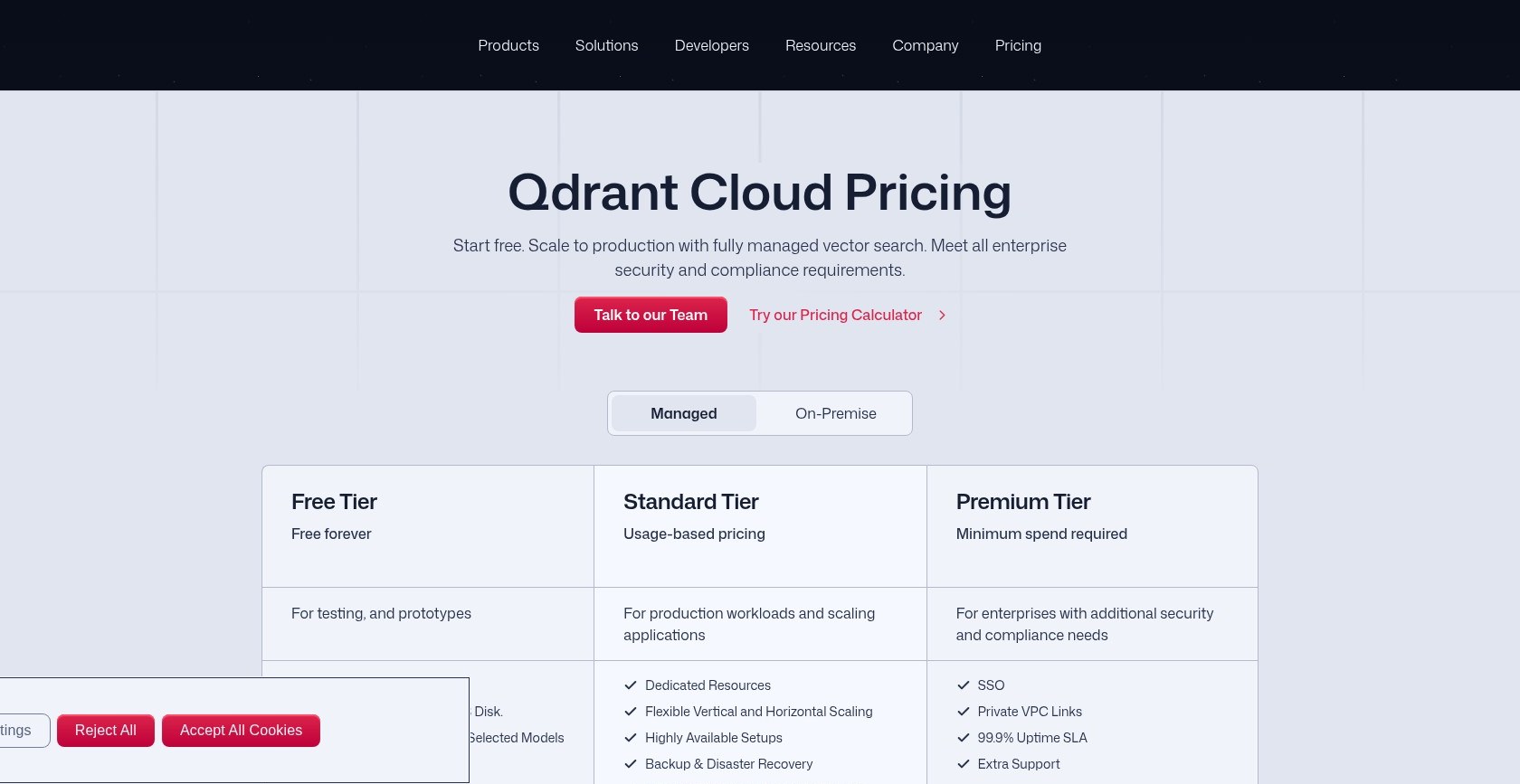
Among the three big managed vector databases (Qdrant, Pinecone, Weaviate), Qdrant Cloud pairs the most predictable free tier with the least published paid tier. The free cluster (0.5 vCPU, 1GB RAM, 4GB disk) is free forever with no card, and it includes free Cloud Inference with selected embedding models. Paid usage is billed hourly on vCPU, memory, storage, backup storage, and inference tokens, but the pricing page, checked September 2026, publishes no per-unit rates. It points to a calculator at cloud.qdrant.io instead.
The tiers:
- Free ($0): a single node with 0.5 vCPU, 1GB RAM, and 4GB disk. For testing and prototypes.
- Standard (usage-based): hourly metering on compute, memory, storage, and backups, with a 99.5% uptime SLA. Priced only through the calculator.
- Premium (minimum spend, amount undisclosed): adds SSO, Private VPC Links, a 99.9% SLA, and 24/7 premium support.
- Hybrid Cloud / Private Cloud (on request): Qdrant’s control plane on your infrastructure, with air-gapped deployment possible.
| Tier | Price basis | SLA | Key additions |
|---|---|---|---|
| Free | $0 forever | None | 1GB single node, free Cloud Inference |
| Standard | Hourly usage metering | 99.5% | Managed clusters, backups, scaling |
| Premium | Undisclosed minimum spend | 99.9% | SSO, Private VPC Links, 24/7 support |
| Hybrid / Private Cloud | On request | Custom | Runs on your infrastructure, air-gap option |
One third-party 2026 estimate puts standard managed clusters at roughly $0.078 per GB-hour, about $57 per month per GB of RAM. That is an outside estimate, not a quoted rate. An older 2024 starting rate of $0.03494 per hour (about $25 per node per month) predates the current pricing structure, so treat it as historical. Neither number appears on Qdrant’s own page, so run the calculator before you budget.
Self-hosting sidesteps all of this: the engine is Apache-2.0, so the software bill is zero and the real cost is your hardware and ops time.
Is Qdrant Good Value for Money?
- Self-hosting is the value play. The license is free, and in one production comparison self-hosted Qdrant delivered near-Pinecone throughput and latency for the cost of your own hardware
- The free tier never expires. 1GB forever supports a long-running prototype, and it is more generous than Pinecone’s free and starter tiers
- The cost risk is predictability. Usage-metered billing moves exactly when traffic spikes, which is when the bill matters most
- Procurement will struggle. With no published rate card, a budget approval rests on calculator screenshots and a sales conversation
Author’s Testing Notes 📝
Prototype on the free tier; it costs nothing and never expires. Before any production commitment, run the cloud calculator with your real vector dimensions and query volume, and choose self-hosting only if container or Kubernetes capacity already exists in-house.
— Panoply reviewer
My Experience With Qdrant
Qdrant is one of the few databases you can evaluate the same afternoon you hear about it, because the local install is a single Docker command and the free cloud tier needs no card.
🐳 Standing It Up with Docker
One command starts a complete local instance:
docker run -p 6333:6333 -p 6334:6334 -v $(pwd)/qdrant_storage:/qdrant/storage:z qdrant/qdrant
Port 6333 serves the REST API plus a built-in web dashboard, and 6334 handles gRPC. I connected with the official Python client, qdrant-client; Go, Rust, JavaScript/TypeScript, and C# have official clients too. The same client code runs unchanged against the local container, a CI instance, or a managed cloud cluster. That portability matters later when we get to exit costs.
[Screenshot needed: the local Qdrant web UI on port 6333 showing the collections view] The bundled web UI lists collections out of the box, with no separate admin tool to install. Source: Panoply
🔍 Creating a Collection and Filtered Search
A collection takes two decisions up front: vector size and distance metric, chosen from cosine similarity, Euclidean distance, or dot product. From there the filtered-search workflow has four moves:
- Create the collection with a vectors_config naming the size and Distance.COSINE
- Create a payload index on every field you plan to filter, for example client.create_payload_index with field_name=”category” and field_schema=”keyword”
- Upsert PointStruct objects carrying an id, a vector, and a payload dict
- Search with a Filter built from FieldCondition, MatchValue, or Range clauses
Because those filter clauses execute inside HNSW graph traversal rather than after it, a selective filter does not gut the result set the way post-filter engines can. Named vectors add flexibility here: a single point can carry multiple vectors with independent dimensionality and metrics.
⚙️ Where the Configuration Surface Shows Up
The API is straightforward; the decisions around it are not. Storage alone offers in-memory versus memmap modes. Quantization is a choice among three families. Cluster sizing keys on shard count and memory per segment rather than raw vector count, and the production guidance calls for 3 or more nodes with 2 or more shard replicas so a single node failure does not stop operations. There is no universal ingestion batch size either: the documentation says to benchmark against your own dimensionality, payload size, and available memory.
Author’s Testing Notes 📝
Budget your learning time for the configuration options, not the API. Creating collections and running filtered searches is the quick part. Choosing between storage modes, three quantization families, and cluster layouts is the part that deserves dedicated benchmarking against your own data before production.
— Panoply reviewer
Performance, Filtering, and Quantization
The engine is Rust using SIMD instructions for fast int8 vector comparisons, and its custom HNSW variant applies payload filters during graph traversal instead of after search. Pinecone filters after search, which can return empty results on selective queries. pgvector filters after retrieval too: in one 5M-vector test at 10% filter selectivity, it scanned 500,000 candidates to return 50,000 results.
The headline numbers need their labels attached:
- Qdrant’s own benchmark suite, as republished by a third party, shows about 850 QPS at roughly 8ms p95 on 1M 768-dimension vectors at ~99% recall, using about 1.4GB RAM, against Weaviate’s ~380 QPS at ~18ms p95 under the same conditions
- A separate published comparison measured 30-40ms p99 at 8,000-15,000 QPS, ahead of Pinecone’s 40-50ms p99 and Weaviate’s 50-70ms
- Elastic’s own blog shows its DiskBBQ index beating Qdrant on throughput and latency, while a separately reproduced run found both landing near 56 QPS once setup and segment counts were matched
Those three sets of figures do not agree, and most trace to a vendor on one side or the other. Treat any single QPS or latency number as condition-dependent, not settled fact.
Quantization is the memory lever:
- Scalar: float32 down to int8, roughly 4x memory compression
- Binary: one bit per component, about 32x compression and up to 40x faster search
- Product quantization: the third family, with its own speed, memory, and accuracy trade-off
- Asymmetric pattern: store vectors in binary, keep incoming queries at scalar precision for better accuracy
Independent developer Brian Sunter benchmarked Qdrant against LanceDB for a local app and found Qdrant faster, especially on top-50-plus searches, but holding roughly 400MB of RAM continuously while LanceDB idled near 4MB. Community reports echo the pattern, flagging high RAM use against lighter libraries like Annoy. That makes memory budgeting, and the quantization settings above, part of the evaluation itself rather than a post-launch tuning job.
Hybrid Search and the Missing Turnkey Pieces
Qdrant handles hybrid search natively, combining dense and sparse vectors in one engine, and the implementation is production-ready for domain-specific terminology where pure semantic matching misses exact terms.
What it does not hand you is the wiring: you choose and run the sparse encoders yourself, where Weaviate ships turnkey BM25 fusion. G2 users report the same: hybrid retrieval and fusion pipelines take considerable manual orchestration and code rather than a single API call.
Cloud Inference covers embedding generation with selected models, but answer generation stays in your application, an extra network hop that Pinecone Assistant’s single-endpoint pipeline and Weaviate’s generative module both absorb server-side. There is also no built-in visualization or monitoring tooling, a limitation users of the self-hosted product raise repeatedly.
A team composing its own retrieval stack gets exactly the primitives and control it wants, with no framework in the way. A team that wants a finished pipeline inherits homework that Pinecone and Weaviate have already done, and should weigh that engineering time against Qdrant’s price and filtering advantages.
The middle path is a framework: Qdrant plugs into LangChain, LlamaIndex, Haystack, and Microsoft Semantic Kernel, which supply the orchestration the engine leaves out. If you choose Qdrant for a RAG product without a framework, budget for three pieces of your own code: the sparse encoder, the fusion logic, and the generation call.
Deployment, Adoption, and Momentum
Qdrant runs four ways, and your code does not care which:
- Self-hosted: Docker for a single node, Kubernetes with Helm charts for clusters (production guidance calls for at least 2 replicas)
- Qdrant Cloud: the managed service reviewed above
- Hybrid Cloud: Qdrant’s control plane managing clusters on your infrastructure
- Private Cloud: fully inside your environment, air-gapped if required
Identical client code across all four is the exit-path argument. Switching costs in this category live in infrastructure, not API ergonomics, so a database you can carry between hosting models is a structurally smaller bet than a managed-only engine.
The repository holds about 34.9k GitHub stars and 2.7k forks, second of 11 open-source vector databases, and is adding roughly 150 to 600 stars a month. The qdrant-client package logs about 25.4 million PyPI downloads in the trailing month, around 6 million a week, and the official Docker image has passed 10 million pulls; the company reports over 250 million open-source downloads overall.
Funding is recent: a $50 million Series B in March 2026, led by AVP with Bosch Ventures, Unusual Ventures, Spark Capital, and 42CAP, bringing total funding to $87.8 million after the $28 million 2024 Series A. The raise is earmarked for product R&D, headcount, and go-to-market. Reported customers include Disney, Bayer, Deloitte, HubSpot, Mozilla, Tripadvisor, Canva, and Bosch, whose venture arm joined the round, though these are company-reported names rather than verified case studies.
How Does Qdrant Compare to Competitors?
Each of the main Qdrant alternatives wins a specific niche:
- Pinecone wins zero-ops and compliance depth: SOC 2, HIPAA, ISO 27001, and BYOC for hard isolation, plus a finished RAG pipeline in Pinecone Assistant. There is no self-host option, its post-search filtering can return empty results on selective queries, and one production comparison found it 3 to 8 times pricier than a Postgres baseline at equivalent scale
- Weaviate wins turnkey hybrid fusion, multimodal modules like CLIP for text-image retrieval, and native multi-tenancy. The costs are schema-first rigidity, where metadata changes need migrations, and dimension-based pricing that gets unpredictable when you upgrade embedding models
- Milvus wins bulk indexing speed, the broadest index menu (HNSW, IVF, DiskANN), and the hundreds-of-millions-to-billions tier. It only earns its distributed-architecture complexity at that scale; below it, Qdrant is simpler to operate with better latency at equal precision
- pgvector wins for Postgres teams under about 2 million vectors: no second service, one transactional store, row-level security for multi-tenancy. Past that line come post-filter candidate scans, index builds beyond 20 minutes, and p95 latency of 80-140ms at 5M vectors
- Elasticsearch wins when you already run it for keyword search or logs and want vectors in the same platform. The benchmark record cuts both ways: Elastic’s blog shows its DiskBBQ index ahead, while a separate re-run found parity near 56 QPS once conditions matched. A team that needs logs, metrics, and vectors in one platform stays put; a team that wants a vector-first store leans Qdrant
First, the database choice affects RAG accuracy mainly in one case, selective metadata filtering; everywhere else your embedding model and chunking strategy dominate. Second, the hosting model outweighs any feature checklist, because switching costs concentrate in infrastructure lock-in.
How We Test Vector Databases
We combine independent analysis, data collection, and hands-on testing to review data and AI tools. For vector databases that means setting the tool up ourselves and running a real retrieval task end to end, then weighing it against direct rivals on the same criteria.
We collect public signals from GitHub, PyPI, Docker Hub, Stack Overflow, G2, and Gartner peer reviews, and we hand-check every vendor pricing page rather than relying on republished numbers. Third-party review scores are deliberately small-weighted in our assessment, sustained practitioner sentiment counts more than any single rating, and areas we cannot measure are marked not applicable rather than scored zero. Signals are refreshed monthly and editorial verdicts quarterly, and sponsors and affiliates cannot change a score. Prices current as of September 2026.
Qdrant Review: Should You Run Your Vector Search on Qdrant?
We recommend Qdrant for engineering teams with container or Kubernetes competence that want near-Pinecone latency at self-hosted cost, for products whose queries lean on selective metadata filters, and for multi-tenant designs that need data residency control through payload-based sharding. The free 1GB cluster, the Apache-2.0 license, and identical client code across four hosting models make it one of the lowest-lock-in options in the category.
Skip it if you want a finished RAG pipeline (Pinecone Assistant does retrieval through generation in one endpoint), turnkey hybrid search (Weaviate ships BM25 fusion out of the box), or a published rate card your procurement team can approve without a sales call. And if you already run Postgres with fewer than 2 million vectors and modest filtering, try pgvector before adding a second database.
The evaluation itself costs nothing: the Docker one-liner from the walkthrough above plus the forever-free cloud tier means you can have a filtered semantic search running against your own data today, on the same client code you would ship to production.
FAQ
Is Qdrant free?
The engine is Apache-2.0 open source, so self-hosting is free beyond your own hardware. Qdrant Cloud adds a forever-free single-node cluster with 0.5 vCPU, 1GB RAM, and 4GB disk, no card required. Paid managed tiers bill hourly by usage, with rates only in the calculator at cloud.qdrant.io or from sales.
Should I use Qdrant or pgvector?
Stay on pgvector if you already run Postgres, hold under roughly 2 million vectors, and filter lightly. Move to Qdrant when you need selective metadata filtering at scale, higher throughput, or hybrid search without extra tooling. pgvector’s post-filter scans and 20-minute-plus index builds past 2M vectors mark the crossover.
Is Qdrant faster than Pinecone and Weaviate?
Often, but not settled. Qdrant’s own suite shows about 850 QPS at 8ms p95 against Weaviate’s 380 QPS, and a separate comparison puts it ahead of both rivals on p99 latency. Elastic’s benchmark shows the opposite, while a separate re-run found parity near 56 QPS. Benchmark against your own data and filters.
Does Qdrant support hybrid search?
Yes, natively: dense and sparse vectors combine in one engine and catch the domain-specific exact-match terms that pure semantic search misses. You manage the sparse encoders yourself, which means more control but more code than Weaviate’s turnkey BM25 fusion.
Can I migrate away from Qdrant later?
More easily than from a managed-only engine, since Apache-2.0 licensing and identical client code across hosting models keep infrastructure lock-in low. Migration to a different database is still real work: exporting embeddings, rebuilding indexes (hours for a million-vector corpus), and rewriting filter logic, because every vector database uses different filter syntax.