Editor’s note: This Vectorize review evaluates the RAG platform through its documented capabilities and billing terms. It does not include hands-on testing.
Quick verdict: I recommend shortlisting Vectorize if your team wants managed document ingestion and retrieval without giving up its choice of vector database. My main reservations are the need for account-specific RAG pricing and limits that make freshness, filtering, and spending caps part of the architecture decision.
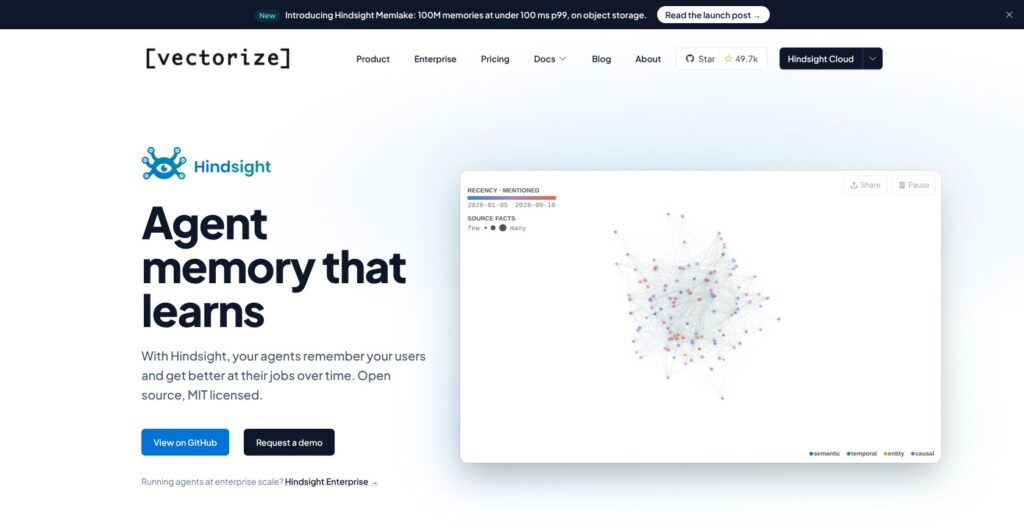
This review covers the RAG platform, separate from Hindsight, the agent-memory product now promoted on Vectorize’s main website. That distinction matters because the current main pricing page describes Hindsight, not the RAG plans discussed here.
Among managed RAG tools, Vectorize interests me most as the layer between changing documents and an application’s retrieval endpoint. Built-in components offer a simpler starting point, while external database connections leave room for an existing stack.
I’ll focus on the buying decisions: what drives the bill, how the documented workflow fits together, and where parsing, synchronization, and retrieval controls impose tradeoffs.
Key Takeaways
- Built-in embedding and storage let you start without separate OpenAI and Pinecone credentials.
- External database support makes Vectorize worth considering for an existing RAG application.
- Fast, Iris, and Mixed extraction offer different approaches to document processing.
- Current RAG prices need account-level confirmation; Hindsight prices do not apply.
- Real-time synchronization costs extra, and reaching an overage cap suspends retrieval as well as ingestion.
Vectorize Pros and Cons
I like the choice of built-in or external storage. The biggest drawbacks concern ongoing cost and which retrieval features your database supports.
Pros
- Built-in embedding and vector storage simplify initial setup.
- External database connectors support an existing retrieval stack.
- Iris accepts PDFs, images, and scanned documents.
- The Extraction Tester exposes text, Markdown, and chunks.
- Retrieval supports reranking and conversation-aware query rewriting.
Cons
- The main pricing page covers Hindsight, a separate product.
- Real-time pipelines require premium eligibility and separately purchased quota.
- Overage caps suspend retrieval alongside document processing.
- Advanced query support is limited to the built-in database and Elasticsearch.
- Malformed metadata sidecars cause entire documents to be skipped.
How Much Does Vectorize Cost?
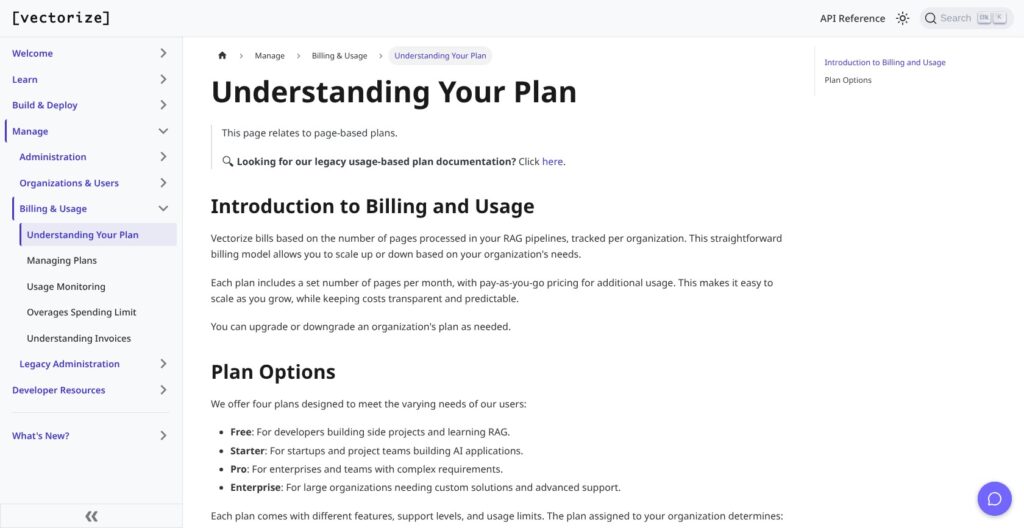
Vectorize pricing needs a RAG-specific quote or account offer, not a glance at the main pricing page. The RAG service has four documented plans. Confirm the current paid rates and included allowances in your RAG account before budgeting.
Here is how I would approach the four plans:
- Free ($0): quota-limited. My starting point for a scoped evaluation rather than a production capacity commitment.
- Starter (account pricing): The first paid option I would examine for a smaller deployment.
- Pro (account pricing): Worth comparing when Starter’s actual allocations or access levels do not fit.
- Enterprise (quote required): My route for discussing requirements that need contractual agreement.
| RAG plan | Current price status | What the buyer needs |
|---|---|---|
| Free | Free | Account-specific pipeline and usage allowances |
| Starter | Confirm in RAG account | Base fee, included usage, connector access, and overage rates |
| Pro | Confirm in RAG account | Allocation and access differences versus Starter |
| Enterprise | Obtain a RAG-specific quote | Written commercial terms and applicable service commitments |
Plans differ by pipeline count and monthly pages, as well as connector availability. Iris processing, API and monitoring access, and support level also vary. I would not assume a higher tier is necessary just because the application is customer-facing; the actual requirements should decide.
The invoice has several potential components:
- Base subscription: separate from usage charges; base fees can be prorated.
- Page ingestion: additional processed pages can add charges.
- Iris extraction: Iris pages appear as a separate billing item.
- Retrieval and storage: query activity and retained vector data affect usage.
- Extra pipelines: additional pipeline charges can also be prorated.
Bring-your-own services add another bill. The OpenAI and Pinecone accounts used in Vectorize’s external-provider quickstart remain buyer-managed, so their charges should not be treated as included.
Starter and Pro serverless organizations can set a monthly overage cap with a $1 minimum, excluding the base subscription. Reaching it suspends both ingestion and retrieval. Data remains intact, and increasing the cap restores service, but an answering application can still be interrupted.
For a public support assistant, a burst of questions could therefore exhaust the overage budget and interrupt answers. I would treat the cap as an operating policy, not a harmless budget reminder.
Is Vectorize Good Value for Money?
I would pay for Vectorize to reduce pipeline maintenance. The value is less clear if your team only needs a parser.
- Best value case: replacing ingestion upkeep that otherwise consumes engineering attention.
- Less compelling case: buying the whole pipeline when document parsing is the only missing component.
- Budgeting advantage: organization reporting shows usage and the next invoice amount and date.
My recommendation for a small development team is to start Free with a narrow source set, then choose the smallest paid offer that meets its connector and freshness needs. Budget retrieval traffic separately from the initial document load.
Getting Started With Vectorize
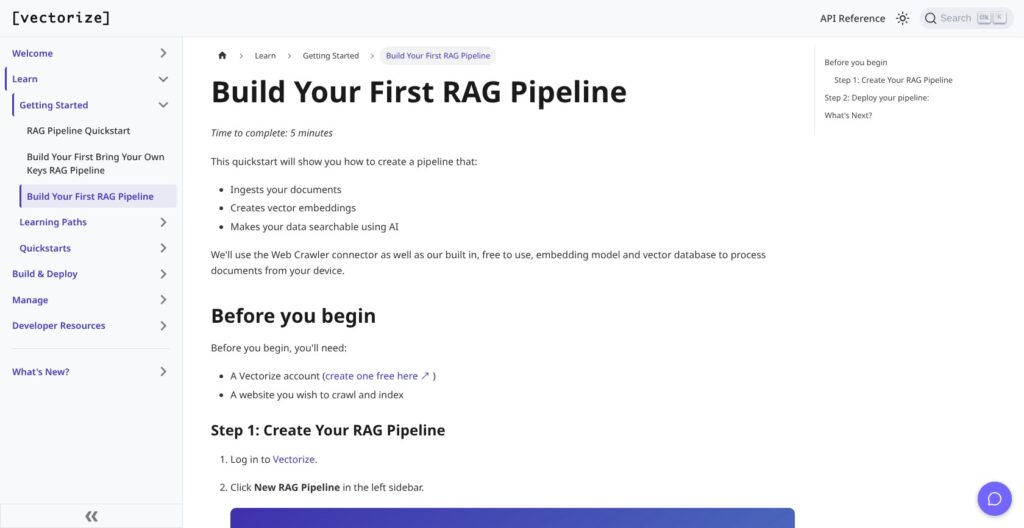
The simplest documented route uses built-in embedding and storage. I would choose that for a new evaluation unless keeping an existing database is already a requirement.
A pipeline connects a source to extraction and chunking, then an embedder and vector database. That is a useful boundary: Vectorize manages the document-to-retrieval path, but a custom application’s behavior remains your responsibility.
The documented setup follows this sequence:
- Create the account and pipeline. Work in the relevant RAG organization and give the pipeline a name tied to its purpose.
- Select a source. The all-inclusive quickstart uses Web Crawler with a seed website. Allowed paths can narrow the content collected.
- Choose extraction and chunking. Select Fast, Iris, or Mixed, then configure chunk size and overlap.
- Choose embedding and storage. Built-in options avoid separate provider credentials. Custom embedders and external vector databases are also supported.
- Save or deploy. A draft preserves the configuration; deployment begins the initial backfill.
- Connect retrieval after processing. Connect supplies endpoint details, and an access token authenticates requests. Set reranking and query options explicitly, then inspect returned chunks and usage.
Consider a developer building a support assistant from public help pages. I would begin with that help section alone rather than the entire corporate website. That keeps retrieval focused on the questions the assistant is meant to answer.
The crawler supports boundaries such as maximum depth and URL count, plus request throttling. Those settings are useful scope controls, not just infrastructure details. Unrelated pages can complicate the corpus before the application has answered its first useful question.
For an existing Pinecone deployment, the bring-your-own-keys quickstart instead uses OpenAI credentials, Pinecone credentials and a database, and File Upload. I like having that route, but it adds provider ownership rather than removing it.
Keep retrieval tokens server-side. Vectorize tokens can access all RAG pipeline retrieval endpoints within an organization, so a token should not be mistaken for document-level or pipeline-specific authorization. Tokens are shown once at creation and support expiration settings.
There are managed delivery options too: a standalone Chat App, embedded Chat Widget, and MCP Agent. Those can change how a team exposes a pipeline, but they do not make source selection or permissions irrelevant.
My practical judgment is that the built-in route reduces account setup. It does not eliminate the need to decide what the application may retrieve, who may ask, and what happens when retrieval is unavailable.
Document Parsing: When Iris Makes Sense
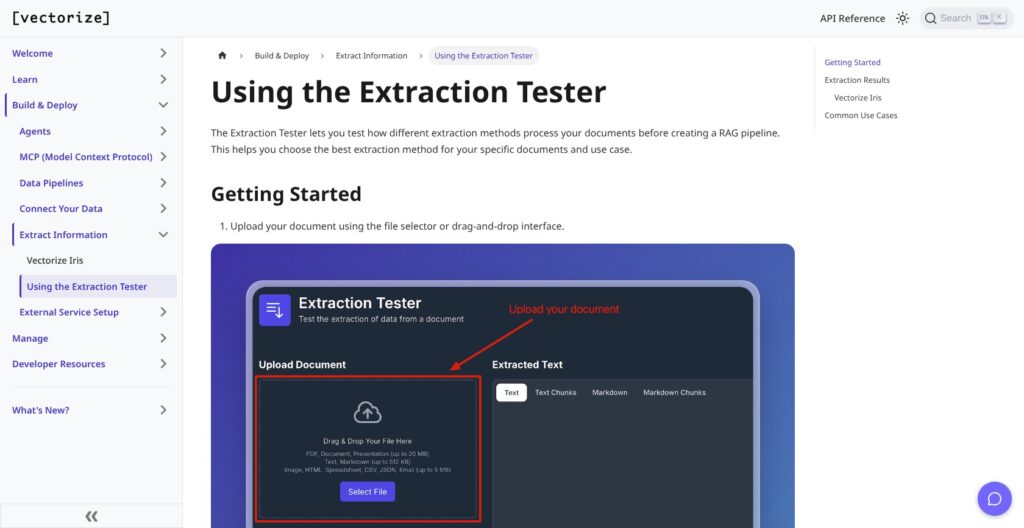
I would choose an extraction strategy around the documents, not automatically select the most sophisticated option. Iris is a processing choice, with a separate billing consequence, rather than a blanket upgrade.
Vectorize offers three modes:
- Fast: the simpler extraction option to consider for straightforward documents.
- Iris: model-based extraction and chunking for supported inputs including PDFs, images, and scans.
- Mixed: selects Fast or Iris according to file type.
Chunk size and overlap are configurable. Iris also supports schema-based metadata extraction, with document-level metadata stored separately from chunk-level metadata.
For a collection of mostly clean text documents, I would begin by assessing whether Fast preserves the information needed for retrieval. For scanned manuals or PDFs containing important tables, Iris deserves closer attention. Neither choice establishes that the extracted content is correct.
The Extraction Tester makes that decision more concrete. It accepts a sample and lets you choose Fast or Iris, a chunk size, and optional page boundaries. Its outputs include text and Markdown, their corresponding chunks, and extracted metadata.
What matters is not simply whether text appears. Imagine a policy table where a fee belongs to a particular service tier. If extraction separates that fee from its label, readable output may still be poor evidence for answering the customer’s question.
Likewise, a chunk boundary that drops an exception from the surrounding rule can change meaning. I would judge the output as material for retrieval, not as a nicely formatted document preview.
LlamaParse is a relevant alternative when document transformation is the main purchase. Its commercial offering includes parsing and structured extraction, while Unstructured exposes partitioning and enrichment stages. Vectorize’s reason to stay on that shortlist is the connection between extraction and ongoing RAG pipelines, not a demonstrated parsing-quality lead.
Reviewer’s Notes: I would pay for Iris where the source structure justifies it, rather than process every document through it by default. Mixed mode is useful to consider, but file type is not the same thing as document difficulty.
Iris is also available through an extraction API, SDK examples, and a CLI. That gives it a role outside a fully managed pipeline without proving it is the best standalone parser for your files.
Keeping RAG Pipelines in Sync
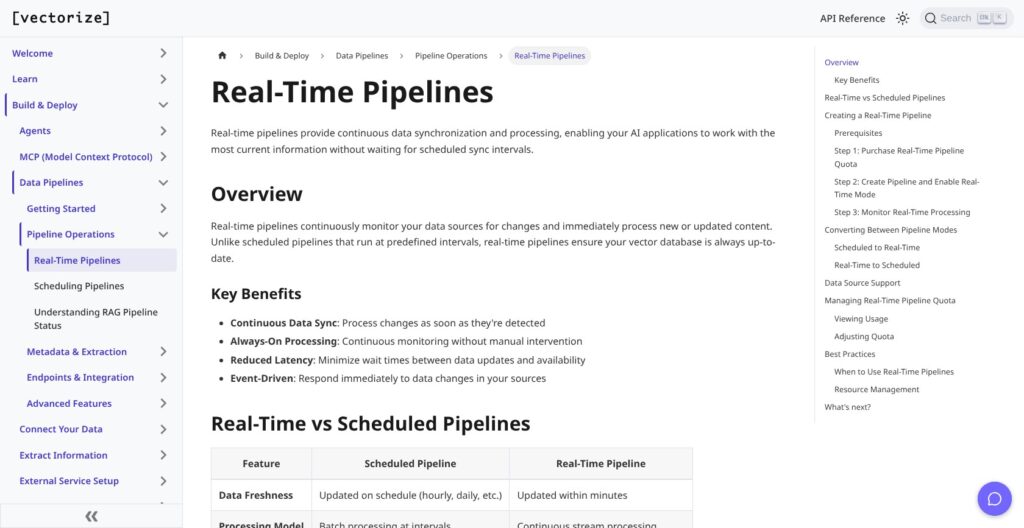
An initial import is only part of the purchase. I find Vectorize more interesting when the source changes regularly and someone would otherwise own that upkeep.
Source examples include Google Drive and SharePoint, alongside file uploads and the web crawler. Their setup requirements differ. Google Drive offers service-account and OAuth approaches; SharePoint requires a Microsoft Entra application and configuration of sites and file extensions.
Those distinctions matter more than a headline connector count. A source that exists on a feature list may still require an administrator’s involvement before it belongs in a production workflow.
For destinations, the supported choices include:
- Pinecone: authentication through an API key or Pinecone Connect.
- Qdrant: a cluster endpoint and API key, with creation of a named collection supported.
- PostgreSQL: connection credentials and the pgVector extension, with configured table creation supported.
Scheduled pipelines support daily, weekday, weekly, custom-day, and manual operation. Timezone selection is available, while syncs per day depend on the plan.
Real-time is a separate purchase decision. It requires a premium plan and separately purchased pipeline quota. The documentation describes updates within minutes, subject to connector change detection and document complexity, not instant propagation or a universal latency guarantee.
For a handbook assistant whose source changes infrequently, scheduled updates may be reasonable. An assistant answering questions about frequently changing operational instructions has a different freshness requirement. I would pay for that requirement explicitly rather than assume “managed” means continuously current.
The web crawler uses content hashing to skip unchanged pages during later crawls and reprocess changed content. It also respects robots.txt.
Metadata needs operational care too. Supported sources can use sidecars named like document.pdf.metadata.json, but malformed JSON or incorrect naming skips the entire document. That makes metadata validation part of ingestion reliability.
Compared with Unstructured, which also supports ingestion workflows, I would choose around source fit and what happens after transformation. Vectorize brings retrieval into the same buying decision. Source authentication, however, should never be treated as proof that the application automatically inherits every document permission.
Retrieval and Evaluation Controls
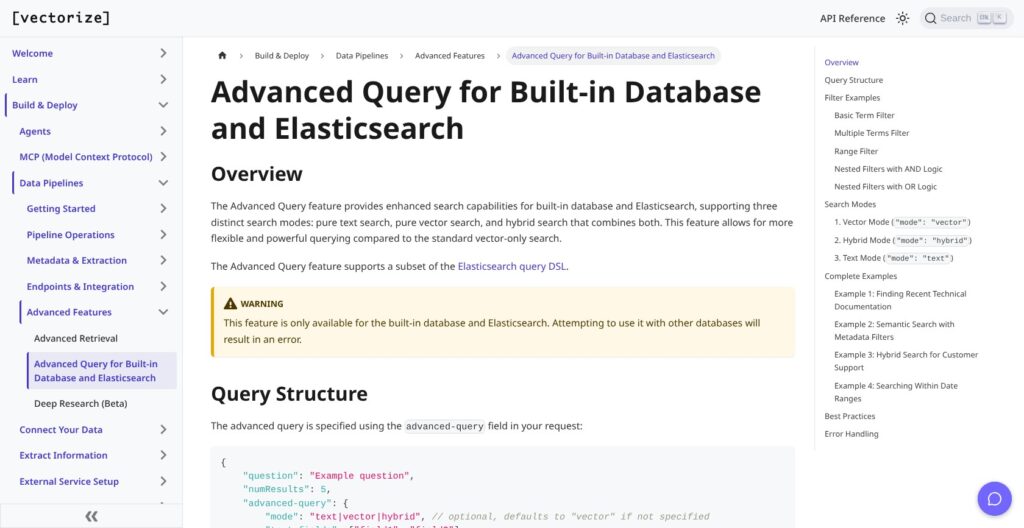
Vectorize offers more than a vector database connection, but database choice changes retrieval capabilities. I would make that choice before treating external storage as interchangeable with the built-in option.
The retrieval endpoint embeds the question and searches the configured database. It can also rerank results and rewrite queries using conversation history. In a support conversation, that could help turn “Does it cover weekends?” into a query that retains the topic of the previous question.
I would set the reranking parameter explicitly rather than rely on an assumed default. Reranking and query rewriting use a separate advanced retrieval quota; a request using multiple advanced features consumes one advanced retrieval unit.
Enabling both features on a request therefore does not double the advanced-unit count. I would still budget this quota separately from ordinary retrieval.
Filtering has two different scopes:
- Standard metadata filters: exact, case-sensitive matching, with AND across keys and OR among allowed values. This route does not support ranges.
- Advanced query: vector, text, and hybrid modes, plus term, range, and boolean filters using a subset of Elasticsearch query DSL. It works only with the built-in database and Elasticsearch; other targets return an error.
An application filtering documents by an exact product category could fit the standard route. An application asking for records within a date range needs a different design decision.
This is where I would be cautious about keeping Qdrant purely for architectural continuity. It is a supported destination, but that does not mean Vectorize’s advanced query features follow it there. For range filters or hybrid search through Vectorize, the built-in database and Elasticsearch are the supported choices.
The retrieval dashboard reports relevance for the top two chunks before and after rewriting, alongside an aggregate health metric and quota information. I see those as useful diagnostics, not proof of answer correctness.
Relevant chunks can still contain outdated information, and an answer generator can mishandle good evidence. Retrieval evaluation and application-level answer evaluation are related, but they are not substitutes.
Vectara offers a different architectural proposition through integrated document processing, embeddings, and an internal database. Vectorize’s external destination choices give it a reason to be considered by teams preserving an existing stack. My preference would depend on required query behavior, not an unsupported assumption that either architecture produces better answers.
How Does Vectorize Compare to Alternatives?
I would shortlist Vectorize alternatives by the responsibility you want to hand off. Parsing a document, maintaining an index, and buying an integrated enterprise RAG service are related purchases, but not identical ones.
- LlamaCloud / LlamaParse: My alternative for teams emphasizing parsing and structured extraction while also considering managed indexing. The commercial offering is distinct from the open-source LlamaIndex framework. Its published plans make initial budgeting clearer, although credit consumption varies by action.
- Unstructured: My alternative when document transformation and ingestion are the central job. Its partition, chunk, enrich, and embed stages make the processing workflow the focus. The initial free page allowance should not be mistaken for a recurring production quota.
- Vectara: My alternative for enterprise buyers considering a more integrated service and deployment options beyond SaaS. Its current pricing places it in a very different procurement conversation from a small self-service pilot.
| Product | Buyer fit | Scope | Published cost position | Main tradeoff |
|---|---|---|---|---|
| Vectorize RAG | Teams buying managed ingestion and retrieval | Parsing, sync, built-in or external storage, retrieval | Free plus paid plans; RAG account pricing | Retrieval features vary by database |
| LlamaCloud / LlamaParse | Teams emphasizing document processing | Parsing, extraction, classification/splitting, Index & RAG | Free; Starter $50/month; Pro $500/month; custom Enterprise | Different actions consume different credits |
| Unstructured | Teams emphasizing ingestion workflows | Partition, chunk, enrich, embed | 10,000 initial free pages, then $0.015/page; custom Business | Initial allowance is not a recurring free quota |
| Vectara | Enterprise integrated RAG buyers | Processing, embeddings, internal database | SaaS from $100,000/year; VPC from $250,000/year; on-premises from $500,000/year | Enterprise-scale commitment |
These prices are not enough to declare a cheapest option. A page-processing charge does not cover the same scope as an integrated service, and Vectorize needs a RAG-specific offer before a like-for-like comparison is possible.
For a team with an established application and only a parsing bottleneck, I would examine LlamaParse or Unstructured first. For a team repeatedly maintaining source-to-index code, Vectorize’s broader managed pipeline deserves more weight.
The deciding question is which operational job disappears. A lower entry price is not necessarily better value if the team still owns the maintenance it wanted to stop doing.
How I Reviewed Vectorize
I evaluated Vectorize through its documented RAG workflow, feature specifications, and billing mechanics. My emphasis was on architecture fit, source freshness, retrieval constraints, and the consequences of usage billing.
This was a documentation-based review, not a credentialed account test or performance benchmark. I did not measure parsing accuracy, retrieval quality, or latency. Competitor comparisons concern documented scope and commercial positioning, not comparative output quality.
Pricing and documentation were checked in October 2026; competitor prices reflect that review date.
Should You Use Vectorize for Managed RAG?
Yes, shortlist it for pipeline upkeep if you want managed ingestion connected to retrieval, especially when retaining an external database matters. I like that a team can start with built-in components without making that the only supported architecture.
I would be less inclined to choose it when standalone parsing is the whole requirement. I would also avoid committing on the assumption that every database supports the same queries or that near-current data is included in the base plan.
The buying question is whether Vectorize removes enough maintenance to justify the complete bill and its operational constraints. That bill includes more than ingested pages, and a spending cap can interrupt the answering service.
My recommendation is a scoped Free pilot, followed by the smallest suitable paid RAG offer. Buy against source and freshness requirements, with retrieval traffic and any external provider charges included in the budget.
Vectorize FAQ
Is Vectorize free?
The RAG documentation lists a Free plan governed by quotas rather than overage billing. I recommend it for a scoped evaluation; whether it can support production depends on your account’s allowances and workload.
Do I need my own vector database?
No. Vectorize offers built-in vector storage and embedding. External destinations are also supported, but the advanced query route has narrower database compatibility than basic pipeline connectivity.
Is Vectorize RAG the same as Hindsight?
No. This review covers the managed RAG platform. Hindsight is the agent-memory product promoted on the main website, and its pricing and deployment terms should not be transferred to RAG.
Does every plan include real-time synchronization?
No. Real-time pipelines require premium eligibility and separately purchased quota. Updates are connector-dependent; “real-time” should not be read as an instant-update guarantee.
Can I self-host Vectorize RAG?
Hindsight’s MIT self-hosting option does not establish a self-hosting option for the RAG platform. I would not select Vectorize RAG on that assumption; a private deployment requirement needs its own RAG-specific agreement.