Editor’s note: This Ragie review evaluates documented capabilities and commercial terms, not firsthand testing. On July 27, 2026, Ragie announced it was joining Ticketmaster. The announcement does not set out continued independent service terms or a shutdown date.
Quick verdict: I would choose another provider for a new project. Ragie’s documented architecture remains useful to understand and compare, particularly its combination of managed ingestion, retrieval, and customer connections, but published product pages are not enough to establish an ongoing independent service commitment.
Ragie sits in the managed RAG category of the AI data stack. Its technical appeal is straightforward: consume a retrieval API rather than assemble every component behind it. That design is still useful when comparing the work each provider manages.
I’ll cover the displayed pricing model first, then setup, source connections, retrieval controls, and alternatives. My focus is what the platform documents and what an application developer would still need to build.
Key Takeaways
- Choose another provider for new projects, given the Ticketmaster announcement and lack of continued independent service terms in it.
- Managed ingestion and retrieval put document context behind an API.
- Ragie Connect documents embedded customer-facing source connections.
- Four-hour scheduled syncing is not a real-time freshness guarantee.
- Generation and authorization remain application responsibilities, rather than disappearing with managed infrastructure.
Ragie Pros and Cons
I like the documented combination of managed data handling and configurable retrieval. These are architectural strengths and limitations, not an endorsement of a new subscription.
Pros
- Managed document indexing behind a retrieval API.
- Embedded source authentication through Ragie Connect.
- Metadata filters narrow retrieval scope.
- Audio and video results include time offsets.
- Partitions separate named knowledge bases.
Cons
- The Ticketmaster announcement omits continued independent service terms.
- Scheduled connection syncing runs every four hours.
- The Notion connector excludes databases.
- Paid retrieval remains subject to rate limits.
- Relevance tuning remains part of implementation.
How Much Does Ragie Cost?
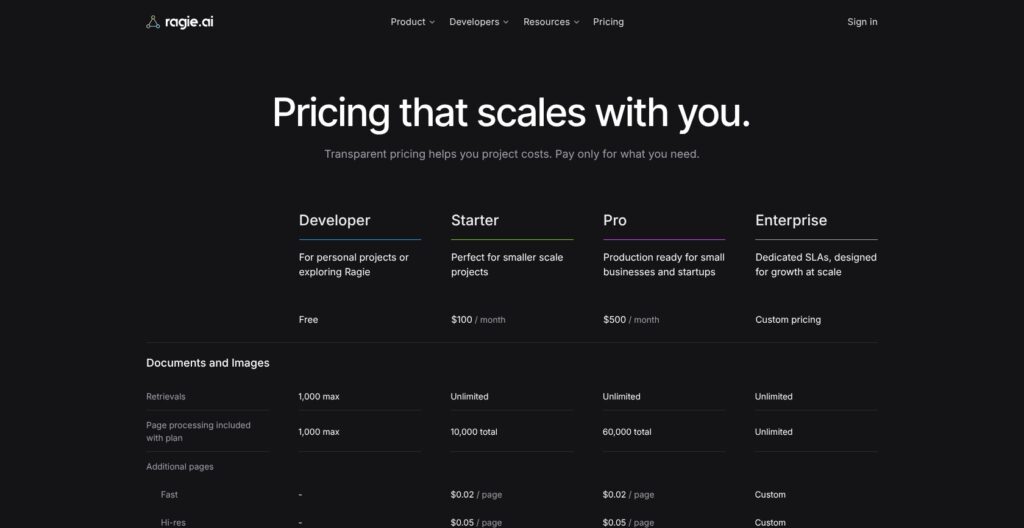
Published prices do not establish availability. The figures below describe Ragie’s displayed commercial model, not confirmation that these plans are currently purchasable. The distinction matters after the Ticketmaster announcement.
The displayed tiers are:
- Developer (Free): A bounded prototype tier.
- Starter ($100/month): The smaller paid application tier.
- Pro ($500/month): A higher-capacity tier.
- Enterprise (Custom): Individually negotiated requirements.
| Plan | Displayed monthly price | Included processing | Retrieval allowance | Retrieval rate limit |
|---|---|---|---|---|
| Developer | Free | 1,000 pages maximum | 1,000 maximum | 10 requests/minute |
| Starter | $100 | 10,000 pages total | Unlimited count | 500 requests/minute |
| Pro | $500 | 60,000 pages total | Unlimited count | 1,000 requests/minute |
| Enterprise | Custom | Custom | Custom | Custom |
Included processing is total, not a monthly reset. Starter/Pro processing overages are $0.02/page for fast mode and $0.05/page for hi-res; excess storage is $0.002/page/month. Future document updates are included in ingestion.
Embedded connectors list the first connector free, then $250 per additional connector/month. That does not establish per-customer OAuth billing.
Audio processing is $0.0067/minute; video is $0.025/minute; media storage is $0.12/GB/month. Overages default to $100 credit top-ups, with configurable increments and a monthly spending cap.
The distinction between retrieval allowance and rate matters. An application can remain within its data budget yet encounter a burst ceiling. Size any comparable service against simultaneous activity as well as average daily questions.
Uploads have separate limits: POST /documents allows 30, 50, and 100 requests per minute on Developer, Starter, and Pro, respectively. A customer’s initial import and their later question traffic therefore need different capacity assumptions.
Is Ragie Good Value for Money?
I see the logic of this commercial model when a team needs ingestion and source maintenance but has little reason to build those systems itself.
- Managed infrastructure: Its value depends on which operational responsibilities it actually replaces.
- An established retrieval stack: Replacing working components needs a stronger justification than consolidating vendors.
- Connector economics: Source coverage deserves its own budget, rather than being treated as incidental.
- Separate model costs: The generation tutorial uses a separate OpenAI call, so the subscription is not the whole answer-generation bill.
For a hypothetical knowledge assistant, initial import, ongoing storage, and question traffic need separate estimates. A large, rarely queried archive differs from a small corpus serving frequent questions. Neither workload is explained by subscription price alone.
Reviewer’s Notes: Within the displayed commercial model, Developer fits a bounded prototype and Starter fits a smaller application exceeding those limits. Pro would make sense only where corpus capacity or request volume justified it. I would use this comparison to assess the pricing structure, while choosing another provider for a new project.
Getting Started With Ragie
The application supplies the answer interface. Ragie’s documented platform offers a REST API plus Python and TypeScript SDKs, with integrations for LangChain and Mastra.
The tutorial describes five main stages:
- Create an API key. Establish the application’s connection to Ragie. My architectural preference is to keep this service credential in the backend.
- Ingest representative content. Upload a file through
/documents, choosing processing mode and metadata. A meaningful evaluation corpus should include difficult files, not only clean text. - Wait for the right state. Processing is asynchronous.
readymeans full availability; the earlierindexedstate permits retrieval before summaries finish. - Request relevant chunks. Send a query to
/retrievalswith the intended partition and metadata filters. Inspect source material before adding generated prose. - Build the answer layer. Pass retrieved content into an LLM prompt. The generation tutorial illustrates this with a separate OpenAI API call.
That state distinction affects product behavior. An accepted upload should not automatically trigger a message saying the knowledge base is fully ready. Visible import status helps users distinguish processing from missing content.
Metadata determines retrieval scope. Filters apply before retrieval, so attributes such as document type or product edition can determine which material is eligible to answer a question.
Imagine a support assistant covering two editions of a software product. My approach would be to attach an edition field during ingestion and derive the filter from application context. That is preferable to retrieving incompatible instructions and hoping the model resolves them.
Other ingestion paths have their own boundaries:
- Raw text:
/documents/rawaccepts text directly. - Public URLs: URL ingestion requires a publicly accessible address.
- URL-specific limits: That endpoint excludes PDFs above 2,000 pages and other static documents above 10,000 pages.
Those size limits should not be generalized to every upload path.
It helps to distinguish ingestion problems from answer-generation problems. If the relevant passage never reaches retrieval, changing the prompt is unlikely to address the underlying issue. If the passage is present but the answer misrepresents it, the answer layer deserves attention.
The remaining application work is substantial. The interface needs source references, a response when context is insufficient, and a way to report incorrect answers. Ragie’s documented infrastructure supplies building blocks; it does not make those product decisions.
My recommendation for this architecture is to establish the complete path with a representative corpus before adding a larger content library.
Ragie Connect: Useful Integrations With a Catch
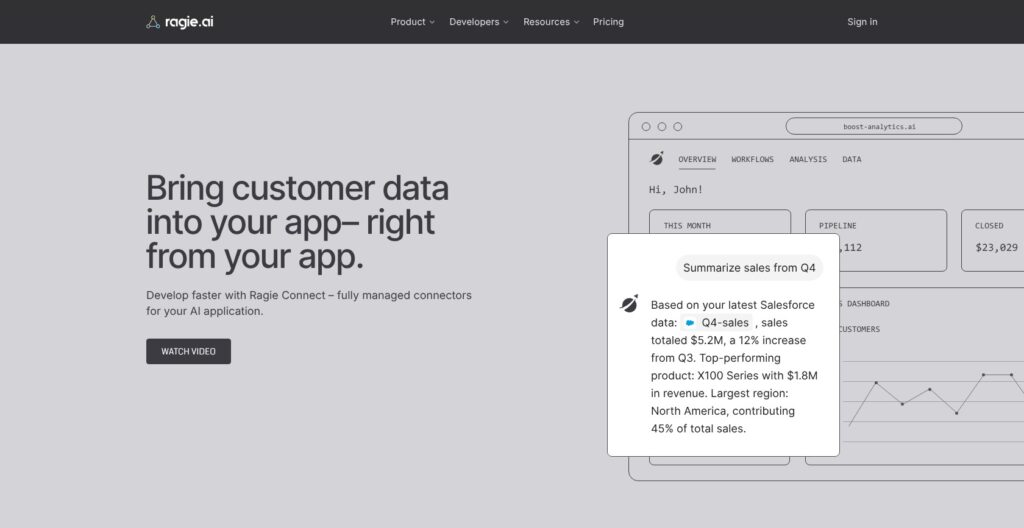
Connections and Ragie Connect serve different buyers. Connections import an organization’s content; Ragie Connect embeds customer-facing source connections inside a SaaS application.
The internal connection documentation describes this flow:
- Open Connections > Add Connection.
- Select the source provider.
- Authorize access with that provider.
- Select the content to synchronize.
Automatic synchronization checks for new, changed, and deleted files every four hours. I consider that reasonable for reference material that changes occasionally, but not a basis for promising immediate answers about a just-edited document.
Ragie Connect handles provider authentication, authorization, and source synchronization. For a hypothetical multi-tenant assistant, that design lets customers connect their own knowledge sources without the product team implementing every provider’s OAuth flow.
What I like is the separation between the application’s customer experience and the mechanics of connecting each source. The catch is content coverage, not merely whether a provider appears in an integration list.
Notion illustrates that distinction:
- Databases are excluded by the connector documentation.
- One Notion connector per account per workspace is permitted.
If essential knowledge lives in Notion databases, the connector’s name alone does not establish fit. Map actual content types before designing onboarding around a source.
Connector authorization also differs from application authorization. Permission to import content is not, by itself, a complete rule for which signed-in users may retrieve it. That second decision belongs in the product’s access model.
For a hypothetical customer onboarding flow, clear source selection and synchronization expectations matter. A successful authorization screen should not imply that every content type is supported or every edit appears immediately.
My architectural judgment is conditional: embedded connectors are valuable when coverage and cadence match the product. Where component-level ingestion control matters more, LlamaIndex is the more relevant comparison, with the implementation responsibility that choice brings.
Retrieval: More Control Than a Basic Vector Search
Ragie’s documented retrieval controls are useful, though relevance still depends on configuration and content. The settings need to match the questions an application answers.
The main controls are:
top_k: Sets how many chunks to retrieve. The reference default is eight.- Metadata filters: Restrict eligible content before retrieval.
rerank: Adds a reranking step. My recommendation is to set it explicitly.max_chunks_per_document: Limits how much one document can contribute.recency_bias: Applies time-based weighting when enabled; the reference default is false.
More context is not automatically better context. Increasing top_k can add latency and model token use. Reranking also adds latency and can discard potentially useful chunks.
I recommend choosing settings around the question. A hypothetical query for a particular contract identifier calls for a different approach from “What themes appear across customer onboarding documents?”
For the identifier query, precise metadata scoping is my preference where that identifier exists as metadata. The broader question needs attention to document coverage. Many passages from one file may leave the wider picture underrepresented.
Summary Index addresses document diversity by using document summaries to broaden retrieval when max_chunks_per_document is set. Automatic summary generation does not support XLSX, CSV, or JSON files. That limits its relevance for a spreadsheet-heavy corpus.
Metadata operators include $eq, $in, and logical combinations such as $and and $or. Their usefulness depends on consistent ingestion labels. Define that vocabulary before separate parts of an application start assigning incompatible values.
Retrieval scores require restraint. They are relative within a request, not values to compare across unrelated queries or use as fixed confidence thresholds. A score alone cannot justify a “safe to answer” badge.
Recency is another preference, not a truth signal. A newer draft can be less authoritative than an older approved policy. For that hypothetical policy assistant, approval status is my priority over freshness alone.
Reviewer’s Notes: I would evaluate exact-match questions and cross-document questions separately. Vectara’s factual-consistency evaluation is also relevant when generated-answer checking matters, but that evaluates a different layer from Ragie’s retrieval scores.
My overall judgment is positive on control, with a firm boundary: managed indexing does not remove relevance engineering. My preference is a small, deliberate configuration whose effect can be assessed.
Documents, Audio, and Video: Choose the Right Processing
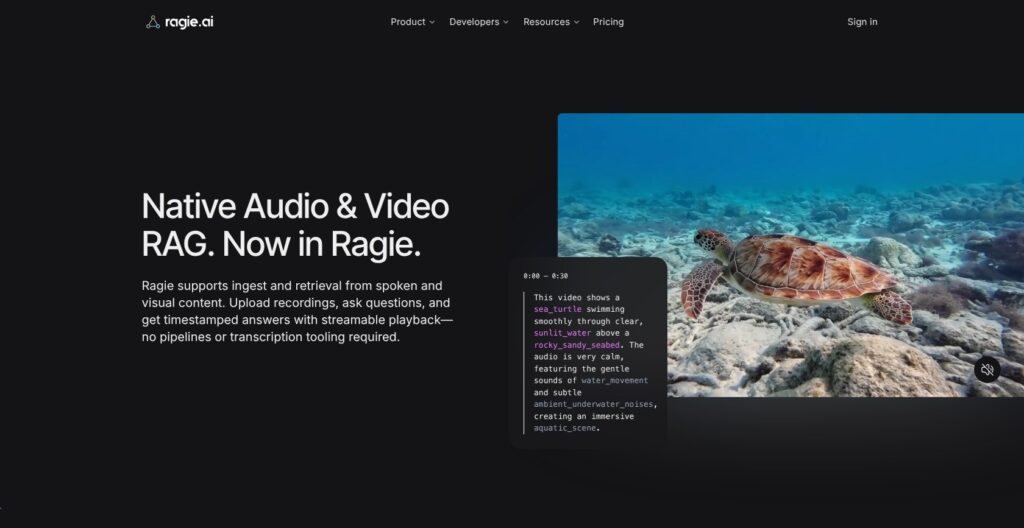
Match processing to the content. I see little value in paying for richer extraction indiscriminately, but text-only processing is a poor choice when the answer lives in a diagram.
Ragie’s documented choices include:
- Fast mode: Extracts text.
- Hi-res mode: Extracts text, images, and tables from supported Word, PDF, image, and PowerPoint formats, with a processing-speed trade-off.
- Connector import controls: Can disable static, audio, or video ingestion.
- Video options: Can process audio only, visuals only, or both. Images always use hi-res.
For a hypothetical presentation archive, audio-only processing might suit spoken explanations. It would be a poor design choice if users need diagrams that nobody describes aloud. Representative content matters more than the file extension.
Audio and video use the same retrieval request interface as text. Responses can include media chunks with start_time and end_time metadata, plus streaming and download URLs.
I particularly like the possibility of showing the source moment. Ragie’s documented Next.js example passes retrieved content to an LLM and uses video stream references for playback. That supports an interface where a user can inspect the relevant recording rather than rely solely on a generated summary.
Document structure and entity extraction serve different purposes:
- Elements API: Exposes structural information such as element types, positions, and table content.
- Entity extraction: Combines natural-language instructions and a JSON schema to produce structured entities at chunk or document scope.
An extraction schema must have an object at its root. Instructions run on newly created or updated documents, and updates replace previously extracted entities. That replacement behavior matters if an application needs a historical record of extracted output.
For a hypothetical contact-extraction task, I would use a schema-based workflow rather than assume top-k retrieval enumerates every matching contact. Finding relevant passages and producing a complete structured record are different requirements.
Agentic OCR is listed as early access in the URL update reference. It should not be treated as a generally available baseline capability in an architecture comparison.
For teams preparing documents for an existing retrieval stack, Unstructured is my preferred comparison. Ragie’s broader design is more relevant when managed retrieval is also part of the requirement.
Partitions and Deployment: Check the Boundaries
Partitions scope retrieval, but the application still needs to enforce authorization. Ragie’s documentation describes named tenant or knowledge-base groups; omitting the partition uses the default.
I recommend making partition selection a backend responsibility. A signed-in user’s identity should determine the permitted scope. An arbitrary client-provided partition name should not become the authorization decision.
Metadata filters can narrow results within that scope. I see them as useful building blocks, not a substitute for access rules.
My implementation priorities would be:
- Explicit scoping: Pass the intended partition consistently.
- Identity binding: Derive permitted scope from authenticated application context.
- Limit handling: Define what users see when a partition can no longer serve its workload.
That last point matters because partition limits are not merely budget notifications. The API supports caps on hosted and processed pages, including monthly and maximum values, and describes a partition being disabled when a limit is reached.
I like spending controls, but a hard stop needs a product response. Otherwise a budget safeguard becomes an unexplained customer failure.
Ragie’s published deployment choices include cloud, customer VPC, and on-prem. I treat VPC and on-prem as custom procurement requirements, not universal self-hosting entitlements. A deployment label also does not settle contractual responsibilities.
For any provider, I would resolve where content can be processed before committing the application architecture. Internal deployment policy can rule out an otherwise suitable design.
How Does Ragie Compare to Alternatives?
Compare the work you retain. The most useful Ragie alternatives differ in which parts of the pipeline a buyer wants to control.
- LlamaIndex: For pipeline control. Its IngestionPipeline supports explicit transformations, selected embedding models, caching, and insertion into a chosen vector store. It is my pick when component choice is a requirement, with an engineering budget for assembling and operating those choices.
- Unstructured: For data preparation. Its workflows connect sources to destinations and define processing; jobs execute those workflows. I recommend it as a comparison when the downstream retrieval system already exists and usable input is the main gap.
- Vectara: For retrieval and generation evaluation. Its query configuration includes generation evaluation and conversational context. It also offers factual-consistency scoring of generated text against source text. It deserves consideration when answer-layer evaluation matters alongside retrieval.
| Tool | Relevant documented capability | My buyer recommendation |
|---|---|---|
| Ragie | Managed ingestion, retrieval, and embedded connections | Use the documented architecture as a comparison reference |
| LlamaIndex | Configurable transformations and vector-store selection | Consider when pipeline ownership is essential |
| Unstructured | Source-to-destination processing workflows | Consider when data preparation is the primary gap |
| Vectara | Generation evaluation and factual-consistency scoring | Consider when answer-layer evaluation is central |
I would not rank these on accuracy or speed without workload-specific evidence. Vectara’s consistency score, for example, is a model prediction, not proof that an answer is correct.
First, decide whether the project needs a managed retrieval service or an upstream component. Replacing a functioning retrieval stack to fix document preparation can create more work than it removes.
For a new managed-service shortlist, I would start with Vectara among these options. For deliberate pipeline ownership, I would start with LlamaIndex. Neither recommendation implies feature-for-feature equivalence with Ragie Connect.
How I Reviewed Ragie
I evaluated the documented workflows, API controls, commercial limits, and July 27 company announcement.
My assessment focuses on:
- Buyer fit: Managed infrastructure versus pipeline ownership.
- Implementation boundaries: Source handling, retrieval, and application responsibilities.
- Cost exposure: Displayed allowances, overages, and connector charges.
This is a documentation-based review, not a hands-on benchmark. My judgments concern architecture and buying fit, not measured retrieval quality or speed. The announcement informs the service-status assessment, not the technical-performance assessment.
Published pricing reviewed October 2026.
Should You Use Ragie?
Choose another provider for a new project. Ragie’s announcement that it was joining Ticketmaster does not set out continued independent service terms. I would not base a new application’s infrastructure commitment on public pricing and documentation alone.
That conclusion is not a claim that Ragie shut down on a particular date. It is a buying judgment about the commitment a new project needs.
The documented architecture still has merit. Managed ingestion, configurable retrieval, and embedded connections form a coherent package, while the application retains generation and access-control responsibilities.
My shortlist depends on the gap: Vectara for managed retrieval and answer evaluation, LlamaIndex for pipeline control, and Unstructured for preparing content for an existing stack.
Ragie’s useful design ideas belong in that comparison, especially explicit retrieval scoping and timestamped source references.
Ragie FAQ
Does Ragie require a vector database I manage?
No. The documented managed service handles indexing and retrieval behind its API. The application consumes retrieved chunks. I would consider a framework-led approach when selecting and operating the vector store is an explicit requirement.
Can I use Ragie with my chosen model?
The documented RAG path passes retrieved context into a separate model call, illustrated with OpenAI. Prompt construction and model integration remain application work. That separation is useful, but it is not evidence that every model integration is supplied out of the box.
Is Ragie a ready-made chatbot?
The developer platform is infrastructure for building applications. Base Chat is a separate conversational product, not another name for the retrieval API. Distinguish those product categories before comparing a finished employee chat interface with developer infrastructure.
Does Ragie synchronize connected sources in real time?
The documented automatic connection schedule is every four hours. That does not promise immediate visibility of source edits. For an application where recent changes are essential, freshness belongs among the source-selection criteria.