Editor’s note: This Imply review evaluates its documented features, pricing, and deployment options, with Polaris as the main focus.
Quick verdict: I recommend Imply Polaris for teams building applications around fresh event data who want Druid without managing the database infrastructure themselves. I like the combination of managed ingestion, SQL, and built-in dashboards, but you’ll still need someone who understands your data and can keep the bill under control.
Imply makes the most sense when analytics is part of your product. Think customer usage dashboards or an operations team investigating changes throughout the day. For an occasional management report, I’d struggle to justify another database service.
Key Takeaways
- Polaris brings Druid, ingestion, and visualization together in a managed service.
- I would shortlist it for interactive analytics on continuously arriving events.
- Starter is an evaluation environment, so it is a poor basis for a production performance decision.
- Your costs extend beyond project capacity to ingestion, storage, and asynchronous queries.
- Lumi serves a different security-data need; it is not an upgrade tier of Polaris.
In this review, I’ll look at what I’d pay for, the setup decisions that matter, and where I’d choose a different analytics platform.
Imply Pros and Cons
Pros
- Managed Druid with batch and streaming ingestion
- Built-in dashboards and embeddable visualizations
- Events API for sending application data directly
- Dart query engine supports demanding analytical joins
- Commercial deployment options beyond managed Polaris
Cons
- Starter is unsuitable for production or performance testing
- Several usage charges contribute to the monthly bill
- Aggregate tables sacrifice individual event detail
- Restricted dashboard embedding needs development work
How Much Does Imply Cost?
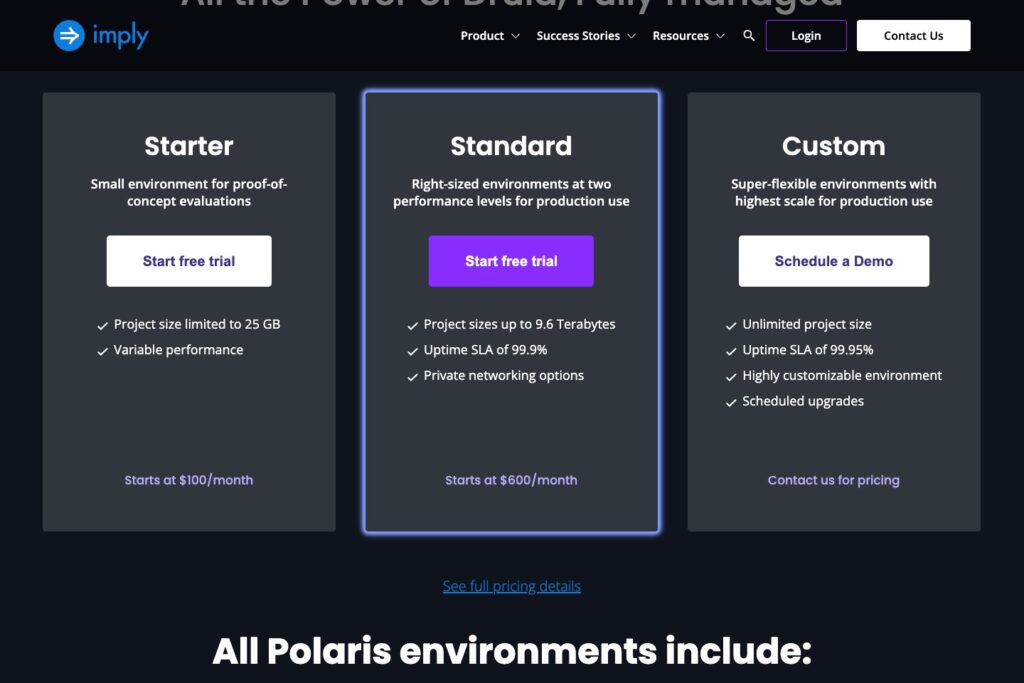
Polaris starts at $100 per month, but I would budget from the $600 Standard starting point for production. These are advertised entry prices in US dollars, not fixed bills with unlimited usage. Regional rates and project size affect what you pay.
- Starter (from $100/month): for checking whether the product’s functionality fits.
- Standard (from $600/month): my starting point for a production evaluation.
- Custom (quoted): for larger workloads and more control over the environment.
| Polaris option | Capacity and availability | My recommendation |
|---|---|---|
| Starter | 25 GB; variable performance | Explore the workflow |
| Standard | Project sizes up to 9.6 TB; 99.9% uptime SLA | Evaluate the application you intend to ship |
| Custom | Bespoke sizing; 99.95% uptime SLA | Discuss specific scale and operational requirements |
The trial gives you $500 in credit for up to 30 days, ending when either limit is reached. No payment card is required. I like that it includes the A.01 and D.04 Standard projects: the cheapest environment isn’t the right place to decide whether your customer dashboard will perform well.
What Will Your Actual Bill Include?
Your Polaris bill has five components:
- Project capacity: the size of the environment and its operating hours.
- Ingestion: the data you bring in through batch and streaming jobs.
- File storage: files retained in the staging area.
- Deep storage: all persisted data, including data also held in the project’s cache.
- Asynchronous queries: processing charged by task and runtime.
My main pricing concern is that the project price only tells part of the story. Even when your data fits comfortably, frequent imports and extensive historical analysis can push the bill higher.
Is Imply Good Value for Money?
- Yes, for a small platform team: managed operations can be worth paying for when engineers would otherwise maintain the cluster.
- Less convincing for occasional reporting: I’d first check whether your existing database and BI tool already do enough.
- Compare the complete cost: include operating effort when considering self-hosted Druid, and usage charges when considering Polaris.
Reviewer’s Notes: I’d start with an eligible Standard project in the trial. D.04 is my starting point when storage capacity matters most; I’d compare A.01 for more demanding queries. Size the environment around your actual application before making an annual commitment.
Getting Started With Imply
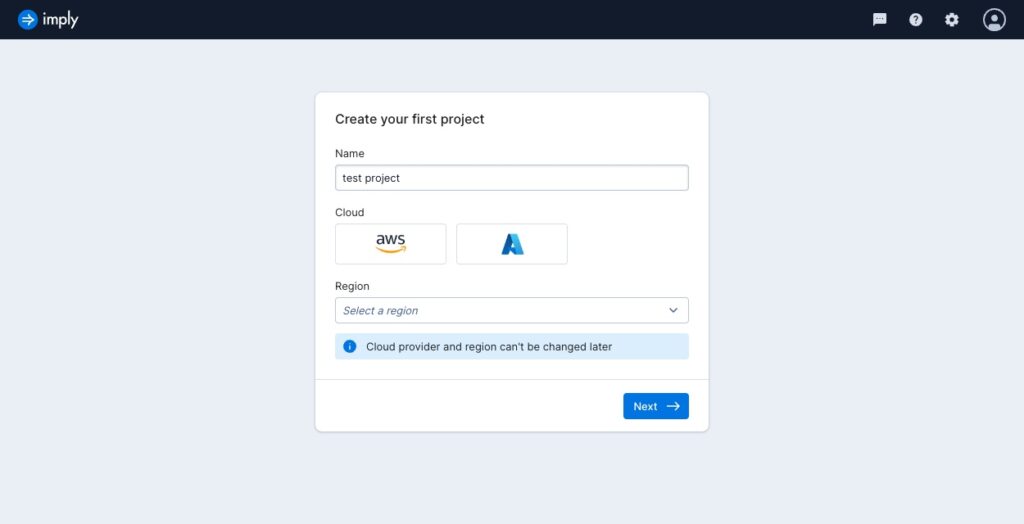
Polaris requires a work email address, so you can’t use a personal free-email account for its quickstart. After verification, you create a project and choose its cloud provider and region. Those choices cannot be changed for that project, which makes this an early decision worth getting right.
I’d choose the region around your data sources and deployment requirements. Putting your application and analytics service unnecessarily far apart is an avoidable complication.
- Create the project. Pick the environment you want to evaluate.
- Select a data source. A representative file is a sensible starting point before connecting a live stream.
- Review the inferred schema. Check field types and the timestamp used for each event.
- Start ingestion. Inspect job details and compare the loaded data with the source.
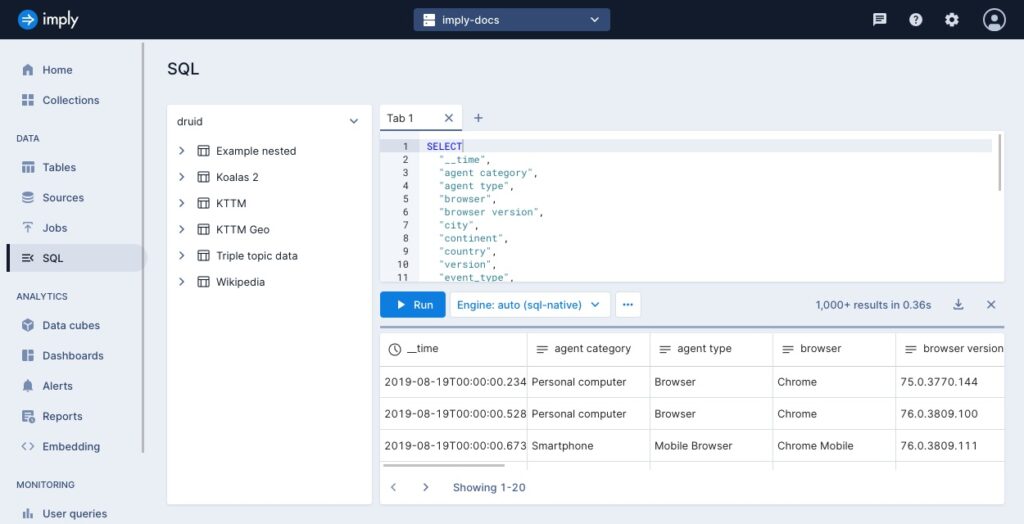
- Open the SQL workbench. Run a query you can independently check before building a dashboard around it.
I like having ingestion and analysis in one service. Compared with assembling those pieces around self-managed Druid, Polaris gives a new application a more focused starting point.
Still, I’d put your messiest representative data into the evaluation early. A clean sample file won’t tell you much about missing timestamps, unexpected field values, or the corrections your real pipeline needs. I want the evaluation to show that I can trust the answers.
Bringing Live Data Into Imply
Polaris is most appealing when events keep arriving and people need to explore them. Batch imports handle existing datasets, while streaming sources keep an application supplied with new activity. Supported routes include Kafka and Kinesis, alongside an Events API for pushing data directly.
I particularly like the Events API option for a team that wants to send application events without adopting Kafka just for this project. If you already have a streaming platform, though, I would start with the existing pipeline and check how its partitioning affects ingestion throughput.
You still need to decide what lands in the database and how much detail to preserve.
Decide How Much Detail You Need to Keep
Polaris offers detail tables and aggregate tables. With aggregate tables, rollup combines events that share the relevant dimensions and time grouping, reducing the number of stored rows.
For example, a dashboard showing activity by country and hour may not need a separate stored row for every click. I like rollup for that kind of repeated summary. It becomes a worse bargain when someone later needs to investigate a particular event that the aggregation no longer preserves.
You cannot change a table’s type after creating it. I would agree on the questions your users need answered before choosing aggregation. If individual event history matters, retain it in a detail table or an appropriate source archive.
Don’t Trust the Success Label Alone
Polaris can populate an unparseable field with a null value, and some ingestion errors can coexist with a successful job status. That is a drawback I would take seriously when building a dashboard others rely on.
My acceptance check would include row totals, timestamp ranges, and key fields with unexpected nulls. I’d make those checks part of the pipeline, so a reassuring status label doesn’t hide missing information.
Querying Fresh Data and Older History
Polaris gives you several query engines, and the choice affects which workload you’re evaluating. The extra flexibility is welcome, although you’ll need to match the engine to the job.
| Query path | Where I would use it | What to watch |
|---|---|---|
| SQL-native | Interactive queries on real-time and precached data | The project’s available resources |
| SQL-dart | Larger joins and demanding high-cardinality analysis | Performance with your particular query mix |
| SQL-async | Historical analysis, exports, and longer-running work | Separate billing and a different response workflow |
Dart is a useful reason to give Polaris a fresh look if you previously ruled it out for joins. It targets work such as large joins and exact grouping across many distinct values. I’d still compare ClickHouse closely for a SQL-heavy application, but I wouldn’t reject Imply on the assumption that it only handles simple summaries.
Retained History Isn’t All Equally Interactive
The synchronous API queries real-time and precached data. Asynchronous queries can also reach historical data in deep storage, returning a query identifier so your application can check progress and retrieve results later.
I like that distinction for a product with a busy recent-data dashboard and occasional historical exports. It lets you think separately about the data customers explore repeatedly and the history they rarely request.
That distinction matters to your customers, too. A report that completes later is a different experience from a chart responding to each filter change. I would evaluate both flows separately and avoid promising the same responsiveness across every retained date range.
Building Dashboards Your Customers Can Use
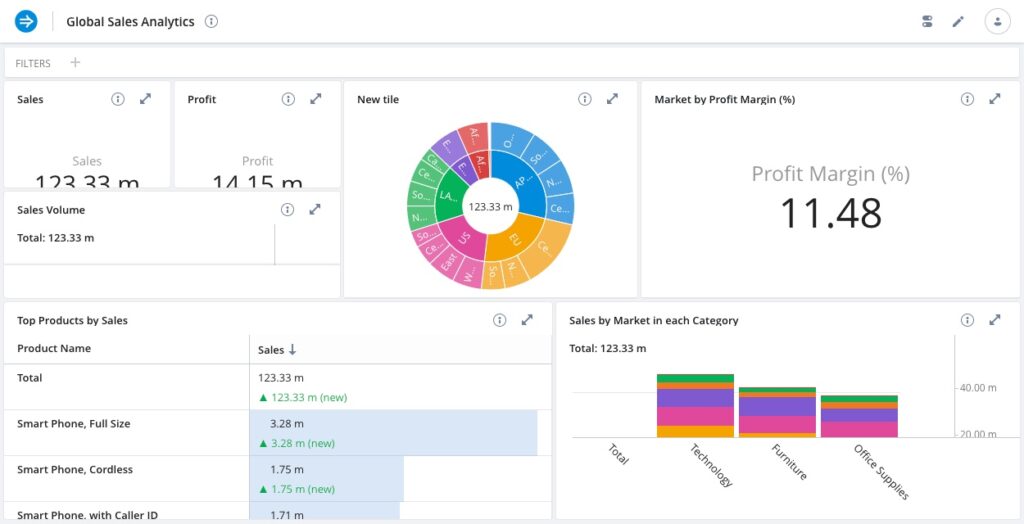
Built-in visualization is one of Polaris’s more convincing advantages. You can create dashboards and embed read-only visualizations from dashboards or data cubes in an application. For a team adding analytics to an existing product, I like having that option alongside the database.
My hesitation is how easily “embeddable” can sound like the entire integration is finished. Restricted embedded links need cryptographic signing, and access filters need to reflect what each customer is allowed to see.
I would involve an application developer from the start if different customers must see different records. Decide how your application identifies the viewer, which filters are mandatory, and how signed links are generated before polishing the charts.
Public links deserve particular care: anyone with access to the link can access the exposed visualization and its underlying data. I’d only use them for information you’re comfortable making public.
Check What Viewers Actually See
Dashboard caching and refresh settings affect freshness. Cached results can show slightly older data, including with streaming rollup, so newly ingested events do not automatically mean every visible chart has refreshed.
For a usage report, that may be a reasonable trade-off. For an operations screen that people watch during an incident, I’d make the refresh behavior part of the acceptance criteria. A chart that looks current needs to be current enough for the decision behind it.
Should You Choose Polaris, Enterprise, or Lumi?
I would start with Polaris for a new managed analytics application. It offers the clearest route when you want Imply to run the database infrastructure and your team to concentrate on the data and application.
Imply Enterprise is more relevant when infrastructure control matters. It combines a commercial Druid distribution with management, monitoring, and support for deployments on premises or in a public cloud. Enterprise Hybrid is a separate managed-in-your-AWS-VPC option. I’d discuss these directly with Imply if deployment policy rules out the standard hosted approach.
Lumi addresses another buying problem: security and observability data, including access through existing SIEM tools. Its prominence on Imply’s homepage can be confusing if you arrived looking for a database for customer analytics.
Lumi Cloud has its own credit-based model for ingestion, search, and retention. Do not use Polaris’s prices to budget for Lumi.
I like the idea of keeping a familiar security interface while changing the underlying data service. However, Lumi’s federated Splunk searches support a subset of SPL commands, with additional compatibility limits. I’d make compatibility with your essential searches the first evaluation step before attaching value to potential savings.
How Does Imply Compare With Alternatives?
- Apache Druid: my alternative when you want the open-source engine and have the team to operate it. The key decision is how much responsibility you want to retain. Imply’s commercial service needs to justify its cost through the operations, support, or integrated tooling you would otherwise provide yourself.
- ClickHouse: a strong shortlist candidate when analytical SQL is the center of the application. It supports an extensive range of joins, including specialist analytical cases. I’d compare your hardest queries in both systems; feature support alone doesn’t tell you which will be quicker or cheaper for your workload.
- StarTree: worth prioritizing when managed Apache Pinot and upsert support fit your incoming data better. I would look closely at it for event feeds where later records need to revise previously stored state. Its different engine means you’ll still need to evaluate modeling and operating behavior.
My preference would come down to the requirement that is hardest to compromise on. If it’s ownership of infrastructure, start with the operating model. If it’s complex analysis or changing records, start with those queries and data behaviors. I would settle those questions before comparing demo dashboards.
How I Reviewed Imply
I assessed Imply’s documented setup, ingestion, query engines, dashboard sharing, deployment options, and billing. My recommendations weigh what these capabilities mean for an application team, including the work that remains with you.
The assessment covers product fit and documented capabilities; it does not assign performance scores or predict a production bill.
Prices and plan information checked October 2026.
Should You Choose Imply?
Choose Imply Polaris if fresh event analytics is important enough to deserve its own service, and you’d rather pay for managed Druid than operate the whole stack yourself. I like its fit for product teams that need ingestion, analysis, and customer-facing dashboards to work together.
I’d be more cautious if you’re expecting a tool that needs no technical ownership. Table design, data quality, access rules, and cost control still need attention. If an existing reporting setup already answers your questions at the right speed, I wouldn’t add Polaris just because it offers more capacity.
My recommendation is to evaluate one complete customer workflow on an eligible Standard trial project. Bring in representative data, check the answers, build the dashboard, and estimate the paid usage. If that workflow earns its place in your product, Polaris has a convincing case.
Imply FAQ
Is Imply the same as Apache Druid?
No. Apache Druid is the open-source database engine. Imply offers commercial products around Druid, including Polaris and Enterprise, as well as the separate Lumi product line. Paying for Imply adds a particular service and operating model.
Does Imply have a free plan?
Polaris offers a limited credit-based trial. I would treat it as an evaluation window, not an ongoing free service. Afterward, budget for paid usage if you want to keep using it.
Do I need SQL skills to use Polaris?
You can explore data through its visual tools, but I would still want SQL and data-modeling skills on the team. Someone needs to check the calculations behind the charts and investigate unexpected results.
Can Imply replace a data warehouse?
It can serve analytical workloads, but I wouldn’t make wholesale replacement the starting goal. First establish whether your problem is interactive event analysis, broad business reporting, or something else. Keep systems that already serve their purpose well.
Is Lumi included in Polaris?
Lumi is a distinct offering with a separate billing model. If your priority is security logs and SIEM integration, evaluate Lumi on that basis rather than choosing a Polaris project and assuming it covers the same job.