When I started my SQL journey not too long ago, I diligently completed interactive tutorials and to be honest, thought I had a grasp on this thing. Fast forward a couple of months, I tried to write my own queries on “real” data and… BAM! A brick wall. I spent a significant amount of time banging my head on it until finally the whole “formatting dates” thing started to click. I realized that once you can format dates properly, you can sort your data in all kinds of interesting ways.
My intention for this blog post is to create a guide that is easy to understand (even for a beginner) and to include queries you can copy and paste into your SQL editor right now. Ultimately, I hope to help you “see the light” with minimal brain damage.
As you may know, there are many different “flavors” of SQL. For Example: Microsoft SQL Server, MySQL (open source) and PostgreSQL (open source). The information in this blog post will be specific to PostgreSQL, but many of the basic commands are the same in all varieties. If you’re not sure which version of SQL you are using, try running: SELECT version() in your SQL editor.
Let’s Get Started
If you’re feeling ready to dive in and want to run the example queries on your own, here is one way to get started:
Sign up for a free account on Mode.com
Connect your data to Panoply (in minutes)
Login to Mode > Click the circle with your username in it > ‘Connect a Database’ > Amazon Redshift > Enter the credentials from Panoply “Connect” screen > Start writing your queries in the Mode editor!
“Big ideas” about Dates
There are many ways to format dates.
For example, today is October 7, 2019. It is also 10-7-2019, 10-07-2019, 10/7/2019, 10/07/2019, 10/7/19, 2019-10-07, 07-10-2019 and Oct-7-2019. You get it. Tomato, to-mah-to. However, when writing queries in SQL, all dates are not created equal. Therefore, you may have to manipulate the format of your dates in order to use them in your queries and/or to take advantage of date functionality. It may seem overwhelming at first, but truly, it’s all a matter of syntax (rules that define the correct sequence of symbols).
Year-First
Although you “can” format dates in a variety of ways, you should format year-first in SQL (yyyy-mm-dd). Why? So that when you use the ORDER BY function, they will be chronological.
Timestamps/Time zones
In addition to storing date information, timestamps also include time data. “Timestamp” does not include time zone data, but “timestamptz” does. Timestamptz converts and stores time values in UTC by default.
What is UTC? Glad you asked. UTC stands for Coordinated Universal Time. Yes, the acronym is jumbled. UTC isn’t exactly a time zone, but it is a standard (has an offset of 00:00 and no concept of Daylight Saving Time) and as such, it makes sense to store your time data this way in a database. To learn more about UTC/time, check out Zac Holman’s post about it. Note: It may blow your mind. If you need or want to convert time zones, PostgreSQL Tutorials can help you learn how to do that.
Bottom line, take some time to think about what you really want to do with your data. If you don’t actually need to know the time, stick with date. Time can get messy.
Dates can be represented in different data types
Date – date data only (no time data)
Integer- time can be represented as the total number of seconds from the “Unix Epoch” on January 1, 1970 (UTC). This is known as a “unix timestamp.”
Interval – represents a period of time (ex. ‘1 week’)
String – dates can be represented as a string for presentation
Timestamp – contains date and time data, no time zone data
Timestamptz – contains date and time data, with time zone data (UTC by default)
Helpful tips:
If you’re performing arithmetic, the data types generally need to be the same or at least compatible (ex. you can subtract a date from another date, but you’d need to cast a string as a timestamp in order to subtract it from another timestamp).
The data type of your results will depend on how you are using the dates/data types (ex. date + interval = date).
SELECT current_date returns a date value (date data type) for the current date.
SELECT NOW() returns a timestamp with time zone, equivalent to current_timestamp (depends on the database server’s time zone settings).
There are several ways to convert a date to a string, but we’ll stick with TO_CHAR for now. You may want to do this for presentation. If you want to use date functions, you can turn a properly formatted string into a date.
Note: The data used in the following examples is from Panoply’s Facebook account, but you can use whatever data and metrics make the most sense for you.
TO_CHAR
The TO_CHAR() function converts a value to a string (might be a date, timestamp, interval or other data type). You’ll always start with a SELECT statement. Next, you’ll write your function, in this case, TO_CHAR. Inside parenthesis, you’ll input your “expression” (which is your date and/or time value) followed by a comma and then, inside single quotes, the format that you want the output to be in (will be a string data type).
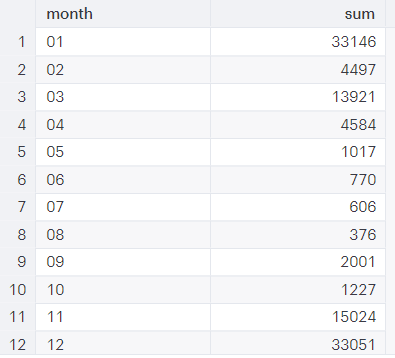
Example: Use TO_CHAR() to calculate the number of page impressions by month. This query takes a column with date values, formats the month as a string value in a column called “month”, sums the total number of page impressions by month and orders them by month.
SELECT
  TO_CHAR(date, 'mm') AS month,
  SUM(page_impressions)
FROM facebook_pages
GROUP BY month
ORDER BY month
Output:
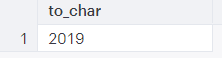
Here is another example. Let’s pretend I want my output to show the year that it is right now, and I want it to be a string datatype. I could use the following:
SELECT TO_CHAR(now() :: timestamptz, 'yyyy')
Output:
Resource: Check out AWS Redshift’s full documentation to see a list of options for how you can format your date (ex. YYYY, MM, DAY, Day).
EXTRACT
The EXTRACT() function retrieves a field such as year, month, day, etc., from a date or time value. Why is this useful? Well, your data might contain a column with a date for each individual page impression. However, you really only care about which day of the week has the most page impressions. It would take a while to calculate that using the dates as they are. Luckily, you can extract the day of the week (‘dow’) from the date and then look for the day of the week that has the most page impressions (sum). I realize that page impressions are not necessarily the most meaningful metric, but I’m using it just for the sake of an example.
Syntax:EXTRACT(field FROM source)
Field Value
TIMESTAMP
Interval
CENTURY
The century
The number of centuries
DAY
The day of the month (1-31)
The number of days
DECADE
The decade that is the year divided by 10
Sames as TIMESTAMP
DOW
The day of week Sunday (0) to Saturday (6)
N/A
DOY
The day of year that ranges from 1 to 366
N/A
EPOCH
The number of seconds since 1970-01-01 00:00:00 UTC
The total number of seconds in the interval
HOUR
The hour (0-23)
The number of hours
ISODOW
Day of week based on ISO 8601 Monday (1) to Saturday (7)
N/A
ISOYEAR
ISO 8601 week number of year
N/A
MICROSECONDS
The seconds field, including fractional parts, multiplied by 1000000
Sames as TIMESTAMP
MILLENNIUM
The millennium
The number of millennium
MILLISECONDS
The seconds field, including fractional parts, multiplied by 1000
Sames as TIMESTAMP
MINUTE
The minute (0-59)
The number of minutes
MONTH
Month, 1-12
The number of months, modulo (0-11)
QUARTER
Quarter of the year
The number of quarters
SECOND
The second
The number of seconds
TIMEZONE
The timezone offset from UTC, measured in seconds
N/A
TIMEZONE_HOUR
The hour component of the time zone offset
N/A
TIMEZONE_MINUTE
The minute component of the time zone offset
N/A
WEEK
The number of the ISO 8601 week-numbering week of the year
Example: Use EXTRACT() to calculate the average number of page impressions by day of the week. This query calculates the average number of page impressions by day of week (Sunday=0) and then lists them in descending order (the day of week with the most page impressions, on average, is at the top). Pretty neat!
SELECT
  EXTRACT('dow' FROM date) AS day_of_week,
  AVG(page_impressions)
FROM facebook_pages
GROUP BY day_of_week
ORDER BY AVG(page_impressions) DESC
Output:
DATE_TRUNC
The DATE_TRUNC() function truncates (shortens) a timestamp or an interval value based on a specified date part (hour, week, month, etc.). Everything to the “right” of the datepart you selected will be “blank” or go back to the beginning (in other words, if you truncate your query at year, then the month, day and time will “reset” to 01-01 00:00).
Syntax:DATE_TRUNC('datepart', field)
Datepart can include
Field can include
millennium
Timestamp(tz) or interval
century
Timestamp(tz) or interval
year
Timestamp(tz) or interval
quarter
Timestamp(tz) or interval
month
Timestamp(tz) or interval
week
Timestamp(tz) or interval
day
Timestamp(tz) or interval
hour
Timestamp(tz) or interval
minute
Timestamp(tz) or interval
second
Timestamp(tz) or interval
milliseconds
Timestamp(tz) or interval
microseconds
Timestamp(tz) or interval
Note: You can use a date for the field value; it will be cast to timestamp with time 00:00.
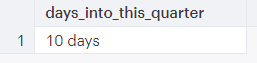
Example: Use DATE_TRUNC() to calculate how many days you are into this quarter. This query subtracts the beginning of this “quarter” from the current date.
SELECT
  CURRENT_DATE - date_trunc('quarter', CURRENT_DATE) AS days_into_this_quarter
Output:
Converting a String to a Date
CAST date or timestamp
“Cast” means to convert a value from one data type to another. You may use this to convert a string to a date.
Syntax:CAST(expression AS target_type)
SELECT CAST('10-07-2019' AS date)
Output: 2019-10-07 00:00:00
SELECT CAST ('10/07/2019' AS date)
Output: 2019-10-07 00:00:00
SELECT '2019-10-11' :: date
Output: 2019-10-11 00:00:00
TO_DATE
TO_DATE converts a string to a date value. Format here means the input format. You need to convert a string to a date if you want to use any of the date functions or perform arithmetic with another date value or interval.
Syntax: TO_DATE(text, format)
SELECT TO_DATE('10-07-2019', 'mm-dd-yyyy')
Output: 2019-10-07 00:00:00
PostgreSQL Date Functions – “Lightning Round” examples
Thank you for taking the time to read through this guide. My intention is to equip you with the tools you need to format dates in SQL so you can start analyzing your data! There are some really great, interactive resources for getting started with SQL (such as Mode Analytics SQL tutorials). If you’re like me, the best way to learn is by practicing with your own data.
At Panoply, we love to learn and grow. If you have questions or have suggestions for how to improve this blog post, we want to hear from you! Contact us here.
Lori Brok wrote 6 pieces for the Panoply blog in 2019, mostly on learning sql and tutorials. Start with "Exploring Tables And Columns In Redshift: A PG_TABLE_DEF Tutorial".

 Here is another example. Let’s pretend I want my output to show the year that it is right now, and I want it to be a string datatype. I could use the following:
 Resource: Check out AWS Redshift’s full documentation to see a list of options for how you can format your date (ex. YYYY, MM, DAY, Day).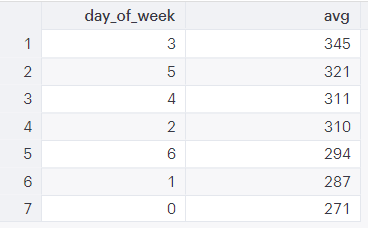
Comments 0 Responses