
Editor’s note: This Polars review is based on my hands-on test of Polars 2.1.0, from installation to a 30-million-row TPC-H workload on my own laptop, in November 2026. I weighed pricing, installation and the lazy API, streaming defaults, SQL and I/O, Nanook, and comparisons with DuckDB, pandas and PySpark.
Quick verdict: I recommend Polars for Python teams whose pipelines fit on one machine and who want multithreaded, lazy DataFrame code, free under the MIT license. My joins lost their row order under the 2.0 streaming default, and DuckDB used less memory. Nanook adds distributed execution at $0.05 per vCPU-hour beyond Developer’s free allowance, but managed compute is AWS-only.
Polars’ Rust DataFrame engine, a processing-engine rival to DuckDB and Spark, answered my 30-million-row aggregation in 0.43 seconds on an M1 laptop. Its paid product became Polars Nanook on November 5, 2026, replacing Polars Cloud and incorporating Polars On-Premises.
In this review, I’ll take a closer look at Polars’ pricing, features, and upgrade risks, so you can see exactly whether it belongs in your data pipelines or whether DuckDB or pandas is the better fit.
Key Takeaways
- Free single-node processing: MIT-licensed Polars ran my lazy streaming query about 14x faster than eager mode: 0.43 versus 6.27 seconds.
- Row-order risk: My joins lost their order under streaming until I added
maintain_order. - DuckDB used less memory: Q1 peaked at 0.21 GB versus about 1.5 GB for Polars.
- Distributed execution costs extra: Nanook includes 2,000 vCPU-hours free or 5,000 with Team at $200 monthly, then $0.05 per vCPU-hour.
- Python version trap: Polars 2.1 needs Python 3.11+; older Python silently installed 1.x.
Pros and Cons
Pros
- Free MIT license, with no single-machine usage limits.
- Lazy streaming answered my 30-million-row Q1 aggregation in 0.43 seconds on an M1 laptop.
- My filter/select plan read only 3 of 16 columns and pushed the date filter into the Parquet scan.
- SQL answered Q1-lite in 0.41 seconds; 2.1 supports recursive CTEs.
- ColumnNotFoundError listed valid columns and suggested the correct spelling.
Cons
- Default streaming lost join order in 3 of 3 runs without maintain_order.
- Polars streaming peaked at 1.49 GB on Q1 versus DuckDB’s 0.21 GB.
- Python 3.11+ is required from 2.1; my older Python silently installed 1.36.1.
- Nanook managed compute is AWS-only, with Azure and GCP forthcoming; idle cluster time is billed for up to 60 minutes by default.
Polars Pricing: How Much Does It Cost?
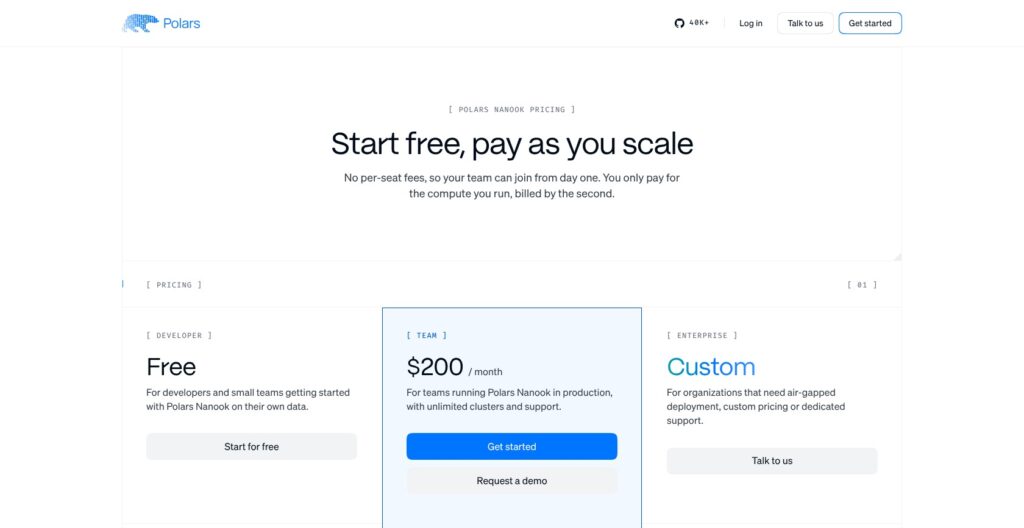
The open-source Polars library is free under MIT, with no usage limits. Charges apply to Nanook, the distributed engine, not to running more local queries.
- Polars open source (free): for single-machine pipelines; MIT-licensed with no usage caps.
- Nanook Developer (free): for evaluating distributed runs, with 2,000 vCPU-hours monthly, capped unless you connect a payment method and enable $0.05-per-vCPU-hour overages. Includes one workspace, up to three concurrent clusters, one service account, 14 days / 2,000 queries of history, and public issue tracker support.
- Nanook Team ($200 a month): for production teams, with 5,000 vCPU-hours included, valued by Polars at $250. Overages cost $0.05 per vCPU-hour. Includes three workspaces, unlimited clusters and service accounts, 90-day history subject to fair use, a support desk, and volume discounts.
- Nanook Enterprise (custom): for air-gapped deployments, custom compute pricing, unlimited workspaces and history, and a dedicated Slack or Teams support channel with an SLA.
| Plan | Price | Included compute | Extra compute | Workspaces / clusters | Support |
|---|---|---|---|---|---|
| Open source | Free | Your own machine | Not applicable | Not applicable | Community (GitHub) |
| Developer | Free | 2,000 vCPU-hours/month | $0.05/vCPU-hour, opt-in | 1 / 3 concurrent | Public issue tracker |
| Team | $200/month | 5,000 vCPU-hours/month | $0.05/vCPU-hour | 3 / Unlimited | Support desk |
| Enterprise | Custom | Custom | Custom | Unlimited / Custom | Dedicated Slack or Teams, SLA |
Is Polars Good Value for Money?
- Per-second billing: A 16-vCPU cluster running for 30 minutes consumes eight vCPU-hours, costing $0.40 beyond the allowance. Developer’s 2,000 hours cover about 125 hours of that cluster monthly. Included hours are shared by all workspaces in the organization, renew monthly, and do not carry over.
- Infrastructure costs extra: On AWS, Nanook starts EC2 instances in my own account; AWS charges separately for instances and storage. The $0.05 rate also applies on Kubernetes and bare metal, where I supply the machines.
- Idle time is billed:
idle_timeout_minsdefaults to 60 minutes, with a minimum of 10. A forgotten 16-vCPU cluster can consume another 16 vCPU-hours. Callctx.stop()in unattended jobs. - Lower platform fee than MotherDuck: MotherDuck offers 10 compute-unit hours and 10 GB on free Lite; Business has a $250 monthly platform fee. Nanook Team costs $200 with 5,000 vCPU-hours.
Payment is by card or AWS Marketplace; Marketplace charges count toward committed AWS spend.
Reviewer’s Notes: Stay on open source until a job outgrows one machine, then measure real queries on Developer. Move to Team for more than three concurrent clusters, more than one service account, or a support desk, rather than paying before those needs exist.
My Experience With Polars
Installing Polars 2.1
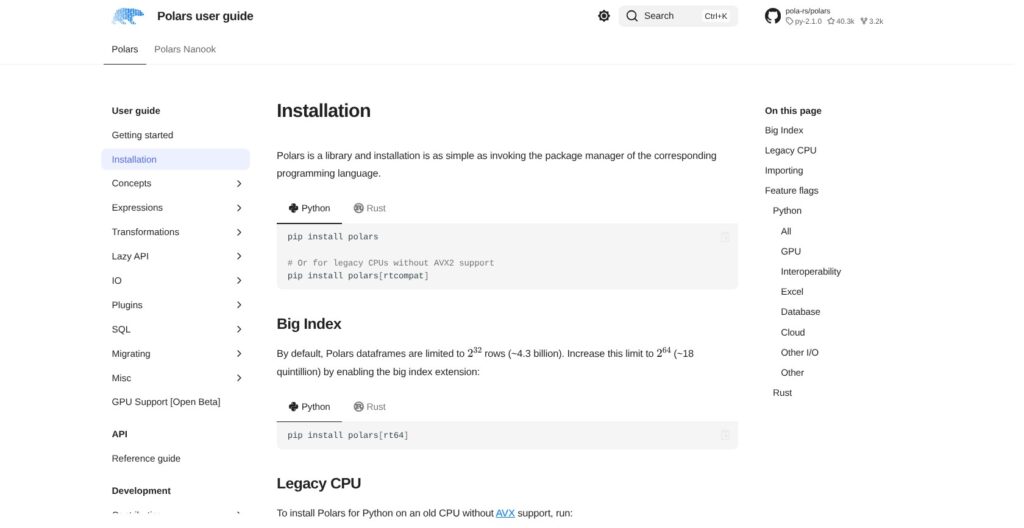
My system Python 3.9.6 installed Polars 1.36.1 without an error, despite 2.1.0 being current. Polars 2.0 required Python 3.10+, but 2.1 raised that floor to 3.11.
I switched to Python 3.12.16 in a fresh virtual environment. Installing Polars 2.1.0 alongside pandas 3.1.1, PyArrow 26.0.1 and DuckDB 2.0.0 took under a minute. The compiled engine occupied about 149 MB on disk, separate from the roughly 10 MB Python package.
I used pl.show_versions() to check optional dependencies, including deltalake, pyiceberg, connectorx, fastexcel and polars_nanook. It marked packages as installed or missing, which helped distinguish the core installation from integrations needing extras.
My test machine was an eight-core Apple M1 MacBook with 16 GB RAM. I generated TPC-H scale factor 5 with DuckDB’s tpch extension in 7 seconds and wrote it as zstd Parquet: 1.1 GB total, including 29,999,795 lineitem rows in a 768 MB file and 7.5 million orders.
Running My First Lazy Query
I first loaded lineitem with read_parquet and ran Q1’s filter and eight aggregates. That eager approach took 6.27 seconds and 4.96 GB peak memory, including loading all 16 columns.
Changing the pipeline to scan_parquet let Polars optimize before reading. The default lazy engine took 1.35 seconds initially and 0.62 seconds on the second run, with 1.46 GB peak memory. Explicit streaming reached 0.43 seconds at about 30% of eager mode’s memory; the in-memory engine reached 0.67 seconds but used 3.90 GB.
| Mode | First run | Second run | Peak memory |
|---|---|---|---|
Eager read_parquet | 6.27 s | 6.32 s | 4.96 GB |
| Lazy default (streaming) | 1.35 s | 0.62 s | 1.46 GB |
| Lazy streaming | 0.51 s | 0.43 s | 1.49 GB |
| Lazy in-memory | 1.56 s | 0.67 s | 3.90 GB |
| DuckDB 2.0 SQL | 0.63 s | 0.26 s | 0.21 GB |
The full lazy Q1 plan read seven columns rather than 16. In a separate filter/select inspection, explain() showed only three columns being read (PROJECT 3/16 COLUMNS) and the date filter pushed into the Parquet scan. Inspect that plan before changing hardware.
A shortened, count-only version of the lazy Q1 pipeline looks like this:
import datetime as dt
import polars as pl

result = (
    pl.scan_parquet("data/lineitem.parquet")
    .filter(pl.col("l_shipdate") <= dt.date(1998, 9, 2))
    .group_by("l_returnflag", "l_linestatus")
    .agg(pl.len().alias("count_order"))
    .collect()
)
For the full eight-aggregate benchmark, I checked quantities and counts against DuckDB: both matched exactly across all four groups.
Where DuckDB Beat It
DuckDB answered Q1 in 0.26 seconds warm with 0.21 GB peak memory, beating Polars streaming at 0.43 seconds and 1.49 GB, roughly 7x DuckDB’s footprint. Choose DuckDB over Polars for this query if memory consumption is the deciding factor.
The three-way Q3 join of customer, orders and lineitem was much closer: Polars’ default engine took 0.47 seconds and 0.38 GB warm, versus DuckDB’s 0.56 seconds and 0.31 GB, though its first run took 2.24 seconds to DuckDB’s 0.91. Polars’ in-memory engine used 1.22 GB on that join, about three times the streaming footprint.
A misspelled column produced ColumnNotFoundError, listed valid columns, suggested "l_shipdate", and marked the failing plan location, so I recovered quickly.
My pandas-style assignment, df["b"] = df["a"] * 2, raised a TypeError stating that DataFrames do not support Series assignment by index and directing me to with_columns. The expression pl.col("s") + 1 on a string column raised InvalidOperationError with a hint to cast explicitly. One eager arithmetic error was misleading, though: I added an integer to a string Series, but the message described the argument as str.
Reviewer’s Notes: Write lazy
scan_*pipelines from day one. Eagerread_*code cost me about 14x the time and over three times the memory on the same Q1 workload; choosing Polars alone did not produce those savings.
Polars 2.0 Streaming Default: Faster, With a Row-Order Catch
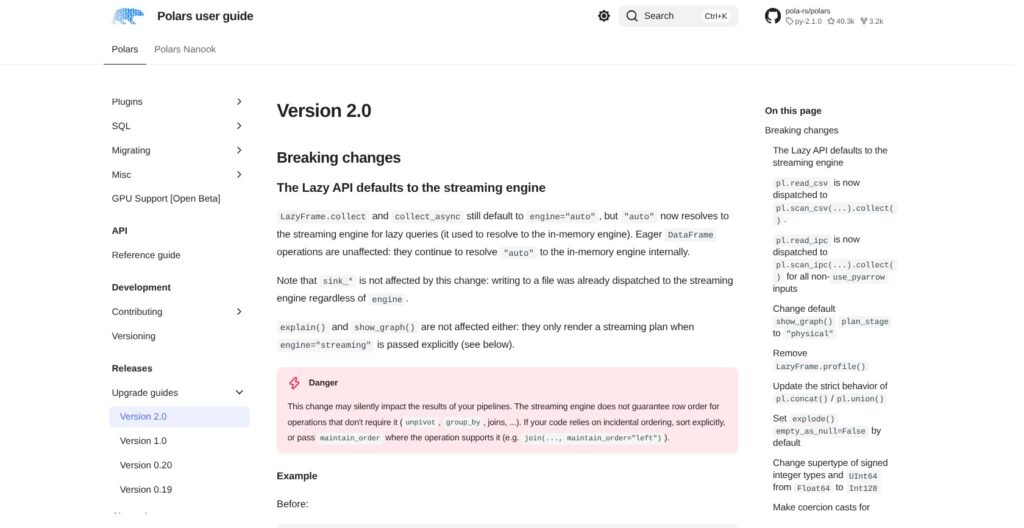
Since Polars 2.0, released October 6, 2026, collect() on a LazyFrame uses streaming by default. Version 2.1 followed on October 25. Eager DataFrame operations still use the in-memory engine, but pl.sql(eager=True) now streams too.
I joined 200,000 reversed keys to orders and checked whether the left-side order survived. The default and explicit streaming engines preserved it in zero of three runs; the in-memory engine preserved it in all three. Adding maintain_order="left" restored order under the default engine.
A separate group_by returned seven ship modes in four different orders across five runs. Add an explicit sort wherever output order matters, rather than treating unchanged counts as proof that an upgrade preserved behavior.
pl.Config.set_engine_affinity("in-memory") restores the old engine globally, and collect(engine="in-memory") does it for a single query. Use them as a migration bridge, not as a substitute for explicit ordering requirements.
Spill-to-disk is enabled by default, starting at approximately 80% of RAM with a 64 GB disk budget. Version 2.1 added out-of-core group-by and window functionality. Out-of-core joins are not listed among its additions.
- CSV arguments changed:
read_csvnow usesscan_csvinternally and drops arguments includingn_threads,batch_size,sample_sizeandrechunk. - Local profiling changed:
LazyFrame.profile()is removed; Nanook supplies query profiling. - Horizontal concatenation is strict: Unequal heights now raise unless you request the padding behavior with
horizontal_extend. - Arithmetic is stricter: Version 2.1 rejects mixed string/numeric arithmetic in eager mode.
- Python requirements increased: Version 2.1 requires Python 3.11 or newer.
I recommend moving to the latest 1.x and clearing deprecation warnings before installing 2.x. pandas is not a no-change alternative: pandas 3.0 also introduced a default string dtype and always-on Copy-on-Write in January 2026.
SQL, Lakehouse Formats and the pandas Bridge
SQL Interface
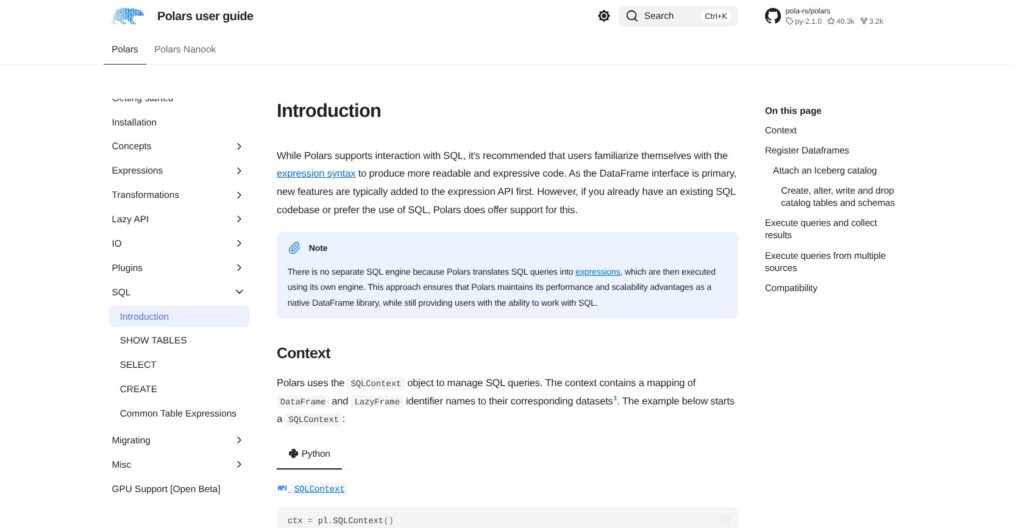
I ran Q1-lite directly against Parquet through pl.sql in 0.41 seconds, with matching results. SQLContext also queried my registered LazyFrame, and a recursive CTE summing 1 through 5 returned the expected 15.
SQL count(*) returned i64, while expression-based pl.len() returned u32. Version 2.1 adds recursive CTEs, ASOF JOIN, and Iceberg catalogs in SQLContext. I still recommend DuckDB for SQL-first work; Polars makes more sense when DataFrame expressions remain the main interface.
Remote Files, Delta and Iceberg
My HTTPS scan of the public 19-column January 2024 NYC taxi Parquet file completed its trip_distance filter and payment-type grouping in 0.66 seconds, without extra packages.
Delta Lake required deltalake. Writing 100,000 rows took 1.7 seconds; append worked, and scan_delta(version=0) returned the original 100,000 rows versus 101,000 in the latest version. Adding a column without schema-evolution options raised SchemaMismatchError: 17 versus 16 fields.
Polars also provides scan_iceberg and sink_iceberg, with overwrite filters and pl.delete_iceberg added in 2.1; Polars marks delete_iceberg as unstable in 2.1, so its API may change in a later release.
pandas and GPU
Converting 100,000 rows with to_pandas() took 0.51 seconds and turned DECIMAL columns into Python objects. Using use_pyarrow_extension_array=True took 0.008 seconds as a zero-copy Arrow conversion.
On my six-million-row comparison, pandas 3.1.1 read DECIMAL columns as Python objects with default settings and took 19.89 seconds with 3.06 GB peak memory. PyArrow-backed pandas with float casts took 1.24 seconds with 1.40 GB, making it the more useful comparison.
Polars took 0.32 seconds with 0.86 GB in-memory, or 0.67 seconds with 0.39 GB streaming. Against PyArrow-backed pandas, the practical gap was roughly 2-4x on time and 1.6-3.6x on memory.
The open-beta GPU engine requires NVIDIA CUDA 12 or 13 on Linux or WSL2, plus cudf-polars. My Mac attempt raised a missing-package error; Apple Silicon has no GPU path.
Polars Nanook: Distributed Polars on Your AWS or Kubernetes
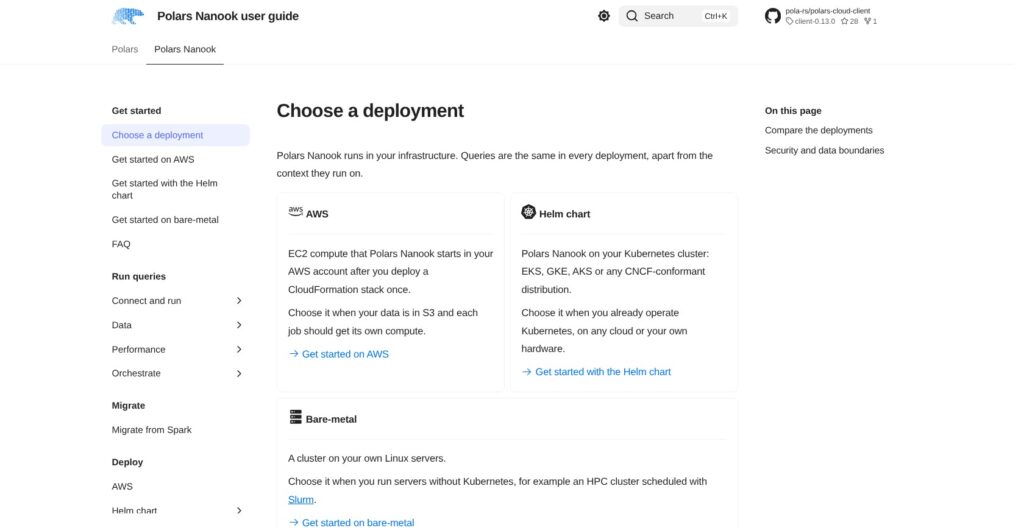
Polars Nanook unified the paid cloud and self-hosted products on November 5, 2026. Its polars-nanook 0.13.0 client requires Python 3.11+. I installed the client and did not start a paid cluster.
Importing polars_cloud with only the new client installed failed. The error directed me to import polars_nanook as pn or the deprecated package, which remains available for a six-month transition with a FutureWarning.
ComputeContext accepts CPU, memory, instance type, cluster size, workspace, and idle-timeout settings. LazyFrame.remote() sends a query to that context.
- AWS: A one-time CloudFormation stack connects your account. Nanook starts EC2 instances there; Polars puts boot time at approximately 45 seconds and concedes that this can feel slow for interactive work.
- Kubernetes: A Helm chart supports EKS, GKE, AKS, and other conformant distributions.
- Bare metal: Deployment supports Linux servers and Slurm.
- Air-gapped: Enterprise supports disconnected infrastructure.
Azure and GCP managed compute are forthcoming, distinct from running Nanook yourself on Kubernetes in those clouds.
- Distributed execution: Cluster release 0.10.0 pins Polars 2.1.0 and supports worker autoscaling.
- Query inspection: Remote
explain()and profiling expose stage graphs and per-node CPU and I/O time. - Automation: Service accounts, a built-in MCP server, and orchestration guides for Airflow, Dagster, Prefect, and Lambda.
- GPU limits: Remote GPU execution is unstable and never falls back to CPU.
In Polars’ own published benchmark, a 1 TB TPC-H-derived workload on 32 m8i.xlarge nodes took Nanook 187 seconds, versus Databricks at 204, Trino at 564, and PySpark 4.0.1 at 820.
I recommend piloting Nanook on Developer rather than committing a platform immediately. Cluster releases arrive every few weeks; the company, founded by Ritchie Vink in 2020, announced an EUR 18 million Series A led by Accel on September 29, 2025.
How Does Polars Compare to Competitors?
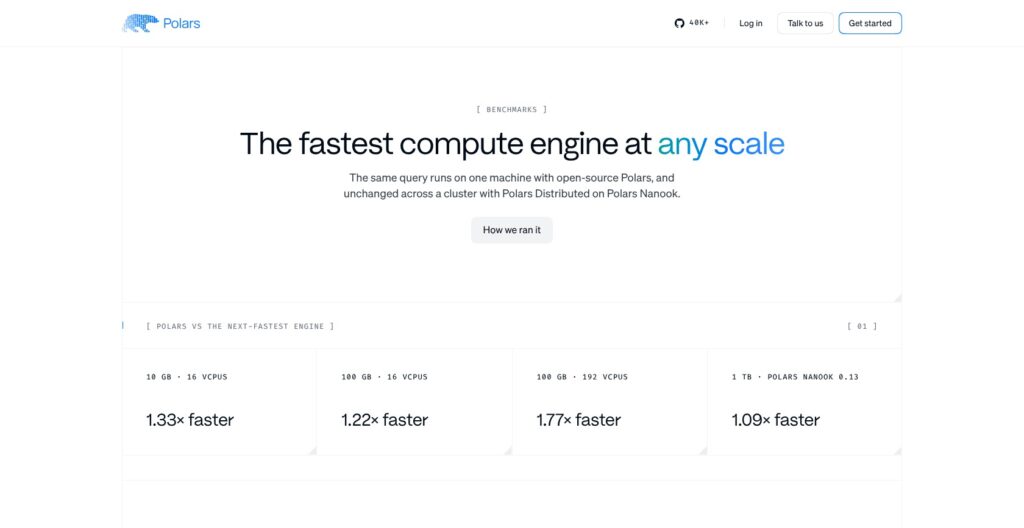
Polars’ own PDS-H SF10 benchmark on 16 vCPUs recorded Polars at 3.22 seconds, DuckDB at 4.27, and DataFusion at 7.41; my M1 Q1 test instead favored DuckDB, 0.26 versus 0.43 seconds.
- DuckDB: I recommend this SQL-first, MIT-licensed engine for SQL-centric analysts and embedded analytics. Version 2.0.0 LTS arrived October 21, 2026. Its 0.21 GB Q1 peak memory beat Polars’ roughly 1.5 GB in my test. Hosted DuckDB through MotherDuck offers free Lite with 10 compute-unit hours and 10 GB; Business has a $250 monthly platform fee.
- pandas: Keep pandas for notebooks and libraries that expect its DataFrames. It has the largest ecosystem, and 3.1.1 is current. Version 3.0 arrived January 21, 2026, changing string defaults and Copy-on-Write behavior. My PyArrow-backed comparison narrowed Polars’ time advantage to roughly 2-4x, making compatibility a legitimate reason to stay.
- Apache Spark / PySpark: Retain PySpark for jobs already running on established clusters or Databricks rather than migrating solely on a vendor benchmark. Version 4.3.0 arrived October 30, 2026, under Apache-2.0. The 820-second result above applies to PySpark 4.0.1, not that current release.
- Daft: Shortlist Daft 0.7.26 for multimodal pipelines involving images, video, or audio. It offers Ray-based distributed execution under Apache-2.0, unlike Polars’ single-machine open-source engine. Its cloud pricing is not published, so get a quote before choosing its hosted route.
- Apache DataFusion: Version 55.0.0 is an Apache-2.0 embeddable engine. Consider it when building an engine into a product rather than replacing pandas in an analyst’s notebook. It finished last among the three engines in Polars’ single-node benchmark.
I favor Polars for Python DataFrame pipelines, not as a universal winner across SQL, multimodal processing, and existing distributed installations.
| Tool | License / model | Paid scale-out | Best for |
|---|---|---|---|
| Polars | MIT; single-machine library | Nanook | Lazy Python DataFrame pipelines |
| DuckDB | MIT; SQL-first engine | Hosted option: MotherDuck | SQL-centric analytics |
| pandas | Open-source DataFrame library | Not a distributed platform | Notebook and library compatibility |
| PySpark | Apache-2.0; distributed engine | Databricks is an option | Existing Spark installations |
| Daft | Apache-2.0; distributed DataFrames | Cloud pricing not published | Multimodal pipelines |
How I Reviewed Polars
I tested Polars 2.1.0 on November 10, 2026, using Python 3.12.16 on an eight-core Apple M1 MacBook with 16 GB RAM. My local benchmark used TPC-H scale factor 5 written to Parquet.
- Engine comparisons: I ran Q1 across eager, default, streaming, and in-memory paths, plus Q3 across the lazy engines.
- Rival comparisons: I used DuckDB 2.0.0 on the same files and pandas 3.1.1 on a six-million-row slice.
- Measurements: Each benchmark configuration started in a fresh process; I recorded first and second execution times and peak resident memory.
- Behavior checks: I tested join ordering, SQL, remote Parquet, Delta Lake, pandas conversion, error messages, and the GPU flag.
- Scope limits: I installed the
polars-nanook0.13.0 client, inspectedComputeContextandLazyFrame.remote(), and weighed Nanook’s plans and pricing. I did not test its distributed execution or profiler, Iceberg catalogs, or local spill-to-disk under memory pressure.
Prices current as of November 2026.
Should You Use Polars for Your Data Pipelines?
I recommend Polars for single-machine Python data pipelines. My 30-million-row aggregation finished in 0.43 seconds using lazy streaming, without a license fee. DuckDB still won that query on speed and memory, so choose by workload and interface rather than a blanket performance claim.
- Recommended if: You want lazy DataFrame transformations over Parquet, Delta, or Iceberg, or need faster pandas-style processing without moving immediately to a cluster.
- Choose DuckDB if: Your team thinks in SQL and memory efficiency matters more than a DataFrame-first API.
- Keep pandas if: Notebook workflows depend on pandas-only libraries and conversion would add more work than the speedup saves.
- Keep PySpark or Databricks if: Your pipelines already belong on established Spark infrastructure.
- Consider Daft if: Multimodal data is the main workload rather than tabular analytics.
Before upgrading from 1.x, check join and group-by ordering assumptions. Add maintain_order or an explicit sort where needed, and compare outputs rather than just successful execution.
Start Nanook on free Developer only when one machine becomes insufficient; managed compute remains AWS-only. Port one representative job to a lazy pipeline first, measure it against DuckDB, and check its output. Get the library at pola.rs.
FAQ
Is Polars free?
Yes, the open-source Polars library is free under the MIT license, with no usage limits on one machine. Nanook adds distributed execution: Developer includes 2,000 vCPU-hours monthly for free, while Team costs $200 monthly with 5,000 included; extra compute costs $0.05 per vCPU-hour. AWS instances and storage are billed separately from Nanook.
Is Polars faster than DuckDB?
Not on every query. In my M1 test, DuckDB ran Q1 in 0.26 seconds versus Polars’ 0.43 seconds and peaked at 0.21 GB versus 1.49 GB. They were close on Q3. Polars’ own 16-vCPU benchmark favored Polars, 3.22 versus 4.27 seconds at SF10, so I recommend testing representative queries rather than assuming either engine always wins.
What happened to Polars Cloud?
It became Polars Nanook on November 5, 2026, with the self-hosted product folded into Nanook. The new Python package is polars-nanook, imported as polars_nanook. The deprecated polars-cloud package continues working during a six-month transition and emits a FutureWarning. New integrations should use the Nanook package.
Does Polars 2.0 change my results?
It can change output row order because lazy queries now default to streaming, which does not preserve incidental join or group-by ordering. My join test lost order every time until I added maintain_order="left". An explicit sort establishes order; pl.Config.set_engine_affinity("in-memory") restores the previous engine while you migrate.
Which Python version does Polars need?
Polars 2.1 requires Python 3.11 or newer; Polars 2.0 required Python 3.10 or newer. On my system Python 3.9.6, an unpinned installation silently selected Polars 1.36.1 instead of raising an error. Check your interpreter and installed Polars version before following 2.x examples or evaluating an upgrade.