I recommend Trino for data teams that need SQL across lake storage and databases, and have engineers to own the platform. My Trino review comes down to a practical trade-off: you get a flexible, open-source query engine with no license fee, but infrastructure, security, and reliable operation remain your responsibility.
Key Takeaways
- A strong fit for federation: Trino can query across configured data sources, making it worth considering when your analytics don’t live in one place.
- Free software, paid operation: Apache 2.0 licensing removes the software subscription charge, not your compute bill or staffing needs.
- Source limitations still matter: Connector capabilities vary, and cross-catalog joins don’t qualify for join pushdown.
- Iceberg offers useful flexibility: Supported writes and historical queries make Trino more than a read-only layer, although configuration and table maintenance need ownership.
- Production safeguards aren’t automatic: Security and fault-tolerant execution are disabled by default. Both require deliberate configuration.
Among lake query engines, I see Trino as an engineering choice rather than a ready-made analytics service. It’s particularly interesting when you want control over how SQL reaches existing data, not another application database.
I’ll cover the real cost, the documented starting workflow, and the limitations that matter when connecting sources. Then I’ll explain where Athena, Starburst Galaxy, Dremio, or Spark makes more sense.
Pros and Cons
Pros
- No software license charge under Apache 2.0.
- SQL queries can span configured data sources.
- Iceberg supports writes and snapshot-based historical queries.
- Resource groups provide query queueing and concurrency controls.
- CLI and client drivers support different SQL workflows.
Cons
- Self-hosting requires infrastructure and ongoing operational ownership.
- Join pushdown requires tables in the same catalog.
- Task retries can increase latency for short queries.
- Default installations have no security features enabled.
I like the breadth, but these drawbacks aren’t minor setup details. They determine whether Trino belongs on your shortlist at all.
How Much Does Trino Cost?
Trino is free software, not a SaaS product with subscription tiers. Its Apache 2.0 license has no software license charge, so a pricing comparison needs to focus on how you deploy and operate it.
That distinction matters to the budget. A license-free engine can still be the wrong financial choice if your team needs to build an operational capability just to support it.
Choose between these deployment options:
- Local exploration: Run the open-source software on your own machine. This is my starting recommendation for engineers learning the query model, not a production deployment recommendation.
- Self-hosted production: Run Trino on infrastructure you manage. Budget for compute, storage, networking, and the people responsible for configuration and ongoing operation.
- A separate managed service: Consider Starburst Galaxy if you want a managed platform built on Trino. Its commercial charges are separate from the open-source project’s license.
| Deployment option | Software pricing | Other costs | Best fit |
|---|---|---|---|
| Local Trino | No license fee | Local computing resources | Learning and exploration |
| Self-hosted Trino | No license fee | Infrastructure and engineering | Teams wanting operational control |
| Starburst Galaxy | Separate commercial service | Service-specific charges | Buyers wanting managed Trino |
For a production budget, I recommend separating the engine from the systems it touches. Trino’s workers need resources, but the underlying databases and lake storage don’t disappear from your cost model.
Staff ownership deserves its own line, too. Production deployment includes coordinator and worker configuration, JVM and node settings, and source catalogs. Those responsibilities aren’t a subscription price, but they still compete with other engineering work.
Don’t build the business case around a hypothetical managed-service saving. Compare the deployment you actually need against the managed alternative you’re considering, including who handles problems after launch.
Is Trino Good Value for Money?
Yes, for an equipped platform team. I like its value when operating a distributed query service is already within your team’s capabilities and federation solves a recurring problem.
- Better value: You need cross-source SQL and have a named platform owner.
- Weaker value: Your analytics team needs a service but has nobody to maintain it.
- Wrong reason to choose it: You want to eliminate a subscription without budgeting for replacement responsibilities.
My recommendation is local exploration first for engineers, self-hosting for teams prepared to own production, and a managed-service comparison for everyone else.
Getting Started With Trino
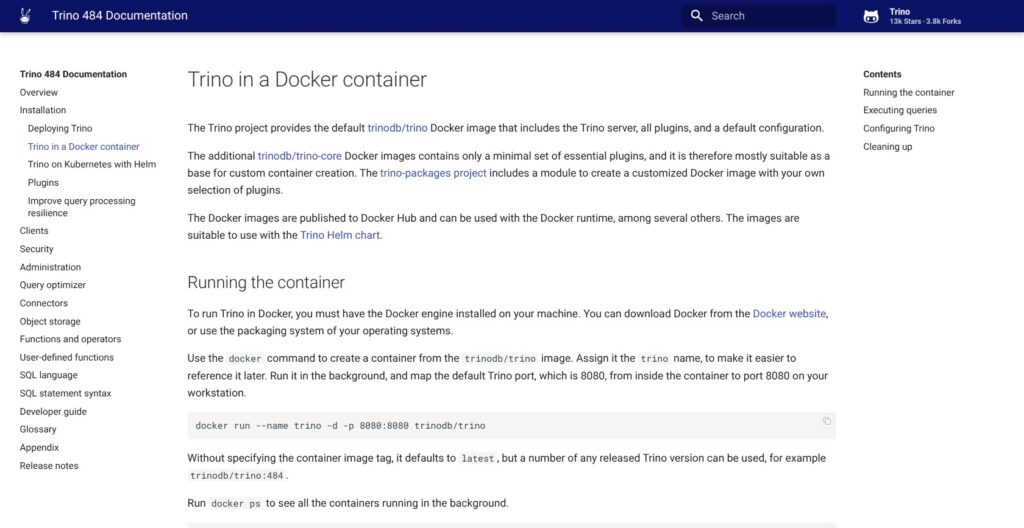
The documented Docker route provides a contained introduction to Trino. I recommend starting with sample data, because connecting a business database adds credentials and network dependencies before you’ve learned the basic query structure.
The official image includes the CLI and example catalogs. A short local sequence is:
- Start a pinned image: For the documented release, use
docker run --name trino -d -p 127.0.0.1:8080:8080 trinodb/trino:484. The host binding keeps this demonstration port local. - Wait for startup: Use
docker psto check that the container is healthy. - Open the CLI: Connect with
docker exec -it trino trino. - Run the sample query: Enter
SELECT count(*) FROM tpch.sf1.nation;. The documented result is 25. - Leave the CLI: Use
quitwhen finished exploring.
I like this as a first encounter because it separates SQL exploration from source setup. The sample establishes the query path; production performance depends on your actual sources and workload.
The naming model is worth understanding before adding data:
- Connector: The adapter for a particular data source.
- Catalog: A configured instance of a connector.
- Schema and table: The remaining parts of a fully qualified
catalog.schema.tablename.
That structure becomes useful when sources overlap. For a sales analysis, you might distinguish a customer table in a database catalog from an order table in a lake catalog without asking analysts to switch query tools.
Adding PostgreSQL requires more than naming a connection. The connector supports PostgreSQL 12 or newer, and both coordinator and workers need network access. Configuration includes the PostgreSQL connector name, a JDBC connection URL, and credentials; secret handling can avoid plaintext secret values in catalog properties.
For the container approach, catalog configuration can be mounted at /etc/trino/catalog. Mounting all of /etc/trino replaces the image’s default configuration, so I favor the narrower starting point when the immediate goal is adding a source.
The next decision is how people will submit queries. Trino maintains a CLI and JDBC driver, along with several language clients. If you’re buying for a BI workflow, treat the intended client connection as part of the deployment choice rather than assuming the engine alone supplies the analyst experience you want.
The Web UI serves a different purpose: it monitors the cluster and manages queries. It displays details such as query text, state, and progress. I see it as an operational view, not a substitute for choosing an appropriate SQL or BI client.
Secure the service before connecting sensitive data. The local demonstration is a learning environment, not a production security configuration. I wouldn’t expose it to a shared network simply because the sample query works.
My preferred progression is deliberately modest: understand the query model, introduce a limited source, then decide whether the operational burden fits your team. Keep the initial question narrow enough that Trino’s value is clear.
Querying Across Lakes and Databases
Federation is Trino’s strongest buying argument for me. It lets you ask questions across configured sources rather than treating each database or lake as an isolated SQL destination.
Consider a retailer with customer reference data in PostgreSQL and order history in an Iceberg lake. A Trino query could join those tables through their catalog-qualified names. I like that option when a question crosses system boundaries and relocating the data would be a separate project.
It doesn’t mean data stops moving. It also doesn’t remove dependence on the source systems.
Trino’s connector range includes database and lake options, but connector counts tell you little about suitability. A connector’s presence answers whether a route exists. Its supported operations determine whether that route fits your workload.
The key concept is pushdown: supported work can be passed to the underlying source. Depending on the connector, this can include:
- Filtering: Applying eligible conditions at the source.
- Aggregation: Passing supported calculations to the source.
- Joins: Moving eligible joins into the source.
- Limits and Top-N: Delegating supported row-limiting operations.
The major restriction is easy to miss: join pushdown requires the same catalog, plus pushable predicates. A join between a PostgreSQL catalog and an Iceberg catalog cannot meet that same-catalog requirement, even though Trino can express the query.
I consider that a fair trade-off, provided you buy federation for access flexibility rather than assuming every operation happens beside the original data. If the business case depends on avoiding substantial cross-source work, the distinction becomes central.
PostgreSQL illustrates how specific these limits get. Its cost-based join pushdown uses table statistics and skips that pushdown when statistics are unavailable. Ordinary range conditions on text columns also have pushdown restrictions.
Trino’s EXPLAIN output helps distinguish work handled by the source from work remaining in Trino. A successfully pushed join or aggregation removes the corresponding operator from the Trino plan. That’s useful visibility, not proof of better performance.
For buyers, my dividing line is simple. Choose federation for a real cross-source need, not because consolidating connections sounds tidy.
If your reporting question already lives comfortably in one database, adding another query layer needs a clear justification. If analysts repeatedly need to combine lake history with operational reference data, Trino becomes much more compelling. I especially like that second scenario when the platform team and database owners can agree on acceptable source usage before broad access begins.
Working With Iceberg Tables
Trino’s Iceberg connector makes it a credible option for teams that want SQL over lake tables with more than read-only access. My reservation is that table flexibility brings maintenance responsibilities, not a managed lakehouse by itself.
The documented capabilities include:
- Table compatibility: Iceberg specification versions 1 and 2 are supported; version 3 support is experimental.
- Data changes: The connector supports
INSERT,UPDATE,DELETE,TRUNCATE, andMERGE. - Historical queries: Snapshot IDs or timestamps can identify earlier table states.
- Maintenance: Optimization compacts smaller files, while snapshot expiration removes older history and associated files according to retention settings.
Storage access and a metadata catalog both need configuration. Catalog choices include AWS Glue and REST-based catalogs, among others.
I like that separation for teams with an established lake architecture. It gives you room to choose the pieces that fit your environment. For a team starting from nothing, however, those choices are additional decisions before the first useful business report.
For a finance analyst investigating why a report changed, snapshot-based time travel could make an earlier table state available for comparison. The important caveat is history depends on retention: an expired snapshot isn’t a permanent archive.
That means retention deserves a business conversation, not just a technical default. How far back might someone need to investigate a discrepancy? Who decides when old states can go? I want clear ownership of those questions before calling historical querying a dependable part of the reporting process.
The same applies to maintenance. I don’t see compaction as a reason to reject Trino, but somebody must own it. A table format’s flexibility is less valuable when every team assumes another team is responsible for its upkeep.
My recommendation is Trino for buyers who already want an Iceberg-based architecture and are comfortable managing its components. If your main interest is serving repeated analytical queries through precomputed data, Dremio deserves consideration instead. That’s a different approach to evaluate, not evidence that either engine will be faster on your workload.
Performance, Reliability, and Security
Trino gives you controls, not automatic outcomes. Its architecture distributes execution across workers, with a coordinator planning queries, but more workers aren’t a promise of proportionally faster results.
I don’t recommend choosing it on a general speed claim. The relevant question is whether its execution model fits your source systems and the mix of queries your organization actually needs.
Resource groups give administrators control over concurrency and queueing, with memory and scheduling settings. I see these as important buying features when a shared service must accommodate competing demands.
For example, a platform owner may want different treatment for interactive analysis and large scheduled jobs. The value isn’t a guaranteed response time. It’s having policy controls rather than treating every submitted query as equally urgent.
Resilience needs a separate decision. Fault-tolerant execution is off by default, with retry-policy=NONE.
The available retry approaches differ:
- QUERY retries: Retry an entire query.
- TASK retries: Retry individual tasks and require an exchange manager.
- Connector support: Retriable SQL behavior varies by connector.
Task retries target large batch queries and can add latency for many short queries. The documentation recommends separate task-retry clusters for large batches and clusters serving short queries.
I like having the option, but recommend choosing the retry policy for the workload. A dashboard query and a long batch job have different priorities. Writing and reading intermediate results in exchange storage can also add substantial I/O, so resilience belongs in the cost discussion.
Security is the sharper caution. No security features are enabled by default. The documented setup begins with TLS/HTTPS, a shared secret, and authentication; client access, internal communication, and access to source systems need separate attention.
The Web UI makes the consequence concrete. Without authentication configured, it accepts any username without a password. Without system access control, users can view or kill any query.
That’s not a reason to label Trino inherently unsafe. It is a reason to reject an unsecured default installation as a shared business service.
Authorization also needs deliberate policy. System access control applies globally before connector authorization, with configurable approaches including file-based rules and external policy systems.
My verdict here is capable, but dependent on careful configuration. I want a named person or team responsible for query policies and security configuration before recommending self-hosted production. If that responsibility is unresolved, I recommend comparing Starburst Galaxy’s managed service before committing to self-hosting.
How Does Trino Compare to Alternatives?
I choose between these tools by the work you want to own, not by declaring one SQL engine universally better. Trino is most attractive when control and cross-source querying justify running the service yourself.
- Amazon Athena: My first comparison for an AWS-focused buyer who doesn’t want to provision or manage a query cluster. SQL charges can be based on data scanned or compute capacity, with separate costs for storage and related services. Trino versus Athena is partly an operating-model decision.
- Starburst Galaxy: The clearest alternative if you want a fully managed platform built on Trino. It includes catalog and cluster administration plus a SQL editor. Treat it as a separate commercial product, not a paid Trino tier.
- Dremio: Worth considering when precomputed data fits your analytical workload. Its Reflections can be substituted by the optimizer, but materialized copies and refresh behavior need management. Any performance advantage depends on the workload.
- Apache Spark: My preferred comparison for programmatic transformation work. Spark SQL shares its execution engine with DataFrame and Dataset APIs, making the choice broader than SQL access alone.
| Tool | Main reason to consider it | Main responsibility or caveat |
|---|---|---|
| Trino | Cross-source SQL with self-hosted control | Cluster and source dependencies |
| Athena | Serverless analytics in AWS | Usage charges and related services |
| Starburst Galaxy | Managed platform built on Trino | Separate commercial service |
| Dremio | Reflection-based query acceleration | Materialization and refresh management |
| Spark | SQL plus programmatic transformations | Deployment-specific operational work |
My shortlist would start with Trino and Galaxy for federation, Athena for an AWS serverless preference, and Spark when transformation code is central. Dremio earns a closer look when its acceleration model addresses the actual reporting problem.
How I Reviewed Trino
I evaluated Trino’s documented capabilities and deployment requirements, focusing on the decisions a platform buyer must make. The review covers licensing, source connectivity, Iceberg behavior, and the operational controls behind a shared query service.
The technical basis is the Trino 484 documentation. The workflow describes documented behavior, and the business examples are illustrative rather than hands-on results. My recommendations reflect those specifications, not benchmarks or a production deployment.
Pricing basis: October 2026. Open-source licensing and separate commercial services are treated distinctly.
Should You Use Trino?
Yes, if cross-source SQL solves a recurring problem and you can own the platform. I recommend Trino most confidently to engineering-led teams that want a query layer across existing data systems and understand that source behavior still shapes the result.
A free license alone isn’t a reason to choose it. If your analytics team needs somebody else to run the service, compare Starburst Galaxy. If your needs are AWS-centered and avoiding cluster administration matters most, start with Athena.
The buying question I care about is this: Who owns the service after launch? A clear answer makes Trino’s flexibility valuable. An unclear answer makes the missing subscription fee a distraction.
For the right team, Trino deserves a serious shortlist position. Start with a specific question that needs more than one data source, then assess whether Trino’s connector capabilities fit that work.
Trino FAQ
Is Trino free?
Yes. Trino has no software license fee under Apache 2.0. Infrastructure, storage, networking, and operational work remain separate costs.
Is Trino a database?
Trino is a distributed SQL query engine designed for analytical workloads. It isn’t an OLTP replacement for an application database such as PostgreSQL or MySQL.
Is Trino the same as Presto?
Trino is the renamed PrestoSQL project, announced in December 2020. Trino and PrestoDB should not be treated as identical current products.
Can Trino write data?
Yes, through supported connectors. Iceberg supports operations including inserts, updates, deletes, and merges. Write support is connector-specific, so don’t assume the same behavior across every source. PostgreSQL, for example, restricts updates to constant assignments and predicates rather than arbitrary arithmetic or function-based assignments.