I recommend Starburst for SQL teams that need to analyze data across systems without consolidating everything first. Its appeal is flexible access, but federation adds cost and complexity that a single-platform workload may not justify.
This Starburst review focuses on its value as a lake query engine when data location is already a business constraint. It is less compelling when your existing warehouse holds everything analysts need.
Key Takeaways
- Cross-source SQL is the main attraction: Starburst connects analysis across lake storage and databases.
- Galaxy reduces infrastructure responsibility: the managed service is distinct from self-managed Starburst Enterprise.
- Iceberg support adds flexibility: maintenance tools help make open tables practical.
- Costs need workload context: the advertised credit rate is not a monthly budget.
- AI needs prepared data: AIDA requires suitable access and a data product, not just a question.
I’ll separate the editions and costs first, then explain the workflow, technical trade-offs, and alternatives. The buying decision should start with the queries you need to answer, not the length of the connector list.
Pros and Cons
Pros
- SQL queries can span source catalogs.
- Galaxy provides managed query infrastructure.
- Iceberg maintenance includes file compaction.
- Role-based controls govern data access.
- Free-size clusters support initial exploration.
Cons
- SQL write support varies by connector.
- Idle suspension introduces restart delays.
- Usage charges extend beyond query compute.
- Self-managed Enterprise requires cluster administration.
For me, this is a platform purchase rather than an analyst utility. Someone still needs to own source access and workload design, even when Galaxy handles the service infrastructure.
How Much Does Starburst Cost?
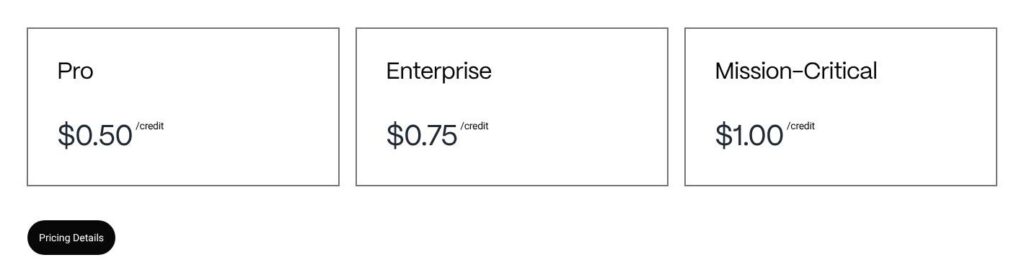
Starburst Galaxy pricing is usage-based, so the starting rate tells you less than the eventual running pattern. These are the public plan entry points and my suggested buying routes:
- Free, $0: initial exploration within restricted capacity.
- Pro, from $0.50/credit: my starting choice for simpler production requirements.
- Galaxy Enterprise, from $0.75/credit: for requirements such as ABAC, SCIM, or AIDA.
- Mission-Critical, from $1.00/credit: evaluate against specific contractual requirements.
- Starburst Enterprise, quoted separately: self-managed deployment, not a Galaxy subscription tier.
| Offering | Published starting price | Purchasing distinction |
|---|---|---|
| Galaxy Free | $0 | Restricted exploration |
| Galaxy Pro | $0.50/credit | Usage-based managed service |
| Galaxy Enterprise | $0.75/credit | Expanded features; AIDA tokens billed separately |
| Galaxy Mission-Critical | $1.00/credit | Scope the commercial agreement |
| Self-managed Starburst Enterprise | Contact sales | Separate licensing and deployment |
The Galaxy trial lasts 30 days with $500 of compute. Starting rates can vary with location, features, and support; they are not fixed monthly subscriptions.
For budgeting, separate the credit price from how much compute your workload consumes. A low rate cannot rescue an oversized cluster that stays active unnecessarily. Equally, a smaller cluster is not automatically economical if it cannot complete the required workload satisfactorily.
Galaxy billing covers more than cluster compute:
- Ingestion compute adds a separate consumption category.
- Private-link transfers can add charges.
- Cross-region use introduces additional cost considerations.
There is also a purchasing wrinkle worth knowing before the trial ends. Adding payment retains Enterprise PAYGO. Moving from Enterprise to Pro requires contacting support, rather than assuming the account will automatically settle on the cheaper plan. Without payment, paid-only clusters are disabled.
I recommend building a budget around a normal working week, not one successful query. An occasional investigation and a dashboard used throughout the day can create very different spending patterns, even against the same tables. Include quiet periods as well as busy ones.
A useful purchasing comparison also needs an explicit alternative. If Starburst replaces a recurring pipeline, compare both approaches over the same period. If it merely adds another way to query an existing warehouse, treat its cost as incremental rather than assuming an offsetting saving.
Is Starburst Good Value for Money?
I judge the value by how much cross-source work you actually need:
- Strong fit: important questions repeatedly cross systems, making consolidation a substantial ongoing task.
- Conditional fit: a lakehouse team wants managed SQL but still needs to establish suitable workload economics.
- Weak fit: nearly every useful query already runs comfortably in one platform.
Free exploration is capped at three active free-size clusters. Free size excludes accelerated execution, fault-tolerant execution, and query-result caching, so it is not a miniature reproduction of every paid configuration.
Reviewer’s Notes: I recommend Pro for a SQL engineering team with straightforward production requirements. Choose Galaxy Enterprise when a named requirement warrants it, and arrange the downgrade from trial-default Enterprise PAYGO if Pro is the intended destination.
Getting Started With Starburst
The first useful milestone is not connecting every source. It is answering one real question with the right access.
Galaxy’s documented route is to configure a catalog, attach it to a cluster, and query through the editor or a compatible client. I favor a small initial scope so connection problems do not become tangled with query-design problems.
- Choose one representative question. Pick an analysis that currently requires data from separate systems. A purely local query proves less about why you need Starburst.
- Configure the source catalogs. Supply the connection details and credentials appropriate to each source.
- Attach catalogs to a cluster. Place compute near the bulk of the queried data where practical.
- Grant intended access. Give the analyst role the privileges needed for the task, rather than using unrestricted administrative access as the working model.
- Run SQL in the query editor. Start with a small source-specific query before attempting the cross-source join.
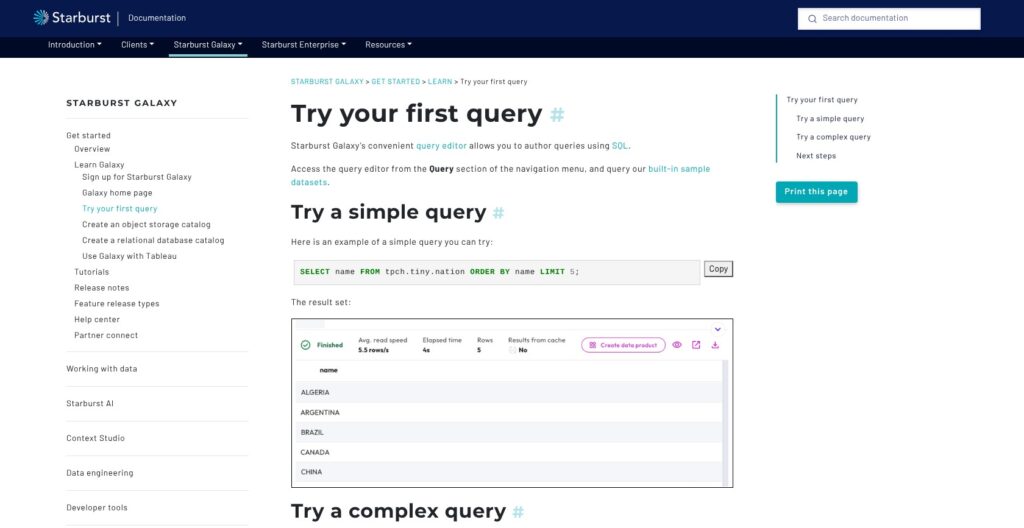
The documented sample query uses tpch.tiny.nation. It provides a simple way to understand the editor, but sample data cannot establish whether your source permissions or production network path are correct.
For a useful evaluation, imagine order history in lake storage and customer records in an operational database. Starburst identifies tables through catalog.schema.table names, allowing SQL to refer to both sources. The intended result might be revenue by customer segment for a particular reporting period.
In this example, the crucial design question is whether the customer table represents today’s segment or the segment at the time of purchase. Federation makes the join possible; it does not decide which business interpretation is right.
Start by comparing a few familiar totals with the source systems. Then expand the query’s date range and result scope. This gives the team a better basis for interpreting unexpected results than immediately running a large join with several unfamiliar tables.
The finishing step is deciding what happens between queries. Galaxy supports automatic suspension, and a new query resumes suspended compute. Starburst specifies a typical startup interval of one to five minutes.
That trade-off matters to the user experience. Waiting may be acceptable for occasional engineering work but awkward for an analyst opening a dashboard before a meeting. Keeping compute running avoids that particular restart delay at the cost of continued consumption.
My preference is to settle this expectation early. “Available when requested” and “ready immediately” are different purchasing requirements, even if both workflows ultimately return the same answer.
Querying Across Sources: Where Starburst Makes Sense
Federation is useful when copying data is the bottleneck, not simply because connecting many systems sounds attractive.
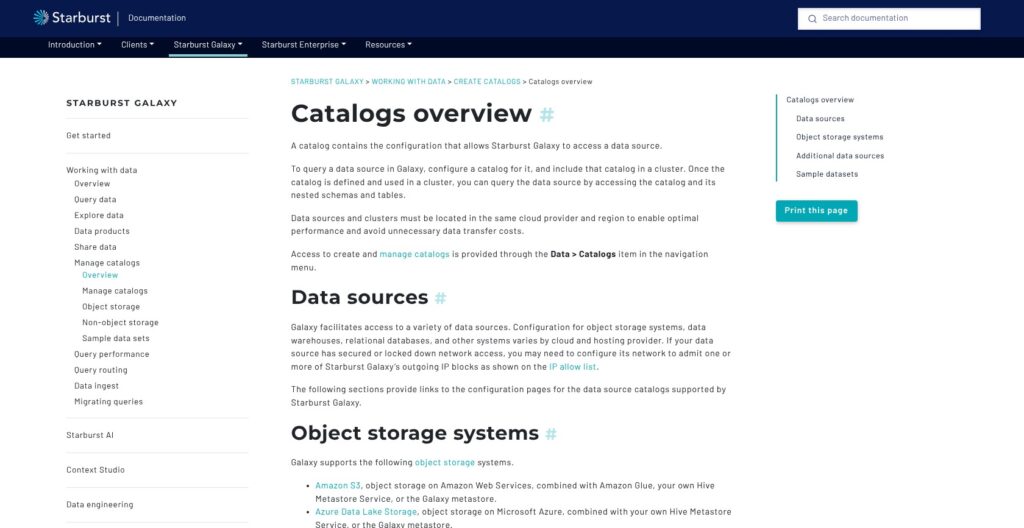
Galaxy catalogs cover major cloud object stores and databases, including PostgreSQL and Snowflake. Connector availability, however, does not mean every source supports the same operations. For me, the behavior of your essential connectors matters more than the total number available.
The main distinction is between reaching data and processing it efficiently. Supported pushdown operations can let a source handle work instead of returning everything to the query engine. The exact behavior depends on the connector and the query.
For self-managed Starburst Enterprise, the pushdown documentation describes supported filtering, projection, and aggregation. Its join pushdown requires tables in the same catalog and suitable predicates. A cross-catalog join is not automatically a source-side join, and SEP-specific behavior should not be treated as a guarantee for every Galaxy connector.
This is why I prefer a narrowly defined federation use case. Joining a selective customer subset to recent events has a different shape from repeatedly joining entire histories. One successful example cannot establish that both are economical.
For a purchasing evaluation, I care about three questions:
- What leaves the source? A selective result and a broad data extraction place different demands on the network.
- What does the source execute? Remote work still consumes resources somewhere.
- How often does the query repeat? A recurring report may justify a prepared table where occasional exploration does not.
Read access also should not be mistaken for database replacement. SQL write and transaction support vary by connector, and most connectors do not support transactions. I do not recommend Starburst for reproducing an application database’s behavior merely because its tables are visible.
Concurrency deserves the same care. Galaxy documents a maximum of 40 concurrently running queries per cluster, with additional queries queued. That is a scheduling limit, not a promise about response time.
For a team already comfortable operating Trino, the question is whether Starburst’s managed service or commercial capabilities justify the additional spend. For mostly S3-based analysis, Athena belongs in the comparison. I favor Starburst when the mixed-source requirement is persistent enough to justify a dedicated query layer.
Iceberg, Performance, and the Work You Still Own
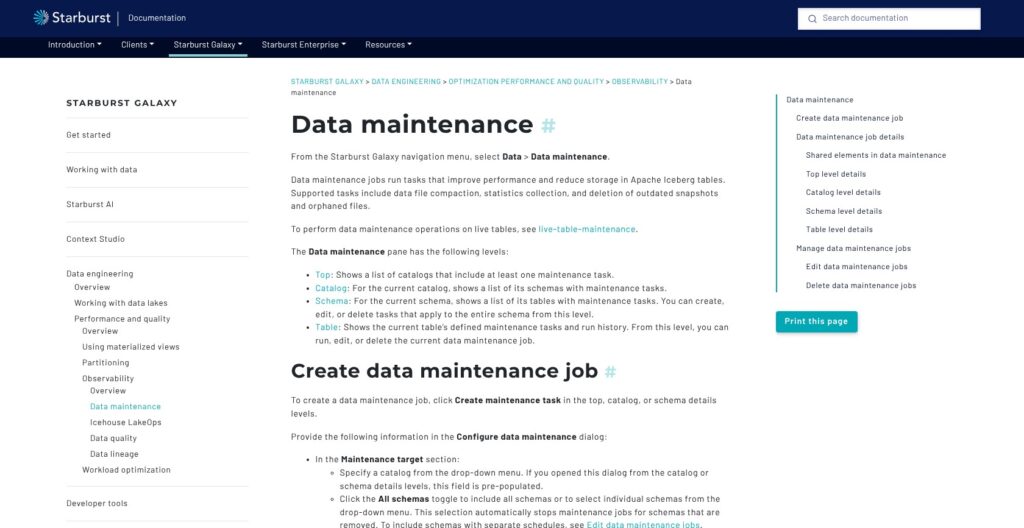
I like Starburst’s Iceberg story because it combines open tables with practical maintenance. I do not interpret that as a promise that table health looks after itself.
Galaxy data-maintenance jobs support:
- File compaction to consolidate files.
- Statistics collection to support query planning.
- Snapshot expiration to remove older snapshots.
- Orphan-file cleanup to remove unreferenced files.
Jobs can target tables or schemas. These controls matter because choosing an open table format is only the start; the team still needs a policy for maintaining those tables.
The useful buyer distinction is between having maintenance capabilities and having appropriate maintenance decisions. A finance history table and a short-lived staging table may need different retention choices. Those choices need to follow data requirements. Cleanup is not always beneficial.
Galaxy also offers continuous ingestion of JSON files from S3 into managed Iceberg live tables in the customer’s S3 bucket. That workflow requires compatible AWS access and catalog configuration in a supported region. Other Iceberg-capable engines can read the resulting tables.
Open storage does not mean unrestricted management. While managed ingestion is active, live-table definitions and data cannot be directly updated or deleted through SQL. Schema changes use the UI, and decommissioning converts the table to unmanaged Iceberg for normal DDL and DML.
That trade-off is reasonable for a controlled ingestion process. It is less attractive if several tools need to modify the same table freely. Decide which system owns changes before choosing this workflow. That boundary matters when you need to correct a record.
Performance needs similarly specific expectations. Cluster size affects available memory and query performance, so a tiny sample cannot settle production sizing. Accelerated clusters also default to never suspending because restarts rebuild indexes and warm caches.
My concern is not that acceleration exists, but that its resource lifecycle belongs in the budget. A feature that suits continuously used reporting may be a poor match for intermittent exploration.
Dremio offers a different mechanism through Reflections, which materialize acceleration structures as Iceberg tables. I recommend comparing maintenance and refresh work alongside query results. Neither approach deserves a speed advantage on paper without representative workload measurements.
Governance and AI: Useful Controls, Real Prerequisites
A shared SQL endpoint needs deliberate permissions. Galaxy provides role-based access control and tag/policy-based attribute-based controls, but source credentials and source permissions remain part of the design.
I like having a central access layer. That does not automatically reproduce every source system’s security behavior. In particular, a connection using shared credentials needs careful thought about what users should be allowed to see through that connection.
One documented exception deserves attention: native query pass-through functions are disabled by default for supported catalogs. Their query strings bypass Galaxy query validation and security checks, leaving the underlying source’s security in control. Granting execution privileges is therefore more consequential than simply enabling another SQL convenience.
Nor is “query data where it lives” an absolute guarantee that data never moves or gets stored elsewhere. Optional execution and caching features can involve temporary or cached storage. Buyers with strict handling requirements should judge the selected configuration, not the slogan.
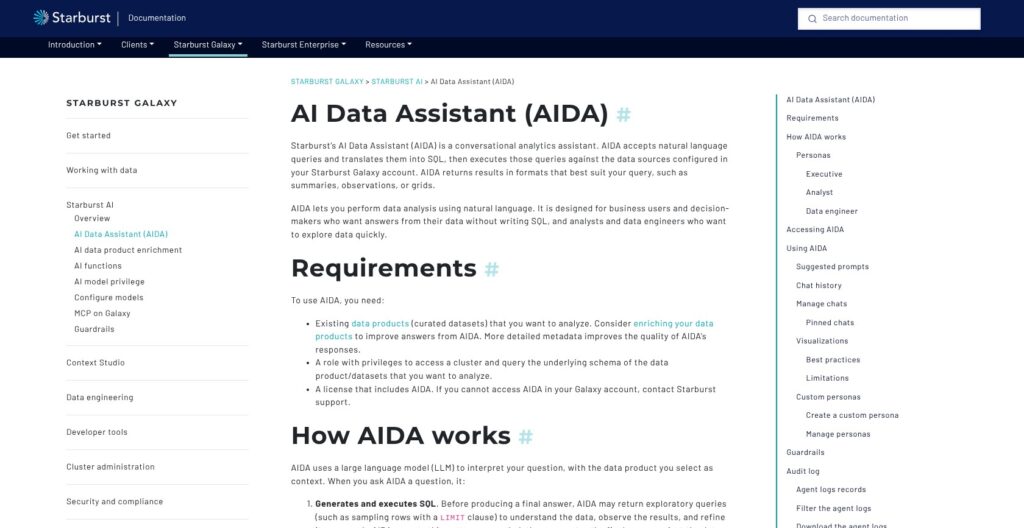
AIDA adds a conversational interface to this access layer. Its documented workflow includes:
- A selected data product as the context for questions.
- A qualifying license and privileges for the cluster and queried data.
- Generated SQL and live execution, potentially including exploratory queries before the final answer.
- Starburst-selected models through AWS Bedrock, without alternative LLM configuration.
The interface lets users inspect generated SQL and results. I consider that visibility valuable, but it does not establish that the answer uses the correct business definition.
For example, “Which customers are most valuable?” could mean revenue or margin, with very different implications. Clear data definitions matter more here than a polished conversational response. My recommendation is to introduce AIDA around a well-scoped data product before encouraging broad, ambiguous questions.
Its guardrails are account-wide, without per-user or per-data-product overrides. They supplement permissions, row security, and column masks rather than replacing them. That scope could be limiting for an organization that wants different AI policies for different teams.
Galaxy also provides a hosted MCP server for compatible clients on Enterprise, Mission-Critical, or trial tiers. I see it as an integration option, not evidence that an external AI client produces reliable analysis.
My buying advice is simple: select Starburst for its data architecture first. AIDA becomes a useful addition when the underlying access and definitions are ready.
How Does Starburst Compare to Alternatives?
I shortlist alternatives by architecture because an advertised speed advantage says little about your workload. Each option makes a different responsibility central to the decision.
- Trino: The clearest Starburst vs Trino comparison is self-managed infrastructure versus paid product capabilities and deployment choices. Trino supplies distributed SQL across catalogs, but running its coordinator and workers remains your responsibility. I favor it when the platform team wants that ownership.
- Dremio: A serious candidate for lakehouse SQL, particularly when Reflections fit the workload. Those structures introduce refresh and physical-design decisions. Compare repeated reporting queries as well as exploratory work before choosing an acceleration approach.
- Amazon Athena: A natural shortlist entry for AWS-centered querying. It offers serverless SQL with scanned-data or reserved-capacity billing. Associated services can add charges, so compare complete workload costs rather than one headline unit price against Galaxy credits.
- Snowflake: Worth favoring when the buyer wants warehouse-centered analytics. Its virtual warehouses provide resizable compute with suspension controls. Snowflake also supports Iceberg interoperability, subject to feature-specific prerequisites. An open-versus-closed label oversimplifies this decision.
| Alternative | Primary fit | Responsibility to weigh | Why choose Starburst instead? |
|---|---|---|---|
| Trino | Teams owning distributed SQL infrastructure | Deployment and cluster operation | Managed Galaxy or commercial SEP capabilities |
| Dremio | Lakehouse SQL with materialized acceleration | Reflection design and refresh | A federation-led architecture fits better |
| Amazon Athena | AWS-centered serverless analysis | Scan patterns and associated service costs | Persistent mixed-source requirements |
| Snowflake | Warehouse-centered analytics | Compute and data architecture choices | Direct access across existing systems is central |
My deciding question is where the team wants complexity to sit. Operating engines, preparing acceleration structures, and consolidating data are different jobs. Starburst is compelling when a query layer addresses the hardest job, not when it simply becomes another platform to maintain.
How I Reviewed Starburst
I assessed Starburst through its documented pricing, setup workflow, and technical behavior, with particular attention to edition boundaries and buyer responsibilities. This is a documentation-based review, not a hands-on benchmark.
My judgments focus on whether the architecture suits federated SQL buyers and where costs or constraints could change that decision. I compared documented mechanisms and purchasing requirements, keeping performance and usability judgments within that evidence.
Prices current as of October 2026. Published starting rates are not account-specific quotes.
Should You Choose Starburst?
Choose Starburst when cross-source analysis is a recurring requirement. I recommend Galaxy for teams that want managed SQL infrastructure, provided they are prepared to own source access and workload economics.
Choose self-managed Starburst Enterprise only when deployment control or customization justifies the administrative responsibility. It is not simply the higher-priced version of a Galaxy plan.
I recommend skipping Starburst if nearly all useful data already sits in one satisfactory warehouse. My recommendation is less favorable if the main attraction is conversational AI rather than a concrete data-access problem. Neither case establishes why another query platform is needed.
The strongest evaluation starts with a small, representative workload that includes the difficult part: the real sources and expected usage pattern. Give it a business definition and an acceptable cost envelope.
My verdict is favorable but specific: Starburst earns its place through useful federation. It does not earn it merely by making more systems visible from one SQL editor.
Starburst FAQ
What is Starburst used for?
Starburst is a Trino-based SQL platform used to query lake and database data, including analysis across sources. I see its strongest role as a lake query engine and federated access layer, rather than a universal replacement for every connected database.
Is Starburst free?
Galaxy has a restricted Free option for exploration. That does not mean paid trial clusters continue operating free after the trial. Treat free access as an introduction to the workflow, not evidence of production capacity.
Is Starburst the same as Trino?
No. Trino is the underlying open-source query engine. Starburst Enterprise is a commercial distribution, with a license required for various enterprise capabilities; Galaxy is a managed service. The shared foundation does not make all capabilities or operating responsibilities identical.
What is the difference between Galaxy and Starburst Enterprise?
Galaxy is managed by Starburst. Starburst Enterprise is separately deployed and administered by your team. Galaxy’s Enterprise pricing tier is not SEP: the similar names describe different purchasing and deployment decisions.