Editor’s note: This KNIME review evaluates the pricing ladder, the documented behavior of KNIME Analytics Platform 5.12 and the Hub plans as KNIME sells them in October 2026. It is not a hands-on performance test.
Quick verdict: I recommend KNIME for analysts and small data teams who want a visual, node-based data-prep and modeling tool on Windows, macOS or Linux without a license bill, and who accept that scheduling and sharing move to a paid Hub plan. Go in knowing the free desktop gives 20 K-AI interactions a month, Pro at $19 a month buys 120 runtime credits, and Business Hub has no public price.
Key Takeaways
- Free, open-source desktop (GPL v3) on Windows, macOS 14 and 15 (Intel or Apple Silicon) and Linux, with 300+ connectors and unlimited local execution.
- Pro: $19 a month, 1 user, 120 runtime credits, 30 GB, scheduling, data apps, REST services. Team: $99 a month, 3 members, up to 10 at $49 each.
- Caveat: overage past the 120 credits bills $0.025 per vCore-minute, and KNIME does not publish minutes per credit.
- Caveat: Business Hub is quote-only at 4, 8 or 16 vCores; a KNIME partner has cited about $39,900 a year for Basic.
- K-AI runs on OpenAI GPT-4.1 models, sends column names and types by default and row data only with per-workflow permission; free accounts get 20 a month.
KNIME sits in the Panoply directory under Transformation, since most workflows built in it clean, join and reshape data before a model or report.
In this review, I’ll take a closer look at KNIME’s pricing, the first-workflow path, the node ecosystem, K-AI, the Hub tiers, and how it stacks up against Alteryx, Dataiku and Tableau Prep.
KNIME Pros and Cons
Pros
- Free, open-source desktop (GPL v3) with unlimited local execution and 300+ connectors.
- Runs on Windows, macOS (Intel and Apple Silicon) and Linux, unlike Alteryx Designer’s Windows-only desktop.
- Pro at $19 a month adds scheduling, data apps, REST services, versioning and secrets for one user.
- Python, R and JavaScript scripting nodes plus Spark, H2O and Keras integrations.
- AI Extension ships agent, RAG and LLM nodes for OpenAI, Azure OpenAI and Mistral, plus Gemini image nodes.
Cons
- Overage past 120 credits bills $0.025 per vCore-minute, with no published minutes-per-credit rate.
- Business Hub is quote-only; partner-cited Basic pricing starts near $39,900 a year.
- Modern UI dialogs open slowly and large workflows can freeze, per sustained forum threads, with WebGL rendering (default since 5.8) as KNIME’s answer.
- Batch execution is deprecated since April 2026, so unattended desktop automation now means a paid Hub plan.
How Much Does KNIME Cost?
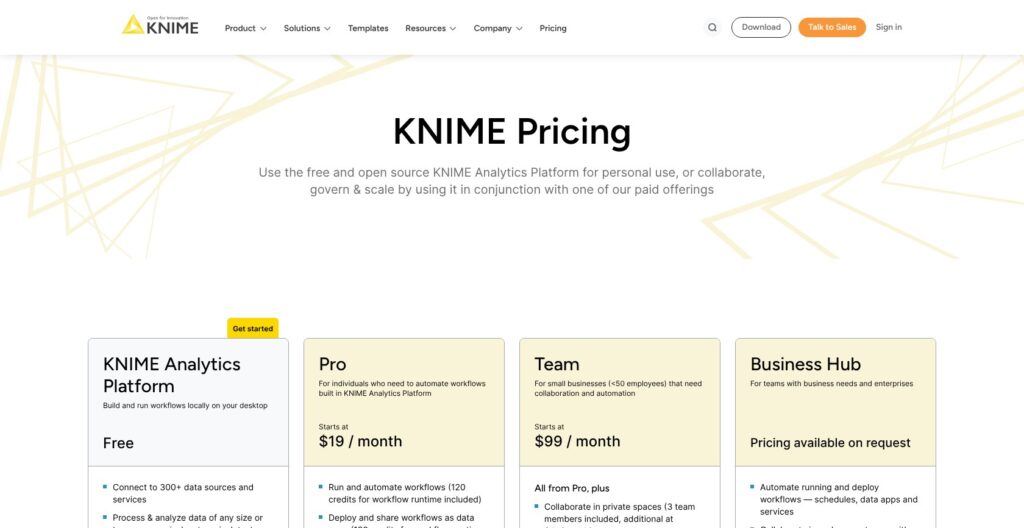
KNIME pricing starts at zero for the Analytics Platform desktop, and the paid ladder is Pro at $19 a month, Team at $99 a month and Business Hub by quote. Alteryx One Starter opens at $250 per user a month billed annually, so a full year of KNIME Pro costs less than one month of Alteryx’s entry seat.
- KNIME Analytics Platform (free): for one person on their own machine, with unlimited local execution, 300+ connectors, public spaces on the Community Hub, 20 K-AI interactions a month with a free Personal account, and 2 versions per workflow in a private space.
- Pro ($19 a month): for one user who needs schedules, data apps, REST services, unlimited versioning, secrets storage, 120 runtime credits and 30 GB of disk, plus 500 K-AI interactions a month and $0.025 per 5 requests after that.
- Team ($99 a month): for 3 members, up to 10, at $49 a month per extra member, with private team spaces, centralized billing, the same 120 credits and the same $0.025 per vCore-minute overage.
- Business Hub (quote): for Basic with 4 vCores, 5 users, 1 execution context and 1 team; Standard with 8 vCores and 5 users; Enterprise with 16 vCores, 20 users, 3 teams, high availability and SCIM. All tiers add LDAP, OAuth, OIDC and SAML sign-in, staged deployment, a GenAI gateway and enterprise support in United States and EU business hours, as single-tenant SaaS on AWS (99.9% SLA since November 2025) or self-hosted Kubernetes (Basic sizing 16+ vCores, 64 GB, 500 GB disk, x86-64 only).
| Plan | Price | Users | Included execution | Standout gate |
|---|---|---|---|---|
| Analytics Platform (desktop) | Free | Any number of desktops | Unlimited, local only | No scheduling, data apps or private sharing |
| Personal Hub account | Free | 1 | No hosted execution | 20 K-AI interactions a month, 2 versions per workflow |
| Pro | $19 a month | 1 | 120 credits, then $0.025 per vCore-minute | Google or LinkedIn sign-in |
| Team | $99 a month | 3 included, up to 10 at $49 each | 120 credits, then $0.025 per vCore-minute | 1 team, private spaces |
| Business Hub | Quote only | 5, 5 or 20 (Basic, Standard, Enterprise) | 4, 8 or 16 vCores | SSO, staged deployment, SCIM and high availability on Enterprise |
What the Runtime Meter Means
Pro and Team include 120 credits and bill $0.025 per vCore-minute beyond them, and KNIME does not state how many minutes a credit buys. My arithmetic at the list rate: a workflow scheduled hourly on 1 vCore for 5 minutes a run is 3,600 vCore-minutes in a 30-day month, or $90 if the credits were already spent, so treat that as a ceiling rather than a quote. Pro and Team each carry a “Try for free” button with no stated trial length, where Dataiku spells out 14 days.
Is KNIME Good Value for Money?
- Good fit: one analyst or a 3-person team automating spreadsheet-grade prep, where $19 to $99 a month undercuts Alteryx One Starter at $250 per user a month billed annually.
- Less convincing fit: teams that need public-facing data apps or REST endpoints on Basic Business Hub, which exposes them only to other Hub users.
- Budget priority: get the Business Hub quote in writing early; the only public figure is a partner’s EUR 35,000, about $39,900 a year, for Basic.
- Rival entry points: Alteryx One Starter at $250 per user a month, Dataiku with a 14-day cloud trial then a quote, Tableau Prep bundled into Tableau Creator at about $75 to $115 per user a month in pricing guides outside Tableau, and Mammoth from $39 a month.
Reviewer’s Notes: Start on the free desktop, move to Pro the week you need a schedule, and only talk to sales about Business Hub once more than ten people need private spaces or you need SSO.
Getting Started With KNIME
Day one on KNIME Analytics Platform is a download, a workspace folder and one line in knime.ini that you have to change yourself. Alteryx Designer is a Windows-only desktop and Dataiku’s free edition installs on macOS with an experimental Windows build, while KNIME ships a supported desktop for Windows, macOS and Linux.
Installing and Sizing the Desktop
Download the installer for Windows 10 or 11, Ubuntu 20.04 or 22.04, RHEL 8 or 9, or macOS 14 or 15 on Intel or Apple Silicon. The launcher asks for a workspace folder, which is where your local workflows and preferences live.
Before you open anything, edit knime.ini. It ships with -Xmx1024m, a 1 GB Java heap, and KNIME recommends roughly half of your RAM, so set -Xmx8192m on a 16 GB laptop. Some extensions have limited Apple Silicon support, and users report install failures for extensions that lack native arm64 plugins, so check the extensions you need before buying an M-series Mac for it.
Building a First Workflow in the Modern UI
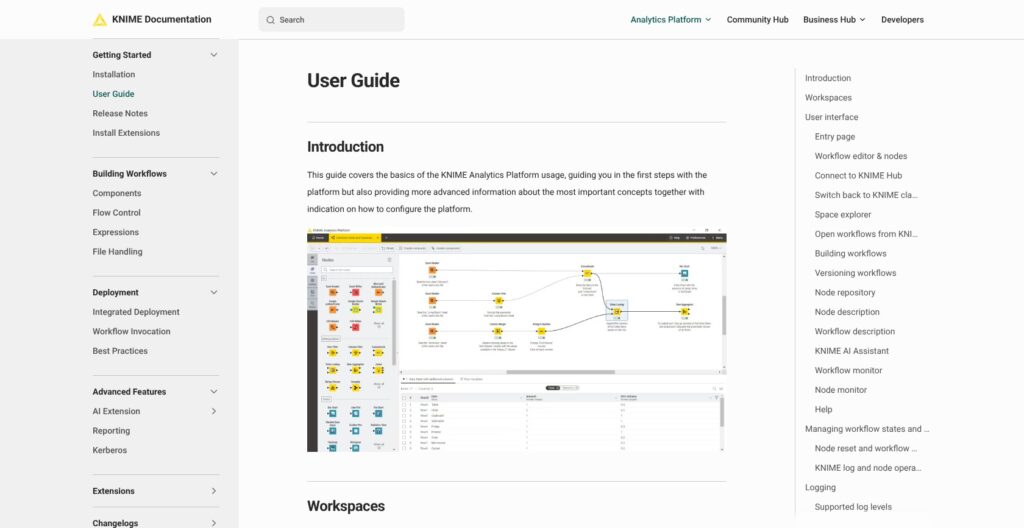
The Home tab shows Recent workflows, your Local space, the Community Hub and example workflows. Create a workflow from the three-dots menu in the space explorer, then search the node repository, which offers Grid, List and Tree views.
Drag a node onto the canvas or double-click it. Dragging from an output port opens the quick-add panel with up to 12 recommended nodes, a feature that needs the usage-data opt-in. Selecting a node opens its configuration in the right-hand panel, with an Open dialog button for nodes that do not support the panel.
Traffic lights carry the state: red means not configured, yellow configured, green executed. Execute with F7, Reset with F8, which also clears downstream outputs, and read the output tables, flow variables and Statistics in the node monitor at the bottom. To me, the traffic lights plus the node monitor are the Modern UI’s best idea, because a step that is not configured shows red on the canvas before anything runs.
Letting K-AI Build the Next Nodes
Build mode extends the workflow from a selected node that provides data, and you can also reach it from Build with K-AI in the quick-add panel. Q&A mode answers questions with sources. A free Personal account gets 20 interactions a month, Pro and Team 500.
Column names and types go to OpenAI by default; row data leaves your machine only after you grant the Fetch Data permission per workflow. Since 5.12, Build mode can inspect node configuration and, with permission, output data, and it can build a data app from a workflow. Switch the whole assistant off under Preferences > KNIME Modern UI > AI Assistant.
Switching to the Classic UI
Menu > Switch to classic user interface takes you back, and Open KNIME Modern UI returns. Users with large workflows report the classic UI stays responsive where the Modern UI freezes inside big metanodes and components, and KNIME has acknowledged slower Modern UI dialog startup.
Reviewer’s Notes: Set the heap first, keep the classic UI one menu away for workflows with hundreds of nodes, and treat K-AI as a node-finder rather than a workflow author until you have checked what it sends.
Nodes, Connectors and Scripting
KNIME markets 300+ connectors and 14,000+ community solutions on the Community Hub, but publishes no total node count, so judge coverage by the extension list rather than a headline number. Alteryx One Professional lists 100+ data sources, so on paper KNIME’s catalog is three times larger.
Connectors and Big Data
The connector set covers databases, files, cloud storage and REST, and the named integrations are Apache Spark, H2O and Keras, plus free community and commercial partner extensions. In-database nodes push the work to the database instead of pulling rows onto a laptop, the same push-down model Matillion sells as its core product. For distributed big-data jobs, the Spark integration hands the work to the cluster.
Python, R and JavaScript
The Python Script node moves tables over Apache Arrow and hands them to you as pandas or PyArrow, and it ships bundled packages so a first script runs without building an environment. Environments are moving to a Pixi-based provider with a documented migration from Conda, so plan that change before upgrading a whole team. R and JavaScript scripting nodes cover the rest, and scripts can be shared for reuse.
I count the scripting nodes as the escape hatch that keeps a visual tool honest: the day a node runs out, you write a few lines of pandas instead of waiting for an extension.
Components, Metanodes and Flow Control
Metanodes collapse a group of nodes into one box. Components add a configuration dialog on top and can be shared on the Hub, which is how a team turns a cleaning routine into a reusable building block.
Flow variables, loops with Resume, Pause and Step controls, switches and try-catch make up the L2 certification syllabus ($50, 25 questions, 45 minutes), and that syllabus is also where the learning curve lives.
Performance Settings
The default memory policy keeps only small tables in memory, with small defined as under 100,000 cells, and larger tables spill to disk; the threshold changes with -Dorg.knime.container.cellsinmemory. Streaming execution runs streamable nodes concurrently with less I/O, at the cost of inspecting intermediate results, and nodes such as joins cannot stream.
The columnar backend caches outside the JVM heap, so giving Java all your RAM can leave that cache at zero. Version 5.8 made WebGL canvas rendering the default, which is KNIME’s answer to large-canvas lag.
K-AI and the AI Extension
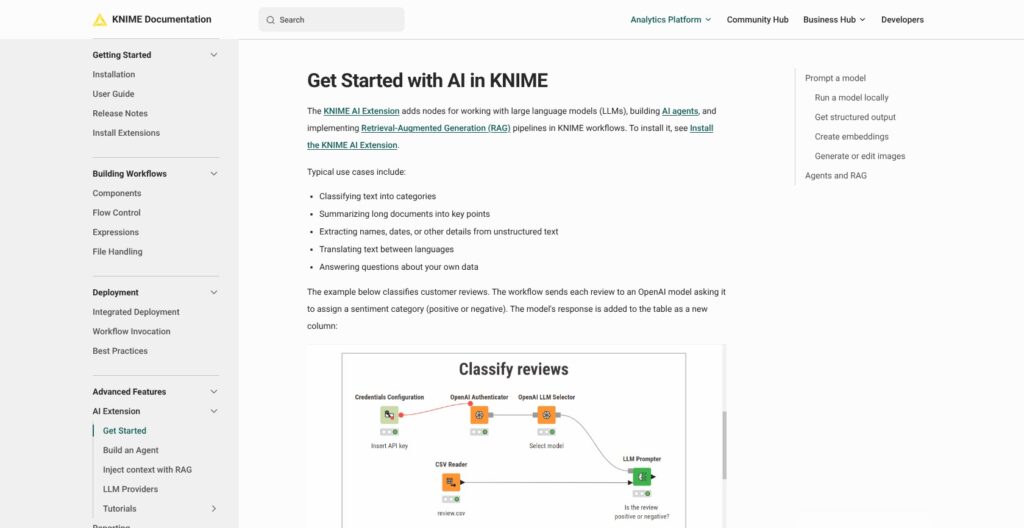
K-AI is a chat panel that calls OpenAI’s GPT-4.1 for Build mode and GPT-4.1-mini for Q&A through KNIME’s own OpenAI contract, while the AI Extension is a set of nodes that call whichever provider you configure. The two carry different data paths, and that difference decides which one a regulated team can use.
K-AI: Q&A and Build
Quotas are 20 interactions a month on a free Personal account, 500 on Pro and 500 per user on Team, with Pro billing $0.025 per 5 requests past 500. What goes out is the chat text plus column names and types; row data goes only after the per-workflow Fetch Data permission, and node execution asks Allow or Deny with a Remember choice box.
KNIME’s privacy notice names OpenAI as the processor under a data processing agreement with standard contractual clauses, and K-AI query logs are kept until you close the account. On Business Hub, admins must bring their own provider, such as Azure OpenAI.
The release ladder runs: workflow explanations in 5.9 (December 2025), execution and data permissions in 5.11 (March 2026), configuration inspection and data-app building in 5.12 (July 2026).
The AI Extension Nodes
The extension has authenticator nodes for OpenAI, Azure OpenAI and Mistral (the Mistral one arrived in 5.12, with LLM and embedding selector nodes), plus Gemini image nodes. LLM Prompter has output structured tables since 5.10, vector store nodes and RAG tutorials cover retrieval, and Agent Chat View and the experimental Agent Chat Widget show tool-call timelines.
KNIME staff state the extension shares nothing with KNIME, only with the provider you pick. Business Hub adds a GenAI gateway with OpenAI, Azure, Anthropic and Hugging Face connections, MCP support and PII guardrails.
For a regulated team I would pick the AI Extension with Azure OpenAI, since K-AI’s processor is OpenAI directly. Dataiku’s LLM Mesh is the enterprise equivalent, and Dataiku keeps its advanced LLM Mesh features out of the 14-day trial.
Sharing, Scheduling and Business Hub
Unattended runs now need a paid plan: KNIME split Batch execution into a separate extension in 5.9 (December 2025), deprecated it on April 7, 2026, and points users to Pro for supported automation. KNIME staff have said the Hub services added over the past 18 months sit in paid plans because they consume compute and storage.
What Pro and Team Buy
Pro and Team run schedules, data apps and REST services for other users on KNIME-managed execution, with unlimited versioning, secrets storage and Google or LinkedIn sign-in only; Team adds 1 team with private spaces for up to 10 members. Alteryx One Starter, cloud-only at $250 per user a month, costs 13 times Pro, and Dataiku’s trial gives 4 CPUs and 32 GiB for 14 days before a quote.
What KNIME Business Hub Adds
KNIME Business Hub adds teams and spaces with fine-grained permissions, staged deployment from test to prod, and execution contexts, which are Docker images containing a KNIME executor with assigned vCores and RAM. The default context ships at 1 CPU and 2 GB and must be resized for production.
Monitoring covers running and scheduled jobs, with REST remote control, SCIM, LDAP, OAuth, OIDC and SAML sign-in, ISO 27001 and GDPR, and 3 teams plus high availability on Enterprise.
Deployment is single-tenant SaaS on AWS managed by KNIME with a 99.9% SLA, launched November 4, 2025, or self-hosted Kubernetes. The kURL embedded cluster needs 100 GB per node at minimum, 256 GB recommended, and KNIME tells you to avoid Linux kernels 6.12 to 6.14.
A KNIME partner describes Basic as unlimited desktop users with one execution context, one team and data apps or REST only for other Hub users, which suits internal processing rather than public-facing apps.
Support is the forum for free users, a support portal for commercial customers, and United States and EU business hours on Business Hub.
How Does KNIME Compare to Competitors?
KNIME wins on price and operating-system coverage and loses on polish and public pricing at the enterprise end. In KNIME vs Alteryx, the entry seat is $19 against $250 a month, and each of the other KNIME alternatives below wins one niche.
- Alteryx: One Starter costs $250 per user a month billed annually and is cloud-only; Professional and Enterprise are by quote. It wins for finance and ops analysts who want the most polished no-code prep and will pay for it. If you are leaving Alteryx, KNIME ran a webinar converting an Alteryx project tool-to-node.
- Dataiku: a 14-day cloud trial with 4 CPUs and 32 GiB, a free edition for local install on macOS, and enterprise by quote. It wins for collaborative ML teams that need governance, LLM Mesh and MLOps in one place.
- Tableau Prep: bundled with Tableau Creator at about $75 to $115 per user a month, figures from pricing guides rather than Tableau’s own list. It wins when the output is a Tableau dashboard and nothing else.
- Orange Data Mining: free, GPL, visual ML for teaching and quick exploration, with no hub, scheduling or deployment tier.
- dbt and Apache Airflow: code-first SQL modeling and DAG orchestration with Git-native review. They win for engineering teams that refuse a desktop canvas; KNIME answers with unlimited versioning on Pro and Team rather than a Git workflow.
- Databricks: the Spark-scale alternative for data that no longer fits on one machine. KNIME’s Spark integration can push work there instead of competing with it.
| Tool | Entry price | Desktop OS | Free tier | Best for |
|---|---|---|---|---|
| KNIME | Free desktop; Pro $19 a month | Windows, macOS, Linux | Full desktop plus Personal Hub | Visual prep and modeling without a license bill |
| Alteryx One | $250 per user a month, annual | Windows (Designer); Starter is cloud-only | No free plan listed | Polished no-code prep for funded analyst teams |
| Dataiku | Quote after 14-day trial | macOS free edition, experimental Windows | Free edition for local install | Governed, collaborative ML and LLM Mesh |
| Tableau Prep | Inside Creator, about $75 to $115 per user a month | Bundled with Tableau Creator | No standalone free tier | Prep that ends in a Tableau dashboard |
| Orange Data Mining | Free | Desktop, GPL | Entirely free | Teaching and quick visual ML |
| dbt and Apache Airflow | Open-source core | Code, any OS | Free to self-host | Git-native SQL modeling and DAG orchestration |
Choose KNIME over Alteryx when the budget is under $100 a month or the desktop is a Mac. Choose Alteryx when the analysts are non-technical and the company is paying, and Dataiku when the deliverable is a governed model rather than a cleaned table.
How I Reviewed KNIME
I evaluated KNIME on the areas Panoply weighs for every data tool: pricing transparency, openness and exit costs, setup and operating effort, connector and scripting depth, and development momentum.
For KNIME that meant working through the free desktop, Pro, Team and the three Business Hub tiers line by line, pricing an hourly schedule at the overage rate, and mapping the documented path from install to a first workflow and a K-AI build.
I also traced what K-AI and the AI Extension send to which provider, followed the release ladder from 5.6 to 5.12 and the Batch deprecation, and compared plan features against Alteryx, Dataiku, Tableau Prep, Orange, dbt and Airflow at their current list rates.
This is not a hands-on performance test. Prices current as of October 2026.
Should You Build Your Data Prep on KNIME?
Yes, if you want a visual data-prep and modeling desktop that costs nothing, runs on macOS or Linux as well as Windows, and scripts in Python the day a node runs out. Yes again if your automation fits Pro at $19 or Team at $99 a month and you can keep the classic UI one menu away for workflows with hundreds of nodes.
Skip it if you need a polished no-code experience for business analysts with budget (Alteryx One Starter, $250 per user a month), enterprise ML governance and LLM Mesh (Dataiku), a Tableau-only output (Tableau Prep), or Git-native code review (dbt and Airflow).
KNIME’s free tier is the whole desktop, which no commercial rival here matches, and the price of that is a Hub ladder with an unpublished minutes-per-credit rate and a quote-only enterprise tier.
Next action: install the desktop from knime.com, set -Xmx to half your RAM, rebuild one real spreadsheet process as a workflow, then start the Pro trial the day you want it on a schedule and watch the vCore-minute meter for a month before asking for a Business Hub quote.
FAQ
Is KNIME free for commercial use?
Yes. KNIME Analytics Platform is free and open source under GPL v3 for any use, including inside a company, with unlimited local execution and no seat count. The license treats nodes built on the node extension API as separate programs, so partners can sell proprietary extensions. The paid products are the Hub plans, which add scheduling, sharing and governance.
How much does KNIME cost?
KNIME pricing starts at zero: the desktop is free. Pro costs $19 a month for 1 user with 120 runtime credits, and Team costs $99 a month for 3 members, with extra members at $49 each up to 10. Both bill $0.025 per vCore-minute past the credits. Business Hub is by quote; a KNIME partner has cited about $39,900 a year for Basic.
Does K-AI see my data?
It sees your chat text and the column names and types of connected tables. Row data goes to the model only after you grant the Fetch Data permission for that workflow, and node execution asks Allow or Deny. The processor is OpenAI under KNIME’s contract; on Business Hub you connect your own provider, such as Azure OpenAI.
Does KNIME run on a Mac?
Yes. KNIME Analytics Platform supports macOS 14 and 15 on both Intel and Apple Silicon, alongside Windows 10 and 11 and Ubuntu or RHEL. Some extensions have limited Apple Silicon support, and users report install failures for extensions without native arm64 plugins, so check the ones you need before relying on an M-series Mac.
KNIME vs Alteryx: which should I pick?
Pick KNIME for price and cross-platform desktops: the Analytics Platform is free on Windows, macOS and Linux, and Pro costs $19 a month. Pick Alteryx One Starter at $250 per user a month billed annually for the most polished no-code prep and a cloud-only setup. The comparison section above lists where Dataiku and Tableau Prep fit.