Editor’s note: This review evaluates Tobiko Cloud’s documented capabilities, pricing model, and practical trade-offs for data teams.
Quick verdict: I recommend Tobiko Cloud for teams that like SQLMesh’s approach to transformation but want help operating it in production. Its debugging tools and managed scheduling justify a closer look, although custom pricing and technical onboarding make it a harder sell for small, straightforward projects.
Key Takeaways
- Tobiko Cloud’s strongest selling point is bringing transformation operations, change history, and troubleshooting into one service.
- You pay a platform fee plus consumption charges, with no seat or project limit in the published pricing model.
- Reusing unchanged model outputs can reduce unnecessary development work, but it doesn’t make warehouse usage free.
- Detailed cost estimates cover BigQuery On Demand and Snowflake Credits, so other warehouse users should check feature fit carefully.
- Existing dbt projects need compatibility checks; support for the project format doesn’t guarantee a migration without changes.
In this Tobiko Cloud review, I’ll take a closer look at pricing, setup, deployment controls, and the alternatives I’d consider before signing a contract.
Tobiko Cloud Pros and Cons
Pros
- Managed SQLMesh operations with built-in model scheduling
- Debugger connects failed runs with code and dependency history
- Virtual environments reuse unchanged model outputs
- Model-level cost estimates for BigQuery On Demand and Snowflake Credits
- Hybrid execution keeps warehouse operations in your infrastructure
Cons
- Custom pricing prevents a quick monthly cost comparison
- Setup still requires command-line and warehouse administration skills
- Some dbt incremental logic and Jinja need changes
- Self-hosted runners leave infrastructure work with your team
How Much Does Tobiko Cloud Cost?
Tobiko Cloud uses a platform fee plus pay-as-you-go consumption pricing. You’ll need a tailored quote, so I wouldn’t budget for it using a headline subscription price or assume your warehouse bill is included.
- Tobiko Cloud (custom quote): The commercial service for teams that want managed transformation operations. The published pricing model doesn’t cap seats or projects.
- SQLMesh open source ($0 license fee): The alternative if you want the underlying framework and can take responsibility for hosting and maintenance. This is a separate option, not a free Tobiko Cloud plan.
| Option | Price basis | What you’re choosing | Best fit |
|---|---|---|---|
| Tobiko Cloud | Platform fee plus consumption; contact sales | Managed service around SQLMesh | Teams spending too much time operating transformations |
| SQLMesh open source | $0 software license fee; infrastructure extra | Self-managed transformation framework | Teams with engineering capacity to run it themselves |
I like the absence of seat-based restrictions, especially when several engineers need to investigate the same problem. However, you’ll need to understand the usage charges before comparing quotes. Ask what counts as consumption, how development activity is billed, and what a busy backfill month would cost.
Is Tobiko Cloud Good Value for Money?
The strongest reason to pay is less operational work. The free framework already provides much of the underlying transformation intelligence, so your decision should rest on the work the commercial service takes off your team.
- Worth shortlisting: You already use SQLMesh and maintaining its production setup is becoming a distraction.
- Worth a closer cost comparison: Multiple developers repeatedly rebuild overlapping data, and failed runs take time to investigate.
- Harder to justify: A small, dependable project has modest operating costs and an engineer who can comfortably maintain it.
My recommendation is to price Tobiko Cloud against the complete cost of self-managed SQLMesh, including maintenance time. A subscription can be worthwhile without producing dramatic warehouse savings, provided it removes enough recurring work.
Reviewer’s Notes: Ask for a quote covering an ordinary month and a month with a substantial historical rebuild. I’d be more comfortable buying against those two scenarios than an estimate based only on routine production runs.
Getting Started With Tobiko Cloud
Tobiko Cloud needs an engineering-led setup. A solutions architect provisions your account, and you need someone with warehouse administration permissions involved in onboarding.
The setup sequence is:
- Configure access to your Tobiko Cloud instance.
- Install the
tcloudcommand-line tool in a local Python environment. - Configure the project and warehouse connection.
- Check that the project can interact with the warehouse.
- Review a deployment plan before applying your models.
I like having guided onboarding for a tool that will touch production data. However, this isn’t the instant start I’d want for a casual experiment. If you’re still deciding whether the SQLMesh workflow suits you, the open-source quickstart is a more practical starting point.
Moving an existing production SQLMesh setup involves validating and migrating its state, with some downtime. I’d treat that as a scheduled infrastructure change, even though the transformation framework remains familiar.
Can You Bring an Existing dbt Project?
You can retain the dbt project format when running through SQLMesh’s adapter, which gives you a way to evaluate the workflow before rewriting everything. That is useful, but compatibility needs to be checked against your actual project.
Incremental logic can need adaptation, and some Jinja functionality, including graph.nodes.values, is unsupported. I’d include your busiest incremental model and your most important macros in an evaluation. A successful run of a simple SQL model doesn’t tell you whether the difficult parts will migrate cleanly.
If your current dbt Cloud setup is reliable, Tobiko needs to solve a specific problem that’s worth the migration work.
Reviewing Changes Before They Reach Production
The deployment plan is the feature I’d pay closest attention to during an evaluation. It shows how model changes affect the project and which data intervals need processing, giving you something concrete to review before applying an update.
For example, adding a column that downstream models don’t use can avoid rebuilding those downstream models, though the changed model itself may still need a backfill. Changing a filter is a different matter: that can change existing results and require a wider backfill, meaning previously processed dates must be computed again.
That distinction makes the consequences of a SQL edit easier to discuss. A one-line filter change can affect years of stored results, so a small code change doesn’t necessarily mean a cheap deployment.
Development Environments That Reuse Work
SQLMesh’s virtual environments can share physical tables for unchanged model versions. You can work with a separate development environment without automatically creating another full copy of every output.
That’s appealing when several developers change different parts of the same project. I would rather spend compute on the models under development than repeatedly recreate data that hasn’t changed.
Changed models still need processing and storage. Forward-only changes, for example, produce development preview data that won’t be reused when deployed to production. Reuse reduces unnecessary work, but development costs remain.
These environments also belong to open-source SQLMesh. Tobiko Cloud’s paid value includes operating the system and extending the tools around it; you don’t need a commercial subscription simply to access the basic environment concept.
Data Checks Still Need Careful Design
Audits can block promotion when a deployment plan produces data that fails your checks. I like that extra checkpoint for changes to tables that feed important reports.
Scheduled runs behave differently: an audit checks the updated table and can stop downstream processing, but the failing data may already be present in that table. I’d build this distinction into incident procedures.
The practical lesson is to write checks around the business rules that matter. A technically valid result can still contain an incorrect revenue calculation.
Debugging and Scheduling: The Best Reasons to Pay
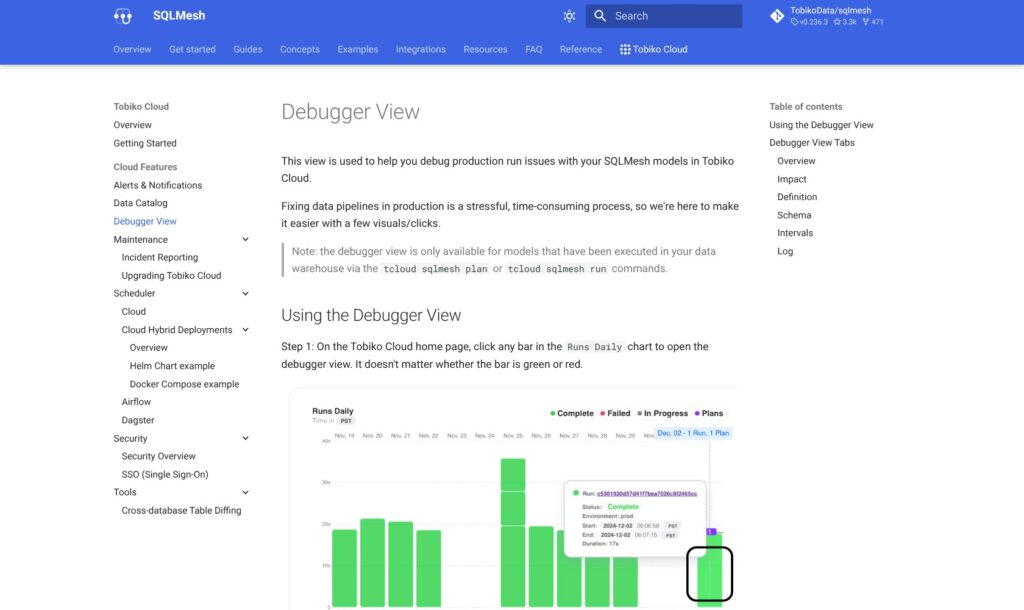
Tobiko Cloud’s debugger gives a failed run more context than an isolated error message. You can inspect:
- The code executed for that model.
- Successful and failed data intervals.
- Upstream and downstream dependencies.
- Logs and links to previous runs and plans.
This is where I find the managed service most persuasive. When a report breaks after a change, understanding what ran and what changed is often the first task. Bringing those details together should make an investigation more focused, even though it doesn’t automatically fix the underlying SQL.
The debugger covers models executed through Tobiko Cloud’s tcloud plan and run workflow. I wouldn’t buy it expecting a general monitoring console for every unrelated workload in your warehouse.
More Control Over Scheduled Models
The native scheduler lets you pause an environment or an individual model. Pausing a model also prevents dependent downstream models from running, which is helpful when continuing the pipeline would only spread a problem.
A pause isn’t a universal execution lock, though. A paused model can still run when an applied plan affects it. That’s a behavior I’d want everyone handling incidents to understand before using pause as a safeguard.
Alerts add another useful layer. You can configure notifications for plan and run events, or use measurement thresholds for more specific conditions. Slack and PagerDuty notification targets give those alerts a practical route to the person handling the incident.
For teams coordinating a broader mix of workloads, I’d also consider Dagster. Tobiko Cloud supports integration with it, so adopting managed SQLMesh doesn’t have to mean replacing orchestration across the entire data stack.
Cost Tracking and Deployment Options
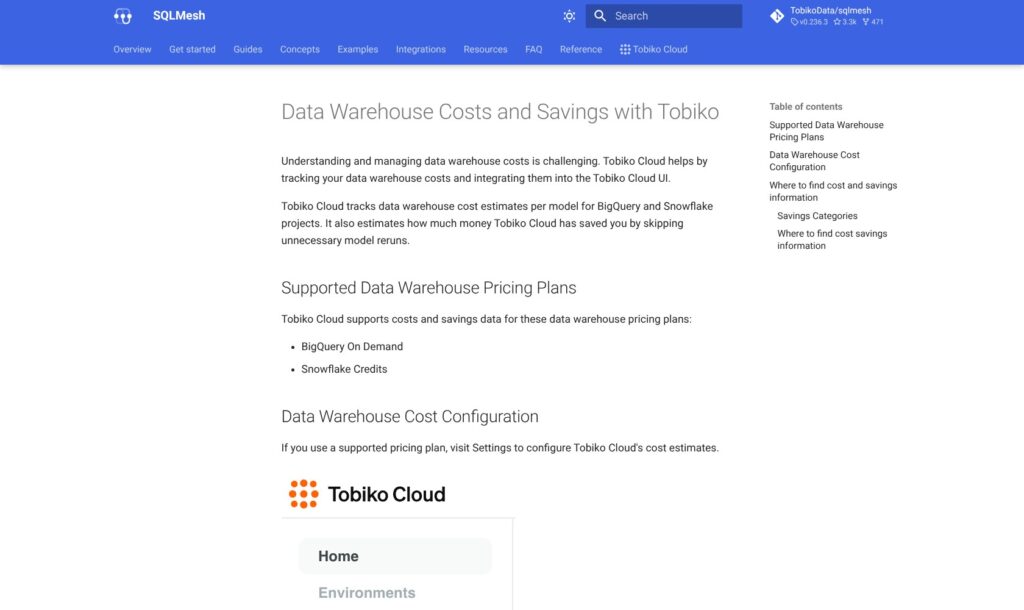
Tobiko Cloud’s cost reporting is most useful if you run BigQuery On Demand or Snowflake Credits, the supported cost modes in its documentation. Its cost estimates use configured rates to help identify expensive models.
I like that level of detail because a rising warehouse bill alone doesn’t tell you which transformation deserves attention. Seeing model-level estimates gives you a better starting point for deciding what to optimize.
Compare those estimates with your warehouse billing. A savings display isn’t a guaranteed reduction in the next invoice, and this reporting doesn’t cover every engine Tobiko can execute against.
Hosted or Hybrid?
Hybrid deployment lets warehouse operations run in your infrastructure while Tobiko Cloud provides the managed coordination layer. Warehouse credentials and data access remain in your environment, which can help meet internal access requirements.
The catch is that hybrid requires two running executor instances, one for scheduled runs and another for applying changes. Someone on your team must maintain that infrastructure.
Involve your infrastructure owner before buying, particularly when agreeing who handles upgrades and recovery after an executor fails.
How Does Tobiko Cloud Compare to Its Alternatives?
Your existing workflow should carry more weight than an impressive feature list. These are the alternatives I’d put alongside Tobiko Cloud:
| Tool | Why I’d consider it | Best-fit team | Main trade-off |
|---|---|---|---|
| Tobiko Cloud | Managed SQLMesh operations and debugging | Engineers seeking less production maintenance | Quote-based costs and technical onboarding |
| SQLMesh open source | The core framework without a license fee | Teams able to operate their own infrastructure | Internal maintenance responsibility |
| dbt Cloud | Hosted development and deployment for dbt projects | Teams already comfortable with dbt | Staying with the existing workflow may leave current pain points unresolved |
| Dataform | SQL workflow development within Google Cloud | Teams committed to BigQuery | A BigQuery-focused choice |
- SQLMesh: My first comparison if cost is the concern. Establish which operational jobs you would actually hand over before paying for managed hosting.
- dbt Cloud: I’d favor continuity when the existing project and deployment process work well. Tobiko becomes more compelling when change review or repeated computation is a persistent problem.
- Dataform: I’d shortlist it for developing, testing, and scheduling SQL transformations within BigQuery. Its warehouse focus fits a team committed to Google Cloud.
How I Reviewed Tobiko Cloud
I evaluated the documented setup, deployment behavior, debugging tools, cost reporting, and pricing structure. My recommendations weigh the operational work Tobiko Cloud can take on against migration effort and the responsibilities that remain with your team. This is a research-based evaluation, not a hands-on performance benchmark.
Pricing basis checked October 7, 2026. Your service cost requires a tailored quote.
Should You Choose Tobiko Cloud?
Choose Tobiko Cloud if you want SQLMesh’s workflow and need a more manageable way to operate it. I particularly like its combination of run history, debugging context, and scheduling controls for teams supporting important production pipelines.
I’d hold off if your existing transformations are dependable, inexpensive to run, and easy to maintain. Changing frameworks or adding a managed service needs to earn its place through a practical improvement.
My preferred evaluation would follow one awkward change from development through deployment, then examine how a failed run is investigated. If Tobiko makes those jobs meaningfully clearer and the quote fits your budget, it deserves serious consideration.
FAQ
Is Tobiko Cloud free?
Tobiko Cloud is a paid commercial service with a platform fee and consumption charges. SQLMesh is the separate open-source framework with no software license fee.
Do you need dbt to use Tobiko Cloud?
No. Tobiko Cloud runs SQLMesh projects independently. It can also work with existing dbt projects through the adapter, subject to compatibility requirements.
Does Tobiko Cloud replace your data warehouse?
No. It manages transformations that run against your warehouse. You still need to account for the warehouse’s compute, storage, and access requirements.
Is Tobiko Cloud now part of Fivetran?
Yes. Fivetran acquired Tobiko Data in September 2025. SQLMesh subsequently joined the Linux Foundation in March 2026. That governance change concerns the open-source project; Tobiko Cloud remains a separate commercial offering.
Can Tobiko Cloud keep warehouse execution inside your infrastructure?
Yes. Its hybrid deployment uses self-hosted executors for warehouse operations. You retain responsibility for running those executors, so include that work when comparing deployment options.