Editor’s note: This dbt Cloud review evaluates pricing, development, automation, and AI through product documentation, without a hands-on production benchmark.
Quick verdict: I recommend dbt Cloud for SQL-focused teams that want to build and deploy dbt projects without maintaining all the surrounding infrastructure. Its managed workflow is the attraction, but seats, usage, and warehouse compute make it a harder sell if your existing dbt setup already runs smoothly.
Key Takeaways
- Managed development, scheduling, and pull-request checks bring everyday dbt work together.
- The free Developer plan is useful for an individual evaluating the hosted workflow.
- Starter adds a recurring seat charge, with usage charges beyond its included allowance.
- AI-assisted development still needs someone who can judge SQL and business logic.
- Broader pipelines can still need an orchestrator alongside dbt Cloud.
I’ll take a closer look at what you get for paying, where the costs accumulate, and when I’d stick with dbt Core.
You’ll also see this managed offering called the dbt platform. In Panoply’s Transformation category, its appeal is bringing dbt development and deployment into one service.
dbt Cloud Pros and Cons
Pros
- Browser-based Studio reduces local development setup
- Managed scheduling includes job logs and monitoring
- CI checks validate changes before production merges
- Semantic Layer centralizes metrics for supported consumers
- Wizard can propose project-aware edits with file diffs
Cons
- Seat fees do not cover your complete data stack
- Developer and Starter are limited to one project
- Wizard’s Studio experience is still in Preview
- Hosted warehouse support differs from local adapter support
How Much Does dbt Cloud Cost?
The seat subscription is only part of the cost. I’d check your expected usage alongside these plans:
- Developer (free): for one person learning or evaluating managed dbt.
- Starter ($100/user/month): for a small team collaborating on one project.
- Enterprise (custom): for organizations needing more projects and negotiated terms.
- Enterprise+ (custom): for buyers with more extensive platform requirements.
| Plan | Price | Projects | Successful model builds/month included | Queried metrics/month included |
|---|---|---|---|---|
| Developer | Free | 1 | 3,000 | None listed |
| Starter | $100/user/month | 1 | 15,000 | 5,000 |
| Enterprise | Custom | 30 | 100,000 | 20,000 |
| Enterprise+ | Custom | Custom | 100,000 | 20,000 |
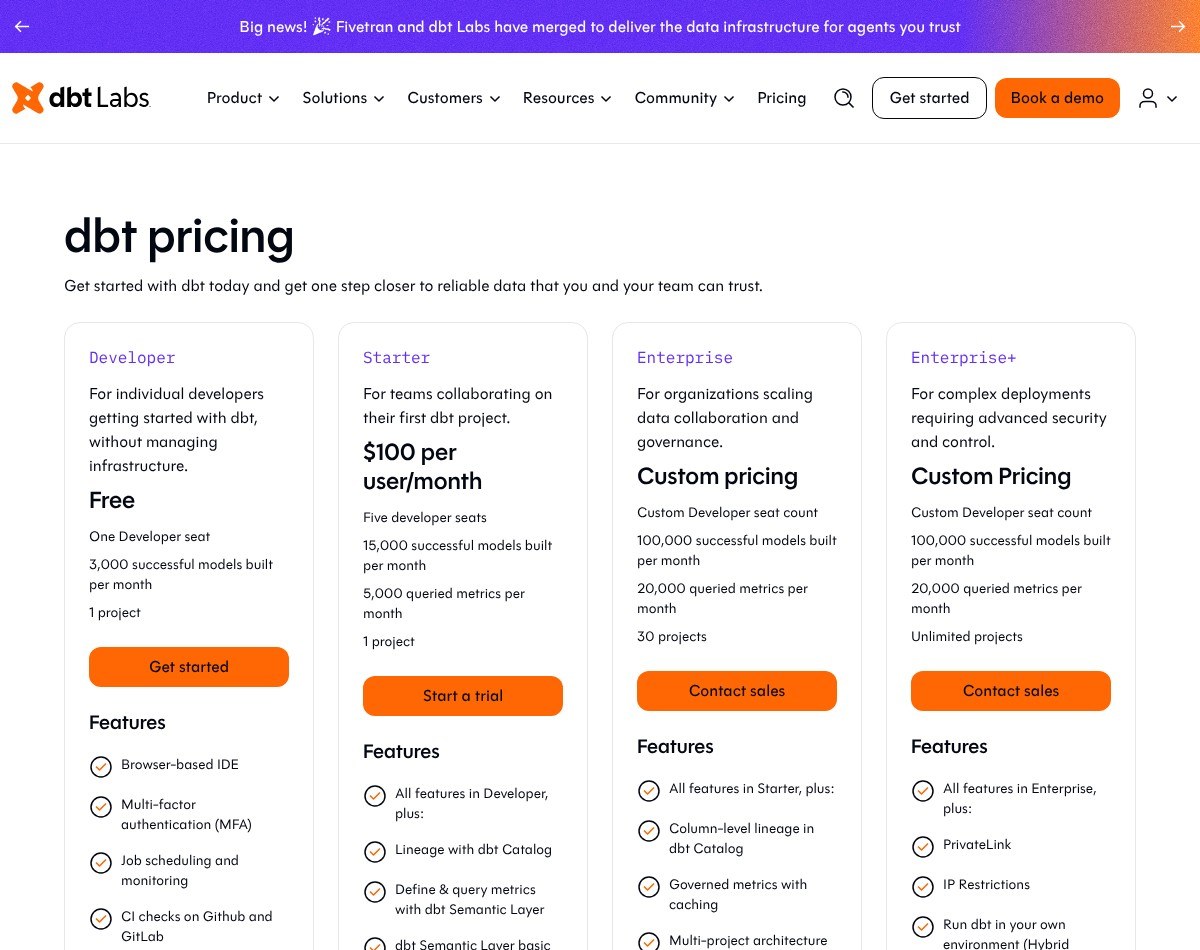
Starter bills seats upfront and excess usage afterward. Enterprise agreements use annual billing, with additional usage billed in arrears where applicable. Check your contract if you’re on a legacy plan.
The Usage Detail I’d Check First
A successful model build is a billing event, not a unique SQL file. Deployment builds count, including CI and API-triggered runs. If a job fails after some models succeed, those successful builds still count. Development-environment builds, tests, seeds, snapshots, and ephemeral models are excluded.
For a simplified example, 100 counted models rebuilt daily for 30 days produce 3,000 builds. Running those same models hourly produces 72,000. That excludes additional CI work and assumes every selected model is rebuilt successfully each time.
The free plan cancels subsequent runs after its model allowance is exhausted, until the allowance resets or you upgrade. Starter instead charges for excess usage. Unused included models do not roll over.
Is dbt Cloud Good Value for Money?
I think the value depends on what your team would otherwise maintain:
- Scheduler and CI maintenance: paying for a managed workflow can be worthwhile when nobody has time to own it.
- Warehouse compute: transformations still execute against your data platform, so account for that separately.
- Additional services: AI and dbt State have their own usage arrangements; a seat subscription is not an unlimited bundle.
Three Starter seats work out to $300 per month before additional usage and warehouse costs. That is reasonable if it removes recurring operational work, but less compelling if you’re paying mainly to move an established workflow into a browser.
I’d start with Developer for an individual evaluation. For a small team, I’d choose Starter only after checking the project’s build frequency and confirming that one project is enough.
Getting Started With dbt Cloud
Warehouse access and project design still need attention. Cloud provides the hosted development environment; your setup follows this path:
- Connect your data platform. Configure the warehouse connection and development credentials.
- Connect your repository. Keep model changes under version control so they can be reviewed.
- Set up development. Use Studio or a supported local workflow to create and test models.
- Configure deployment. Give production its own environment and credentials, then set up jobs.
- Add checks and notifications. Decide how changes reach production and who responds when jobs fail.
I like the separation between development and deployment. An analyst should be able to work on a model without treating the production schema as a scratchpad. Cloud makes that distinction part of the workflow, although you still need to configure permissions sensibly.
Check compatibility before importing an existing project. The current hosted v2 connection documentation lists Snowflake, BigQuery, Databricks, and Redshift as generally available, while ClickHouse is in private beta. A local dbt adapter does not automatically mean equivalent hosted support.
If your team already uses dbt Core, I’d evaluate one representative project first. Include its awkward dependencies and permissions, not only a small model that is easy to run anywhere.
Developing and Deploying Your Models
The strongest reason to choose Cloud is the managed path from editing a model to running it reliably. Studio, Git integration, deployment jobs, and monitoring reduce the number of separate services you need to connect.
For me, reliable deployment matters more than editing conveniences. Someone still has to own the refresh schedule and respond to failures, but Cloud supplies the operational tools.
The scheduler supports scheduled, completion-based, API, and manual triggers. It retains job logs and artifacts, so you can investigate a run after it finishes. For ordinary dbt workloads, that can be enough without adding Airflow solely to launch transformations.
CI is another practical benefit. Pull-request checks let you validate a change before merging it into production. They do not establish that your revenue definition is correct, though. A passing technical test still needs a useful business rule behind it.
Production concurrency also deserves attention. Run slots constrain deployment throughput, and runs of the same deployment job execute serially. CI can use separate temporary schemas and run concurrently without consuming production slots. I’d check queue behavior against the team’s refresh deadlines before choosing a plan.
Reviewer’s Notes: If your pipeline also coordinates ingestion, Python processing, and downstream delivery, assess the whole dependency chain. Astronomer can orchestrate dbt Cloud jobs as part of a broader Airflow workflow; the two products can work together.
Using dbt Cloud’s AI Features
Wizard is the AI feature I’d focus on for development. It can use your project context to propose models, tests, documentation, and refactoring changes. In Studio, it shows file diffs and supports approving changes file by file.
That review step matters. I would rather evaluate a visible change to a known model than accept a large block of generated SQL without understanding its assumptions. A plausible join can still duplicate revenue, and an automatically generated test can miss the business condition you actually care about.
Wizard can also help investigate failed jobs. For an analyst moving between unfamiliar models, contextual assistance has a more useful role than simply completing the next line of SQL.
- Wizard in Studio is in Preview. Evaluate it as an evolving feature, rather than making it the sole reason for a production commitment.
- Wizard and Copilot are separate. Copilot remains in experiences such as Canvas and Insights, with its own availability and action limits. Do not apply a Copilot quota to Wizard usage.
Wizard’s embedded Studio experience also differs from the separate Wizard CLI. I’d verify the experience available in your preferred editor before assuming every interface includes the same assistance.
My recommendation is to use AI for a scoped change, inspect the diff, and validate the result. If nobody on your team can review the SQL, AI does not make dbt Cloud a suitable replacement for that expertise.
Keeping Metrics Consistent
The Semantic Layer is useful when teams keep redefining the same metric in different places. MetricFlow provides centrally defined metrics that supported downstream applications can query.
Imagine finance and marketing both reporting revenue, with one excluding refunds and the other including them. A shared definition gives you a place to settle that disagreement and reuse the result. It cannot decide which definition the business should adopt.
I like having that work close to the transformation models. However, I would confirm the consuming tools before committing. An unsupported BI tool can use exported metrics in warehouse tables or views, but that loses the dynamic query experience of a direct integration.
There are modeling limits too. Custom measure aggregations are unsupported, and the latest Semantic Layer YAML specification does not yet support cross-project references. Those details matter more than the promise of consistent metrics if your implementation depends on them.
For a metrics-led purchase, see our separate dbt Semantic Layer review. I’d keep that evaluation distinct from the decision to pay for managed development and scheduling.
How Does dbt Cloud Compare to Competitors?
I’d compare Cloud with the cost of improving your current setup first. Changing who hosts your dbt jobs is a smaller decision than replacing the transformation framework.
- dbt Core: my first alternative for teams comfortable operating their own development and deployment setup. You keep control, but someone must own scheduling, CI, and troubleshooting. The absence of a Cloud subscription does not remove infrastructure or labor costs.
- SQLMesh: worth evaluating if you are open to a different SQL/Python transformation framework. Its virtual development environments and plan/apply workflow make it relevant to teams prioritizing change management. This is a framework decision, not simply a cheaper Cloud seat.
- Coalesce Transform: a better shortlist candidate if your team wants visual pipeline design alongside code. Its documentation includes Snowflake and Databricks workflows; check your specific platform and project requirements before assuming an easy migration.
- Astronomer with Cosmos: worth considering when dbt models are one part of a wider Airflow pipeline. Cosmos represents dbt work as Airflow tasks and groups. That provides broader coordination, but also introduces DAG maintenance and Airflow concepts.
How I Reviewed dbt Cloud
I evaluated the published development workflow, scheduler behavior, billing rules, AI availability, and Semantic Layer limitations, then compared the responsibilities retained by teams using alternative approaches. My recommendations reflect those capabilities and trade-offs, rather than measured speed, reliability, or AI accuracy from a production deployment.
Prices and plan details checked in October 2026.
Should You Choose dbt Cloud?
Choose dbt Cloud if your team wants to use dbt without owning every supporting service. I think its best fit is an analytics team with SQL skills, a supported warehouse, and limited appetite for maintaining deployment infrastructure.
I’d stay with Core when the existing workflow is dependable and someone already owns its operation. I’d also avoid buying Cloud mainly for AI: useful assistance is a bonus, while project compatibility, deployment behavior, and the full monthly cost should drive the decision.
FAQ
Is dbt Cloud free?
There is a free Developer plan for an individual. Its model allowance is capped, and the warehouse you connect can still incur charges.
Is dbt Cloud the same as dbt Core?
No. Core is an open-source tool for dbt development. Cloud adds a hosted platform for development and operations.
Does dbt Cloud replace a data warehouse?
No. It connects to a supported data platform and runs transformations against it. You still need somewhere to store and process the data.
Does dbt Cloud include AI?
It offers Wizard and Copilot experiences, with different availability and usage arrangements. Wizard in Studio is currently in Preview.
Can dbt Cloud replace Airflow?
It can handle scheduling for dbt jobs. A broader pipeline may still need Airflow or another orchestrator to coordinate work across different systems.