
Editor’s note: This review weighs Confluent’s published pricing, streaming capabilities, and deployment options.
Quick verdict: I recommend Confluent for teams that need reliable event streaming and want to spend less time operating Kafka infrastructure. Its appeal is having managed Kafka, connectors, stream processing, and governance in one platform. The trade-off is a bill with several moving parts, plus engineering work that a managed service cannot remove.
If you only need to copy business data into a warehouse overnight, I would start with a simpler ingestion tool. Confluent makes more sense when applications need to react to events as they happen.
Key Takeaways
- Confluent Cloud combines managed Kafka with Flink processing and governance, making it attractive for production streaming applications.
- Basic includes the first elastic Confluent Unit free, but storage, data transfer, and other services can still cost money.
- The Kafka compute price is only part of your bill. Connectors, processing, and support need separate consideration.
- Confluent Platform and Confluent Private Cloud offer options for infrastructure you control, with different operating responsibilities from Cloud.
- Private networking, availability requirements, and connector limitations can determine which configuration you need.
In this review, I’ll look at the costs I would budget for, the features I find most useful, and where I would choose an alternative.
Confluent Pros and Cons
Pros
- Managed Kafka reduces the infrastructure work needed to run streaming applications.
- Flink adds SQL-based stream processing alongside Kafka.
- Schema management and lineage help teams understand shared data streams.
- Cloud and self-managed products accommodate different infrastructure requirements.
- Managed connectors reduce the need to build every source and destination integration.
Cons
- Compute, storage, transfer, connectors, and processing create several billing dimensions.
- Higher availability and private networking can increase the required spend.
- Custom connectors still leave support responsibilities with your team.
- Teams still need Kafka knowledge and application-level monitoring.
How Much Does Confluent Cost?
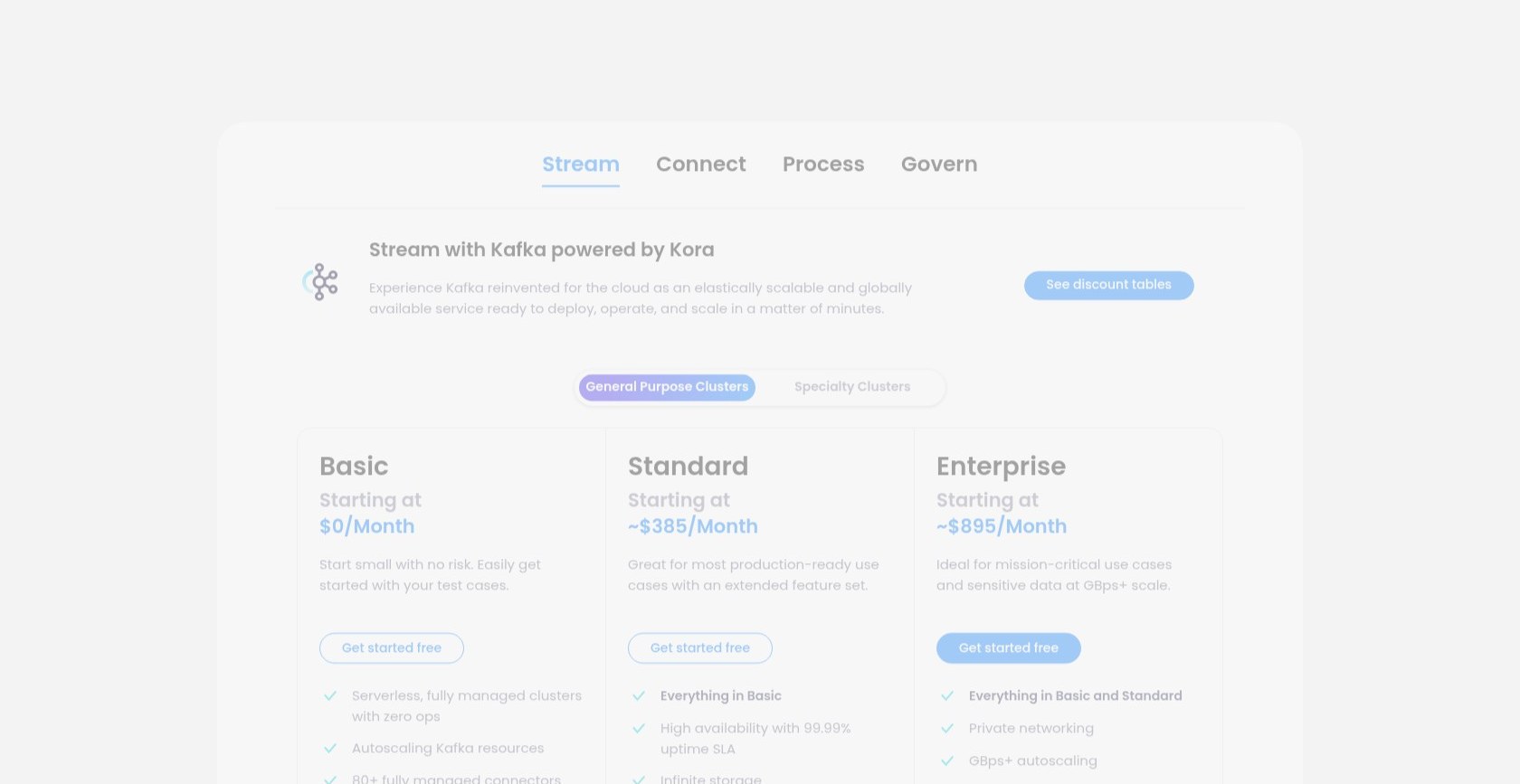
Confluent Cloud charges for usage rather than one all-inclusive monthly subscription. Its cluster types serve different workloads:
- Basic (first eCKU free): my starting point for learning and a small pilot.
- Standard (from $0.75 per eCKU-hour): a production option using public networking.
- Enterprise (from $1.75 to $2.25 per eCKU-hour): a choice when private networking is required.
- Freight (from $2.25 per eCKU-hour, two-unit minimum): aimed at high-throughput workloads that can accept its latency and feature trade-offs.
- Dedicated (configuration-based pricing): provisioned capacity for teams that need a dedicated cluster.
An eCKU is an elastic Confluent Unit, a measure of cluster capacity. Dedicated uses provisioned CKUs instead. The rates below are in US dollars.
| Cloud cluster | Published base compute rate | What I would check first |
|---|---|---|
| Basic | First eCKU free; additional usage from $0.14/eCKU-hour | Storage and transfer charges even with free compute |
| Standard | From $0.75/eCKU-hour | Public networking and availability requirements |
| Enterprise | From $1.75 to $2.25/eCKU-hour | Region, networking, and required capacity |
| Freight | From $2.25/eCKU-hour; two-eCKU minimum | Region availability and workload compatibility |
| Dedicated | Provisioned CKU pricing | Reserved capacity, including idle periods |
Rates depend on configuration and region. I would budget from the resources my workload needs, rather than an advertised monthly starting estimate.
For example, one Standard eCKU running for 720 hours at $0.75 per hour costs $540 in compute alone. That illustration excludes storage, data transfer, connectors, Flink, other services, support, taxes, and any discounts. It is not a complete monthly quote.
Availability changes the calculation too. Standard and Enterprise provide a 99.9% availability SLA at one eCKU; the 99.99% option requires a minimum of two. I would confirm the applicable SLA before using the cheaper configuration in a production budget.
Is Confluent Good Value for Money?
I find Confluent easiest to justify when Kafka maintenance is taking engineering time away from the product:
- Good value: a team maintaining operational event streams across several applications.
- Harder to justify: a modest nightly warehouse load that a scheduled pipeline could handle.
The trial provides $400 in credits for up to 30 days, ending earlier if the credits run out. I would use it to measure consumption.
Cost monitoring needs attention after launch. Elastic compute billing uses the highest usage within each hour, and stopping producers does not necessarily eliminate charges: partitions, connections, and requests still matter. Dedicated capacity remains billable while provisioned.
For a team new to Kafka, my recommendation is Basic for a small pilot, followed by production capacity chosen around networking and availability requirements.
Getting Started With Confluent
In Kafka, producers write events into topics, which are named streams of data. Consumers read those events and use them in applications or downstream systems.
The Cloud quickstart follows a straightforward sequence: create a cluster, create a topic, produce sample events, inspect the data, and process it with Flink. You also need to clean up resources when the exercise is complete.
For a real evaluation, I would keep the first pipeline small:
- Pick one source and one business event, such as an order update.
- Choose the cloud region and networking arrangement your application needs.
- Define the topic and schema, including how records identify the same order.
- Connect a consumer that does something useful with the events.
- Check delivery, recovery behavior, and consumption costs before expanding.
Managed infrastructure does not design the application for you. You still need decisions about event keys, retention, schema changes, access, and what happens when a consumer falls behind.
I like having the main streaming components together, but I would not describe Confluent as a no-code shortcut. Teams with no Kafka experience should budget for learning and ownership alongside the platform bill.
Connecting Your Sources and Destinations
Confluent’s managed connectors are one of its biggest practical advantages. Supported integrations can move data between Kafka and systems such as databases, cloud storage, and analytics destinations without requiring a custom connector for every pipeline.
I would check the exact connector and version before choosing the platform. A supported destination name does not guarantee every data type, authentication method, or delivery requirement is covered.
Version changes can affect existing pipelines too. The legacy Google BigQuery Sink connector reached end of life on March 31, 2026; BigQuery Sink V2 is the relevant replacement to evaluate. An old implementation guide can therefore point you toward the wrong option.
Confluent also supports uploaded custom connectors, but customers remain responsible for their management and support. That flexibility is useful, although it weakens the assumption that every integration becomes Confluent’s operational responsibility.
If your goal is primarily warehouse ingestion, I would compare Fivetran and Airbyte before committing to a Kafka-centered workflow. My deciding question is whether other applications need the event stream itself, or whether the warehouse is the only destination that matters.
Processing Live Data With Flink
Flink is the feature that makes Confluent more than a place to host Kafka. It lets you filter, join, enrich, and transform streams, including through SQL. An order event could be enriched with customer information before another application consumes it.
I like this approach for teams that need useful operational data while events are arriving. It also gives SQL users a route into stream processing, although they still need to understand streaming behavior and how their queries use resources.
Compute pools provide processing capacity, and statements within a pool share its resources. I would separate business-critical production work from exploratory queries when resource contention would be a problem. Autoscaling has a configured ceiling; it is not unlimited capacity.
There is also a regional boundary: Confluent Cloud Flink does not support cross-region queries. A company spreading its Kafka deployments across regions needs to plan around that limitation.
Against Amazon MSK, Confluent appeals to me when the team wants managed Kafka and managed stream processing together. For an AWS-focused team with an established processing stack, that integration may be less persuasive.
Governance, Security, and Deployment
Schema Registry helps producers and consumers agree on the structure of their records. I consider that especially valuable when several teams share the same topics, because an unexpected field change can affect more than one application.
Essentials and Advanced both include schema management, but Advanced adds capabilities such as data rules and business metadata. Lineage history is also different: Essentials covers the last 10 minutes, while Advanced extends that to seven days.
That distinction matters when investigating a problem discovered well after it happened. I would choose the package around how far back my team needs to investigate incidents.
Security options include service accounts, API keys, access controls, and encryption. The practical work is assigning permissions that match each application’s role and selecting a networking configuration that meets your organization’s requirements.
Cloud or Your Own Infrastructure?
| Product | Where it runs | My view of the fit |
|---|---|---|
| Confluent Cloud | Managed cloud service | Teams prioritizing reduced infrastructure operations |
| Confluent Platform | Infrastructure you manage | Teams needing deployment control and accepting operational ownership |
| Confluent Private Cloud | Private infrastructure with additional platform orchestration | Organizations seeking cloud-style operations within their own environment |
Cloud Enterprise and Confluent Private Cloud are different products. I would settle that distinction before comparing quotes. Private Cloud has its own enterprise subscription requirements; it is not simply a private-networking switch in a Cloud account.
Support also needs a separate decision. Developer support targets non-production fully managed use, while Business and Premier address production needs. I would check coverage for the components I actually run, particularly when combining managed services with self-managed software.
How Does Confluent Compare to Alternatives?
- Amazon MSK: I would shortlist it for an AWS-centered team that wants managed Apache Kafka and already has its surrounding data services in AWS. Compare the complete architecture and operating workload, not just a cluster price.
- Redpanda: Worth considering when Kafka API compatibility matters but you are open to a different implementation. Validate the clients, integrations, and deployment model you need rather than assuming every Confluent feature has an equivalent.
- Apache Kafka: Self-managing Kafka offers direct control over the core streaming infrastructure. I would only choose that route with clear ownership of upgrades, availability, monitoring, and recovery.
- Fivetran or Airbyte: My starting comparison when the actual requirement is moving data into an analytics destination. They belong on the shortlist for that use case, rather than as substitutes for every event-driven application.
Confluent’s strongest argument is the work you avoid by having several streaming services managed together. Its weakest argument is a workload that does not need those services in the first place.
How I Reviewed Confluent
I compared Confluent’s published pricing, billing rules, cluster options, connector documentation, and governance features. I also checked the workflow and deployment distinctions against official documentation and calculated the compute example above. Prices were checked in September 2026. The assessment covers documented capabilities and costs; it does not include a live workload benchmark.
Should You Choose Confluent?
I would choose Confluent when event streaming is important enough to justify a dedicated platform budget, but operating every component internally is not the best use of the team. Managed Kafka, Flink, and governance give it a strong case for production applications with several connected systems.
I would be more cautious with a small analytics pipeline or an unclear streaming requirement. Start with a defined workload, calculate the full bill, and make the purchase depend on the operating work Confluent will actually remove.
Confluent FAQ
Is Confluent free?
Basic includes the first eCKU free, but that does not make the entire service free. Storage, transfer, and additional features can incur charges. The separate trial offers $400 in credits for up to 30 days.
Is Confluent the same as Apache Kafka?
No. Apache Kafka is an open-source event-streaming platform. Confluent adds commercial products and services, including managed cloud infrastructure, connectors, processing, and governance. Choosing Confluent involves evaluating those additions and their costs.
Do I need developers to use Confluent?
I would plan for technical ownership. Managed services reduce infrastructure tasks, but someone still needs to configure integrations, design events, manage access, and maintain the applications consuming the data.
Can Confluent run on my own infrastructure?
Yes. Confluent Platform and Confluent Private Cloud provide options for infrastructure you control. They differ from the managed Confluent Cloud service in deployment, licensing, and the responsibilities your team retains.
Is Confluent a replacement for a data warehouse?
No. A streaming platform moves and processes event data; a warehouse serves a different analytical role. Confluent can feed a warehouse and other applications, but I would not buy it expecting it to replace the warehouse itself.